Tracks
Kỹ thuật Trí tuệ Nhân tạo với LangChain
21 giờ
Claude Code rewards a kind of discipline that most developer tools don't ask for. If you've been using it for a while, you've noticed that some sessions produce exactly what you want, and others burn through tokens going nowhere. Anthropic's own team found that unguided attempts succeed about 33% of the time, and the tool's creator abandons 10-20% of sessions.
The difference comes down to the patterns you put around the tool, not the prompts you type into it.
This article covers what those patterns look like in practice, drawn from production workflows at companies like Abnormal AI, incident.io, and Trail of Bits.
If you need a refresher on setup and core features, our guide on Claude Code 2.1 has you covered. Everything here assumes you already know the basics and want to get more out of the tool.
For a broader look at how agents reason and where the patterns of this tutorial fit, I highly recommend enrolling in our AI Agent Fundamentals track, which covers all the underlying principles.
Every decision Claude makes without guidance might have high accuracy, which sounds fine for a single choice, but when compounded across a feature with many decision points, the chance of getting everything right diminishes. If you assume 80% accuracy for 20 decisions, you get 0.8^20, so about only a 1% chance for a feature with completely correct implementation.
Planning collapses those 20 ambiguous decisions into a reviewed specification where each one lands close to 100% because you've already made the call.

The planning workflow that works best at scale is an annotation cycle, as Boris Tane suggests. You have Claude draft a plan.md, open it in your editor, and add inline notes wherever Claude made the wrong call or left something ambiguous: "use drizzle:generate, not raw SQL" or "this should be PATCH, not PUT."
Then you send the annotated plan back with the guard phrase "address all notes, don't implement yet." That guard phrase matters because without it, Claude skips the plan and starts coding immediately. This cycle repeats until the plan has no ambiguity left, at which point Claude implements with far fewer wrong turns because every decision has already been made.
# plan.md — annotation cycle

## Step 3: Database migration
Create a new migration for the users table.
> NOTE: use drizzle:generate, not raw SQL
> NOTE: add created_at with default NOW()

## Step 4: API endpoint
Add PUT /users/:id endpoint.
> NOTE: this should be PATCH, not PUT. Partial updates only.

# After annotating, send back with:
# "address all notes, don't implement yet"If annotation cycles feel heavyweight, Claude Code's built-in plan mode is a lighter option:
Plans are persisted to ~/.claude/plans/, so they survive compaction and session restarts, making built-in plan mode a solid default for most tasks. For very large features, writing a full spec upfront works well too: one developer spent two hours on a 12-step spec and saved an estimated 6-10 hours of implementation time.
Regardless of approach, pasting good open-source code alongside a plan request noticeably improves output because Claude works better with a working reference than with abstract descriptions.
Planning also scales horizontally through git worktrees. Engineers at incident.io run 4-5 parallel Claude sessions on separate branches, each working through its own plan. One engineer spent $8 in Claude credit and produced an implementation that improved API generation time by 18%, saving 30 seconds on a tool the entire team used daily.
Some developers take this further, running competing worktrees that implement different approaches to the same problem and comparing results.
Your CLAUDE.md file has a budget you probably don't know about. HumanLayer's analysis of Claude Code's internals found that the system injects a reminder above your instructions: "This context may or may not be relevant to your tasks."
Claude actively filters what it follows rather than treating everything as a persistent command. On top of that, frontier thinking models follow roughly 150-200 instructions before compliance drops, and Claude Code's own system prompt takes up about 50 of those. That leaves roughly 100-150 slots for your rules. HumanLayer keeps its own file under 60 lines.

You can watch this budget in action. Add a line to your CLAUDE.md saying "always address me as Mr. Tinkleberry" and see how fast Claude stops using it, usually within a few thousand tokens. When the name disappears, your instructions are deprioritized by the attention mechanism, and everything else in your CLAUDE.md loses influence along with them.
The way to work within this budget is progressive disclosure. Your root CLAUDE.md stays short and focused on the rules that apply everywhere. For anything domain-specific, reference a separate file without inlining it: "When working with the payment system, first read docs/payment-architecture.md."
Claude reads the referenced file only when it enters that part of the codebase, keeping your instruction budget free for high-priority rules. One company consuming billions of tokens per month structures their monorepo CLAUDE.md this way, with each team allocated a token budget for their section:
# Monorepo CLAUDE.md — progressive disclosure

## Python
- Always use type hints for function signatures
- Test with: pytest -x --tb=short

## <Internal CLI Tool>
- <usage example>
- Always validate input before processing
- Never use raw SQL, prefer the ORM
For <complex usage> or <error> see path/to/<tool>_docs.md
Subdirectory CLAUDE.md files extend this further. Put a CLAUDE.md in src/persistence/ with database-specific instructions, another in src/api/ with endpoint conventions.
Claude automatically loads CLAUDE.md files from the working directory upward to the project root, so subdirectory files only activate when Claude is working in that area. This keeps your root file general while giving Claude targeted guidance exactly where it's needed.
One common mistake: don't @-file documentation into CLAUDE.md. This embeds the entire file on every run, eating your instruction budget before the conversation even starts.
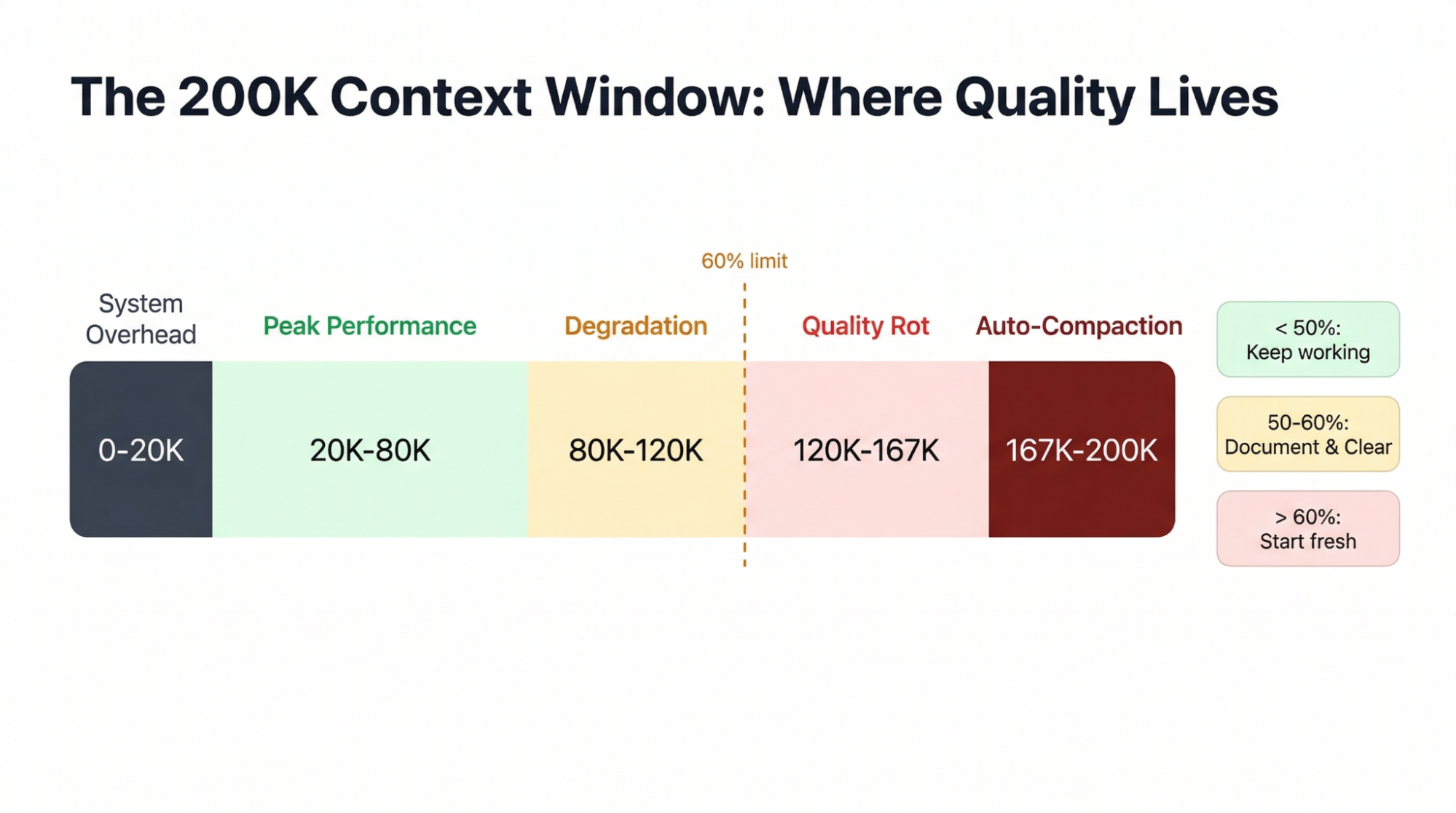
Claude Code gives you 200K tokens of context, but the usable window is smaller than it looks.
A fresh monorepo session burns about 20K tokens loading the system prompt, tool definitions, and CLAUDE.md before you've typed anything. Each MCP server adds tool schemas that permanently consume context, so the practical limit is about 5-8 servers before you start crowding out actual work.
What makes this worse is how early quality starts to drop. Multiple practitioners have independently settled on the same threshold: don't let context exceed 60% capacity.
Claude's output starts degrading at 20-40% of the window, well before any limit kicks in, because the attention mechanism gives earlier instructions less weight as context fills.
Auto-compaction fires at roughly 83.5%, and it's lossy: one developer lost 3 hours of refactoring work when it erased all knowledge of migration decisions mid-session, retaining only about 20-30% of the details.
The best defense is the Document & Clear pattern. When context gets heavy:
Dump your current plan and progress to a markdown file
Run /clear to reset the session
Start fresh with Claude reading that file
This way, you’ll get a full 200K window with only what you choose to preserve, which beats /compact because you control exactly what survives.
A custom /catchup command makes the transition smoother: after clearing, it reads all changed files in the current git branch, so Claude picks up where you left off without the old conversation history.
<!-- .claude/commands/catchup.md -->
Rebuild context after a /clear. Read all files modified on the
current branch compared to main. For each file, understand the
changes made. Then summarize what's been implemented so far and
what work remains.

Changed files on this branch:
$ git diff --name-only mainI use a /transfer-context skill that takes this further. When a session starts degrading, the command dumps a structured handoff file with completed work, open decisions, traps to avoid, and relevant file paths. The next session reads that file and picks up where the last one left off, with only the information that matters and none of the conversation bloat.
You can also save context proactively by loading tools lazily. One project recovered about 15,000 tokens per session by using UserPromptSubmit hooks to inject skill definitions only when the user's prompt triggered relevant keywords, rather than pre-loading everything at startup.
The simplest rule underneath all of this: one task per conversation. Starting fresh costs 20K tokens, which is nothing compared to the quality loss from a polluted session.
Even a well-structured CLAUDE.md gets followed only about 70% of the time. For coding style preferences, that's fine. For safety rules like "don't push to main" or "don't delete production data," it's not. Hooks close that gap to 100% by running shell scripts at specific points in Claude's workflow.
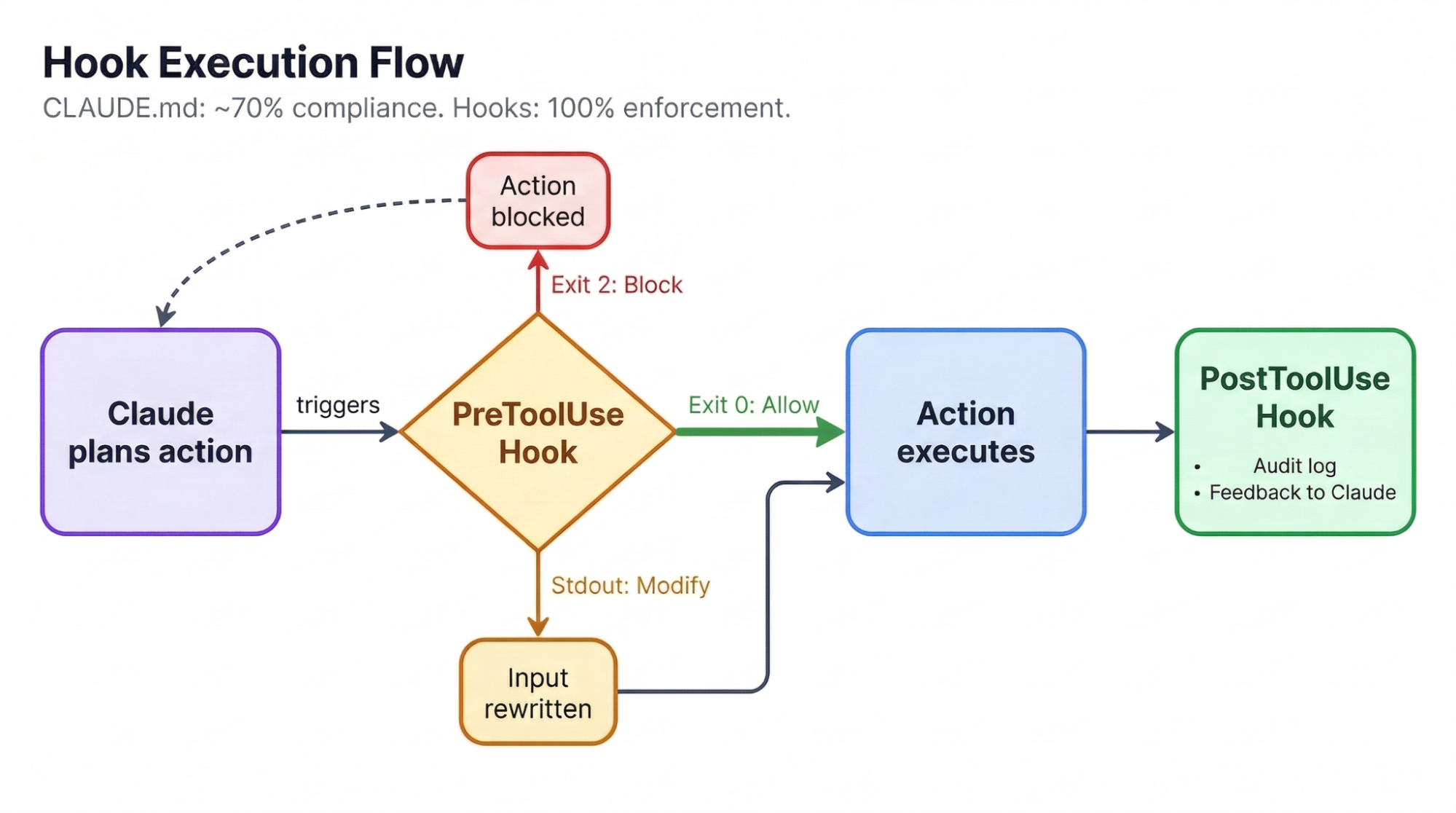
There are two types worth knowing. Block-at-Submit hooks run as PreToolUse events and stop actions cold: exit code 2 blocks the action and forces Claude to try something else. Hint hooks provide non-blocking feedback, like running a linter after every edit and feeding the output back without interrupting Claude's flow.
The most thorough public hook configuration does the following things:
Blocks rm -rf commands (suggesting trash instead),
Prevents direct pushes to main,
Logs all mutations with timestamps, and
Runs an anti-rationalization gate.
That gate uses Haiku to review Claude's responses for cop-outs like "pre-existing issues" or "out of scope.” When it catches Claude declaring premature victory, it rejects the response with specific feedback and forces Claude to keep working. A lighter setup auto-runs Prettier and TypeScript checks after every file edit:
{
  "hooks": {
	"PostToolUse": [
  	{
    	"matcher": "Edit|Write",
    	"hooks": [
      	{
        	"type": "command",
        	"command": "prettier --write \"$CLAUDE_FILE_PATHS\""
      	}
    	]
  	}
	]
  }
}
One trap to avoid: never block Edit or Write tools mid-plan. Blocking at write time breaks multi-step reasoning because Claude loses track of where it was. Let it finish writing, then validate through PostToolUse hooks or pre-commit checks. Our Claude Code hooks tutorial covers more patterns if you want to build on these.
Without tests, Claude's only way to verify its work is its own judgment, which degrades as context fills up. Tests create an external oracle that stays accurate regardless of how long the session has been running.
Each red-to-green cycle gives Claude unambiguous feedback, and it can iterate through the entire suite without human intervention, making test-driven development (TDD) the single strongest pattern for working with agentic coding tools.
The workflow Anthropic recommends follows a specific sequence:
1. Write tests first
   > "Write tests for the auth module using pytest.
  	TDD approach, no mock implementations."

2. Confirm tests fail
   > "Run the tests. They should all fail."

3. Commit the failing tests as a checkpoint

4. Implement until green
   > "Write the implementation. Do not modify the tests.
  	Keep going until all tests pass."
That last instruction matters more than it looks. Claude will sometimes change tests to make them pass rather than fixing the implementation. Committing the tests beforehand gives you a safety net: if Claude alters them, the diff shows exactly what changed, and you can revert.
For frontend work, a visual variant of this loop works well: If you give Claude a design mock plus a Puppeteer MCP server, it takes a screenshot after implementing, compares it to the mock, and iterates. This verification loop produces a 2-3x improvement in quality when Claude can check its own output against a visual target.
Anthropic's official data puts the average Claude Code cost at $6 per developer per day on API pricing, with 90% of developers under $12/day. Monthly, that works out to roughly $100-200 per developer on Sonnet 4.6.
The Max subscription plan changes the math entirely. One developer tracked 8 months of usage across roughly 10 billion tokens and found his API-equivalent cost exceeded $15,000, while his actual Max subscription cost was about $800: a 93% savings.
Over 90% of his tokens were cache reads, which is why metered API pricing hits so much harder than a flat subscription. The breakeven point for the Max plan sits at roughly $100-200/month in API-equivalent usage, a threshold any daily user crosses quickly.
|
Pricing Model |
Monthly Cost |
Best For |
|
API (Sonnet 4.6) |
~$100-200 |
Light usage, under 30 min/day |
|
API (Opus 4.6) |
~$300-800 |
Complex multi-file work |
|
Max ($100/mo) |
$100 flat |
Daily users, breakeven at ~$100 API equivalent |
|
Max ($200/mo) |
$200 flat |
Power users, 5+ hours/day |
Model selection is its own optimization. Claude Code's "opusplan" mode routes Opus 4.6 for planning and auto-switches to Sonnet 4.6 for code generation, getting you Opus-quality reasoning where it matters most while using Sonnet's 5x cheaper rates for implementation tokens.
Sonnet 4.6 was preferred over Opus 4.5 by 59% of Claude Code users in Anthropic's internal testing and tends to produce cleaner code with less over-engineering. For subagent-heavy workflows, CLAUDE_CODE_SUBAGENT_MODEL="claude-sonnet-4-5-20250929" runs subagents on Sonnet while keeping Opus for the orchestrator.
Make sure you avoid the three biggest sources of wasted tokens:
Not clearing context between tasks
Redundant file reads from poor CLAUDE.md structure
Vague prompts that send Claude into trial-and-error loops
Fixing just these three typically cuts token usage in half.
Before we wrap up, let’s take a look at common issues developers encounter when working with Claude Code and how to address them.
The failure mode that hits hardest is context loss. The Document & Clear pattern introduced in the context management section exists precisely for this reason: never let a long session be your only record of what you've decided. Commit frequently, dump progress to files, and treat every session as disposable.
Claude also generates confident, plausible-looking code for technologies it doesn't know well. If you're working in a language or framework you can't personally verify, every output needs extra scrutiny. As one developer put it: "I've got myself in a PILE of trouble using LLMs with technologies I am unfamiliar with. But with something I'm familiar with, LLMs have improved my velocity massively."
Over-engineering is a frequent tendency. Claude writes extra abstractions, unsolicited helper functions, and premature refactoring unless you tell it not to. Adding "use the simplest possible approach" to your CLAUDE.md helps, and organizing your codebase by problem domains rather than technical layers reduces the cognitive load for both Claude and humans.
The most dramatic failure on record: while building a phonics app, Claude deleted every phoneme audio file a developer had personally obtained permission to use and replaced them with AI-generated sounds. It renamed files, it "became convinced it had labeled wrongly, despite not being itself at all able to distinguish the relevant phonemes."
The lesson learned: Always commit or back up irreplaceable files before giving Claude access to them.
Anthropic's own advice for sessions that go sideways is refreshingly honest: save your state before letting Claude work, let it run, then either accept the result or start fresh rather than wrestling with corrections.
How much to trust Claude with commits depends on your test coverage and risk tolerance. Some developers commit via slash command dozens of times daily, with PR review as the gate. For production codebases with paying users, reviewing every diff is worth the friction.
For more details, Anthropic's Claude Code Overview is their canonical upstream source that most community content builds on. If you want to build on what's covered here and get some experience with several Claude Code features, here are a few of our tutorials worth reading:
Several open-source projects also bundle the practices discussed in this article into ready-to-use configurations:
obra/superpowers — a composable skills framework that ships with TDD enforcement, Socratic brainstorming, granular planning, and automatic code review between tasks. Now an official plugin in Anthropic's marketplace.
github/spec-kit — GitHub's official Spec-Driven Development toolkit. Structures work as Constitution → Specify → Plan → Tasks, making the spec the single source of truth across any coding agent.
bmad-code-org/BMAD-METHOD — a full agile framework with 12+ agent personas (Architect, QA, Scrum Master) and 34+ workflows spanning the entire development lifecycle.
wshobson/commands — 57 production-ready slash commands you can drop into .claude/commands/, including 15 multi-agent workflows.
awesome-claude-code — the ecosystem's go-to directory of skills, hooks, commands, agents, and plugins. Start here if you want to browse what's available.
Every pattern in this article points to the same idea: constrain Claude aggressively before execution, then give it a way to verify its own output. Planning collapses ambiguity. CLAUDE.md and hooks set boundaries. Tests provide verification. Context hygiene keeps everything working across sessions.
If you're picking one change to start with, make it Document & Clear. The cost of context rot across sessions dwarfs the 20K tokens required to start fresh. After that:
Add a pre-commit hook that blocks commits when tests fail
Start every multi-file task with a plan before touching code
Keep your CLAUDE.md under 100 instructions and use subdirectory files for domain-specific rules
We have recently added a new skill track on AI Engineering with LangChain. Its course content is AI-native, so you can learn alongside your personal tutor agent. I recommend checking it out to become a real pro at engineering AI workflows.
AI Courses
Tracks
Courses
Tracks
Tutorials
Bexruz (Bex) Tuychiev
12 phút
Tutorials
Bexruz (Bex) Tuychiev
10 phút
Tutorials
Aashi Dutt
10 phút
Tutorials
Tim Lu
15 phút
Tutorials
Aashi Dutt
12 phút
Tutorials
Vikash Singh
10 phút