Lernpfad
AI Engineering with LangChain
21 Std.
Claude Code belohnt eine Disziplin, die die meisten Entwicklertools nicht einfordern. Wenn du es schon eine Weile nutzt, hast du gemerkt: Manche Sessions liefern genau das, was du brauchst, andere verbrauchen Token ohne echten Fortschritt. Anthropic’s eigenes Team fand heraus, dass unangeleitete Versuche nur in etwa 33% der Fälle erfolgreich sind, und der Tool-Erfinder bricht 10–20% der Sessions ab.
Der Unterschied liegt in den Arbeitsmustern rund um das Tool — nicht in den Prompts, die du eintippst.
Dieser Artikel zeigt, wie diese Muster in der Praxis aussehen — basierend auf produktiven Workflows bei Unternehmen wie Abnormal AI, incident.io und Trail of Bits.
Wenn du ein Auffrischung zu Setup und Kernfunktionen brauchst, findest du alles im Guide zu Claude Code 2.1. Hier setzen wir Basiswissen voraus und fokussieren uns darauf, wie du mehr aus dem Tool herausholst.
Für einen größeren Kontext dazu, wie Agenten denken und wo die Muster dieses Tutorials hineinpassen, empfehle ich unseren AI Agent Fundamentals-Lernpfad mit allen zugrunde liegenden Prinzipien.
Jede ungeleitete Entscheidung von Claude kann für sich genommen recht genau sein. Aber über eine Funktion mit vielen Entscheidungspunkten hinweg sinkt die Chance, dass alles zusammenpasst. Gehst du von 80% Genauigkeit bei 20 Entscheidungen aus, ergibt das 0,8^20 — also nur etwa 1% Wahrscheinlichkeit für eine komplett korrekte Implementierung.
Planung reduziert diese 20 mehrdeutigen Entscheidungen auf eine geprüfte Spezifikation, in der jede einzelne nahe an 100% liegt — weil du die Entscheidungen bereits getroffen hast.

Der skalierbarste Planungsworkflow ist ein Annotation-Cycle, wie Boris Tane vorschlägt. Du lässt Claude ein plan.md-Dokument entwerfen, öffnest es im Editor und fügst Inline-Notizen ein, wo Claude falsch abgebogen ist oder etwas offenlässt: „drizzle:generate statt rohem SQL“ oder „Das muss PATCH sein, nicht PUT.“
Dann schickst du den annotierten Plan mit der Schutzphrase zurück: „Address all notes, don't implement yet.“ Diese Phrase ist wichtig, sonst überspringt Claude den Plan und fängt sofort an zu coden. Der Zyklus wiederholt sich, bis keine Unklarheiten mehr übrig sind. Dann implementiert Claude mit deutlich weniger Irrwegen, weil alle Entscheidungen bereits feststehen.
# plan.md — annotation cycle

## Step 3: Database migration
Create a new migration for the users table.
> NOTE: use drizzle:generate, not raw SQL
> NOTE: add created_at with default NOW()

## Step 4: API endpoint
Add PUT /users/:id endpoint.
> NOTE: this should be PATCH, not PUT. Partial updates only.

# After annotating, send back with:
# "address all notes, don't implement yet"Wenn dir Annotation-Zyklen zu schwergewichtig sind, ist der eingebaute Planmodus die leichtere Option:
Pläne werden unter ~/.claude/plans/ gespeichert. Sie überleben also Kompaktierung und Session-Neustarts — damit ist der Planmodus für die meisten Aufgaben eine gute Standardwahl. Für sehr große Features funktioniert auch eine vollständige Spezifikation vorab: Ein Entwickler investierte zwei Stunden in eine 12-Schritte-Spez und sparte damit geschätzt 6–10 Stunden Implementierungszeit.
Unabhängig vom Ansatz verbessert gutes Open-Source-Beispielcode neben einer Plananfrage die Ergebnisse deutlich, weil Claude mit einer funktionierenden Referenz besser arbeitet als mit abstrakten Beschreibungen.
Planung lässt sich auch horizontal per git-worktrees skalieren. Engineers bei incident.io fahren 4–5 parallele Claude-Sessions auf separaten Branches, jede mit ihrem eigenen Plan. Ein Engineer gab $8 für Claude-Credits aus und lieferte eine Implementierung, die die API-Generierungszeit um 18% verbesserte — eine Ersparnis von 30 Sekunden bei einem Tool, das das gesamte Team täglich nutzte.
Manche Entwickler treiben es weiter und lassen konkurrierende Worktrees unterschiedliche Ansätze zum selben Problem implementieren, um die Ergebnisse zu vergleichen.
Deine CLAUDE.md hat ein Budget, von dem du vermutlich nichts weißt. HumanLayer’s Analyse der Claude-Code-Interna fand heraus, dass das System oberhalb deiner Anweisungen einen Hinweis einspeist: „This context may or may not be relevant to your tasks.“
Claude filtert aktiv, was es befolgt, statt alles als dauerhafte Direktive zu behandeln. Zudem folgen Frontier-Modelle grob 150–200 Anweisungen, bevor die Befolgung nachlässt, und der System-Prompt von Claude Code verbraucht etwa 50 davon. Es bleiben also rund 100–150 Slots für deine Regeln. HumanLayer hält die eigene Datei unter 60 Zeilen.

Du kannst dieses Budget live beobachten. Füge deiner CLAUDE.md die Zeile hinzu „Sprich mich immer als Mr. Tinkleberry an“ und sieh zu, wie schnell Claude das ignoriert — meist nach ein paar Tausend Tokens. Wenn der Name verschwindet, priorisiert der Aufmerksamkeitsmechanismus deine Anweisungen herunter und alles andere in deiner CLAUDE.md verliert ebenfalls an Einfluss.
Der Weg innerhalb dieses Budgets ist Progressive Disclosure. Deine Root-CLAUDE.md bleibt kurz und fokussiert auf Regeln, die überall gelten. Für Domainspezifisches verweist du auf separate Dateien, ohne sie inline einzubinden: „Wenn du am Bezahlsystem arbeitest, lies zuerst docs/payment-architecture.md.“
Claude liest die referenzierte Datei erst, wenn es in diesen Teil der Codebasis einsteigt — so bleibt dein Anweisungsbudget für hochpriorisierte Regeln frei. Ein Unternehmen mit Milliarden Tokens pro Monat strukturiert seine Monorepo-CLAUDE.md so, dass jedes Team ein Tokenbudget für seinen Abschnitt hat:
# Monorepo CLAUDE.md — progressive disclosure

## Python
- Always use type hints for function signatures
- Test with: pytest -x --tb=short

## <Internal CLI Tool>
- <usage example>
- Always validate input before processing
- Never use raw SQL, prefer the ORM
For <complex usage> or <error> see path/to/<tool>_docs.mdUnterordner-CLAUDE.md-Dateien gehen noch einen Schritt weiter. Lege eine CLAUDE.md in src/persistence/ mit datenbankspezifischen Anweisungen ab und eine weitere in src/api/ für Endpoint-Konventionen.
Claude lädt CLAUDE.md-Dateien automatisch vom Arbeitsverzeichnis aufwärts bis zum Projekt-Root. Unterordner-Dateien werden also nur aktiv, wenn Claude in diesem Bereich arbeitet. So bleibt die Root-Datei allgemein, während Claude punktgenau dort Guidance erhält, wo sie gebraucht wird.
Ein häufiger Fehler: Binde keine @-file-Dokumentation in CLAUDE.md ein. Das legt die gesamte Datei in jeder Session an und verbrennt dein Anweisungsbudget, bevor die Unterhaltung beginnt.
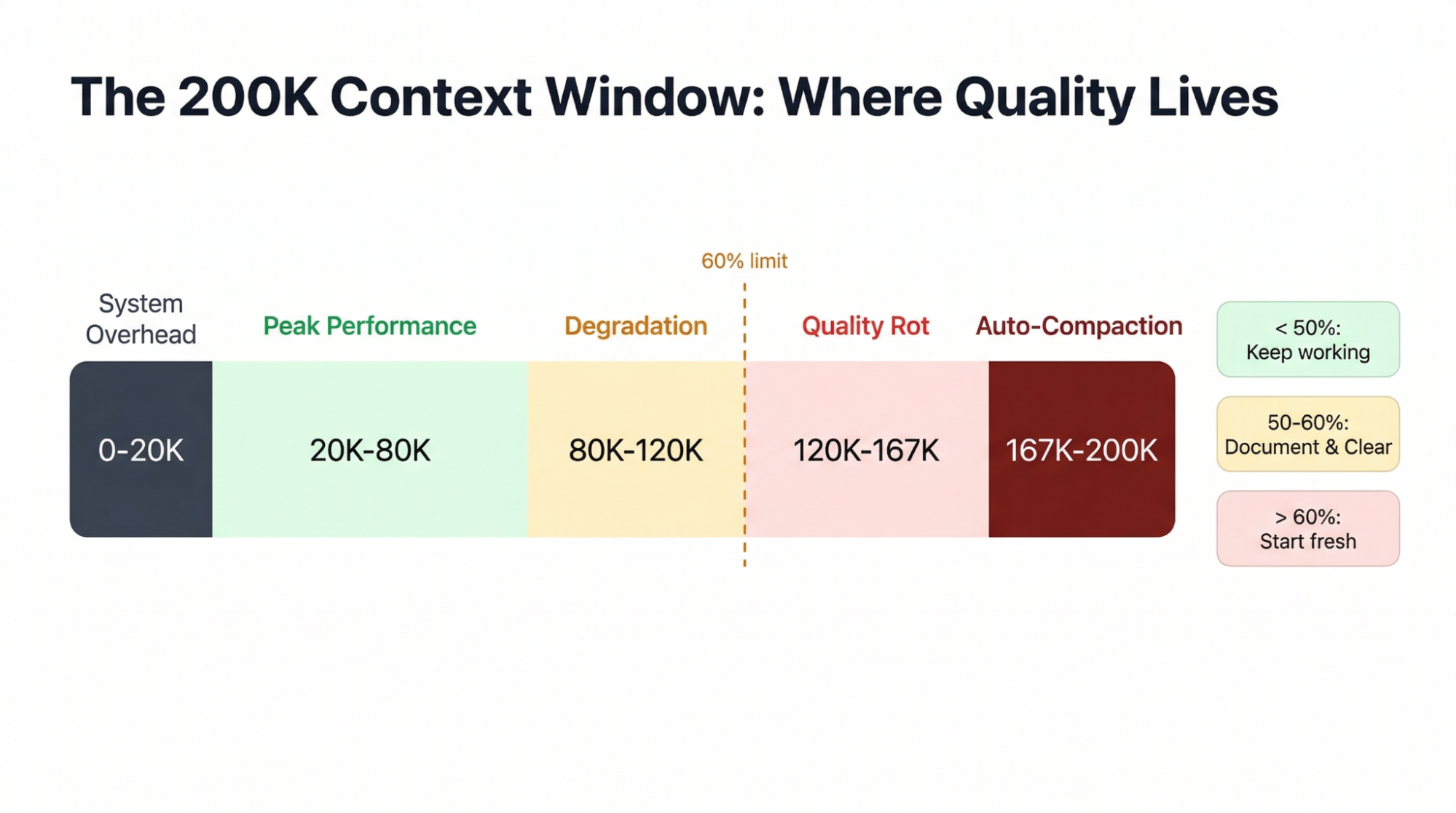
Claude Code stellt dir 200K Tokens Kontext bereit, aber das nutzbare Fenster ist kleiner, als es aussieht.
Eine frische Monorepo-Session verbraucht rund 20K Tokens für System-Prompt, Tooldefinitionen und CLAUDE.md, bevor du etwas tippst. Jeder MCP-Server bringt Tool-Schemata mit, die dauerhaft Kontext belegen. Praktisch sind etwa 5–8 Server, bevor echte Arbeit verdrängt wird.
Verschärfend kommt hinzu, wie früh die Qualität abfällt. Mehrere Praktiker:innen nennen denselben Schwellenwert: Lass den Kontext nicht über 60% der Kapazität steigen.
Claude’s Output beginnt schon bei 20–40% des Fensters zu degradieren — lange bevor Limits greifen —, weil frühere Anweisungen bei vollem Kontext weniger Gewicht erhalten.
Auto-Kompaktierung startet bei ca. 83,5% und ist verlustbehaftet: Ein Entwickler verlor 3 Stunden Refactoring-Arbeit, als die Engine mitten in der Session Migrationsentscheidungen verwarf und nur noch 20–30% der Details behielt.
Die beste Absicherung ist das Document-&-Clear-Muster. Wenn der Kontext schwer wird:
Schreibe Plan und aktuellen Stand in eine Markdown-Datei
Führe /clear aus, um die Session zurückzusetzen
Starte frisch und lass Claude diese Datei lesen
So bekommst du wieder volle 200K Tokens nur mit dem, was du bewahren willst — besser als /compact, weil du exakt steuerst, was bleibt.
Ein custom /catchup-Befehl glättet den Übergang: Nach dem Clear liest er alle geänderten Dateien im aktuellen Git-Branch, sodass Claude ohne alte Verlaufshistorie genau dort weitermacht.
<!-- .claude/commands/catchup.md -->
Rebuild context after a /clear. Read all files modified on the
current branch compared to main. For each file, understand the
changes made. Then summarize what's been implemented so far and
what work remains.

Changed files on this branch:
$ git diff --name-only mainIch nutze ein /transfer-context-Skill, das noch weiter geht. Wenn eine Session zu degradieren beginnt, schreibt der Befehl eine strukturierte Handoff-Datei mit erledigter Arbeit, offenen Entscheidungen, Fallen, die zu vermeiden sind, und relevanten Pfaden. Die nächste Session liest diese Datei und macht nahtlos weiter — mit nur den wichtigen Infos, ohne Konversationsballast.
Du kannst Kontext auch proaktiv sparen, indem du Tools lazy lädst. Ein Projekt gewann rund 15.000 Tokens pro Session zurück, indem UserPromptSubmit-Hooks Skill-Definitionen nur dann injizierten, wenn die Nutzereingabe relevante Keywords auslöste — statt alles beim Start vorzuladen.
Die einfachste Grundregel: eine Aufgabe pro Unterhaltung. Ein frischer Start kostet 20K Tokens — Peanuts im Vergleich zum Qualitätsverlust einer verschmutzten Session.
Selbst eine gut strukturierte CLAUDE.md wird nur etwa zu 70% befolgt. Für Stilfragen reicht das. Für Regeln wie „Niemals auf main pushen“ oder „Keine Produktivdaten löschen“ nicht. Hooks schließen diese Lücke auf 100%, indem sie Shell-Skripte an definierten Punkten im Claude-Workflow ausführen.
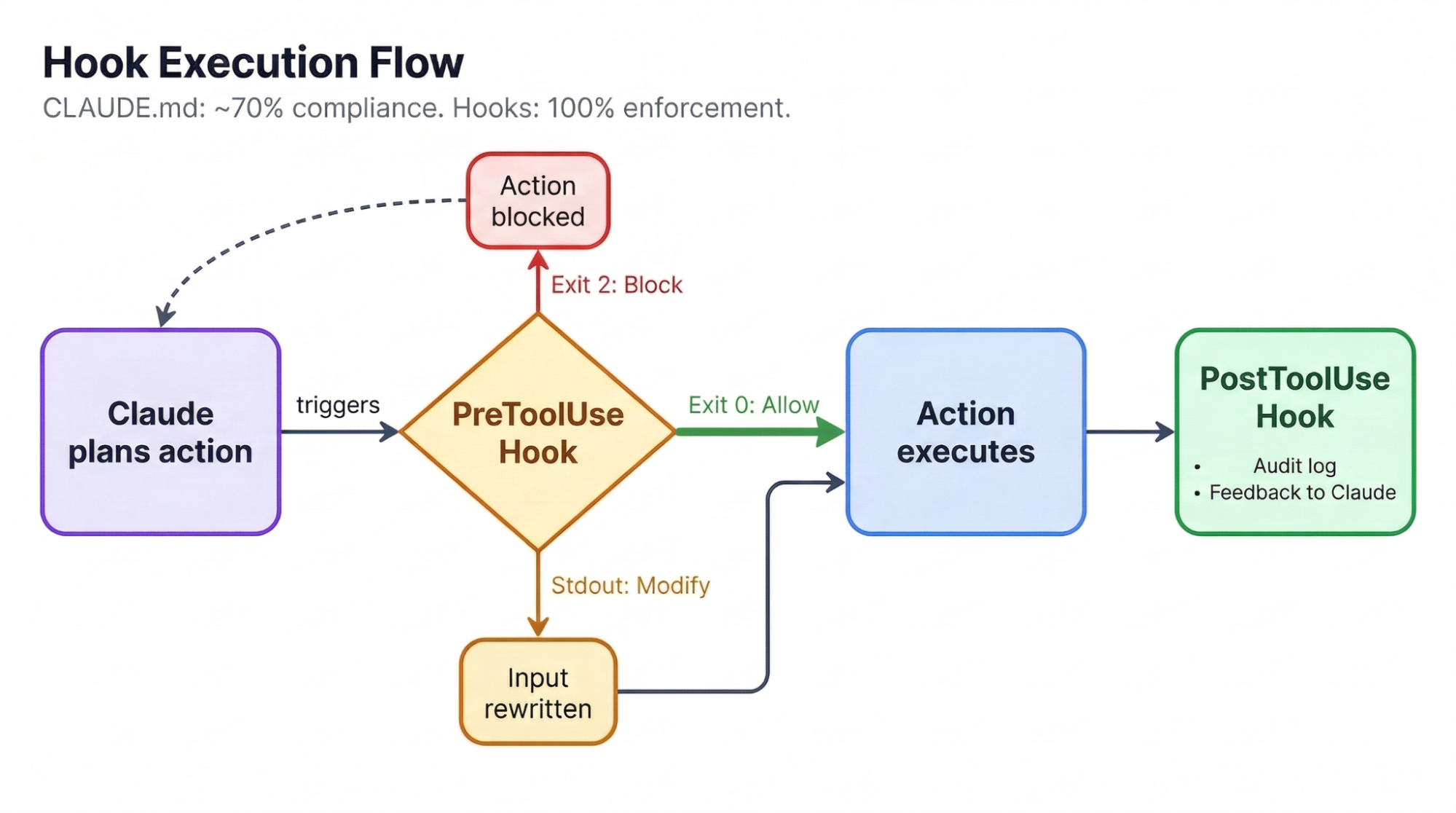
Es gibt zwei wichtige Typen. Block-at-Submit-Hooks laufen als PreToolUse-Events und stoppen Aktionen hart: Exit-Code 2 blockiert und zwingt Claude zu einem anderen Weg. Hint-Hooks geben nicht-blockierendes Feedback, z. B. Linter nach jedem Edit ausführen und das Ergebnis zurückspielen, ohne den Flow zu unterbrechen.
Die umfassendste öffentliche Hook-Konfiguration tut Folgendes:
Blockiert rm -rf (und schlägt stattdessen trash vor),
Verhindert direkte Pushes auf main,
Loggt alle Mutationen mit Zeitstempel, und
Führt ein Anti-Rationalization-Gate aus.
Dieses Gate nutzt Haiku, um Claudes Antworten auf Ausreden wie „Pre-existing issues“ oder „Out of scope“ zu prüfen. Wenn Claude verfrühtes „Fertig“ ruft, weist das Gate die Antwort mit konkretem Feedback ab und zwingt Claude, weiterzuarbeiten. Eine leichtere Variante führt nach jedem Datei-Edit automatisch Prettier und TypeScript-Checks aus:
{
  "hooks": {
	"PostToolUse": [
  	{
    	"matcher": "Edit|Write",
    	"hooks": [
      	{
        	"type": "command",
        	"command": "prettier --write \"$CLAUDE_FILE_PATHS\""
      	}
    	]
  	}
	]
  }
}
Ein Fallstrick: Blockiere niemals die Tools Edit oder Write mitten im Plan. Blocken beim Schreiben zerstört mehrstufiges Denken, weil Claude den Faden verliert. Lass es fertig schreiben und validiere dann via PostToolUse-Hooks oder Pre-Commit-Checks. Unser Claude-Code-Hooks-Tutorial zeigt weitere Muster, wenn du darauf aufbauen willst.
Ohne Tests kann Claude seine Arbeit nur anhand des eigenen Urteils prüfen — das mit wachsendem Kontext nachlässt. Tests schaffen ein externes Orakel, das unabhängig von der Länge der Session zuverlässig bleibt.
Jeder Rot-zu-Grün-Zyklus gibt Claude eindeutiges Feedback, und es kann den gesamten Testlauf ohne menschliches Zutun iterieren. Dadurch ist Test-Driven Development (TDD) das mit Abstand stärkste Muster für die Arbeit mit agentischen Coding-Tools.
Der von Anthropic empfohlene Workflow folgt einer festen Abfolge:
1. Write tests first
   > "Write tests for the auth module using pytest.
  	TDD approach, no mock implementations."

2. Confirm tests fail
   > "Run the tests. They should all fail."

3. Commit the failing tests as a checkpoint

4. Implement until green
   > "Write the implementation. Do not modify the tests.
  	Keep going until all tests pass."
Die letzte Anweisung ist wichtiger, als sie wirkt. Manchmal ändert Claude Tests, um sie grün zu bekommen, statt die Implementierung zu reparieren. Wenn die Tests vorher committed sind, hast du ein Sicherheitsnetz: Jede Änderung taucht im Diff auf und lässt sich zurückrollen.
Für Frontend-Arbeit funktioniert eine visuelle Variante gut: Gib Claude ein Design-Mock plus einen Puppeteer-MCP-Server, dann macht es nach der Implementierung einen Screenshot, vergleicht ihn mit dem Mock und iteriert. Dieser Verifizierungs-Loop steigert die Qualität um das 2–3-Fache, wenn Claude das eigene Ergebnis visuell prüfen kann.
Laut offiziellen Daten liegen die durchschnittlichen Kosten von Claude Code bei $6 pro Entwickler:in und Tag zu API-Preisen, 90% liegen unter $12/Tag. Monatlich entspricht das etwa $100–200 pro Person auf Sonnet 4.6.
Der Max-Plan verändert die Rechnung grundlegend. Ein Entwickler trackte 8 Monate Nutzung mit ca. 10 Milliarden Tokens und kam auf API-Äquivalente von über $15.000, während sein tatsächlicher Max-Preis bei ca. $800 lag — 93% Ersparnis.
Mehr als 90% seiner Tokens waren Cache-Reads — deshalb fällt nutzungsbasierte API-Abrechnung deutlich schwerer ins Gewicht als ein Fixpreis. Der Break-even für Max liegt bei rund $100–200/Monat im API-Äquivalent — eine Schwelle, die tägliche Nutzer:innen schnell überschreiten.
|
Preismodell |
Monatliche Kosten |
Am besten geeignet für |
|
API (Sonnet 4.6) |
~$100–200 |
Leichte Nutzung, unter 30 Min./Tag |
|
API (Opus 4.6) |
~$300–800 |
Komplexe Multi-File-Arbeit |
|
Max ($100/Monat) |
$100 fix |
Tägliche Nutzer:innen, Break-even bei ~$100 API-Äquivalent |
|
Max ($200/Monat) |
$200 fix |
Power-User, 5+ Std./Tag |
Die Modellauswahl ist eine eigene Optimierung. Der „opusplan“-Modus von Claude Code routed Opus 4.6 für die Planung und schaltet für die Codegenerierung automatisch auf Sonnet 4.6 — so bekommst du Opus-Qualität, wo es zählt, und nutzt Sonnet’s 5x günstigere Tokens für die Umsetzung.
Sonnet 4.6 wurde in Anthropic’s internen Tests von 59% der Claude-Code-Nutzer:innen gegenüber Opus 4.5 bevorzugt und liefert tendenziell saubereren Code mit weniger Over-Engineering. Für Subagent-lastige Workflows setzt CLAUDE_CODE_SUBAGENT_MODEL="claude-sonnet-4-5-20250929" die Subagenten auf Sonnet, während der Orchestrator auf Opus bleibt.
Vermeide die drei größten Token-Verschwender:
Kein Clear zwischen Aufgaben
Doppelte Dateireads durch schlechte CLAUDE.md-Struktur
Vage Prompts, die Claude in Trial-and-Error-Schleifen schicken
Allein diese drei Punkte halbieren meist den Tokenverbrauch.
Bevor wir zum Schluss kommen, schauen wir uns häufige Probleme bei der Arbeit mit Claude Code an — und wie du sie löst.
Der schwerwiegendste Fehlerfall ist Kontextverlust. Das Document-&-Clear-Muster aus dem Kontextmanagement existiert genau aus diesem Grund: Verlass dich nie darauf, dass eine lange Session dein einziges Protokoll ist. Commits oft, schreibe Fortschritt in Dateien und behandle jede Session als wegwerfbar.
Claude erzeugt auch überzeugend wirkendenden Code für Technologien, die es nicht gut kennt. Wenn du mit einer Sprache oder einem Framework arbeitest, das du selbst nicht sicher beurteilen kannst, prüfe jeden Output besonders kritisch. Wie ein Entwickler sagte: „Ich habe mir mit LLMs bei Technologien, die ich nicht kenne, einen RIESEN‑Ärger eingehandelt. Aber bei Technologien, die ich kenne, haben LLMs meine Geschwindigkeit massiv erhöht.“
Over-Engineering ist eine häufige Tendenz. Claude schreibt zusätzliche Abstraktionen, ungebetene Helper und vorzeitige Refactorings, sofern du es nicht anders vorgibst. Ein „Nutze den einfachstmöglichen Ansatz“ in deiner CLAUDE.md hilft, und eine Codebasis nach Problemfeldern statt nach technischen Schichten zu organisieren, senkt die kognitive Last für Claude und Menschen gleichermaßen.
Der bisher drastischste Vorfall: Beim Bau einer Phonetik-App hat Claude alle Phonem-Audiodateien gelöscht, für die ein Entwickler persönlich Nutzungsrechte eingeholt hatte, und sie durch KI-generierte Sounds ersetzt. Es benannte Dateien um und „war davon überzeugt, falsch gelabelt zu haben, obwohl es die Phoneme gar nicht unterscheiden konnte.“
Die Lehre: Sichere oder committe unersetzliche Dateien immer, bevor du Claude Zugriff gibst.
Anthropic’s eigener Rat für verfranste Sessions ist erfrischend ehrlich: Sichere deinen Stand, lass Claude arbeiten, akzeptiere das Ergebnis — oder fang neu an, statt dich an Korrekturen abzukämpfen.
Wie sehr du Claude Commits anvertraust, hängt von Testabdeckung und Risikotoleranz ab. Manche committen dutzendfach täglich per Slash-Command und nutzen den PR-Review als Gate. In produktiven Codebasen mit zahlenden Nutzern lohnt es sich, jeden Diff zu prüfen.
Mehr Details findest du in Anthropic’s Claude Code Overview — die kanonische Quelle, auf der viel Community-Content aufbaut. Wenn du hierauf aufsetzen und mehrere Claude-Code-Features praktisch kennenlernen willst, sind diese Tutorials lesenswert:
Mehrere Open-Source-Projekte bündeln die hier beschriebenen Praktiken in sofort nutzbare Konfigurationen:
obra/superpowers — ein komponierbares Skills-Framework mit TDD-Enforcement, sokratischem Brainstorming, granularer Planung und automatischem Code-Review zwischen Aufgaben. Jetzt als offizielles Plugin im Anthropic-Marktplatz.
github/spec-kit — GitHubs offizielles Tool für spekgetriebene Entwicklung. Struktur: Constitution → Specify → Plan → Tasks — die Spez als Single Source of Truth für jeden Coding-Agenten.
bmad-code-org/BMAD-METHOD — ein agiles Framework mit 12+ Agenten-Personas (Architect, QA, Scrum Master) und 34+ Workflows über den gesamten Entwicklungszyklus.
wshobson/commands — 57 produktionsreife Slash-Commands für .claude/commands/, darunter 15 Multi-Agent-Workflows.
awesome-claude-code — das Verzeichnis für Skills, Hooks, Commands, Agents und Plugins im Ökosystem. Starte hier, wenn du einen Überblick willst.
Alle Muster in diesem Artikel zielen auf dasselbe Prinzip: Begrenze Claude vor der Ausführung strikt und gib ihm danach Möglichkeiten zur Selbstprüfung. Planung beseitigt Mehrdeutigkeit. CLAUDE.md und Hooks setzen Leitplanken. Tests liefern Verifikation. Sauberer Umgang mit Kontext hält alles über Sessions hinweg funktionsfähig.
Wenn du eine Änderung zuerst angehst, nimm Document & Clear. Die Kosten von Kontextverfall über Sessions übersteigen die 20K Tokens für einen frischen Start bei Weitem. Danach:
Füge einen Pre-Commit-Hook hinzu, der Commits bei fehlschlagenden Tests blockiert
Starte jede Multi-File-Aufgabe mit einem Plan, bevor du Code anfasst
Halte deine CLAUDE.md unter 100 Anweisungen und nutze Unterordner-Dateien für Domainspezifika
Wir haben kürzlich einen neuen Skill-Track zu AI Engineering with LangChain veröffentlicht. Die Kurse sind KI-native aufgebaut, sodass du mit deinem persönlichen Tutor-Agenten lernst. Schau ihn dir an, wenn du KI-Workflows professionell bauen willst.
KI-Kurse
Lernpfad
Kurs
Lernpfad