Track
AI Engineering with LangChain
21 hr
Practice and track your progress.
Continue with GoogleWhen I first started using Claude Code heavily, I noticed two things quickly: the quality is excellent, and the bill reflects it. Every request, whether it's a three-line docstring or a full architectural refactor, hits the same Anthropic endpoint at the same rate.
Over time, that single-vendor dependency doesn't just create cost pressure; it also creates risk. It also means a rate limit on one model can bring your entire workflow to a halt.
Claude Code Router (CCR) addresses both problems directly. It's an open-source proxy that intercepts your Claude Code requests before they reach any provider, then redirects each request to the backend model that makes the most sense for that task.
In this tutorial, I'll walk you through the complete setup: installing the router, configuring multi-provider routing pathways, and hardening the system for daily operational use. To follow along, grab the API keys for the providers you want to use (DeepSeek, Gemini, OpenRouter, or any other supported backend) and open your terminal. Let's get started.
For some inspiration on different new LLMs and their strengths, check out our guides on these latest models:
Before diving into the setup, it's worth understanding what CCR actually is and why it works the way it does. If you haven’t worked with Claude Code yet, make sure to check our Claude Code 2.1 Practical Guide out first.
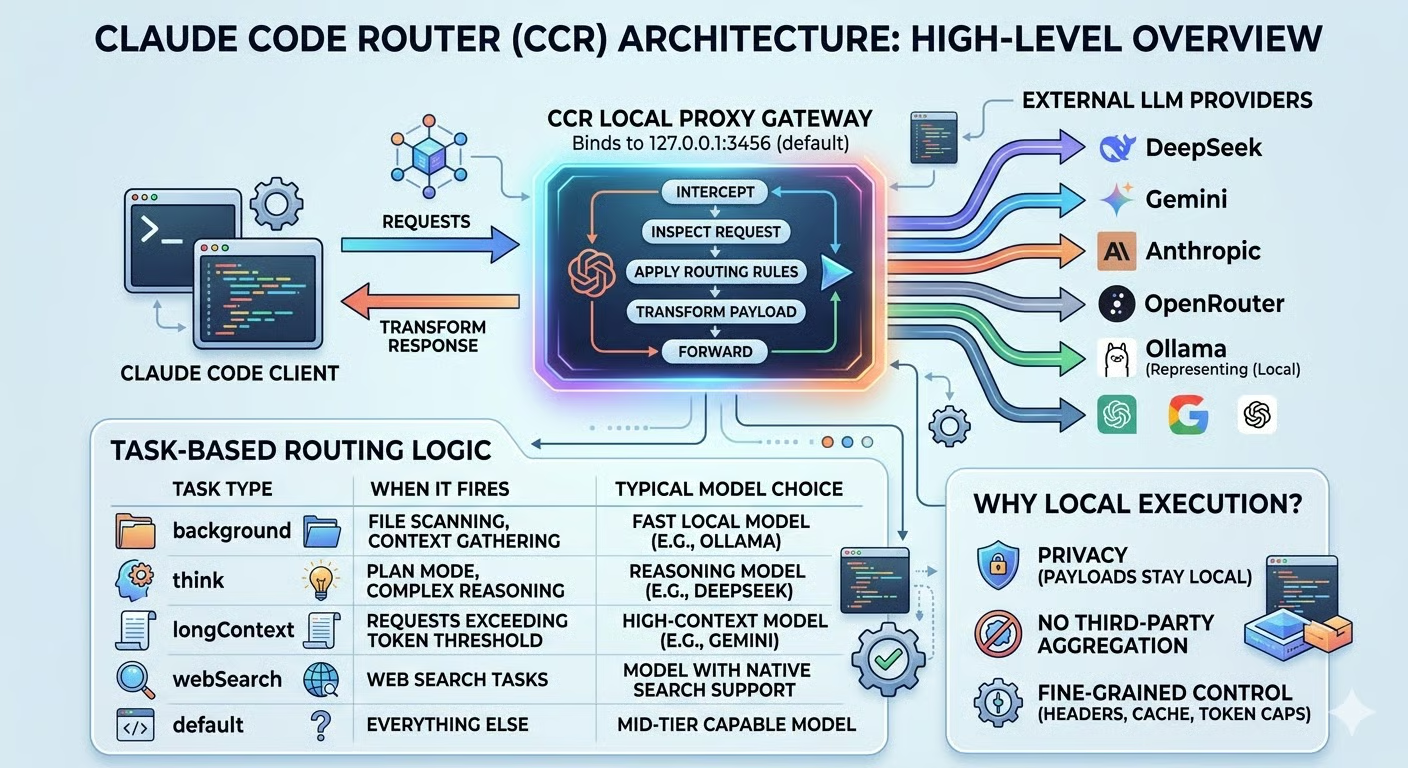
Claude Code Router is a local proxy gateway. When you launch it, it binds to a port on your machine (127.0.0.1:3456 by default) and positions itself between your Claude Code client and any external LLM provider. From Claude Code's perspective, it's just talking to a local endpoint. Under the hood, CCR decides in real time where that request actually goes.
The core problem it solves is single-vendor dependency. When everything routes through one provider, you inherit all of that provider's constraints:
CCR eliminates that by letting you define routing rules that automatically switch models based on task type, token count, or any custom logic you write. A background file scan doesn't need the same model as a Plan Mode reasoning session, and with CCR, it won't use one.
What sets CCR apart from direct provider APIs or cloud-based aggregators is where it runs.
Because the proxy executes locally, your request payloads never pass through a third-party aggregation service before reaching their destination. You also get fine-grained control over request transformation, including modifying headers, stripping cache fields, and capping token limits, through a transformer system that operates entirely on your machine.
To me, that local execution model is what makes CCR genuinely practical rather than just a clever workaround: the result is a setup that's more cost-efficient, more resilient, and more private than routing everything through a single cloud vendor.
With a clear picture of what CCR does, let's look at how it works under the hood and what you'll need before installing it.
Understanding CCR's architecture makes the configuration much easier to reason about, and I find the proxy pattern clicks quickly once you see it end to end.
When you start CCR, it intercepts all outbound requests from your terminal before they reach the default Anthropic endpoint. For each request, it:
The response comes back the same way, transformed back into the format Claude Code expects, so the client never knows anything changed.
The key mechanism inside that interception is task-based routing. CCR classifies incoming requests by type and maps them to the appropriate model. Here's how the main task categories behave in practice:
|
Task type |
When it fires |
Typical model choice |
|
|
File scanning, context gathering |
Fast local model (e.g., Ollama) |
|
|
Plan Mode, complex reasoning |
Reasoning model (e.g., DeepSeek) |
|
|
Requests exceeding the token threshold |
High-context model (e.g., Gemini) |
|
|
Web search tasks |
Model with native search support |
|
|
Everything else |
Mid-tier capable model |
Each task type gets the right tool for the job, and none require manual intervention once configured. In my experience, the background route delivers the biggest immediate return: those silent file-scanning requests happen constantly during a coding session, and before CCR, I had no idea how much they were quietly adding up.
Before installing CCR, make sure the following are in place:
Node.js v18 or later as the runtime environment
npm as your package manager
Claude Code installed globally (npm install -g @anthropic-ai/claude-code)
At least one model backend, either an API key from a supported external provider (DeepSeek, Gemini, OpenRouter, Groq, Volcengine, SiliconFlow, and others), or a local Ollama instance with a model already pulled, if you prefer to avoid external providers entirely
You don't need accounts with every provider upfront. One working backend is enough to complete this tutorial, and you can add more later.
For a comparison of Claude Code with one of its most popular alternatives, I recommend reading our piece on OpenClaw vs Claude Code.
Now that the concepts and prerequisites are clear, let's build the setup step by step.
With the prerequisites in place, you can install CCR globally with npm. On Linux, however, you may hit a permissions error when installing global packages because npm tries to write to /usr/lib/node_modules, which is owned by root. The recommended fix is to redirect npm's global directory to a folder your user already owns, rather than running the command with sudo:
mkdir -p ~/.npm-global
npm config set prefix '~/.npm-global'
export PATH=~/.npm-global/bin:$PATH
To make that PATH change permanent, add the export line to your ~/.bashrc or ~/.zshrc and reload your shell. Then install CCR:
npm install -g @musistudio/claude-code-routerThis makes the ccr CLI available globally in your shell. Next, start the router service:
ccr startCCR binds to http://127.0.0.1:3456 by default. Once you see the service is bound to the port in the startup output, the proxy is ready to accept requests.
All CCR configuration lives in ~/.claude-code-router/config.json. Before wiring up multiple providers, I recommend starting with a single, known-good provider to isolate any variables and confirm the baseline works.
OpenRouter is a good starting point here, and it's the one I reach for first whenever I'm setting up CCR on a new machine. It gives you access to dozens of models, including several free-tier ones, through a single API key, which makes it ideal for getting the routing layer working before committing to specific providers. You can sign up and grab a key at OpenRouter.
Here's a minimal configuration using OpenRouter:
{
  "Providers": [
    {
      "name": "openrouter",
      "api_base_url": "https://openrouter.ai/api/v1/chat/completions",
      "api_key": "YOUR_OPENROUTER_API_KEY",
      "models": ["openai/gpt-oss-120b:free"],
      "transformer": {
        "use": ["openrouter"]
      }
    }
  ],
  "Router": {
    "default": "openrouter,openai/gpt-oss-120b:free"
  }
}
A few things to note here:
api_base_url must point to the provider's full chat completions endpoint, not just the base domain.
transformer specifies which built-in payload adapter CCR should use, since different providers expect different request formats. The transformer handles that translation silently.
Router.default sets the fallback model for any request that doesn't match a more specific rule, using provider,model syntax.
For security, avoid hardcoding keys directly in the file. CCR supports environment variable interpolation: replace YOUR_OPENROUTER_API_KEY with $OPENROUTER_API_KEY and export the variable in your shell instead. The interpolation works recursively through the entire config, so this pattern scales cleanly as you add more providers.
With the config in place, launching Claude Code through the router is a single command:
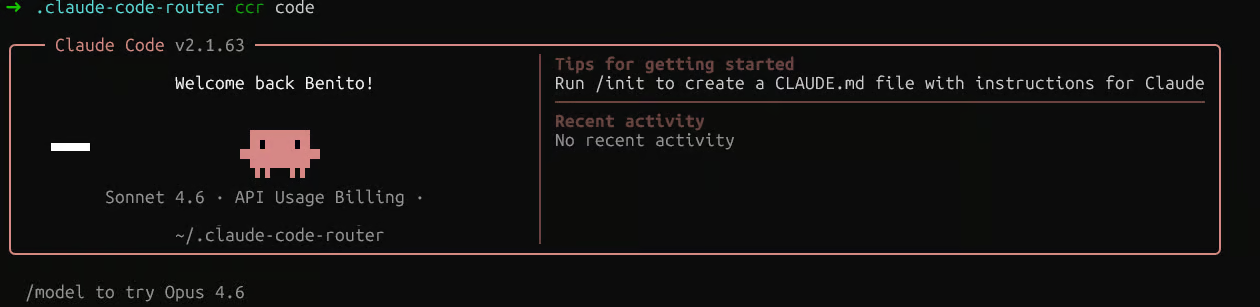
ccr codeThat's it. ccr code starts the proxy service and launches Claude Code simultaneously, with the environment pre-configured automatically. You don't need to run ccr start separately first.
To verify routing is active, check the ~/.claude-code-router/logs/ folder. A file named ccr-*.log there confirms the proxy started and is receiving requests. You can tail it to watch requests in real time:
tail -f ~/.claude-code-router/logs/$(ls -t ~/.claude-code-router/logs/ | head -1)
Claude Code Router logs
Two things worth knowing about verification. The Claude Code header always displays thecurrent default Claude model, regardless of which model CCR is routing to, because it reflects your Anthropic account session, not the active backend. If you ask the model "which model are you?", it will also say “Claude Sonnet 4.6”, because that's what the Claude Code client tells it to identify as. Neither is a reliable signal.
Claude Code Router session
The log is the only source of truth. Look for the "model" field in the response entries. If you see your configured model name there, for example, "model":"openai/gpt-oss-120b:free", routing is working.
If you want to make CCR persistent so you can use the claude command directly without ccr code, add this to your ~/.bashrc or ~/.zshrc:
eval "$(ccr activate)"Just make sure ccr start runs first in that case, since activate only sets environment variables and does not start the service itself.
Now that the baseline is verified, let's extend the config to route different task types to different providers. Here's a more complete Router configuration:
{
  "Router": {
    "default": "deepseek,deepseek-chat",
    "background": "ollama,qwen2.5-coder:latest",
    "think": "deepseek,deepseek-reasoner",
    "longContext": "openrouter,google/gemini-2.5-pro-preview",
    "longContextThreshold": 60000,
    "webSearch": "gemini,gemini-2.5-flash"
  }
}
Each key maps a task category to a "provider,model" pair:
The background route handles file scanning and context-gathering requests. These can safely go to a local Ollama model, keeping them free, and this is the single change that made the biggest dent in my monthly API bill.
The think route captures Plan Mode and complex reasoning tasks, where a model like deepseek-reasoner pays for itself.
The longContext route activates automatically once a request exceeds longContextThreshold tokens (defaulting to 60,000), redirecting to a high-capacity model without any manual switching.
For webSearch, note that the model itself must support web search natively. If you're routing through OpenRouter, you also need to append the :online suffix to the model name (for example, "anthropic/claude-3.5-sonnet:online").
For rate-limit resilience, CCR's custom router feature lets you define fallback logic in JavaScript. Create a file at a path of your choice, reference it in your config with "CUSTOM_ROUTER_PATH": "/path/to/custom-router.js", then export an async function that returns a "provider,model" string or null to fall back to the default rules:
module.exports = async function router(req, config) {
  // Primary logic here. Return null to fall back to config-defined rules.
  return null;
};
This is where you'd implement retry-on-rate-limit logic, for example, by detecting a 429 response and automatically rerouting to a secondary provider. After any config change, remember to restart the service for it to take effect:
ccr restartWith routing working, the focus shifts to keeping the system observable, secure, and easy to debug when something goes wrong.
CCR provides two separate logging systems worth knowing about:
Server-level logs cover HTTP requests, API calls, and server events. They are written to ~/.claude-code-router/logs/ in files named ccr-*.log. This is the log you'll use most in practice.
Application-level logs capture routing decisions and are written to ~/.claude-code-router/claude-code-router.log, though this file may not always be present depending on your setup and log level configuration.
Reviewing the server log regularly gives you a clear picture of which routes are firing, which models are being called, and whether any provider errors are occurring.
For real-time visibility, CCR also includes a statusline tool (available from v1.0.40 onward) that you can enable through ccr ui. Once active, it surfaces the current routing status directly in your terminal while Claude Code is running, showing you at a glance which model is handling each request.
On the budget side, the most effective guardrail is your routing configuration itself. By ensuring that background and default routes point to cheaper or local models, you prevent premium models from being invoked for low-value tasks. Reserve think and longContext for models that justify their cost, and keep the token threshold for longContext as high as your workflow tolerates.
In my experience, this configuration-level discipline is more reliable than reactive monitoring because it prevents overspend before it happens rather than catching it afterward.
Credential management deserves explicit attention, especially as your provider list grows. The rules I follow are straightforward:
Never commit raw API keys to config.json if that file is tracked in version control. Always use environment variable interpolation with the "$PROVIDER_API_KEY" syntax, and export keys from your shell profile or a secrets manager.
Keep the proxy on localhost for individual developer setups. If you don't set an APIKEY in your config, CCR automatically forces the server to bind only to 127.0.0.1, preventing external access on shared machines or networks.
Set an APIKEY for team deployments if you need to open the host to 0.0.0.0. Every client connecting to the router must include that key in the Authorization: Bearer or x-api-key header.
Disable or reduce logging if you're routing sensitive code. Logging is enabled by default ("LOG": true). Set "LOG": false to stop writing request payloads to disk, or "LOG_LEVEL": "warn" to suppress verbose debug output.
A practical way to implement this is to keep all your API keys in your shell profile and reference them via the $VAR_NAME syntax in config.json. That way, the config file itself contains no secrets and can be safely shared or version-controlled.
If you're ever unsure whether a key is leaking into logs, check your log level setting first. Switching to "LOG_LEVEL": "warn" is the fastest way to reduce what gets written to disk without disabling logging entirely.
When something breaks, a layered diagnostic sequence saves a lot of time. I find it's best to start at the outermost layer and work inward.
Run ccr code and look for the service startup confirmation. If the port is occupied or the service failed to start, you'll see connection refused errors in Claude Code.
Check the server logs in~/.claude-code-router/logs/ for details. Most startup failures come down to either a port conflict or a malformed config.json file.
The most common config mistake is a mismatch between the model name in Providers and the one in Router. Both must be identical.
If they differ, CCR sends a request with no model field, and you'll see a Missing model in request body error. After fixing the config, always run ccr restart to reload it.
If the model name is correct but requests still fail with a 404, check your provider account settings. OpenRouter, for example, has a default privacy policy that blocks free models from sending data to third-party providers. You'll see an error like No endpoints found matching your data policy.
The fix is to visit your OpenRouter privacy settings and enable free model usage. Other providers may have similar account-level toggles worth checking if you hit unexpected 4xx errors.
If requests reach the provider but responses are malformed or tool calls fail, the issue is usually a missing or incorrect transformer. Cross-reference your provider against the built-in transformer list and make sure the correct one is in the "use" array.
In most cases, working through these four steps in order will quickly isolate the problem. The server log captures both the outgoing request and the provider's raw response, giving you everything you need to understand where a failure occurred.
You now have a working multi-provider routing infrastructure built on top of Claude Code. Background tasks go to fast local models, reasoning-heavy work routes to specialized models, and long-context requests are handled by high-capacity providers, all automatically based on rules you control.
The immediate benefits are lower API costs, no single point of failure in rate limits, and the flexibility to swap providers without touching your workflow.
To keep the setup efficient over time, review your routing logs periodically. The server log will show which routes are firing most often and whether expensive models are being triggered for tasks that a cheaper alternative could handle. Adjusting longContextThreshold and fallback rules based on real usage is far more effective than setting them once and walking away.
Finally, if your work involves proprietary code, I'd strongly recommend routing those requests to a local LLM via Ollama. It's something I do for any client work involving unreleased code. Adding it as a provider takes under a minute, and your most sensitive queries never leave your machine.
For those of you interested in leveling up in AI application development, I highly recommend enrolling in our AI Engineering with LangChain skill track. The teaching content is AI-native, giving you access to a personal tutor who teaches you the exact skills you need to become a real pro at engineering AI workflows.
AI Courses
Track
Course
Practice and track your progress.
Continue with GoogleTutorial
Abid Ali Awan
8 min
Tutorial
Aashi Dutt
10 min
Tutorial
Tim Lu
15 min
Tutorial
Aashi Dutt
8 min
Tutorial
Bexruz (Bex) Tuychiev
14 min
Tutorial
François Aubry
12 min