Course
Implementing AI Solutions in Business
2 hr
55K
SpaceXAI wants you to stop prompting and start delegating. Three other AI labs are making the same bet at the same time.
On August 11, 2026, SpaceXAI launched Grok Bot, a beta product built around what it calls "always-on" AI teammates. They run on a cloud computer, sign into the tools you already use, and keep working after you have closed the laptop and gone to bed. According to the launch post, Bots only come back to you when something needs a human decision. Grok Bot's debut was quickly followed by Grok 4.6, which carried the same long-agent focus into the API (which we tested in our Grok 4.6 API tutorial) and Cursor.
Skip past the branding, because the interesting part is not "SpaceXAI shipped another Grok product." It is that SpaceXAI just joined a race OpenAI, Anthropic, and Google are already running: building AI systems you hand real work to, not ones you interrogate for answers. OpenAI has ChatGPT Work. Anthropic has Claude Cowork. Google has Gemini Spark. Grok Bot is the fourth entry from a fourth major lab, and that timing says more about where AI is headed than any single feature does. We already covered Claude Cowork in our tutorial, so I will keep that part brief here.
Grok Bot is not a chat window with extra permissions. According to SpaceXAI's own documentation, it is a separate product from the Grok chatbot apps, built around persistent, named Bots that live on a cloud computer assigned to your account. You give a Bot a name, a job, and a short description of how it should work, then message it the way you would message a coworker.
That framing changes what "using" the product means. A normal AI assistant follows a loop: you ask, it answers, you do the next step. Grok Bot's loop is different. You hand over an outcome, the Bot works across whatever apps and websites the job touches, and it comes back with finished work or a question that needs your judgment. The docs say Bots keep stable preferences and role context between conversations, though they warn against treating memory as an authoritative source. For anything that matters, ask the Bot to check the current data instead. Matt Palmer, who works on developer experience at Cursor, described this memory on X as three separate layers shortly after launch, covering the user, the individual Bot, and the shared project, though the official docs do not break it down that specifically, so treat that split as his read on it rather than a confirmed spec.
As of launch, Grok Bot is in beta for SuperGrok Heavy, Cursor Ultra, and Cursor Teams Premium subscribers, running on macOS, Windows, and iPhones with iOS 18 or later. Linux desktop, Android, and iPad are not supported yet, and enterprise access is a waitlist for now. I will skip the install steps here, but the access list is short and entirely tied to paid plans. For a detailed guide on how to get started and use the tool, I recommend reading our Grok Bot tutorial, where we built a learning assistant.
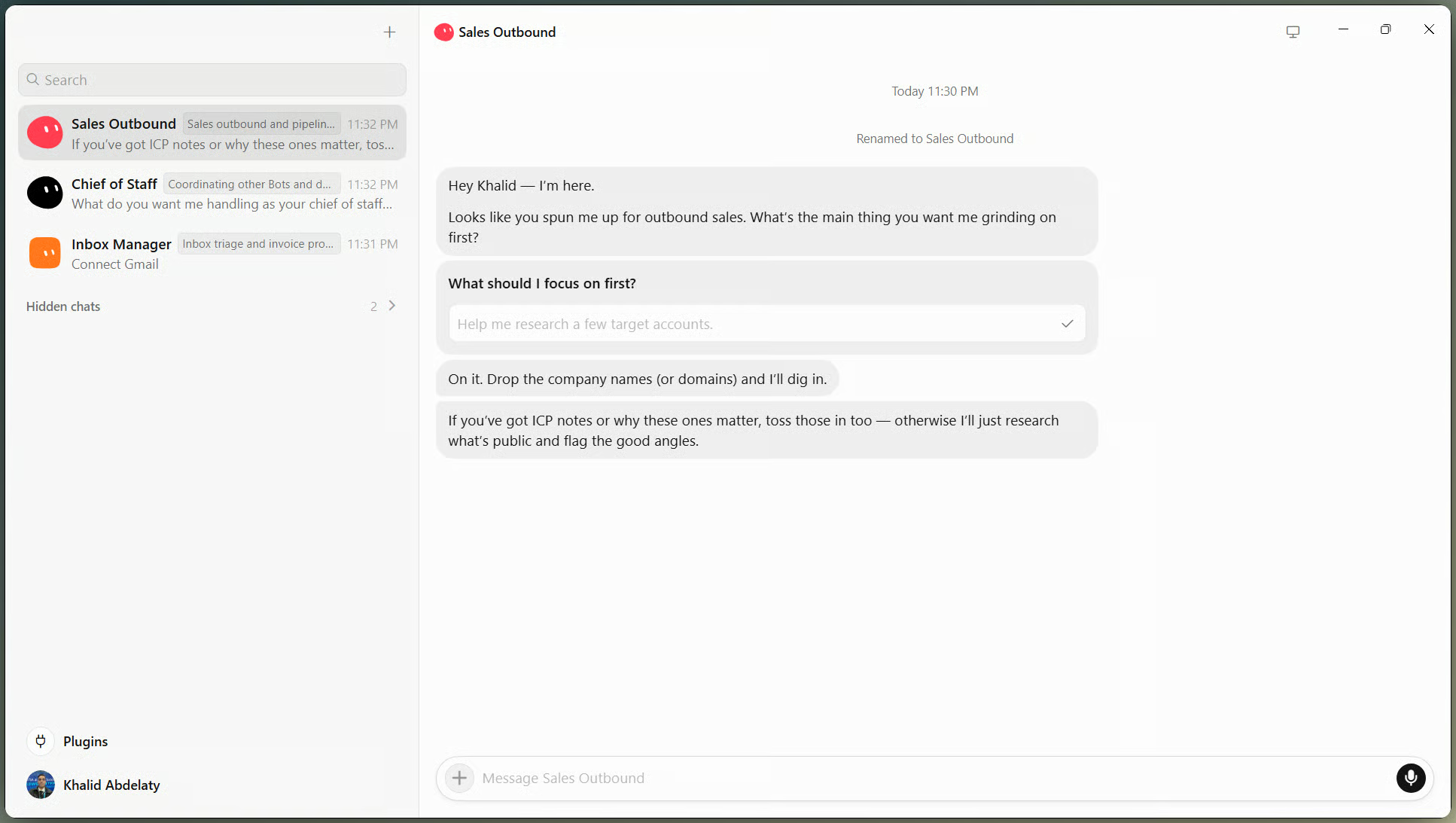
Named Bots share one roster view. Image by Author
Three mechanics do most of the work in explaining why SpaceXAI thinks this is a different category of product.
Most agent products are limited by what has a clean API. Grok Bot's Bots are not, at least in theory. I will admit the docs themselves are a little slippery on this point: one line calls it "a computer of its own," and a few sections later the same page clarifies it is one shared machine per account. I am going with the more precise version here, since it is the one that matters once you actually connect real accounts. According to the product docs, Bots operate on a shared cloud computer and log into apps, dashboards, and websites the way a person would, including tools with no proper connector. That is a real gap in a lot of workplaces, where the tools people touch daily are dashboards and legacy web apps with no API in sight.
One SpaceXAI product employee put it this way in the launch post: "There is a huge difference between 90% done and 100% done. Most AI gets you almost there. Grok Bot can finish the swing, because the work lands where a human would put it, in the actual tool." Whether that holds up outside a company's own demos is a question I will come back to later. Microsoft has made a similar bet with computer-using agents in Copilot Studio, aimed at the same UI-only, no-API problem, though that is its own conversation.
This is the part that stuck with me most reading the docs. SpaceXAI is not selling one assistant that does everything. It is selling a roster. You can run several specialist Bots at once, and internally the company reportedly runs one "chief of staff" Bot coordinating specialists for inbox, recruiting, expenses, and bug triage.
The docs on messaging and collaboration describe Bots that can message each other directly, sit together in group chats, and pass ownership of a task without you acting as the router between them. One growth employee described it as feeling "like I have eight arms like an octopus, with every arm in concert with the others." That is a marketing quote, obviously, but the underlying idea, that the product is a small team rather than one very capable assistant, is a genuinely different pitch than what most competitors are making. In that same post, Palmer called these shared spaces "Projects" rather than group chats, with an orchestrator Bot delegating to specialists inside one. That naming is not in the docs I read, so it may just be internal shorthand, but the underlying behavior lines up with what SpaceXAI describes officially.
It comes with a catch the docs are upfront about: every Bot on your account shares one computer, including its files, browser sessions, and logins. The isolation boundary is your account, not the individual Bot, and the documentation says plainly not to treat separate Bots as a security boundary. A real tradeoff, not a footnote.
The third mechanic is quieter but says something about how SpaceXAI wants people to onboard. Instead of configuring an automation first, you ask a Bot to watch you do a task once. It records the workflow, up to ten minutes with no audio, and turns it into a draft skill you review and test.
Here the docs on skills and routines draw a line worth keeping straight: a skill is instructions for how to do something, and it works across any Bot with the right access. A routine assigns one specific workflow to one Bot and a schedule for when to run it. You typically test a skill on a real task first, then turn it into a routine once you trust it. Skip that order and you are trusting an automation you never watched work.
SpaceXAI built Grok Bot as an internal tool before opening it up, and its launch materials lean on that usage for examples. Worth remembering these are company-reported, not independently benchmarked. Two of the workflows below come from the official use-case catalog; two are from a launch-day list of 100 uses that Cursor's Eric Zakariasson posted on X, and I have kept those separate rather than blending them into the company's own claims:
The company-reported examples read like department-level workflows. Zakariasson's two are smaller and more personal, the kind of thing you would only bother automating once you already trusted the product. The engineering example is the most interesting of the four either way: one Bot passing structured work to another without a person relaying it would be hard to fake in a demo and easy to overstate in a press release. The others make the product sound useful. This one makes it sound like a colleague.
You cannot really understand Grok Bot without understanding how deep the SpaceXAI and Cursor relationship already runs, and this deserves its own section rather than a passing mention. If you only care about what the product does, you can skip ahead to the market comparison.
Start with what is confirmed. I already mentioned the Cursor Ultra and Cursor Teams Premium access, and the macOS download link for Grok Bot points straight to downloads.cursor.com. In July, Cursor and SpaceXAI jointly trained and launched Grok 4.5, which SpaceXAI itself says was available immediately in Grok Build, in Cursor on all plans, and from the SpaceXAI console.
That partnership did not appear out of nowhere. SpaceX had already folded xAI into itself through an all-stock merger earlier in 2026, and by June, SpaceX had agreed to buy Anysphere, the company behind Cursor, for $60 billion in stock. As of this writing, that acquisition is still described as expected to close in the third quarter, not confirmed closed, a distinction worth holding onto since a lot of casual coverage already treats Cursor as if it were fully part of SpaceX. It is not, at least not on paper yet, even though the two companies are already shipping models and products together as if the deal had gone through.
Grok Bot lands in the middle of a season where nearly every major lab is moving past the chat window, and putting the four side by side says more than any single one does alone.
OpenAI's ChatGPT Work, mentioned earlier, is built to stay with a project for hours at a stretch, breaking larger tasks into steps and completing them mostly on its own. It works across apps and files the user has connected, produces finished documents, spreadsheets, presentations, and web apps, and can keep running in the cloud after the app is closed. OpenAI frames it explicitly as moving ChatGPT past answering questions and toward finishing work, which is nearly the same sentence SpaceXAI uses for Grok Bot with different branding.
Anthropic's Cowork follows a similar shape but a different starting point: you hand it a goal instead of a prompt, and it works across whichever files and tools you have granted access to rather than defaulting to everything. It launched as a narrower research preview in January 2026, then picked up more connectors and a broader rollout through the year, including support for continuing a task after the laptop is closed and scheduling recurring work. The core pitch, saying what you want rather than how to do it step by step, is close enough to Grok Bot's own framing that the two products read like answers to the same design brief.
Google is coming at the same idea from the consumer side. Gemini Spark is a cloud agent designed to keep running 24 hours a day, connected to Gmail, Calendar, and Docs through proper APIs rather than screen navigation, and expanded over the summer with Chrome browsing and more third-party integrations. Google has also been the most explicit of the three about where the agent should stop: Spark is described as asking first before high-stakes actions like spending money, with permissions off by default until a user turns them on.
None of the four sells the agent on its own, either, which is easy to miss if you only skim the pricing pages. ChatGPT Work rides on top of an existing ChatGPT plan rather than carrying a separate price. Claude Cowork now ships with every paid Claude plan, down to the Pro tier, after originally requiring the pricier Max plan. Gemini Spark started tied to Google's AI Ultra plans and has since opened up to the cheaper AI Pro tier in more than 160 countries. Grok Bot follows the same pattern, riding on the same plans I mentioned earlier instead of being sold by itself. Whichever one you already pay for is, in practice, the one you already have.
None of these four products are identical, and a scorecard would not tell you much anyway. The competition used to be about whose model answered questions best. It is quietly becoming a different question: which system can you trust with a piece of your work and walk away from. That shift, not any roadmap, is the real story behind this launch.
The product is in early beta, and SpaceXAI's own materials mostly show internal usage and early feedback, so it is worth being honest about what is still unknown. A few open questions stand out:
None of these are damning on their own, and I do not think they should read as accusations. Even Google's Spark, further along and generally available, still hands sensitive actions like payments back to the user rather than letting its agent finish them. The rest of the industry has not solved this either.
Pull back far enough and three things stand out about this moment, and they matter more than what Grok Bot itself does next.
The industry's center of gravity is shifting from assistance to ownership of outcomes. OpenAI has observed this in its own usage data: as of May 2026, most Codex users had asked it to complete at least one task the company estimated would take a person more than an hour by hand. That does not prove every agent succeeds at long-horizon work, and it is specific to OpenAI's coding tool rather than Grok Bot. But it shows where behavior is already moving, regardless of which vendor someone uses.
The second idea is less certain and more interesting to sit with: the next interface might be a team, not a chat window. Grok Bot's multiple-Bot structure suggests a future with a handful of narrower assistants instead of one that does everything, maybe with something coordinating between them. Treat that as a direction, not a prediction I stand behind as fact.
The third holds up best, in my view. The model behind any of these products is becoming one ingredient among several, alongside computer access, memory, permissions, and whether the thing works reliably enough that you stop double-checking it. The system that wins this category will not necessarily have the best benchmark score. It will be whichever one people trust enough to leave alone.
Grok Bot is another loud signal that AI companies are racing past the chatbot era toward delegated labor. Its shared cloud computer, roster of named Bots, and bet on teaching by demonstration make SpaceXAI's version of this idea an ambitious one, on paper.
But it is still a beta with company-picked examples and a documentation page admitting its own gaps. The real test was never whether Grok Bot can produce a good demo. It will be whether people trust it enough, months from now, to hand over something real and not check on it constantly. Our AI agent roundup covers where the wider category is heading, and our Introduction to AI Agents course is a fine start if the concepts are still new to you.
Learn with DataCamp
Course
Course
Track
blog
Tom Farnschläder
11 min
blog
Vinod Chugani
12 min
blog
Khalid Abdelaty
13 min
Tutorial
Khalid Abdelaty
15 min
Tutorial
François Aubry
14 min
Tutorial
Abid Ali Awan
9 min