
What Is Grok Bot?
Grok Bot is SpaceXAI's product for giving AI agents standing jobs. A Bot has one main job, its own conversation, and a working context that develops over time.
All your Bots share one cloud computer with a browser, filesystem, and terminal. Each Bot gets its own screen, but those screens are not separate security boundaries. Skills record how work is done; routines schedule it; and background work continues after the laptop closes. The same Bots and conversations sync across desktop and mobile, though some desktop controls are not available in the mobile apps.
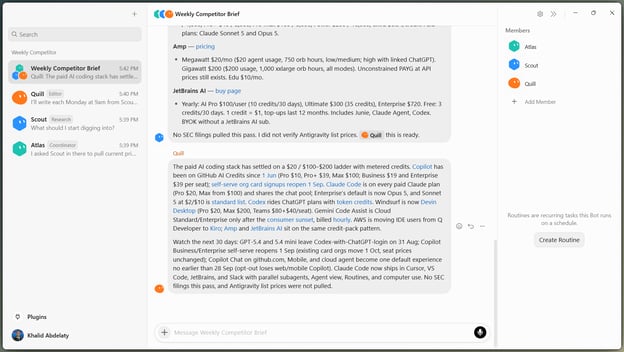
Three Grok Bots coordinate one brief. Image by Author.
How Grok Bot fits alongside Grok Chat and Grok Build
Grok Chat handles conversation. Grok Bot keeps named workers for recurring jobs. Grok Build handles coding from the terminal.
If you want to see the tools in action, I recommend reading our Grok Bot and Grok Build tutorials.
What Is Claude Cowork?
Claude Cowork is Anthropic's environment for delegating multi-step work across files, research, browsers, and documents. It uses the same agent system as Claude Code but doesn't require a terminal. Cowork is generally available through Claude Desktop on macOS and Windows, while web and mobile access remain in beta.
Claude plans the task, creates subtasks, and can run parts of the work in parallel. Cloud Projects keep files, instructions, and context across supported apps and devices. Cloud sessions continue after the laptop closes, while local files and apps still require Claude Desktop to be online.
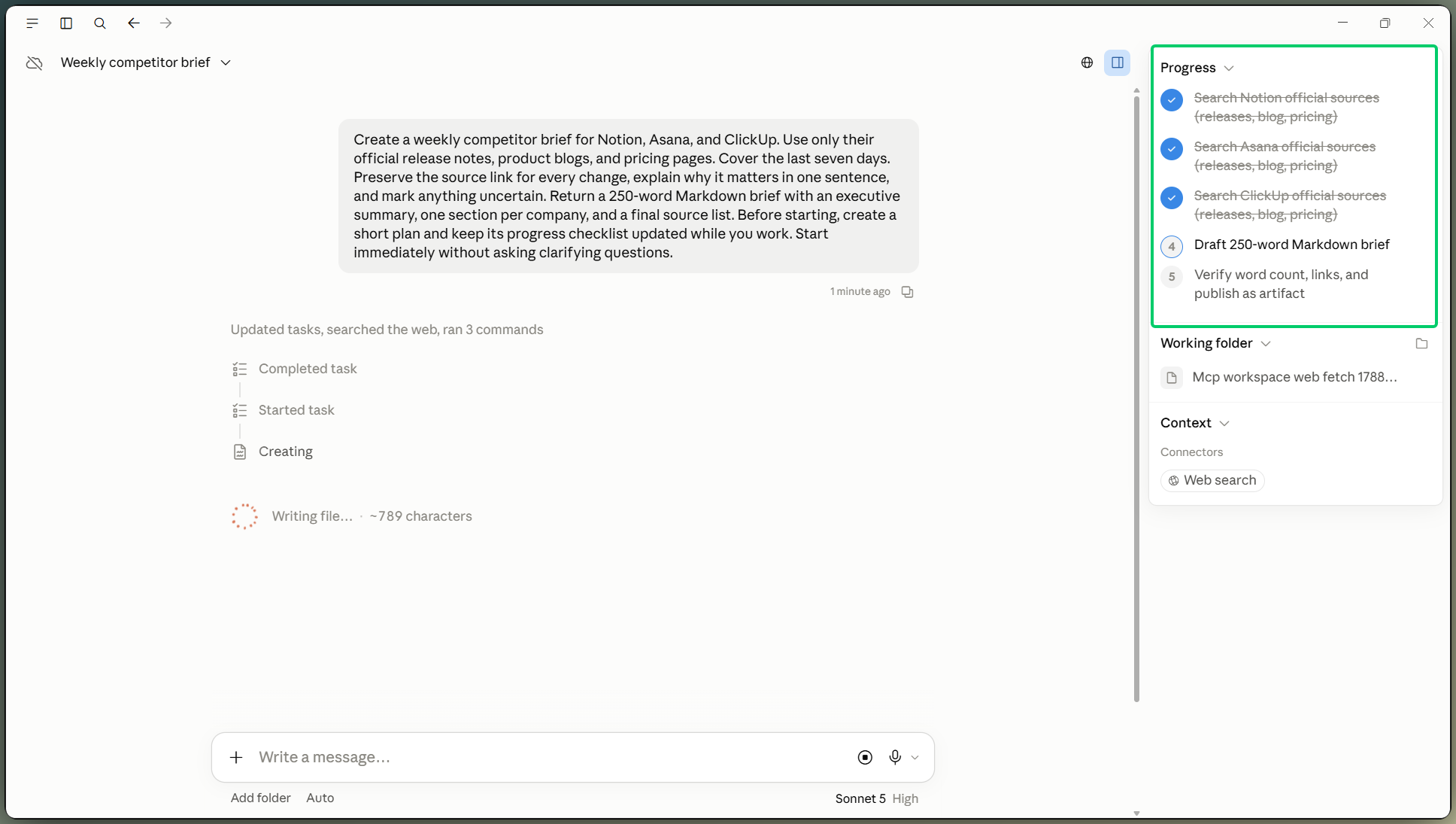
Claude Cowork planning a research task. Image by Author.
How Claude Cowork fits alongside Claude Chat and Claude Code
Claude Chat returns an answer. Claude Cowork plans and carries out general work. Claude Code handles software engineering from the terminal. We covered the comparison between the latter two more extensively in our Claude Cowork vs Claude Code guide. For a hands-on walkthrough, we’ve got you covered with our Claude Cowork tutorial.
What Is the Main Difference Between Grok Bot and Claude Cowork?
Grok Bot keeps named workers with lasting roles. Claude Cowork keeps the session and Project context, then uses sub-agents inside the task. In Grok Bot, you choose the workers. In Claude Cowork, Claude does.
Grok Bot: build a standing AI team
With Grok Bot, you define the roles. A research Bot, editor, and coordinator can each own one repeated job. You can see their handoffs, and the roles remain after one task ends. SpaceXAI recommends creating another Bot only when one of the following features of the work is distinct:
- Goal
- Tool set
- Working style
- Approval boundary
- Recurring schedule
Claude Cowork: organize work around an outcome
Claude Cowork starts with the result you want. Claude plans the work and can create subagents. Those workers belong to the current task; you do not name or manage them between jobs.
Why this difference matters
Grok Bot shows the team and asks you to manage it. Claude Cowork hides most of that work and asks you to manage the session, Project, and result. This affects who divides the work, where you make corrections, and what remains after the task ends. You either manage a Bot roster or write Project instructions.
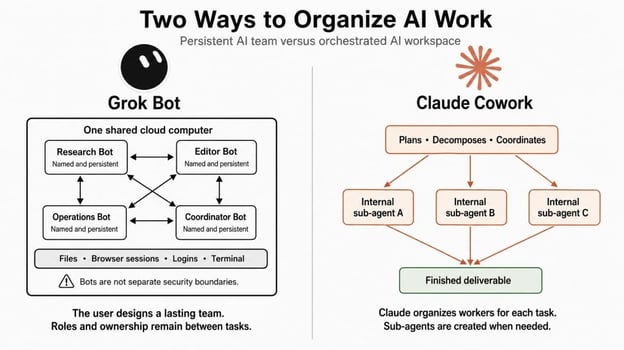
Two ways to organize AI work. Image by Author.
Grok Bot vs Claude Cowork: A Head-to-Head Comparison
Let’s combine both tools across a few key areas.
Setup and multi-agent delegation
The products ask for different information before the first task begins. A Claude Cowork task starts with a description of the result, optionally inside a Project. Claude then creates the plan. Claude Cowork can run several sub-agents at once, but it does not give them lasting names or roles.
Grok Bot starts by creating a Bot. You can add a name, role, and tools when needed, then add a Routine if the work should repeat. Those bots are messaging, sharing threads, and passing work. A group chat can contain up to 6 Bots, and a coordinator can send work to agents with specific jobs.
An experimental SpaceXAI guide maps this structure to projects. Each project gets a group channel, a small Bot roster, and linked Notion Projects and Tasks boards. A manager Bot opens the channel, assigns existing Bots, and flags blocked work for the user.
Memory and context
Memory matters once the job lasts longer than one session. Grok Bot remembers the Bot's role, conversation, and preferences. A Claude Cowork Project keeps its files, instructions, and context. Files and logins also remain on Grok Bot's shared computer, but copying a Bot does not copy its conversation history or learned memory.
Shared account memory can carry context between Claude Chat and cloud Cowork sessions when the new memory experience is enabled. Local Cowork sessions do not use that shared memory. Project files and instructions are, therefore, the more dependable source of continuity across Cowork tasks.
Computer, browser, and app access
Both products can keep cloud work running after you close the laptop, but they operate differently.
As mentioned earlier, Grok Bot keeps one cloud computer per user. Browser sign-ins persist between jobs, and sensitive steps such as passkeys, two-factor authentication, and CAPTCHAs require human intervention. You can fill forms and login fields from the chat with any password manager instead of switching to the Bot's screen. Local execution asks for approval by default.
Grok Bot supports purchases through Stripe’s Link checkout. You approve every spend request, and the Bot receives a secure, single-use card for that payment. The service is available in the US and is rolling out to mobile. Link has confirmed the integration.
Claude Cowork runs work in two places.
- Cloud sessions, the default, use temporary Anthropic sandboxes destroyed when the session ends.
- Local sessions run the agent loop on the device and execute code inside an isolated VM.
Either way, reaching the machine is a separate question: a cloud session gets to approved folders and the browser only through Claude Desktop while it's online, and computer use controls approved apps on the real desktop with no sandbox in between.
Claude Cowork's built-in browser is separate from the user's normal browser and is rolling out to macOS, Windows, and Linux beta.
Claude in Chrome remains the option for a page already open in the user's browser. Its side panel can read the current tab without Claude Desktop, but running a browser as part of a Cowork task still requires the Desktop app to be online. Anthropic still advises against using either browser option for financial, medical, or other sensitive personal information.
On Team and Enterprise plans, both browser options are on by default, though admins can disable either one and apply the same site allowlist or blocklist to both.
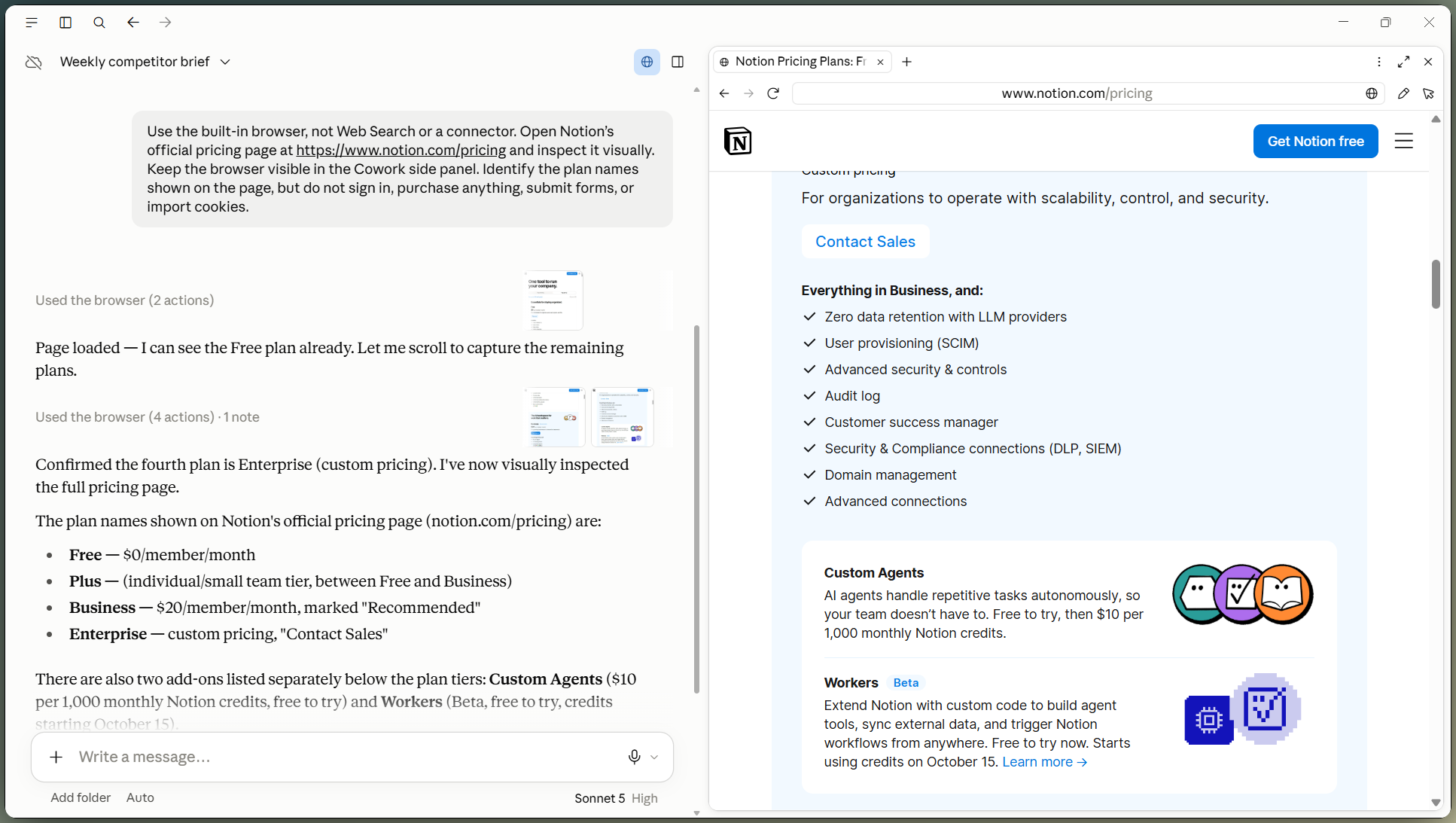
Claude Cowork opens its built-in browser. Image by Author.
Skills, plugins, connectors, and MCP
The number of connectors does not tell you much on its own. Grok Bot shares tools across its Bot roster. It uses Skills, Cursor plugins, connectors, and the Model Context Protocol (MCP). Claude Cowork has plugins that bundle Skills, connectors, and sub-agents, plus Agent Skills for office files. Check whether the service you need appears in the relevant marketplace or connector list.
Grok Bot can also connect to an X account and pull recent bookmarks into a task. Paid Grok Bot users receive starter X API credits, and the setup can create a developer account when one does not already exist. It can search and act across Microsoft Teams, and connect to Salesforce, HubSpot, Gong, Clay, and Granola for sales work.
Grok Bot also supports shareable Bot templates. A public share link copies the Bot's identity, description, Skills, and Routines, but not the owner's computer, logins, or conversation history.
Scheduled and recurring work
Scheduling itself is not the main difference; ownership is. One Bot owns the recurring job in Grok Bot; a Project or task owns it in Claude Cowork.
Grok Bot turns a successful task into a Skill, then assigns a Routine to one Bot. A Routine can run on a schedule or, where supported, after a Slack or GitHub event. Teach a Task can draft the Skill from up to ten minutes of recorded browser work.
Claude Cowork's Scheduled Tasks normally run in the cloud without a device online and can inherit project context. A scheduled task that needs local files or apps runs locally and requires the computer and the desktop app.
Files and Finished Outputs
The finished file matters more than the chat that produced it.
Claude Cowork supports Excel files with formulas, PowerPoint decks, and formatted documents. Examples include turning invoice PDFs into a CSV and folder structure, converting receipt images into an expense report, and combining several research tasks into one dashboard.
Grok Bot can also return documents, spreadsheets, slide decks, and other files you can inspect. Its mobile app lets you share a file directly with a Bot. SpaceXAI gives more attention to work completed inside the app where it already lives. That may mean drafting an email in Gmail, updating a task in ClickUp, or saving research into the shared workspace.
For document work, test both with your own templates and compare formula accuracy, formatting, citations, and revision effort.
Steering and Approvals
The supervision level is partly a matter of taste. Both show progress, tool activity, and approval requests, and both let you redirect work.
Grok Bot exposes individual workers and handoffs, and it can draft messages inline for you to approve before sending.
Claude Cowork emphasizes the task as a whole and supports manual, automatic, or skipped approval modes, though file deletion always needs confirmation.
How Recurring Workflows Are Organized in Grok Bot vs Claude Cowork
A weekly competitor brief shows how each product organizes the same job. The comparison covers research, evidence, revision, and a later rerun rather than the quality of the model or final text.
Starting with one agent
Give both products the same outcome: research three competitors and return a sourced brief. One Grok Bot can start from its signed-in cloud browser, while Claude Cowork can plan the task and coordinate parallel research. The Claude Cowork built-in browser can keep selected sign-ins for the next run, but Claude Desktop must remain online.
Splitting the work across roles
Add researcher, analyst, and editor roles. Grok Bot maps them to named Bots with visible handoffs. Claude Cowork coordinates the work inside the task without adding a roster to manage.
Correcting the workflow
Now require primary sources only and change the report format.
- In Claude Cowork, one correction can redirect the current task; save it to the Project instructions if it should apply to later runs.
- In Grok Bot, you may need to correct the researcher Bot for source selection and the editor Bot for formatting. Changes must reach the Bot responsible for that part of the job.
Repeating the workflow
For this brief, Grok Bot saves the method as a Skill and gives the Routine to the owner Bot. The “teach a task” feature helps if a source sits behind a portal with no API, though a redesign of that portal may require the Skill to be revised.
Grok Bot runs the weekly brief. Video by Author.
Claude Cowork creates the recurrence from the Scheduled Tasks page and can carry the Project context, while a run that needs local files or apps depends on Claude Desktop being open at the scheduled time.
Claude Cowork runs one weekly brief. Video by Author.
Grok Bot vs Claude Cowork: Security and Trust
Both tools can act across external systems, but their trust boundaries differ.
How Grok Bot's shared computer affects security
The shared-computer setup also affects security. Every Bot can reach its files, browser sessions, and logins. The Bot names look separate, but the credentials are not. SpaceXAI says, "Do not use separate Bots as a security boundary." Deleting a Bot does not automatically remove its files or sign-ins, so sensitive systems need accounts with limited access.
Enterprise accounts add network policies and static egress ranges. Admins can restrict which destinations a computer reaches, though the default policy allows all destinations. The static IP ranges are shared across Grok Bot customers rather than being dedicated to one company.
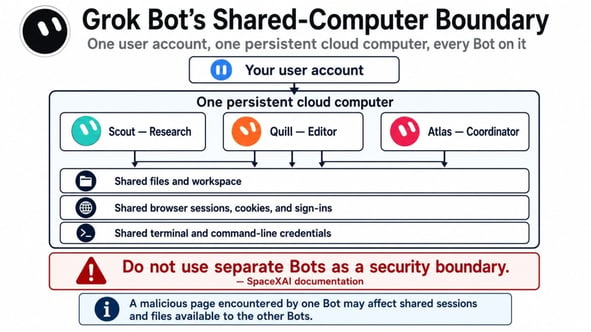
Grok Bot's shared computer security model. Image by Author.
How Claude Cowork separates cloud and local access
Claude Cowork draws the boundary per session instead of per account. A cloud session runs the agent loop and code in an isolated, temporary sandbox on Anthropic's servers, created when the session starts and destroyed when it ends, sharing no state with other sessions.
Connector tokens never enter that sandbox; those calls are made server-side. A local session runs the agent loop on the device, with shell commands and code confined to a hypervisor-isolated VM. Computer use is the exception: there is no sandbox between Claude and the apps you approve.
What each one logs
Progress logs are not audit records. Grok Bot now offers Enterprise-only Audit Logs for admin, security, and authentication events, while Action Recording captures Bot actions and can export them through OpenTelemetry.
Anthropic captures Claude Cowork sessions in the Compliance API, including local session content that Enterprise admins can retrieve. Deletion endpoints for local sessions are not yet available, and OpenTelemetry does not replace compliance audit logs.
Which security model fits which risk?
Neither is safer in every case. Grok Bot keeps shared state; Claude Cowork separates cloud sessions but gains more access when controlling local apps. Prompt injection remains a threat to both, since external content can steer actions taken through authorized tools, and both vendors describe their controls as reducing that risk rather than removing it.
A rule of thumb for either tool: Keep publishing, deletion, purchases, permission changes, and production work behind human approval.
Grok Bot vs. Claude Cowork: Pricing
Grok Bot access is included with Cursor Pro, Pro+, Ultra, and Teams, and Enterprise customers enable it through their account team. You can also link SuperGrok, SuperGrok Plus, SuperGrok Heavy, or X Premium+ as a usage grant rather than a plan. Cursor Pro starts at $20 monthly. Every paid plan includes a weekly allowance, with metered on-demand usage after it runs out. The free trial is a usage credit inside a seven-day window, not a permanent free tier.
Claude Cowork is included with every paid Claude plan (Pro, Max, Team, and Enterprise) with no separate charge. Pro is $20 month-to-month or $200 annually, and Max starts at $100 monthly. There is no Cowork-specific allowance: tasks draw from the same pool as chat and Claude Code, and Anthropic notes that Cowork consumes more of it than chatting does, because multi-step tasks are compute-intensive. Supported plans can add usage credits once the pool is spent.
|
Access path |
Grok Bot |
Claude Cowork |
|---|---|---|
|
Entry individual plan |
Cursor Pro, $20/month |
Claude Pro, $20/month or $200/year |
|
Other individual access |
Cursor Pro+ and Ultra; SuperGrok tiers; X Premium+ |
Claude Max, from $100/month |
|
Team access |
Cursor Teams; Enterprise with admin enablement |
Claude Team and Enterprise |
|
Included usage |
Weekly Grok Bot allowance |
Shared Claude chat-and-agent allowance |
|
After included usage |
Metered overages |
Optional usage credits on supported plans |
The month-to-month individual entry price is now tied at $20. Included usage still differs by plan, and platform availability varies. I would not convert either price into tasks per dollar because neither vendor publishes a stable conversion.
Pros and Cons of Grok Bot and Claude Cowork
This table collects the facts that affect a buying decision. It is not a scorecard.
|
Category |
Grok Bot |
Claude Cowork |
|---|---|---|
|
Pros |
Named ownership, visible handoffs, cloud browser state, Skills and Routines tied to one Bot |
Starts from an outcome prompt, keeps the project context, plans cloud tasks, includes a built-in browser, creates documents and spreadsheets |
|
Cons |
Shared computer across Bots, weekly usage limit, overage use the account's shared on-demand spend |
Local and built-in-browser work needs Claude Desktop. Web and mobile cloud sessions remain beta; pooled usage can run down quickly |
|
Access limits |
macOS, Windows, Linux, iPhone, and Android, plus a dedicated iPad version; some desktop controls are unavailable on mobile |
Computer use is limited to Pro and Max; features vary by plan and surface |
|
When a person steps in |
Logins, CAPTCHAs, approvals, and blocked sites may pause work |
Local access, sensitive actions, and computer use may require approval or an online device |
Grok Bot shares one computer across the Bot roster, so separate Bots cannot isolate sensitive work. Claude Cowork still needs the desktop app for local work and its built-in browser. Test both with the files and apps you plan to use before paying.
Should You Use Grok Bot or Claude Cowork?
The choice is easier once you name the task. Is it a recurring role, or a different job each time?
Choose Grok Bot if the work has a persistent role, visible handoffs matter, or the job depends on a browser state that should remain available even when your local desktop is offline. Existing access through Cursor, SuperGrok, or X Premium+ may also change the cost.
Choose Claude Cowork if the work moves between research, documents, spreadsheets, and browser tasks, or if you want to describe the outcome instead of managing workers. A weekly report can still fit Claude Cowork when its Project holds the source files and instructions.
Use both only if the split maps to real work. Grok Bot might own recurring data collection while Claude Cowork handles a one-off report, but you would need to move files or results between them yourself. I would not pay for both until that division appears in practice.
Final Thoughts
Choose based on what you want to manage. Grok Bot asks you to manage named workers. Claude Cowork asks you to manage tasks and Projects. Neither removes the need to define the sources, approval limits, and expected output.
If I were starting with a varied, one-off job, I would begin with Claude Cowork. If the job already had a clear owner and needed to run weekly, I would begin with Grok Bot. Existing subscriptions, local-file needs, and security rules can reverse that choice. This is a starting rule, not a permanent ranking.
For a closer look at the neighboring tools, Grok Build versus Claude Code covers the split between the two vendors’ terminal agents.
FAQs
What is the main difference between Grok Bot and Claude Cowork?
Grok Bot gives you named agents that stay between tasks and share one computer. Claude Cowork keeps the session and Project context, then uses sub-agents inside the task without giving them lasting names or roles.
Do both Grok Bot and Claude Cowork use multiple agents?
Yes, but differently. Grok Bots can message one another, coordinate in group chats, and pass ownership. Claude Cowork can coordinate parallel sub-agents, but the user manages the task as a whole rather than a standing team.
Do Grok Bot and Claude Cowork keep working when my laptop is closed?
Their cloud work does. Grok Bot continues on its cloud computer, and Claude Cowork cloud sessions continue on Anthropic's servers. Work that needs local files, local apps, or local computer control still depends on the relevant desktop connection.
Which is better for recurring tasks, Grok Bot or Claude Cowork?
Grok Bot fits recurring work that belongs to one named Bot through a Skill and Routine. Claude Cowork fits recurring work that belongs to a Project or task through Scheduled Tasks. The better fit depends on whether the work has a stable owner or changing inputs.
Which is cheaper, Grok Bot or Claude Cowork?
The paid month-to-month entry price is tied: Cursor Pro and Claude Pro both start at $20. Included usage, existing subscriptions, and the type of work determine the practical cost.

I’m a data engineer and community builder who works across data pipelines, cloud, and AI tooling while writing practical, high-impact tutorials for DataCamp and emerging developers.
%22%3E%0A%20%20%20%20%20%20%20%20%3Crect%20fill%3D%22%23EFEBE4%22%20height%3D%22180%22%20width%3D%22336%22%20%2F%3E%0A%20%20%20%20%20%20%20%20%3Crect%0A%20%20%20%20%20%20%20%20%20%20fill%3D%22%23DD3400%22%0A%20%20%20%20%20%20%20%20%20%20height%3D%22106.6%22%0A%20%20%20%20%20%20%20%20%20%20transform%3D%22rotate(-30%20-208.588%20220.18)%22%0A%20%20%20%20%20%20%20%20%20%20width%3D%22456.125%22%0A%20%20%20%20%20%20%20%20%20%20x%3D%22-208.588%22%0A%20%20%20%20%20%20%20%20%20%20y%3D%22220.18%22%0A%20%20%20%20%20%20%20%20%2F%3E%0A%20%20%20%20%20%20%20%20%3Crect%0A%20%20%20%20%20%20%20%20%20%20fill%3D%22%23FFEC3C%22%0A%20%20%20%20%20%20%20%20%20%20height%3D%2235.875%22%0A%20%20%20%20%20%20%20%20%20%20transform%3D%22rotate(-30%20-208.588%20220.18)%22%0A%20%20%20%20%20%20%20%20%20%20width%3D%22347.576%22%0A%20%20%20%20%20%20%20%20%20%20x%3D%22-208.588%22%0A%20%20%20%20%20%20%20%20%20%20y%3D%22220.18%22%0A%20%20%20%20%20%20%20%20%2F%3E%0A%20%20%20%20%20%20%20%20%3Crect%0A%20%20%20%20%20%20%20%20%20%20fill%3D%22%23FF931E%22%0A%20%20%20%20%20%20%20%20%20%20height%3D%2235.875%22%0A%20%20%20%20%20%20%20%20%20%20transform%3D%22rotate(-30%20-226.525%20189.111)%22%0A%20%20%20%20%20%20%20%20%20%20width%3D%22347.576%22%0A%20%20%20%20%20%20%20%20%20%20x%3D%22-226.525%22%0A%20%20%20%20%20%20%20%20%20%20y%3D%22189.111%22%0A%20%20%20%20%20%20%20%20%2F%3E%0A%20%20%20%20%20%20%20%20%3Crect%0A%20%20%20%20%20%20%20%20%20%20fill%3D%22%23DD3400%22%0A%20%20%20%20%20%20%20%20%20%20height%3D%22106.6%22%0A%20%20%20%20%20%20%20%20%20%20transform%3D%22rotate(-30%2085.5879%20256.055)%22%0A%20%20%20%20%20%20%20%20%20%20width%3D%22456.125%22%0A%20%20%20%20%20%20%20%20%20%20x%3D%2285.5879%22%0A%20%20%20%20%20%20%20%20%20%20y%3D%22256.055%22%0A%20%20%20%20%20%20%20%20%2F%3E%0A%20%20%20%20%20%20%20%20%3Crect%0A%20%20%20%20%20%20%20%20%20%20fill%3D%22%23FFEC3C%22%0A%20%20%20%20%20%20%20%20%20%20height%3D%2235.875%22%0A%20%20%20%20%20%20%20%20%20%20transform%3D%22rotate(-30%2085.5879%20256.055)%22%0A%20%20%20%20%20%20%20%20%20%20width%3D%22184.5%22%0A%20%20%20%20%20%20%20%20%20%20x%3D%2285.5879%22%0A%20%20%20%20%20%20%20%20%20%20y%3D%22256.055%22%0A%20%20%20%20%20%20%20%20%2F%3E%0A%20%20%20%20%20%20%20%20%3Crect%0A%20%20%20%20%20%20%20%20%20%20fill%3D%22%23FF931E%22%0A%20%20%20%20%20%20%20%20%20%20height%3D%2235.875%22%0A%20%20%20%20%20%20%20%20%20%20transform%3D%22rotate(-30%20227.432%20132.736)%22%0A%20%20%20%20%20%20%20%20%20%20width%3D%22271.625%22%0A%20%20%20%20%20%20%20%20%20%20x%3D%22227.432%22%0A%20%20%20%20%20%20%20%20%20%20y%3D%22132.736%22%0A%20%20%20%20%20%20%20%20%2F%3E%0A%20%20%20%20%20%20%3C%2Fg%3E%0A%20%20%20%20%20%20%3Cdefs%3E%0A%20%20%20%20%20%20%20%20%3CclipPath%20id%3D%22clip%22%3E%0A%20%20%20%20%20%20%20%20%20%20%3Crect%20fill%3D%22white%22%20height%3D%22180%22%20width%3D%22336%22%20%2F%3E%0A%20%20%20%20%20%20%20%20%3C%2FclipPath%3E%0A%20%20%20%20%20%20%3C%2Fdefs%3E%0A%20%20%20%20%3C%2Fsvg%3E)
%22%3E%0A%20%20%20%20%20%20%20%20%3Crect%20fill%3D%22%23EFEBE4%22%20height%3D%22180%22%20width%3D%22336%22%20%2F%3E%0A%20%20%20%20%20%20%20%20%3Crect%0A%20%20%20%20%20%20%20%20%20%20fill%3D%22%23FF931E%22%0A%20%20%20%20%20%20%20%20%20%20height%3D%22106.6%22%0A%20%20%20%20%20%20%20%20%20%20transform%3D%22rotate(-30%20-208.588%20220.18)%22%0A%20%20%20%20%20%20%20%20%20%20width%3D%22456.125%22%0A%20%20%20%20%20%20%20%20%20%20x%3D%22-208.588%22%0A%20%20%20%20%20%20%20%20%20%20y%3D%22220.18%22%0A%20%20%20%20%20%20%20%20%2F%3E%0A%20%20%20%20%20%20%20%20%3Crect%0A%20%20%20%20%20%20%20%20%20%20fill%3D%22%23F7F3EB%22%0A%20%20%20%20%20%20%20%20%20%20height%3D%2235.875%22%0A%20%20%20%20%20%20%20%20%20%20transform%3D%22rotate(-30%20-208.588%20220.18)%22%0A%20%20%20%20%20%20%20%20%20%20width%3D%22347.576%22%0A%20%20%20%20%20%20%20%20%20%20x%3D%22-208.588%22%0A%20%20%20%20%20%20%20%20%20%20y%3D%22220.18%22%0A%20%20%20%20%20%20%20%20%2F%3E%0A%20%20%20%20%20%20%20%20%3Crect%0A%20%20%20%20%20%20%20%20%20%20fill%3D%22%23000820%22%0A%20%20%20%20%20%20%20%20%20%20height%3D%2235.875%22%0A%20%20%20%20%20%20%20%20%20%20transform%3D%22rotate(-30%20-226.525%20189.111)%22%0A%20%20%20%20%20%20%20%20%20%20width%3D%22347.576%22%0A%20%20%20%20%20%20%20%20%20%20x%3D%22-226.525%22%0A%20%20%20%20%20%20%20%20%20%20y%3D%22189.111%22%0A%20%20%20%20%20%20%20%20%2F%3E%0A%20%20%20%20%20%20%20%20%3Crect%0A%20%20%20%20%20%20%20%20%20%20fill%3D%22%23000820%22%0A%20%20%20%20%20%20%20%20%20%20height%3D%22106.6%22%0A%20%20%20%20%20%20%20%20%20%20transform%3D%22rotate(-30%2085.5879%20256.055)%22%0A%20%20%20%20%20%20%20%20%20%20width%3D%22456.125%22%0A%20%20%20%20%20%20%20%20%20%20x%3D%2285.5879%22%0A%20%20%20%20%20%20%20%20%20%20y%3D%22256.055%22%0A%20%20%20%20%20%20%20%20%2F%3E%0A%20%20%20%20%20%20%20%20%3Crect%0A%20%20%20%20%20%20%20%20%20%20fill%3D%22%23D87300%22%0A%20%20%20%20%20%20%20%20%20%20height%3D%2235.875%22%0A%20%20%20%20%20%20%20%20%20%20transform%3D%22rotate(-30%2085.5879%20256.055)%22%0A%20%20%20%20%20%20%20%20%20%20width%3D%22184.5%22%0A%20%20%20%20%20%20%20%20%20%20x%3D%2285.5879%22%0A%20%20%20%20%20%20%20%20%20%20y%3D%22256.055%22%0A%20%20%20%20%20%20%20%20%2F%3E%0A%20%20%20%20%20%20%20%20%3Crect%0A%20%20%20%20%20%20%20%20%20%20fill%3D%22%23FF931E%22%0A%20%20%20%20%20%20%20%20%20%20height%3D%2235.875%22%0A%20%20%20%20%20%20%20%20%20%20transform%3D%22rotate(-30%20227.432%20132.736)%22%0A%20%20%20%20%20%20%20%20%20%20width%3D%22271.625%22%0A%20%20%20%20%20%20%20%20%20%20x%3D%22227.432%22%0A%20%20%20%20%20%20%20%20%20%20y%3D%22132.736%22%0A%20%20%20%20%20%20%20%20%2F%3E%0A%20%20%20%20%20%20%3C%2Fg%3E%0A%20%20%20%20%20%20%3Cdefs%3E%0A%20%20%20%20%20%20%20%20%3CclipPath%20id%3D%22clip%22%3E%0A%20%20%20%20%20%20%20%20%20%20%3Crect%20fill%3D%22white%22%20height%3D%22180%22%20width%3D%22336%22%20%2F%3E%0A%20%20%20%20%20%20%20%20%3C%2FclipPath%3E%0A%20%20%20%20%20%20%3C%2Fdefs%3E%0A%20%20%20%20%3C%2Fsvg%3E)
%22%3E%0A%20%20%20%20%20%20%20%20%3Crect%20fill%3D%22%2305192D%22%20height%3D%22180%22%20width%3D%22336%22%20%2F%3E%0A%20%20%20%20%20%20%20%20%3Crect%0A%20%20%20%20%20%20%20%20%20%20fill%3D%22%23B08EFF%22%0A%20%20%20%20%20%20%20%20%20%20height%3D%22106.6%22%0A%20%20%20%20%20%20%20%20%20%20transform%3D%22rotate(-30%20-208.588%20220.18)%22%0A%20%20%20%20%20%20%20%20%20%20width%3D%22456.125%22%0A%20%20%20%20%20%20%20%20%20%20x%3D%22-208.588%22%0A%20%20%20%20%20%20%20%20%20%20y%3D%22220.18%22%0A%20%20%20%20%20%20%20%20%2F%3E%0A%20%20%20%20%20%20%20%20%3Crect%0A%20%20%20%20%20%20%20%20%20%20fill%3D%22%237933FF%22%0A%20%20%20%20%20%20%20%20%20%20height%3D%2235.875%22%0A%20%20%20%20%20%20%20%20%20%20transform%3D%22rotate(-30%20-208.588%20220.18)%22%0A%20%20%20%20%20%20%20%20%20%20width%3D%22347.576%22%0A%20%20%20%20%20%20%20%20%20%20x%3D%22-208.588%22%0A%20%20%20%20%20%20%20%20%20%20y%3D%22220.18%22%0A%20%20%20%20%20%20%20%20%2F%3E%0A%20%20%20%20%20%20%20%20%3Crect%0A%20%20%20%20%20%20%20%20%20%20fill%3D%22%2372E5FE%22%0A%20%20%20%20%20%20%20%20%20%20height%3D%2235.875%22%0A%20%20%20%20%20%20%20%20%20%20transform%3D%22rotate(-30%20-226.525%20189.111)%22%0A%20%20%20%20%20%20%20%20%20%20width%3D%22347.576%22%0A%20%20%20%20%20%20%20%20%20%20x%3D%22-226.525%22%0A%20%20%20%20%20%20%20%20%20%20y%3D%22189.111%22%0A%20%20%20%20%20%20%20%20%2F%3E%0A%20%20%20%20%20%20%20%20%3Crect%0A%20%20%20%20%20%20%20%20%20%20fill%3D%22%235EB1FF%22%0A%20%20%20%20%20%20%20%20%20%20height%3D%22106.6%22%0A%20%20%20%20%20%20%20%20%20%20transform%3D%22rotate(-30%2085.5879%20256.055)%22%0A%20%20%20%20%20%20%20%20%20%20width%3D%22456.125%22%0A%20%20%20%20%20%20%20%20%20%20x%3D%2285.5879%22%0A%20%20%20%20%20%20%20%20%20%20y%3D%22256.055%22%0A%20%20%20%20%20%20%20%20%2F%3E%0A%20%20%20%20%20%20%20%20%3Crect%0A%20%20%20%20%20%20%20%20%20%20fill%3D%22%23B08EFF%22%0A%20%20%20%20%20%20%20%20%20%20height%3D%2235.875%22%0A%20%20%20%20%20%20%20%20%20%20transform%3D%22rotate(-30%2085.5879%20256.055)%22%0A%20%20%20%20%20%20%20%20%20%20width%3D%22184.5%22%0A%20%20%20%20%20%20%20%20%20%20x%3D%2285.5879%22%0A%20%20%20%20%20%20%20%20%20%20y%3D%22256.055%22%0A%20%20%20%20%20%20%20%20%2F%3E%0A%20%20%20%20%20%20%20%20%3Crect%0A%20%20%20%20%20%20%20%20%20%20fill%3D%22%2372E5FE%22%0A%20%20%20%20%20%20%20%20%20%20height%3D%2235.875%22%0A%20%20%20%20%20%20%20%20%20%20transform%3D%22rotate(-30%20227.432%20132.736)%22%0A%20%20%20%20%20%20%20%20%20%20width%3D%22271.625%22%0A%20%20%20%20%20%20%20%20%20%20x%3D%22227.432%22%0A%20%20%20%20%20%20%20%20%20%20y%3D%22132.736%22%0A%20%20%20%20%20%20%20%20%2F%3E%0A%20%20%20%20%20%20%3C%2Fg%3E%0A%20%20%20%20%20%20%3Cdefs%3E%0A%20%20%20%20%20%20%20%20%3CclipPath%20id%3D%22clip%22%3E%0A%20%20%20%20%20%20%20%20%20%20%3Crect%20fill%3D%22white%22%20height%3D%22180%22%20width%3D%22336%22%20%2F%3E%0A%20%20%20%20%20%20%20%20%3C%2FclipPath%3E%0A%20%20%20%20%20%20%3C%2Fdefs%3E%0A%20%20%20%20%3C%2Fsvg%3E)

%22%3E%0A%20%20%20%20%20%20%20%20%3Crect%20fill%3D%22%23F7F3EB%22%20height%3D%22180%22%20width%3D%22336%22%20%2F%3E%0A%20%20%20%20%20%20%20%20%3Crect%0A%20%20%20%20%20%20%20%20%20%20fill%3D%22%23000820%22%0A%20%20%20%20%20%20%20%20%20%20height%3D%22106.6%22%0A%20%20%20%20%20%20%20%20%20%20transform%3D%22rotate(-30%20-208.588%20220.18)%22%0A%20%20%20%20%20%20%20%20%20%20width%3D%22456.125%22%0A%20%20%20%20%20%20%20%20%20%20x%3D%22-208.588%22%0A%20%20%20%20%20%20%20%20%20%20y%3D%22220.18%22%0A%20%20%20%20%20%20%20%20%2F%3E%0A%20%20%20%20%20%20%20%20%3Crect%0A%20%20%20%20%20%20%20%20%20%20fill%3D%22%2300C74E%22%0A%20%20%20%20%20%20%20%20%20%20height%3D%2235.875%22%0A%20%20%20%20%20%20%20%20%20%20transform%3D%22rotate(-30%20-208.588%20220.18)%22%0A%20%20%20%20%20%20%20%20%20%20width%3D%22347.576%22%0A%20%20%20%20%20%20%20%20%20%20x%3D%22-208.588%22%0A%20%20%20%20%20%20%20%20%20%20y%3D%22220.18%22%0A%20%20%20%20%20%20%20%20%2F%3E%0A%20%20%20%20%20%20%20%20%3Crect%0A%20%20%20%20%20%20%20%20%20%20fill%3D%22%23FF931E%22%0A%20%20%20%20%20%20%20%20%20%20height%3D%2235.875%22%0A%20%20%20%20%20%20%20%20%20%20transform%3D%22rotate(-30%20-226.525%20189.111)%22%0A%20%20%20%20%20%20%20%20%20%20width%3D%22347.576%22%0A%20%20%20%20%20%20%20%20%20%20x%3D%22-226.525%22%0A%20%20%20%20%20%20%20%20%20%20y%3D%22189.111%22%0A%20%20%20%20%20%20%20%20%2F%3E%0A%20%20%20%20%20%20%20%20%3Crect%0A%20%20%20%20%20%20%20%20%20%20fill%3D%22%23D87300%22%0A%20%20%20%20%20%20%20%20%20%20height%3D%22106.6%22%0A%20%20%20%20%20%20%20%20%20%20transform%3D%22rotate(-30%2085.5879%20256.055)%22%0A%20%20%20%20%20%20%20%20%20%20width%3D%22456.125%22%0A%20%20%20%20%20%20%20%20%20%20x%3D%2285.5879%22%0A%20%20%20%20%20%20%20%20%20%20y%3D%22256.055%22%0A%20%20%20%20%20%20%20%20%2F%3E%0A%20%20%20%20%20%20%20%20%3Crect%0A%20%20%20%20%20%20%20%20%20%20fill%3D%22%23000820%22%0A%20%20%20%20%20%20%20%20%20%20height%3D%2235.875%22%0A%20%20%20%20%20%20%20%20%20%20transform%3D%22rotate(-30%2085.5879%20256.055)%22%0A%20%20%20%20%20%20%20%20%20%20width%3D%22184.5%22%0A%20%20%20%20%20%20%20%20%20%20x%3D%2285.5879%22%0A%20%20%20%20%20%20%20%20%20%20y%3D%22256.055%22%0A%20%20%20%20%20%20%20%20%2F%3E%0A%20%20%20%20%20%20%20%20%3Crect%0A%20%20%20%20%20%20%20%20%20%20fill%3D%22%2300C74E%22%0A%20%20%20%20%20%20%20%20%20%20height%3D%2235.875%22%0A%20%20%20%20%20%20%20%20%20%20transform%3D%22rotate(-30%20227.432%20132.736)%22%0A%20%20%20%20%20%20%20%20%20%20width%3D%22271.625%22%0A%20%20%20%20%20%20%20%20%20%20x%3D%22227.432%22%0A%20%20%20%20%20%20%20%20%20%20y%3D%22132.736%22%0A%20%20%20%20%20%20%20%20%2F%3E%0A%20%20%20%20%20%20%3C%2Fg%3E%0A%20%20%20%20%20%20%3Cdefs%3E%0A%20%20%20%20%20%20%20%20%3CclipPath%20id%3D%22clip%22%3E%0A%20%20%20%20%20%20%20%20%20%20%3Crect%20fill%3D%22white%22%20height%3D%22180%22%20width%3D%22336%22%20%2F%3E%0A%20%20%20%20%20%20%20%20%3C%2FclipPath%3E%0A%20%20%20%20%20%20%3C%2Fdefs%3E%0A%20%20%20%20%3C%2Fsvg%3E)

%22%3E%0A%20%20%20%20%20%20%20%20%3Crect%20fill%3D%22%23EFEBE4%22%20height%3D%22180%22%20width%3D%22336%22%20%2F%3E%0A%20%20%20%20%20%20%20%20%3Crect%0A%20%20%20%20%20%20%20%20%20%20fill%3D%22%2372E5FE%22%0A%20%20%20%20%20%20%20%20%20%20height%3D%22106.6%22%0A%20%20%20%20%20%20%20%20%20%20transform%3D%22rotate(-30%20-208.588%20220.18)%22%0A%20%20%20%20%20%20%20%20%20%20width%3D%22456.125%22%0A%20%20%20%20%20%20%20%20%20%20x%3D%22-208.588%22%0A%20%20%20%20%20%20%20%20%20%20y%3D%22220.18%22%0A%20%20%20%20%20%20%20%20%2F%3E%0A%20%20%20%20%20%20%20%20%3Crect%0A%20%20%20%20%20%20%20%20%20%20fill%3D%22%23000820%22%0A%20%20%20%20%20%20%20%20%20%20height%3D%2235.875%22%0A%20%20%20%20%20%20%20%20%20%20transform%3D%22rotate(-30%20-208.588%20220.18)%22%0A%20%20%20%20%20%20%20%20%20%20width%3D%22347.576%22%0A%20%20%20%20%20%20%20%20%20%20x%3D%22-208.588%22%0A%20%20%20%20%20%20%20%20%20%20y%3D%22220.18%22%0A%20%20%20%20%20%20%20%20%2F%3E%0A%20%20%20%20%20%20%20%20%3Crect%0A%20%20%20%20%20%20%20%20%20%20fill%3D%22%235EB1FF%22%0A%20%20%20%20%20%20%20%20%20%20height%3D%2235.875%22%0A%20%20%20%20%20%20%20%20%20%20transform%3D%22rotate(-30%20-226.525%20189.111)%22%0A%20%20%20%20%20%20%20%20%20%20width%3D%22347.576%22%0A%20%20%20%20%20%20%20%20%20%20x%3D%22-226.525%22%0A%20%20%20%20%20%20%20%20%20%20y%3D%22189.111%22%0A%20%20%20%20%20%20%20%20%2F%3E%0A%20%20%20%20%20%20%20%20%3Crect%0A%20%20%20%20%20%20%20%20%20%20fill%3D%22%23000820%22%0A%20%20%20%20%20%20%20%20%20%20height%3D%22106.6%22%0A%20%20%20%20%20%20%20%20%20%20transform%3D%22rotate(-30%2085.5879%20256.055)%22%0A%20%20%20%20%20%20%20%20%20%20width%3D%22456.125%22%0A%20%20%20%20%20%20%20%20%20%20x%3D%2285.5879%22%0A%20%20%20%20%20%20%20%20%20%20y%3D%22256.055%22%0A%20%20%20%20%20%20%20%20%2F%3E%0A%20%20%20%20%20%20%20%20%3Crect%0A%20%20%20%20%20%20%20%20%20%20fill%3D%22%23D87300%22%0A%20%20%20%20%20%20%20%20%20%20height%3D%2235.875%22%0A%20%20%20%20%20%20%20%20%20%20transform%3D%22rotate(-30%2085.5879%20256.055)%22%0A%20%20%20%20%20%20%20%20%20%20width%3D%22184.5%22%0A%20%20%20%20%20%20%20%20%20%20x%3D%2285.5879%22%0A%20%20%20%20%20%20%20%20%20%20y%3D%22256.055%22%0A%20%20%20%20%20%20%20%20%2F%3E%0A%20%20%20%20%20%20%20%20%3Crect%0A%20%20%20%20%20%20%20%20%20%20fill%3D%22%235646A5%22%0A%20%20%20%20%20%20%20%20%20%20height%3D%2235.875%22%0A%20%20%20%20%20%20%20%20%20%20transform%3D%22rotate(-30%20227.432%20132.736)%22%0A%20%20%20%20%20%20%20%20%20%20width%3D%22271.625%22%0A%20%20%20%20%20%20%20%20%20%20x%3D%22227.432%22%0A%20%20%20%20%20%20%20%20%20%20y%3D%22132.736%22%0A%20%20%20%20%20%20%20%20%2F%3E%0A%20%20%20%20%20%20%3C%2Fg%3E%0A%20%20%20%20%20%20%3Cdefs%3E%0A%20%20%20%20%20%20%20%20%3CclipPath%20id%3D%22clip%22%3E%0A%20%20%20%20%20%20%20%20%20%20%3Crect%20fill%3D%22white%22%20height%3D%22180%22%20width%3D%22336%22%20%2F%3E%0A%20%20%20%20%20%20%20%20%3C%2FclipPath%3E%0A%20%20%20%20%20%20%3C%2Fdefs%3E%0A%20%20%20%20%3C%2Fsvg%3E)

Most AI assistants still begin with a blank chat box. Grok Bot and Claude Cowork begin with a job that may involve files, websites, connected apps, and several steps.
Claude Cowork now runs on desktop, web, and mobile. Grok Bot is newer and ties access to eligible Cursor, SuperGrok, or X Premium+ plans, with named Bots working from one shared cloud computer.
That makes them look like the same kind of tool, but there are differences. Grok Bot keeps the workers around, each with a lasting role and memory. Claude Cowork keeps the session and Project context. It can use sub-agents, but it does not give you a named team that stays between tasks.
I'll focus on what changes after the job starts: who divides the work, where it runs, what remains for next time, and how much control you keep. This compares the products, not Grok models against Claude models.
TL;DR