Track
AI Agent Fundamentals
6 hr
At Google I/O 2026, Google announced Gemini Spark, a personal AI agent that keeps running on Google's cloud infrastructure even after you close your laptop or lock your phone. It monitors your Gmail, manages your Calendar, drafts documents in Google Docs, and, in the near future, will make purchases on your behalf.
The announcement lands in the middle of an intense period of competition with OpenAI, Anthropic, and Microsoft on how to integrate agents. Google's bet with Spark is different from Claude Cowork or ChatGPT Agent: persistent cloud execution combined with deep integration into its own consumer services, from Gmail to Google Slides.
In this article, I'll cover what Gemini Spark actually does, the privacy trade-offs Google itself flags, how it compares to competing agents, and whether the $100/month AI Ultra price tag makes sense for a beta product. You can also read our coverage of Gemini 3.5 Flash, the model that powers Spark, and our earlier piece on Gemini Personal Intelligence for broader context on Google's personalization strategy.
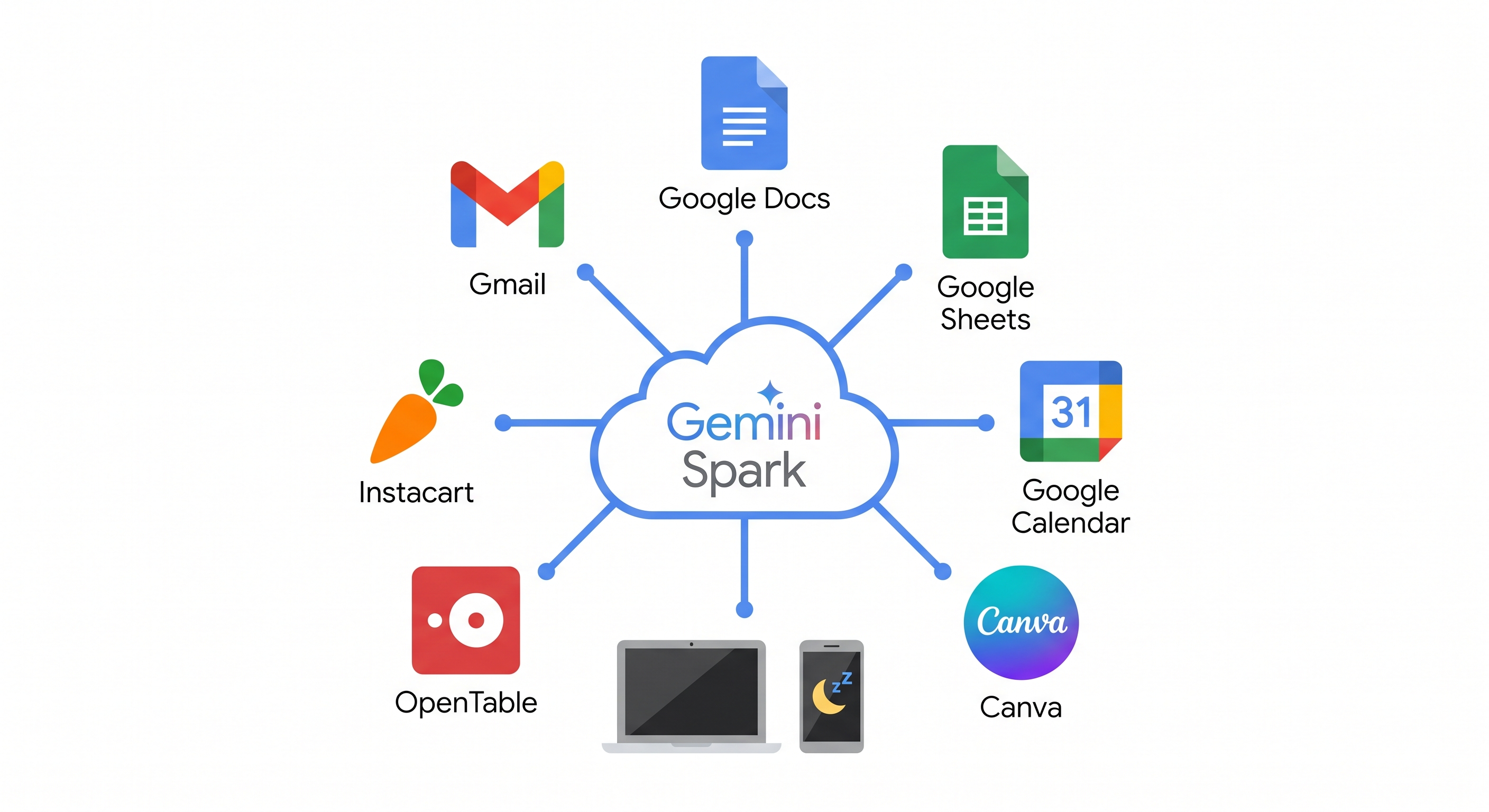
Gemini Spark is a 24/7 personal AI agent that runs on Gemini 3.5 Flash and Google's Antigravity harness. Unlike a chatbot you open and close, Spark runs on dedicated virtual machines on Google Cloud and keeps working in the background even when you close your laptop or lock your phone.
It connects to Gmail, Docs, Slides, and other Workspace tools through structured API integrations rather than screen-reading, which makes it more predictable than agents that navigate a desktop pixel by pixel.
Spark can handle tasks that repeat on a schedule or fire when a condition is met. A few examples of the complexity it's targeting:
You can teach Spark reusable behaviors by describing what you want in natural language. For example, if you write a lot of outreach emails, you could have Spark analyze your last 50 sent messages, distill your writing style into a "ghostwriter" skill, and apply it every time you ask it to draft something. Skills persist across sessions, so you build them once, and Spark applies them going forward.
Spark can chain multiple steps together across apps. If you're a team lead who just finished a planning meeting, you could ask Spark to pull the action items from the meeting chat in Gmail, create a project tracker in Sheets with owners and deadlines, draft a kickoff email to the team, and schedule a follow-up reminder in Calendar, all from a single prompt.
Google CEO Sundar Pichai described it at the I/O keynote as an agent that never stops working because "you don't need to keep your laptop open to make sure it's running."
New MCP connections are launching alongside Spark, with more partners integrating now. At launch, the supported third-party apps include:
In the coming weeks, Spark will use those connections to take actions inside third-party apps, not just Google's own services. Google also has several more features on the roadmap:
Google is bringing Spark to the Gemini desktop app for macOS this summer, allowing it to help with tasks involving local files and automate workflows across your desktop. The app also adds new voice features that turn free-flowing speech into precise drafts, using your screen context to capture your intent. The macOS app is available to download today, with Spark and voice features rolling out later this summer.
Spark is a persistent agent that connects to your Gmail, Calendar, Docs, and third-party services like OpenTable and Instacart. For it to do its job, it needs to share relevant information with those services. If you ask it to book a dinner reservation, it's going to pass along your name and preferences. That's not a hidden cost; it's how the product works.
Google is fairly transparent about this. The official Spark product page tells users to "check responses" and "supervise closely, interrupt when needed." Google also says Spark "is designed to ask you first before performing high-stakes actions like spending money or sending emails." Permissions are off by default; you choose which apps it connects to, and you can disable it entirely.
The broader point worth keeping in mind is that a 24/7 cloud agent with access to your inbox and calendar is a different trust model than a chatbot you open, ask a question, and close. You're granting standing access, not one-off permission. That doesn't make it dangerous, but it does mean the setup choices matter more than usual.
The sensible approach is to start with a conservative whitelist. Connect the one or two services where you actually want Spark to take action, see how it behaves, and expand from there. There's no reason to grant access to everything on day one, and Google's own interface makes it easy to be selective.
The I/O 2026 update touches several other parts of the Gemini app beyond Spark. Google also shipped a redesigned interface called Neural Expressive, a new video generation model called Gemini Omni, and a proactive morning digest called Daily Brief. Here's what each one actually does.
Daily Brief is a separate agent that runs overnight and delivers a personalized morning summary. It pulls emails and calendar events, reasons about them based on your goals, and finally organizes them into a skimmable briefing with suggested next steps.
It's built on Google's CC experiment from Google Labs. You can steer it over time with thumbs up or down feedback. Daily Brief is rolling out today to Google AI Plus, Pro, and Ultra subscribers in the US.
Google redesigned the entire Gemini app interface under a new design language called Neural Expressive, with updated animations, typography, and a microphone that handles longer, uninterrupted speech. The more practical change is that Gemini now generates mixed-format responses (think of timelines, interactive graphics, narrated videos) instead of defaulting to plain text, which makes answers easier to scan and act on.
Neural Expressive is rolling out globally today across the web, Android, and iOS.
Gemini Omni is a new model that accepts any combination of text, images, and video as input and produces video output. You can apply cinematic zooms, swap backgrounds, or create a custom AI avatar through conversational prompts. We covered Omni in detail in our Gemini Omni article, including hands-on tests of its physics simulation and style transfer capabilities.
Omni is rolling out today to Google AI Plus, Pro, and Ultra subscribers worldwide.
The shift from "assistant that answers questions" to "agent that completes tasks" is where every major AI platform is heading right now. OpenAI's ChatGPT agent operates primarily through a browser. Anthropic's Claude Cowork works directly on a user's desktop. Microsoft's Copilot Cowork is grounded in Office 365 data. Apple is preparing a revamped Siri for WWDC 2026 that will be partly powered by Google's own Gemini models through a multi-year deal.
What makes Spark different from competing agents is that it runs on Google's servers around the clock and plugs directly into Google's own apps. Because it connects to Gmail, Docs, and Calendar through proper APIs rather than trying to read what's on your screen, it's more reliable, but it's also more limited. Right now, Spark can only work with the services it's been connected to, so it's most useful if you already use Google's tools for most of your work.
If you're a data scientist or ML engineer, the infrastructure behind Spark is worth paying attention to separately. Spark runs on Google's Antigravity harness, which can run multiple sub-agents in parallel and handle tasks that take a long time to complete. Spark is the consumer product built on top of that, but the same underlying architecture is available through the Gemini API.
Access to Spark requires a Google AI Ultra subscription. Google restructured its subscription tiers alongside the I/O announcement, so here's where things stand:
Spark is rolling out to trusted testers this week. The broader beta for US Google AI Ultra subscribers is planned for the following week. There's no self-serve way to join the trusted tester group; you'll need to wait for the beta rollout.
Once you have access, setup works like this:
The macOS desktop app is available to download today at gemini.google/mac. Spark support for the desktop app, along with new voice features that convert free-flowing speech into precise drafts, is planned for later this summer.
Google, Anthropic, and OpenAI all now offer a $100/month tier. Here's how they compare, with a focus on agentic capabilities:
| Google AI Ultra ($100/mo) | Claude Max ($100/mo) | ChatGPT Pro ($100/mo) | |
|---|---|---|---|
| Always-on agent | Gemini Spark (24/7, cloud-based, runs while device is off) | No persistent agent | No persistent agent |
| Agentic coding | Antigravity (priority access, 5x usage vs Pro) | Claude Code (terminal-based, 5x usage vs Pro) | Codex (cloud sandbox, 5x usage vs Plus) |
| Desktop agent | Spark on macOS (coming summer 2026) | Claude Cowork (screen-aware, multi-step tasks) | ChatGPT Agent (browser-based deep research) |
| Third-party integrations | MCP (Canva, OpenTable, Instacart at launch) | MCP + Agent SDK credits for external agents | 1,000+ custom GPTs and plugins |
| Model access | Gemini 3.5 Flash | Claude Opus 4.7, Sonnet 4.6 | GPT-5.5 Pro, GPT-5.3-Codex |
| Usage limit | 5x Pro | 5x Pro | 5x Plus |
| Cloud storage | 20TB (Google One) | None | None |
| Extras | YouTube Premium included | None | Unlimited image generation |
| Availability | Spark: US only (beta) | Generally available | Generally available |
Google's $100 tier is the only one with a persistent cloud agent, which really sets it apart from Anthropic and OpenAI. Additionally, it includes some Google-specific perks, such as 20TB of storage and YouTube Premium bundled in. On paper, it's the most feature-packed. But Spark is a US-only beta with experimental disclaimers, while Claude Max and ChatGPT Pro are generally available with mature agentic tooling.
If you're already deep in Google's ecosystem (Gmail, Docs, Sheets are your daily tools), the $100 tier has the strongest case. Spark's always-on automation for Workspace is something the other two simply don't offer yet, and the 20TB storage and YouTube Premium sweeten the deal.
If you're a developer interested in Antigravity and higher Gemini API limits, the value is in the infrastructure access, not Spark itself.
If you mainly want a capable AI agent today, Claude Max and ChatGPT Pro are safer bets. They're generally available, not in beta, and their agentic tools are more mature. Spark's persistent execution is a genuine differentiator, but it's hard to recommend paying $100/month for a feature that's still US-only and experimental.
Gemini Spark is Google's most direct answer yet to the question of what an AI assistant should actually do. The persistent cloud execution model is a genuine architectural difference from chatbots, and the Workspace integration depth is hard for competitors to replicate quickly.
The bigger question with Spark isn't really about Google specifically, but about what it means to give any AI agent standing access to your inbox, calendar, and eventually your payment methods. We're still in the early days of figuring out how much autonomy these tools should have by default and how much users should actively manage. Google's approach of keeping permissions off by default and letting you whitelist services is a reasonable starting point, but the norms around always-on agents are being defined in real time, across the whole industry.
If you're keen to see what you can do with Gemini in Google's Workspace apps like Gmail, Docs, and Drive, I recommend taking the Practical AI with Google Gemini and NotebookLM course. To learn about the concepts behind agentic AI, enroll in our AI Agent Fundamentals skill track.
Learn AI with DataCamp
Track
Course
Course
blog
Vinod Chugani
10 min
blog
Matt Crabtree
8 min
blog
Josef Waples
7 min
Tutorial
Aashi Dutt
8 min
Tutorial
Tim Lu
6 min
Tutorial
Kurtis Pykes
9 min