
Course
Introduction to Claude Models
3 hr
14.6K
OpenClaw started as a side project to connect LLMs to messaging apps and somehow ended up with 188K GitHub stars. It runs on your hardware, talks to Telegram, Discord, or Slack, and does whatever you configure it to do through tools and prompts. The community around it has gotten creative.
We went through the most popular OpenClaw projects and picked 9 that are actually worth your time. They range from a Reddit digest bot you can wire up in an afternoon to a multi-agent team running on a VPS, and each one comes with documented configs and prompts, so you're not guessing at implementation details.
The list assumes you already have OpenClaw running. If not, our OpenClaw tutorial covers the setup.
OpenClaw binds to 0.0.0.0 by default, meaning your instance listens on every network interface the moment you start it. A Bitdefender audit found over 135,000 instances sitting wide open on the internet because nobody changed that default. A good chunk of those were vulnerable to remote code execution. Change the bind address to 127.0.0.1 in your config before doing anything else.
ClawHub skills deserve the same skepticism as random npm packages. That same audit flagged around 17% of listed skills as malicious, with some designed to steal credentials from your machine. Read the source code before installing anything.
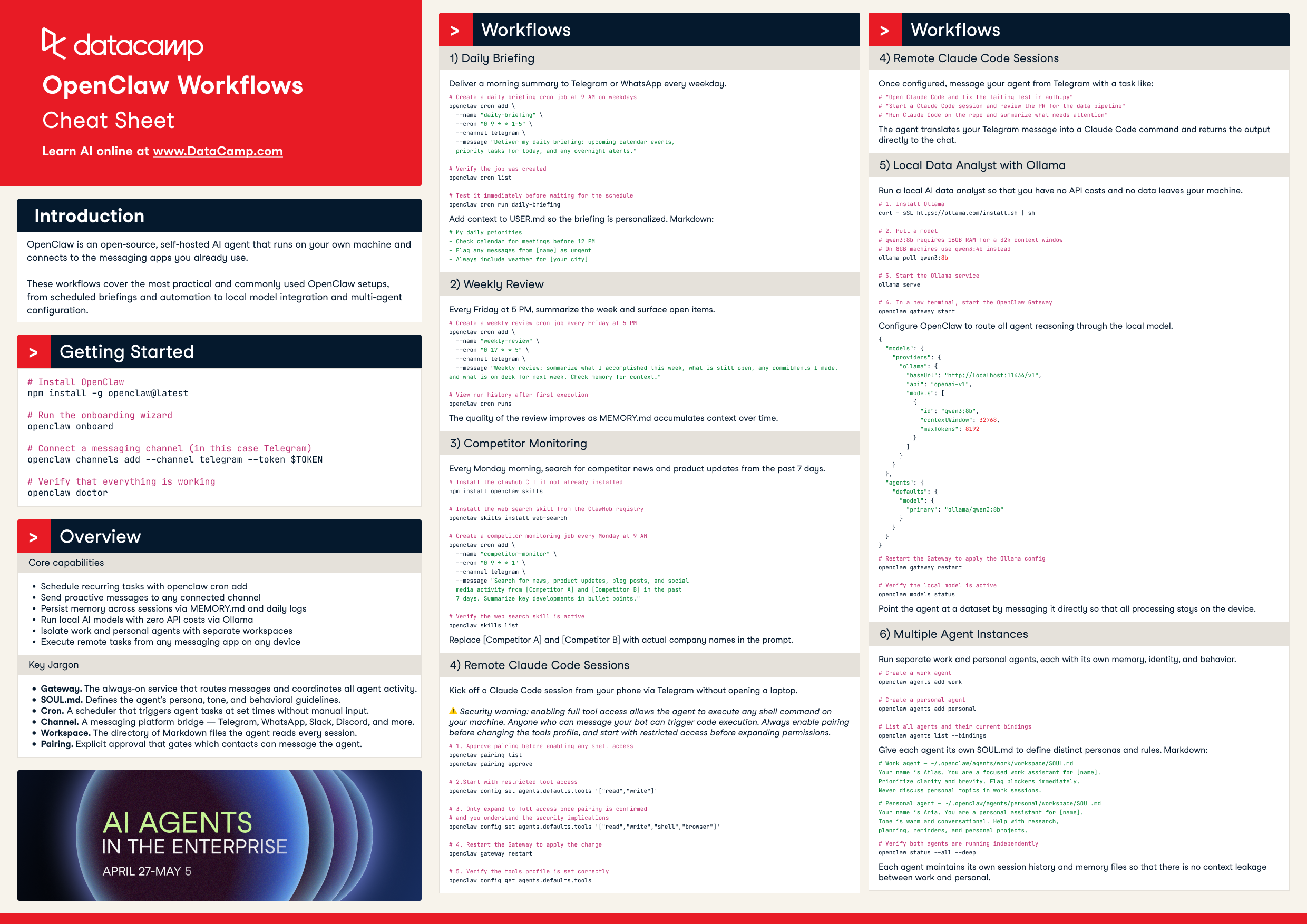
One more thing on setup: Ollama gives you a local LLM (Qwen3 8B, Llama 3.2, whatever fits your RAM) at zero API cost. Good enough for prototyping any project on this list, and you can swap in a cloud model later if you need the horsepower. Our OpenClaw with Ollama tutorial walks through the full setup.
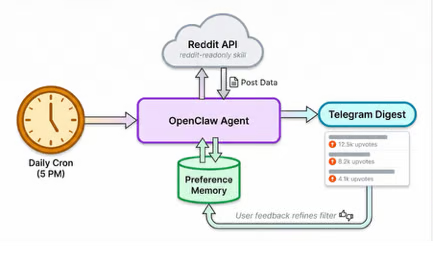
You wake up to a Telegram message with the best posts from your favorite subreddits, already filtered to the stuff you actually care about.
It runs on the reddit-readonly skill, which pulls hot, new, and top posts plus comment threads without needing Reddit API auth. A cron job triggers the agent on your schedule and it delivers the digest to Telegram. Install the skill, paste in your subreddit list, set the cron time, done. Fifteen minutes, tops. The full guide has the exact prompt.
What makes this worth running long-term is the feedback loop. The prompt tells the agent to keep a separate memory file tracking your preferences and to ask daily whether the list hit the mark. A few weeks in, it's filtering out memes on its own, favoring longer discussion posts, skipping reposts. The digest sharpens as the memory file grows.
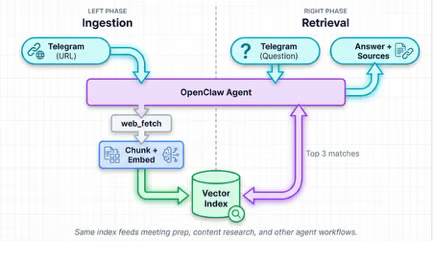
Send a URL to a Telegram chat, and the agent fetches it, chunks the content, and drops it into a searchable index. Articles, tweet threads, YouTube transcripts, and PDFs all go into the same pile.
Later, you ask, "What did I save about vector databases last month?" and get ranked results with sources and excerpts instead of a list of links you bookmarked and forgot. The knowledge-base skill handles ingestion and retrieval, while web_fetch grabs the raw content. Each time you send a link, the agent confirms what it stored: title, type, and chunk count.
The real payoff comes from stacking this with other workflows. The agent pulls from your knowledge base during meeting prep or content research without being asked, as long as the prompt tells it to query the KB when context fits. You need:
knowledge-base and web_fetch skillsFull prompt is in the setup guide.
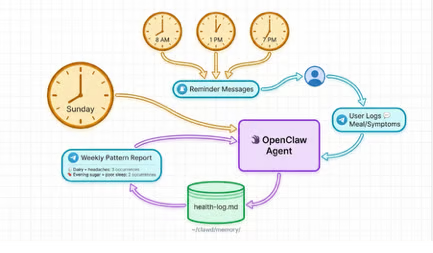
Message a Telegram topic with what you ate or how you're feeling, and the agent appends a timestamped entry to a markdown file at ~/clawd/memory/health-log.md. Reminders at 8 AM, 1 PM, and 7 PM keep the data flowing without relying on your memory.
Every Sunday, the agent runs pattern analysis on the week's log and posts back to the same topic: which foods showed up on bad days, whether symptoms cluster around certain meals, and anything that repeats enough to notice. Dairy plus headaches three Wednesdays in a row is the kind of thing it catches.
No skills needed. A prompt and a cron job cover everything, and the config is ready to copy. This is the lowest-effort project on the list, which makes it a good starting point if you've never configured an OpenClaw cron job before.
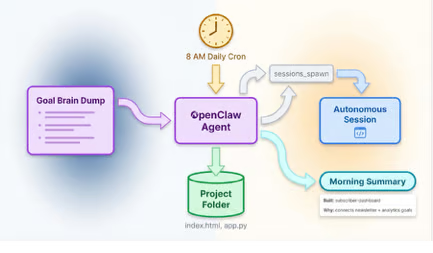
Tell the agent what you're working toward (a YouTube channel, a SaaS launch, a freelance business) and let it figure out what to build while you sleep. By morning, there's a working mini-app in your project folder and a message in Telegram explaining what it made and why.
The setup is a single long prompt where you dump your goals, interests, and current projects. The agent uses that context to generate 4-5 daily tasks at 8 AM, and one of those tasks is always a small build: a landing page, an automation script, a calculator for something you mentioned needing.
It spawns a session, writes the code, and moves on to the next task. The sessions_spawn and sessions_send skills handle the autonomous execution.
What keeps this from being a gimmick is the goal context. The agent connects dots across your brain dump that you might not connect yourself. Mention both "growing a newsletter" and "building analytics tools" and it might prototype a subscriber dashboard you hadn't thought to build. Alex Finn documented the approach in the original guide.
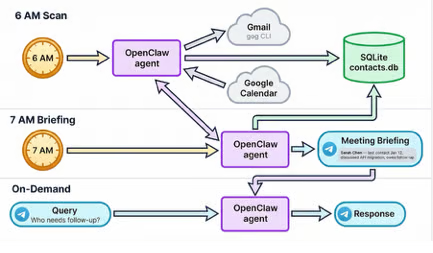
A cron job at 6 AM scans your Gmail and Google Calendar for anyone you interacted with in the last 24 hours. New contacts go into a SQLite database. Existing ones get their interaction count bumped and notes updated. By the time you're awake, yesterday's meetings and emails are already logged.
A second cron at 7 AM checks your calendar for the day ahead and builds a briefing on each external attendee: when you last talked, what you discussed, and anything that needs follow-up. That briefing lands in a dedicated Telegram topic before your first meeting starts.
Between the scheduled jobs, you can query the CRM in natural language through the same Telegram topic. "Who needs follow-up?" and "What do I know about Sarah?" both work. The setup needs:
gog CLI for Gmail and Google Calendar accessCalendar fragmentation is the problem here. Work calendars with restricted sharing, school schedules buried in PDFs, camp dates in email threads, appointment confirmations in text messages. This project pulls all of it into a single morning briefing at 8 AM with a 3-day conflict lookahead and weather context.
The more interesting piece is ambient iMessage monitoring. Every 15 minutes, the agent scans for patterns like "your appointment is confirmed for Tuesday at 2 PM" and auto-creates a calendar event with 30-minute driving buffers on both sides. It catches promises, too. "I'll send that over by Friday" becomes a calendar hold so you don't forget.
Pantry tracking rounds it out. Snap a photo of your fridge or a receipt, and the vision model extracts items into an inventory file. Ask "Do we have butter?" through Telegram, and you get back a location and quantity. "Generate grocery list" compiles everything that's running low.
This one runs best on a Mac Mini since it needs iMessage access and always-on availability. Start with calendar reading only and add write actions (event creation, inventory updates) once you trust the agent's judgment. The full setup walkthrough covers the phased rollout.
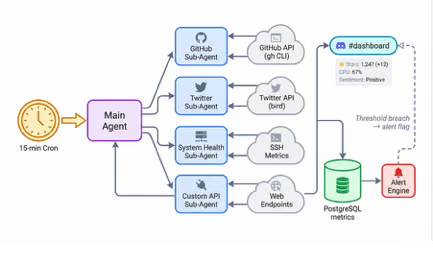
Every 15 minutes, a cron job spawns sub-agents that fan out to GitHub, Twitter, your server metrics, and whatever other APIs you care about. Each one fetches its data and reports back. The main agent collects everything, formats it into a Discord message, and posts to a #dashboard channel.
Fetching sequentially would be the obvious approach, but API latency stacks up fast when Twitter rate-limits you and SSH health checks take their time. Sub-agents run in parallel so a slow source doesn't block the rest.
A PostgreSQL metrics table stores every data point with timestamps. "How did GitHub stars move this week?" works because the history is queryable, not because the agent remembers. Alert conditions sit in a separate table: star count spikes over 50 in an hour, CPU above 90%, and negative sentiment clusters on Twitter. When a threshold trips, the Discord message gets an alert flag instead of waiting for the next scheduled cycle. SQL schema and cron config are in the setup guide.
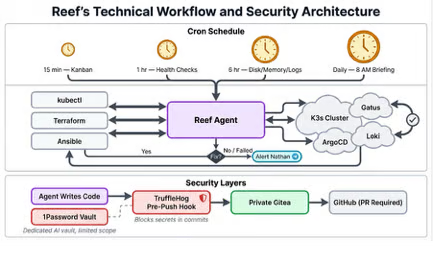
Nathan runs an agent called Reef on a home Kubernetes cluster, and it operates as a junior sysadmin that never sleeps. Reef has SSH access to every machine on the local network, credentials in a dedicated 1Password vault, and enough tooling (Terraform, Ansible, kubectl) to fix problems without waking anyone up.
The cron schedule is dense. Health checks against Gatus and ArgoCD run hourly, kanban board scans every 15 minutes, and a 6-hour rotation audits disk usage, memory, and Loki logs. The 8 AM briefing pulls weather, both partners' calendars, system health across all machines, service status, recent ArgoCD deployments, task board progress, and email action items into a single Telegram message.
Reef doesn't just alert on a failing pod. It runs kubectl to restart it, confirms the fix held, and only pings Nathan when the problem persists after intervention. That closed loop is the difference between a monitoring stack and an agent with agency.
The security setup reflects a hard lesson from day one, when the agent hardcoded an API key into a commit and pushed it. Now TruffleHog pre-push hooks block secrets, changes go through a private Gitea instance before reaching GitHub, and branch protection forces PRs to main. Nathan's full writeup covers every cron job and the phased rollout.
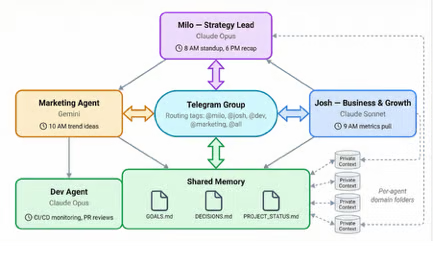
A single Telegram group, four agents, each running a different model. Milo is the strategy lead on Claude Opus and owns the 8 AM standup review. Josh pulls business metrics on Sonnet at 9.
A marketing agent generates content ideas on Gemini by 10. The dev agent watches CI/CD and reviews PRs throughout the day, and Milo closes things out with a 6 PM recap. Tag @milo, @josh, @dev, or @all to route messages. Untagged messages default to Milo.
Shared memory lives on disk. GOALS.md holds OKRs, DECISIONS.md is append-only so no agent overwrites another's conclusions, and PROJECT_STATUS.md tracks shared state. Each agent also gets a private folder for the domain context that the others don't touch.
Two things worth knowing from people who've run this. Personality in the system prompt affects output quality more than model size for most tasks. And matching models to workload saves real money: Gemini handles trend monitoring fine, while Opus earns its cost on strategy reasoning where depth matters.
Start with two agents and add others once you see where coordination breaks down. The routing config and prompt templates are ready to copy.
Every OpenClaw project on this list came from someone who set up OpenClaw, got curious, and pushed it further than the defaults. The Reddit digest and health tracker take an afternoon. A weekend covers the CRM or family calendar if you're comfortable with cron scheduling. The self-healing server and multi-agent team are longer commitments that grow alongside your infrastructure.
Our introductory tutorial and Ollama integration guide cover the foundation if you're starting fresh.
Pick one, get it running, and let the community on GitHub and Discord fill in the gaps when you hit something the guide doesn't cover.
Top DataCamp Courses
Course
Course
Course
blog
Austin Chia
12 min
blog
Derrick Mwiti
8 min
blog
Khalid Abdelaty
15 min
cheat-sheet
DataCamp Team
5 min
Tutorial
Bexruz (Bex) Tuychiev
11 min
Tutorial
Austin Chia
12 min