Claude Code vs. Antigravity: Zentrale Unterschiede
Nachdem du nun weißt, wie jedes Tool für sich funktioniert, hier die wirklich entscheidenden Unterschiede bei der Wahl zwischen beiden.
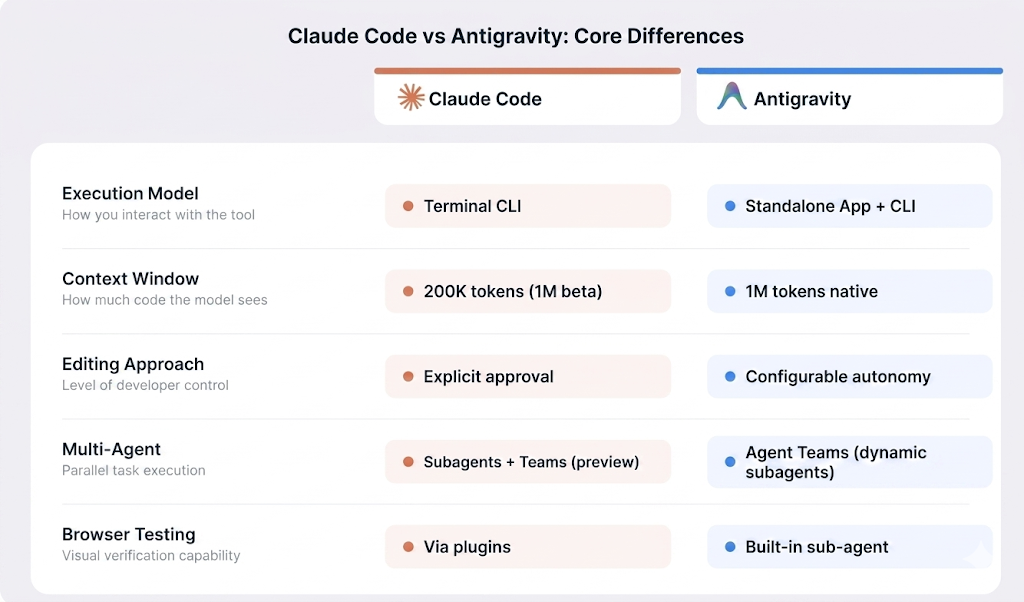
Architekturvergleich Claude Code versus Antigravity. Grafik von der Autorin/dem Autor.
Ausführungsmodell
Claude Code ist ein Terminal-First-Tool, das du parallel zu deinem bestehenden Editor nutzt. Es arbeitet über eine Command-Line-Interface (CLI) mit vollständigen Flags für Scripting, Piping und Automatisierung. Antigravity 2.0 ist eine eigenständige Desktop-App und wird seit der Google I/O 2026 zusätzlich mit einer in Go geschriebenen Antigravity-CLI ausgeliefert – für alle, die lieber im Terminal arbeiten. Die Desktop-App ersetzt deinen Editor; die CLI läuft daneben.
Die Wahl prägt deinen Alltag. Wenn dein Setup tmux, Neovim oder stark angepasste Terminals umfasst, fügt sich Claude Code nahtlos ein – ohne Änderungen an deiner Umgebung. Wenn du eine grafische IDE mit visueller Dateiverwaltung und integrierten Browsertests bevorzugst, ist die Antigravity-Desktop-App darauf ausgelegt. Bevorzugst du das Terminal, deckt die neue Antigravity-CLI das ebenfalls ab.
Kontexthandling
Wie erwähnt, bietet Claude Code standardmäßig 200K Token Kontext, mit einer 1M-Token-Beta über die API. Der Kontext wird agentisch verwaltet: Statt alles auf einmal zu laden, scannt Claude Code dein Repository bei Bedarf und erstellt eine Karte. Die CLAUDE.md Datei fungiert als persistenter Speicher über Sessions hinweg.
Antigravity nutzt das native 1M-Token-Kontextfenster von Gemini 3.5 Flash. Persistentes Wissen wird zusätzlich in einem .gemini/antigravity/knowledge/ Verzeichnis abgelegt und ein Skills-System erlaubt wiederverwendbare Anweisungen auf Projekt- und globaler Ebene.
Editierverhalten
Claude Code nimmt strukturierte, mehrdateiige Änderungen vor – immer mit deiner expliziten Zustimmung. Bevor Dateien geschrieben, Shell-Befehle ausgeführt oder Git-Commits erstellt werden, zeigt es dir genau den Plan und wartet auf dein Okay. Das hält dich am Steuer, erfordert aber deine Präsenz während der Session.
Bei Antigravity stellst du ein, wie viel Kontrolle du behalten willst. Im autonomen Modus planen und agieren Agenten über Editor, Terminal und Browser, ohne auf Freigaben zu warten. Das Artifact-System liefert eine nachvollziehbare Spur, doch mit voller Kontrolle arbeitet der Agent deutlich schneller.
Autonomie und Multi-Agent-Support
Claude Code ist primär ein Single-Agent-Tool, unterstützt jedoch Subagenten mit isolierten 200K-Token-Kontexten für komplexe Aufgaben. Ein neues Feature namens Agent Teams befindet sich derzeit als Research Preview mit Opus 4.6 und erlaubt parallele Claude-Code-Sessions mit gemeinsamer Aufgabenliste.
Antigravity wurde von Beginn an für Multi-Agent-Orchestrierung gebaut. Version 2.0 macht das zum Kern: Der Planer-Agent kann zur Laufzeit dynamisch Subagenten erzeugen, sodass sich bei komplexen Anfragen das Team automatisch erweitert. Jeder Agent erhält eine eigene Sandbox plus gemeinsamen Projektkontext – die Prüferin sieht also bereits die Entscheidungen des Coders, ohne den gesamten Chat neu zu lesen.
Browser-Fähigkeiten
Claude Code hat keinen eingebauten Browser. Du kannst Browserfunktionen über MCP-Server oder Plugins ergänzen, sie sind jedoch nicht Teil des Kernerlebnisses.
Antigravity enthält einen nativen Browser-Subagenten. Wie beschrieben, können Agenten eine vollständige Chromium-Instanz starten, Seiten bedienen, Screenshots erstellen und Walkthroughs aufzeichnen. Für Frontend- und UI-Arbeit heißt das: Visuelle Verifizierung passiert direkt im Tool – ohne Wechsel in einen separaten Browser.
Claude Code vs. Antigravity: Codegenerierung und Refactoring
Beide Tools gehen weit über Autocomplete hinaus. Sie planen, schreiben und prüfen Code über ganze Projekte. Der Ansatz ist jedoch unterschiedlich – am deutlichsten bei konkreten Aufgabentypen.
Neue Features implementieren
Claude Code glänzt, wenn du ein Feature in natürlicher Sprache beschreibst und die Umsetzung planen lässt. Es liest die Projektstruktur, verfolgt Abhängigkeiten und skizziert die Änderungen dateiübergreifend, bevor etwas geschrieben wird.
Antigravity setzt auf seine Multi-Agent-Architektur. Parallele Agenten bearbeiten verschiedene Aspekte eines Features gleichzeitig, benötigen bei komplexen Aufgaben aber gelegentlich präzisere Anleitung.
Großflächiges Refactoring
Claude Code geht bei Refactorings über verknüpfte Dateien sequenziell vor. Die agentische Suche verfolgt Abhängigkeiten und wendet koordinierte Änderungen Schritt für Schritt an.
Antigravity nutzt stattdessen Parallelität, spannt mehrere Agenten über verschiedene Teile der Aufgabe und ist damit insgesamt schneller. Der Trade-off ist Koordination: Einzelne Agentenoutputs benötigen mitunter Nacharbeit, während der sequentielle Ansatz von Claude Code Änderungen und Begründungen leichter nachvollziehbar macht.
Debugging
Der Debugging-Loop von Claude Code ergänzt Logging, liest Ausgaben, verfolgt Ursachen und iteriert. Das erweiterte Denken in Opus 4.6 hilft bei komplexen Abhängigkeitsketten.
Antigravity bringt Browsertests direkt in den Debugging-Prozess. Bei UI-Bugs kann der Browser-Subagent Probleme visuell reproduzieren, Screenshots machen und Soll-/Ist-Renderings vergleichen – etwas, das Claude Code nativ nicht kann.
Claude Code vs. Antigravity für echte Workflows
Wichtiger als der Papiervergleich ist, wie gut die Tools in deinen Alltag passen. Die folgenden Szenarien helfen bei der Entscheidung.
Solo-Projekte
Wenn du dich im Terminal wohlfühlst, ist Claude Code mit wenig Overhead verbunden. Keine IDE installieren, keine neue GUI lernen. Der Pro-Plan für 20 $/Monat reicht zum Einstieg.
Antigravity ist in der Preview kostenlos und bietet Solo-Entwickelnden Multi-Agent-Orchestrierung. Die Manager-Ansicht ist für viele Solo-Projekte mehr als nötig, aber der Browser-Subagent ist für alle mit Frontend-Fokus relevant.
Startup-Teams
Claude Code hat einen Team-Plan für 25 $ pro Nutzer und Monat, mit geteilten CLAUDE.md Dateien, nativen GitHub Actions für automatisierte PR-Reviews, Slack-Integration und SOC 2 Type II-Zertifizierung.
Antigravity hat noch keine nutzerbasierte Team-Pricing-Struktur, Enterprise-Zugriff läuft über die Gemini Enterprise Agent Platform. Gleichzeitige Agenten sind nützlich für Sprint-Arbeit, und die Pro-Stufe zu 20 $/Monat entspricht dem Einstiegspreis von Claude Code. Das Produkt ist noch relativ neu, und Googles Historie eingestellter Produkte ist ein Faktor.
Enterprise und Legacy-Codebasen
Claude Code hat die umfangreichere, dokumentierte Enterprise-Funktionspalette. SSO, SCIM-Provisioning, Audit-Logs, HIPAA-Readiness und Bereitstellung über Amazon Bedrock, Google Vertex AI oder Microsoft Foundry sind verfügbar.
Antigravity ist über die Gemini Enterprise Agent Platform auf Google Cloud für Unternehmen verfügbar; Unternehmen wie AirAsia, Deloitte und WPP berichten über Produktionseinsatz. Konkrete Sicherheitszertifizierungen auf dem Niveau von Claude Codes SOC 2 und HIPAA sind öffentlich nicht dokumentiert.
Für große Legacy-Codebasen ist Claude Code länger im Einsatz und verfügt über mehr dokumentierte Muster für Abhängigkeitsverfolgung und komplexe Migrationen. Antigravitys größeres, natives Kontextfenster hilft, ganze Repositories auf einmal zu laden, die kürzere Markthistorie bedeutet jedoch weniger belastbare Erfahrungsberichte.
Schnelles MVP-Building
Antigravity eignet sich gut für schnelles Prototyping. Der Browser-Subagent fängt UI-Bugs früh ab, parallele Agenten können verschiedene Projektteile gleichzeitig aufsetzen, und der Pro-Tarif für 20 $/Monat hält die Kostenhürde niedrig. Frühe Nutzerberichte aus 2026 zeigen, dass ein lauffähiger Prototyp zügig sichtbar wird.
Claude Code ist fürs MVP ein anderer Trade-off. Der sequentielle, freigabebasierte Ansatz schafft eine klare Audit-Spur jeder Änderung. Wenn dein Prototyp zugleich der Grundstein für Produktion ist, kann diese Transparenz wichtiger sein als reine Geschwindigkeit.
Claude Code vs. Antigravity: Integration und Ökosystem
Bei Integrationen unterscheiden sich beide Tools am stärksten.
Claude Code läuft als CLI neben jedem Editor. Es gibt offizielle Erweiterungen für VS Code (inklusive Forks wie Cursor und Windsurf), ein JetBrains-Plugin in der Beta und native Zusammenarbeit mit Terminal-Editoren wie Neovim und Emacs.
Antigravity deckt inzwischen zwei Oberflächen ab: eine eigenständige Desktop-App und eine Go-basierte CLI für Terminal-Workflows. Die Desktop-App kann bei der Ersteinrichtung Einstellungen aus VS Code oder Cursor importieren und nutzt das Open VSX-Erweiterungs-Registry. Ein Antigravity-SDK bietet programmatischen Zugriff, um Agenten in eigene Tools oder CI-Pipelines einzubetten.
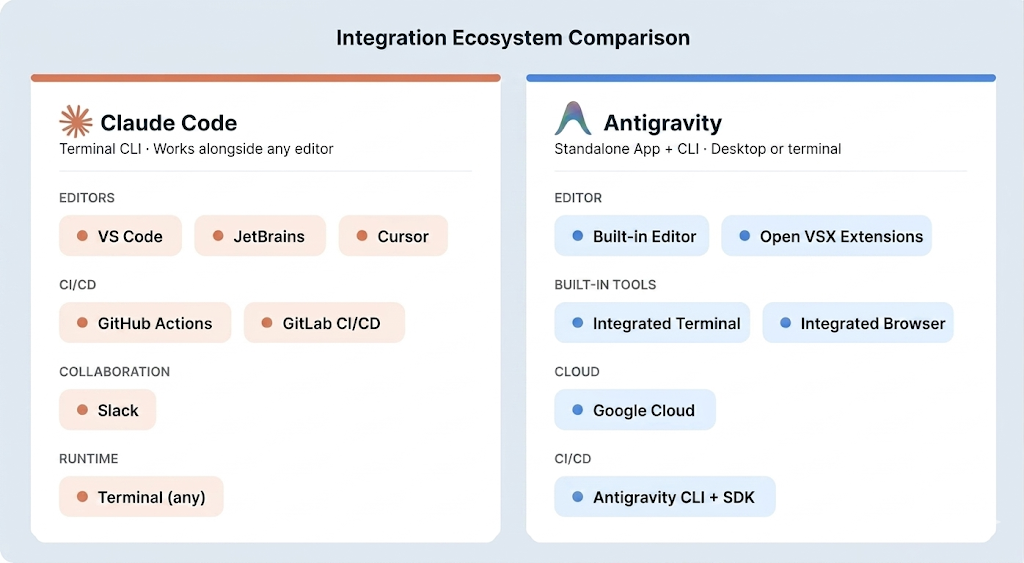
Integrationsökosystem beider KI-Coding-Tools. Grafik von der Autorin/dem Autor.
Bei Git und CI/CD geht Claude Code in die Tiefe: native Commit-Erstellung, Branch-Management, Merge-Konfliktlösung, Worktrees und offizielle Integrationen mit GitHub Actions und GitLab CI/CD. Du kannst in GitHub-PRs @claude taggen, um automatische Reviews auszulösen.
Zusätzlich enthält Claude Code inzwischen eine Code-Review-Funktion als Research Preview für Team- und Enterprise-Pläne. Dafür läuft pro Pull Request ein dediziertes Agententeam für eine tiefere Prüfung als die Standard-GitHub-Action allein.
Antigravity bedient CI/CD über CLI und SDK, mit denen Agenten Pipeline-Konfigurationen automatisieren und geplante Hintergrundtasks ausführen. Native Plattformintegrationen auf dem Niveau von Claude Codes GitHub-Action-Unterstützung wurden nicht angekündigt.
Für Zusammenarbeit integriert sich Claude Code in Slack und unterstützt geteilte Workspaces über Team- und Enterprise-Pläne. Antigravity setzt bei Kollaboration auf Artifact-Kommentare und geteilten Agentenkontext über Squads. Formale Multiuser-Teamfunktionen sind noch in Entwicklung.
Claude Code vs. Antigravity: Performance und Kontext
Beide Tools bewältigen große Repositories, unterscheiden sich jedoch in Kontextstrategie und Fehlermustern.
Claude Code liest Dateien selektiv bei Bedarf, statt alles auf einmal zu laden. Subagenten bringen zusätzliche isolierte Kontextfenster für komplexe Subtasks. Antigravity verteilt Kontext über mehrere Agenten, die jeweils im 1M-Token-Fenster von Gemini 3.5 Flash arbeiten. Beide Tools können über lange Sessions hinweg abbauen: Bei Claude Code hilft der /compact Befehl beim Aufräumen, während Antigravity kein dokumentiertes Checkpoint- oder Rollback-System hat.
Beide Tools halluzinieren, und das Risiko steigt mit der Sitzungsdauer. Die Fehlermuster von Claude Code sind gut dokumentiert; zu Antigravity gibt es aufgrund der kürzeren Historie weniger Katalogisierung. Keinem der beiden würde ich die eigenständige Verifikation von produktionsnahen Daten oder sicherheitskritischer Logik anvertrauen.
Claude Code vs. Antigravity: Preisvergleich
Claude Code und Antigravity starten beide bei 20 $/Monat, darüber hinaus unterscheiden sich die Stufen.
Claude Code beginnt bei 20 $/Monat (Pro, Sonnet 4.6) und steigt auf 100 bzw. 200 $/Monat für Opus 4.6 im Max-Plan. Teams zahlen 25 $ pro Nutzer und Monat. Ich habe Entwickler gesehen, die ein Wochenkontingent an einem Nachmittag Agentenarbeit verbraucht haben – prüfe also deine Nutzungsmuster, bevor du dich auf den Pro-Tarif festlegst.
Antigravity bietet in der Preview weiterhin eine Freistufe, allerdings mit Drosselung zu Stoßzeiten. Google hat auf der I/O 2026 bezahlte Stufen formalisiert: Google AI Pro für 20 $/Monat, das neue Google AI Ultra für 100 $/Monat mit dem Fünffachen des Pro-Kontingents und einen Top-Plan für 200 $/Monat (zuvor 250 $) mit dem Zwanzigfachen des Kontingents. Prüfe aktuelle Preise auf der Claude-Preisseite und der Antigravity-Preisseite, bevor du entscheidest.
Pro und Kontra: Claude Code vs. Antigravity
Die folgende Tabelle zeigt Stärken und Schwächen beider Tools in neun Kategorien.
| Kategorie | Claude Code | Antigravity |
|---|---|---|
| Editieransatz | Sequenziell, freigabebasierte Änderungen über Dateien | Multi-Agent-Orchestrierung in einem Workspace |
| Interface | CLI, die mit jedem Editor funktioniert | Eigenständige Desktop-IDE + CLI |
| Ausführung | Läuft lokal, Code bleibt auf deiner Maschine | Eigenständige App und CLI; läuft lokal |
| Automatisierung / CI | Integration mit GitHub Actions und GitLab | CLI und SDK für Pipeline-Automatisierung |
| Review / Tracking | Code-Review-Tools und Checkpoints zum Rückgängig machen | Artifact-System protokolliert Agentenaktionen |
| Kontext & Modelle | Kontext kann in langen Sessions nachlassen | 1M-Token-Kontext (Gemini 3.5 Flash); mehrere Modelle |
| Enterprise-Fähigkeit | SOC 2 Type II, SSO und HIPAA-ready | Gemini Enterprise Agent Platform auf Google Cloud |
| Kosten | Keine Freistufe; hoher Verbrauch kann Limits sprengen | Kostenlose Preview; bezahlt von 20 $/Monat (Pro) bis 200 $/Monat |
| Reifegrad | Etabliertere Tools und Workflows | Wachsende Enterprise-Adoption (AirAsia, Deloitte, WPP) |
Ist Claude Code besser als Antigravity?
Es gibt keinen eindeutigen Sieger. Die richtige Wahl hängt von deiner Arbeitsweise und den akzeptablen Trade-offs ab.
Wähle Claude Code, wenn dein Workflow terminalzentriert ist, du CI/CD-Integration mit GitHub oder GitLab brauchst, du komplexe Backend- oder Legacy-Codebasen bearbeitest oder dein Unternehmen heute Enterprise-Compliance benötigt.
Wähle Antigravity, wenn du die kostenlose Preview testen oder den 20 $/Monat-Einstiegspreis von Claude Code matchen willst, deine Arbeit frontendorientiert ist und von Browsertests profitiert, du eine visuelle IDE bevorzugst oder mehrere Agenten parallel auf unterschiedliche Aufgaben ansetzen willst.
Zieh beide in Betracht, wenn sich dein Workflow zwischen Backend und Frontend aufteilt. Der sequentielle, dateibasierte Ansatz von Claude Code passt zu komplexem Refactoring und CI/CD-Automatisierung, während Antigravitys parallele Agenten und Browsertests für Frontend-Builds und schnelles Prototyping punkten.
Am besten bewertest du beide Tools in einem realen Projekt. Claude Code startet bei 20 $/Monat, Antigravity bietet eine kostenlose Preview-Stufe mit bezahlten Plänen ab 20 $/Monat für höhere Limits.
|
Feature |
Claude Code |
Antigravity |
|
Primäre Oberfläche |
Terminal-CLI |
Eigenständige IDE |
|
IDE-Support |
VS Code, JetBrains (Beta), Neovim, Emacs |
Nur Antigravity (Open VSX-Erweiterungen) |
|
Kontextfenster |
200K Standard, 1M Beta |
1M nativ (Gemini 3.5 Flash) |
|
Multi-Agent |
Subagenten + Agent Teams (Preview) |
Agent Teams-Panel (dynamisches Subagent-Spawning) |
|
Browsertests |
Über MCP-Plugins |
Eingebauter Chromium-Subagent |
|
CI/CD-Integration |
GitHub Actions, GitLab CI/CD |
Antigravity-CLI + SDK |
|
Persistenter Kontext |
|
|
|
Einzelpreise |
Ab 20 $/Monat |
Kostenlose Preview; 20–200 $/Monat bezahlt |
|
Teampreise |
25 $/Nutzer/Monat |
Noch nicht verfügbar |
|
Enterprise |
SOC 2 Type II, SSO, HIPAA |
Gemini Enterprise Agent Platform |
|
Checkpoint/Rollback |
Ja |
Agenten-Timeline mit Pause/Kill pro Agent |
Fazit
Claude Code passt besser, wenn dein Workflow terminalzentriert ist, du CI/CD-Integration mit GitHub oder GitLab brauchst oder du komplexe Backend- und Legacy-Themen bearbeitest, bei denen ein sequentieller, freigabebasierter Ansatz dir Kontrolle gibt.
Antigravity passt besser, wenn du visuelle Verifizierung direkt im Tool willst, eine grafische IDE bevorzugst, Multi-Agent-Parallelität benötigst oder einfach mit der kostenlosen Preview starten willst.
Am Ende zählt, wo du die meiste Zeit verbringst, welche Aufgaben täglich anstehen und wie viel Kontrolle du über Agentenaktionen behalten willst. Beide Tools entwickeln sich schnell – Unterschiede von heute können in ein paar Monaten anders aussehen.
Wenn du mit KI-Coding-Tools weitergehen willst, empfehle ich diese Ressourcen:
- Unsere Artikel Cursor vs. GitHub Copilot und Claude Code vs Cursor zeigen, wie sich diese agentischen Tools von zeilenbasierten Assistenten unterscheiden – hilfreich, wenn du den Gesamtüberblick über die KI-Coding-Landschaft willst.
- Unser Kurs Software Development with GitHub Copilot lohnt sich, wenn du ein agentisches Tool mit einem Echtzeit-Assistenten im selben Workflow kombinieren willst.
- Unser Kurs AI-Assisted Coding for Developers trainiert Gewohnheiten, die beide Tools nützlicher machen – unabhängig davon, welches du am Ende nutzt.
- Unser Artikel Top 15 Vibe Coding Tools deckt die breitere Landschaft der KI-Coding-Tools ab, inklusive Vergleichen von Claude Code und Antigravity mit Alternativen wie Cursor, Copilot und anderen.