
Kurs
Einführung in die Regression mit statsmodels in Python
4 Std.
62K
Eine Gerade an gekrümmte Daten zu fitteten ist nie eine gute Idee.
Die lineare Regression setzt voraus, dass der Zusammenhang zwischen Prädiktoren und Ziel eine Gerade ist. In der Praxis ist das selten der Fall. Denk an Einkommen und Ausgaben oder Zeit und Wachstum – die Verläufe biegen ab, verlaufen flach, biegen erneut und ändern die Richtung auf Weisen, die sich nicht mit nur einer Steigung abbilden lassen.
Spline-Regression löst das Problem, indem sie den Zusammenhang dort biegen lässt, wo es nötig ist – ohne eine ungebundene wilde Kurve zu erzwingen. Die Idee: mehrere glatte polynomiale Segmente über den Prädiktorbereich hinweg fitten und sie an bestimmten Punkten kombinieren.
In diesem Artikel lernst du die Grundidee hinter Spline-Regression, wie Knoten die Flexibilität steuern, die wichtigsten Spline-Arten und wie du sie in der Praxis anwendest.
Bevor du in Splines eintauchst, lies unser Tutorial, das dir alles Wichtige über einfache lineare Regression beibringt.
Spline-Regression ist eine Regressionsmethode, die nichtlineare Zusammenhänge mit stückweisen Polynomen modelliert, die an sogenannten Knotenpunkten zusammengefügt werden.
Statt eine einzige Gleichung für den gesamten Zusammenhang zu erzwingen, zerlegt die Spline-Regression den Prädiktorbereich in kleinere Abschnitte und fittet auf jeden Abschnitt ein eigenes Polynom. Diese Abschnitte treffen sich an den Knoten, und Nebenbedingungen sorgen für weiche Übergänge.
Das Ergebnis liegt zwischen zwei Extremen. Sie ist flexibler als die lineare Regression, die nur eine Gerade durch die Daten legen kann. Und sie ist strukturierter als völlig unbeschränkte nichtlineare Modelle wie tiefe neuronale Netze oder Kernel-Methoden, die zwar fast alles fitten, dir aber wenig darüber sagen, was sie genau gelernt haben.
Aus genau diesem Grund begegnen dir Splines so häufig in der angewandten Statistik.
Echte Daten folgen fast nie einer Geraden.
Lineare Regression ist oft der Startpunkt, bringt aber eine starke Annahme mit: Der Effekt eines Prädiktors auf das Ziel bleibt über den gesamten Bereich konstant. Wenn der wahre Zusammenhang gebogen ist oder die Richtung wechselt, unterfittet eine Gerade. Du bekommst Fehler an den Extremen und ein Modell, das dem Muster nicht folgen kann.
Die Lösung ist ein flexibleres Modell. Polynomiale Regression hoher Ordnung ist eine Option – du fügst x^2, x^3, x^4 hinzu, bis sich die Kurve ausreichend biegt. Doch Polynome werden an den Datenrändern instabil und schwingen dort, wo wenige Punkte liegen. Dieses Verhalten heißt Runge-Phänomen und macht hohe Polynomialgrade riskant für Vorhersagen.
Spline-Regression liegt zwischen diesen Extremen.
Du bekommst lokale Flexibilität dort, wo die Daten sich biegen, ohne die globale Instabilität eines einzigen hochgradigen Polynoms. Jedes Segment ist ein Polynom niedriger Ordnung (meist kubisch), sodass kein Teil sich unvorhersehbar verhält. Und weil die Segmente an den Knoten glatt verbunden sind, wirkt die Gesamtkurve wie eine einzige stetige Funktion.
Kurz: Ein Spline bietet genug Flexibilität für komplexe Muster und genug Struktur, um sich an den Rändern gut zu benehmen.
Spline-Regression folgt immer einem einfachen Dreischritt.
Diese Nebenbedingungen lassen Splines wie eine einzige glatte Kurve erscheinen, die lokal biegt, aber über den gesamten Prädiktorbereich kontinuierlich verläuft. Visuell ist kaum zu erkennen, wo ein Polynom endet und das nächste beginnt.
Knoten, Polynomgrad und Stetigkeitsbedingungen definieren gemeinsam den Spline. Änderungen an einem davon ergeben einen anderen Spline mit anderen Eigenschaften – genau darum geht es in den nächsten Abschnitten.
Knoten sind die Punkte entlang der Prädiktorachse, an denen ein Polynomsegment endet und das nächste beginnt.
Du kannst sie dir als Gelenke des Splines vorstellen. Wenn du einen Knoten bei x = 5 setzt, fittet das Modell ein Polynom für Werte unterhalb 5 und ein anderes für Werte oberhalb 5. Die beiden Polynome treffen sich am Knoten, und Stetigkeitsbedingungen sorgen für eine glatte Verbindung. Mit mehr Knoten entstehen mehr Segmente, und die Kurve kann sich an mehr Stellen biegen.
Darum sind Knoten der wichtigste Hebel, um die Flexibilität des Modells zu steuern.
Die Anzahl der Knoten bestimmt, wie viele einzelne Polynomstücke den Spline bilden. Die Lage der Knoten bestimmt, wo die Kurve ihre Form ändern darf. Ein Spline mit zwei Knoten kann nur an wenigen Stellen biegen. Ein Spline mit zwanzig Knoten kann fast jedem Datenpunkt folgen.
Die richtige Anzahl und Platzierung der Knoten ist daher die zentrale Entscheidung in der Spline-Regression.
Bei zu wenigen Knoten hat der Spline nicht genug Segmente, um dem tatsächlichen Muster zu folgen. Die Kurve bleibt zu starr. Sie verhält sich fast wie ein Polynom niedriger Ordnung – allgemein flexibel, aber unfähig, lokale Veränderungen abzubilden.
Stell dir vor, du fittest einen Spline mit einem Knoten an Daten mit drei Phasen: Anstieg, Plateau, Abfall. Mit nur einem Knoten hat der Spline zwei Segmente. Er kann den Anstieg und eine der anderen Phasen erfassen, aber nicht alle drei. Du landest beim gleichen Problem wie mit linearer Regression – Fehler dort, wo der Spline die Form der Daten nicht trifft.
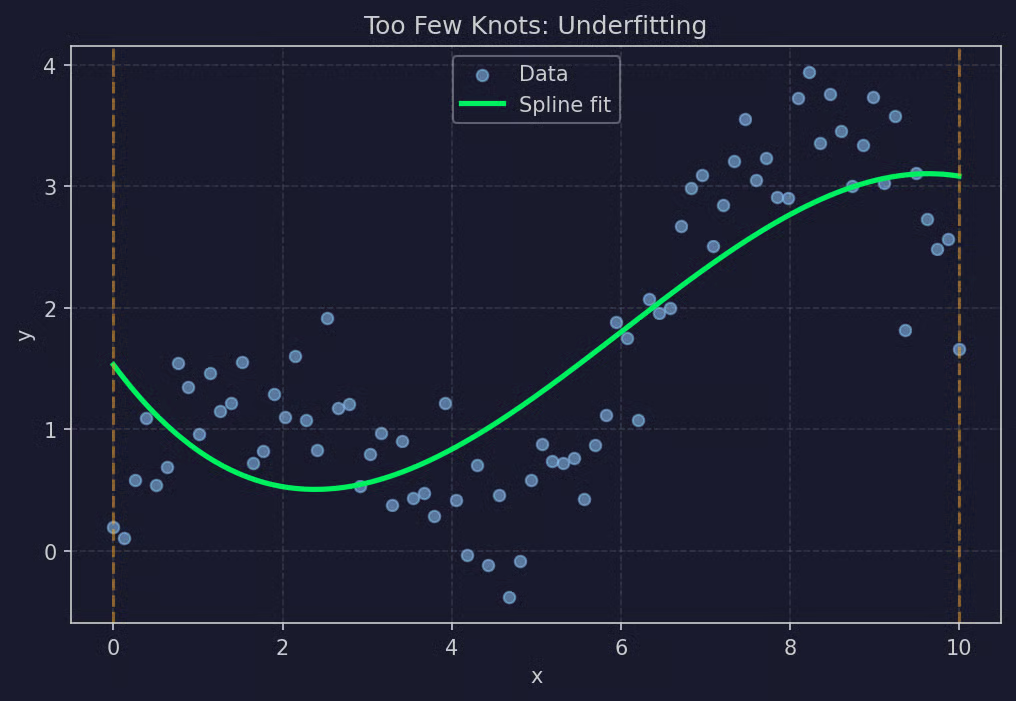
Beispiel: Zu wenige Knoten
Zu wenige Knoten führen zu Underfitting. Das Modell ist zu glatt, um nützlich zu sein.
Das Gegenproblem ist genauso schlimm. Mit zu vielen Knoten hat der Spline so viele Segmente, dass er beginnt, das Rauschen statt des Musters zu fitten. Die Kurve schlängelt sich zwischen den Beobachtungen und jagt zufälligen Schwankungen hinterher statt dem Trend.
Ein Spline mit zwanzig Knoten auf fünfzig Datenpunkten sieht eher wie „Malen nach Zahlen“ aus als wie ein Modell. Er passt die Trainingsdaten fast perfekt an, liefert aber unzuverlässige Vorhersagen. Kleine Änderungen am Input führen zu großen, unvorhersehbaren Änderungen im Output.
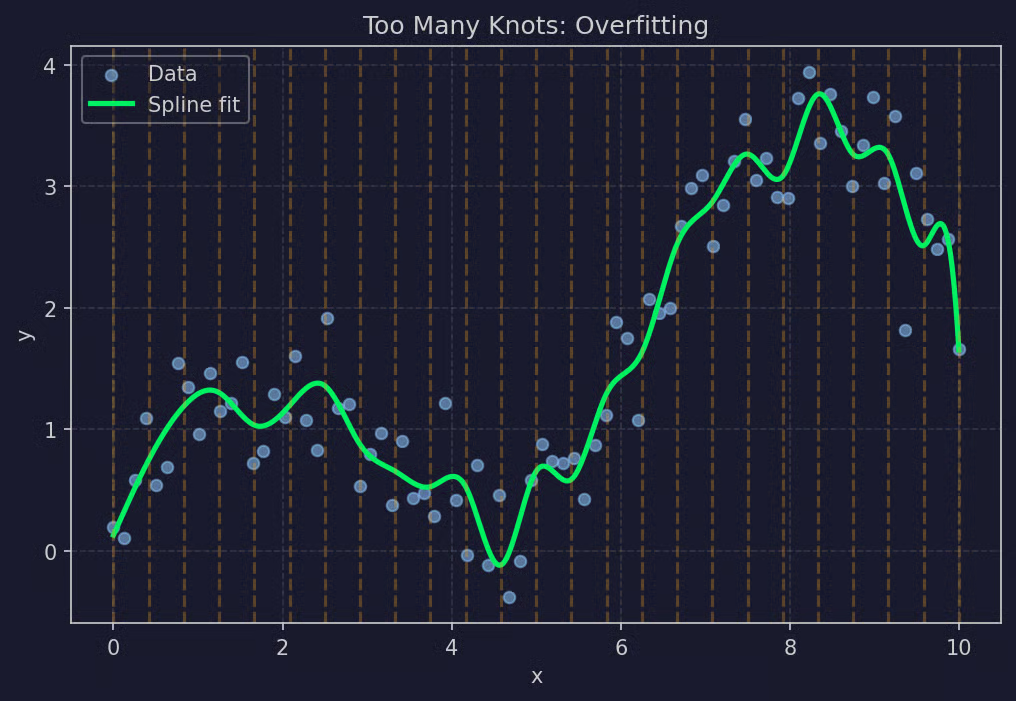
Beispiel: Zu viele Knoten
Zu viele Knoten führen zu Overfitting. Das Modell ist zu flexibel, um zu generalisieren.
Du willst genug Knoten, um echte Biegungen zu erfassen, aber nicht so viele, dass das Modell Rauschen auswendig lernt. In den nächsten Abschnitten erfährst du, wie du das in der Praxis entscheidest.
Splines gibt es in verschiedenen Varianten. Die Wahl hängt vor allem davon ab, welches Polynom pro Segment genutzt wird und welche Nebenbedingungen für die Kurve gelten.
Lineare Splines sind die einfachste Variante. Jedes Segment ist eine Gerade, und die Segmente treffen sich an den Knoten.
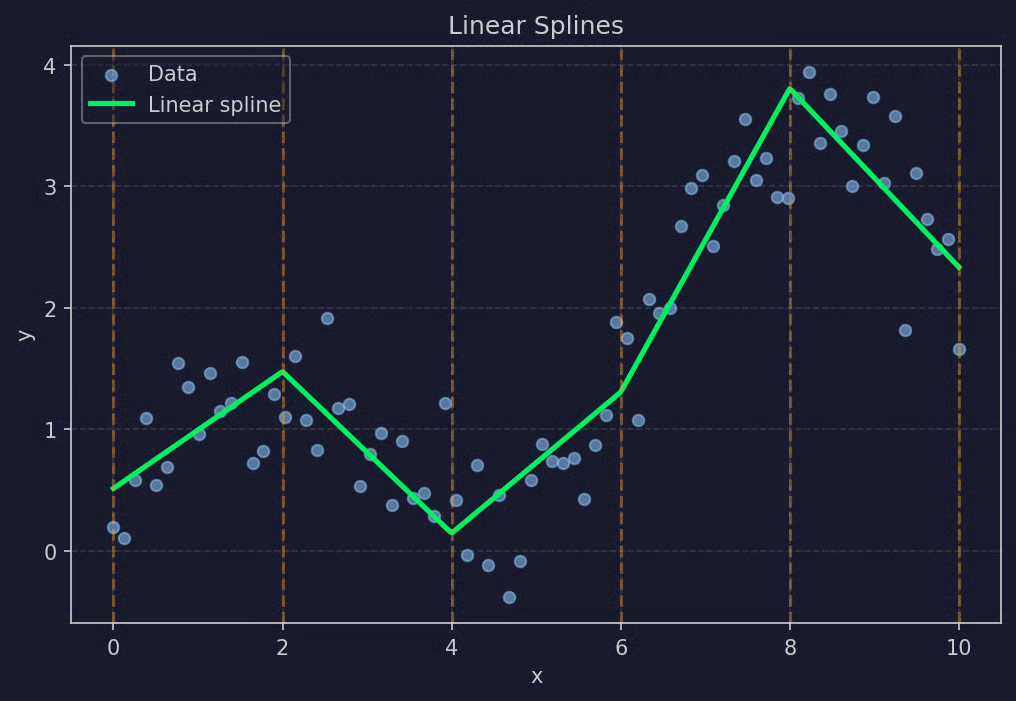
Beispiel: Lineare Splines
Die Stetigkeitsbedingung ist hier locker: Die Werte müssen am Knoten übereinstimmen, aber die Steigungen dürfen wechseln. Das Ergebnis wirkt wie verbundene Liniensegmente mit Ecken an den Knoten. Flexibel genug für einfache Biegungen, aber nicht immer optisch glatt.
Lineare Splines sind sinnvoll, wenn es um grobe Trends geht und dich die optische Kantigkeit nicht stört. Außerdem sind sie leicht zu interpretieren, da jedes Segment eine Linie mit eigener Steigung ist.
Kubische Splines sind in der Praxis der Standard. Jedes Segment ist ein kubisches Polynom (Grad 3), und die Stetigkeitsbedingungen sind strenger als bei linearen Splines.
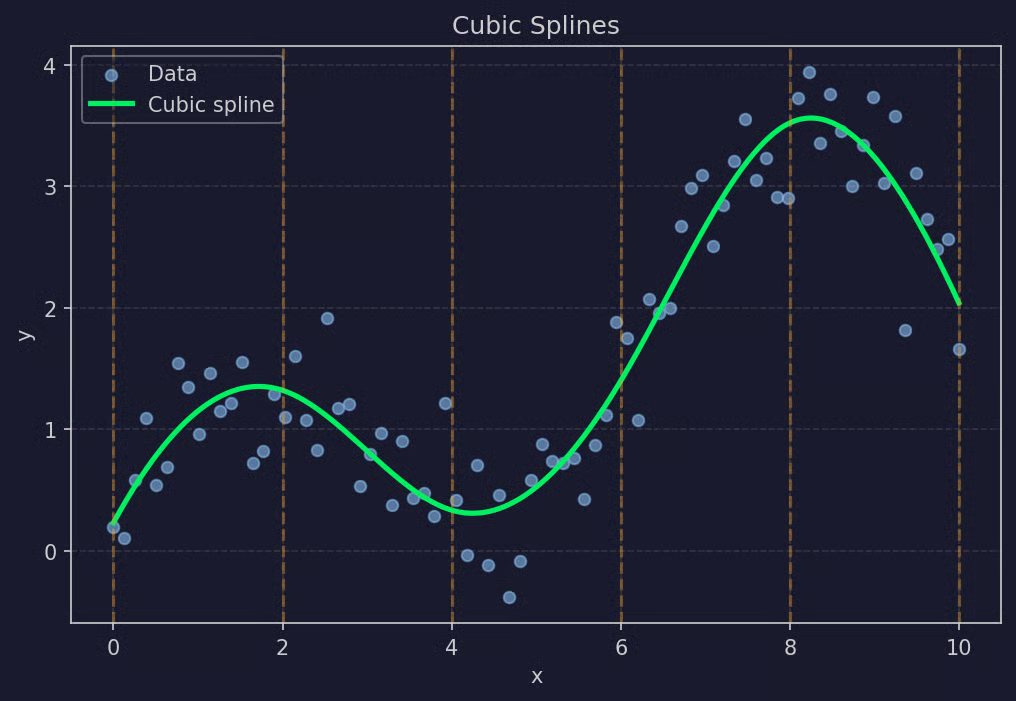
Beispiel: Kubische Splines
An jedem Knoten müssen drei Bedingungen gelten: Werte stimmen überein, erste Ableitungen stimmen überein und zweite Ableitungen stimmen überein. Das heißt: keine Sprünge, keine Ecken, keine abrupten Krümmungswechsel. Die Kurve fließt durch die Knoten, ohne dass man die Übergänge sieht.
Kubisch ist der niedrigste Polynomgrad, der sanfte Krümmungswechsel zulässt – daher so beliebt. Höhere Grade bringen selten sinnvolle Flexibilität und erschweren die Kontrolle.
Natürliche kubische Splines sind eine Variante mit zusätzlichen Randbedingungen an den Datenrändern.
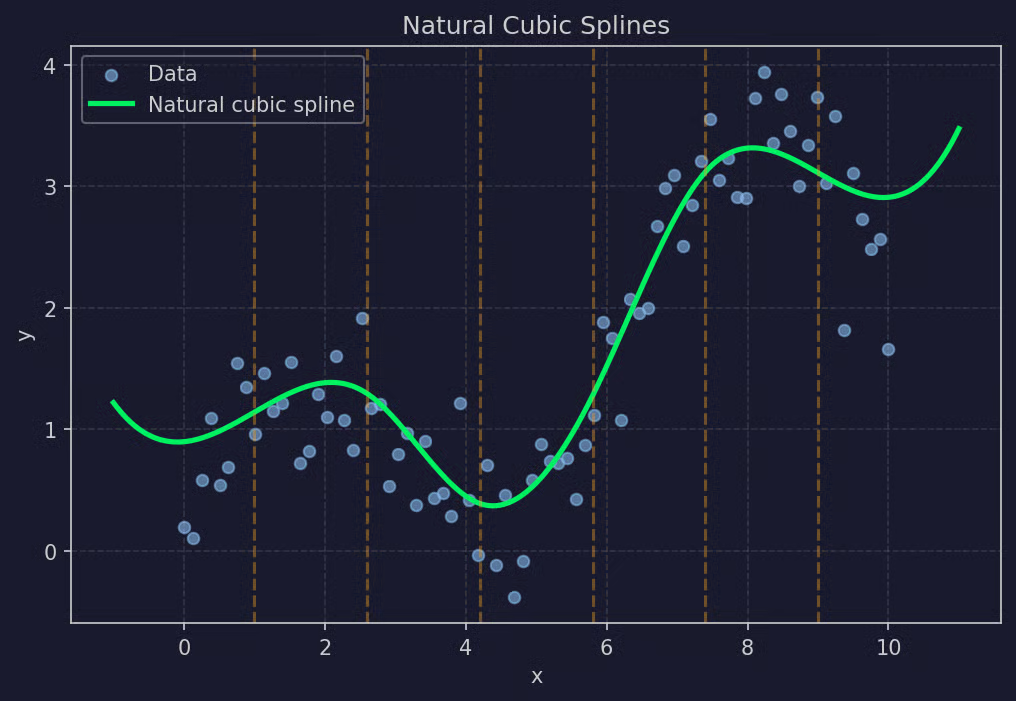
Beispiel: Natürliche kubische Splines
Das Problem regulärer kubischer Splines: Sie können sich an den Rändern merkwürdig verhalten, besonders bei wenigen Punkten. Die äußersten Segmente sind weiterhin kubische Polynome, die bei Extrapolation stark nach oben oder unten ausschlagen können.
Natürliche kubische Splines umgehen das, indem sie die zweite Ableitung an beiden Randknoten auf Null setzen. Praktisch heißt das: Jenseits der äußersten Knoten verhält sich die Kurve linear. Die Extrapolation ist deutlich stabiler – ideal, wenn dir Vorhersagen an den Datenrändern wichtig sind.
B-Splines (Basis-Splines) sind eine alternative Konstruktionsweise. Statt jedes Polynomsegment direkt zu definieren, wird der Spline als gewichtete Summe von Basisfunktionen aufgebaut.
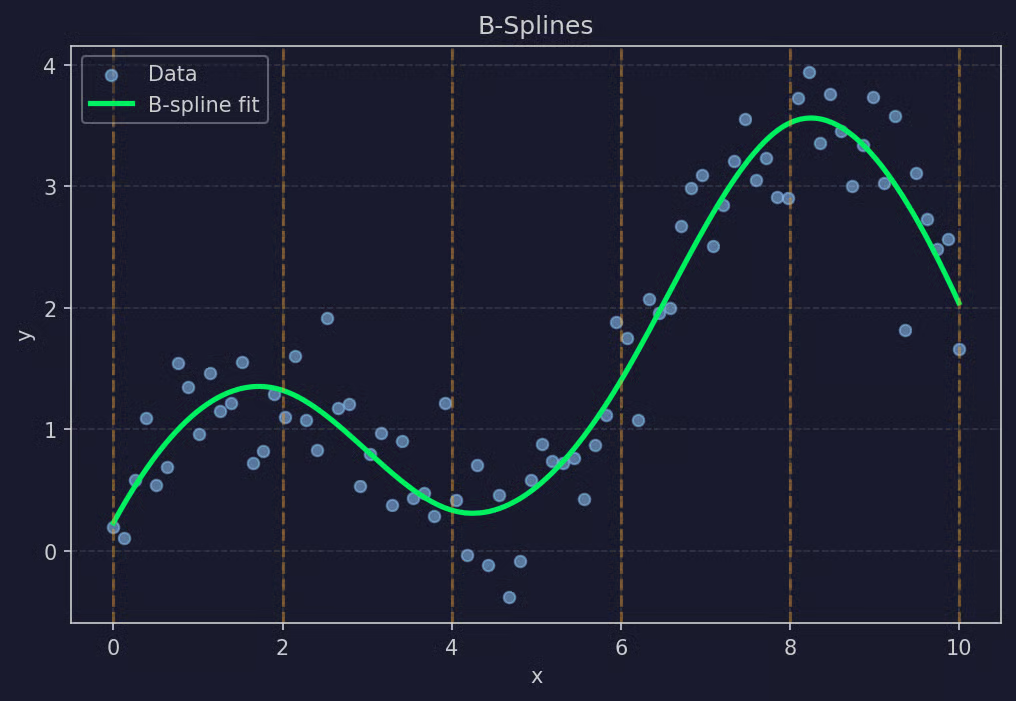
Beispiel: B-Splines
Jede Basisfunktion ist selbst ein kleiner Spline, der nur in einem begrenzten Bereich ungleich Null ist. Der gesamte Spline ist die Summe dieser Basisfunktionen, jeweils multipliziert mit einem vom Modell geschätzten Koeffizienten.
B-Splines sind numerisch stabil und leicht erweiterbar. Die meisten modernen Implementierungen in Python und R nutzen B-Splines unter der Haube – auch wenn die Oberfläche wie ein regulärer Spline wirkt. Wenn du in R schon einmal bs() aufgerufen oder in scikit-learn den SplineTransformer verwendet hast, hast du mit B-Splines gearbeitet.
Beide – polynomiale und Spline-Regression – können Nichtlinearität abbilden, gehen aber sehr unterschiedlich vor. Der Unterschied liegt darin, wie die Kurve aufgebaut wird.
Polynomiale Regression fittet ein einziges globales Polynom über den gesamten Prädiktorbereich. Du wählst einen Grad (2, 3, 5, 10), und das Modell findet einen Koeffizientensatz, der den Gesamtfehler minimiert. Es gibt eine Gleichung, und die beschreibt den Zusammenhang überall.
Das klingt sauber, hat aber einen Haken: Ein einzelnes Polynom muss den Fit über den gesamten Bereich ausbalancieren, sodass sich Änderungen in einem Abschnitt auf alle anderen auswirken. Erhöhst du den Grad, um eine starke Biegung in der Mitte zu erfassen, beginnt die Kurve an den Rändern zu schwingen. Das ist das erwähnte Runge-Phänomen – hochgradige Polynome werden an den Grenzen instabil.
Zudem kennt die polynomiale Regression keine Lokalität. Ein Ausreißer bei x = 5 kann die Form des Fits bei x = 50 verändern, weil jede Beobachtung zur gleichen globalen Gleichung beiträgt.
Spline-Regression teilt den Prädiktorbereich in Segmente und fittet in jedem Segment ein Polynom niedriger Ordnung. Die Polynome sind an den Knoten glatt verbunden, aber in ihrem Bereich weitgehend unabhängig, weil ihre Form primär von den lokalen Daten getrieben ist.
So erhältst du lokale Flexibilität: Ein Bereich mit starker Biegung bekommt eine kurvigere Funktion, ein flacher Bereich eine nahezu flache. Und weil jedes Segment niedriggradig (meist kubisch) ist, verhält sich kein Teil an den Rändern seltsam. Der Fit wird glatter und stabiler – besonders nahe der Datenränder.
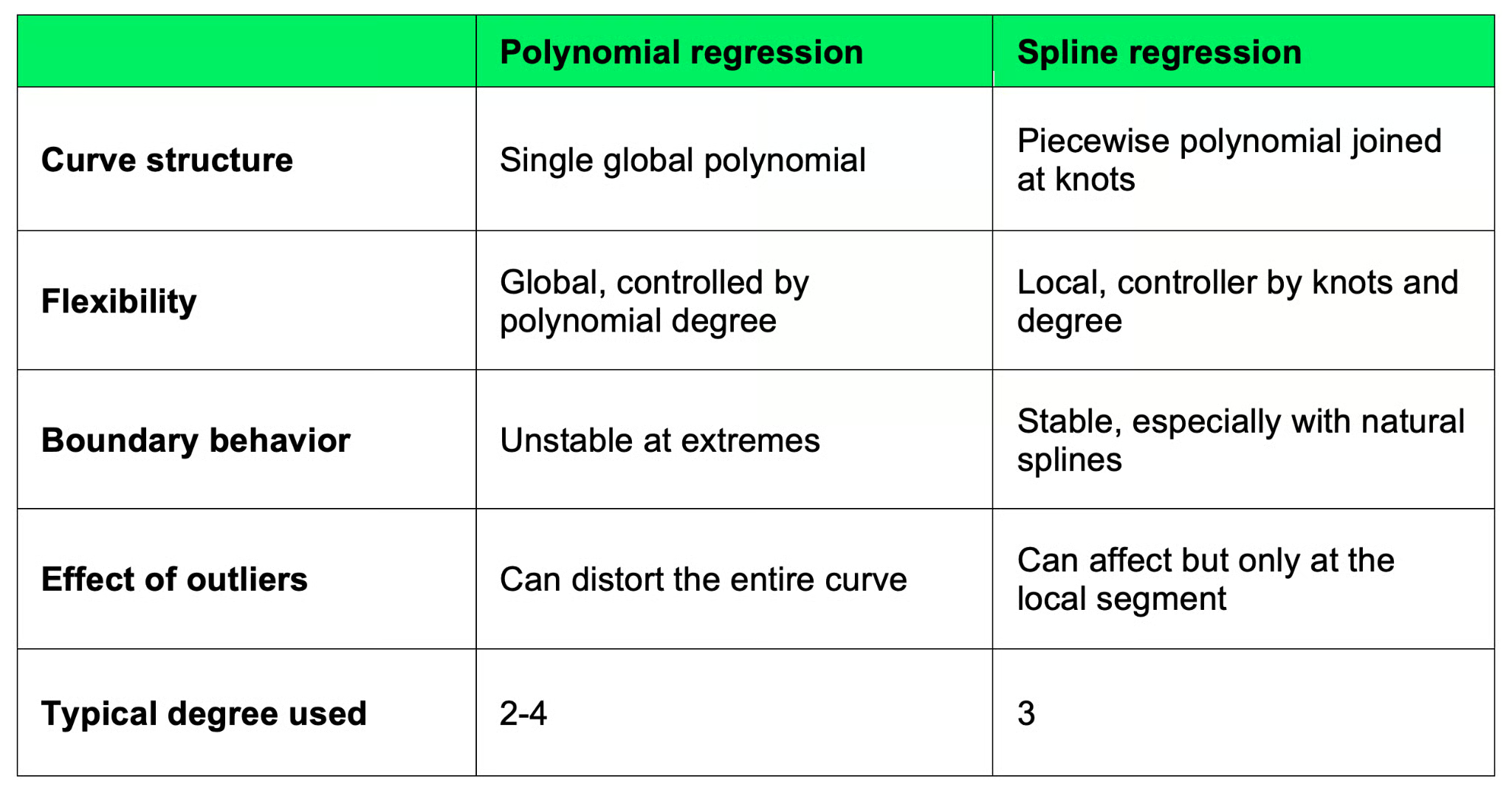
Polynomiale versus Spline-Regression
Wenn der Zusammenhang nur leicht nichtlinear ist und dir ein globaler Fit reicht, kann polynomiale Regression funktionieren. Bei komplexeren Mustern oder wenn dir Vorhersagen an den Rändern wichtig sind, sind Splines die sicherere Wahl.
Die Knotenauswahl ist der wichtigste Teil der Spline-Regression. Zu wenige Knoten unterfitten, zu viele überfitten. Und wo du sie platzierst, bestimmt, welche Muster das Modell erfassen kann.
Es gibt mehrere Ansätze – oft kombinierst du zwei oder mehr davon.
Der Zielkonflikt ist der klassische: Flexibilität versus Komplexität. Mehr Knoten bedeuten mehr Flexibilität, die feinere Muster zulässt – aber auch mehr Risiko, Rauschen zu fitten. Weniger Knoten machen das Modell stabiler und interpretierbarer, riskieren aber, echte Muster zu verpassen.
Starte mit 3–5 Knoten an Quantilen und prüfe die Residuen. Siehst du systematische Muster, füge in der betroffenen Region einen Knoten hinzu. Wirkt der Fit zappelig, nimm einen heraus. Cross-Validation lohnt sich, wenn du die Wahl begründen musst oder wenn das Modell produktiv gehen soll.
Spline-Regression kommt überall dort zum Einsatz, wo ein glatter nichtlinearer Effekt modelliert werden soll, ohne eine konkrete Funktionsform vorzugeben. Häufige Anwendungsfelder:
In all diesen Fällen liefern Splines Flexibilität dort, wo du sie brauchst – ohne dass du die Funktionsform raten musst. Sie eignen sich für exploratives Modellieren und sind eine gute Wahl für produktive Modelle, wenn Interpretierbarkeit zählt.
In Python gibt es drei gängige Wege: scikit-learn für ML-Pipelines, patsy für formelbasiertes Spezifizieren und statsmodels für statistische Inferenz. Hier sind alle drei.
scikit-learn bietet den SplineTransformer, der ein numerisches Feature in B-Spline-Basisfunktionen umwandelt. Diese Features gibst du anschließend an ein lineares Regressionsmodell weiter.
import numpy as np
from sklearn.linear_model import LinearRegression
from sklearn.preprocessing import SplineTransformer
from sklearn.pipeline import make_pipeline

# Data
np.random.seed(42)
x = np.linspace(0, 10, 100).reshape(-1, 1)
y = np.sin(x).ravel() + 0.3 * x.ravel() + np.random.normal(0, 0.3, 100)

# Spline features + linear regression pipeline
model = make_pipeline(
    SplineTransformer(n_knots=5, degree=3),
    LinearRegression()
)
model.fit(x, y)
y_pred = model.predict(x)

print("R^2 score:", model.score(x, y))
scikit-learn R2-Score
Der SplineTransformer erzeugt eine Spline-Basis mit 5 Knoten und kubischen Polynomen. Danach schätzt LinearRegression die Koeffizienten für jede Basisfunktion. Du kannst hier jeden sklearn-Regressor einsetzen – Ridge, Lasso, alles, was ein lineares Modell auf transformierten Features fitten kann.
Dieser Ansatz passt zu sklearn-Workflows, liefert aber keine statistischen Ausgaben wie Standardfehler oder p-Werte. Dafür brauchst du patsy oder statsmodels.
patsy ist ein formelbasiertes Interface zum Aufbau von Designmatrizen. Es kommt R-Formeln am nächsten und ist der Standardweg, um Spline-Features für statsmodels zu erstellen.
import numpy as np
import pandas as pd
from patsy import dmatrix
import statsmodels.api as sm

np.random.seed(42)
x = np.linspace(0, 10, 100)
y = np.sin(x) + 0.3 * x + np.random.normal(0, 0.3, 100)
df = pd.DataFrame({"x": x, "y": y})

# B-spline basis using patsy
spline_basis = dmatrix("bs(x, df=6, degree=3)", data=df, return_type="dataframe")

# Fit with statsmodels OLS
model = sm.OLS(df["y"], spline_basis).fit()
print(model.summary())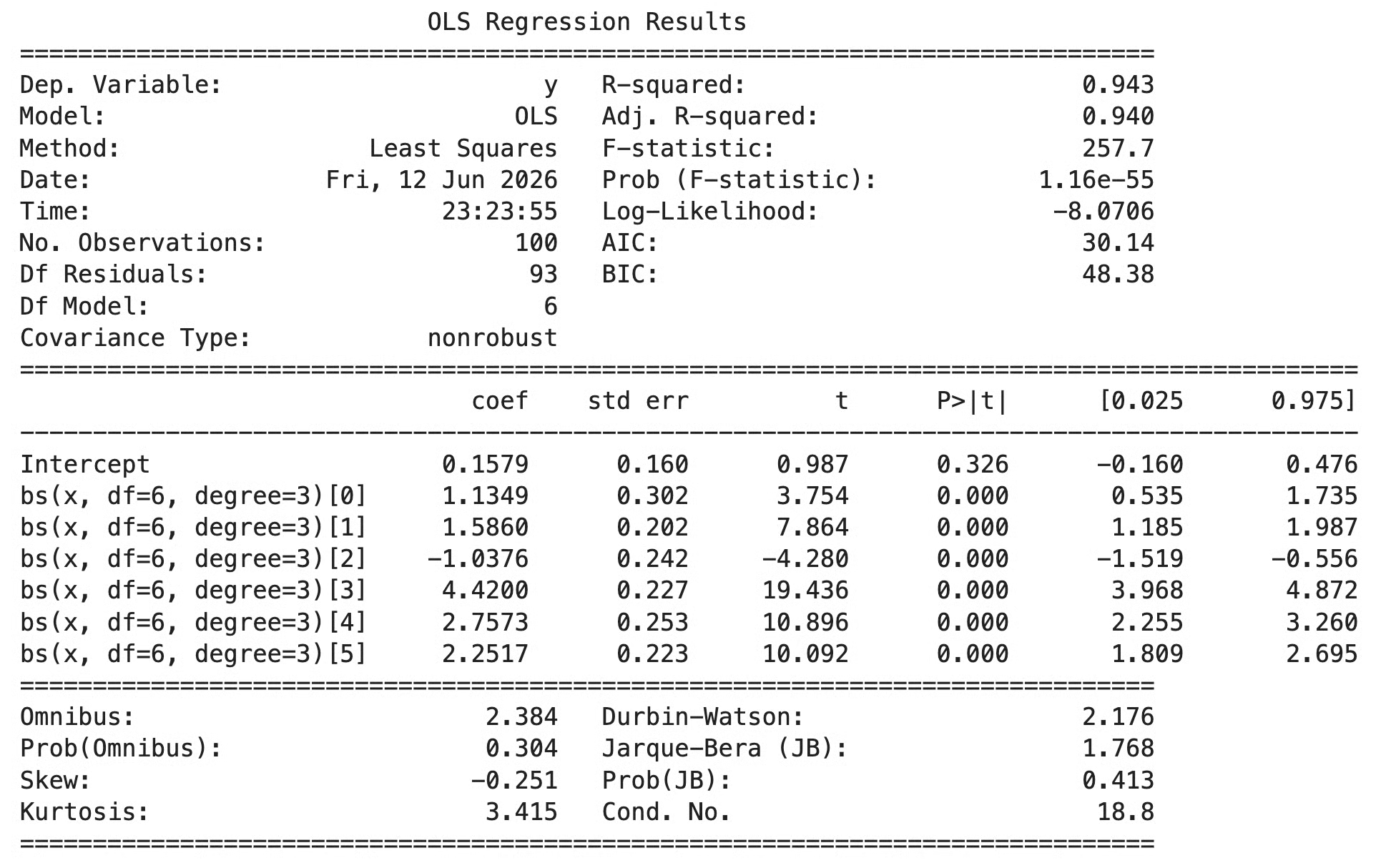
patsy Modellübersicht
Die Funktion bs() in der Formel weist patsy an, eine B-Spline-Basis mit 6 Freiheitsgraden und Grad 3 (kubisch) zu bauen. patsy gibt die Designmatrix zurück, die direkt in sm.OLS() geht. Der Parameter df steuert die Anzahl der Basisfunktionen – höhere Werte bedeuten mehr Flexibilität, ähnlich wie mehr Knoten.
Für natürliche Splines ersetzt du bs() einfach durch ns():
spline_basis = dmatrix("ns(x, df=6)", data=df, return_type="dataframe")statsmodels hat ebenfalls eine Formel-API, die mit patsy integriert ist. Das ist die sauberste Variante, wenn du eine Einzeiler-Spline-Regression mit voller statistischer Ausgabe möchtest.
import statsmodels.formula.api as smf

model = smf.ols("y ~ bs(x, df=7, degree=3)", data=df).fit()
print(model.summary())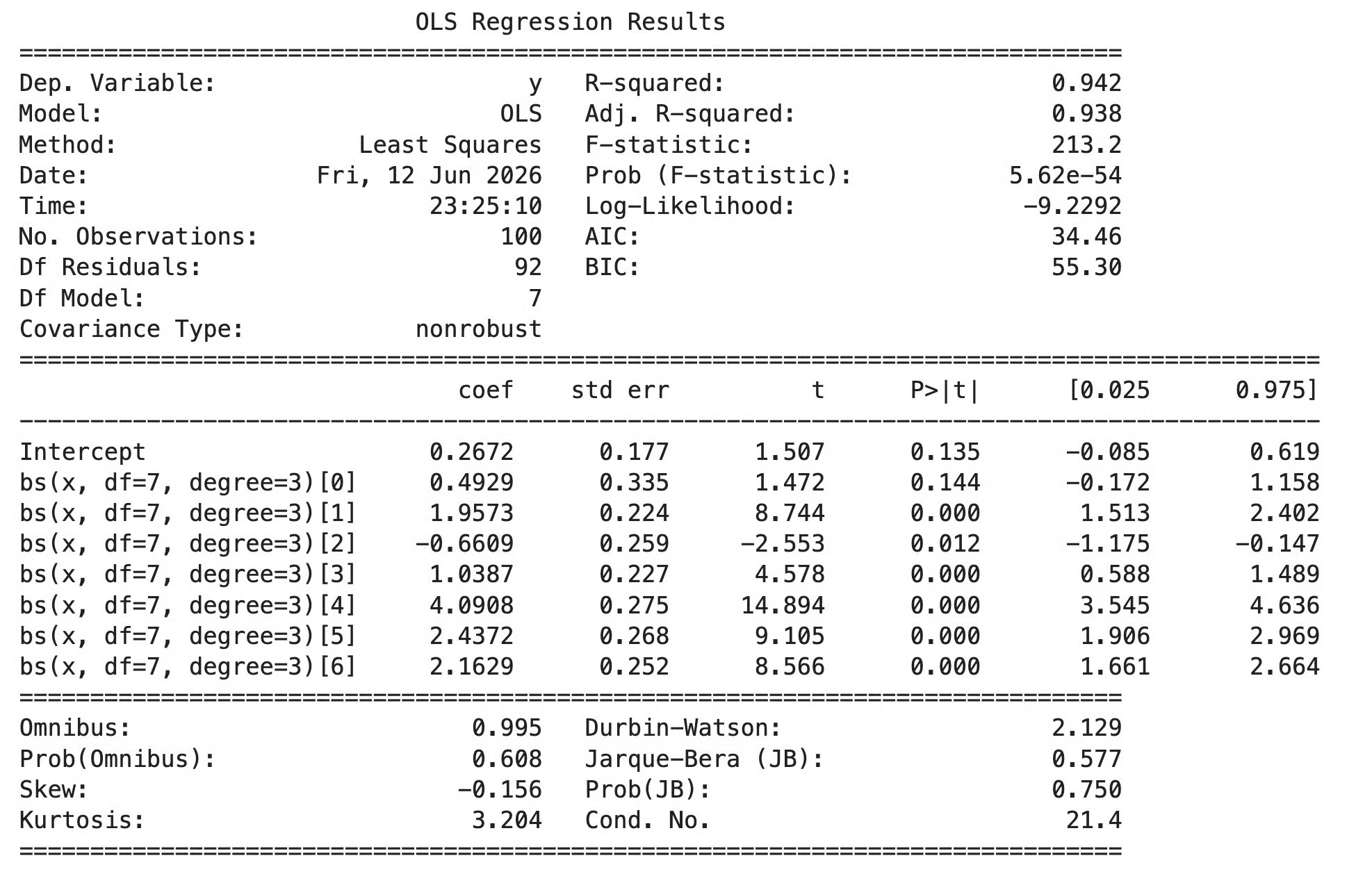
statsmodels Modellübersicht
Die Ausgabe von summary() liefert Koeffizienten für jede Basisfunktion, Standardfehler, p-Werte und übliche Fit-Statistiken. Die Koeffizienten sind nicht direkt interpretierbar, da sie Basisfunktionen entsprechen, nicht realen Größen. Du interpretierst den Fit, indem du Vorhersagen über den Prädiktorbereich plottest.
Für statistische Workflows ist die statsmodels-Formel-API meist am bequemsten. Nutze scikit-learn, wenn Splines Teil einer größeren ML-Pipeline sind.
R hat unter den großen Sprachen die beste Spline-Unterstützung eingebaut. Das Paket splines gehört zu Base R, und seine zwei Hauptfunktionen – bs() und ns() – funktionieren direkt in jeder Regressionsformel.
bs() erzeugt eine B-Spline-Basis. ns() erzeugt eine Basis für natürliche kubische Splines. Beide liefern eine Feature-Matrix, die Rs Formelsystem automatisch ins Modell einfügt.
# Data
set.seed(42)
x <- seq(0, 10, length.out = 100)
y <- sin(x) + 0.3 * x + rnorm(100, sd = 0.3)
df <- data.frame(x = x, y = y)

# Cubic B-spline with 6 degrees of freedom
library(splines)
model <- lm(y ~ bs(x, df = 6, degree = 3), data = df)
summary(model)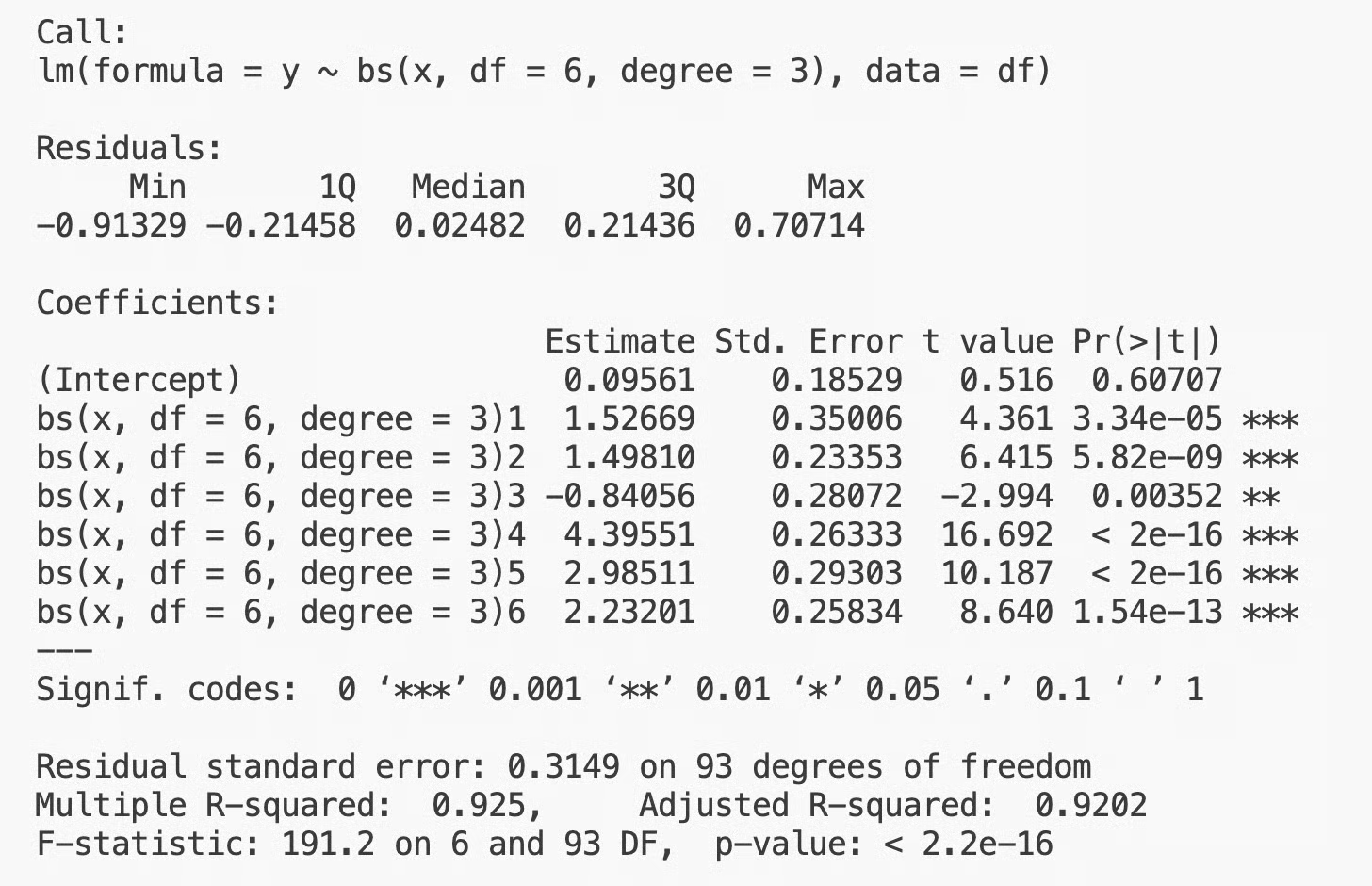
bs()-Ausgabe in R
Die Formel y ~ bs(x, df = 6, degree = 3) sagt R, dass x durch eine B-Spline-Basis Grad 3 mit 6 Freiheitsgraden ersetzt werden soll. R erledigt den Rest – Basis bauen, lineares Modell fitten und ein gewohntes lm-Objekt mit allen Diagnosen erzeugen.
Du kannst Knotenpositionen auch direkt angeben:
model <- lm(y ~ bs(x, knots = c(2, 5, 8), degree = 3), data = df)So setzt du Knoten bei x = 2, x = 5 und x = 8, statt R sie wählen zu lassen.
Für natürliche kubische Splines (mit linearem Verhalten jenseits der Grenzen) nutzt du ns():
model_natural <- lm(y ~ ns(x, df = 6), data = df)
summary(model_natural)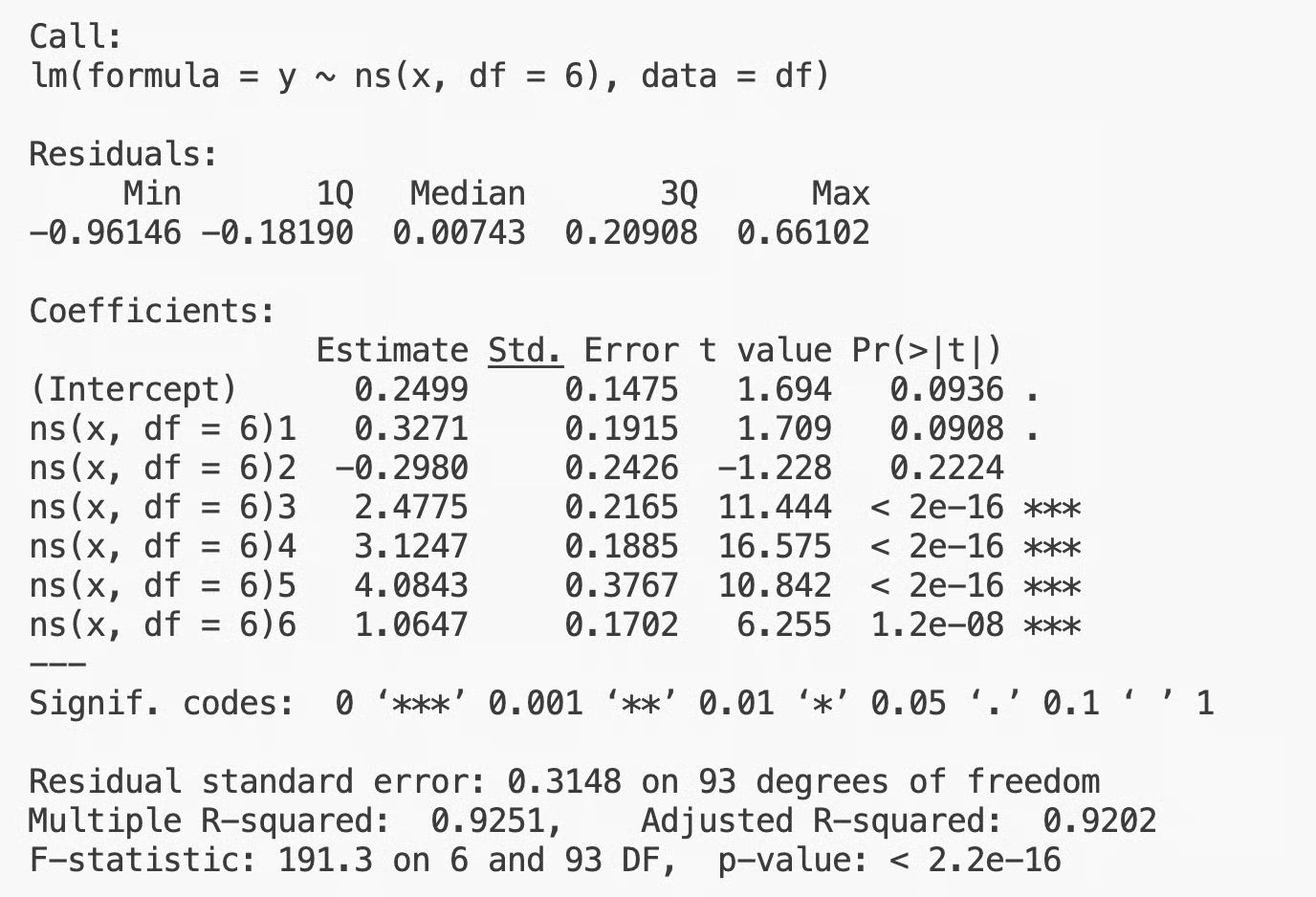
ns()-Ausgabe in R
Die Syntax ist identisch, doch das Randverhalten ist anders. Natürliche Splines sind meist die sicherere Wahl, wenn Vorhersagen oder Interpretationen an den Rändern wichtig sind.
Die Koeffizienten in der summary()-Ausgabe gehören zu Basisfunktionen, nicht zu direkt interpretierbaren Größen. Um zu sehen, was das Modell gelernt hat, erstellst du Vorhersagen über ein feines Gitter von x-Werten und plottest das Ergebnis:
x_grid <- data.frame(x = seq(0, 10, length.out = 200))
preds <- predict(model, newdata = x_grid)
plot(df$x, df$y)
lines(x_grid$x, preds, col = "green", lwd = 2)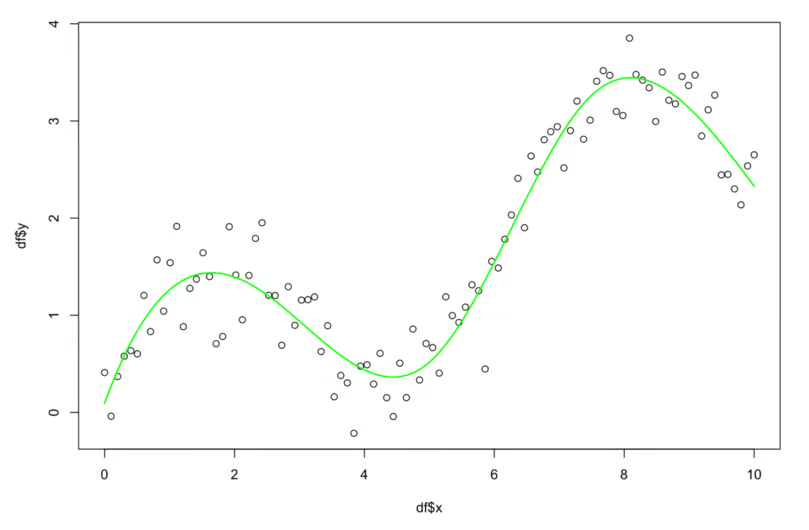
Ausgaben in R interpretieren
Das ist das Standardvorgehen in R: Spline fitten, auf einem feinen Gitter vorhersagen und die Kurve über die Daten legen. R erlaubt auch Spline-Terme neben anderen Prädiktoren in derselben Formel:
model_multi <- lm(y ~ ns(x, df = 6) + other_var, data = df)So fittest du in einem Modell einen nichtlinearen Effekt für x und einen linearen Effekt für other_var. Diese Flexibilität macht Splines in R-Workflows so verbreitet.
Hier sind einige Vorteile von Splines im Vergleich zu populären ML-Modellen:
Wie die meisten Modelle bringen Splines einige Trade-offs mit, die du kennen solltest:
Hier sind typische Fehler, die Einsteiger:innen machen:
Splines sind nicht der einzige Weg, Nichtlinearität zu modellieren, aber sehr nützlich, wenn Interpretierbarkeit zählt. So schneiden sie gegenüber gängigen Alternativen ab.
Polynomiale Regression nutzt eine einzige globale Gleichung. Einfacher zu spezifizieren, aber weniger stabil – besonders an den Rändern. Splines schlagen Polynome bei Flexibilität und Stabilität, sobald es mehr als eine Biegung gibt. Polynome sind nur bei sehr niedrigen Graden (2 oder 3) leichter zu interpretieren. Danach werden Splines zugleich verlässlicher und interpretierbarer.
GAMs sind im Grunde Splines im großen Stil. Ein GAM fittet für jeden Prädiktor einen Spline und kombiniert sie additiv. Du kannst Spline-Regression als GAM mit einer Variablen sehen – und GAMs als Summe aus Splines über mehrere Variablen.
GAMs handhaben mehrere nichtlineare Prädiktoren eleganter, als Splines einzeln zu fitten. Sie enthalten zudem Glättungsstrafen, die die richtige Flexibilität wählen – das nimmt Arbeit bei der Knotenauswahl ab. Wenn du mehrere Prädiktoren mit einigen nichtlinearen Effekten hast, sind GAMs meist die bessere Wahl.
Bäume gehen völlig anders vor. Statt eine glatte Kurve zu fitten, teilen sie den Prädiktorraum in rechteckige Regionen und sagen in jeder einen konstanten Wert vorher. Das Ergebnis ist eine Stufenfunktion.
Bäume sind in mancher Hinsicht flexibler – sie modellieren Interaktionen und abrupte Sprünge. Aber die Funktion ist nicht glatt oder stetig und verallgemeinert in dünn besetzten Regionen schlechter. Splines sind besser, wenn dir Glattheit und stabile Extrapolation wichtig sind. Bäume, wenn du scharfe Grenzen oder viele Interaktionen brauchst.
Splines sind allgegenwärtig in der angewandten Statistik: in klinischer Forschung, Ökonomie, Umweltwissenschaften, Zeitreihenanalyse – überall, wo ein glatter nichtlinearer Effekt ohne Black-Box-Modell gebraucht wird.
Der Grund ist die Balance: genug Flexibilität für unordentliche Daten, genug Struktur für Interpretierbarkeit und Stabilität.
Sie sind zudem die Grundlage für fortgeschrittenere Methoden. Generalized Additive Models bauen direkt auf Splines auf, Glättungssplines erweitern die Idee mit Regularisierung, und viele moderne nichtlineare Regressionsverfahren nutzen Spline-Basen. Wer diese Methoden verstehen will, muss Splines verstehen.
Splines sind wichtig, weil sie praktisch sind – und weil sie Bausteine für vieles sind, was danach kommt. Sie sind nicht das mächtigste Modell, aber eines der verlässlichsten – und das ist oft entscheidend.
Spline-Regression modelliert Nichtlinearität, indem stückweise Polynome an Knotenpunkten zusammengefügt werden. Das ist der Kern – der Rest sind Variationen darauf.
Knoten und Glattheit sind die zwei Konzepte, die du verstehen musst. Alles andere (Spline-Typen, Basisdarstellungen, Implementierung in R und Python) sind nur verschiedene Wege, mit diesen Konzepten zu arbeiten.
Probier verschiedene Spline-Typen auf deinen Daten aus. Vergleiche kubische, natürliche kubische und B-Splines. Verschiebe die Knoten und sieh, was passiert. Experimentiere – die visuelle Natur des Fits macht es leicht, die Effekte deiner Entscheidungen zu sehen.
Wenn du tiefer in die Mathematik hinter Splines und vielen anderen Algorithmen einsteigen willst, melde dich für unseren Machine Learning Scientist in Python-Lernpfad an. Er enthält alles, was du brauchst, um 2026 jobready zu sein.
Lerne mit DataCamp
Kurs
Kurs
Kurs
Tutorial
DataCamp Team
5 Min.
Tutorial
Laiba Siddiqui
6 Min.
Tutorial
Sejal Jaiswal
24 Min.
Tutorial
Satyabrata Pal
15 Min.
Tutorial
Aditya Sharma
5 Min.
Tutorial
Aditya Sharma
7 Min.