It's a safe bet that at some point you've used Google Search, Google Maps, Gmail, or another major Google product. If so, you have almost certainly interacted with Bigtable without knowing it. This foundational component is a database that Google built to handle the scale and speed its core products require.
Today, Google Cloud offers Bigtable as a petabyte-scale NoSQL database service designed for applications that demand consistent low latency and massive throughput.
For junior data practitioners, understanding Bigtable is an important step in the path of learning distributed systems. Unlike traditional relational databases, which force you to conform to a strict schema, Bigtable comes with a flexible and sparse wide-column model that excels at storing huge volumes of single-keyed data. In this article, I will break down what Bigtable is, how its architecture works under the hood, and the important design decisions you need to make to use it the right way.
What Is Bigtable?
At its core, Bigtable is essentially a sparse and persistent multidimensional sorted map. To simplify, think of it as a key-value and wide-column store. Although it is often compared to databases like Cassandra or HBase, Bigtable stands apart because it is fully managed by Google, which means you do not need to worry about patching servers or managing replication manually.
The service is designed for high-throughput, low-latency workloads. It can scale to billions of rows and thousands of columns, storing terabytes or even petabytes of data, which makes it a strong choice for workloads such as time-series data, financial transactions, ad-tech bidding, machine learning feature serving, and several others. Additionally, Bigtable treats data as raw byte strings, which gives developers the full flexibility to store structured, semi-structured, or unstructured data of their choice without the overhead of type enforcement.
Architecture: Instances, Clusters, and Nodes
To understand Bigtable, you first need to understand its resource model. Unlike a traditional database, where you simply create a table, Bigtable asks you to provision compute and storage through a specific hierarchy of instances, clusters, and nodes.
An instance is the container for your data and is a logical grouping of clusters that lets you manage the replication and application profiles. A cluster, on the other hand, represents the Bigtable service in a specific geographic location. Therefore, if you create an instance with multiple clusters in different zones, Bigtable automatically starts replicating your data between them, which gives you high availability and excellent disaster recovery.
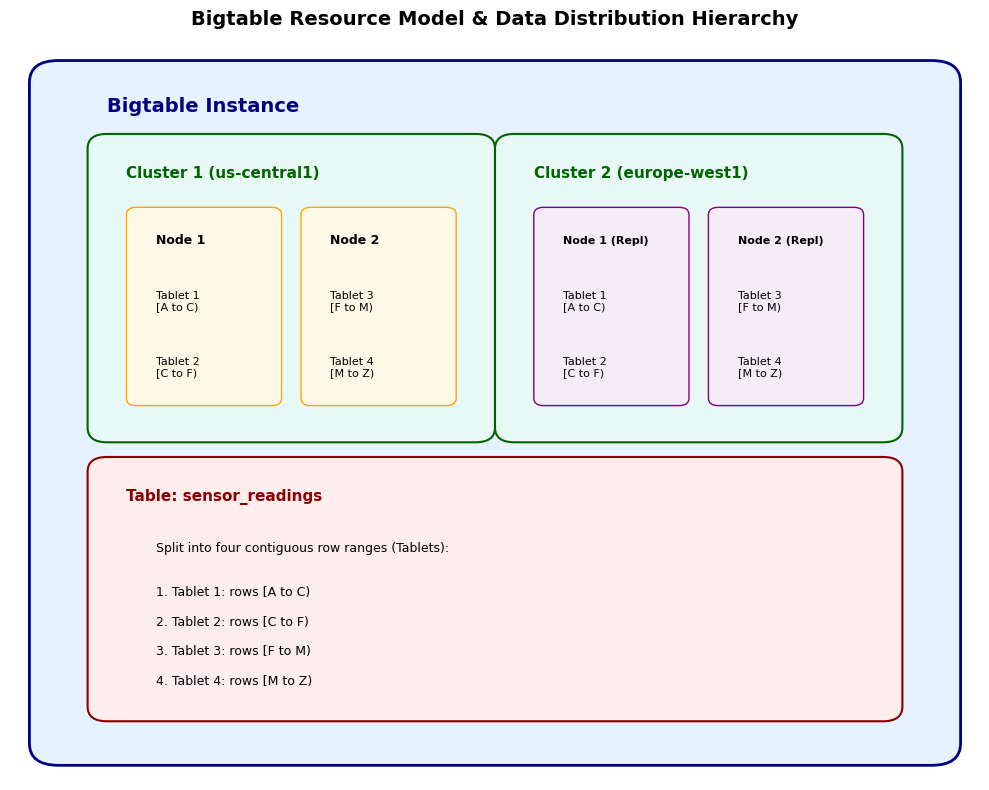
Finally, nodes are the actual compute units within a cluster. They handle the read and write requests and manage the data stored on the disk. The performance of your cluster scales linearly with the number of nodes that you provision. Fortunately, Bigtable comes with autoscaling, which automatically adjusts the number of nodes based on your CPU utilization, so you don't really have to do manual capacity planning during traffic spikes. For workloads that need sub-millisecond latency, you can even enable an in-memory tier on Enterprise Plus editions.
How Data Is Structured in Bigtable
Bigtable's data model looks simple at first, but it is highly optimized for scale. Data is stored in tables, which are sorted maps of rows, where every row is uniquely identified by a row key and contains a set of columns. Columns that are related to one another are grouped into column families.
Rows and row keys
Every row in a Bigtable table is identified by exactly one row key, and there are no secondary indexes. That single fact explains most of Bigtable's behavior. Because rows are stored in lexicographical (dictionary) order by that key, rows with similar keys end up physically close together on the same tablet, which means that a query that asks for a contiguous range of keys can be answered by reading a small number of tablets in sequence.
This is also why row-key design has such an important effect on query performance and scalability. If your keys are chosen well, your reads become fast range scans, and your writes spread uniformly on the cluster. If they are chosen poorly, you get slow scans and write hotspots, and no amount of extra nodes will fix either problem. I will come back to this in detail in the next section.
Column families and columns
Bigtable's wide-column model is what gives it its flexibility because columns are not defined up front in a schema the way they are in a relational database. Instead, you define column families, which are the groupings that Bigtable uses for storage and access control, and then add arbitrary columns within those families as your data requires.
Because the model is sparse, a column only exists for a row if you actually wrote a value there. If a column has no value for a given row, it simply does not exist and takes up no storage space, which makes Bigtable extremely efficient for datasets where different rows have different attributes. This is a real advantage for semi-structured data like device telemetry where many different sensor types report many different fields, because you are not paying for empty columns across millions of rows.
Cells and timestamps
One of the most useful features of Bigtable is its versioning, where each cell, which is the intersection of a row and a column, can contain multiple versions of a value and is indexed by timestamp, which lets you store a history of changes over time. Additionally, you can configure Garbage Collection policies at the column family level to automatically expire data either based on age or on the number of versions you want to keep.
A small example makes this clearer. Imagine you are storing readings from a temperature sensor:
|
Row key
|
readings,temperature
|
readings,humidity
|
|
sensor-001#2024-05-01T10,00
|
21.5 (v3)
|
40 (v3)
|
| |
21.2 (v2, 09,00)
|
41 (v2, 09,00)
|
| |
20.9 (v1, 08,00)
|
42 (v1, 08,00)
|
|
sensor-001#2024-05-01T10,05
|
21.7 (v1)
|
—
|
You can notice two things here. First, the cell for the 10,00 row holds three timestamped versions of the temperature, so you can read the current value or the history without a separate audit table. Second, the humidity column is simply absent from the 10,05 row, and that absence costs nothing, which is exactly the sparsity described above, in action.
How to Read and Write Data in Bigtable
Bigtable's access patterns are deliberately narrow, and they are easy to tell apart. The simplest is a point read by row key, which is a direct lookup of one row and is the fastest operation the service offers. The second is a range scan, which reads a contiguous block of rows between a start key and an end key, and this is where good row-key design pays off, because adjacent rows are read together efficiently.
Writes and mutations work at the row level as well: you can write new rows, update individual cells, and apply conditional mutations using check-and-mutate operations, where the mutation only commits if a condition on the row holds at that moment. You can also delete rows, cells, or entire ranges, and you can attach filters to reads so that returned data is trimmed server-side by row key, column, value, or timestamp before it ever reaches your application.
The important thing to internalize is that Bigtable works best when applications know the row or the range of rows they need, rather than relying on arbitrary ad hoc queries. There is no query planner that will rescue a badly shaped access pattern, so the application is responsible for asking the right question in the right shape.
How Bigtable Scales
Bigtable's scalability comes from the tablet mechanism described earlier, combined with the fact that compute and storage are managed separately. When a table grows, Bigtable splits its tablets automatically, and when a node has too many tablets or too much CPU load, the service rebalances tablets across the nodes in the cluster. Because of that automatic load balancing, high-throughput reads and writes are spread across many machines rather than concentrated on one.
Adding compute capacity is straightforward as well. You add nodes to a cluster, or you let the autoscaling do it for you based on CPU utilization, and throughput scales roughly linearly with the number of nodes. Storage, meanwhile, is billed and managed independently, which means you can hold petabytes of data without provisioning corresponding compute.
Scaling only works as intended when the workload is spread uniformly. Therefore, if all of your traffic targets one tablet because of a sequential row key, adding nodes will not help, because the bottleneck is the single tablet rather than the cluster as a whole. That is why scalability in Bigtable is ultimately a row-key design problem as much as an infrastructure problem.
Bigtable Replication and Availability
Replication in Bigtable is configured at the instance level. Therefore, when an instance contains clusters in more than one zone or region, Bigtable replicates the data between those clusters automatically, and each cluster gets a full copy of the data. This gives you high availability within a region and, if you use multiple regions, protection against a regional outage.
Application profiles are how you control routing. An application profile is simply a named configuration attached to your client that determines which cluster or clusters your traffic is sent to, so a single-region profile might route all reads and writes to the nearest cluster, while a multi-cluster profile can route reads to the closest healthy replica. Additionally, failover happens automatically when a cluster becomes unavailable, which is what makes multi-region configurations attractive for latency-sensitive global applications.
The architectural point to remember is that replication is a property of the instance and its clusters, and routing is a property of the application profile that your client uses. Together they determine both where your data lives and where your traffic goes.
Bigtable vs Other Databases
Bigtable has a lot in common with several other databases, but it also differs from each in important ways. The clearest way to see this is through direct comparisons:
Bigtable vs. BigQuery
BigQuery is an analytical data warehouse, designed for large-scale SQL scans, aggregations, and joins over data that is written once and read many times. Bigtable is an operational NoSQL database, designed for high-throughput with low-latency key-based access to data that changes constantly.
Bigtable vs. Firestore
Firestore is an application-oriented document store, with a hierarchical document model and real-time synchronization. Bigtable, on the other hand, is a wide-column store built for very large scale and high throughput, with no document semantics and no real-time listeners. If you are building a mobile app with modest data volumes, Firestore is usually the better fit for you. If you are ingesting billions of rows and reading them by key, Bigtable is.
Bigtable vs. Cassandra
Both are distributed wide-column databases and so have the same data model, but the operational model is completely different. Cassandra is self-managed, which means you own cluster sizing, repairs, and upgrades, whereas Bigtable is fully managed by Google: you provision an instance and let the service handle the rest.
Bigtable vs. HBase
HBase is the open-source implementation of the original Bigtable model, and Bigtable provides an HBase client API, which is why organizations often migrate from self-managed HBase clusters to Bigtable to shed operational overhead. The APIs are compatible enough that the migration path is well understood, but Bigtable adds managed scaling, replication, and features like Data Boost that you would otherwise have to build yourself.
Key Features and Capabilities
Outside the core architecture, Bigtable comes with several features that make it suitable for many modern data applications. For instance, Bigtable provides an HBase client API, which makes it a popular destination for organizations that are migrating off self-managed Apache HBase clusters, and this integration lets you keep using the existing Hadoop and Spark ecosystem. On the cost side, tiered storage lets you configure an age-based policy to automatically move infrequently accessed data that is older than 30 days to a lower-cost HDD-based tier, while keeping the data accessible through the same API, so you can store hot and cold data in one system.
For high-throughput analytical jobs like Spark or MapReduce, you can use Data Boost, which is a serverless compute option that isolates your read jobs from your core application traffic, so that a heavy analytics query does not degrade the performance of your live application. Finally, while Bigtable is fundamentally a NoSQL store, Google has added an SQL Query API for ad-hoc analysis, and recent updates also include integrations for many tools like LangChain, vector stores, and AI agent tools, which now positions Bigtable as a backend for LLM-powered applications.
Bigtable Pricing and Cost Considerations
Bigtable pricing is driven by a handful of factors. The first driver is compute capacity, which is the number of nodes in your clusters, or the autoscaled equivalent. This is typically the largest line item for high-traffic workloads. The second is storage, which is billed per gigabyte and varies by storage type, since SSD storage costs more than the HDD tier used for infrequently accessed data. The third is networking, especially when that data travels between regions for replication or reads. Replication itself is a cost consideration as well because every additional cluster holds a full copy of your data and adds compute in that region.
When to Use Bigtable and When Not To
Bigtable is a specialized tool, which means that if you choose it for the wrong workload, you can end up with unnecessary complexity. You should consider Bigtable when you need sub-10ms latency at massive scale, like real-time bidding or user profile lookups, or when you are storing time-series data, like IoT or monitoring metrics, where you need to scan recent ranges. It is also a good fit when you are dealing with petabyte-scale datasets that require high write throughput, or when you are migrating an existing HBase workload.
You should avoid Bigtable, on the other hand, when you need complex SQL queries and joins, in which case you should consider BigQuery for analytics or Spanner for relational transactions. It is also not the right choice when you are building a document store with deep nesting, where Firestore would serve you better, or when your dataset fits comfortably in a traditional relational database and you do not need horizontal scale.
Conclusion
Google Cloud Bigtable is a great example of distributed system design, because it hides the immense complexity of managing a globally distributed, petabyte-scale database and leaves you with a clean API and one very important responsibility: designing the right row key. For data practitioners, mastering Bigtable means understanding that it is not a general-purpose database, but a precision tool for speed and scale. By understanding its architecture, respecting the nuances of row key design, and using features like tiered storage and autoscaling, you can build applications that handle the most demanding workloads with ease.







It's a safe bet that at some point you've used Google Search, Google Maps, Gmail, or another major Google product. If so, you have almost certainly interacted with Bigtable without knowing it. This foundational component is a database that Google built to handle the scale and speed its core products require.
Today, Google Cloud offers Bigtable as a petabyte-scale NoSQL database service designed for applications that demand consistent low latency and massive throughput.
For junior data practitioners, understanding Bigtable is an important step in the path of learning distributed systems. Unlike traditional relational databases, which force you to conform to a strict schema, Bigtable comes with a flexible and sparse wide-column model that excels at storing huge volumes of single-keyed data. In this article, I will break down what Bigtable is, how its architecture works under the hood, and the important design decisions you need to make to use it the right way.
What Is Bigtable?
At its core, Bigtable is essentially a sparse and persistent multidimensional sorted map. To simplify, think of it as a key-value and wide-column store. Although it is often compared to databases like Cassandra or HBase, Bigtable stands apart because it is fully managed by Google, which means you do not need to worry about patching servers or managing replication manually.
The service is designed for high-throughput, low-latency workloads. It can scale to billions of rows and thousands of columns, storing terabytes or even petabytes of data, which makes it a strong choice for workloads such as time-series data, financial transactions, ad-tech bidding, machine learning feature serving, and several others. Additionally, Bigtable treats data as raw byte strings, which gives developers the full flexibility to store structured, semi-structured, or unstructured data of their choice without the overhead of type enforcement.
Architecture: Instances, Clusters, and Nodes
To understand Bigtable, you first need to understand its resource model. Unlike a traditional database, where you simply create a table, Bigtable asks you to provision compute and storage through a specific hierarchy of instances, clusters, and nodes.
An instance is the container for your data and is a logical grouping of clusters that lets you manage the replication and application profiles. A cluster, on the other hand, represents the Bigtable service in a specific geographic location. Therefore, if you create an instance with multiple clusters in different zones, Bigtable automatically starts replicating your data between them, which gives you high availability and excellent disaster recovery.
Finally, nodes are the actual compute units within a cluster. They handle the read and write requests and manage the data stored on the disk. The performance of your cluster scales linearly with the number of nodes that you provision. Fortunately, Bigtable comes with autoscaling, which automatically adjusts the number of nodes based on your CPU utilization, so you don't really have to do manual capacity planning during traffic spikes. For workloads that need sub-millisecond latency, you can even enable an in-memory tier on Enterprise Plus editions.
How Data Is Structured in Bigtable
Bigtable's data model looks simple at first, but it is highly optimized for scale. Data is stored in tables, which are sorted maps of rows, where every row is uniquely identified by a row key and contains a set of columns. Columns that are related to one another are grouped into column families.
Rows and row keys
Every row in a Bigtable table is identified by exactly one row key, and there are no secondary indexes. That single fact explains most of Bigtable's behavior. Because rows are stored in lexicographical (dictionary) order by that key, rows with similar keys end up physically close together on the same tablet, which means that a query that asks for a contiguous range of keys can be answered by reading a small number of tablets in sequence.
This is also why row-key design has such an important effect on query performance and scalability. If your keys are chosen well, your reads become fast range scans, and your writes spread uniformly on the cluster. If they are chosen poorly, you get slow scans and write hotspots, and no amount of extra nodes will fix either problem. I will come back to this in detail in the next section.
Column families and columns
Bigtable's wide-column model is what gives it its flexibility because columns are not defined up front in a schema the way they are in a relational database. Instead, you define column families, which are the groupings that Bigtable uses for storage and access control, and then add arbitrary columns within those families as your data requires.
Because the model is sparse, a column only exists for a row if you actually wrote a value there. If a column has no value for a given row, it simply does not exist and takes up no storage space, which makes Bigtable extremely efficient for datasets where different rows have different attributes. This is a real advantage for semi-structured data like device telemetry where many different sensor types report many different fields, because you are not paying for empty columns across millions of rows.
Cells and timestamps
One of the most useful features of Bigtable is its versioning, where each cell, which is the intersection of a row and a column, can contain multiple versions of a value and is indexed by timestamp, which lets you store a history of changes over time. Additionally, you can configure Garbage Collection policies at the column family level to automatically expire data either based on age or on the number of versions you want to keep.
A small example makes this clearer. Imagine you are storing readings from a temperature sensor:
Row key
readings,temperaturereadings,humiditysensor-001#2024-05-01T10,0021.5 (v3)
40 (v3)
21.2 (v2, 09,00)
41 (v2, 09,00)
20.9 (v1, 08,00)
42 (v1, 08,00)
sensor-001#2024-05-01T10,0521.7 (v1)
—
You can notice two things here. First, the cell for the 10,00 row holds three timestamped versions of the temperature, so you can read the current value or the history without a separate audit table. Second, the humidity column is simply absent from the 10,05 row, and that absence costs nothing, which is exactly the sparsity described above, in action.
How to Read and Write Data in Bigtable
Bigtable's access patterns are deliberately narrow, and they are easy to tell apart. The simplest is a point read by row key, which is a direct lookup of one row and is the fastest operation the service offers. The second is a range scan, which reads a contiguous block of rows between a start key and an end key, and this is where good row-key design pays off, because adjacent rows are read together efficiently.
Writes and mutations work at the row level as well: you can write new rows, update individual cells, and apply conditional mutations using check-and-mutate operations, where the mutation only commits if a condition on the row holds at that moment. You can also delete rows, cells, or entire ranges, and you can attach filters to reads so that returned data is trimmed server-side by row key, column, value, or timestamp before it ever reaches your application.
The important thing to internalize is that Bigtable works best when applications know the row or the range of rows they need, rather than relying on arbitrary ad hoc queries. There is no query planner that will rescue a badly shaped access pattern, so the application is responsible for asking the right question in the right shape.
How Bigtable Scales
Bigtable's scalability comes from the tablet mechanism described earlier, combined with the fact that compute and storage are managed separately. When a table grows, Bigtable splits its tablets automatically, and when a node has too many tablets or too much CPU load, the service rebalances tablets across the nodes in the cluster. Because of that automatic load balancing, high-throughput reads and writes are spread across many machines rather than concentrated on one.
Adding compute capacity is straightforward as well. You add nodes to a cluster, or you let the autoscaling do it for you based on CPU utilization, and throughput scales roughly linearly with the number of nodes. Storage, meanwhile, is billed and managed independently, which means you can hold petabytes of data without provisioning corresponding compute.
Scaling only works as intended when the workload is spread uniformly. Therefore, if all of your traffic targets one tablet because of a sequential row key, adding nodes will not help, because the bottleneck is the single tablet rather than the cluster as a whole. That is why scalability in Bigtable is ultimately a row-key design problem as much as an infrastructure problem.
Bigtable Replication and Availability
Replication in Bigtable is configured at the instance level. Therefore, when an instance contains clusters in more than one zone or region, Bigtable replicates the data between those clusters automatically, and each cluster gets a full copy of the data. This gives you high availability within a region and, if you use multiple regions, protection against a regional outage.
Application profiles are how you control routing. An application profile is simply a named configuration attached to your client that determines which cluster or clusters your traffic is sent to, so a single-region profile might route all reads and writes to the nearest cluster, while a multi-cluster profile can route reads to the closest healthy replica. Additionally, failover happens automatically when a cluster becomes unavailable, which is what makes multi-region configurations attractive for latency-sensitive global applications.
The architectural point to remember is that replication is a property of the instance and its clusters, and routing is a property of the application profile that your client uses. Together they determine both where your data lives and where your traffic goes.
Bigtable vs Other Databases
Bigtable has a lot in common with several other databases, but it also differs from each in important ways. The clearest way to see this is through direct comparisons:
Bigtable vs. BigQuery
BigQuery is an analytical data warehouse, designed for large-scale SQL scans, aggregations, and joins over data that is written once and read many times. Bigtable is an operational NoSQL database, designed for high-throughput with low-latency key-based access to data that changes constantly.
Bigtable vs. Firestore
Firestore is an application-oriented document store, with a hierarchical document model and real-time synchronization. Bigtable, on the other hand, is a wide-column store built for very large scale and high throughput, with no document semantics and no real-time listeners. If you are building a mobile app with modest data volumes, Firestore is usually the better fit for you. If you are ingesting billions of rows and reading them by key, Bigtable is.
Bigtable vs. Cassandra
Both are distributed wide-column databases and so have the same data model, but the operational model is completely different. Cassandra is self-managed, which means you own cluster sizing, repairs, and upgrades, whereas Bigtable is fully managed by Google: you provision an instance and let the service handle the rest.
Bigtable vs. HBase
HBase is the open-source implementation of the original Bigtable model, and Bigtable provides an HBase client API, which is why organizations often migrate from self-managed HBase clusters to Bigtable to shed operational overhead. The APIs are compatible enough that the migration path is well understood, but Bigtable adds managed scaling, replication, and features like Data Boost that you would otherwise have to build yourself.
Key Features and Capabilities
Outside the core architecture, Bigtable comes with several features that make it suitable for many modern data applications. For instance, Bigtable provides an HBase client API, which makes it a popular destination for organizations that are migrating off self-managed Apache HBase clusters, and this integration lets you keep using the existing Hadoop and Spark ecosystem. On the cost side, tiered storage lets you configure an age-based policy to automatically move infrequently accessed data that is older than 30 days to a lower-cost HDD-based tier, while keeping the data accessible through the same API, so you can store hot and cold data in one system.
For high-throughput analytical jobs like Spark or MapReduce, you can use Data Boost, which is a serverless compute option that isolates your read jobs from your core application traffic, so that a heavy analytics query does not degrade the performance of your live application. Finally, while Bigtable is fundamentally a NoSQL store, Google has added an SQL Query API for ad-hoc analysis, and recent updates also include integrations for many tools like LangChain, vector stores, and AI agent tools, which now positions Bigtable as a backend for LLM-powered applications.
Bigtable Pricing and Cost Considerations
Bigtable pricing is driven by a handful of factors. The first driver is compute capacity, which is the number of nodes in your clusters, or the autoscaled equivalent. This is typically the largest line item for high-traffic workloads. The second is storage, which is billed per gigabyte and varies by storage type, since SSD storage costs more than the HDD tier used for infrequently accessed data. The third is networking, especially when that data travels between regions for replication or reads. Replication itself is a cost consideration as well because every additional cluster holds a full copy of your data and adds compute in that region.
When to Use Bigtable and When Not To
Bigtable is a specialized tool, which means that if you choose it for the wrong workload, you can end up with unnecessary complexity. You should consider Bigtable when you need sub-10ms latency at massive scale, like real-time bidding or user profile lookups, or when you are storing time-series data, like IoT or monitoring metrics, where you need to scan recent ranges. It is also a good fit when you are dealing with petabyte-scale datasets that require high write throughput, or when you are migrating an existing HBase workload.
You should avoid Bigtable, on the other hand, when you need complex SQL queries and joins, in which case you should consider BigQuery for analytics or Spanner for relational transactions. It is also not the right choice when you are building a document store with deep nesting, where Firestore would serve you better, or when your dataset fits comfortably in a traditional relational database and you do not need horizontal scale.
Conclusion
Google Cloud Bigtable is a great example of distributed system design, because it hides the immense complexity of managing a globally distributed, petabyte-scale database and leaves you with a clean API and one very important responsibility: designing the right row key. For data practitioners, mastering Bigtable means understanding that it is not a general-purpose database, but a precision tool for speed and scale. By understanding its architecture, respecting the nuances of row key design, and using features like tiered storage and autoscaling, you can build applications that handle the most demanding workloads with ease.