
Curso
Introduction to Google Workspace with Gemini
30 min
2.7K
Ficou claro que já passamos da fase em que a IA era só um chatbot turbinado, dando respostas rápidas e previsíveis. Os modelos de ponta de hoje conseguem raciocinar, enfrentando problemas com uma profundidade surpreendentemente humana. Como dados estão no centro de tantas profissões, o desafio não é mais encontrar uma única resposta “certa”; é lidar com dados bagunçados, caçar problemas difíceis de detectar e construir sistemas que não quebrem sob pressão. O Gemini 3 Deep Think se destaca em todas essas frentes.
Neste artigo, vou explorar o que torna esse modelo de raciocínio especializado único e como você pode acessá-lo. Mais importante: vou mostrar como usá-lo para levar sua produtividade para o próximo nível e ganhar confiança de verdade nos seus fluxos de trabalho com Python, SQL e R.
O Gemini 3 Deep Think é um modo de raciocínio especializado criado para expandir a fronteira do modelo Gemini do Google. Enquanto modelos de chat tradicionais são ótimos para recuperar fatos rapidamente ou resumir textos, o Deep Think foi projetado para tarefas em que não existe uma solução correta evidente de imediato. Ele foi construído para pensar nos problemas de forma mais parecida com a humana e considerar um conjunto mais amplo de opções do que apenas uma alternativa probabilística.
Com base nos fundamentos discutidos na nossa visão geral do Gemini 3 e na recente atualização do Gemini 3.1, o Deep Think foca em rigor algorítmico e precisão matemática. Isso significa que o modelo age menos como uma ferramenta de autocompletar e mais como uma pessoa que pensa logicamente sobre o problema, identifica sutilezas e explora estratégias alternativas de código antes de entregar uma resposta final.
O Google integrou esse modelo avançado de raciocínio principalmente no app web, mas oferece acesso selecionado via API para que desenvolvedores e pesquisadores possam adotá-lo sem fricção:
Diferente de modelos padrão que geram respostas token a token com base na probabilidade imediata, o Gemini 3 Deep Think utiliza computação em tempo de inferência (test-time compute).
Quando faço uma pergunta complexa, o modelo efetivamente dá uma “pausa para pensar”. O importante é entender que ele leva tempo para considerar as opções com cuidado. Não é aquela resposta relâmpago típica de chatbot. O modelo explora diferentes alternativas e pode demorar um pouco para responder, o que lhe rendeu o apelido de “Slow AI”.
Por baixo dos panos, a arquitetura investiga várias estratégias independentes. Ela gera hipóteses, testa cada uma no contexto que você forneceu e critica suas próprias soluções propostas.
Por exemplo, se você pedir para estruturar uma simulação de dados interativa, o modelo avalia riscos potenciais em tempo real.
Esse recurso combina muito bem com frameworks de ambiente avançados como o Google ADK, permitindo que a inteligência artificial orquestre tarefas complexas e multietapas com mínimas alucinações.
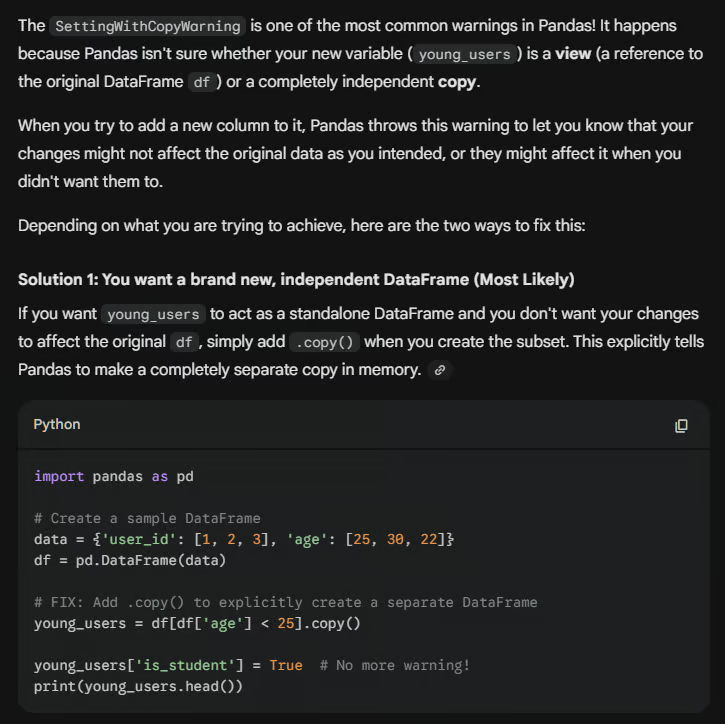
Costumo esbarrar em erros chatos ao manipular dados em Python. Um clássico é o SettingWithCopyWarning no pacote pandas. Vamos ver como o Gemini 3 Deep Think aborda o debugging.
Se você fornecer o seguinte código problemático:
import pandas as pd
# Create a sample DataFrame
data = {'user_id': [1, 2, 3], 'age': [25, 30, 22]}
df = pd.DataFrame(data)
# mistake: Modifying a slice of a DataFrame
young_users = df[df['age'] < 25]
young_users['is_student'] = True  # This triggers a SettingWithCopyWarning!
print(young_users.head())
Em vez de apenas colar um conserto, o Gemini 3 Deep Think explica por que o alerta ocorre e apresenta algumas soluções diferentes. Veja abaixo como o Gemini 3 Deep Think respondeu quando perguntei sobre o alerta no código acima e sugeri usar .copy() como solução.
Escrever uma consulta SQL que retorna os dados corretos já é ótimo, mas garantir que ela rode com eficiência é ainda melhor. Um problema comum é depender demais de subconsultas correlacionadas, que podem reduzir drasticamente a performance em conjuntos de dados grandes.
Imagine que você escreve esta consulta para encontrar o valor médio de pedidos por cliente:
-- Junior approach: Using a slow dependent subquery
SELECT
    customer_id,
    order_date,
    order_amount,
    (SELECT AVG(order_amount)
     FROM orders AS o2
     WHERE o1.customer_id = o2.customer_id) AS avg_customer_amount
FROM orders AS o1;
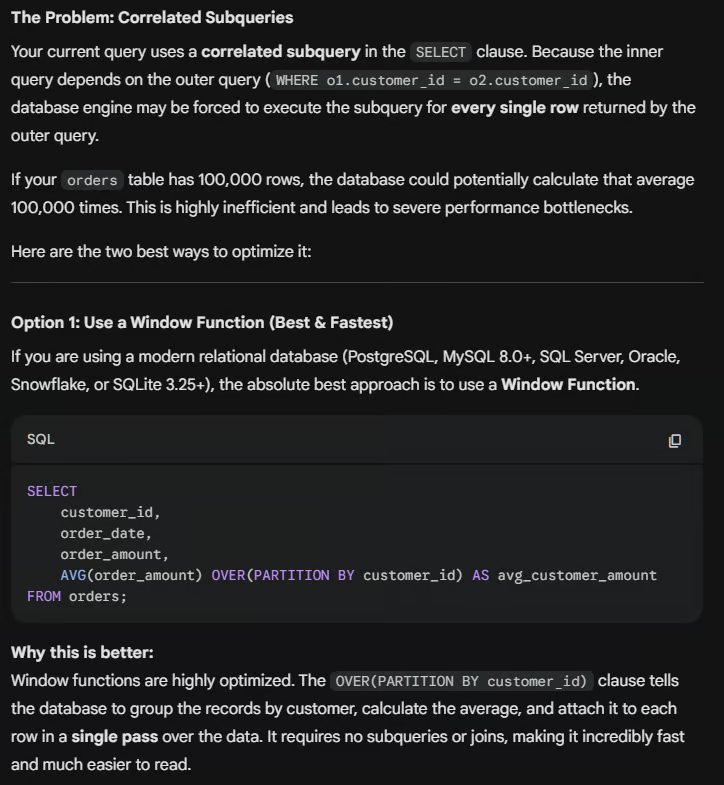
Quando essa consulta é passada ao Gemini 3 Deep Think, o modelo reconhece a ineficiência. Ele deduz que fazer o parsing da tabela várias vezes sai caro e sugere uma abordagem mais performática usando funções de janela:
Cientistas de dados precisam frequentemente interpretar dados experimentais avançados. O Deep Think vai bem no rigor científico e matemático, orientando você a usar testes estatísticos adequados em R ao lidar com distribuições assimétricas ou outliers em um data frame. Por exemplo, considere os seguintes dados de amostra:
# Define control and test group data with an outlier
control_group <- c(12, 15, 14, 19, 200)
test_group <- c(18, 22, 24, 25, 29)
O Gemini 3 Deep Think fornece o teste estatístico apropriado e o raciocínio por trás da escolha. 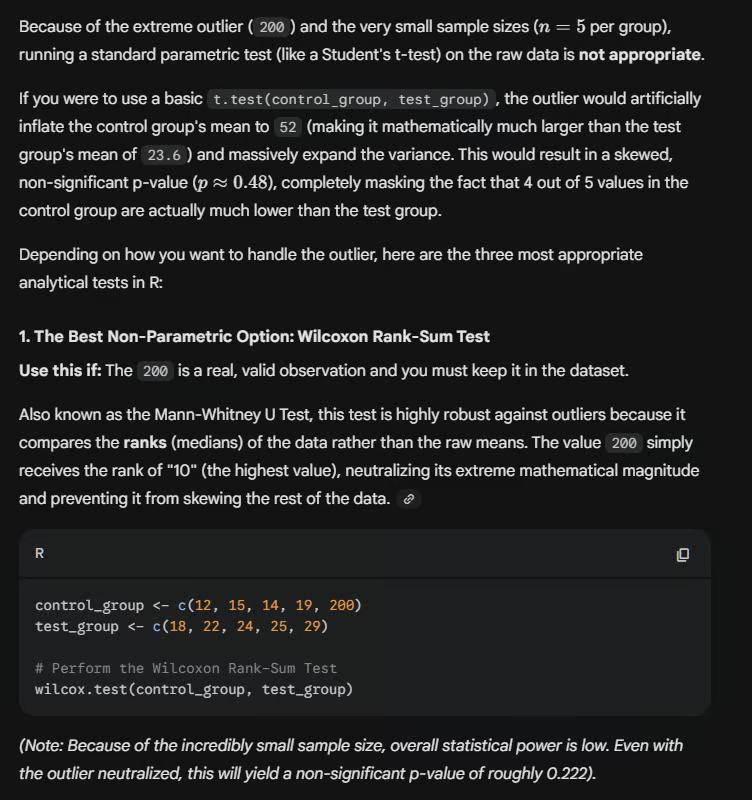
Algo importante a notar em todos esses problemas é que nem sempre há uma única resposta definitiva. Pode haver várias maneiras de otimizar uma consulta SQL, corrigir um alerta em Python ou analisar seus dados. O Deep Think é capaz de iterar sobre múltiplas versões e entregar o que considera a solução mais bem pensada.
Ao comparar o Gemini 3 Deep Think com o GPT-5.2 Thinking, estamos falando dos dois líderes em “Slow AI”. Ambos os modelos compartilham uma filosofia arquitetural central: utilizam computação estendida em tempo de inferência para gerar cadeias de raciocínio ocultas.
Esse recurso permite que se autocorrijam, deliberem e iterem sobre problemas, matemática avançada e código complexo antes de fornecer a saída final. O GPT-5.2 Thinking tem uma leve vantagem em alguns benchmarks de inteligência fluida e em performance, mas os dois são bastante comparáveis.
A escolha depende muito das demandas específicas do seu projeto. O Gemini 3 Deep Think consegue lidar com grandes volumes de contexto. Com sua janela de 1M de tokens, é a melhor opção para raciocinar sobre bases de código enormes ou centenas de artigos científicos de uma vez. Além disso, oferece integração nativa e fluida com serviços do Google Cloud como BigQuery e Vertex AI, o que o torna um encaixe natural para infraestrutura intensiva em dados.
Por outro lado, o GPT-5.2 Thinking, especialmente no modo xHigh effort, atualmente leva vantagem em “inteligência fluida” e lógica de precisão. Continua sendo a referência para raciocínio abstrato e design de algoritmos complexos, integrando-se ao ecossistema corporativo em torno da OpenAI API.
Enquanto o Gemini brilha em pesquisa ampla e multimodal, o modo xHigh do GPT-5.2 é feito para trabalho analítico.
|
Gemini Deep Think |
Chat GPT-5.2 Thinking |
|
|
Janela de contexto |
1M tokens |
196k (depende do plano) |
|
Pontuação ARC-AGI-1 |
87,5% |
90,5% |
|
Pontuação ARC-AGI-2 |
45,1% |
54,2% |
|
Custo/tarefa |
US$ 44,26 (acesso seletivo) |
US$ 11,65 |
|
Integração |
Ecossistema Google Cloud |
OpenAI Enterprise |
O Gemini 3 Deep Think representa uma virada na forma como pensamos a IA. Em vez de focar em respostas rápidas e volume de saída, o Deep Think permite que o modelo considere opções, percorra sua própria lógica e construa uma solução mais rigorosa. É uma forma de interagir com a IA que soa mais bem pensada e orgânica.
Seja lidando com problemas de dados como os que vimos acima ou com outros quebra-cabeças complexos, o Deep Think mostra o que a IA é capaz de fazer quando deixamos ela pensar. Embora não seja tão rápida quanto um humano, ela trabalha de forma minuciosa e completa. À medida que a IA evolui, veremos mais variações desse tipo de ferramenta: algumas feitas para alto volume e velocidade, outras para um trabalho mais lento e metódico.
Acredito que, num futuro próximo, ferramentas que “pensam” se tornarão o padrão para fluxos de trabalho técnicos. Para sair na frente, recomendo que você encontre maneiras de testar esses modelos e veja como eles se comportam de forma diferente da interface de chat de IA tradicional.
Para continuar fortalecendo seus fundamentos, vale explorar a vasta biblioteca de recursos da DataCamp para ampliar seu conhecimento!
Principais cursos da DataCamp
Curso
Curso
Curso
blog
Javier Canales Luna
9 min
blog
Hesam Sheikh Hassani
15 min
blog
Matt Crabtree
11 min
blog
Adel Nehme
15 min
Tutorial
Moez Ali
11 min
Tutorial
Dimitri Didmanidze
8 min