
Kurs
Introduction to Google Workspace with Gemini
30 Min.
2.7K
Es ist inzwischen klar, dass wir die Zeiten hinter uns gelassen haben, in denen KI nur ein aufgehübschter Chatbot war, der schnelle, vorhersehbare Antworten liefert. Die heutigen Spitzenmodelle können schlussfolgern und Probleme mit überraschend menschlicher Tiefe angehen. Da Daten in so vielen Berufen im Zentrum stehen, geht es nicht mehr darum, die eine „richtige“ Antwort zu finden. Es geht darum, mit unordentlichen Datensätzen zu arbeiten, schwer greifbare Probleme aufzuspüren und Systeme zu bauen, die unter Druck nicht einknicken. Gemini 3 Deep Think glänzt in all diesen Disziplinen.
In diesem Artikel zeige ich, was dieses spezialisierte Reasoning-Modell einzigartig macht und wie du darauf zugreifst. Wichtiger noch: Ich zeige dir, wie du damit deine Produktivität steigerst und echte Sicherheit in deinen Python-, SQL- und R-Workflows aufbaust.
Gemini 3 Deep Think ist ein spezialisierter Reasoning-Modus, der die Grenzen von Googles Gemini-Modell erweitert. Während klassische Chatmodelle beim schnellen Abrufen von Fakten oder Zusammenfassen von Texten brillieren, ist Deep Think für Aufgaben konzipiert, bei denen es nicht sofort eine eindeutig richtige Lösung gibt. Es ist darauf ausgelegt, Probleme eher wie ein Mensch zu durchdenken und mehr Optionen zu erwägen als nur die wahrscheinlichste.
Aufbauend auf den Grundlagen in unserer Übersicht zu Gemini 3 und dem jüngsten Update auf Gemini 3.1 fokussiert Deep Think auf algorithmische Strenge und mathematische Präzision. Das Modell verhält sich dadurch weniger wie ein Autovervollständigungs-Tool und eher wie ein Mensch, der ein Problem logisch durchdenkt, subtile Schwachstellen erkennt und alternative Coding-Strategien prüft, bevor es eine finale Antwort liefert.
Google hat dieses fortgeschrittene Reasoning-Modell primär in seine Web-App integriert, stellt aber ausgewählten API-Zugang bereit, damit Entwicklerinnen, Entwickler und Forschende es nahtlos übernehmen können:
Anders als Standardmodelle, die Antworten Token für Token aufgrund unmittelbarer Wahrscheinlichkeiten erzeugen, nutzt Gemini 3 Deep Think Test-Time-Compute.
Wenn ich eine komplexe Frage stelle, hält das Modell effektiv inne, um zu „denken“. Wichtig ist zu verstehen: Es nimmt sich bewusst Zeit, Optionen sorgfältig abzuwägen. Das ist nicht die typische Chatbot-Geschwindigkeit. Das Modell erkundet verschiedene Möglichkeiten und braucht mitunter etwas länger für die Antwort – daher der Spitzname „Slow AI“.
Unter der Haube prüft die Architektur mehrere unabhängige Strategien. Sie erzeugt Hypothesen, testet sie gegen deinen Kontext und kritisiert die eigenen Lösungsvorschläge.
Wenn du es beispielsweise bittest, eine interaktive Datensimulation zu strukturieren, bewertet es potenzielle Fallstricke in Echtzeit.
Dieses Feature harmoniert hervorragend mit fortgeschrittenen Umgebungs-Frameworks wie Google ADK und ermöglicht es der Künstlichen Intelligenz, komplexe, mehrstufige Aufgaben nahezu ohne Halluzinationen zu orchestrieren.
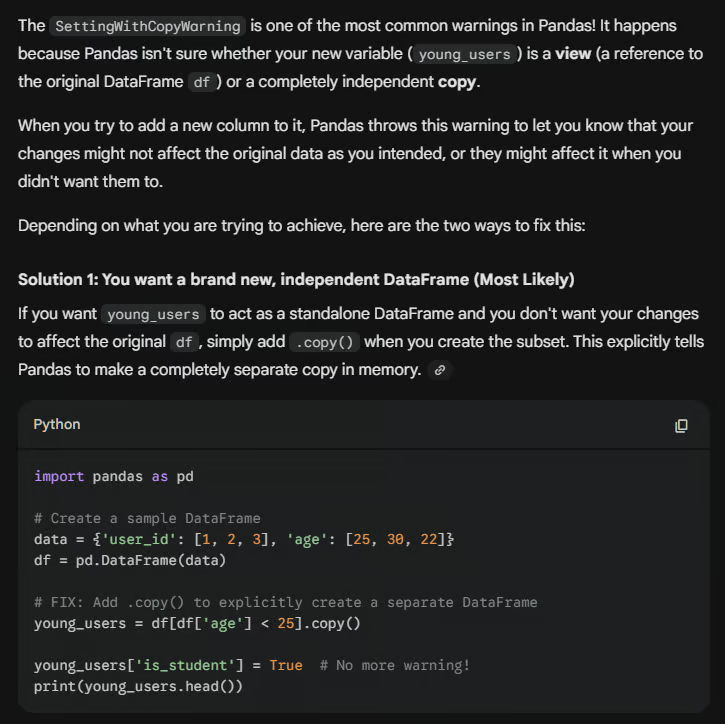
Beim Bearbeiten von Daten in Python stoße ich häufig auf knifflige Fehler. Ein Klassiker ist die SettingWithCopyWarning im pandas-Paket. Schauen wir uns an, wie Gemini 3 Deep Think an das Debuggen herangeht.
Wenn du den folgenden fehleranfälligen Code bereitstellst:
import pandas as pd
# Create a sample DataFrame
data = {'user_id': [1, 2, 3], 'age': [25, 30, 22]}
df = pd.DataFrame(data)
# mistake: Modifying a slice of a DataFrame
young_users = df[df['age'] < 25]
young_users['is_student'] = True  # This triggers a SettingWithCopyWarning!
print(young_users.head())
Statt nur eine Korrektur zu posten, erklärt dir Gemini 3 Deep Think, warum die Warnung auftritt, und liefert mehrere Lösungswege. Unten siehst du, wie Gemini 3 Deep Think auf die Warnung im obigen Code reagiert und .copy() als Lösung vorschlägt.
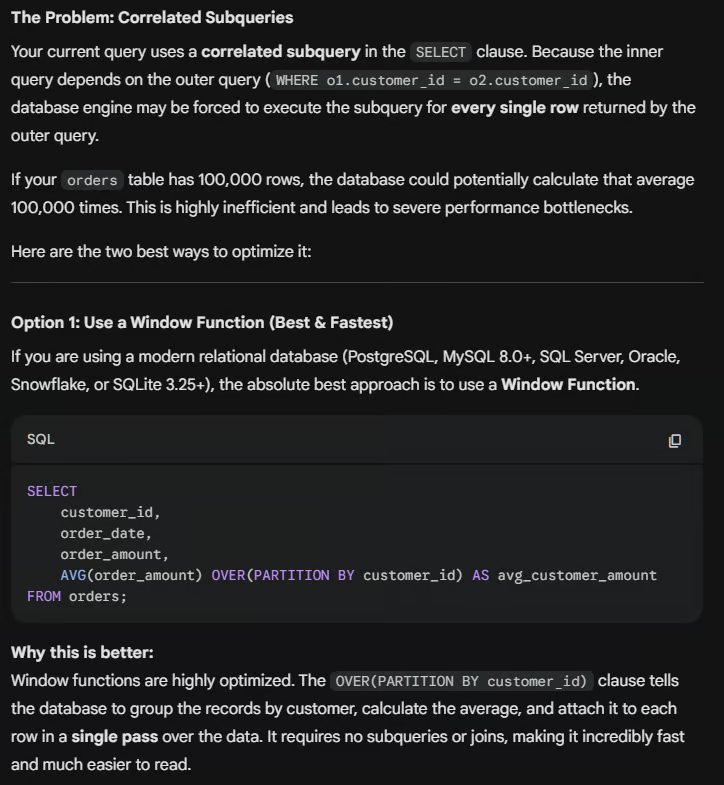
Eine SQL-Abfrage zu schreiben, die die richtigen Daten liefert, ist gut – noch besser ist, wenn sie effizient läuft. Ein häufiges Problem ist die starke Abhängigkeit von korrelierten Unterabfragen, die große Datensätze massiv ausbremsen können.
Stell dir vor, du schreibst diese Abfrage, um den durchschnittlichen Bestellwert pro Kunde zu finden:
-- Junior approach: Using a slow dependent subquery
SELECT
    customer_id,
    order_date,
    order_amount,
    (SELECT AVG(order_amount)
     FROM orders AS o2
     WHERE o1.customer_id = o2.customer_id) AS avg_customer_amount
FROM orders AS o1;
Gibst du sie an Gemini 3 Deep Think weiter, erkennt das Modell die Ineffizienz. Es folgert, dass das mehrfache Parsen der Tabelle teuer ist, und schlägt einen performanteren Ansatz mit Window-Funktionen vor:
Data Scientists müssen häufig fortgeschrittene experimentelle Daten interpretieren. Deep Think überzeugt durch wissenschaftliche und mathematische Strenge und leitet dich in R zu passenden statistischen Tests, etwa bei schief verteilten Daten oder Ausreißern in einem Data Frame. Angenommen, du hast die folgenden Beispieldaten:
# Define control and test group data with an outlier
control_group <- c(12, 15, 14, 19, 200)
test_group <- c(18, 22, 24, 25, 29)
Gemini 3 Deep Think liefert den passenden statistischen Test inklusive Begründung. 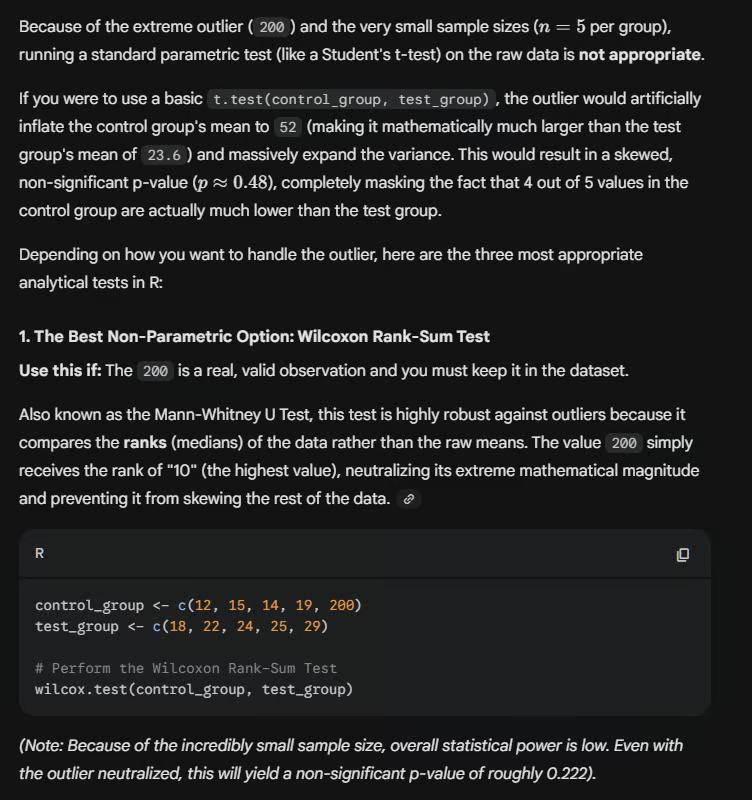
Wichtig ist bei all diesen Problemen: Es gibt nicht immer die eine eindeutige Lösung. Es kann mehrere Wege geben, eine SQL-Abfrage zu optimieren, eine Python-Warnung zu beheben oder deine Daten zu analysieren. Deep Think ist in der Lage, mehrere Varianten zu iterieren und dir die aus seiner Sicht am besten durchdachte Lösung vorzulegen.
Vergleichst du Gemini 3 Deep Think mit GPT-5.2 Thinking, siehst du zwei Vorreiter der „Slow AI“. Beide Modelle folgen einer ähnlichen Architektur-Philosophie: Sie nutzen erweitertes Test-Time-Compute, um verborgene Gedankenketten zu erzeugen.
Diese Fähigkeit ermöglicht es ihnen, sich selbst zu korrigieren, abzuwägen und zu iterieren – bei Aufgaben, fortgeschrittener Mathematik und komplexem Code –, bevor sie ein finales Ergebnis liefern. GPT-5.2 Thinking hat bei einigen Liquid-Intelligence-Benchmarks und in der Performance einen leichten Vorsprung, insgesamt sind beide aber sehr gut vergleichbar.
Die Wahl hängt stark von den Anforderungen deines Projekts ab. Gemini 3 Deep Think kann sehr große Kontextmengen verarbeiten. Mit seinem 1-Millionen-Token-Fenster ist es die beste Wahl, um über riesige Codebasen oder hunderte Forschungsarbeiten hinweg zu schlussfolgern. Zudem bietet es nahtlose, native Integration mit Google-Cloud-Services wie BigQuery und Vertex AI und passt damit ideal zu datenintensiver Infrastruktur.
Umgekehrt hat GPT-5.2 Thinking – insbesondere im xHigh-Effort-Modus – derzeit die Nase vorn bei „flüssiger Intelligenz“ und präziser Logik. Es bleibt die Messlatte für abstraktes Reasoning und komplexes Algorithmendesign und fügt sich in das Enterprise-Ökosystem rund um die OpenAI-API ein.
Während Gemini bei breiter, multimodaler Recherche punktet, ist der xHigh-Modus von GPT-5.2 für analytische Arbeit ausgelegt.
|
Gemini Deep Think |
Chat GPT-5.2 Thinking |
|
|
Kontextfenster |
1 Mio. Tokens |
196k (abhängig vom Tier) |
|
ARC-AGI-1-Score |
87,5% |
90,5% |
|
ARC-AGI-2-Score |
45,1% |
54,2% |
|
Kosten/Aufgabe |
$44,26 (selektiver Zugang) |
$11,65 |
|
Integration |
Google-Cloud-Ökosystem |
OpenAI Enterprise |
Gemini 3 Deep Think verändert, wie wir über KI denken. Statt auf schnelle Antworten und hohe Ausgabemengen zu setzen, lässt Deep Think das Modell Optionen abwägen, die eigene Logik durchgehen und eine fundiertere Lösung entwickeln. So entsteht eine Interaktion mit KI, die durchdachter und organischer wirkt.
Ob bei Datenproblemen wie oben oder anderen komplexen Aufgaben: Deep Think zeigt, wozu KI fähig ist, wenn wir sie denken lassen. Es ist zwar nicht so schnell wie der Mensch, arbeitet dafür gründlich und umfassend. Mit dem Fortschritt der KI werden wir mehr spezialisierte Tools sehen: manche für schnelle, hochvolumige Aufgaben, andere für langsameres, methodisches Arbeiten.
Ich bin überzeugt, dass Tools, die „denken“, bald zum Standard in technischen Workflows werden. Um die Nase vorn zu behalten, probiere diese Modelle aus und erlebe, wie anders sie sich im Vergleich zu einer klassischen KI-Chat-Oberfläche verhalten.
Wenn du deine Grundlagen weiter ausbauen willst, wirf einen Blick in die umfangreiche Bibliothek von DataCamp und stärke dein Wissen!
Top-DataCamp-Kurse
Kurs
Kurs
Kurs
Blog
Hesam Sheikh Hassani
15 Min.
Blog
Blog
Zoumana Keita
15 Min.
Tutorial
Matt Crabtree
5 Min.
Tutorial
Laiba Siddiqui
6 Min.
Tutorial
Kurtis Pykes
15 Min.