
Course
Retrieval Augmented Generation (RAG) with LangChain
3 hr
20.5K
Traditional RAG systems retrieve document chunks based on semantic similarity, which works well for straightforward questions. But when queries require synthesizing information scattered across multiple documents or reasoning through connected concepts, vector search falls short. The system retrieves fragments without understanding how they relate to each other.
GraphRAG doesn't treat documents as isolated chunks. It builds a knowledge graph that captures entities and their relationships. This structure allows the system to traverse connections and answer questions that require pulling together information from multiple sources. It's one of several advanced RAG techniques that address the limitations of basic retrieval.
GraphRAG is a retrieval-augmented generation technique that represents documents as knowledge graphs instead of vector embeddings. Rather than breaking text into chunks that get searched independently, GraphRAG extracts entities (think like people, organizations, concepts, events) and the relationships between them, organizing this information into an interconnected graph structure.
The GraphRag system then applies community detection algorithms to identify clusters of related entities and generates summaries for these clusters at hierarchical levels. When a query arrives, GraphRAG can either traverse specific entity neighborhoods for targeted questions or run map-reduce operations across community summaries for corpus-wide synthesis.
Let's now look more closely into the mechanics. It will help us understand why graph-based retrieval came about and what gap it fills.
The core issue with traditional RAG isn't the retrieval or the generation, it's the representation. Documents get split into chunks, and each chunk becomes an isolated vector floating in embedding space. Whatever structure existed in the original - the headings, the narrative flow, which paragraph referred to what - gets flattened away.
This creates problems for questions that need combining information. Ask "What are the main themes across these documents?" and vector search returns chunks containing the word "themes" or related terms. But finding relevant fragments isn't the same as understanding patterns across a corpus. The system has no way to pull info together at scale because it only sees individual pieces, never the whole picture.
Multi-hop reasoning hits a similar wall. Say the answer to a question depends on connecting concept A to concept B to concept C. Traditional RAG retrieves each chunk independently based on similarity to the query. If B isn't close to the question, it might not get retrieved at all, breaking the chain. The system finds endpoints but misses the path between them.
There's also a retrieval-context mismatch to consider. You can retrieve twenty highly relevant chunks, but stuffing them all into a prompt doesn't guarantee the LLM will use them well. The "lost in the middle" paper shows that LLMs tend to focus on information at the beginning and end of their context window, often overlooking what's buried in between. More retrieval doesn't automatically mean better answers.
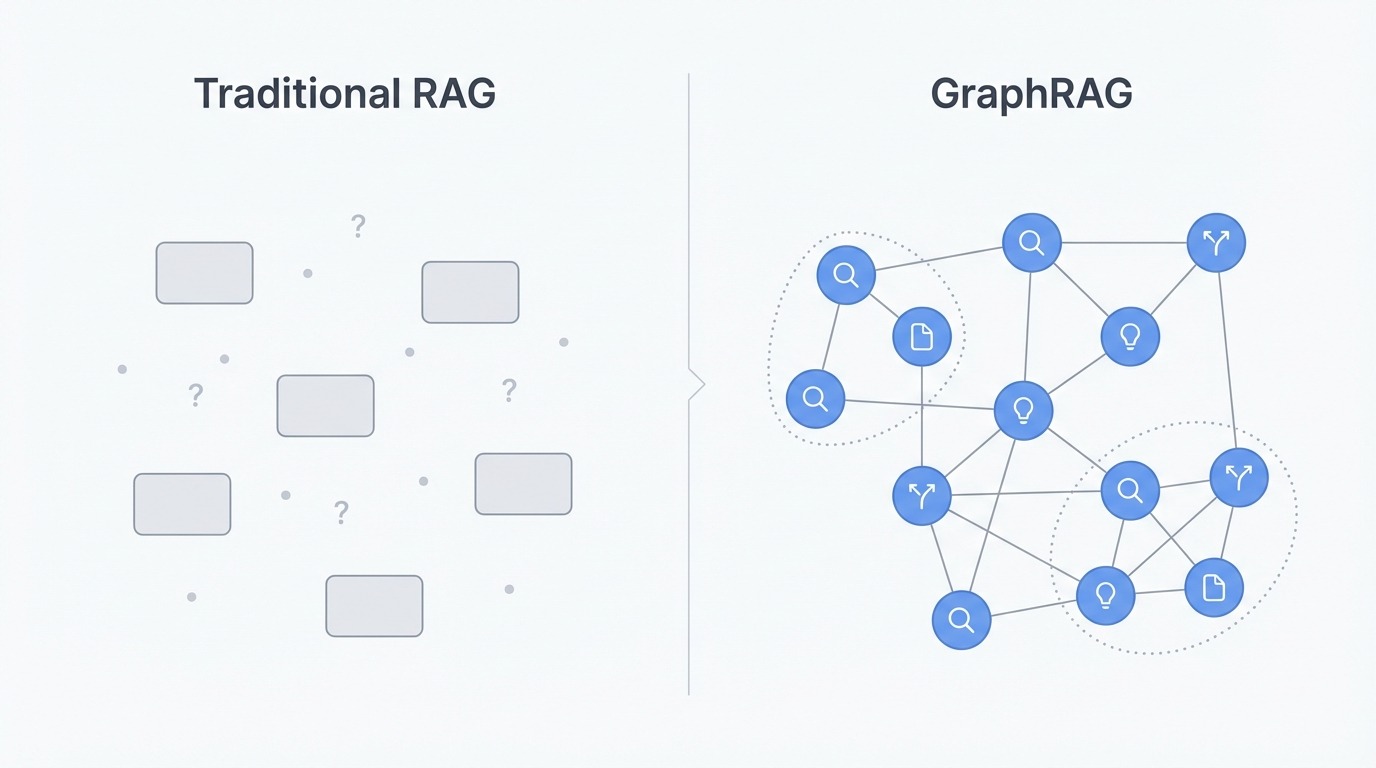
Comparison of traditional RAG versus GraphRAG. Image by Author.
GraphRAG gets around these limitations by changing the representation entirely. Instead of chunks, it builds a knowledge graph where entities become nodes and relationships become edges. People, organizations, locations, concepts, and events get extracted from the source documents along with how they connect to each other. This keeps structure that chunking throws away.
With the graph in place, the system applies community detection (typically the Leiden algorithm) to cluster related entities into groups. These clusters form at multiple levels, some tight and specific, others broad and thematic. The groupings come from actual connections in the data rather than document boundaries or chunk sizes.
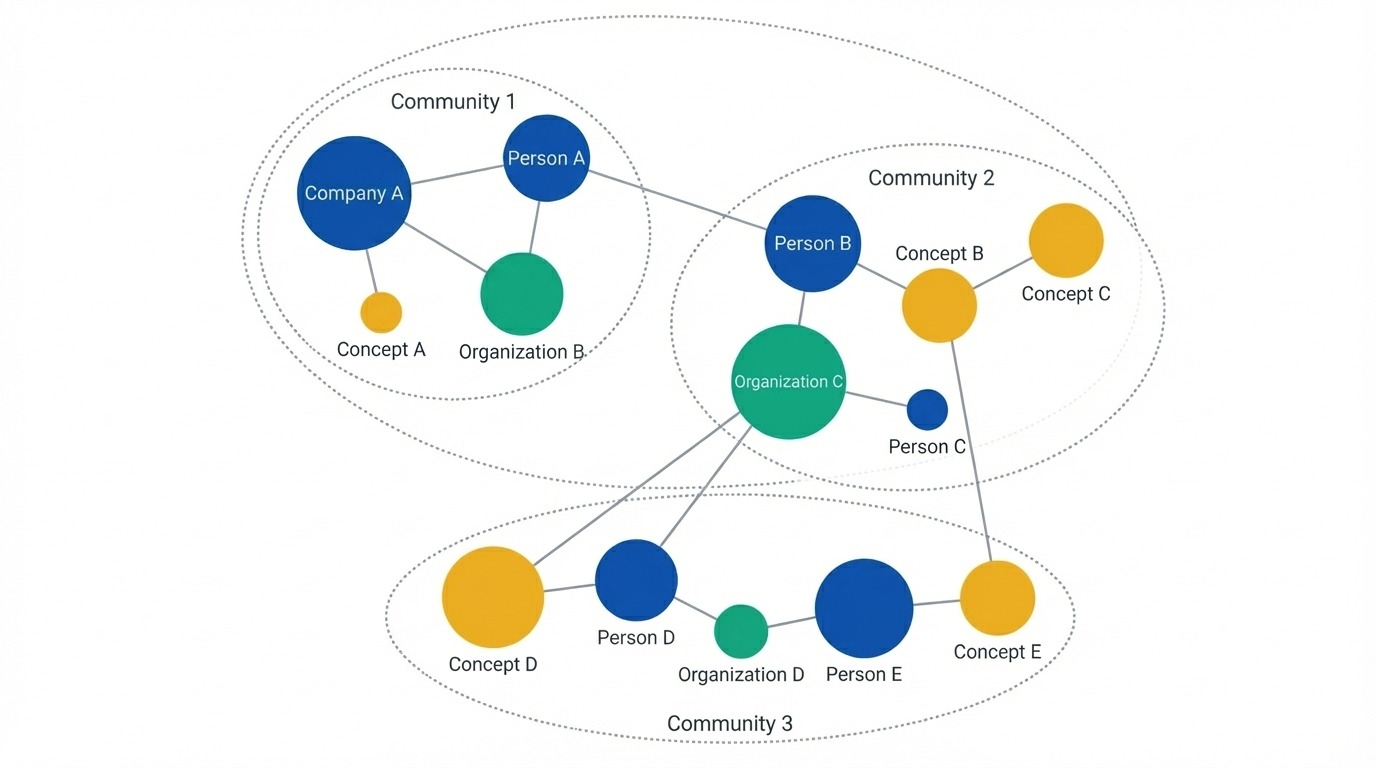
Knowledge graph showing entities as nodes. Image by Author.
For global questions, GraphRAG pre-generates summaries for each community before any user query arrives. When someone asks "What are the main themes?", the system doesn't search for matching text. Instead, it runs a map-reduce operation: each community summary produces a partial answer based on its slice of the graph, then all the partials get combined into a final response. This lets GraphRAG reason over an entire corpus without retrieving thousands of chunks.
For multi-hop questions, graph traversal replaces similarity search. The system can walk edges from entity to entity, following conceptual chains that vector search would miss. If A connects to B connects to C, the graph knows that path exists and can follow it.
GraphRAG pays off when your questions need corpus-wide understanding. If users frequently ask about themes, patterns, or summaries across large document collections, graph-based retrieval will outperform chunking approaches. Same goes for domains with rich entity relationships, think company org charts, research citation networks, or legal case histories where following connections matters.
For simple factual lookups ("What is X's phone number?") or small document sets, traditional RAG works fine and costs less to run. GraphRAG adds overhead in both indexing time and LLM calls, so the payoff needs to justify the investment. Start with standard RAG and move to GraphRAG when you hit its limitations.
The table below summarizes the tradeoffs. Traditional RAG wins on simplicity and cost, while GraphRAG pulls ahead when questions require synthesis or connected reasoning.
|
Aspect |
Traditional RAG |
GraphRAG |
|
Data representation |
Isolated text chunks as vectors |
Knowledge graph with entities and relationships |
|
Structure preservation |
Lost during chunking |
Maintained through graph edges |
|
Global queries |
Poor (retrieves fragments, can't synthesize) |
Strong (map-reduce over community summaries) |
|
Multi-hop reasoning |
Limited (independent chunk retrieval) |
Native (graph traversal follows connections) |
|
Indexing cost |
Low (embedding only) |
High (LLM extraction + embedding + clustering) |
|
Query cost |
Low |
Varies (local is cheap, global is expensive) |
|
Best for |
Factual lookups, small corpora |
Thematic questions, connected domains |
The pipeline has two phases: indexing builds the graph, querying uses it.
Indexing transforms raw documents into a knowledge structure through five steps:
The extraction step is where most LLM calls happen. Each chunk gets processed with a prompt asking the model to identify entities and relationships. A chunk mentioning "OpenAI released GPT-4" yields entities for both, plus a relationship linking them. The same pass captures the relationship type. Since every chunk requires an LLM call, indexing is the expensive part of the pipeline. Query time is comparatively cheap because the heavy work already happened.
Graph construction handles entity resolution, which gets tricky. "OpenAI," "Open AI," and "the company" might all refer to the same entity across different chunks. The system merges these duplicates to create a clean graph.
Community detection applies the Leiden algorithm to find natural groupings at multiple levels. Level 0 might contain tight clusters of 5-10 related entities. Higher levels group those into broader themes. A corpus about AI companies could have level-0 communities for individual companies, level-1 for "AI labs" and "chip manufacturers," and level-2 capturing the whole tech ecosystem. Each community then gets an LLM-generated summary describing what that cluster represents. These summaries are pre-computed before any user query arrives.
The end result isn't a retrieval index. It's a structured representation: graph plus summaries, ready to be queried different ways.
With the graph built, queries route to different retrieval strategies:
The retrieved content (summaries, entities, relationships, source text) gets assembled into a prompt, and the LLM generates the final answer. Each strategy serves different question types, which we'll break down next.
GraphRAG offers three distinct retrieval strategies, each suited to different question types. Picking the right one depends on whether you need broad synthesis, specific entity information, or something in between.
Global search answers questions that require understanding an entire corpus. Questions like "What are the main themes in this document collection?" or "What patterns emerge across these reports?" need information aggregated from everywhere, not retrieved from a few matching chunks.
The mechanism is map-reduce over community summaries. In the map phase, each community summary gets processed independently: the system asks an LLM to extract relevant points and rate their importance. In the reduce phase, the highest-rated points from all communities get aggregated into a final prompt, and the LLM synthesizes them into a coherent response.
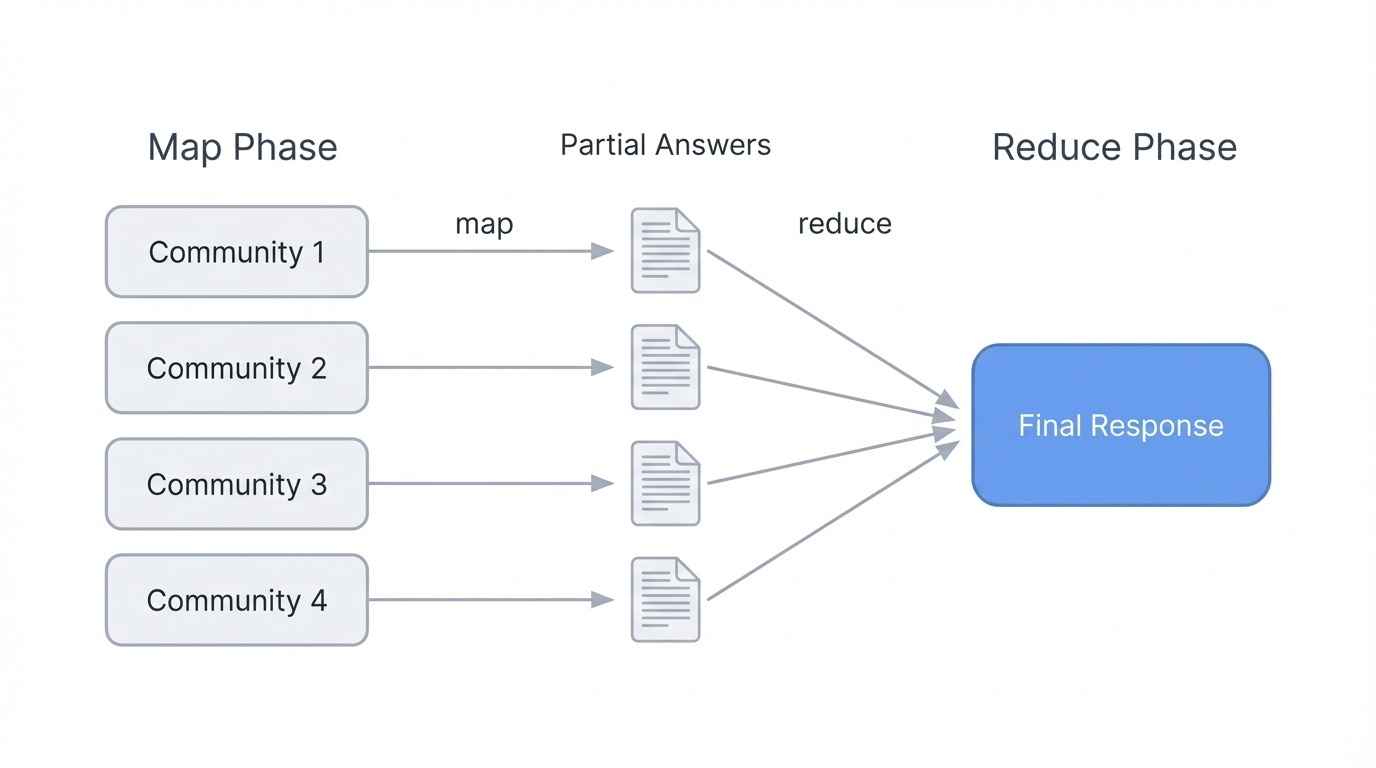
GraphRAG global search using map-reduce. Image by Author
This works because community summaries already capture what each cluster of entities is about. The system doesn't need to retrieve thousands of chunks. Instead, it reasons over pre-computed descriptions that represent the graph's structure at whatever hierarchy level you choose. Lower levels (smaller, tighter communities) give more detailed answers but cost more LLM calls. Higher levels (broader groupings) run faster but may miss nuance.
Global search is computationally heavier than the other modes since it processes all communities. Use it when questions genuinely need corpus-wide understanding rather than specific facts.
Local search handles entity-specific questions. "What are the healing properties of chamomile?" or "What did Acme Corp announce about their Q3 earnings?" target particular entities and the information connected to them.
The retrieval process starts by identifying which entities in the graph relate to the query. These entities become entry points for traversal. From each starting node, the system pulls connected entities, relationships between them, any associated claims or facts, and the community reports those entities belong to. It also retrieves the original text chunks linked to those entities, giving the LLM both structured graph data and source text.
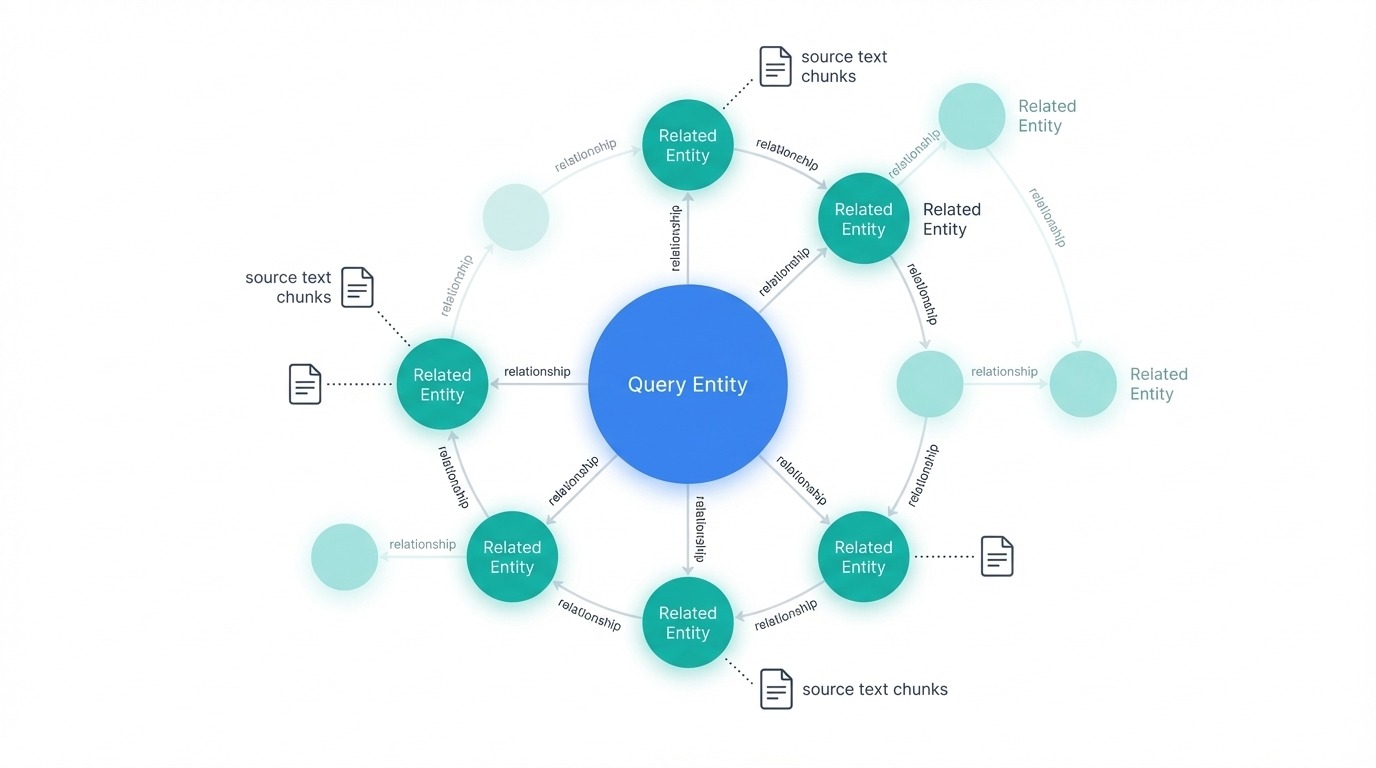
GraphRAG local search with related nodes. Image by Author
All this candidate information gets ranked and filtered to fit the context window. The LLM then generates an answer grounded in the retrieved content. Because local search focuses on a neighborhood of the graph rather than the whole thing, it runs faster and cheaper than global search.
Choose local search when questions ask about specific things, people, organizations, or concepts mentioned in your documents.
DRIFT (Dynamic Reasoning and Inference with Flexible Traversal) sits between global and local. It handles complex queries that need both broad context and specific detail.
The process has three phases. First, the primer phase compares the query against the most semantically relevant community summaries and generates an initial answer along with follow-up questions. Second, the follow-up phase takes those questions and applies local search to drill into specific areas, producing intermediate answers and more targeted follow-ups. Third, the output phase combines everything into ranked results that balance global insights with local specifics.
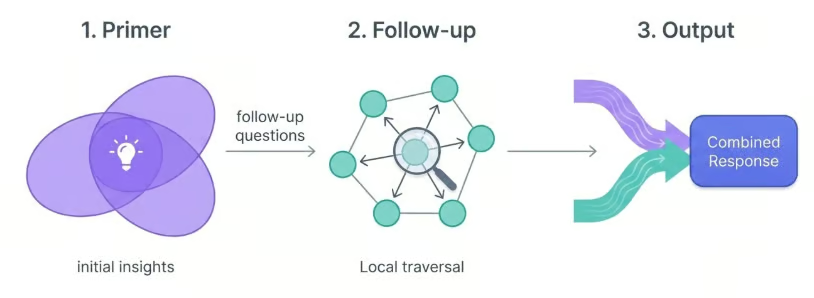
GraphRAG DRIFT search three-phase process. Image by Author.
What makes DRIFT useful is how it expands the search starting point. By beginning with community-level context, it retrieves a wider variety of facts than pure local search would. But by refining through local traversal, it avoids the cost of full global search.
Use DRIFT for questions like "How do the challenges facing Company X compare to broader industry trends?" where you need both specific entity information and thematic context.
|
Aspect |
Global |
Local |
DRIFT |
|
Best for |
Corpus-wide themes and patterns |
Specific entity questions |
Complex queries needing both |
|
Mechanism |
Map-reduce over community summaries |
Entity neighborhood traversal |
Primer → follow-up → output phases |
|
Speed |
Slowest (processes all communities) |
Fastest (focused traversal) |
Medium (starts broad, narrows down) |
|
Cost |
Highest |
Lowest |
Medium |
|
Example query |
"What are the main themes?" |
"What did Company X announce?" |
"How does X compare to industry trends?" |
GraphRAG also provides a basic vector search as a fallback for simple queries where graph traversal would be overkill. But for most use cases, choosing between global, local, and DRIFT covers what you need.
This section walks through building a GraphRAG system using Microsoft's reference implementation. We'll work with a small corpus of Paul Graham essays about startups to keep the examples runnable and the costs reasonable. If you're new to combining knowledge graphs with retrieval systems, the knowledge graph RAG tutorial covers the foundational concepts.
Create a project directory and initialize it with uv, then install the graphrag package. The library has substantial dependencies (237 packages including PyTorch), so expect installation to take around five minutes:
mkdir ragtest && cd ragtest
 uv init
 uv add graphrag
 graphrag init --root .
This generates the project structure:
ragtest/
 ├── .env                	# API key configuration
 ├── settings.yaml       	# Pipeline settings
 ├── prompts/            	# LLM prompt templates
 │   ├── extract_graph.txt
 │   ├── summarize_descriptions.txt
 │   └── ...
 └── input/              	# Your source documents go here
The prompts/ directory contains the templates GraphRAG uses for entity extraction and summarization. You can customize these for domain-specific needs, though the defaults work well for general text.
Add text files to the input/ directory. For this tutorial, we'll use three Paul Graham essays about startups. His website uses minimal HTML with content wrapped in <font> tags, so a simple parser extracts the text cleanly:
import urllib.request
 from html.parser import HTMLParser

 class TextExtractor(HTMLParser):
 	def __init__(self):
     	super().__init__()
     	self.text = []
     	self.in_font = False

 	def handle_starttag(self, tag, attrs):
     	if tag == 'font':
         	self.in_font = True

 	def handle_endtag(self, tag):
     	if tag == 'font':
         	self.in_font = False

 	def handle_data(self, data):
     	if self.in_font:
         	self.text.append(data)

 essays = {
 	"startupideas": "http://paulgraham.com/startupideas.html",
     "do_things_that_dont_scale": "http://paulgraham.com/ds.html",
 	"startup_growth": "http://paulgraham.com/growth.html"
 }

 for name, url in essays.items():
 	with urllib.request.urlopen(url) as response:
     	html = response.read().decode('utf-8')
 	parser = TextExtractor()
 	parser.feed(html)
 	text = ' '.join(parser.text)
 	with open(f"input/{name}.txt", "w") as f:
     	f.write(text)
 	print(f"Saved {name}.txt ({len(text.split())} words)")
Saved startupideas.txt (3000 words)
Saved do_things_that_dont_scale.txt (3000 words)
Saved startup_growth.txt (3000 words)About 9,000 words total across three thematically connected essays, enough to see meaningful entity relationships without racking up large API costs.
Edit .env to add your OpenAI API key:
GRAPHRAG_API_KEY=your-openai-api-key-hereThe default settings.yaml works out of the box, but you may want to adjust the model. The file uses gpt-4o-mini by default, which balances cost and quality. See the full configuration reference for all available options:
models:
   default_chat_model:
 	type: openai_chat
 	auth_type: api_key
 	api_key: ${GRAPHRAG_API_KEY}
 	model: gpt-4o-mini
 	model_supports_json: true
 	concurrent_requests: 25

   default_embedding_model:
 	type: openai_embedding
 	auth_type: api_key
 	api_key: ${GRAPHRAG_API_KEY}
 	model: text-embedding-3-small
Other notable settings in the config:
chunks:
   size: 1200  	# Tokens per chunk
   overlap: 100	# Overlap between chunks

 extract_graph:
   entity_types: [organization, person, geo, event]
   max_gleanings: 1	# Additional extraction passes

 cluster_graph:
max_cluster_size: 10Build the knowledge graph with:
graphrag index --root .The pipeline processes documents through entity extraction, graph construction, and community detection:
├── Loading Input (InputFileType.text) - 3 files loaded (0 filtered) ───
 ├── create_base_text_units
 ├── create_final_documents
 ├── extract_graph
 ├── finalize_graph
 ├── create_final_entities
 ├── create_final_relationships
 ├── create_final_text_units
 ├── create_base_entity_graph
 ├── create_communities
 ├── create_final_communities
 ├── create_community_reports
 ├── generate_text_embeddings
 ⠋ GraphRAG Indexer
 ├── All workflows completed successfully
Each step builds on the previous one. The extract_graph phase makes the bulk of the LLM calls, while create_communities applies the Leiden algorithm to cluster related entities.
With our three essays, indexing completes in about two minutes. You can inspect the results by loading the parquet files or checking the row counts:
The output lives in output/ as parquet files:
output/
 ├── documents.parquet
 ├── entities.parquet
 ├── relationships.parquet
 ├── text_units.parquet
 ├── communities.parquet
 ├── community_reports.parquet
 └── lancedb/      	# Vector embeddings
The parquet format keeps everything portable. You can load these files with pandas to inspect entities, browse relationships, or debug extraction issues. The entire project directory is small enough to version control (under 10MB for this corpus), just exclude the .env file containing your API key.
GraphRAG provides three query modes. Let's try each one.
Global search for thematic questions:
graphrag query \
 	--root . \
 	--method global \
 	--query "What are the main themes and lessons about startups in these essays?"
SUCCESS: Global Search Response:
The essays present several interconnected themes about startups:
**Growth as the defining characteristic**: A startup isn't just a new company—it's
specifically designed for rapid growth. This growth orientation shapes everything
from idea selection to daily decision-making. The essays suggest using weekly
growth rate as a compass for all strategic choices.
**The power of doing unscalable things**: Counterintuitively, successful startups
often begin with manual, labor-intensive approaches. Stripe's founders would
physically set up new users on the spot. Airbnb's founders went door-to-door
recruiting hosts. These unscalable tactics bootstrap the initial user base.
**Ideas emerge from problems, not brainstorming**: The best startup ideas come
from founders solving their own problems or noticing gaps while "living in the
future." Deliberately trying to generate ideas tends to produce plausible-sounding
but ultimately weak concepts.
**User relationships matter early**: Early users provide irreplaceable feedback.
Founders should go beyond standard customer service to create exceptional
experiences, gathering insights that shape the product.The response synthesizes themes across all three essays, something that would require retrieving and processing many chunks with traditional RAG. Global search pulled from community summaries instead, giving a coherent high-level view.
Local search for entity-specific questions:
graphrag query \
 	--root . \
 	--method local \
 	--query "What role does Y Combinator play according to these essays?"
SUCCESS: Local Search Response:
Y Combinator functions as both an accelerator and a testing ground for startup
principles. According to the essays, YC provides:
**Funding and validation**: YC offers initial funding that lets founders focus
on building rather than fundraising. The program validates ideas through its
selection process.
**Growth measurement framework**: YC tracks startups by weekly growth rate,
with 5-7% weekly growth considered good and 10% exceptional. This metric-driven
approach forces founders to confront whether they're making real progress.
**Network effects**: B2B startups at YC gain immediate access to hundreds of
potential customers—other YC companies. Stripe leveraged this extensively in
its early days.
**Demo Day as forcing function**: The program's structure, culminating in Demo
Day presentations to investors, creates urgency that pushes founders to ship
and iterate quickly.Local search traversed the graph starting from the Y Combinator entity, pulling in connected concepts like growth metrics, Stripe, and Demo Day. The answer stays grounded in what the essays actually say about YC rather than general knowledge.
DRIFT search for questions needing both breadth and specificity:
graphrag query \
 	--root . \
 	--method drift \
 	--query "How do the essays describe the relationship between startup ideas and user problems?"
SUCCESS: Drift Search Response:
The essays establish a direct link between viable startup ideas and genuine user
problems through several mechanisms:
**Organic discovery over invention**: Rather than brainstorming ideas, founders
should notice problems they personally experience. Microsoft, Apple, Google, and
Facebook all started this way—founders building something they themselves needed.
**The "well" vs "shallow hole" distinction**: Good ideas serve a small number of
users who desperately need the solution (a narrow, deep well) rather than many
users with mild interest (a broad, shallow hole). Depth of need matters more
than breadth of appeal initially.
**Feedback loops as validation**: Engaging directly with early users reveals
whether the problem is real and the solution fits. This feedback shapes the
product more than any amount of planning.
**Problem-first, solution-second**: The essays warn against "sitcom startup
ideas"—concepts that sound plausible but don't address real pain points. A
social network for pet owners sounds reasonable but lacks urgent demand.DRIFT started broad with community-level context about startup philosophy, then drilled into specific examples like the well analogy and sitcom ideas. The result blends thematic insight with concrete details from the source text.
For production systems, use the Python API directly. The process has three parts: loading configuration, loading the indexed data, and running queries.
First, set up the configuration by loading environment variables and parsing the settings file:
import os
 import yaml
 from pathlib import Path
 from dotenv import load_dotenv
 from graphrag.config.create_graphrag_config import create_graphrag_config

 ROOT_DIR = Path(".")

 # Load environment variables and config
 load_dotenv(ROOT_DIR / ".env")
 with open(ROOT_DIR / "settings.yaml") as f:
 	yaml_content = f.read()
 yaml_content = os.path.expandvars(yaml_content)  # Expand ${VAR} references
 settings = yaml.safe_load(yaml_content)
 config = create_graphrag_config(values=settings, root_dir=str(ROOT_DIR))
Next, load all the indexed data from the parquet files. GraphRAG stores entities, relationships, communities, and text chunks separately:
import pandas as pd

 output_dir = ROOT_DIR / "output"
 entities = pd.read_parquet(output_dir / "entities.parquet")
 communities = pd.read_parquet(output_dir / "communities.parquet")
 community_reports = pd.read_parquet(output_dir / "community_reports.parquet")
 text_units = pd.read_parquet(output_dir / "text_units.parquet")
 relationships = pd.read_parquet(output_dir / "relationships.parquet")

 print(f"Loaded {len(entities)} entities, {len(relationships)} relationships")
Loaded 74 entities, 89 relationshipsFinally, run queries using the async API. The local_search function takes all the dataframes plus query parameters:
import asyncio
 from graphrag.api import local_search

 async def run_query(query: str):
 	response, context = await local_search(
     	config=config,
     	entities=entities,
     	communities=communities,
         community_reports=community_reports,
     	text_units=text_units,
     	relationships=relationships,
     	covariates=None,
     	community_level=2,
     	response_type="Multiple Paragraphs",
     	query=query,
 	)
 	return response

 query = "What advice do the essays give about finding startup ideas?"
 response = asyncio.run(run_query(query))
 print(response)
The essays provide several valuable insights into finding startup ideas:
Focus on Growth: A startup is designed to grow quickly. Founders should commit
to seeking ideas that can scale significantly, as this distinguishes startups
from ordinary businesses.
Identify Unmet Needs: Successful startups arise from recognizing problems that
need solving. Founders who can see different problems, particularly those
addressable through technology, are more likely to develop effective solutions.
Leverage Personal Insights: Many successful startups originate from the unique
insights of their founders, often stemming from personal experiences or
frustrations. This personal connection leads to more authentic solutions.
Explore Overlooked Markets: Founders should think outside the box and explore
markets that may be overlooked. Successful startups often emerge from ideas
that seem obvious to the founders but aren't yet recognized broadly.The Python API gives you full control over which data to load, which community level to query, and how to format responses. For applications requiring custom retrieval logic or integration with existing systems, this is the path to take.
Traditional RAG works fine until it doesn't. You'll know you've hit the wall when users ask about themes or patterns and get back a jumble of loosely related chunks instead of a coherent answer. That's the problem GraphRAG solves by trading chunks for a knowledge graph with pre-computed community summaries.
The cost is real though. Indexing burns through LLM calls, and global search isn't cheap either. For a small doc collection or straightforward lookups, stick with vector search.
But if your corpus has rich connections between entities and your users care about those connections, GraphRAG pays off. Pick your query type based on what you're asking: global for themes, local for specific entities, DRIFT when you need both. The implementation isn't complicated once you've run through it once, and the parquet output makes the whole thing easy to inspect and debug.
Learn with DataCamp
Course
Course
Course