Track
Python Programming Toolbox
13 hr
Python's map() function is a powerful built-in tool that enables functional programming patterns for data transformation. If you want to process large datasets, clean text data, or perform bulk calculations, then the map() function can be very helpful to boost productivity.
In this tutorial, I’ll show you the syntax, practical applications, and advanced techniques of Python’s map() function. We’ll also look at lazy evaluation for memory efficiency and compare map() to alternatives like list comprehension, and discuss best practices for optimal performance.
Understanding iterators is just the first step in writing efficient code. To truly master data manipulation, you need a complete Python programming toolbox that includes everything from error handling to advanced iterables.
Before looking into the usage of the map() function, let’s take a look at the way this function works. Understanding its syntax and behavior can help us apply it more effectively.
The map() function is a built-in Python utility that applies a specified function to every item in an iterable (like a list, tuple, or string) and returns an iterator with the transformed results. As a result, it promotes immutability and code reusability, which is important in data processing pipelines and preprocessing features for machine learning models.
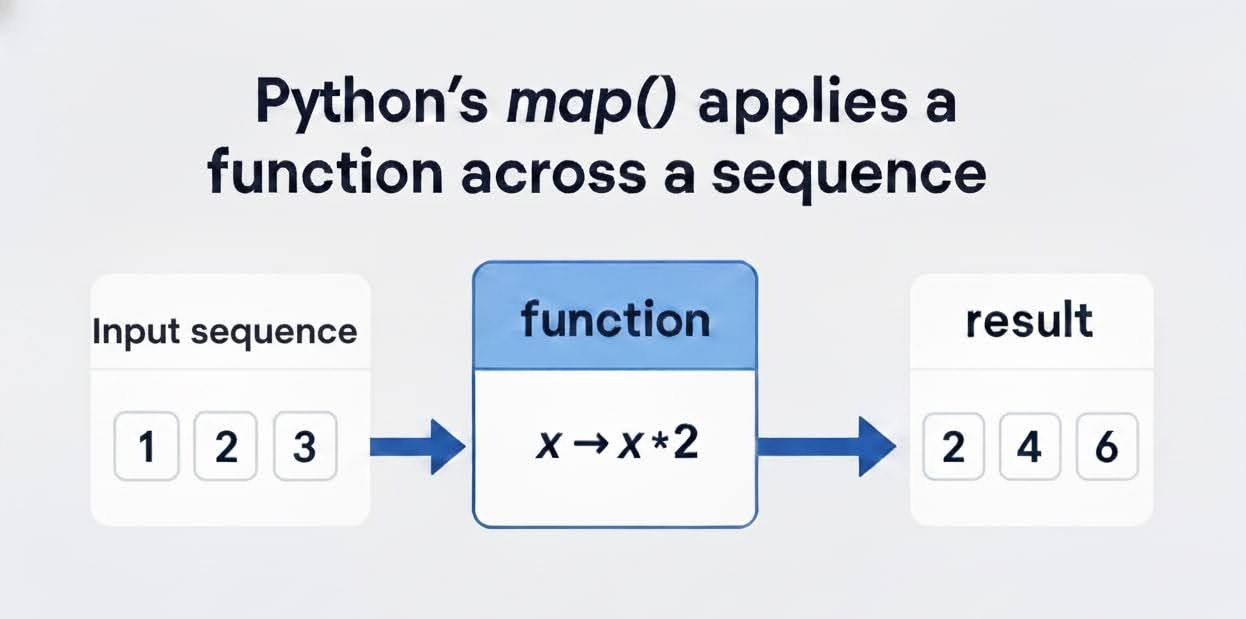
The syntax is straightforward, as shown below:
map(function, iterable, ...) The function, which can be a built-in function like len() or a custom one, is applied to every item in the iterable. We can also add multiple iterables to enable parallel mapping. We’ll get to that later.
Unlike eager evaluation (which computes everything upfront), map() employs lazy evaluation. It returns a map object, an iterator that yields values on demand. This defers computation until you iterate over it, saving memory for large datasets.
For a quick visual, consider this simple example of squaring numbers:
numbers = [1, 2, 3, 4]
squared = map(lambda x: x**2, numbers)
print(list(squared))
[1, 4, 9, 16]The map() function requires at least two parameters: a callable function and an iterable. Optional additional iterables allow broadcasting the function across zipped sequences, which are perfect for vectorized operations akin to NumPy's apply_along_axis().
In Python 3, map() returns a map object, an iterator subclass, rather than a list. This shift enhances memory efficiency, as it doesn't allocate space for the entire result upfront. To materialize results, convert them explicitly:
To a list: list(map(function, iterable))
To a set: set(map(function, iterable))
Iterate directly: for item in map(function, iterable): ..
Here's a code snippet demonstrating conversion:
words = ['python', 'data', 'science']
# Converts map object to list
lengths = list(map(len, words))
print(lengths)
[6, 4, 7]For a quick overview of different Python operations used throughout this tutorial, I recommend you take a look at this Python cheat sheet.
In Python 2, map() eagerly returned a list, which could bloat memory for large inputs, a common pitfall in legacy data scripts. Python 3's lazy map object changed this, aligning with iterator protocols for scalability in big data environments like PySpark.
The implications? Smoother handling of massive datasets without Out of Memory (OOM) errors, though it requires explicit conversion for indexing. For instance, my_map[0] won't work, so we have to use next(iter(my_map)) instead.
If you are accustomed to list-based logic, take a look at the Python for MATLAB users course to ease your shift from vectorized operations to Python iterators.
Now that we’ve looked at the basics, let's implement the map() function. We’ll look at the most common ways to apply map(), from simple built-in functions to more complex multi-iterable transformations.
The most straightforward way to use map() is with a built-in function. Let's say you have a list of strings and you want to find the length of each one. To apply the map() function:
Identify your iterable: words = ['apple', 'banana', 'cherry']
Identify your function: The built-in len() function.
Apply map(): map(len, words)
Convert to a list: list(map(len, words)
Let’s see the code below:
words = ['apple', 'banana', 'cherry']

# Apply the len() function to each item in the list
lengths_map = map(len, words)

# Convert the map object to a list to see the results
lengths_list = list(lengths_map)

print(lengths_list)
[5, 6, 6]As we can see, this is more concise than writing a for loop, appending to a new list, and managing the state of that list.
Often, the operation you want to perform is simple and short-lived. Instead of defining a full function with def, you can use a lambda function, which is a small, anonymous, one-line function.
This is extremely common in data processing. For instance, if you want to square a list of numbers, a lambda function is the perfect choice. Let’s see that with an example below:
numbers = [1, 2, 3, 4, 5]

# Use a lambda function to square each number
squared_map = map(lambda x: x * x, numbers)

squared_list = list(squared_map)
print(squared_list)
[1, 4, 9, 16, 25]Using lambda functions with map() is recommended in the following cases:
The transformation is simple (ideally, a single expression).
The function is not reused elsewhere in your code.
To know more about lambda functions, check out this detailed interactive Python lambda tutorial.
For more complex or repeated transformations, use a custom function defined with the def keyword. It makes your code more readable, modular, and easier to test.
Let’s say you have a list of temperatures in Celsius and you need to convert them to Fahrenheit. We can do that as follows:
def celsius_to_fahrenheit(c):
    # The formula is (Celsius * 9/5) + 32
    return (c * 9/5) + 32

celsius_temps = [0, 10, 25, 30.5, 100]

# Pass the user-defined function to map()
fahrenheit_map = map(celsius_to_fahrenheit, celsius_temps)

fahrenheit_list = list(fahrenheit_map)
print(fahrenheit_list)
[32.0, 50.0, 77.0, 86.9, 212.0]Using a function with a descriptive name, such as celsius_to_fahrenheit(), clearly documents the code's intent, making it a best practice for any specialized business logic.
One powerful feature of map() is its ability to process multiple iterables simultaneously. To do this, your function must accept the same number of arguments as the number of iterables you provide.
Let's say you have two lists of numbers and you want to add them together element-wise:
list_a = [1, 2, 3, 4]
list_b = [10, 20, 30, 40]

# The lambda function now takes two arguments, x and y
sums_map = map(lambda x, y: x + y, list_a, list_b)

sums_list = list(sums_map)
print(sums_list)
[11, 22, 33, 44]Now, what if the iterables have different sizes? The map() function will stop processing as soon as the shortest iterable runs out, so the output will have the length of the shortest iterable. Let’s see that in action with an example:
list_a = [1, 2, 3]          # Length 3
list_b = [10, 20, 30, 40]   # Length 4

# map() will stop after the 3rd element
short_map = map(lambda x, y: x + y, list_a, list_b)

print(list(short_map))
[11, 22, 33]This behavior is predictable and useful, preventing IndexError exceptions. If you need to process all elements and fill in a default value for the shorter list, you can use itertools.zip_longest().
Next, let’s see some everyday use cases for the map() function.
The map() function is versatile and is very useful for many common data processing and cleaning tasks. Let's take a look at where you'll find it most useful.
This is the most classic use case. When you have a list of numbers and need to apply a uniform mathematical operation to every single element, map() is a clean and efficient solution.
We already saw a great example of this with the conversion from Celsius to Fahrenheit in the previous section. Another common scenario is applying a financial formula, like calculating sales tax or converting currencies.
Imagine you have a list of product prices in USD and you need to convert them to EUR. We can do that as shown below:
def usd_to_eur(price_usd):
    # Assuming a static exchange rate for this example
    EXCHANGE_RATE = 0.92
    return round(price_usd * EXCHANGE_RATE, 2)

prices_usd = [99.99, 150.00, 45.50, 78.25]

prices_eur_map = map(usd_to_eur, prices_usd)

print(list(prices_eur_map))
[91.99, 138.0, 41.86, 71.99]This pattern is far more readable than a for loop, especially when the conversion logic is complex and best kept inside its own function.
Data cleaning often involves processing large volumes of text data. You might have thousands of text entries that need to be normalized before analysis. The map() function is perfect for applying string methods to an entire list.
For example, let's clean a list of names by removing unwanted whitespace and standardizing the case:
raw_names = ['  Alice Smith ', ' bob johnson', 'Charlie Brown  ', ' david lee']

# Use map() with the built-in .strip() method
cleaned_names_map = map(str.strip, raw_names)

# Now chain another map() to convert to title case
# Note: we apply the second map to the *results* of the first map
final_names_map = map(str.title, cleaned_names_map)

print(list(final_names_map))
['Alice Smith', 'Bob Johnson', 'Charlie Brown', 'David Lee']This ability to chain map() operations (because each one returns an iterator) is important for handling efficient data pipelines.
Often, you don't want to transform every item. You only want to transform items that meet a certain condition. This is a common pattern in data analysis, and it's easily solved by combining map() with Python's filter() function.
The filter(function, iterable) function works similarly to map(), but it only returns items for which the function returns True.
Let's say we have a list of sensor readings, and we want to square only the positive values, ignoring any negative ones (which might be errors). We can do that by:
Filter: First, use filter() to get only the positive numbers.
Map: Then, use map() to apply the squaring function to the filtered results.
readings = [10, -5, 3, -1, 20, 0]

# 1. Filter out the negative numbers
positive_readings = filter(lambda x: x > 0, readings)

# 2. Map the squaring function to the filtered iterator
squared_positives = map(lambda x: x * x, positive_readings)

print(list(squared_positives))
[100, 9, 400]Because both map() and filter() are lazy, this two-step process is extremely memory-efficient. No intermediate lists are created. This filter-then-map pattern is a powerful alternative to a more complex Python list comprehension.
Now that we've seen the basic concepts and common use cases, let's take a look at some specific practical examples that demonstrate how the map() function provides a clean and efficient syntax for various data transformation tasks.
This is a classic string processing task. Given a list of strings, you can use the map() function with the built-in str.upper() method to convert every item to uppercase, as shown below:
words = ['data science', 'python', 'map function']

# Apply the str.upper method to each item
upper_words = map(str.upper, words)

print(list(upper_words))
['DATA SCIENCE', 'PYTHON', 'MAP FUNCTION']Sometimes you need to extract a specific piece of information from each item. Here, we can use a lambda function to get the first character (at index 0) from each string in a list.
names = ['Alice', 'Bob', 'Charlie']

# Use a lambda function to get the character at index 0
first_chars = map(lambda s: s[0], names)

print(list(first_chars))
['A', 'B', 'C']As we saw in the section about processing strings, cleaning whitespace is a fundamental step in text data preparation. map() with str.strip() is the most Pythonic way to do this.
raw_data = ['  value1 ', ' value2  ', '  value3']

# Apply the str.strip method
cleaned_data = map(str.strip, raw_data)

print(list(cleaned_data))
['value1', 'value2', 'value3']For more ways to manage string and list data, this interactive tutorial on Python list functions and methods provides many examples.
In a web or data-driven application, you often receive data as a list of dictionaries (like a JSON payload). The map() function can be used to prepare the data for a database update, such as in Django or when working with MongoDB.
Let's imagine we have a list of dictionaries representing product updates, and we need to add a processed timestamp to each one before sending it to the database:
import datetime

def add_timestamp(record):
    # Don't modify the original! Return a new copy.
    new_record = record.copy()
    new_record['processed_at'] = datetime.datetime.now()
    return new_record

product_updates = [
    {'id': 101, 'price': 50.00},
    {'id': 102, 'price': 120.50},
    {'id': 103, 'price': 75.25}
]

processed_data = map(add_timestamp, product_updates)

print(list(processed_data))
[{'id': 101, 'price': 50.0, 'processed_at': datetime.datetime(2025, 11, 11, 13, 40, 25, 123456)},
{'id': 102, 'price': 120.5, 'processed_at': datetime.datetime(2025, 11, 11, 13, 40, 25, 123457)},
{'id': 103, 'price': 75.25, 'processed_at': datetime.datetime(2025, 11, 11, 13, 40, 25, 123458)}]This pattern is ideal for batch updates and really shows the value of knowing your way around dictionaries.
For web developers, map() can be a simple template engine. You can transform a list of data items into a list of HTML strings, ready to be rendered. Below is an example of how to transform a Python list into an unordered HTML list:
def create_list_item(text):
    return f"<li>{text}</li>"

menu_items = ['Home', 'About', 'Contact']

# Map the function to the list
html_items = map(create_list_item, menu_items)

# Join the results into a single string
html_list = "\n".join(html_items)

print(f"<ul>\n{html_list}\n</ul>")
<ul>
<li>Home</li>
<li>About</li>
<li>Contact</li>
</ul>While map() is excellent for simple, one-to-one transformations, its true power shows in more complex scenarios. Let's look at some advanced patterns where map() is a key component of a sophisticated data processing strategy.
We've touched on using map() with multiple iterables, and it is a pattern that is fundamental to many advanced data and scientific computations. When you provide multiple iterables, map() acts like a zipper, feeding the i-th element from each iterable to your function, meaning the number of arguments must match the number of iterables.
For example, to calculate the total value of different products in an inventory, you might have three separate lists. Let’s see how map() is used here:
product_ids = ['A-101', 'B-202', 'C-303']
quantities = [50, 75, 30]
prices = [10.99, 5.49, 20.00]

# A function that takes three arguments
def calculate_line_total(pid, qty, price):
    # Returns a tuple of (id, total_value)
    return (pid, round(qty * price, 2))

# map() feeds one element from each list into the function
line_totals = map(calculate_line_total, product_ids, quantities, prices)

print(list(line_totals))
[('A-101', 549.5), ('B-202', 411.75), ('C-303', 600.0)]As noted before, map() stops at the shortest iterable. This is a deliberate feature to prevent IndexError exceptions. If your logic requires processing all items from the longest list (e.g., filling in defaults), remember to use itertools.zip_longest() instead. You can learn it alongside many other useful functions in this course on writing efficient Python code.
What happens when your data is already "zipped" into a list of tuples? This is extremely common when working with database query results, CSV files, or coordinate pairs.
Suppose you have a list of (x,y) points as shown below, and you want to calculate the product of each pair.
points = [(1, 5), (3, 9), (4, -2)]You could use a lambda with map(), but it's a bit awkward with long nested functions within it:
list(map(lambda p: p[0] * p[1], points))A much cleaner, more Pythonic solution is itertools.starmap(). It takes a function and a single iterable of iterables (like our list of tuples). It then unpacks each inner tuple as arguments for the function. Let’s see this in action:
import itertools

points = [(1, 5), (3, 9), (4, -2)]

# A simple function that takes two arguments
def product(x, y):
    return x * y

# starmap() unpacks each tuple from 'points' into (x, y)
# and passes them to product()
products = itertools.starmap(product, points)

print(list(products))
[5, 27, -8]starmap() is the correct tool when your function's arguments are already pre-packaged in tuples. This pattern is especially useful when processing geospatial data, such as a list of (latitude, longitude) coordinates. For a deeper look into these concepts, I recommend taking this course on working with geospatial data in Python.
The map() function is very useful in functional programming. We can combine it with other functional tools like filter() and functools.reduce() to build clean, highly efficient data processing pipelines.
We've already seen the combination of filter() and map(). Now, let's see how to use reduce(), which aggregates (or "reduces") an iterable to a single cumulative value.
Let’s say you want to find the sum of the squares of all odd numbers in a given list. We can do that as follows:
from functools import reduce

numbers = [1, 2, 3, 4, 5, 6, 7]

# 1. Filter: Get only the odd numbers
odd_numbers = filter(lambda x: x % 2 != 0, numbers)
# -> Iterator(1, 3, 5, 7)

# 2. Map: Square the odd numbers
squared_odds = map(lambda x: x * x, odd_numbers)
# -> Iterator(1, 9, 25, 49)

# 3. Reduce: Sum the results
#    (lambda a, b: a + b) is the summing function
#    'a' is the accumulator, 'b' is the next item
total = reduce(lambda acc, val: acc + val, squared_odds)

print(total)84This is a powerful pattern. Because map() and filter() both return lazy iterators, this entire operation is incredibly memory-efficient. No large, intermediate lists are ever created in memory. The data flows through the pipeline, item by item.
One of the most critical features of map() in Python 3 is its use of lazy evaluation. Understanding this concept is necessary for writing efficient, scalable code, especially for data practitioners who regularly handle large datasets. In this section, we’ll see how this works.
In Python 3, map() does not immediately run your function and return a list. Instead, it returns a map object, which is an iterator. This iterator "knows" what function and what data to use, but it doesn't actually perform the calculation until you explicitly ask for the next item.
This "just-in-time" computation has profound benefits, like:
Memory Efficiency: A map object occupies only a small, constant amount of memory, regardless of whether it's processing 10 items or 10 billion. It doesn't create a new list in memory to hold all the results.
Performance with Large Datasets: When you iterate over the map object (e.g., in a for loop), it computes and yields one value at a time. This allows you to process massive files or data streams that would be too large to fit in memory all at once.
Chainability: As we saw in the functional programming section, lazy iterators can be chained together (e.g., map() after filter()). Because no intermediate lists are created, the data flows through the pipeline one item at a time, which is incredibly efficient.
Compare this to a list comprehension, which uses eager evaluation. Consider this example:
squared = [x * x for x in range(10000000)]This code will instantly try to create a list with 10 million numbers, potentially consuming a huge amount of RAM.
A generator expression is the lazy equivalent of a list comprehension. It looks very similar, but behaves like map() in terms of memory.
squared = (x * x for x in range(10000000))The code above also creates a memory-efficient iterator, just like map() would. The choice between map() and a generator expression often comes down to readability. map() can be clearer when applying a complex, existing function, while a generator expression is often more readable for simple, inline expressions.
Let’s compare the memory usage for these operations:
import tracemalloc

# Define the base data for comparison
large_numbers = range(10000000)

print("--- Memory Usage (Object Creation vs. List Materialization) ---")

# --- 1. Memory for List Comprehension (creates full list immediately) ---
tracemalloc.start()
list_comp_obj = [x * x for x in large_numbers]
current, peak = tracemalloc.get_traced_memory()
tracemalloc.stop()
print(f"Peak RAM for List Comprehension (full list): {peak / (1024 * 1024):.2f} MB")
del list_comp_obj  # Free up memory


# --- 2. Memory for Map Object (lazy) ---
tracemalloc.start()
map_obj = map(lambda x: x * x, large_numbers)
current, peak = tracemalloc.get_traced_memory()
tracemalloc.stop()
print(f"Peak RAM for Map Object (iterator itself): {peak / (1024 * 1024):.2f} MB")
del map_obj  # Free up memory


# --- 3. Memory for Generator Expression (lazy) ---
tracemalloc.start()
gen_exp_obj = (x * x for x in large_numbers)
current, peak = tracemalloc.get_traced_memory()
tracemalloc.stop()
print(f"Peak RAM for Generator Expression (iterator itself): {peak / (1024 * 1024):.2f} MB")
del gen_exp_obj  # Free up memory
--- Memory Usage (Object Creation vs. List Materialization) ---
Peak RAM for List Comprehension (full list): 390.16 MB
Peak RAM for Map Object (iterator itself): 0.03 MB
Peak RAM for Generator Expression (iterator itself): 0.03 MBNote: The 'Peak RAM' for Map/Generator Objects here refers to the memory allocated to the iterator object itself, not the memory of the full list it would produce if converted, demonstrating their lazy nature.
Since map() returns a lazy iterator, you often need to materialize it or convert it into a concrete collection to actually use the results.
You should convert a map object when you need to:
See all results at once (e.g., to print() them).
Access elements by index (e.g., results[0]).
Get the length of the results (e.g., len(results)).
Pass the results to a function that requires a list or set.
Iterate over the results multiple times. (A map object, like all iterators, is exhaustible.) You can only loop over it once.
Here’s how to convert a map object:
def square(x):
    return x * x

numbers = [1, 2, 3, 3, 4, 5]
map_obj = map(square, numbers)

# --- Common Conversions ---

# 1. To a list:
list_results = list(map_obj)
print(f"List: {list_results}")

# Important
# The map_obj is now exhausted.
# If you try to do list(map_obj) again, you'll get an empty list.
# You must re-create the map object to reuse it.

map_obj = map(square, numbers) # Re-create it

# 2. To a set (removes duplicates):
set_results = set(map_obj)
print(f"Set: {set_results}")

map_obj = map(square, numbers) # Re-create it

# 3. To a tuple:
tuple_results = tuple(map_obj)
print(f"Tuple: {tuple_results}")
List: [1, 4, 9, 9, 16, 25]
Set: {1, 4, 9, 16, 25}
Tuple: (1, 4, 9, 9, 16, 25)To convert to a dictionary (if the output is key-value pairs), you might use map() with dict(), but often Python's dictionary comprehensions are clearer.
The key takeaway is to be intentional. Let map() remain a lazy iterator as long as possible in your pipeline, and only convert it to a list at the very last moment when you actually need concrete results.
Python Courses
Track
Track
Course
Tutorial
Mark Pedigo
10 min
Tutorial
Aditya Sharma
14 min
Tutorial
Mark Pedigo
11 min
Tutorial
Abid Ali Awan
7 min
Tutorial
Aditya Sharma
7 min
Tutorial
Sejal Jaiswal
14 min


