
Courses
Kết hợp dữ liệu trong SQL
4 giờ
338.8K
Trong cơ sở dữ liệu quan hệ, các hàng thường phụ thuộc lẫn nhau, và để trả lời một câu hỏi phức tạp, truy vấn thường cần quay lại chính bảng mà nó đang xử lý.
Để truy vấn những bảng như vậy, SQL cho phép bạn sử dụng subquery tương quan, trong đó định nghĩa một mối liên hệ cụ thể: truy vấn bên trong phụ thuộc vào các giá trị của truy vấn bên ngoài. Trong khi một subquery chuẩn chạy một lần rồi kết thúc, subquery tương quan mang tính động, được thực thi lặp lại với từng hàng mà truy vấn chính đánh giá.
Trong hướng dẫn này, tôi sẽ giải thích cách subquery tương quan hoạt động trong SQL, các lưu ý về hiệu năng, và khi nào nên dùng chúng so với join và hàm cửa sổ. Nếu bạn mới học SQL, hãy bắt đầu với khóa học Introduction to SQL của chúng tôi, hoặc khóa Intermediate SQL nếu bạn đã có chút kinh nghiệm.
Subquery tương quan là một dạng subquery phụ thuộc vào các giá trị từ truy vấn bên ngoài để chạy.
Thay vì thực thi một lần và trả về kết quả cố định, subquery này được đánh giá một lần cho mỗi hàng do truy vấn bên ngoài xử lý. Điều này xảy ra vì truy vấn bên trong tham chiếu đến một cột của truy vấn bên ngoài, tạo ra liên kết trực tiếp giữa hai truy vấn.
Ngược lại, một subquery không tương quan chạy độc lập với truy vấn bên ngoài. Nó thực thi một lần, trả về một tập kết quả hoặc giá trị, và truy vấn bên ngoài sử dụng kết quả đó mà không cần chạy lại subquery cho từng hàng.
Một subquery tương quan điển hình trong SQL có quy trình như sau:
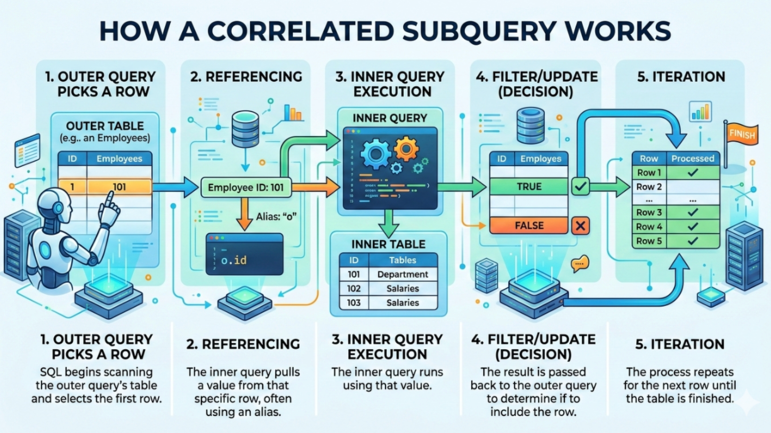
Cách một subquery tương quan hoạt động. Hình ảnh bởi Gemini.
Đến đây, những gì tôi trình bày mang tính khái niệm. Cách học tốt nhất là đi qua các ví dụ.
Giả sử bạn có bảng employees với lương và ID phòng ban. Bạn muốn tìm các nhân viên có thu nhập cao hơn mức lương trung bình của phòng ban họ.
Bạn sẽ dùng truy vấn dưới đây, trong đó:
Truy vấn ngoài chọn nhân viên từ bảng employees.
Subquery tính lương trung bình cho cùng phòng ban.
Điều kiện e2.department_id = e.department_id tham chiếu bí danh e của truy vấn ngoài.
 -- Fetch employees earning more than the average salary in dept
SELECT
    e.employee_id,
    e.employee_name,
    e.salary,
    e.department_id
FROM employees e
WHERE e.salary > (
    SELECT AVG(e2.salary)                 -- Calculate the average salary
    FROM employees e2
    WHERE e2.department_id = e.department_id
    -- Correlation: references the outer query's department_id
);Bạn cũng có thể dùng toán tử EXISTS() với subquery tương quan để kiểm tra liệu có bản ghi liên quan trong bảng khác hay không.
Giả sử bạn có dữ liệu ở các bảng customers và orders. Bạn muốn liệt kê những khách hàng đã đặt ít nhất một đơn. Bạn sẽ sử dụng truy vấn dưới đây, trong đó:
Truy vấn ngoài quét các hàng trong bảng customers.
Subquery kiểm tra xem có ít nhất một đơn hàng cho khách hàng đó hay không.
Điều kiện o.customer_id = c.customer_id liên kết subquery với truy vấn ngoài.
-- Fetch customers with at least one order
SELECT
    c.customer_id,
    c.customer_name
FROM customers c
WHERE EXISTS (
    SELECT 1
    FROM orders o
    WHERE o.customer_id = c.customer_id
    -- Correlation: references the outer query customer_id
);
Trong truy vấn trên, SQL kiểm tra liệu có hàng khớp trong bảng orders hay không. Nếu có, toán tử EXISTS() trả về true và khách hàng sẽ được đưa vào kết quả.
Như đã đề cập, subquery trong SQL gồm hai loại: không tương quan và tương quan. Khác biệt chính là truy vấn bên trong có phụ thuộc vào truy vấn bên ngoài hay không.
Với subquery không tương quan, cơ sở dữ liệu thực thi nó một lần, rồi dùng kết quả trong truy vấn bên ngoài.
Ví dụ, truy vấn dưới đây tìm các nhân viên có thu nhập cao hơn mức lương trung bình toàn công ty.
-- Query employees who earn more than the overall average salary
SELECT
    employee_id,
    employee_name,
    salary
FROM employees
WHERE salary > (
    SELECT AVG(salary)
    FROM employees
);
Trong truy vấn trên, subquery tính lương trung bình cho toàn bộ bảng và chỉ chạy một lần. Truy vấn ngoài sau đó so sánh lương của từng nhân viên với giá trị đó.
Vì subquery không tương quan chạy một lần, chúng thường nhanh hơn khi có thể tái sử dụng kết quả. Chúng phù hợp nhất cho các so sánh mang tính tổng thể, như trung bình và tổng toàn cục.
Tuy nhiên, subquery tương quan có thể chậm trên các bảng lớn. Chúng hữu ích khi điều kiện cần được đánh giá tương đối với từng hàng, như so sánh theo phòng ban hoặc kiểm tra sự tồn tại.
Tôi khuyến nghị bạn học khóa Introduction to SQL Server để tìm hiểu thêm về nhóm và tổng hợp dữ liệu, cũng như join bảng.
Nhiều subquery tương quan có thể được viết lại bằng JOIN. Trong cơ sở dữ liệu quan hệ, JOIN thường hiệu quả hơn vì CSDL có thể xử lý các mối quan hệ theo tập thay vì từng hàng.
Xem truy vấn dưới đây dùng subquery tương quan. Truy vấn này liệt kê các nhân viên có lương cao hơn mức trung bình của phòng ban họ
-- Use subquery to fetch employees earning more than the average salary in dept
SELECT
    e.employee_id,
    e.employee_name,
    e.salary,
    e.department_id
FROM employees e
WHERE e.salary > (
    SELECT AVG(e2.salary)
    FROM employees e2
    WHERE e2.department_id = e.department_id
);
Bạn có thể viết lại truy vấn bằng mệnh đề JOIN để cho ra cùng kết quả.
-- Use JOIN to fetch employees earning more than the average salary in dept
SELECT
    e.employee_id,
    e.employee_name,
    e.salary,
    e.department_id
FROM employees e
JOIN (
    SELECT
        department_id,
        AVG(salary) AS avg_salary
    FROM employees
    GROUP BY department_id
    -- Precompute the department average once per department
) dept_avg
ON e.department_id = dept_avg.department_id
-- Match employees with their department averages
WHERE e.salary > dept_avg.avg_salary;
-- Compare salary with the computed department average
Bảng dưới đây tóm tắt sự khác nhau giữa subquery tương quan và JOIN trong SQL.
|
Tính năng |
Subquery tương quan |
JOIN |
|
Dễ đọc |
Thường dễ đọc hơn vì logic được thể hiện trực tiếp trong mệnh đề |
Có thể phức tạp hơn đôi chút vì có thể cần bảng dẫn xuất hoặc CTE. |
|
Biểu đạt logic |
Diễn đạt điều kiện tự nhiên. Ví dụ: “lương lớn hơn trung bình phòng ban”. |
Yêu cầu tính trước các giá trị tổng hợp rồi join ngược lại vào bảng chính. |
|
Hành vi thực thi |
Subquery có thể chạy một lần cho mỗi hàng của truy vấn ngoài. |
Kết quả tổng hợp thường được tính một lần và tái sử dụng. |
|
Hiệu năng |
Có thể chậm hơn trên tập dữ liệu lớn do lặp lại thực thi. |
Thường hiệu quả hơn với các bảng lớn. |
|
Trường hợp sử dụng thường gặp |
Kiểm tra điều kiện theo từng hàng, lọc với |
Truy vấn báo cáo, tổng hợp, và khối lượng công việc nhạy hiệu năng. |
Tôi khuyến bạn học khóa Joining Data in SQL để tìm hiểu các loại join trong SQL và cách làm việc với các bảng liên quan khác nhau trong cơ sở dữ liệu.
Trong SQL hiện đại, các hàm cửa sổ như AVG() và OVER (PARTITION BY) có thể tính tổng hợp theo từng hàng chỉ với một lần quét.
Ví dụ, truy vấn dưới đây trả về những nhân viên có lương cao hơn mức trung bình của phòng ban họ. Bên trong subquery, nó dùng OVER () để biến phép tổng hợp thành hàm cửa sổ và PARTITION BY department_id để chia bảng thành các nhóm (phân vùng) theo phòng ban.
-- Use window function to get employees earning more than dept average salary
SELECT
    employee_id,
    employee_name,
    salary,
    department_id
FROM (
    SELECT
        employee_id,
        employee_name,
        salary,
        department_id,
        AVG(salary) OVER (PARTITION BY department_id) AS dept_avg_salary
        -- Window function calculates department average once per partition
    FROM employees
) t
WHERE salary > dept_avg_salary;
Tuy vậy, subquery tương quan vẫn hữu ích khi bạn muốn dùng EXISTS() hoặc NOT EXISTS() để kiểm tra mối quan hệ giữa các bảng. Bạn cũng có thể dùng subquery tương quan khi làm việc với các CSDL hoặc tình huống không hỗ trợ hàm cửa sổ.
Dù mạnh mẽ, subquery tương quan thường đi kèm một số vấn đề về hiệu năng.
Vì truy vấn chạy một lần cho mỗi hàng của truy vấn ngoài, nó có thể làm chậm truy vấn trên các bảng lớn do phải quét lại dữ liệu bên trong nhiều lần. Nếu bảng ngoài có 100.000 hàng, CSDL sẽ thực hiện 100.000 tác vụ con.
Nếu không tối ưu đúng cách, truy vấn tương quan có thể dẫn đến sử dụng CPU cao và thời gian chờ dài, đặc biệt khi truy vấn trong thực hiện phép tính phức tạp hoặc quét các bảng lớn.
Đánh chỉ mục các cột dùng trong điều kiện tương quan sẽ giúp CSDL tìm hàng liên quan trong subquery gần như ngay lập tức, thay vì phải quét toàn bộ bảng bên trong mỗi lần.
Các CSDL hiện đại thường tối ưu subquery tương quan nội bộ. Bộ lập kế hoạch truy vấn có thể biến đổi truy vấn sang dạng hiệu quả hơn, như JOIN hoặc phép tổng hợp được cache, và giảm đáng kể thời gian truy vấn.
Bạn có thể dùng subquery tương quan nếu muốn thực hiện các thao tác sau:
Lọc dựa trên tổng hợp theo từng hàng: Dùng khi bạn cần so sánh một giá trị theo từng hàng, như nhân viên có lương cao hơn trung bình phòng ban.
Kiểm tra dữ liệu liên quan với EXISTS(): Bạn cũng có thể dùng subquery tương quan với EXISTS() để kiểm tra sự tồn tại của các hàng liên quan.
Diễn đạt logic lồng phức tạp: Subquery tương quan có thể giúp điều kiện phức tạp dễ đọc và dễ diễn đạt hơn so với chuỗi JOIN dài.
Tuy nhiên, tránh dùng subquery tương quan khi:
JOIN đơn giản là đủ: Nếu bạn có thể đạt cùng kết quả với LEFT JOIN hoặc INNER JOIN, hãy dùng chúng vì sẽ luôn nhanh hơn.
Làm việc với dữ liệu lớn: Nếu điều kiện tương quan tham chiếu các bảng lớn không có chỉ mục, các lần đánh giá lặp lại có thể làm truy vấn chậm đáng kể.
Dưới đây là một số vấn đề thường gặp khi dùng subquery tương quan và cách xử lý:
Biết khi nào và cách dùng subquery tương quan, cũng như khi nào thay thế bằng kỹ thuật khác, là kỹ năng quan trọng để viết truy vấn SQL rõ ràng và hiệu quả.
Bước tiếp theo, tôi khuyến nghị bạn lấy chứng chỉ SQL Associate để chứng minh năng lực dùng SQL cho phân tích dữ liệu và tạo lợi thế trước các chuyên gia dữ liệu khác. Cuối cùng, tôi khuyến nghị khóa Database Design, nơi bạn sẽ học cách tạo và quản lý cơ sở dữ liệu và chọn DBMS phù hợp với nhu cầu.
Học SQL với DataCamp
Courses
Courses
Courses