
Cours
Assembler des données en SQL
4 h
338.8K
Dans les bases de données relationnelles, les lignes sont souvent interdépendantes, et répondre à une question complexe impose fréquemment à une requête de revenir consulter la table qu’elle est en train de traiter.
Pour interroger ce type de tables, SQL permet d’utiliser des sous-requêtes corrélées, qui établissent une relation explicite où la sous-requête dépend des valeurs produites par la requête externe. Alors qu’une sous-requête classique s’exécute une fois puis s’arrête, une sous-requête corrélée est dynamique : elle s’exécute de manière répétée pour chaque ligne évaluée par la requête principale.
Dans ce tutoriel, j’explique le fonctionnement d’une sous-requête corrélée en SQL, ses implications en matière de performance, et dans quels cas la privilégier par rapport aux jointures et aux fonctions fenêtre. Si vous débutez en SQL, commencez par notre cours Introduction to SQL, ou le cours Intermediate SQL si vous avez déjà de l’expérience.
Une sous-requête corrélée est un type de sous-requête qui a besoin des valeurs de la requête externe pour s’exécuter.
Au lieu de s’exécuter une fois et de renvoyer un résultat fixe, la sous-requête est évaluée pour chaque ligne traitée par la requête externe. Cela s’explique par le fait que la requête interne référence une colonne de la requête externe, créant un lien direct entre les deux.
À l’inverse, une sous-requête non corrélée s’exécute indépendamment de la requête externe. Elle s’exécute une seule fois, renvoie un ensemble de résultats ou une valeur, et la requête externe réutilise ce résultat sans relancer la sous-requête pour chaque ligne.
Une sous-requête corrélée typique en SQL suit le déroulé suivant :
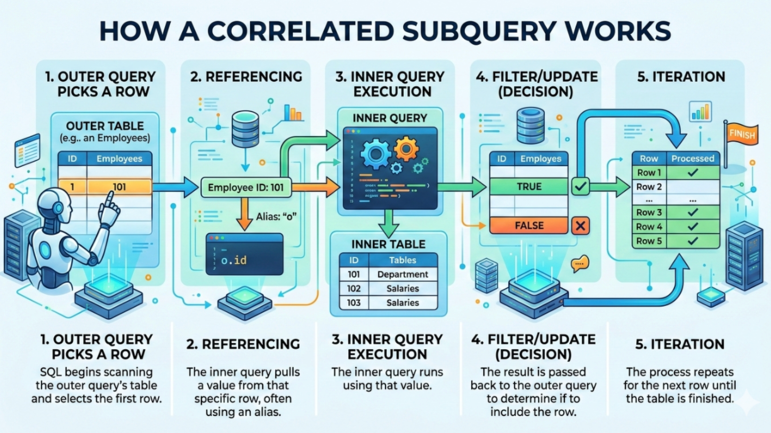
Fonctionnement d’une sous-requête corrélée. Image par Gemini.
Jusqu’ici, nous sommes restés conceptuels. Le meilleur moyen d’apprendre, c’est de pratiquer sur des exemples.
Supposons que vous ayez une table employees avec les salaires et les identifiants de service. Vous souhaitez trouver les employés qui gagnent plus que la moyenne de leur service.
Vous pouvez utiliser la requête ci-dessous, où :
La requête externe sélectionne les employés dans la table employees.
La sous-requête calcule le salaire moyen pour ce même service.
La condition e2.department_id = e.department_id référence l’alias e de la requête externe.
 -- Fetch employees earning more than the average salary in dept
SELECT
    e.employee_id,
    e.employee_name,
    e.salary,
    e.department_id
FROM employees e
WHERE e.salary > (
    SELECT AVG(e2.salary)                 -- Calculate the average salary
    FROM employees e2
    WHERE e2.department_id = e.department_id
    -- Correlation: references the outer query's department_id
);Vous pouvez aussi utiliser l’opérateur EXISTS() avec une sous-requête corrélée pour vérifier l’existence d’enregistrements liés dans une autre table.
Imaginons que vous ayez des enregistrements dans les tables customers et orders. Vous souhaitez lister les clients ayant passé au moins une commande. Utilisez la requête ci-dessous, où :
La requête externe parcourt les lignes de la table customers.
La sous-requête vérifie s’il existe au moins une commande pour ce client.
La condition o.customer_id = c.customer_id relie la sous-requête à la requête externe.
-- Fetch customers with at least one order
SELECT
    c.customer_id,
    c.customer_name
FROM customers c
WHERE EXISTS (
    SELECT 1
    FROM orders o
    WHERE o.customer_id = c.customer_id
    -- Correlation: references the outer query customer_id
);
Dans la requête ci-dessus, SQL vérifie s’il existe une ligne correspondante dans la table orders. Si oui, l’opérateur EXISTS() renvoie vrai et le client est inclus dans le résultat.
Comme nous l’avons vu, les sous-requêtes en SQL sont soit non corrélées, soit corrélées. La différence clé tient au fait que la requête interne dépend, ou non, de la requête externe.
Pour une sous-requête non corrélée, la base l’exécute une seule fois, puis la requête externe réutilise son résultat.
Par exemple, la requête ci-dessous identifie les employés qui gagnent plus que la moyenne globale des salaires.
-- Query employees who earn more than the overall average salary
SELECT
    employee_id,
    employee_name,
    salary
FROM employees
WHERE salary > (
    SELECT AVG(salary)
    FROM employees
);
Ici, la sous-requête calcule la moyenne des salaires pour l’ensemble de la table, et ne s’exécute qu’une fois. La requête externe compare ensuite le salaire de chaque employé à cette valeur unique.
Comme les sous-requêtes non corrélées ne s’exécutent qu’une fois, elles sont généralement plus rapides lorsque le résultat peut être réutilisé. Elles conviennent bien aux comparaisons globales, comme les moyennes et totaux généraux.
À l’inverse, les sous-requêtes corrélées peuvent être plus lentes sur de grandes tables. Elles deviennent utiles lorsque les conditions doivent être évaluées relativement à chaque ligne, comme pour des comparaisons au niveau d’un service ou des vérifications d’existence.
Je vous recommande notre cours Introduction to SQL Server pour approfondir le regroupement, l’agrégation et les jointures.
Beaucoup de sous-requêtes corrélées peuvent être réécrites avec des JOIN. Dans les bases relationnelles, les JOIN sont souvent plus performants, car la base peut traiter les relations par ensembles plutôt que ligne par ligne.
Considérez la requête ci-dessous, utilisant une sous-requête corrélée. Elle liste les employés payés au-dessus de la moyenne de leur service.
-- Use subquery to fetch employees earning more than the average salary in dept
SELECT
    e.employee_id,
    e.employee_name,
    e.salary,
    e.department_id
FROM employees e
WHERE e.salary > (
    SELECT AVG(e2.salary)
    FROM employees e2
    WHERE e2.department_id = e.department_id
);
Vous pouvez réécrire cette requête avec la clause JOIN pour produire le même résultat.
-- Use JOIN to fetch employees earning more than the average salary in dept
SELECT
    e.employee_id,
    e.employee_name,
    e.salary,
    e.department_id
FROM employees e
JOIN (
    SELECT
        department_id,
        AVG(salary) AS avg_salary
    FROM employees
    GROUP BY department_id
    -- Precompute the department average once per department
) dept_avg
ON e.department_id = dept_avg.department_id
-- Match employees with their department averages
WHERE e.salary > dept_avg.avg_salary;
-- Compare salary with the computed department average
Le tableau ci-dessous résume les différences entre les sous-requêtes corrélées et les JOIN en SQL.
|
Caractéristique |
Sous-requête corrélée |
JOIN |
|
Lisibilité |
Souvent plus lisible car la logique est exprimée directement dans la clause |
Peut être légèrement plus complexe car elle peut nécessiter des tables dérivées ou des CTE. |
|
Expression de la logique |
Exprime naturellement les conditions. Par exemple : « salaire supérieur à la moyenne du service ». |
Nécessite de calculer d’abord les agrégats puis de les rejoindre à la table principale. |
|
Comportement à l’exécution |
La sous-requête peut s’exécuter une fois par ligne de la requête externe. |
Les résultats agrégés sont généralement calculés une fois et réutilisés. |
|
Performance |
Peut être plus lent sur de grands volumes à cause des exécutions répétées. |
Généralement plus efficace sur de grandes tables. |
|
Cas d’usage courants |
Vérification de conditions spécifiques à la ligne, filtrage avec |
Requêtes de reporting, agrégations et charges sensibles aux performances. |
Je vous recommande le cours Joining Data in SQL pour découvrir les différents types de jointures en SQL et apprendre à travailler avec des tables liées.
Dans le SQL moderne, les fonctions fenêtre comme AVG() et OVER (PARTITION BY) peuvent calculer des agrégats par ligne en un seul parcours.
Par exemple, la requête ci-dessous renvoie les employés dont le salaire est supérieur à la moyenne de leur service. À l’intérieur de la sous-requête, OVER () transforme l’agrégat en fonction fenêtre et PARTITION BY department_id divise la table en groupes (partitions) par service.
-- Use window function to get employees earning more than dept average salary
SELECT
    employee_id,
    employee_name,
    salary,
    department_id
FROM (
    SELECT
        employee_id,
        employee_name,
        salary,
        department_id,
        AVG(salary) OVER (PARTITION BY department_id) AS dept_avg_salary
        -- Window function calculates department average once per partition
    FROM employees
) t
WHERE salary > dept_avg_salary;
Cependant, les sous-requêtes corrélées restent pertinentes lorsque vous souhaitez utiliser EXISTS() ou NOT EXISTS() pour tester des relations entre tables. Vous pouvez aussi les privilégier dans des bases ou des contextes ne prenant pas en charge les fonctions fenêtre.
Bien que puissantes, les sous-requêtes corrélées peuvent poser des problèmes de performance.
Comme la requête s’exécute une fois par ligne de la requête externe, elle peut ralentir les traitements sur de grandes tables en rescannant plusieurs fois les données internes. Si votre table externe comporte 100 000 lignes, la base réalise 100 000 sous-tâches.
Sans optimisation adéquate, les sous-requêtes corrélées peuvent entraîner une forte utilisation CPU et des temps d’attente importants, surtout si la sous-requête réalise des calculs complexes ou parcourt de grandes tables.
Indexer les colonnes utilisées pour la corrélation aide la base à retrouver quasi instantanément la ligne correspondante dans la sous-requête, au lieu de scanner la table interne à chaque fois.
Les bases modernes optimisent souvent les sous-requêtes corrélées en interne. Le planificateur peut transformer la requête en une forme plus efficace, comme un JOIN ou un agrégat mis en cache, et réduire significativement le temps d’exécution.
Utilisez des sous-requêtes corrélées lorsque vous souhaitez :
Filtrer sur des agrégats spécifiques à la ligne : utilisez-les pour comparer une valeur relativement à chaque ligne, par exemple des employés gagnant au-dessus de la moyenne de leur service.
Vérifier des données liées avec EXISTS() : vous pouvez aussi les utiliser avec EXISTS() pour tester l’existence de lignes liées.
Exprimer une logique imbriquée complexe : elles peuvent rendre plus lisibles certaines conditions complexes, par rapport à de longues chaînes de JOIN.
Évitez toutefois les sous-requêtes corrélées lorsque :
Un JOIN simple suffit : si vous pouvez obtenir le même résultat avec un LEFT JOIN ou un INNER JOIN, préférez-le : il sera presque toujours plus rapide.
Vous traitez de gros volumes : si la condition corrélée référence de grandes tables non indexées, les évaluations répétées peuvent fortement ralentir la requête.
Voici des pièges fréquents lorsque vous utilisez des sous-requêtes corrélées, et comment les éviter :
Savoir quand et comment utiliser les sous-requêtes corrélées, et quand les remplacer par d’autres techniques, est une compétence clé pour écrire des requêtes SQL claires et efficaces.
Pour aller plus loin, nous vous recommandons d’obtenir notre SQL Associate Certification pour attester votre maîtrise de SQL pour l’analyse de données et vous démarquer auprès des professionnels des données. Enfin, suivez notre cours Database Design pour apprendre à créer et gérer des bases et choisir le SGBD adapté à vos besoins.
Apprenez SQL avec DataCamp
Cours
Cours
Cours
blog
Kurtis Pykes
15 min
Tutoriel
Mark Pedigo
10 min
Tutoriel
Abid Ali Awan
7 min
Tutoriel
Aditya Sharma
7 min
Tutoriel
Matt Crabtree
5 min
Tutoriel
Samuel Shaibu
9 min