ChatGPT Work vs. Claude Cowork: Which AI Work Agent Should You Use?

Not sure whether to choose ChatGPT Work vs. Claude Cowork? We cover delegation, cloud execution, projects, connectors, and pricing to help you decide what's best.
Aug 14, 2026  · 15 min read

Explore with AI

ChatGPTClaudePerplexity

A year ago, "AI assistant" mostly meant a chat window that answered questions. When Claude Cowork appeared earlier this year, it brought Claude Code's agent loop to people who had no reason to open a terminal. It started on desktop, then moved to web and mobile, over the summer, with cloud sessions that keep running after you close your laptop.

ChatGPT Work, followed in July, sitting between everyday ChatGPT use and Codex-style software engineering.

For a while, the comparison was easy: Cowork was Anthropic's desktop work agent, and OpenAI had nothing quite like it. That version is gone. Both now run long tasks in the cloud, remember project context, work with connected apps, and create files. The differences show up after the task starts.

I'll focus on those differences: how each agent takes instructions, where it can work, what it can touch, and what it hands back.

TL;DR: ChatGPT Work vs. Claude Cowork

If you only read one section, make it this one.

  • If you already use ChatGPT: Work keeps chat, Projects, and Codex under one login, so there is less switching between apps.
  • If you want more visible delegation: Cowork. Its Claude Code roots show in the questions it asks and the work trace it exposes.
  • Projects and context: roughly tied. Both support persistent Projects with their own memory, files, and instructions.
  • Spreadsheets and presentations: Work stays closer to editable office files; Cowork can return a Live Artifact that remains tied to its data.
  • Apps and connectors: Work connects to more apps; Cowork tends to go deeper once a connector is installed.
  • Cost: depends on whether you use Work's shared Codex credits or Cowork's pooled chat-and-agent allowance faster.
  • Quick rule: Start with Work if your context already lives in ChatGPT. Start with Cowork if seeing and shaping the agent's path matters more.

What Is ChatGPT Work?

ChatGPT Work is what you open when a normal chat would leave you doing the rest yourself. Give it an outcome and access to the files or apps it needs, and it plans the steps, does the research, and hands back the file.

It arrived in July on the GPT-5.6 family. Work can return documents, spreadsheets, presentations, reports, and lightweight web apps called Sites. You can answer questions, change direction, or approve a sensitive action while it runs. Projects carry context between tasks, and Scheduled Tasks repeat work without a fresh prompt each time.
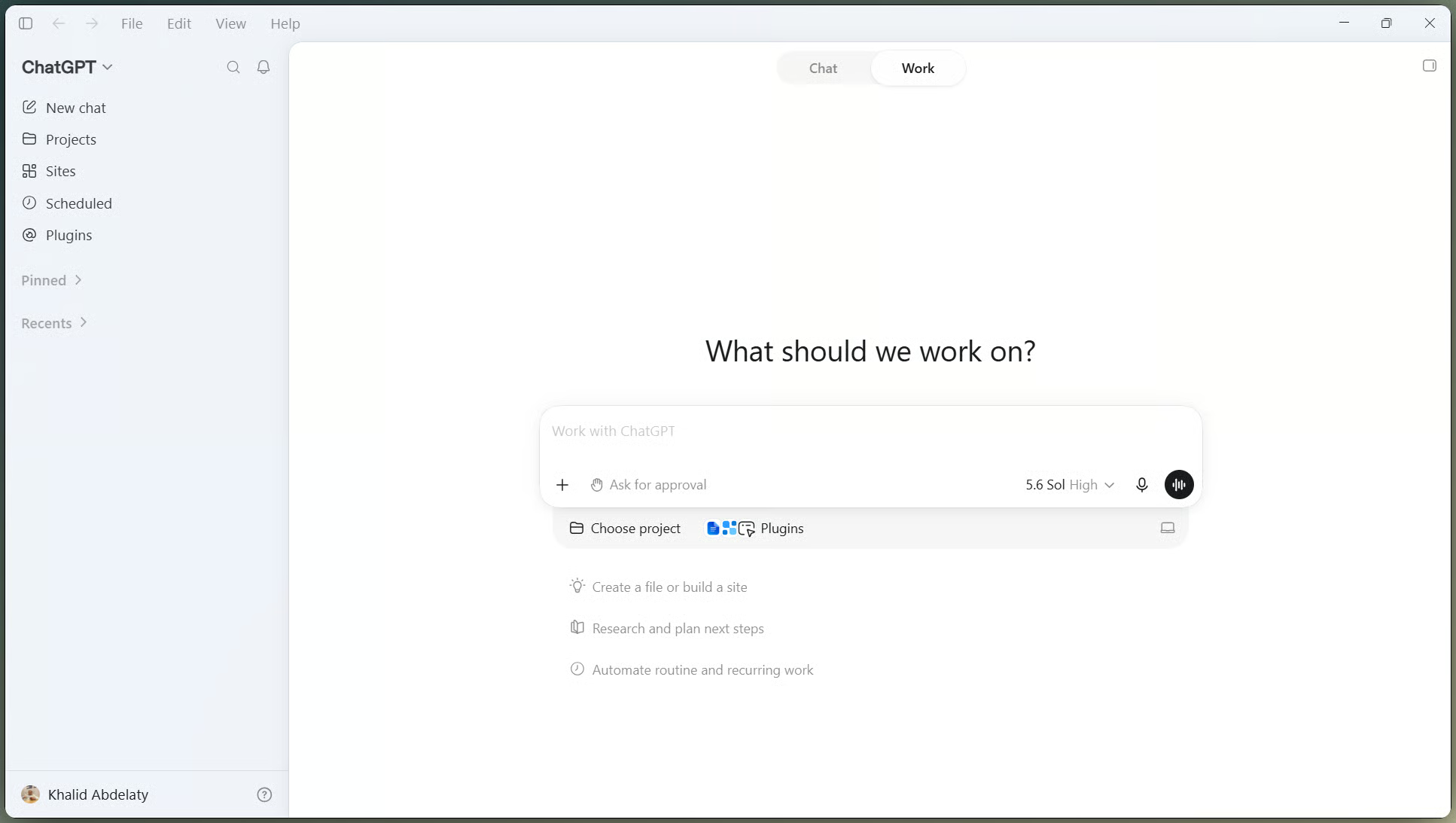
ChatGPT Work interface showing the Chat to Work mode toggle and task input box

ChatGPT's Work toggle sits at top-left. Image by Author.

The name makes more sense once you see where it sits in the app.

How ChatGPT Work fits alongside Chat and Codex

Chat handles quick questions. Work handles the spreadsheet, deck, or research brief. Codex handles repositories, tests, code review, and pull requests. Work borrows technology from Codex, but Codex remains a separate view. That naming is easy to trip over.

What Is Claude Cowork?

Cowork is Anthropic's place for work that lives in folders, documents, spreadsheets, and browser tabs rather than a code repository. It uses the same basic agent loop as Claude Code, but drops the terminal-first interface. Anthropic's engineers said they built the first version in about a week and a half, largely with Claude Code itself.

Cowork began as a Max preview, reached Pro soon after, and moved onto both macOS and Windows in the spring. Its cloud beta now runs on web and mobile for Pro, Max, and Team plans, and on Enterprise when an admin turns it on. Desktop still matters for some local work. Cowork also has Projects, Scheduled Tasks, and Live Artifacts, which are interactive dashboards rather than static files.
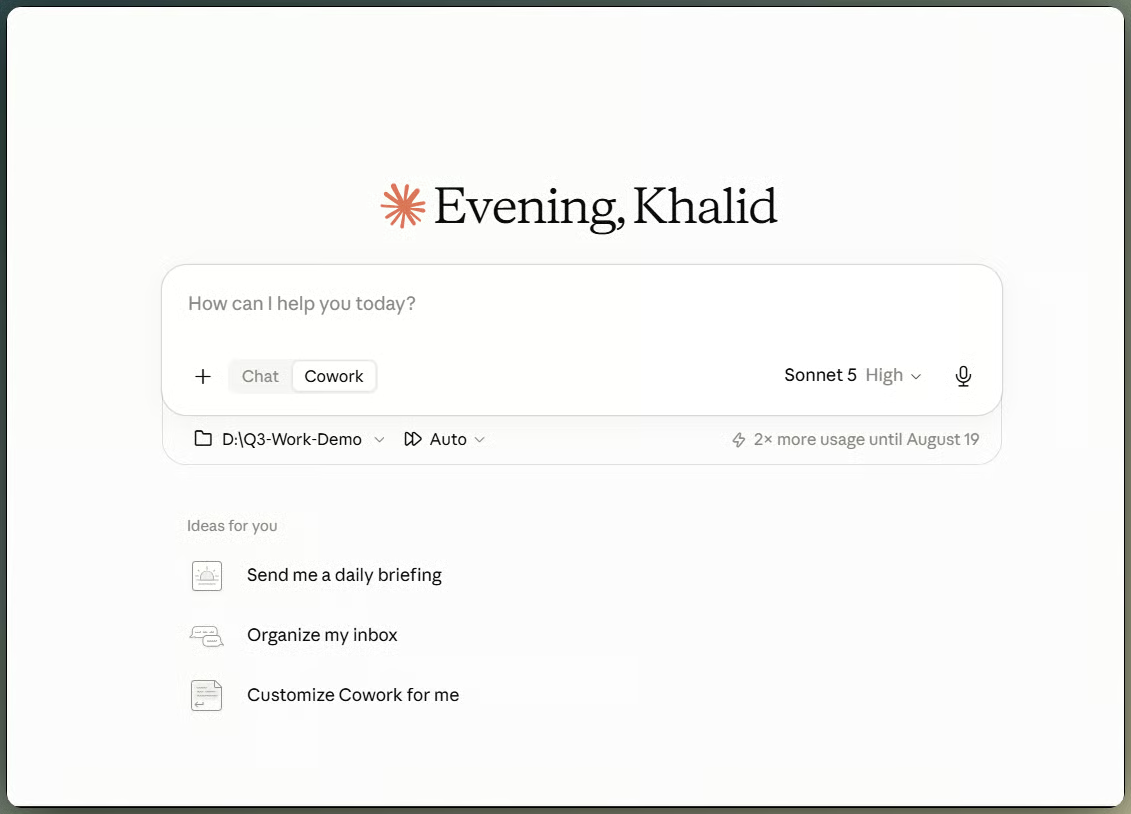
Claude Cowork new task screen with a local working folder connected

Cowork mounts a folder before starting. Image by Author.

One distinction matters before we move on: Cowork is not Claude Code with a friendlier name.

How Cowork fits alongside Claude Chat and Claude Code

No need to repeat the whole three-part split. Claude Chat is conversation, Cowork is general work, and Claude Code is software engineering from the terminal. The names are close; the jobs are not.

ChatGPT Work vs. Claude Cowork: The Big Differences

On paper, both can take a brief, search connected sources, and return a file. Press Enter, though, and they stop feeling alike. Work keeps you in a familiar chat and aims at a file; Cowork shows more of the path and may end with a Live Artifact.

Workflow and delegation model

Work keeps the job inside the ChatGPT thread you already know. You can steer it, answer questions, or approve actions without leaving that thread. Most of the time, you are watching for the finished file.

Cowork shows more of the work along the way. A running trace lists the files Claude opens and the tools it calls. Larger jobs can split into sub-agents that work in parallel and report back their conclusions. I find that reassuring, though someone else may just see more to read.

Cloud work, local work, and working across devices

This is where older comparisons are now wrong. "Work runs in the cloud, Cowork needs your laptop open" was true in the spring. It stopped being true in July, according to Anthropic's Cowork architecture overview.

ChatGPT Work on web and mobile runs in the cloud and syncs across devices, and cloud scheduled tasks don't need your machine awake. Claude Cowork now runs the same way: sessions execute remotely in Anthropic's cloud by default, in beta, and continue after you close the laptop. On August 12, the Claude in Chrome side panel became a Cowork session, so a task can also start in a browser tab and continue in another Claude app.

Local work is where the two differ slightly. ChatGPT needs its desktop app to reach local files and apps. Cowork also needs Claude Desktop for local files and computer use; its Chrome side panel can read the current tab without the desktop app, but broader browser control still needs it.

ChatGPT Work vs. Claude Cowork: Projects and Context

Projects matter once the job lasts longer than one session. Picture a quarterly planning folder with meeting notes, financial data, last quarter's report, and a style guide.

ChatGPT Projects carry files and context across their chats, and you can start Work from inside one. Claude Projects also keep their own files, instructions, and memory, and they can launch Cowork sessions. The wrinkle is local folders: a Claude Project tied to one behaves differently from a cloud-only project, even though both now appear in the same Projects list.

ChatGPT Work vs. Claude Cowork: Files and Finished Outputs

The chat is not what gets forwarded to a client; the file is. Output format matters here.

ChatGPT Work officially supports documents, spreadsheets, presentations, reports, and analyses, as well as Sites, OpenAI's lightweight hosted web apps. Native Google files require the matching Workspace app, while direct control of an open Excel workbook uses Codex with the Excel add-in. Claude Cowork covers spreadsheets, presentations, and documents too, plus Live Artifacts on supported desktop plans, which behave less like a file and more like a small application that stays connected to your data and updates as the numbers change.

Output type

ChatGPT Work

Claude Cowork

Documents and reports

Yes

Yes

Spreadsheets

Yes, with formulas

Yes, with formulas

Slides

Yes

Yes

Hosted web output

Sites

Live Artifacts (desktop, sharing on Team/Enterprise)

Interactive, data-connected artifact

Limited

Yes

Local-file support

Desktop app

Desktop app

In plain English, Work stays closer to editable office files. Cowork is more willing to hand back something that behaves like a small app.

Work's spreadsheet keeps formulas fully editable. Video by Author.

Feed the same messy file to Cowork instead, and the output doesn't look like a spreadsheet at all.

Cowork's dashboard updates as data changes. Video by Author.

ChatGPT Work vs. Claude Cowork: Apps, Connectors, and External Tools

Counting integrations is a lazy way to compare these two, since both directories are large enough that the number stops mattering. What matters more: how easy the connection is, whether the agent can only read a source or act in it, whether that connection survives into a cloud session, and how much control an admin retains.

ChatGPT Work reaches other services through Connected Apps and plugins. It still inherits the permissions underneath them: if your Salesforce account cannot see a record, Work cannot see it either.

Claude Cowork uses Connectors, Plugins, and MCP. Its Microsoft 365 connector shows how far that can go: with admin approval, Claude can send mail, manage calendar events, and change files in OneDrive or SharePoint. Teams remains read-only.

OpenAI added Google Drive files and folders to Library on August 13 for eligible users on the web, in both Chat and Work. Where permissions allow, Work can edit the source file directly.

Neither system triggers itself off an external event the way Zapier or Make does; both wait on you or a schedule, not a webhook like "start the moment a form gets submitted."

ChatGPT Work vs. Claude Cowork: Scheduled and Autonomous Work

Scheduling matters because neither tool needs a fresh prompt every morning. ChatGPT Work's Scheduled Tasks can run once, repeat, react to a trigger, or watch for a change. Claude Cowork's scheduled tasks run on demand or on a schedule, and no longer need a device online.

Take a weekday risk brief. In both tools, you connect the sources, set the schedule, and check the first run. I can't claim one is faster from documentation alone. The difference is where the task lives: Work groups it with Codex automations, while Cowork keeps it inside the Project that owns the inputs and outputs.

ChatGPT Work vs. Claude Cowork: How They Handle the Same Kind of Task

I didn't get matched enterprise accounts for this piece, so this is not a controlled test. Dressing up published demos as one would be dishonest. I compared the same task categories instead, starting with the spreadsheet nobody wants to clean by hand.

Turning a messy spreadsheet into a working analysis

Both sides have a real example of this. On the Work side, one demo dropped five raw exports, community stats, activity logs, Stripe transactions, roughly 35 megabytes total, into a project folder and asked for a formula-driven cohort analysis, explicitly rejecting hardcoded numbers. It ran over an hour and returned a multi-tab workbook with live formulas and an editable findings tab. On the Cowork side, one walkthrough fed in over a hundred receipt images for a categorized expense report with blurry ones flagged for review, while another handed it two years of credit card statements for an interactive spending dashboard that wouldn't have fit through a normal chat upload limit.

Both got through large, messy inputs. What came back was different: Work stayed close to an editable Excel file, while Cowork produced something you would view and filter rather than reformat by hand. If the next person in the chain lives in Excel, that matters.

Turning research into a finished presentation

Work's demos lean on Projects tied to real folders: a spending report and a matching PowerPoint from the same linked budget files, or parallel sub-agents researching two dozen companies against buying signals and returning a sourced spreadsheet. Cowork's demos lean toward one detailed prompt producing a live result, an eight-sub-agent research sweep feeding straight into a branded dashboard with flashcards and a progress tracker, built and styled in one pass.

Both planned first and used sub-agents in parallel. The final shape differed again: Work looked like a deliverable to forward, while Cowork looked like something to reopen next week.

How We Score ChatGPT Work vs. Claude Cowork

I'm not going to invent a 92-versus-89 score. That precision does not exist here; it would just be theater. A category-by-category read is more honest.

  • Task completion: tie. Both finished every documented task without abandoning it partway.
  • Accuracy: tie, with a caveat. Both need a human check on any number in a report; neither should be treated as self-verifying.
  • Autonomy: Cowork, slightly. The sub-agent pattern and hour-plus unattended runs show up more consistently.
  • Interventions: Work, slightly. Its clarifying questions tend to arrive as one short set upfront rather than repeated mid-task back-and-forth.
  • Output quality: tie, but for different outputs. Work favors office files; Cowork favors connected, interactive output.
  • Context handling: tie. Both carry project context across sessions, but neither handles unlimited context cleanly.
  • Transparency: Cowork. Its visible tool trace and file-by-file progress list is more detailed than what Work exposes by default.
  • Integrations: Work on breadth, Cowork on depth once a connector is installed. Call it a tie unless one matters more to you.
  • Ease of use: Work for someone already living inside ChatGPT, Cowork for someone who'd rather be walked through a task than guess what to type.

ChatGPT Work vs. Claude Cowork: Transparency, Control, and Security

Neither tool should be handed the keys and forgotten. Give it only the access it needs, then check anything expensive, public, or hard to reverse. If you don't set admin policy for your team, feel free to skip to pricing.

ChatGPT Work asks for approval before higher-impact actions. Local permission profiles and filesystem or network boundaries limit what it can reach, and connected services keep their own access rules.

Cowork also runs in an isolated environment, including cloud sessions, with separate browser and local permissions. Anthropic makes an important distinction in its engineering writeup: isolation controls where code runs, not what Claude may read or act on. Prompt injection therefore remains a risk whenever external content enters the task.

Anthropic has published more detail about this than OpenAI provides in its Work admin FAQ. That is a documentation gap, not proof that one product is safer.

ChatGPT Work vs. Claude Cowork Pricing

Pricing checked on August 14, 2026, and it will be stale within a few months, so treat this as a snapshot, not a promise.

ChatGPT Work has no separate subscription. Desktop access spans ChatGPT plans, while web and mobile access sit on paid tiers. Work shares its usage allowance with Codex. Plus costs $20 a month on the ChatGPT pricing page, while the two Pro tiers cost $100 and $200.

Cowork starts with Claude Pro at $20 a month or $200 a year. Claude's pricing page lists Max 5x at $100 a month and Max 20x at $200, with optional usage credits after the included allowance runs out.

Plan 

ChatGPT Work

Claude Cowork

Entry paid tier

Plus, $20/month

Pro, $20/month ($200/year)

Mid tier

Pro, $100 to $200/month

Max 5x, $100/month

Top individual tier

Pro (20x usage

Max 20x, $200/month

Overage option

Shared Work/Codex credits

Pay-as-you-go usage credits

Don't convert either into "X tasks per dollar." Neither publishes a stable conversion, and both usage meters are shared, Work with Codex, Cowork with regular chat. The real question isn't the sticker price, it's how much work the tier will actually cover.

What Are Users Saying About Work and Cowork?

I almost cut this section because social threads prove little. These are anecdotes, not polling, so treat them as context rather than a verdict.

The Hacker News launch thread often framed Work as OpenAI catching up to Cowork, while some users were unclear where it sat beside Codex. One Excel-heavy operations user on the Cowork subreddit described switching to Work, while other Claude users still prefer Cowork for context-heavy delegation. These reactions reflect individual workflows, not a broader consensus.

ChatGPT Work: Pros and Cons

  ChatGPT Work Claude Cowork
Pros Sits inside ChatGPT and its existing Projects, so there is less new software to learn Consistently asks clarifying questions before acting on your files
  Creates documents, spreadsheets, slides, reports, and hosted Sites Projects with persistent memory, files, and instructions
  Works from the cloud or your desktop, depending on the surface Live Artifacts for output that stays connected to real data instead of going stale
  Scheduled automation that reacts to triggers, not just a clock Connectors, plugins, and MCP support that go deep once set up
  Cloud Work chats sync across desktop, web, and mobile Visible, detailed tool trace for anyone who wants to watch each step
Cons Usage is metered as shared Work-and-Codex credits, harder to predict than a flat subscription Requires a paid plan outright, with no real free tier for Cowork itself
  Three-tool structure (Chat, Work, Codex) adds a "which mode" layer Cowork doesn't have Usage is pooled with regular Claude chat, so heavy use eats into everyday chat allowance
  Less detailed visibility into agent steps compared to Cowork's trace Local files, computer use, and broader browser control still depend on Claude Desktop
  Independent tutorials repeatedly show it skipping the intended tool, like Sites, unless selected explicitly Live Artifacts sharing is limited to Team and Enterprise, even though creating one works on Pro and Max

ChatGPT Work vs. Claude Cowork: Which Should You Choose?

Ignore the logos for a minute. Where do your files live, and what should come back?

Choose ChatGPT Work if your files and project history already live in ChatGPT. It also fits work that ends as a report, spreadsheet, and deck for the same meeting, especially when you want chat, Work, and Codex under one login.

Choose Claude Cowork if you want to see which files and tools the agent touches as it works. It also makes more sense when a Live Artifact or a long-lived Claude Project is more useful than another static file.

Use both if the split maps to real work. Cowork can handle exploratory, file-heavy jobs while Work produces the client-facing file, or different teams can use different tools. I would not pay for both until that split shows up in practice.

Final Verdict: ChatGPT Work or Claude Cowork?

Both now run long jobs in the cloud, remember project context, and work with connected files. What separates them is the working style: Work keeps the job inside ChatGPT and aims at a finished file; Cowork shows more of the path and is more willing to return a Live Artifact.

If I had to choose a starting point, I would begin with the app already holding my project context. That means Work for many ChatGPT users. I would start with Cowork when the visible trace or Live Artifacts are the reason for using an agent in the first place. This is a snapshot of August 2026, not a permanent ranking.

If you want to go further with either tool, these resources are worth a look:

  • Our ChatGPT Work tutorial walks through a full data science workflow inside Work, useful if you want to see GPT-5.6 handle a real project end to end. 
  • Our Claude Cowork tutorial covers the desktop agent from setup to your first delegated task.
  • Our Claude Cowork vs. Claude Code article breaks down how the two Claude surfaces split the same underlying engine, useful if this piece leaves you wanting the Claude-only version of that comparison.

Khalid Abdelaty's photo
Author
Khalid Abdelaty
LinkedIn

I’m a data engineer and community builder who works across data pipelines, cloud, and AI tooling while writing practical, high-impact tutorials for DataCamp and emerging developers.

FAQs

Do I need a paid plan to use ChatGPT Work or Claude Cowork?

Cowork requires a paid Claude plan, starting at Pro. ChatGPT Work offers limited desktop use on Free and Go, while web, mobile, and Sites require Plus or above.

Can I use ChatGPT Work or Claude Cowork on my phone?

Both. Work is selectable directly in the ChatGPT mobile app, and its cloud chats sync across mobile, web, and desktop. Cowork on mobile can also start or continue cloud sessions. As mentioned earlier, local files still require the relevant desktop app to be open.

Is my data used to train the model when I use these agents?

For Claude Cowork on Team and Enterprise plans, Anthropic states cloud session data isn't used to train Claude, per its architecture documentation. OpenAI's enterprise data-usage policies apply to Work in the same way they apply to the rest of ChatGPT Enterprise. If this matters for your job, read the actual policy page for your plan rather than trusting a summary, mine included.

Which one is better for someone who can't code at all?

Honestly, both are built for that person now, which is a change from a year ago. Cowork leans on clarifying questions before it acts, which suits someone who wants to be walked through it. Work leans on presets and slash-style tool selection, which suits someone who'd rather click a button than type a paragraph.

Do I have to pick just one?

No, and I'd gently push back on anyone who tells you that you do. As I mentioned earlier, plenty of the heaviest users run both, and the split is usually by role rather than by preference, one person on ops running Cowork, another on content running Work. Start with whichever matches your most frequent task, then add the second one only when you notice yourself wishing for the other's strengths.

Topics

Learn with DataCamp

Course

Understanding ChatGPT

1 hr
430.7K
Learn how to use ChatGPT. Discover best practices for writing prompts and explore common business use cases for the powerful AI tool.
See DetailsRight Arrow
Start Course
See MoreRight Arrow
Related

blog

Claude Cowork Alternatives: 8 Agentic Tools Compared on Price, Cloud Execution, and Model Choice

Claude Cowork is locked to Claude models, and its run-in-the-cloud mode is still in limited beta. I compared 8 alternatives, from ChatGPT Work to self-hosted agents you run with your own API keys.
Tom Farnschläder's photo

Tom Farnschläder

15 min

blog

Claude vs. ChatGPT for Data Science: A Comparative Analysis

We explore Claude vs ChatGPT to determine which generative AI works best for performing various data science tasks.
Abid Ali Awan's photo

Abid Ali Awan

10 min

blog

ChatGPT vs. Copilot: Choosing the Best AI Assistant for Your Needs

Discover the differences between ChatGPT and Microsoft Copilot. Learn how their features, integrations, and use cases compare, helping you choose the right AI tool.
Vinod Chugani's photo

Vinod Chugani

9 min

blog

Perplexity vs. ChatGPT: Which AI Assistant Fits Your Needs Best?

A practical guide to choosing the right AI assistant for research, creativity, and everyday tasks.
Vinod Chugani's photo

Vinod Chugani

8 min

blog

GPT-5.4 vs Claude Opus 4.6: Which Is the Best Model For Agentic Tasks?

GPT-5.4 vs Claude Opus 4.6. Compare benchmarks, pricing, coding, and agentic performance to find the best AI model for your workflow in 2026.
Derrick Mwiti's photo

Derrick Mwiti

9 min

Tutorial

ChatGPT Agent: A Guide With Five Practical Examples

Learn what ChatGPT Agent is, how to use it, how it handles real-world tasks, and where it still falls short.
Bex Tuychiev's photo

Bex Tuychiev

See MoreSee More