Claude Cowork is a strong tool profiting from capable models, and it would be dishonest to pretend otherwise.
Still, running unattended in the cloud is a beta feature, and anything touching your local files still needs the desktop app open. For most users that means: if your laptop sleeps, so does your agent. It also requires a Claude Pro subscription at $20/month (with heavy users quickly climbing to Max at $100/month or $200/month), locks you into the Claude model family, and is not optimal for many team workflows with shared access.
Enough reasons to look elsewhere. I've compared 9 alternatives on four things that actually decide the purchase: what it costs, whether work continues after you shut the lid, which model families you can point it at, and how much setup it demands.
For background on Cowork itself and its place in Anthropic's lineup, see our Claude Cowork tutorial and our guide to learning Claude.
In a Nutshell
- If you want the closest like-for-like swap, ChatGPT Agent is the one.
- If your work is email, calendar, and meetings, Lindy handles everything in the cloud while you're offline; if it's code, Cursor's cloud agents are the way to go.
- If you're looking for a free alternative, OpenClaw is open-source and free to run; you only pay for your own API keys and hosting.
- If team collaboration is the point, Notion Agents works on your shared workspace, or Copilot Cowork if you're already a Microsoft 365 shop.
The Best Claude Cowork Alternatives at a Glance
All prices below come from each vendor's official pricing page at the time of writing. This category re-prices often, so check before you commit a team budget.
| Tool | Best for | Pricing | Runs without your machine | Key differentiator |
|---|
| ChatGPT Work | The closest swap for Cowork-style task execution | From $20/mo (Plus) | Yes | Autonomous web browsing plus scheduled and triggered runs |
| Perplexity Computer | Research-heavy tasks that need citations | $200/mo (Max), or $325/seat/mo (Enterprise Max) | Yes | Every answer carries live web citations |
| Cursor (Cloud Agents) | Engineering work rather than general office tasks | From $20/mo (Pro) | Yes, via cloud agents | Cloud agents plus MCP tool connections |
| OpenClaw | Privacy and model choice, self-hosting | Free; you directly pay for your keys + hosting | Yes, if hosted on a server | Open source, BYOK across any model, runs on your own infrastructure |
| Lindy AI | Inbox, calendar, and meeting automation that never sleeps | $49.99-$199.99/mo | Yes | Connected inboxes with browser automation on Pro and above |
| Notion Agents | Teams whose documents already live in Notion | $20/seat/mo + $10/1,000 credits for Custom Agents | Yes | Custom Agents running on Notion credits |
| Microsoft 365 Copilot Cowork | Organizations standardized on Microsoft 365 | From ~$30/user/mo for Copilot seat + $10/1,000 credits for Cowork agents | Yes | Native access to Outlook, Teams, and SharePoint data |
| Open-source work agents | Privacy-first or budget-constrained setups | Free software, you pay for API and hosting | Yes, if hosted on a server | Bring your own key and your own model |
The Best General Claude Cowork Alternatives
General cloud agents are the nearest like-for-like replacements: hosted agents that take a task, work across the web, and hand back a finished result.
ChatGPT Work
ChatGPT Work is OpenAI's autonomous task runner and the closest thing to a drop-in replacement for Cowork. It's one of three modes in the rebuilt ChatGPT app, sitting between Chat and Codex, and the line-up maps almost one-to-one onto Anthropic's: Chat, Work, and Codex against Chat, Cowork, and Claude Code. If you've used Cowork, the mental model transfers directly.
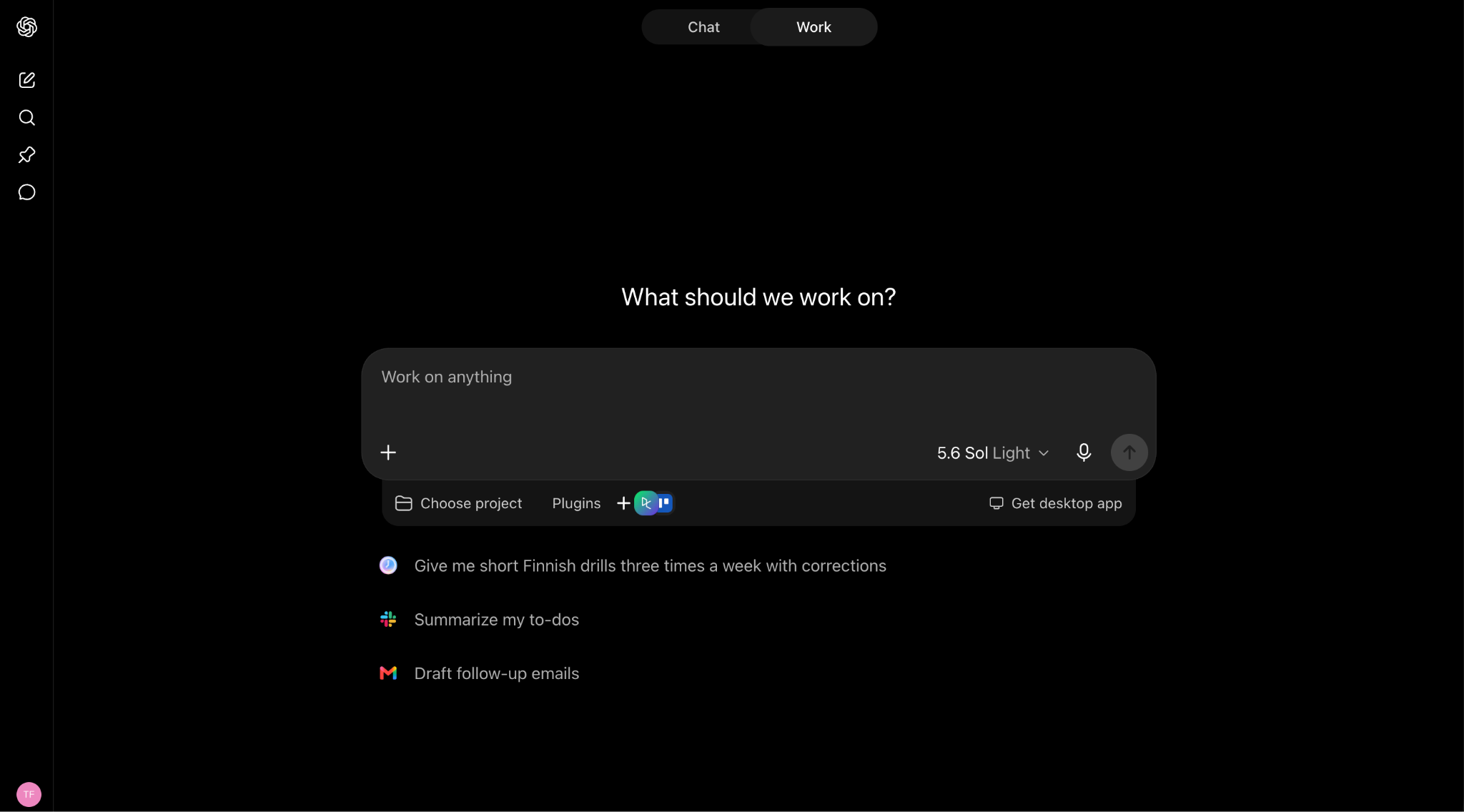 It browses the web on its own, executes multi-step tasks in a hosted environment, and, in the business and enterprise contexts covered by ChatGPT Work, keeps workflows persistent across a team rather than tied to one person's session.
The difference that matters against Cowork is where the work happens. Work has run on OpenAI's infrastructure since launch, so a long research-and-compile task keeps going while your laptop is in a bag. Cowork can now do this too, but only through a beta cloud mode, and never for tasks that touch your local files.
The trade is model lock-in of a different flavor. You get the GPT family and nothing else, which is fine until you want to compare outputs across providers. If you're weighing model choice specifically, our comparison of GPT-5.6 Terra and Claude Sonnet on benchmarks and pricing is a better starting point than any vendor's marketing page.
Key features
- Autonomous web browsing: The agent navigates sites, fills forms, and pulls data without you supervising each click.
- Hosted execution: Tasks run server-side, so nothing depends on your machine staying awake.
- Persistent across your devices: Cloud Work chats sync across web, mobile, and desktop, and persist through Projects and Scheduled Tasks. Team sharing runs through workspace projects, not shared live sessions.
Pricing
Work has no standalone price. It's bundled into ChatGPT plans and metered against your allowance, just like Codex. Free ($0) and Go ($8/mo) do not include Work. Plus, at $20/month is the entry point, similar to Anthropic's pricing structure.
Limitations
You are on GPT models with no bring-your-own-key path, so cost control across a mixed workload is limited to whatever tier you buy. Agent runs are also fairly opaque: you see the result, but reconstructing exactly which pages the agent read and in what order is harder than with a tool that logs each step explicitly.
Perplexity Computer
Perplexity Computer executes desktop-style tasks with its built-in research engine, so the output includes live web citations rather than an unsourced summary. We put it through parallel workflows in our hands-on Perplexity Computer tutorial, and the citation trail is what separates it from every other tool here.
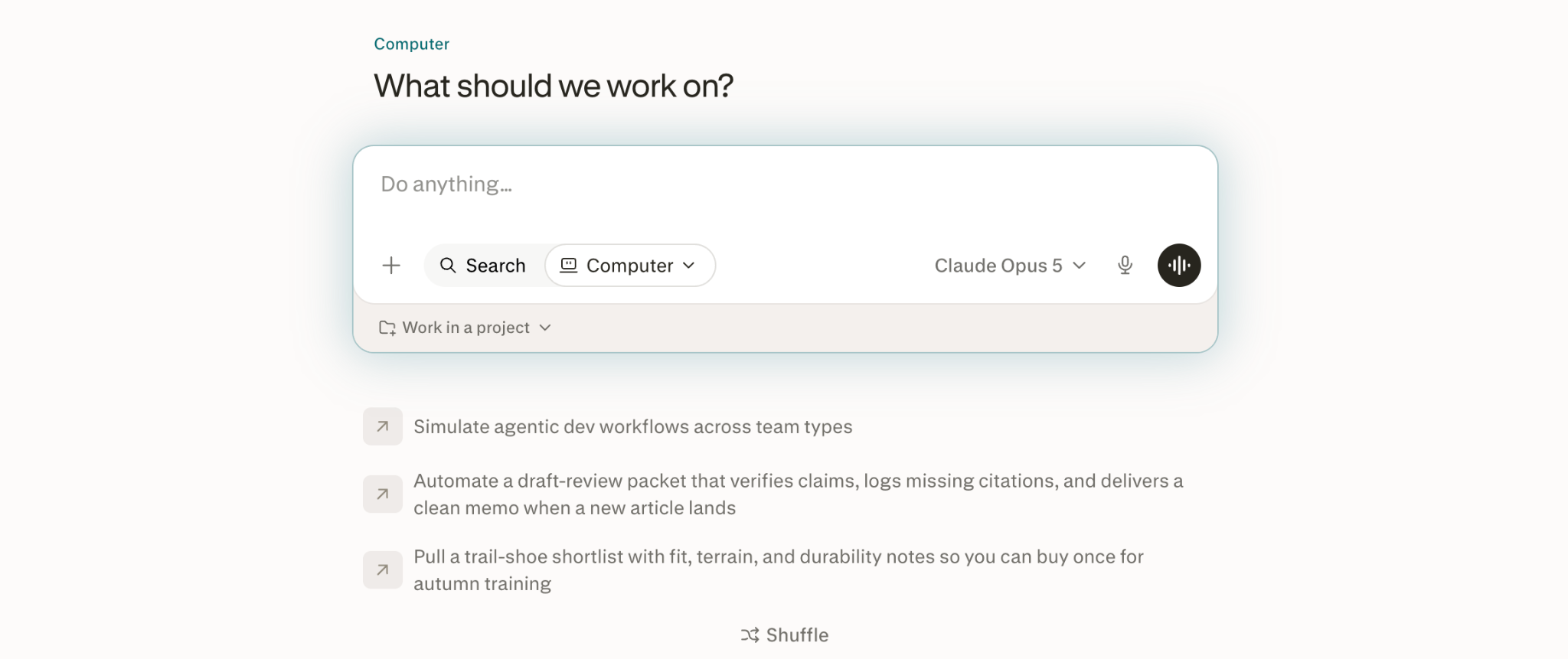 Where Cowork reaches into your local files, Computer reaches out to the web. If your work is competitive analysis, market sizing, or anything where a colleague will ask "where did this number come from", that is a real advantage. If your work is reorganizing a folder of spreadsheets on your Mac, it is not.
Key features
- Cited task execution: Every claim in a research output links back to a source, which survives review by someone who did not run the task.
- Auto-routed model selection: Perplexity picks the model per request across Claude, GPT, Gemini, and its own Sonar family.
- Cloud task execution: Computer handles multi-step work in Perplexity's cloud, so it doesn't depend on your machine staying awake.
- Education pricing: Verified students and educators get Pro features at $10/month through SheerID verification.
Pricing
Perplexity publishes six tiers, and Computer access is limited to the top two: Max ($200/month) and Enterprise Max ($325/seat/month). This smoothly brings us to the limitations.
Limitations
Computer is gated to Max at $200/month, which is the same price as Claude's Max 20x tier and 10x the Pro plan most people start on. Model routing is automatic with no bring-your-own-key option, so you cannot force a specific model for a task where you already know which one performs better.
The Best Role-Specific Claude Cowork Alternatives
Next up are tools built deep rather than wide, purpose-shaped for one job, like your inbox or your codebase.
Cursor (Cloud Agents)
Cursor is an AI-first code editor, and it belongs on this list because of one feature: cloud agents. If the reason you are leaving Cowork is that your agent stops when your laptop sleeps, and the work in question is engineering, Cursor already solves it. We walk through the setup in our guide to Cursor Automations and always-on coding agents.
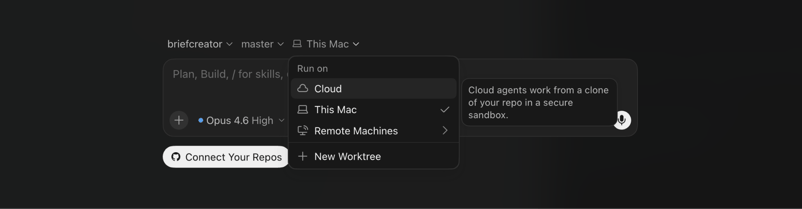 Cursor also supports Claude, GPT, and Gemini model families in the same editor, so you can run a refactor on one and a test-writing pass on another without changing tools. That is the direct answer to Cowork's single-provider constraint. New to it? Start with our roundup of the best ways to learn Cursor.
The obvious caveat: Cursor is not going to triage your inbox or build a slide deck. Its scope is narrower than Cowork's on purpose, and inside that scope, it is considerably deeper.
Key features
- Agent mode: Multi-file changes driven from a single instruction, with the agent running commands and checking its own work.
- Cloud agents: Background work continues on Cursor's infrastructure rather than your machine.
- Tab completions: Inline autocomplete, unlimited on paid individual plans.
- MCP support: Connect external tools and data sources through the Model Context Protocol.
- Max context windows: Larger context for reasoning across a big codebase in one pass.
- Agentic code reviews and a team marketplace: Shared rules and skills across a team, with review passes handled by the agent.
- Cursor SDK: Drive coding agents programmatically from TypeScript.
Pricing
Like Claude Cowork and ChatGPT Work, the cloud agents feature is accessible with a $20/month subscription, which is Cursor's Pro level.
Limitations
Everything happens in a code editor. If your Cowork usage was 70% document and spreadsheet work, Cursor replaces almost none of it.
Lindy AI
Lindy builds no-code assistants that run in the cloud on a schedule, which is the cleanest fix for Cowork's desktop dependency if your work is email, calendar, and meetings rather than code. Its assistants handle inbox triage, draft replies, book meetings, and take meeting notes without anything installed locally.
Browser automation and model selection both sit on the Pro plan and above, so the $49.99 Plus tier is more limited than the price suggests. That is worth knowing before you sign up, especially if you expect Cowork-equivalent behavior.
Key features
- Inbox triage and drafting: The assistant sorts incoming mail and prepares replies for approval.
- Connected inboxes by tier: 2 on Plus, 3 on Pro, 5 on Max.
- Computer use and browser automation: Included on Pro and above, which is where Lindy starts overlapping properly with Cowork.
- Model selection: Also Pro and above, across Claude, GPT, and Gemini families.
- SMS and iMessage support: Assistants can act on messages outside the email channel.
- Integrations: Lindy connects to hundreds of different apps.
- Enterprise controls: SSO, SCIM, audit logs, HIPAA compliance, dedicated support, and onboarding.
Pricing
Lindy's official pricing page lists four tiers:
- Plus: $49.99/month, 2 connected inboxes.
- Pro: $99.99/month, 3 connected inboxes, adds computer use and model selection.
- Max: $199.99/month, 5 connected inboxes.
- Enterprise: Custom pricing, adds SSO, SCIM, audit logs, and compliance packaging.
There is no permanent free plan, but you can test Lindy in a 7-day free trial.
Limitations
At $49.99/month, Lindy's entry price is more than double Claude Pro's $20, and the features that make it a genuine Cowork substitute only appear at $99.99. It is also assistant-shaped rather than general-purpose: you configure Lindys for specific jobs, which is more setup work upfront than opening Cowork and describing a task.
The Best Ecosystem-Native Claude Cowork Alternatives
Ecosystem-native agents live inside the suite your team already works in and act on the content that's already there.
Notion Agent
Notion Agent is the option to consider if your team's documents, wikis, and project databases already live in Notion. Notion rebuilt its AI feature set as Agent in its 3.0 release, and the pitch is that the agent works on your actual workspace content rather than files scattered across a laptop.
That is the structural difference from Cowork. Cowork reads what is on your machine; a Notion Agent reads what your whole team has written, which makes handover between people much less painful.
Key features
- Custom Agents: Configurable agents available as an add-on to Business and Enterprise, running on Notion credits.
- AI Meeting Notes: Transcription and summarisation tied into the pages the meeting relates to.
- Enterprise Search: Retrieval across the workspace as part of the full AI bundle.
- Research Mode: Longer-form research output, with full access on Enterprise.
- Zero data retention with LLM providers: An Enterprise AI and security feature.
- SCIM provisioning and audit logs: Enterprise admin controls.
Pricing
To access the Agents feature, you need either Notion's Business subscription ($20/month) or the custom-priced Enterprise tier.
Custom Agents run on Notion credits, priced at $10 per 1,000 monthly credits on top of the seat cost. Model access spans the Claude, GPT, and Gemini families.
Limitations
Agents work on Notion content. Point one at a folder of CSVs on your desktop, and it has nothing to do. The credit model also makes it hard to forecast heavy agent use: two teams on Business at $20/seat can end up with wildly different bills depending on how much their agents run.
Microsoft 365 Copilot
Copilot Cowork is the agent layer inside Microsoft 365 Copilot, and yes, Microsoft gave it the same name as the tool you're leaving. You describe an outcome, and it works across your email, meetings, files, and Teams chats, and hands back finished work. If your company already runs on Microsoft 365, it's the closest thing to Cowork that lives where your data already sits.
It also addresses Cowork's desktop problem: Cowork runs autonomously within your Microsoft 365 tenant, not on your laptop, so a long task keeps running while you're offline. The other advantage is permissions. Cowork reads what's on your machine, while Copilot Cowork already knows who can see which document and inherits that visibility, so there's no need to hand files to an app.
The catch is how it bills. Cowork needs a Microsoft 365 Copilot license underneath it, and the work you delegate is metered on top in credits, so the sticker price tells you little about the real bill.
Key features
-
Work IQ grounding: Reasons across your org's emails, meetings, files, and Teams chats, so its output is built on your real data.
-
Autonomous execution: Plans and runs multi-step work in your tenant, sending emails, booking meetings, and drafting documents, then returns a finished deliverable.
-
Inherited permissions: Respects your existing Microsoft 365 access controls instead of needing separate file access.
-
Live cost check: Type /cost in a task to see credits consumed so far.
Pricing
Two layers, only the first fixed:
- Microsoft 365 Copilot license: Required, $30/user/month (annual), itself an add-on to a qualifying Microsoft 365 plan.
- Copilot Credits: The agent's work is metered at $0.01/credit pay-as-you-go. No credits are included with the license.
- Per-task cost: Rough estimates run about $1–3 light, $4–7 medium, and more for heavy tasks, scaling with model, context, tool calls, and runtime.
Limitations
The pricing is the limitation. A single heavy task can cost more than a day of a user's seat time, and because cost scales with delegated work rather than seat count, the "license everyone and forget it" model breaks down.
It's also Microsoft-only. Cowork earns its place if your work lives in Outlook, Teams, and SharePoint, and does little if it doesn't. And you can't pick the model for a Cowork task the way you can when building a custom agent in Copilot Studio.
The Best Open Source Claude Cowork Alternatives
Self-hosted agents are bring-your-own-key options you run on your own machine or server, trading setup work for full control over models and data.
OpenClaw
OpenClaw is the open-source project that addresses both of Cowork's constraints at once: model lock-in and execution location. It's a self-hosted, MIT-licensed personal agent that you can point to your own API keys and run on your own machine or a VPS. Created by PSPDFKit founder Peter Steinberger, it became the default name people reach for when they talk about open-source Cowork clones. We compare it directly in our OpenClaw vs. Claude Code article.
Instead of a desktop app, OpenClaw runs as a local gateway that connects your chosen model to your files and to messaging apps like WhatsApp, Telegram, and Discord. You talk to it where you already are, and it acts: clearing your inbox, managing files, watching a GitHub repo, triggering a deploy. Host it on a server, and it keeps working with your laptop closed.
The catch is that self-hosted means the setup and the security are yours, and an agent with local file and shell access is a real surface to lock down.
Key features
- Bring your own key: Model-agnostic across Claude, GPT, Gemini, DeepSeek, Mistral, and local models through Ollama, switchable anytime.
- SKILL.md skills: Each skill is a folder with a Markdown instruction file, the same pattern as Claude's skills, plus a SOUL.md that sets the agent's personality and rules.
- Messaging-app interface: Acts through WhatsApp, Telegram, and Discord rather than a separate window, with persistent memory across conversations.
- Self-hosted and auditable: The full codebase is on GitHub under MIT, so you can read every line and keep data on your own infrastructure.
Pricing
The software is free. Your costs are the model API usage you bring, plus hosting if you run it on a VPS rather than your own machine. Third-party managed hosting exists (OneClaw, from about $9.99/month) if you'd rather not run the server, but that's a separate product, not OpenClaw itself.
Limitations
Setup and upkeep are on you, and by default, it runs locally, so the "works while my laptop sleeps" benefit only arrives once you host it on a server. There's no official support.
It's also shaped more like a personal assistant over messaging than an office agent. If your Cowork use was drafting documents and reorganizing spreadsheets, the overlap is partial; if it was "watch this and act on it," OpenClaw fits well.
Other Open-Source Options
If OpenClaw doesn't fit, a handful of other open-source agents cover the same ground, all sharing one design decision: bring your own key. You supply the API credentials, and the software doesn't care which provider issued them, so Claude, GPT, and Gemini are all reachable through config.
Rowboat is the most developed of them. It's an open-source multi-agent builder with event- and schedule-triggered background agents, MCP support, and hundreds of built-in integrations, self-hostable or run from its cloud. It predates Cowork and was built as a general framework, so it's less a clone than a platform you can shape into a coworker.
OpenWork, OpenWorker, Hermes Agent, and Eigent round out the group. All run on your own keys, and Eigent and Hermes lean on model independence and user-defined workflows as their pitch. Host any of them on a server, and the agent runs whether your laptop is open or not.
Key features
- Bring your own key: All run on API credentials you supply, so Claude, GPT, Gemini, or a local model are reachable through config, with no provider lock-in.
- Self-hosted and private: You run them on your own machine or server, so data stays on your infrastructure. That's the draw for regulated or data-residency work.
- Runs unattended when hosted: Put any of them on a server and the agent keeps working with your laptop closed.
- Rowboat's background agents: Rowboat adds event- and schedule-triggered runs, MCP tool connections, and hundreds of built-in integrations, the most turnkey of the group.
Pricing
The software is free. Your costs are API usage on whichever provider you point it at, plus hosting if you run it on a server rather than your own machine. There are no published tiers for any of these projects, which also means no published support commitments.
Limitations
Setup and maintenance land on you, and several of these are local-only or self-hosted, which reintroduces the exact machine dependency you left Cowork to escape. None of them publishes a support matrix for which model families are tested and working, so expect to find that out yourself. I'd only recommend this route if you have a specific data-residency requirement or you enjoy tinkering.
How to Choose the Right AI Work Agent
The decision usually collapses to two questions: does the work need to continue when your laptop is closed, and does it live in code, documents, email, or the open web?
Entry prices vary more than people expect, from Notion Plus at $10 per seat/month and ChatGPT Agent or Cursor Pro at $20/month, up to Microsoft 365 Copilot at around $30/user/month plus credits and Lindy Plus at $49.99/month.
| If you need... | Go with | Why |
|---|
| The closest replacement for Cowork's general task execution | ChatGPT Work | Autonomous browsing and hosted execution, with a free tier to test on |
| Agents who keep working overnight on email and calendar | Lindy AI | Cloud-hosted assistants with browser automation from the $99.99 Pro plan |
| Research output that your colleagues can verify | Perplexity Computer | Live web citations attached to every result |
| Multi-file code changes and background engineering work | Cursor | Cloud agents plus Claude, GPT, and Gemini in one editor |
| An agent that already knows your team's documents | Notion Agents | Works on workspace content instead of one person's local files |
| Rollout across a Microsoft 365 organization | Microsoft 365 Copilot | Inherits existing tenancy permissions, no connector work |
| Data that cannot leave your own infrastructure | OpenClaw (or Rowboat) | Self-hosted with local models and your own API keys |
The closest call to Claude Cowork is ChatGPT Work versus Perplexity Computer, since both run hosted, multi-step work over the web. The tiebreaker is cost against citations: Computer needs the $200/month Max plan, while Work starts at $20 on Plus. If no one downstream will audit your sources, that $180 gap is hard to justify.
The other real decision is convenience versus control. Pick Copilot Cowork or Lindy if you want the agent managed and running in someone else's cloud, and OpenClaw if you need model choice and want your data to stay on your own infrastructure.
Final Thoughts
Claude Cowork is still the right choice if you are already paying for Claude Pro, your work sits on your own machine, and you never needed a task to run while you slept. Anthropic's model quality is not the weak point, and the tool-use benchmarks back that up.
My top picks for switching are ChatGPT Work, Lindy, and OpenClaw. ChatGPT Work is the closest structural match, hosted rather than desktop-bound, and its entry plan is the same $20 you were already paying Anthropic. Lindy is the one to streamline work-life logistics (although a bit pricey). OpenClaw is the versatile Swiss army knife if you're comfortable handling your own setup and hosting.
Everything else here is a fit question rather than a ranking question. Cursor if the work is code, Notion Agents if the work is already in Notion, Copilot if procurement has decided for you.
If you want to get properly fluent with the concepts behind all of these tools, I recommend starting with our AI Agent Fundamentals skill track.







%22%3E%0A%20%20%20%20%20%20%20%20%3Crect%20fill%3D%22%23F7F3EB%22%20height%3D%22180%22%20width%3D%22336%22%20%2F%3E%0A%20%20%20%20%20%20%20%20%3Crect%0A%20%20%20%20%20%20%20%20%20%20fill%3D%22%23000820%22%0A%20%20%20%20%20%20%20%20%20%20height%3D%22106.6%22%0A%20%20%20%20%20%20%20%20%20%20transform%3D%22rotate(-30%20-208.588%20220.18)%22%0A%20%20%20%20%20%20%20%20%20%20width%3D%22456.125%22%0A%20%20%20%20%20%20%20%20%20%20x%3D%22-208.588%22%0A%20%20%20%20%20%20%20%20%20%20y%3D%22220.18%22%0A%20%20%20%20%20%20%20%20%2F%3E%0A%20%20%20%20%20%20%20%20%3Crect%0A%20%20%20%20%20%20%20%20%20%20fill%3D%22%2300C74E%22%0A%20%20%20%20%20%20%20%20%20%20height%3D%2235.875%22%0A%20%20%20%20%20%20%20%20%20%20transform%3D%22rotate(-30%20-208.588%20220.18)%22%0A%20%20%20%20%20%20%20%20%20%20width%3D%22347.576%22%0A%20%20%20%20%20%20%20%20%20%20x%3D%22-208.588%22%0A%20%20%20%20%20%20%20%20%20%20y%3D%22220.18%22%0A%20%20%20%20%20%20%20%20%2F%3E%0A%20%20%20%20%20%20%20%20%3Crect%0A%20%20%20%20%20%20%20%20%20%20fill%3D%22%23FF931E%22%0A%20%20%20%20%20%20%20%20%20%20height%3D%2235.875%22%0A%20%20%20%20%20%20%20%20%20%20transform%3D%22rotate(-30%20-226.525%20189.111)%22%0A%20%20%20%20%20%20%20%20%20%20width%3D%22347.576%22%0A%20%20%20%20%20%20%20%20%20%20x%3D%22-226.525%22%0A%20%20%20%20%20%20%20%20%20%20y%3D%22189.111%22%0A%20%20%20%20%20%20%20%20%2F%3E%0A%20%20%20%20%20%20%20%20%3Crect%0A%20%20%20%20%20%20%20%20%20%20fill%3D%22%23D87300%22%0A%20%20%20%20%20%20%20%20%20%20height%3D%22106.6%22%0A%20%20%20%20%20%20%20%20%20%20transform%3D%22rotate(-30%2085.5879%20256.055)%22%0A%20%20%20%20%20%20%20%20%20%20width%3D%22456.125%22%0A%20%20%20%20%20%20%20%20%20%20x%3D%2285.5879%22%0A%20%20%20%20%20%20%20%20%20%20y%3D%22256.055%22%0A%20%20%20%20%20%20%20%20%2F%3E%0A%20%20%20%20%20%20%20%20%3Crect%0A%20%20%20%20%20%20%20%20%20%20fill%3D%22%23000820%22%0A%20%20%20%20%20%20%20%20%20%20height%3D%2235.875%22%0A%20%20%20%20%20%20%20%20%20%20transform%3D%22rotate(-30%2085.5879%20256.055)%22%0A%20%20%20%20%20%20%20%20%20%20width%3D%22184.5%22%0A%20%20%20%20%20%20%20%20%20%20x%3D%2285.5879%22%0A%20%20%20%20%20%20%20%20%20%20y%3D%22256.055%22%0A%20%20%20%20%20%20%20%20%2F%3E%0A%20%20%20%20%20%20%20%20%3Crect%0A%20%20%20%20%20%20%20%20%20%20fill%3D%22%2300C74E%22%0A%20%20%20%20%20%20%20%20%20%20height%3D%2235.875%22%0A%20%20%20%20%20%20%20%20%20%20transform%3D%22rotate(-30%20227.432%20132.736)%22%0A%20%20%20%20%20%20%20%20%20%20width%3D%22271.625%22%0A%20%20%20%20%20%20%20%20%20%20x%3D%22227.432%22%0A%20%20%20%20%20%20%20%20%20%20y%3D%22132.736%22%0A%20%20%20%20%20%20%20%20%2F%3E%0A%20%20%20%20%20%20%3C%2Fg%3E%0A%20%20%20%20%20%20%3Cdefs%3E%0A%20%20%20%20%20%20%20%20%3CclipPath%20id%3D%22clip%22%3E%0A%20%20%20%20%20%20%20%20%20%20%3Crect%20fill%3D%22white%22%20height%3D%22180%22%20width%3D%22336%22%20%2F%3E%0A%20%20%20%20%20%20%20%20%3C%2FclipPath%3E%0A%20%20%20%20%20%20%3C%2Fdefs%3E%0A%20%20%20%20%3C%2Fsvg%3E)

%22%3E%0A%20%20%20%20%20%20%20%20%3Crect%20fill%3D%22%23EFEBE4%22%20height%3D%22180%22%20width%3D%22336%22%20%2F%3E%0A%20%20%20%20%20%20%20%20%3Crect%0A%20%20%20%20%20%20%20%20%20%20fill%3D%22%2372E5FE%22%0A%20%20%20%20%20%20%20%20%20%20height%3D%22106.6%22%0A%20%20%20%20%20%20%20%20%20%20transform%3D%22rotate(-30%20-208.588%20220.18)%22%0A%20%20%20%20%20%20%20%20%20%20width%3D%22456.125%22%0A%20%20%20%20%20%20%20%20%20%20x%3D%22-208.588%22%0A%20%20%20%20%20%20%20%20%20%20y%3D%22220.18%22%0A%20%20%20%20%20%20%20%20%2F%3E%0A%20%20%20%20%20%20%20%20%3Crect%0A%20%20%20%20%20%20%20%20%20%20fill%3D%22%23000820%22%0A%20%20%20%20%20%20%20%20%20%20height%3D%2235.875%22%0A%20%20%20%20%20%20%20%20%20%20transform%3D%22rotate(-30%20-208.588%20220.18)%22%0A%20%20%20%20%20%20%20%20%20%20width%3D%22347.576%22%0A%20%20%20%20%20%20%20%20%20%20x%3D%22-208.588%22%0A%20%20%20%20%20%20%20%20%20%20y%3D%22220.18%22%0A%20%20%20%20%20%20%20%20%2F%3E%0A%20%20%20%20%20%20%20%20%3Crect%0A%20%20%20%20%20%20%20%20%20%20fill%3D%22%235EB1FF%22%0A%20%20%20%20%20%20%20%20%20%20height%3D%2235.875%22%0A%20%20%20%20%20%20%20%20%20%20transform%3D%22rotate(-30%20-226.525%20189.111)%22%0A%20%20%20%20%20%20%20%20%20%20width%3D%22347.576%22%0A%20%20%20%20%20%20%20%20%20%20x%3D%22-226.525%22%0A%20%20%20%20%20%20%20%20%20%20y%3D%22189.111%22%0A%20%20%20%20%20%20%20%20%2F%3E%0A%20%20%20%20%20%20%20%20%3Crect%0A%20%20%20%20%20%20%20%20%20%20fill%3D%22%23000820%22%0A%20%20%20%20%20%20%20%20%20%20height%3D%22106.6%22%0A%20%20%20%20%20%20%20%20%20%20transform%3D%22rotate(-30%2085.5879%20256.055)%22%0A%20%20%20%20%20%20%20%20%20%20width%3D%22456.125%22%0A%20%20%20%20%20%20%20%20%20%20x%3D%2285.5879%22%0A%20%20%20%20%20%20%20%20%20%20y%3D%22256.055%22%0A%20%20%20%20%20%20%20%20%2F%3E%0A%20%20%20%20%20%20%20%20%3Crect%0A%20%20%20%20%20%20%20%20%20%20fill%3D%22%23D87300%22%0A%20%20%20%20%20%20%20%20%20%20height%3D%2235.875%22%0A%20%20%20%20%20%20%20%20%20%20transform%3D%22rotate(-30%2085.5879%20256.055)%22%0A%20%20%20%20%20%20%20%20%20%20width%3D%22184.5%22%0A%20%20%20%20%20%20%20%20%20%20x%3D%2285.5879%22%0A%20%20%20%20%20%20%20%20%20%20y%3D%22256.055%22%0A%20%20%20%20%20%20%20%20%2F%3E%0A%20%20%20%20%20%20%20%20%3Crect%0A%20%20%20%20%20%20%20%20%20%20fill%3D%22%235646A5%22%0A%20%20%20%20%20%20%20%20%20%20height%3D%2235.875%22%0A%20%20%20%20%20%20%20%20%20%20transform%3D%22rotate(-30%20227.432%20132.736)%22%0A%20%20%20%20%20%20%20%20%20%20width%3D%22271.625%22%0A%20%20%20%20%20%20%20%20%20%20x%3D%22227.432%22%0A%20%20%20%20%20%20%20%20%20%20y%3D%22132.736%22%0A%20%20%20%20%20%20%20%20%2F%3E%0A%20%20%20%20%20%20%3C%2Fg%3E%0A%20%20%20%20%20%20%3Cdefs%3E%0A%20%20%20%20%20%20%20%20%3CclipPath%20id%3D%22clip%22%3E%0A%20%20%20%20%20%20%20%20%20%20%3Crect%20fill%3D%22white%22%20height%3D%22180%22%20width%3D%22336%22%20%2F%3E%0A%20%20%20%20%20%20%20%20%3C%2FclipPath%3E%0A%20%20%20%20%20%20%3C%2Fdefs%3E%0A%20%20%20%20%3C%2Fsvg%3E)

Claude Cowork is a strong tool profiting from capable models, and it would be dishonest to pretend otherwise.
Still, running unattended in the cloud is a beta feature, and anything touching your local files still needs the desktop app open. For most users that means: if your laptop sleeps, so does your agent. It also requires a Claude Pro subscription at $20/month (with heavy users quickly climbing to Max at $100/month or $200/month), locks you into the Claude model family, and is not optimal for many team workflows with shared access.
Enough reasons to look elsewhere. I've compared 9 alternatives on four things that actually decide the purchase: what it costs, whether work continues after you shut the lid, which model families you can point it at, and how much setup it demands.
For background on Cowork itself and its place in Anthropic's lineup, see our Claude Cowork tutorial and our guide to learning Claude.
In a Nutshell
The Best Claude Cowork Alternatives at a Glance
All prices below come from each vendor's official pricing page at the time of writing. This category re-prices often, so check before you commit a team budget.
The Best General Claude Cowork Alternatives
General cloud agents are the nearest like-for-like replacements: hosted agents that take a task, work across the web, and hand back a finished result.
ChatGPT Work
ChatGPT Work is OpenAI's autonomous task runner and the closest thing to a drop-in replacement for Cowork. It's one of three modes in the rebuilt ChatGPT app, sitting between Chat and Codex, and the line-up maps almost one-to-one onto Anthropic's: Chat, Work, and Codex against Chat, Cowork, and Claude Code. If you've used Cowork, the mental model transfers directly.
The difference that matters against Cowork is where the work happens. Work has run on OpenAI's infrastructure since launch, so a long research-and-compile task keeps going while your laptop is in a bag. Cowork can now do this too, but only through a beta cloud mode, and never for tasks that touch your local files.
The trade is model lock-in of a different flavor. You get the GPT family and nothing else, which is fine until you want to compare outputs across providers. If you're weighing model choice specifically, our comparison of GPT-5.6 Terra and Claude Sonnet on benchmarks and pricing is a better starting point than any vendor's marketing page.
Key features
Pricing
Work has no standalone price. It's bundled into ChatGPT plans and metered against your allowance, just like Codex. Free ($0) and Go ($8/mo) do not include Work. Plus, at $20/month is the entry point, similar to Anthropic's pricing structure.
Limitations
You are on GPT models with no bring-your-own-key path, so cost control across a mixed workload is limited to whatever tier you buy. Agent runs are also fairly opaque: you see the result, but reconstructing exactly which pages the agent read and in what order is harder than with a tool that logs each step explicitly.
Perplexity Computer
Perplexity Computer executes desktop-style tasks with its built-in research engine, so the output includes live web citations rather than an unsourced summary. We put it through parallel workflows in our hands-on Perplexity Computer tutorial, and the citation trail is what separates it from every other tool here.
Key features
Pricing
Perplexity publishes six tiers, and Computer access is limited to the top two: Max ($200/month) and Enterprise Max ($325/seat/month). This smoothly brings us to the limitations.
Limitations
Computer is gated to Max at $200/month, which is the same price as Claude's Max 20x tier and 10x the Pro plan most people start on. Model routing is automatic with no bring-your-own-key option, so you cannot force a specific model for a task where you already know which one performs better.
The Best Role-Specific Claude Cowork Alternatives
Next up are tools built deep rather than wide, purpose-shaped for one job, like your inbox or your codebase.
Cursor (Cloud Agents)
Cursor is an AI-first code editor, and it belongs on this list because of one feature: cloud agents. If the reason you are leaving Cowork is that your agent stops when your laptop sleeps, and the work in question is engineering, Cursor already solves it. We walk through the setup in our guide to Cursor Automations and always-on coding agents.
The obvious caveat: Cursor is not going to triage your inbox or build a slide deck. Its scope is narrower than Cowork's on purpose, and inside that scope, it is considerably deeper.
Key features
Pricing
Like Claude Cowork and ChatGPT Work, the cloud agents feature is accessible with a $20/month subscription, which is Cursor's Pro level.
Limitations
Everything happens in a code editor. If your Cowork usage was 70% document and spreadsheet work, Cursor replaces almost none of it.
Lindy AI
Lindy builds no-code assistants that run in the cloud on a schedule, which is the cleanest fix for Cowork's desktop dependency if your work is email, calendar, and meetings rather than code. Its assistants handle inbox triage, draft replies, book meetings, and take meeting notes without anything installed locally.
Browser automation and model selection both sit on the Pro plan and above, so the $49.99 Plus tier is more limited than the price suggests. That is worth knowing before you sign up, especially if you expect Cowork-equivalent behavior.
Key features
Pricing
Lindy's official pricing page lists four tiers:
There is no permanent free plan, but you can test Lindy in a 7-day free trial.
Limitations
At $49.99/month, Lindy's entry price is more than double Claude Pro's $20, and the features that make it a genuine Cowork substitute only appear at $99.99. It is also assistant-shaped rather than general-purpose: you configure Lindys for specific jobs, which is more setup work upfront than opening Cowork and describing a task.
The Best Ecosystem-Native Claude Cowork Alternatives
Ecosystem-native agents live inside the suite your team already works in and act on the content that's already there.
Notion Agent
Notion Agent is the option to consider if your team's documents, wikis, and project databases already live in Notion. Notion rebuilt its AI feature set as Agent in its 3.0 release, and the pitch is that the agent works on your actual workspace content rather than files scattered across a laptop.
That is the structural difference from Cowork. Cowork reads what is on your machine; a Notion Agent reads what your whole team has written, which makes handover between people much less painful.
Key features
Pricing
To access the Agents feature, you need either Notion's Business subscription ($20/month) or the custom-priced Enterprise tier.
Custom Agents run on Notion credits, priced at $10 per 1,000 monthly credits on top of the seat cost. Model access spans the Claude, GPT, and Gemini families.
Limitations
Agents work on Notion content. Point one at a folder of CSVs on your desktop, and it has nothing to do. The credit model also makes it hard to forecast heavy agent use: two teams on Business at $20/seat can end up with wildly different bills depending on how much their agents run.
Microsoft 365 Copilot
Copilot Cowork is the agent layer inside Microsoft 365 Copilot, and yes, Microsoft gave it the same name as the tool you're leaving. You describe an outcome, and it works across your email, meetings, files, and Teams chats, and hands back finished work. If your company already runs on Microsoft 365, it's the closest thing to Cowork that lives where your data already sits.
It also addresses Cowork's desktop problem: Cowork runs autonomously within your Microsoft 365 tenant, not on your laptop, so a long task keeps running while you're offline. The other advantage is permissions. Cowork reads what's on your machine, while Copilot Cowork already knows who can see which document and inherits that visibility, so there's no need to hand files to an app.
The catch is how it bills. Cowork needs a Microsoft 365 Copilot license underneath it, and the work you delegate is metered on top in credits, so the sticker price tells you little about the real bill.
Key features
Work IQ grounding: Reasons across your org's emails, meetings, files, and Teams chats, so its output is built on your real data.
Autonomous execution: Plans and runs multi-step work in your tenant, sending emails, booking meetings, and drafting documents, then returns a finished deliverable.
Inherited permissions: Respects your existing Microsoft 365 access controls instead of needing separate file access.
Live cost check: Type
/costin a task to see credits consumed so far.Pricing
Two layers, only the first fixed:
Limitations
The pricing is the limitation. A single heavy task can cost more than a day of a user's seat time, and because cost scales with delegated work rather than seat count, the "license everyone and forget it" model breaks down.
It's also Microsoft-only. Cowork earns its place if your work lives in Outlook, Teams, and SharePoint, and does little if it doesn't. And you can't pick the model for a Cowork task the way you can when building a custom agent in Copilot Studio.
The Best Open Source Claude Cowork Alternatives
Self-hosted agents are bring-your-own-key options you run on your own machine or server, trading setup work for full control over models and data.
OpenClaw
OpenClaw is the open-source project that addresses both of Cowork's constraints at once: model lock-in and execution location. It's a self-hosted, MIT-licensed personal agent that you can point to your own API keys and run on your own machine or a VPS. Created by PSPDFKit founder Peter Steinberger, it became the default name people reach for when they talk about open-source Cowork clones. We compare it directly in our OpenClaw vs. Claude Code article.
Instead of a desktop app, OpenClaw runs as a local gateway that connects your chosen model to your files and to messaging apps like WhatsApp, Telegram, and Discord. You talk to it where you already are, and it acts: clearing your inbox, managing files, watching a GitHub repo, triggering a deploy. Host it on a server, and it keeps working with your laptop closed.
The catch is that self-hosted means the setup and the security are yours, and an agent with local file and shell access is a real surface to lock down.
Key features
Pricing
The software is free. Your costs are the model API usage you bring, plus hosting if you run it on a VPS rather than your own machine. Third-party managed hosting exists (OneClaw, from about $9.99/month) if you'd rather not run the server, but that's a separate product, not OpenClaw itself.
Limitations
Setup and upkeep are on you, and by default, it runs locally, so the "works while my laptop sleeps" benefit only arrives once you host it on a server. There's no official support.
It's also shaped more like a personal assistant over messaging than an office agent. If your Cowork use was drafting documents and reorganizing spreadsheets, the overlap is partial; if it was "watch this and act on it," OpenClaw fits well.
Other Open-Source Options
If OpenClaw doesn't fit, a handful of other open-source agents cover the same ground, all sharing one design decision: bring your own key. You supply the API credentials, and the software doesn't care which provider issued them, so Claude, GPT, and Gemini are all reachable through config.
Rowboat is the most developed of them. It's an open-source multi-agent builder with event- and schedule-triggered background agents, MCP support, and hundreds of built-in integrations, self-hostable or run from its cloud. It predates Cowork and was built as a general framework, so it's less a clone than a platform you can shape into a coworker.
OpenWork, OpenWorker, Hermes Agent, and Eigent round out the group. All run on your own keys, and Eigent and Hermes lean on model independence and user-defined workflows as their pitch. Host any of them on a server, and the agent runs whether your laptop is open or not.
Key features
Pricing
The software is free. Your costs are API usage on whichever provider you point it at, plus hosting if you run it on a server rather than your own machine. There are no published tiers for any of these projects, which also means no published support commitments.
Limitations
Setup and maintenance land on you, and several of these are local-only or self-hosted, which reintroduces the exact machine dependency you left Cowork to escape. None of them publishes a support matrix for which model families are tested and working, so expect to find that out yourself. I'd only recommend this route if you have a specific data-residency requirement or you enjoy tinkering.
How to Choose the Right AI Work Agent
The decision usually collapses to two questions: does the work need to continue when your laptop is closed, and does it live in code, documents, email, or the open web?
Entry prices vary more than people expect, from Notion Plus at $10 per seat/month and ChatGPT Agent or Cursor Pro at $20/month, up to Microsoft 365 Copilot at around $30/user/month plus credits and Lindy Plus at $49.99/month.
The closest call to Claude Cowork is ChatGPT Work versus Perplexity Computer, since both run hosted, multi-step work over the web. The tiebreaker is cost against citations: Computer needs the $200/month Max plan, while Work starts at $20 on Plus. If no one downstream will audit your sources, that $180 gap is hard to justify.
The other real decision is convenience versus control. Pick Copilot Cowork or Lindy if you want the agent managed and running in someone else's cloud, and OpenClaw if you need model choice and want your data to stay on your own infrastructure.
Final Thoughts
Claude Cowork is still the right choice if you are already paying for Claude Pro, your work sits on your own machine, and you never needed a task to run while you slept. Anthropic's model quality is not the weak point, and the tool-use benchmarks back that up.
My top picks for switching are ChatGPT Work, Lindy, and OpenClaw. ChatGPT Work is the closest structural match, hosted rather than desktop-bound, and its entry plan is the same $20 you were already paying Anthropic. Lindy is the one to streamline work-life logistics (although a bit pricey). OpenClaw is the versatile Swiss army knife if you're comfortable handling your own setup and hosting.
Everything else here is a fit question rather than a ranking question. Cursor if the work is code, Notion Agents if the work is already in Notion, Copilot if procurement has decided for you.
If you want to get properly fluent with the concepts behind all of these tools, I recommend starting with our AI Agent Fundamentals skill track.