

Course
Introduction to Claude Models
3 hr
15.1K
Practice and track your progress.
Continue with GoogleThe sections below follow a task from context to completion.

It starts with the memory, skills, and connectors already in your Claude account. It can search past Duet chats and Claude chats outside projects. To stop that search, turn off Search and reference chats under Settings > Your Claude.
Duet can use over 6,000 connectors and plugins in the Claude Marketplace. You choose which services to connect.
Its cloud computer and browser keep going after you close the app. For sites without a connector, Duet uses that browser and notifies you when the task is done or blocked.
Account checks run every few hours rather than continuously because each one uses your plan limits. You can change the frequency, but an urgent message may still sit unseen until the next check.
Duet keeps one main thread and optional channels for topics such as finances or hiring. Every channel uses the same memory.
The Tasks tab shows active work and anything waiting on you, and only you can mark a task complete. I like that boundary: Duet can suggest that the work is done, but it can't make the final call. Editable briefs, financial models, slide decks, and dashboards appear in the Make tab.
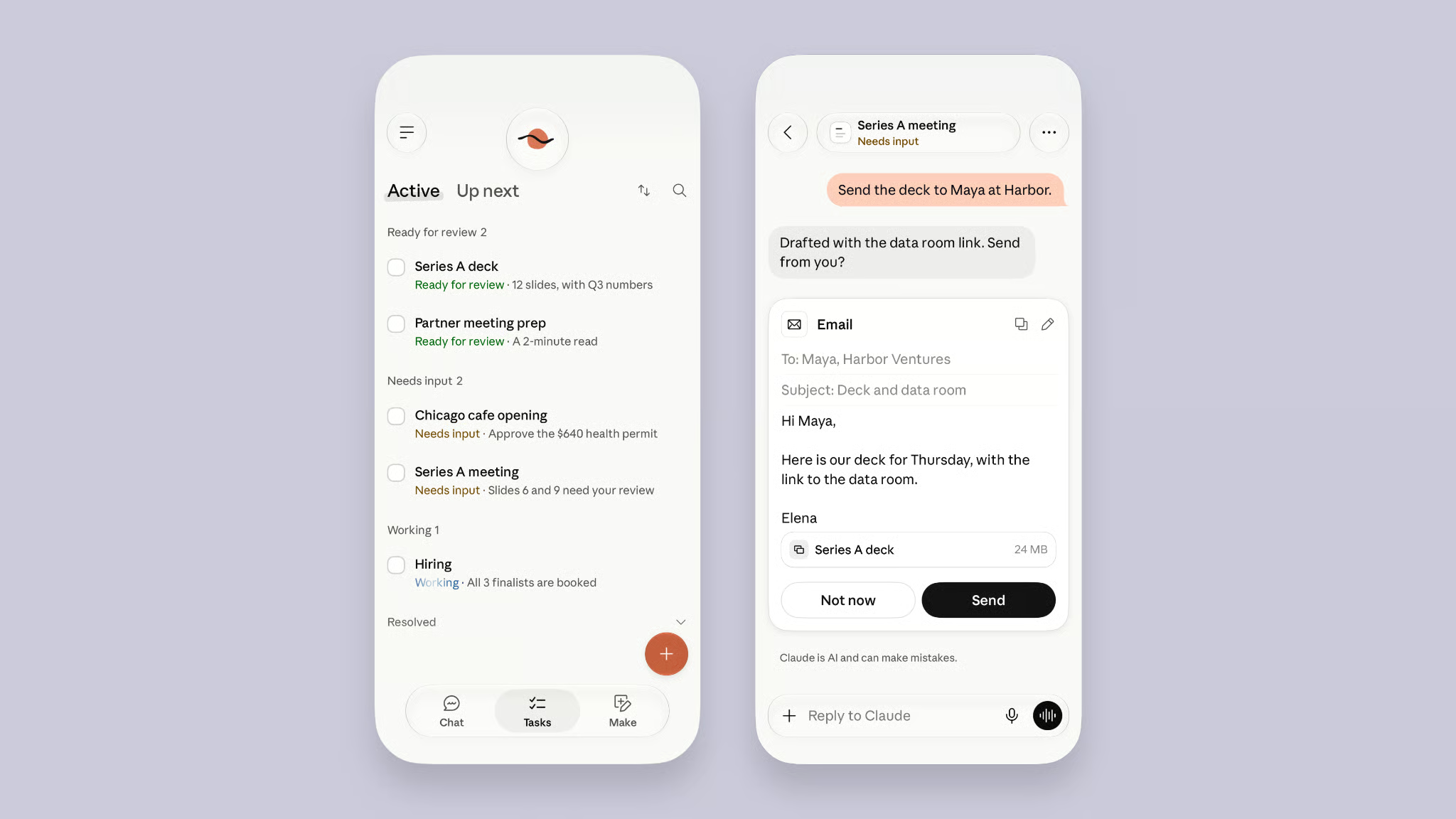
The Claude Duet task list. Source: Anthropic
Duet's clearest use cases are morning triage, business admin, purchases, and larger files such as dashboards.
Each morning, Duet checks your email and calendar, highlights what needs attention, and can draft replies. During the day, it follows up on threads that have gone quiet.
For real estate broker Jess Provencher, Duet flagged a property showing booked for the wrong day without being asked to audit her calendar. The alert came before she asked Duet to check the booking.
Anthropic lists several business tasks Duet can handle through connected apps. These are product examples, not results from one independent test.
Duet can complete routine steps on its own. It pauses for approval before actions such as sending messages, paying, or signing documents. Amin Ebrahimi, owner of Shahs of Kabob, used Duet across invoices, support, and marketing for a business with about 110 employees.
Duet can also buy things through Link, Stripe's digital wallet, or Shopify's Shop Pay.
You connect either wallet directly inside Duet, not through the Claude Marketplace. Each wallet has its own review flow.
With Link, you approve the amount in the Link app. Duet then pays with a one-time card limited to that store and amount. Your real card number isn't shared with Duet or the store.
A one-time card limits what Duet can spend. The card works only for the approved store and amount, but Link can't make recurring payments and some sites block AI checkout.
Larger results appear in the Make tab. Numbers link back to the email, file, or spreadsheet they came from.
Anthropic's Marlo Pulse demo pulls sales, cash, customer, and staffing data into a daily dashboard. It is a product demo, not an independent test.
Claude Cowork and Duet share your Claude account, connectors, and cloud. They differ in who starts the work.
Cowork already handles tasks with several steps in the cloud. Since early October, new Pro and Max Cowork tasks keep running after you close your laptop. Cowork runs work you start or schedule; Duet checks connected accounts and messages first.
Anthropic is also merging chat and Cowork into one Claude experience. A normal request can become a task when needed, while Duet remains a separate preview app.
Both products share your Claude account and plan limits. The differences below affect which work each one can handle.
| Item | Claude Duet | Claude Cowork (Pro and Max) |
|---|---|---|
| Who starts the work | Duet | You, or a schedule you set |
| Where you use it | Separate app on iOS and Android, plus claude.ai | The main Claude app on desktop, web, mobile |
| Files on your computer | Reads your Claude work but can’t change it | Connected folders, through the desktop app |
| Browser and computer access | Separate cloud browser; no user view or takeover | Built-in browser or Claude in Chrome |
| Payments | Link and Shop Pay, available only in Duet | Not available |
| Plans | US Pro and Max, by waitlist | Pro, Max, Team, and Enterprise |
My rule of thumb: use Cowork when you already know the task. A Monday report or a deck due at noon fits that pattern. Duet adds something only when noticing the task is the hard part.
Other agents work in the background too. As mentioned earlier, OpenAI's dots let you open the cloud computer, watch it, and select Take over when it needs a human. Duet doesn't offer that control yet.
Grok Bot gives you a list of separate bots, while Duet uses one thread and sorts work into channels. The difference is whether you want several named roles or one assistant that organizes the work for you.
Meta Muse starts free and focuses more on personal errands and shopping. Duet focuses on work and requires a Pro or Max plan.
Early access produced mixed reactions. The testers worked on different tasks, so their experiences are observations rather than a controlled comparison.
Dan Shipper used Duet for 2 weeks. He liked its channels, task tracking, and editable files, and reported moving from mostly ChatGPT to roughly equal use of ChatGPT and Claude.
Peter Yang also found Duet proactive. In his written comparison, he described it as more proactive by default than the other agents he tested.
Claire Vo had a different experience. She said she tested Duet and then forgot about it.
Shipper found Duet's email drafts weaker than his Dot's, and its voice input worked as transcription rather than a live conversation.
These experiences point to Duet's central problem: proactive messages need to arrive at the right time, not simply more often. Individual results still vary.
If Duet can read your inbox, calendar, and payment wallet, you need to know what it can do without you. Duet's safety checks ask for permission, inspect messages before sending, and keep passwords and login tokens away from the model.
Duet waits before sending a message, making a payment, signing a document, or deleting anything. The approval shows the destination, content, and every recipient, and Duet can finish the rest of a task while that decision waits.
Some actions are blocked even when you approve them. Others can never fall under a "don't ask me again" rule:
Anthropic says a separate system checks whether each action matches your request. Because the check runs outside the agent, a prompt injection attack hidden on a web page cannot directly alter it. Anthropic also says its safeguards can make mistakes.
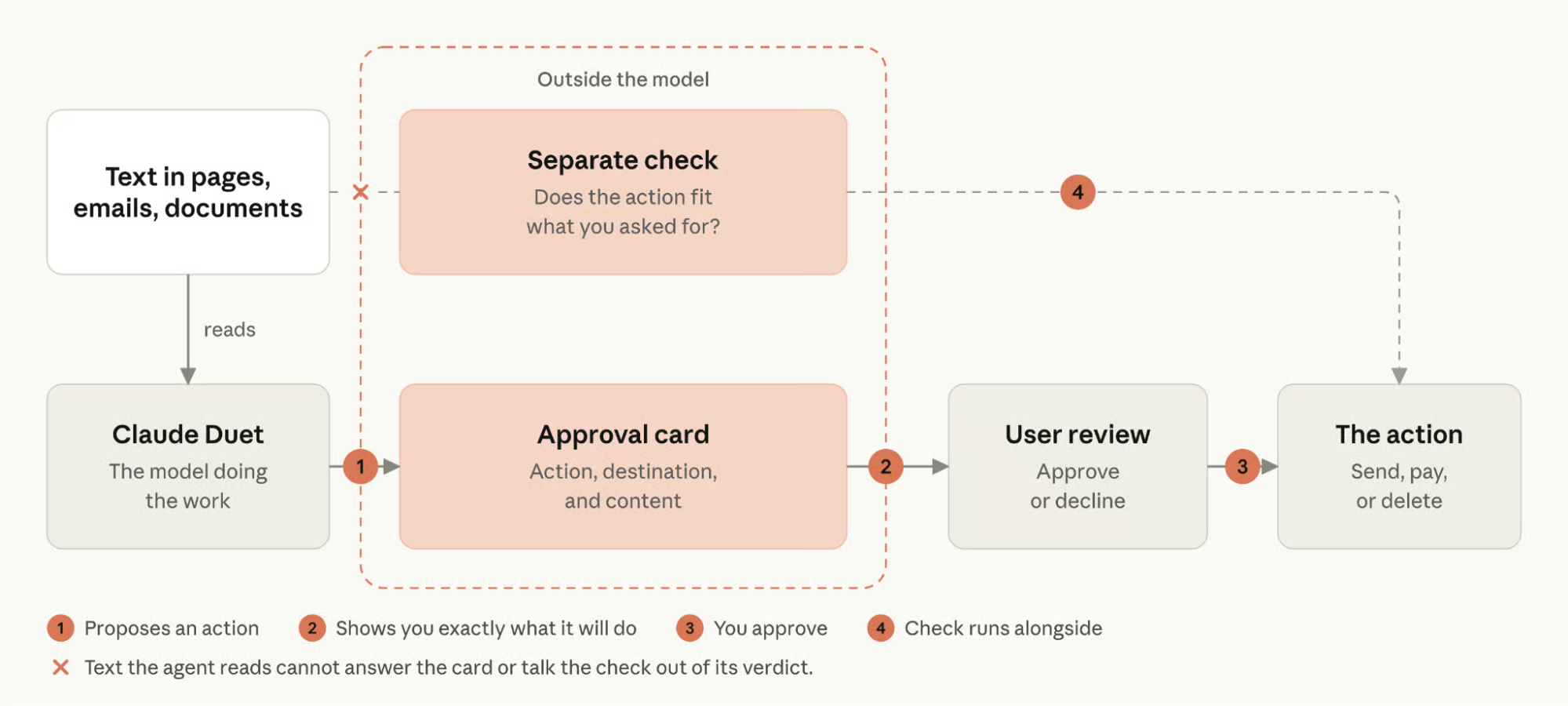
Claude Duet's approval flow. Source: Anthropic
Duet handles login details, browser activity, and outgoing messages through separate controls. Four rules matter:
Duet can still misread page text, and an approval request can contain details you overlook. Review important actions before allowing them.
Duet is still a research preview, so this list may change. Right now, it can’t:
Claude Duet has no separate fee during the research preview, but it requires a paid plan and uses that plan's limits. Access also depends on your plan, location, and waitlist status.
Duet has no extra fee beyond an eligible Claude subscription. The current options are:
Prices are in US dollars and exclude tax. Duet shares Claude's 5-hour session and weekly limits.
Morning briefs, account checks, and larger jobs all count, so a busy schedule can leave less room for regular chats. New preview users get one full limit reset, available until November 30, 2026.
Access remains narrow. You need all three conditions:
Team, Enterprise, Free, and accounts outside the US can't join yet. If that includes you, you can skip the setup details for now.
Otherwise, use the same email for the waitlist, your Claude account, and the Apple or Google account on your phone. Invitations arrive in waves with no guaranteed date, and the app can take a few minutes to appear after acceptance.
For eligible users, I'd start with one low-risk recurring task before trusting Duet with more important work. I wouldn't use it for Microsoft 365 work, local files, or alerts that cannot wait a few hours.
Duet should remove more follow-up work than its check-ins create. Early testers disagreed on whether it does. That disagreement is why the research preview label fits.
If you want to understand how agents make decisions and use tools, our AI Agent Fundamentals skill track covers the underlying ideas.
Learn Claude with DataCamp
Course
Course
Practice and track your progress.
Continue with Googleblog
Tom Farnschläder
15 min
blog
Khalid Abdelaty
15 min
blog
Alex Olteanu
8 min
blog
Khalid Abdelaty
10 min
Tutorial
Bexruz (Bex) Tuychiev
11 min
Tutorial
Tim Lu
12 min