
Programma
Sviluppare modelli linguistici di grandi dimensioni
16 ore
La nuova famiglia di modelli open-source di Google, Gemma 3, sta guadagnando rapidamente popolarità grazie alle sue prestazioni impressionanti, paragonabili ad alcuni degli ultimi modelli proprietari. Gemma 3 introduce funzionalità multimodali, capacità di ragionamento avanzate e supporta oltre 140 lingue.
In questo tutorial esploreremo le capacità di Gemma 3 e impareremo come eseguirne il fine-tuning su un dataset di domande e risposte di ragionamento finanziario. Questo processo di fine-tuning migliorerà sensibilmente l’accuratezza del modello nella comprensione di domande finanziarie complesse e gli permetterà di fornire risposte precise e pertinenti al contesto.
Nuovo al fine-tuning degli LLM? Nessun problema, ci pensiamo noi! Segui il nostro tutorial semplice da seguire, Fine-Tuning LLMs: A Guide With Examples, per capire come funziona il fine-tuning.
Puoi anche seguire il corso Introduction to LLMs in Python per approfondire come funzionano gli LLM, come eseguirne il fine-tuning e come valutarne le prestazioni.
Immagine dell’autore
La famiglia Gemma di modelli open rappresenta un importante passo avanti nel rendere l’AI all’avanguardia accessibile a tutti. Costruita sulla ricerca e la tecnologia dietro i modelli Gemini 2.0, Gemma 3 offre prestazioni di livello state-of-the-art pur restando leggera ed efficiente.
Con dimensioni che vanno da 1 a 27 miliardi di parametri, Gemma 3 offre flessibilità in termini di requisiti hardware e di performance, rendendo più semplice che mai integrare l’AI avanzata in applicazioni reali.
Gemma 3 stabilisce un nuovo riferimento prestazionale nella sua categoria, superando concorrenti come Llama3-405B, DeepSeek-V3 e o3-mini nelle valutazioni di preferenza umana sulla leaderboard LMArena. Il suo design leggero non compromette la potenza, permettendo agli sviluppatori di ottenere risultati leader di settore mantenendo l’efficienza.
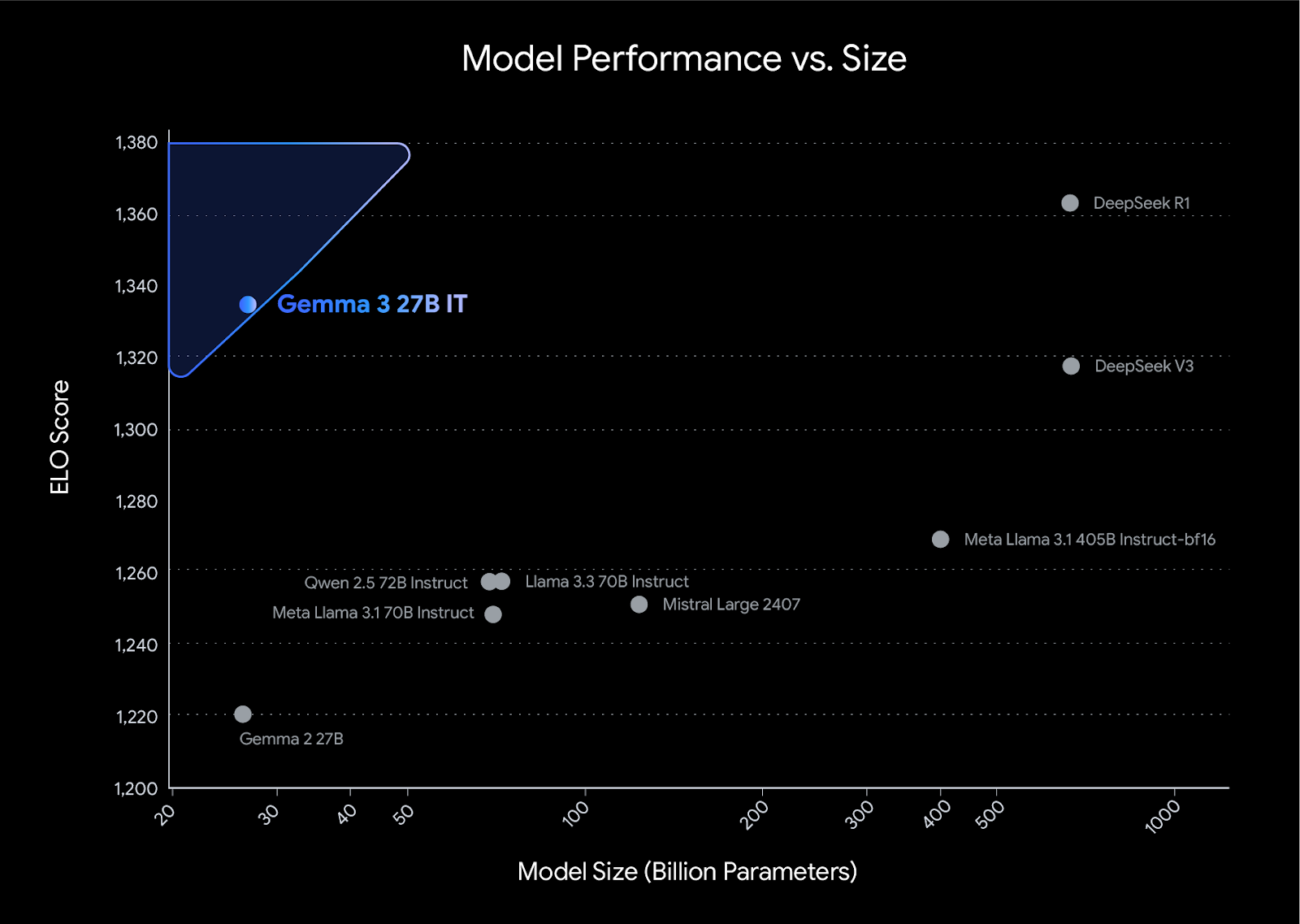
Fonte: Introducing Gemma 3
In questo progetto caricheremo Gemma 3 da Kaggle e recupereremo i dati da Hugging Face. Poi useremo le librerie Transformers e TRL per eseguire il fine-tuning del nostro modello. Per confronto, genereremo la risposta prima e dopo il fine-tuning.
Se vuoi imparare a usare la libreria Unsloth per fare il fine-tuning del tuo modello su dati di ragionamento, dai un’occhiata alla guida Fine-Tuning DeepSeek R1 (Reasoning Model).
Installa tutte le librerie Python necessarie, assicurandoti di aggiornare la libreria transformer.
%%capture
!pip install -U datasets
!pip install -U accelerate
!pip install -U peft
!pip install -U trl
!pip install -U bitsandbytes
!pip install git+https://github.com/huggingface/transformers@v4.49.0-Gemma-3
Accedi al client Hugging Face usando la tua API key. La chiave è archiviata in modo sicuro nei secrets di Kaggle e la estrarremo per applicarla al client Hugging Face.
from huggingface_hub import login
from kaggle_secrets import UserSecretsClient
user_secrets = UserSecretsClient()

hf_token = user_secrets.get_secret("HUGGINGFACE_TOKEN")
login(hf_token)Aggiungi il modello Gemma 3 4B IT al notebook di Kaggle nello stesso modo in cui aggiungi il dataset, cliccando sul pulsante “+ Add Input”.
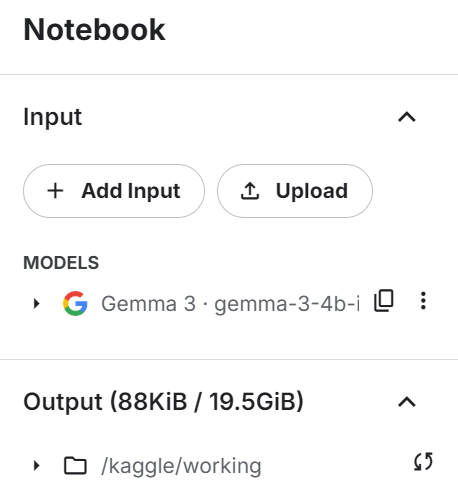
Carica il modello e il tokenizer usando la libreria transformers. Assicurati che il modello sia impostato su device_map="auto" per sfruttare efficacemente una configurazione con doppia GPU.
from transformers import AutoTokenizer, Gemma3ForConditionalGeneration

import torch

GEMMA_PATH = "/kaggle/input/gemma-3/transformers/gemma-3-4b-it/1"

model = Gemma3ForConditionalGeneration.from_pretrained(
    GEMMA_PATH, device_map="auto",attn_implementation='eager'
).eval()

tokenizer = AutoTokenizer.from_pretrained(GEMMA_PATH)Prima di caricare il dataset, creeremo lo stile del prompt di training e forniremo tre segnaposto che riempiremo con le colonne del dataset. Questo stile di prompt ci aiuterà a generare il testo di ragionamento.
train_prompt_style="""
Below is an instruction that describes a task, paired with an input that provides further context.
Write a response that appropriately completes the request.
Before answering, think carefully about the question and create a step-by-step chain of thoughts to ensure a logical and accurate response.

### Question:
{}

### Response:
<think>
{}
</think>
{}
"""
Successivamente, creeremo la funzione di formattazione che utilizza le colonne del dataset e le applica allo stile del prompt di training per creare la colonna "text". Assicurati di aggiungere il token EOS alla fine della risposta.
def formatting_prompts_func(examples):
    inputs = examples["Open-ended Verifiable Question"]
    complex_cots = examples["Complex_CoT"]
    outputs = examples["Response"]
    texts = []
    for question, cot, response in zip(inputs, complex_cots, outputs):
        # Append the EOS token to the response if it's not already there
        if not response.endswith(tokenizer.eos_token):
            response += tokenizer.eos_token
        text = train_prompt_style.format(question, cot, response)
        texts.append(text)
    return {"text": texts}
Ora caricheremo il dataset TheFinAI/Fino1_Reasoning_Path_FinQA, un dataset di ragionamento finanziario basato su FinQA, arricchito con percorsi di ragionamento generati da GPT-4o per risposte a domande finanziarie strutturate. Dopo di ciò, applicheremo la funzione di formattazione al dataset e creeremo la nuova colonna di testo strutturata dallo stile del prompt.
from datasets import load_dataset
dataset = load_dataset("TheFinAI/Fino1_Reasoning_Path_FinQA", split = "train[0:500]",trust_remote_code=True)
dataset = dataset.map(formatting_prompts_func, batched = True,)
dataset["text"][0]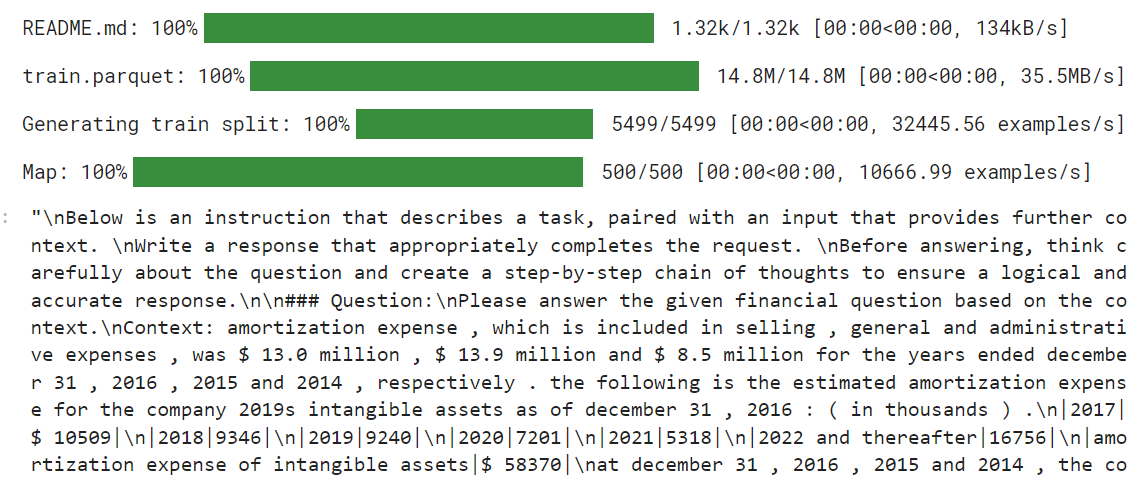
Il nuovo trainer STF non accetta i tokenizer, quindi dobbiamo creare la nostra raccolta dati usando il tokenizer e fornirla al trainer in seguito.
from transformers import DataCollatorForLanguageModeling

data_collator = DataCollatorForLanguageModeling(
    tokenizer=tokenizer,
    mlm=False  # we're doing causal LM, not masked LM
)Prima di iniziare il fine-tuning, testeremo il modello originale per vedere quanto è capace di generare risposte. Creeremo lo stile del prompt con due segnaposto invece di tre.
prompt_style = """Below is an instruction that describes a task, paired with an input that provides further context.
Write a response that appropriately completes the request.
Before answering, think carefully about the question and create a step-by-step chain of thoughts to ensure a logical and accurate response.

### Question:
{}

### Response:
<think>
{}
"""
Poi applicheremo lo stile del prompt alla domanda, lo convertiremo in token e lo forniremo al modello. Successivamente, genereremo la risposta e riconvertiremo i token in testo.
question = dataset[0]['Open-ended Verifiable Question']


inputs = tokenizer(
    [prompt_style.format(question, "") + tokenizer.eos_token],
    return_tensors="pt"
).to("cuda")

outputs = model.generate(
    input_ids=inputs.input_ids,
    attention_mask=inputs.attention_mask,
    max_new_tokens=1200,
    eos_token_id=tokenizer.eos_token_id,
    use_cache=True,
)
response = tokenizer.batch_decode(outputs, skip_special_tokens=True)
print(response[0].split("### Response:")[1])
La risposta è breve e poco accurata.
<think>

The question asks for the portion of the estimated amortization expense that will be recognized in 2017.
The provided table shows the estimated amortization expense for intangible assets for the years 2017, 2018, 2019, 2020, 2021, and 2022 and thereafter.
The amortization expense for 2017 is $10,509.
</think>
$10,509
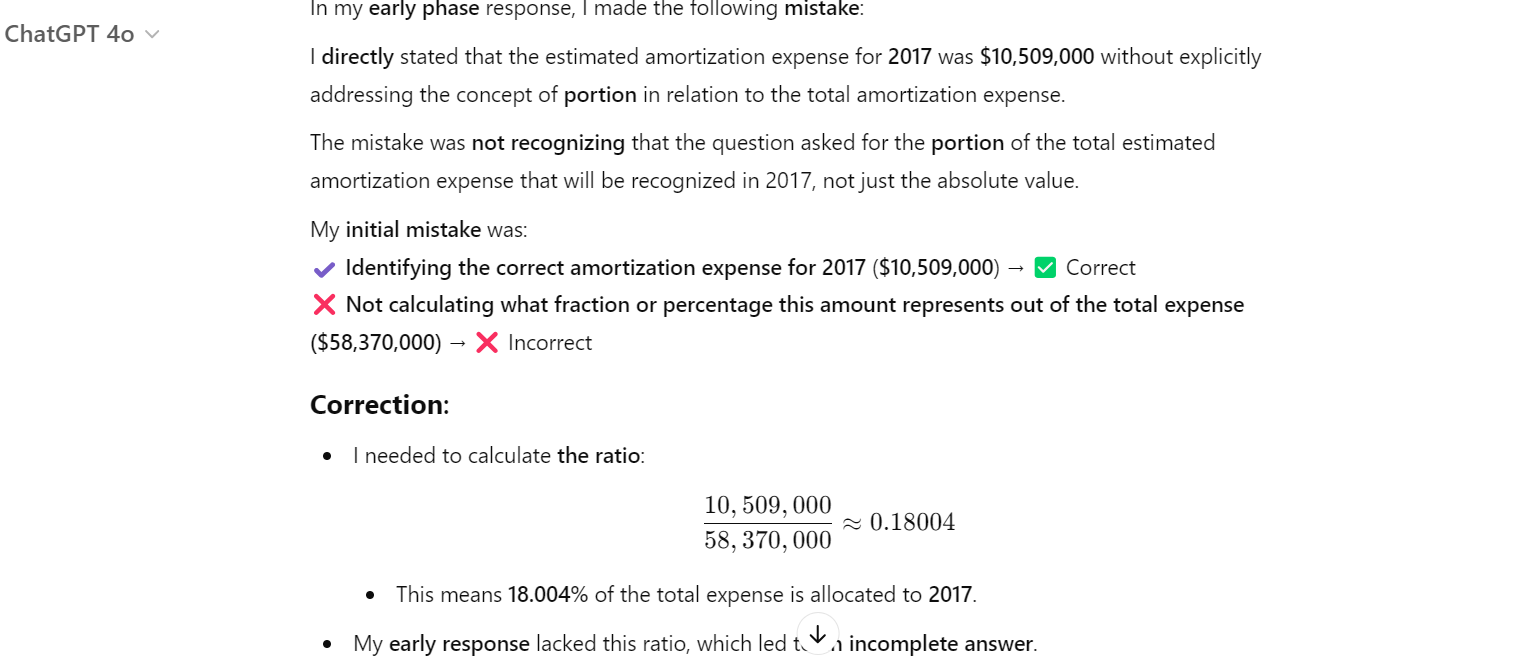
Ecco la risposta dal dataset. La risposta dovrebbe essere un rapporto, non un importo.

Anche ChatGPT ha sbagliato, e abbiamo dovuto chiedergli di correggere l’errore. Dopo di che ha capito di aver sbagliato e ha corretto.
Ora forniremo al SFTTrainer il dataset, il modello, la raccolta dati, gli argomenti di training e la configurazione LoRA.
from trl import SFTTrainer
from transformers import TrainingArguments
from peft import LoraConfig

# LoRA Configuration
peft_config = LoraConfig(
    lora_alpha=16,                           # Scaling factor for LoRA
    lora_dropout=0.05,                       # Add slight dropout for regularization
    r=64,                                    # Rank of the LoRA update matrices
    bias="none",                             # No bias reparameterization
    task_type="CAUSAL_LM",                   # Task type: Causal Language Modeling
    target_modules=[
        "q_proj",
        "k_proj",
        "v_proj",
        "o_proj",
        "gate_proj",
        "up_proj",
        "down_proj",
    ],  # Target modules for LoRA
)


# Training Arguments
training_arguments = TrainingArguments(
    output_dir="output",
    per_device_train_batch_size=1,
    per_device_eval_batch_size=1,
    gradient_accumulation_steps=2,
    optim="paged_adamw_32bit",
    num_train_epochs=1,
    logging_steps=0.2,
    warmup_steps=10,
    logging_strategy="steps",
    learning_rate=2e-4,
    fp16=False,
    bf16=False,
    group_by_length=True,
    report_to="none"
)

# Initialize the Trainer
trainer = SFTTrainer(
    model=model,
    args=training_arguments,
    train_dataset=dataset,
    peft_config=peft_config,
    data_collator=data_collator,
)Svuota la cache CUDA prima di avviare il processo di training.
torch.cuda.empty_cache()
trainer_stats = trainer.train()
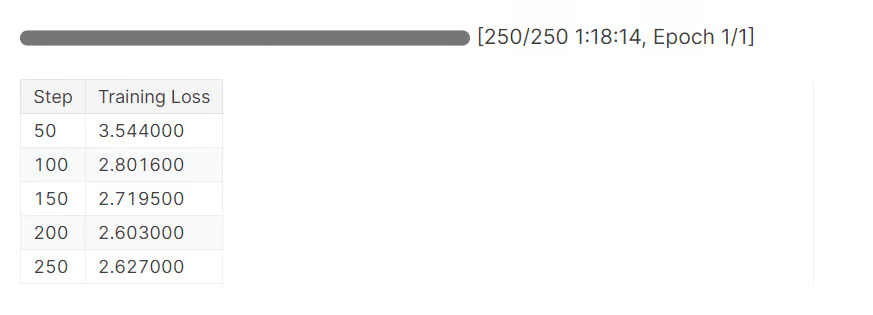
Completare 1 epoca ha richiesto circa 1 ora e 20 minuti. Come possiamo vedere, la loss è diminuita gradualmente.
Ora testiamo il nostro modello fine-tunato fornendo una domanda di esempio come fatto in precedenza.
question = dataset[0]['Open-ended Verifiable Question']

inputs = tokenizer(
    [prompt_style.format(question, "") + tokenizer.eos_token],
    return_tensors="pt"
).to("cuda")

outputs = model.generate(
    input_ids=inputs.input_ids,
    attention_mask=inputs.attention_mask,
    max_new_tokens=1200,
    eos_token_id=tokenizer.eos_token_id,
    use_cache=True,
)
response = tokenizer.batch_decode(outputs, skip_special_tokens=True)
print(response[0].split("### Response:")[1])
La parte di ragionamento è ora dettagliata e corretta. Anche la risposta è accurata.
<think>


Alright, let's figure out what portion of the estimated amortization expense will be recognized in 2017. First, I need to see what the total estimated amortization expense is for the years 2017 through 2022. Looking at the numbers, it's $58,370.

Now, I need to find out how much of that is specifically for 2017. The table shows that the estimated amortization expense for 2017 is $10,509.

So, to find out what portion of the total expense is for 2017, I'll divide the 2017 expense by the total expense. That's $10,509 divided by $58,370.

Let's do the math: $10,509 divided by $58,370 gives me approximately 0.1805.

Now, to express this as a percentage, I'll multiply by 100. So, 0.1805 times 100 gives me 18.05%.

Therefore, about 18.05% of the estimated amortization expense for the years 2017 through 2022 will be recognized in 2017.

</think>
About 18.05% of the estimated amortization expense for the years 2017 through 2022 will be recognized in 2017.
Facciamo un’altra domanda.
question = dataset[10]['Open-ended Verifiable Question']

inputs = tokenizer(
    [prompt_style.format(question, "") + tokenizer.eos_token],
    return_tensors="pt"
).to("cuda")

outputs = model.generate(
    input_ids=inputs.input_ids,
    attention_mask=inputs.attention_mask,
    max_new_tokens=1200,
    eos_token_id=tokenizer.eos_token_id,
    use_cache=True,
)
response = tokenizer.batch_decode(outputs, skip_special_tokens=True)
print(response[0].split("### Response:")[1])
Come possiamo vedere, abbiamo eseguito con successo il fine-tuning del modello sul nuovo dataset. Ora è accurato e segue lo stile di ragionamento e risposta.
<think>


Alright, let's figure out the total purchase price of Impella Cardiosystems. First, we know the purchase price was $45.1 million, but there's a contingent payment of $5.6 million that could be earned. So, we need to see if we can figure out how much of that $5.6 million is actually likely to be paid.

Now, the question mentions that the contingent payment is triggered by FDA approvals. Since we're dealing with a medical device, getting FDA clearance is pretty important. Let's assume that the FDA approval for the Impella 2.5 is a good sign that the contingent payments will be made.

Okay, so if we assume all the contingent payments are earned, we just need to add the $5.6 million to the original $45.1 million. Let's do the math: $45.1 million plus $5.6 million equals $50.7 million.

Hmm, let's double-check our work. We're adding $45.1 million to $5.6 million, which gives us $50.7 million. Yep, that seems right.

So, if we assume all the contingent payments are earned, the total purchase price of Impella Cardiosystems would be $50.7 million.

</think>
The total purchase price of Impella Cardiosystems, assuming all contingent consideration is earned, would be $50.7 million.
Il fine-tuning di un modello richiede competenze, denaro e tempo. In alcuni casi potresti aver bisogno solo di una pipeline RAG migliore per soddisfare le tue esigenze. Leggi la guida RAG vs Fine-Tuning: A Comprehensive Tutorial with Practical Examples per capire meglio i tuoi requisiti.
Per prima cosa salveremo localmente il modello e il tokenizer.
new_model_online = "kingabzpro/Gemma-3-4B-Fin-QA-Reasoning"
new_model_local = "Gemma-3-4B-Fin-QA-Reasoning"
model.save_pretrained(new_model_local) # Local saving
tokenizer.save_pretrained(new_model_local)
Poi caricheremo il modello su Hugging Face Hub.
model.push_to_hub(new_model_online) # Online saving
tokenizer.push_to_hub(new_model_online) # Online saving
Questo processo prima creerà il repository del modello e poi caricherà tutti i file del modello, del tokenizer e di configurazione sul server remoto.
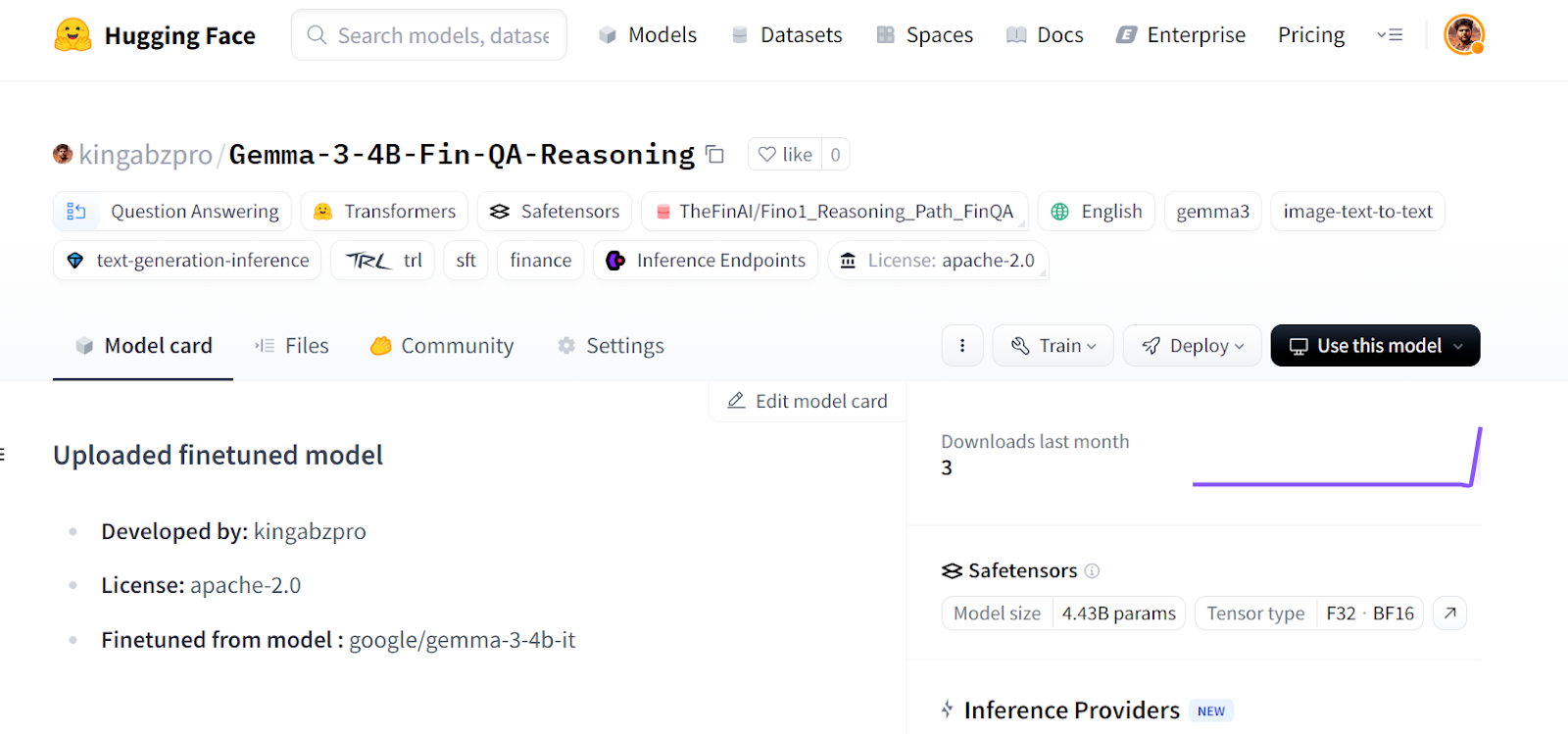
Fonte: kingabzpro/Gemma-3-4B-Fin-QA-Reasoning · Hugging Face
Se riscontri problemi nell’eseguire il codice qui sopra, abbiamo creato un notebook Kaggle che chiunque può clonare ed eseguire per comprendere meglio il processo.
Il fine-tuning del modello Gemma 3 presenta delle sfide: potresti incontrare problemi hardware, di librerie, di frammentazione della memoria e altro. Questa guida offre un’implementazione semplificata di come puoi convertire qualsiasi modello in un modello di ragionamento ed evitare futuri problemi legati a software e hardware.
In questo tutorial abbiamo coperto le caratteristiche del modello Gemma 3 e come possiamo facilmente eseguirne il fine-tuning sul dataset di ragionamento utilizzando risorse GPU gratuite disponibili su Kaggle.
Segui il corso Fine-tuning with Llama 3 per affrontare attività di fine-tuning con TorchTune e imparare tecniche di ottimizzazione efficienti come la quantizzazione.
I migliori corsi DataCamp
Programma
Corso
Corso
blog
Abid Ali Awan
10 min
blog
Tim Lu
12 min
blog
Abid Ali Awan
15 min