PySpark Tutorial: Getting Started with PySpark

A hands-on PySpark tutorial: install PySpark, explore data with DataFrames, and build a K-Means clustering model for customer segmentation.
Updated Jun 2, 2026  · 15 min read

Most data scientists start by processing data on a single machine using Python or R. For most everyday tasks, that works fine. Local machines hit their limit when datasets grow beyond what fits in RAM.

This is where a distributed processing system like Apache Spark comes in. Distributed processing is a setup in which multiple processors are used to run an application. Instead of trying to process large datasets on a single computer, the task can be divided between multiple devices that communicate with each other.

To follow up on this article, you can practice hands-on exercises with our Introduction to PySpark course, which will open doors for you in the area of parallel computing. The ability to analyze data and train machine learning models on large-scale datasets is a valuable skill to have, and having the expertise to work with big data frameworks like Apache Spark will set you apart from others in the field. If you're new to PySpark and want a detailed learning plan, be sure to check out our guide, How to Learn PySpark From Scratch in 2026.

TL;DR

  • PySpark is Python's interface to Apache Spark for distributed big data processing

  • Install with pip install pyspark (requires Java 11+ and Python 3.7+)

  • Create a SparkSession to start working with Spark DataFrames

  • Use RFM (Recency, Frequency, Monetary) modeling for customer segmentation

  • K-Means clustering identifies customer segments based on purchase behavior

  • PySpark handles datasets too large for pandas or single-machine processing

What is Apache Spark?

Apache Spark is a distributed processing system used to perform big data and machine learning tasks on large datasets. With Apache Spark, users can run queries and machine learning workflows on petabytes of data, which is impossible to do on your local device.

This framework is even faster than previous data processing engines like Hadoop, and has increased in popularity since its release in 2014. Companies like IBM, Amazon, and Yahoo are using Apache Spark as their computational framework.

For a deep dive into how Spark distributes work across a cluster, see our Apache Spark architecture guide.

Learn PySpark From Scratch

Learn how to leverage large datasets and machine learning.

What is PySpark?

PySpark is an interface for Apache Spark in Python. With PySpark, you can write Python and SQL-like commands to manipulate and analyze data in a distributed processing environment. Using PySpark, data scientists manipulate data, build machine learning pipelines, and tune models.

Most data scientists and analysts are familiar with Python and use it to implement machine learning workflows. PySpark allows them to work with a familiar language on large-scale distributed datasets. Apache Spark can also be used with other data science programming languages like R. If this is something you are interested in learning, the Introduction to Spark with sparklyr in R course is a great place to start.

RDDs vs DataFrames in PySpark

PySpark gives you two ways to represent distributed data. Understanding which to use is one of the first questions a new PySpark user faces.

Abstraction What it is When to use it
RDD (Resilient Distributed Dataset) Low-level distributed collection of any Python objects. Immutable and fault-tolerant. Fine-grained control over partitioning; unstructured or non-tabular data
DataFrame Distributed table with named, typed columns — similar to a pandas DataFrame but distributed across a cluster. Most data analysis, SQL queries, and ML workflows

For the vast majority of work — including everything in this tutorial — DataFrames are the right choice. Spark's Catalyst query optimizer rewrites DataFrame operations into efficient execution plans automatically, giving you performance benefits you'd have to implement by hand with RDDs. Use RDDs only when you need direct control over partitioning or are working with data that doesn't fit a tabular schema.

Why Use PySpark?

PySpark is the go-to choice for processing big data because it combines Python's accessibility with Spark's distributed computing power. Here's how it compares to alternatives:

Feature PySpark Pandas Dask
Data Size Petabytes+ ~10GB (RAM limited) ~100GB
Processing Distributed cluster Single machine Parallel/distributed
Speed Very fast (in-memory) Fast for small data Moderate
Learning Curve Moderate Easy Easy
ML Support MLlib (scalable) Scikit-learn Scikit-learn
Real-time Processing Yes (Spark Streaming) No Limited

The reason companies choose to use a framework like PySpark is because of how quickly it can process big data. It is faster than libraries like Pandas and Dask, and can handle larger amounts of data than these frameworks. If you had over petabytes of data to process, for instance, Pandas and Dask would fail but PySpark would be able to handle it easily.

While it is also possible to write Python code on top of adistributed system like Hadoop, many organizations choose to use Spark insteadand use the PySpark API since it is faster and can handle real-time data. With PySpark, you can write code to collect data from a source that is continuously updated, while data can only be processed in batch mode with Hadoop. 

Apache Flink is a distributed processing system that has a Python API called PyFlink, and is actually faster than Spark in terms of performance. However, Apache Spark has been around for a longer period of time and has better community support, which means that it is more reliable. 

PySpark also provides fault tolerance: if a node fails mid-job, Spark reconstructs lost data using RDD lineage information.The framework also has in-memory computation and is stored in random access memory (RAM). It can run on a machine that does not have a hard-drive or SSD installed.

How to Install PySpark

Here's how to install PySpark locally or in a cloud environment. 

Prerequisites

Before beginning the installation, ensure you have the following prerequisites installed:

Note: If you're using cloud-based platforms like DataLab or Databricks, you can skip the local installation as PySpark comes pre-installed.

Installing PySpark

Open a Python file in your Jupyter Notebook and run the following lines of code in the first cell:

!pip install pyspark

Alternatively, you can follow along with this end-to-end PySpark installation guide to get the software installed on your device.

End-to-end Machine Learning PySpark Tutorial

Now that you have PySpark up and running, we will show you how to execute an end-to-end customer segmentation project using the library. 

Customer segmentation is a marketing technique companies use to identify and group users who display similar characteristics. For instance, if you visit Starbucks only during the summer to purchase cold beverages, you can be segmented as a “seasonal shopper” and enticed with special promotions curated for the summer season.

Data scientists usually build unsupervised machine learning algorithms, such as K-Means clustering or hierarchical clustering, to perform customer segmentation. These models are great at identifying similar patterns between user groups that often go unnoticed by the human eye.

In this tutorial, we will use K-Means clustering to perform customer segmentation on the e-commerce dataset.

By the end of this tutorial, you will be familiar with the following concepts:

  • Reading CSV files with PySpark

  • Exploratory Data Analysis with PySpark

  • Grouping and sorting data

  • Performing arithmetic operations

  • Aggregating datasets

  • Data Pre-Processing with PySpark

  • Working with datetime values

  • Type conversion

  • Joining two data frames

  • The rank() function

  • PySpark Machine Learning

  • Creating a feature vector

  • Standardizing data

  • Building a K-Means clustering model

  • Interpreting the model

Run and edit the code from this tutorial online

Run code

Step 1: Creating a SparkSession

A SparkSession is an entry point into all functionality in Spark, and is required if you want to build a dataframe in PySpark. Run the following lines of code to initialize a SparkSession: 

from pyspark.sql import SparkSession  # add this import


spark = (
    SparkSession.builder
    .appName("DataCamp PySpark Tutorial")
    .config("spark.memory.offHeap.enabled", "true")
    .config("spark.memory.offHeap.size", "10g")
    .getOrCreate()
)

Using the code above, we built a Spark session and set a name for the application. Then, the data was cached in off-heap memory to avoid storing it directly on disk, and the amount of memory was manually specified.

Step 2: Creating the DataFrame

We can now read the dataset. You can download the sample e-commerce dataset from our PySpark Read CSV tutorial or use your own CSV file:

df = spark.read.csv("datacamp_ecommerce.csv", header=True, escape='"', inferSchema=True)

Note that we defined an escape character to avoid commas in the .csv file when parsing.

Let’s take a look at the head of the DataFrame using the show() function:

df.show(5,0)

The DataFrame consists of 8 variables:

  1. InvoiceNo: The unique identifier of each customer invoice.

  2. StockCode: The unique identifier of each item in stock.

  3. Description: The item purchased by the customer.

  4. Quantity: The number of each item purchased by a customer in a single invoice.

  5. InvoiceDate: The purchase date.

  6. UnitPrice: Price of one unit of each item.

  7. CustomerID: Unique identifier assigned to each user.

  8. Country: The country from which the purchase was made.

Step 3: Exploratory data analysis

Now that we have seen the variables present in this dataset, let’s perform some exploratory data analysis to further understand these data points:

  1. Let’s start by counting the number of rows in the DataFrame:
df.count()  # Answer: 2,500
  1. How many unique customers are present in the DataFrame?
df.select('CustomerID').distinct().count() # Answer: 95

  1. result of show() function in our SparkSessionWhat country do most purchases come from?

To find the country from which most purchases are made, we need to use the groupBy() clause in PySpark:

from pyspark.sql.functions import *
from pyspark.sql.types import *

df.groupBy('Country').agg(countDistinct('CustomerID').alias('country_count')).show()

The following table will be rendered after running the code above:
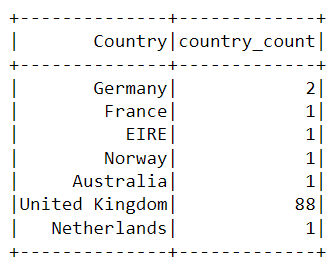
groupBy() output in our SparkSession

Almost all the purchases on the platform were made from the United Kingdom, and only a handful were made from countries like Germany, Australia, and France. 

Notice that the data in the table above isn’t presented in the order of purchases. To sort this table, we can include the orderBy() clause:

df.groupBy('Country').agg(countDistinct('CustomerID').alias('country_count')).orderBy(desc('country_count')).show()

The output displayed is now sorted in descending order:
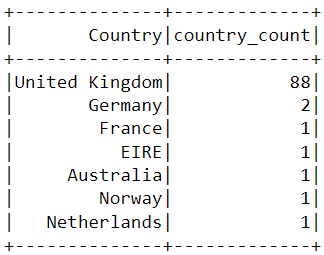
a table in our SparkSession

  1. When was the most recent purchase made by a customer on the e-commerce platform?

To find when the latest purchase was made on the platform, we need to convert the InvoiceDate column into a timestamp format and use the max() function in PySpark:

df = df.withColumn(
    "date",
    coalesce(
        to_timestamp(col("InvoiceDate"), "yy/MM/dd HH:mm"),
        to_timestamp(col("InvoiceDate"), "yyyy-MM-dd HH:mm:ss"),
        to_timestamp(col("InvoiceDate"))  # best-effort fallback
    )
)
df.select(max("date")).show()

You should see the following table appear after running the code above:
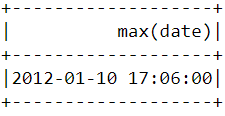
max() function used in our SparkSession

  1. When was the earliest purchase made by a customer on the e-commerce platform?

Similar to what we did above, the min() function can be used to find the earliest purchase date and time:

df.select(min("date")).show()
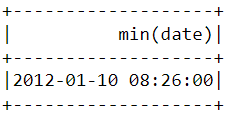
min() function used in our SparkSession

Notice that the most recent and earliest purchases were made on the same day, just a few hours apart. This means that the dataset we downloaded contains information of only purchases made on a single day.

Step 4: Data pre-processing

Now that we have analyzed the dataset and have a better understanding of each data point, we need to prepare the data to feed into the machine learning algorithm.

Let’s take a look at the head of the data frame once again to understand how the pre-processing will be done:

df.show(5,0)

pre-processing example in SparkSession

From the dataset above, we need to create multiple customer segments based on each user’s purchase behavior. 

The variables in this dataset are in a format that cannot be easily ingested into the customer segmentation model. These features individually do not tell us much about customer purchase behavior.

Due to this, we will use the existing variables to derive three new informative features - recency, frequency, and monetary value (RFM).

RFM is commonly used in marketing to evaluate a client’s value based on their:

  1. Recency: How recently has each customer made a purchase?
  2. Frequency: How often have they bought something?
  3. Monetary Value: How much money do they spend on average when making purchases?

We will now preprocess the data frame to create the above variables.

Recency

First, let’s calculate the value of recency - the latest date and time a purchase was made on the platform. This can be achieved in two steps:

i) Assign a recency score to each customer

We will subtract every date in the data frame from the earliest date. This will tell us how recently a customer was seen in the data frame. A value of 0 indicates the lowest recency, as it will be assigned to the person who was seen making a purchase on the earliest date.

df = df.withColumn("from_date", to_timestamp(lit("12/1/10 08:26"), "yy/MM/dd HH:mm"))
df2 = df.withColumn("recency", col("date").cast("long") - col("from_date").cast("long"))


w = Window.partitionBy("CustomerID").orderBy(desc("recency"))
df2 = df2.withColumn("rn", row_number().over(w)).filter(col("rn") == 1).drop("rn")

ii) Select the most recent purchase

One customer can make multiple purchases at different times. We need to select only the last time they were seen buying a product, as this is indicative of when the most recent purchase was made: 

df2 = df2.join(df2.groupBy('CustomerID').agg(max('recency').alias('recency')),on='recency',how='leftsemi')

Let’s look at the head of the new data frame. It now has a variable called “recency” appended to it:

df2.show(5,0)
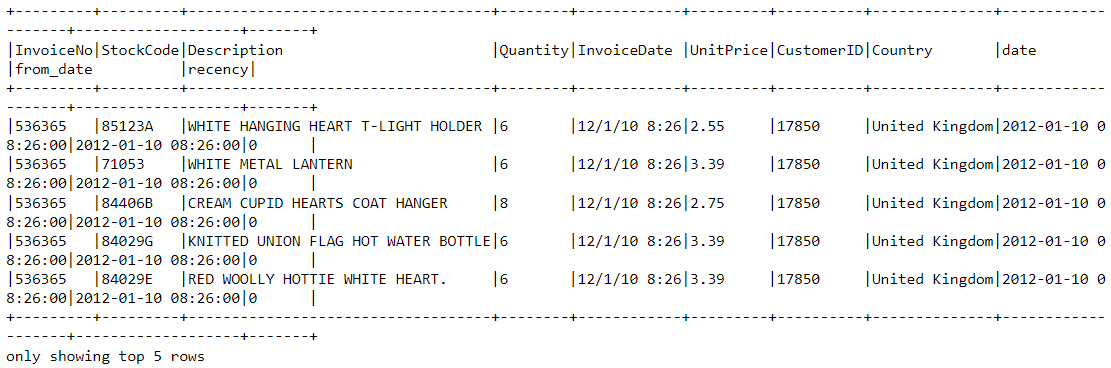
selecting the most recent purchase in our SparkSession

An easier way to view all the variables present in a PySpark DataFrame is to use its printSchema() function. This is the equivalent of the info() function in Pandas:

df2.printSchema()

The output rendered should look like this:
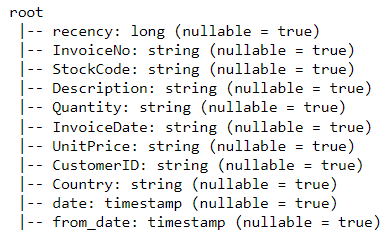
rendered output in our SparkSession

Frequency

Let’s now calculate the value of frequency - how often a customer buys something on the platform. To do this, we just need to group by each CustomerID and count the number of items they purchased. For more advanced grouping techniques, see our PySpark groupBy tutorial:

df_freq = df2.groupBy('CustomerID').agg(count('InvoiceDate').alias('frequency'))

Look at the head of this new DataFrame we just created:

df_freq.show(5,0)
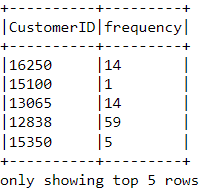
a frequency table in our SparkSession

There is a frequency value appended to each customer in the DataFrame. This new DataFrame only has two columns, and we need to join it with the previous one. Learn more about different join types in our PySpark Joins tutorial:

df3 = df2.join(df_freq,on='CustomerID',how='inner')

Let’s print the schema of this DataFrame:

df3.printSchema()
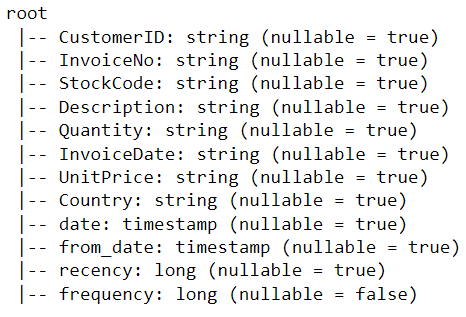
viewing a schema in our SparkSession

Monetary Value

Finally, let’s calculate monetary value - the total amount spent by each customer in the DataFrame. There are two steps to achieving this:

i) Find the total amount spent in each purchase:

Each CustomerID comes with variables called Quantity and UnitPrice for a single purchase:
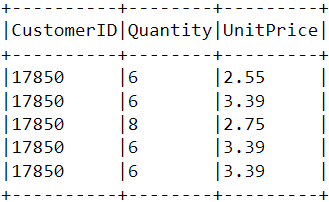
finding total amount spent in our SparkSession

To get the total amount spent by each customer in one purchase, we need to multiply Quantity with UnitPrice:

m_val = df3.withColumn(
    "TotalAmount",
    col("Quantity").cast("double") * col("UnitPrice").cast("double")
)

ii) Find the total amount spent by each customer:

To find the total amount spent by each customer overall, we just need to group by the CustomerID column and sum the total amount spent:

m_val = m_val.groupBy('CustomerID').agg(sum('TotalAmount').alias('monetary_value'))

Merge this DataFrame with all the other variables:

finaldf = m_val.join(df3,on='CustomerID',how='inner')

Now that we have created all the necessary variables to build the model, run the following lines of code to select only the required columns and drop duplicate rows from the DataFrame:

finaldf = finaldf.select(['recency','frequency','monetary_value','CustomerID']).distinct()

Look at the head of the final DataFrame to ensure that the pre-processing has been done accurately:
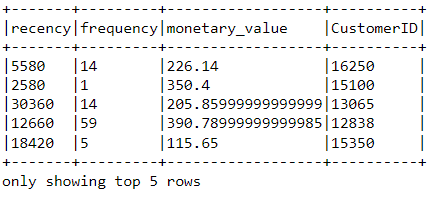
final DataFrame output in our SparkSession

Standardization

Before building the customer segmentation model, let’s standardize the DataFrame to ensure that all the variables are around the same scale:

from pyspark.ml.feature import VectorAssembler, StandardScaler


assemble = VectorAssembler(
    inputCols=["recency", "frequency", "monetary_value"],
    outputCol="features"
)
assembled_data = assemble.transform(finaldf)


scale = StandardScaler(inputCol="features", outputCol="standardized")
data_scale = scale.fit(assembled_data)
data_scale_output = data_scale.transform(assembled_data)

Run the following lines of code to see what the standardized feature vector looks like:

data_scale_output.select('standardized').show(2,truncate=False)
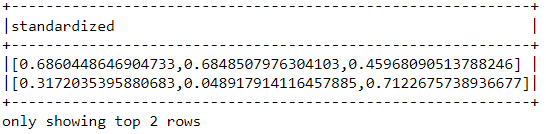
standardized feature vector in our SparkSession

These are the scaled features that will be fed into the clustering algorithm.

If you’d like to learn more about data preparation with PySpark, take this feature engineering course on DataCamp.

Step 5: Building the machine learning model

Now that we have completed all the data analysis and preparation, let’s build the K-Means clustering model. 

The algorithm will be created using PySpark’s machine learning API.

i) Finding the number of clusters to use

When building a K-Means clustering model, we first need to determine the number of clusters or groups we want the algorithm to return. If we decide on three clusters, for instance, then we will have three customer segments.

The most popular technique used to decide on how many clusters to use in K-Means is called the “elbow method.”

This is done by running the K-Means algorithm for a range of cluster counts and visualizing the model results for each cluster. The plot will have an inflection point that looks like an elbow, and we just pick the number of clusters at this point.

Read this DataCamp K-Means clustering tutorial to learn more about how the algorithm works.

Let’s run the following lines of code to build a K-Means clustering algorithm from 2 to 10 clusters:

from pyspark.ml.clustering import KMeans
from pyspark.ml.evaluation import ClusteringEvaluator
import numpy as np

cost = np.zeros(10)

evaluator = ClusteringEvaluator(
    predictionCol="prediction",
    featuresCol="standardized",
    metricName="silhouette",
    distanceMeasure="squaredEuclidean"
)


ks = range(2, 10)
cost = np.zeros(len(ks))


for idx, k in enumerate(ks):
    km = KMeans(featuresCol="standardized", k=k)
    model = km.fit(data_scale_output)
    output = model.transform(data_scale_output)
    cost[idx] = model.summary.trainingCost   # WSSSE

With the code above, we have successfully built and evaluated a K-Means clustering model with 2 to 10 clusters. The results have been placed in an array, and can now be visualized in a line chart:

import pandas as pd
import pylab as pl
df_cost = pd.DataFrame(cost)  # cost has 8 values, one per k in range(2, 10)
df_cost.columns = ["cost"]
new_col = range(2, 10)
df_cost.insert(0, 'cluster', new_col)
pl.plot(df_cost.cluster, df_cost.cost)
pl.xlabel('Number of Clusters')
pl.ylabel('Score')
pl.title('Elbow Curve')
pl.show()

The code above will render the following chart:
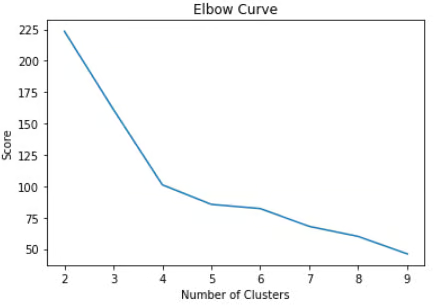
Elbow curve as seen in our SparkSession

ii) Building the K-Means Clustering Model

From the plot above, we can see that there is an inflection point that looks like an elbow at four. Due to this, we will proceed to build the K-Means algorithm with four clusters:

KMeans_algo=KMeans(featuresCol='standardized', k=4)
KMeans_fit=KMeans_algo.fit(data_scale_output)

iii) Making predictions

Let’s use the model we created to assign clusters to each customer in the dataset:

preds=KMeans_fit.transform(data_scale_output)

preds.show(5,0)

Notice that there is a “prediction” column in this DataFrame that tells us which cluster each CustomerID belongs to:

prediction table in our SparkSession

Step 6: Cluster Analysis

The final step in this entire tutorial is to analyze the customer segments we just built.

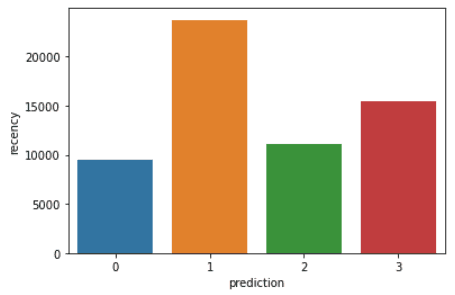
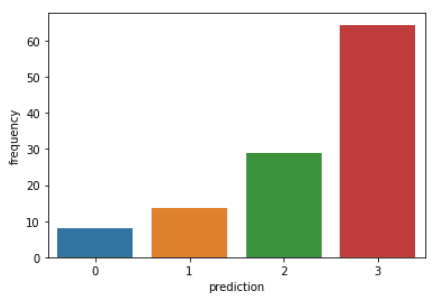
Run the following lines of code to visualize the recency, frequency, and monetary value of each CustomerIDin the DataFrame:

import matplotlib.pyplot as plt
import seaborn as sns

df_viz = preds.select('recency','frequency','monetary_value','prediction')
df_viz = df_viz.toPandas()
avg_df = df_viz.groupby(['prediction'], as_index=False).mean()

rfm_columns = ['recency', 'frequency', 'monetary_value']

for metric in rfm_columns:
    sns.barplot(x='prediction', y=metric, data=avg_df)
    plt.show()

The code above will render the following plots:
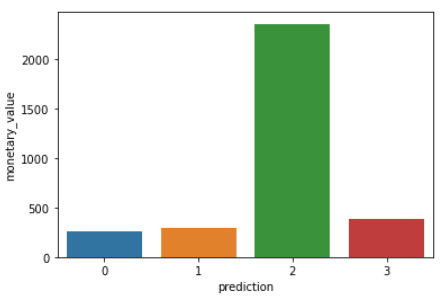
cluster analysis example in our SparkSession

cluster analysis example in our SparkSession

cluster analysis example in our SparkSession

Here is an overview of characteristics displayed by customers in each cluster:

  • Cluster 0: Customers in this segment display low recency, frequency, and monetary value. They rarely shop on the platform and are low-potential customers who are likely to stop doing business with the e-commerce company.
  • Cluster 1: Users in this cluster display high recency but haven’t been seen spending much on the platform. They also don’t visit the site often. This indicates that they might be newer customers who have just started doing business with the company.
  • Cluster 2: Customers in this segment display medium recency and frequency and spend a lot of money on the platform. This indicates that they tend to buy high-value items or make bulk purchases.
  • Cluster 3: The final segment comprises users who display high recency and make frequent purchases on the platform. However, they don’t spend much on the platform, which might mean that they tend to select cheaper items in each purchase.

To go beyond the predictive modeling concepts covered in this course, you can take the Machine Learning with PySpark course on DataCamp.

Learning PySpark From Scratch: Next Steps

Now that you've completed this tutorial, here are the recommended next steps based on your goals:

Goal Recommended Resource
Master PySpark basics Introduction to PySpark course
Learn data cleaning Cleaning Data with PySpark course
Build ML pipelines Machine Learning with PySpark course
Understand Spark architecture Apache Spark Tutorial: ML with PySpark
Become a data engineer Big Data with PySpark track
Prepare for PySpark interviews Top 36 PySpark Interview Questions and Answers

If you managed to follow along with this entire PySpark tutorial, congratulations! You have now successfully installed PySpark onto your local device, analyzed an e-commerce dataset, and built a machine learning algorithm using the framework.

One caveat of the analysis above is that it was conducted with 2,500 rows of ecommerce data collected on a single day. The outcome of this analysis can be solidified if we had a larger amount of data to work with, as techniques like RFM modeling are usually applied onto months of historical data.

However, you can take the principles learned  in this article and apply them to a wide variety of larger datasets in the unsupervised machine learning space.

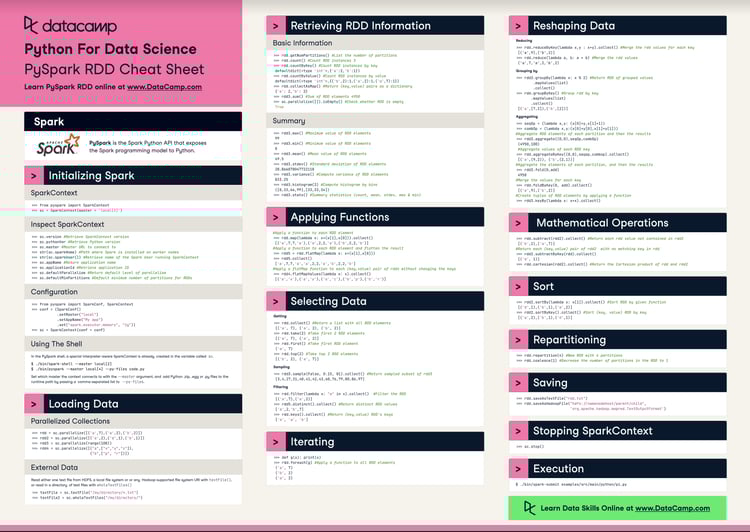
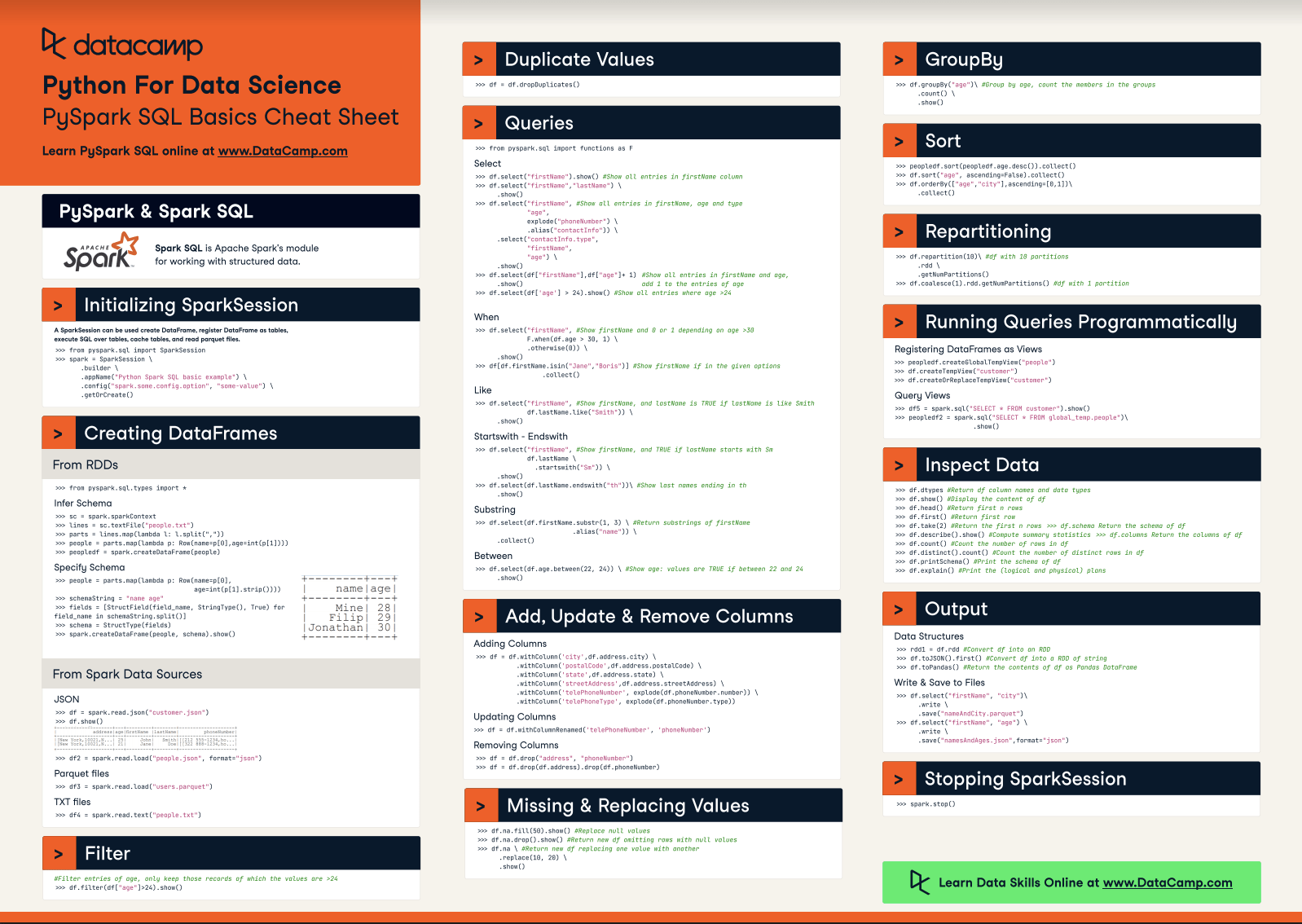
Check out this cheat sheet by DataCamp tolearn more about PySpark’s syntax and its modules.

Finally, if you’d like to go beyond the concepts covered in this tutorial and learn the fundamentals of programming with PySpark, you can take the Big Data with PySpark learning track on DataCamp. This track contains a series of courses that will teach you to do the following with PySpark:

  • Data Management, Analysis, and Pre-processing
  • Building and Tuning Machine Learning Pipelines
  • Big Data Analysis 
  • Feature Engineering 
  • Building Recommendation Engines

Final thoughts

PySpark is the right tool when your data outgrows what a single machine can handle. The RFM customer segmentation project in this tutorial walks through the full workflow: loading data, exploratory analysis, feature engineering, and ML. These are patterns you'll reuse on much larger datasets in production.

One honest caveat: this example uses 2,500 rows from a single day of transactions. PySpark handles that comfortably. The real payoff from a distributed setup comes when you're working with months of transaction history across millions of events — that's when the in-memory execution and fault tolerance actually matter.

To keep building, our Big Data with PySpark track covers data engineering pipelines, recommendation engines, and production ML in a structured sequence. For teams, DataCamp for Business offers learning paths tailored to data engineering roles. Request a demo to learn more.

PySpark FAQs

What are the prerequisites for learning PySpark?

To get started with PySpark, you need Python 3.7 or later, Java 11 or later (Java 17 is recommended), and a basic understanding of Python. Familiarity with pandas DataFrames makes the PySpark DataFrame API feel immediately familiar. No prior experience with distributed systems is required — this tutorial covers everything from installation to a working ML model.

Is PySpark faster than pandas?

For small datasets that fit in RAM (roughly under 10GB), pandas is usually faster because it avoids the overhead of distributed coordination. PySpark becomes significantly faster when data exceeds what a single machine can hold — it distributes the work across multiple cores or nodes. As a practical guide: use pandas for datasets that fit in memory, PySpark for everything that doesn't.

What is the difference between RDDs and DataFrames in PySpark?

RDDs (Resilient Distributed Datasets) are PySpark's low-level distributed data structure — a collection of any Python objects distributed across a cluster. DataFrames are a higher-level abstraction that organizes data into named, typed columns, similar to a pandas DataFrame. For most use cases, DataFrames are the better choice: Spark's Catalyst optimizer automatically rewrites DataFrame queries into efficient execution plans. Use RDDs when you need fine-grained control over partitioning or are working with unstructured data that doesn't fit a tabular schema.

How do I run PySpark in a Jupyter Notebook?

Install PySpark with pip install pyspark, then initialize a SparkSession at the top of your notebook:

from pyspark.sql import SparkSession
spark = SparkSession.builder.appName("MyNotebook").getOrCreate()

Alternatively, use DataLab or Databricks, where PySpark comes pre-installed and no local Java or setup is required.

When should I use PySpark instead of pandas?

Use PySpark when your dataset is too large to fit in a single machine's RAM, when you need to process data in parallel across a cluster, or when you're building production data pipelines that need to scale to terabytes or more. For datasets under roughly 10GB and exploratory analysis on a laptop, pandas is simpler and faster. PySpark's setup overhead only pays off at larger scale.


Natassha Selvaraj's photo
Author
Natassha Selvaraj
LinkedIn
Twitter

Natassha is a data consultant who works at the intersection of data science and marketing. She believes that data, when used wisely, can inspire tremendous growth for individuals and organizations. As a self-taught data professional, Natassha loves writing articles that help other data science aspirants break into the industry. Her articles on her personal blog, as well as external publications garner an average of 200K monthly views.

Topics

Learn Python and PySpark with DataCamp 

Course

Big Data Fundamentals with PySpark

4 hr
65.1K
Learn the fundamentals of working with big data with PySpark.
See DetailsRight Arrow
Start Course
See MoreRight Arrow
Related
TABPY logo

blog

TabyPy Tutorial: Getting Started With TabPy - Part 1

Learn the importance of TabPy and how to create a K Means clustering model using Python script in Tableau. 
Abid Ali Awan's photo

Abid Ali Awan

12 min

blog

Apache Spark Architecture: A Guide for Data Practitioners

Understand how Apache Spark processes data at scale—from its foundational components to the advanced features driving modern big data workflows.
Patrick Brus's photo

Patrick Brus

15 min

cheat-sheet

PySpark Cheat Sheet: Spark in Python

This PySpark cheat sheet with code samples covers the basics like initializing Spark in Python, loading data, sorting, and repartitioning.
Karlijn Willems's photo

Karlijn Willems

cheat-sheet

PySpark Cheat Sheet: Spark DataFrames in Python

This PySpark SQL cheat sheet is your handy companion to Apache Spark DataFrames in Python and includes code samples.
Karlijn Willems's photo

Karlijn Willems

Tutorial

Apache Spark Tutorial: ML with PySpark

Apache Spark tutorial introduces you to big data processing, analysis and ML with PySpark.
Karlijn Willems's photo

Karlijn Willems

Tutorial

Installation of PySpark (All operating systems)

This tutorial will demonstrate the installation of PySpark and hot to manage the environment variables in Windows, Linux, and Mac Operating System.

Olivia Smith

See MoreSee More