
Track
Developing Large Language Models
19 hr
Open‑source AI is moving at breakneck speed; new models pop up almost daily, outperforming earlier versions while getting faster, easier to train, and more “agent‑ready.”
In this hands-on tutorial, we will dive into Qwen3‑Next, run it locally, launch a simple local server, and set things up so you can integrate it into your applications later. Best of all, we will do everything using only the Hugging Face Transformers framework, for both inference and serving.
By the end, you will:
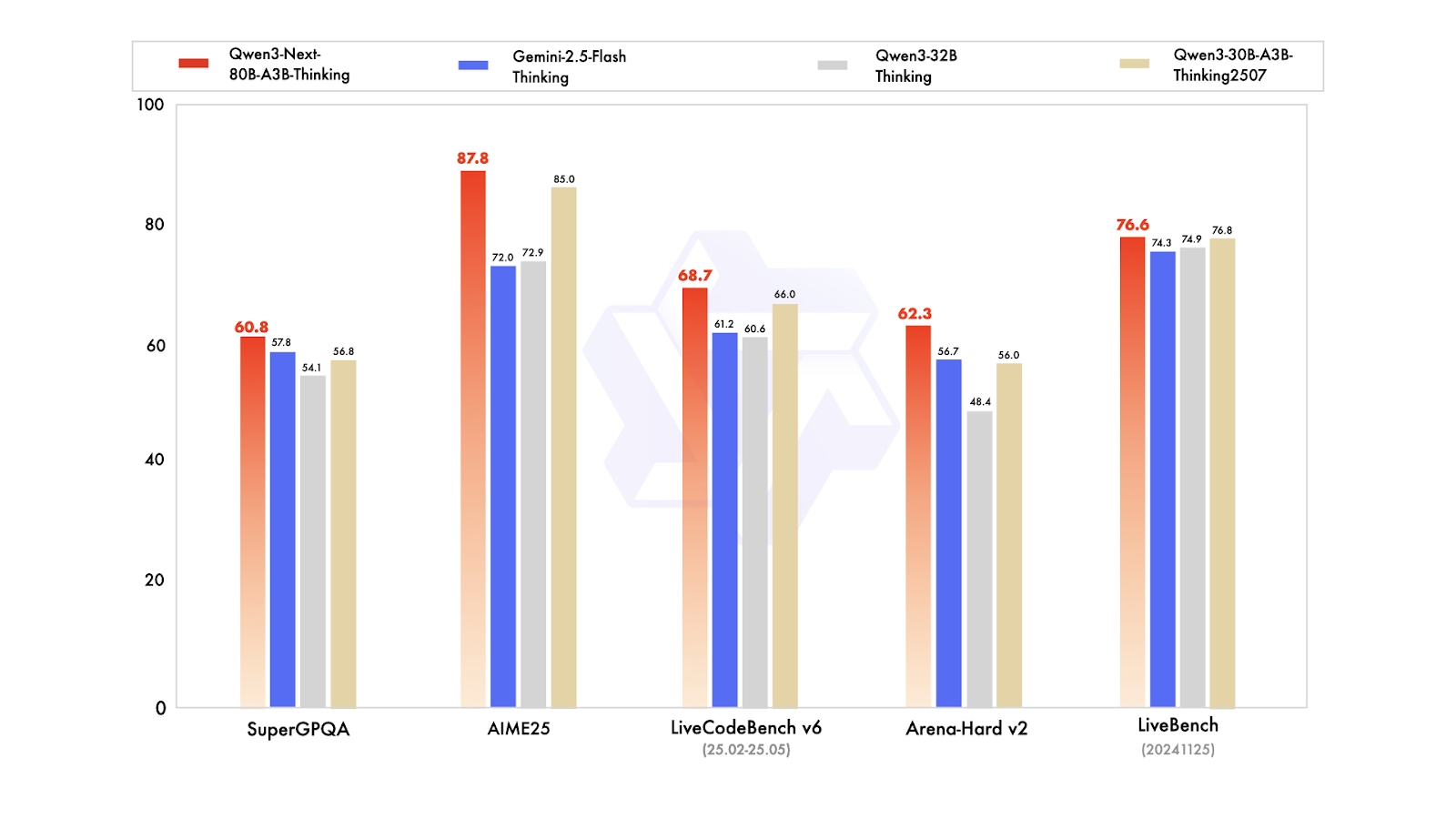
Qwen3-Next is a new architecture designed for scaling both context length and total parameters. The 80 billion-parameter base model activates only about 3 billion parameters during inference, while achieving performance that matches or slightly surpasses the Dense Qwen3-32B model, all with less than 10% of the training cost. It also provides over 10 times the throughput for context lengths exceeding 32,000 tokens.
In terms of post-training variants, the Instruct model competes with the 235 billion-parameter flagship model and supports context lengths of up to 256,000 tokens. Additionally, the Thinking variant outperforms the Qwen3-30B-A3B and Qwen3-32B models, as well as Gemini-2.5-Flash-Thinking, coming close to the performance of the 235 billion Thinking model.
Source: Qwen
What's new in Qwen3-Next:
You can get Qwen3‑Next on Hugging Face and ModelScope to download for local use, or deploy it as a server with frameworks like vLLM, SGLang, or Transformers Serve.
To run Qwen3-Next locally, we will install the transformers library from the main repository, along with accelerate, bitsandbytes, flash-linear-attention, and causal-conv1d for a faster backend.
After installation, please restart the Jupyter notebook kernel.
%%capture

!pip install git+https://github.com/huggingface/transformers.git@main
!pip install accelerate bitsandbytes

!pip install git+https://github.com/fla-org/flash-linear-attention.git
!pip install git+https://github.com/Dao-AILab/causal-conv1d.git
Next, download and load the tokenizers and model using the appropriate data types and device map.
We will be loading a 4-bit quantized model, which reduces our memory footprint by four times. This means you will need less storage space and less VRAM to load and run inference.
from transformers import AutoModelForCausalLM, AutoTokenizer
import torch

model_name = "unsloth/Qwen3-Next-80B-A3B-Instruct-bnb-4bit"

# --- Load tokenizer ---
tokenizer = AutoTokenizer.from_pretrained(model_name)

# --- Load model ---
model = AutoModelForCausalLM.from_pretrained(
    model_name,
    device_map="auto",
    dtype="auto",
)
We will then create a prompt, formulate a message, and pass it through a chat template to ensure it has the necessary formatting recognized by the Qwen3-Next model.
# prepare the model input
prompt = "Write a short introduction to large language models, highlighting how learners can explore them through DataCamp's interactive courses and hands-on projects."
messages = [
    {"role": "user", "content": prompt},
]
text = tokenizer.apply_chat_template(
    messages,
    tokenize=False,
    add_generation_prompt=True,
)
After that, we will tokenize the text, pass it through the model, and extract only the output tokens. We will then decode and display the final response.
model_inputs = tokenizer([text], return_tensors="pt").to(model.device)

# conduct text completion
generated_ids = model.generate(
    **model_inputs,
    max_new_tokens=512,
)
output_ids = generated_ids[0][len(model_inputs.input_ids[0]):].tolist()

content = tokenizer.decode(output_ids, skip_special_tokens=True)

print("content:", content)
The output looks perfect:
content: Large language models (LLMs) are advanced AI systems trained on vast amounts of text data to understand, generate, and reason with human language.
From answering questions and writing code to summarizing documents and engaging in conversation, LLMs are transforming how we interact with technology--and how we learn.
At DataCamp, learners can explore the power of LLMs through interactive courses and hands-on projects that bridge theory with real-world application.
Whether you're building your first chatbot, fine-tuning a model with Hugging Face, or evaluating AI-generated text, DataCamp's guided, code-based learning environment lets you experiment safely and effectively--no prior AI expertise required.
Start your journey into the future of language AI today.
A few things to keep in mind:
You can serve Qwen3-Next locally using SGLang or vLLM, as shown on the model page for Qwen. However, in this tutorial, we will learn something new: using the Transformers CLI to serve the model and access it through a chat interface provided by Transformers, similar to Ollama.
First, install the Transformers library with serving capabilities:
pip install transformers[serving]Next, start the Transformers server from your terminal. This is a general server, similar to Ollama.
transformers serveAs we can see, the server will be accessible on port 8000:
INFO:     Started server process [3502]
INFO:     Waiting for application startup.
INFO:     Application startup complete.
INFO:     Uvicorn running on http://localhost:8000 (Press CTRL+C to quit)
The easiest way to interact with the server is by using the Transformers chat CLI. This allows you to connect with the server and provides a chat-like interface within your terminal.
Launch a new terminal window and install the Rich library:
pip install richThen, run the following command to start the chat interface with the model path:
transformers chat localhost:8000 \
  --model-name-or-path unsloth/Qwen3-Next-80B-A3B-Instruct-bnb-4bit
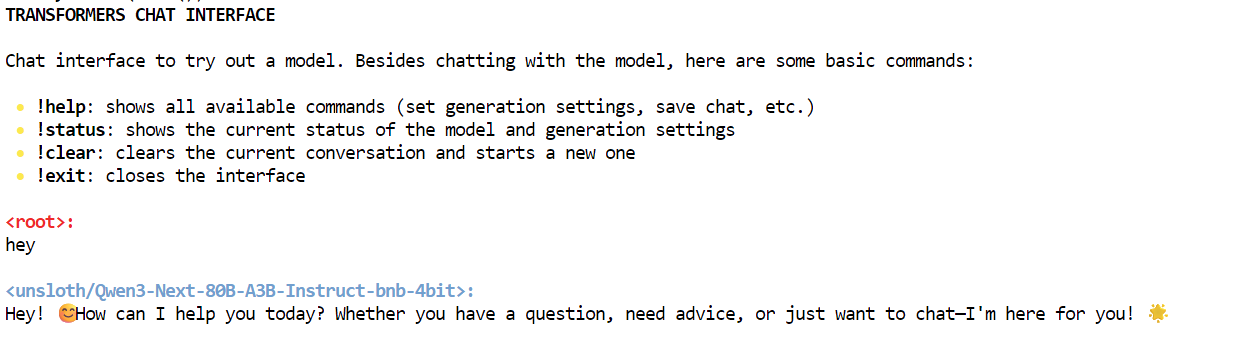
The Transformers chat will automatically decide which already downloaded model to choose and load it. Initially, it may take some time to load the model, but after that, you can start chatting.
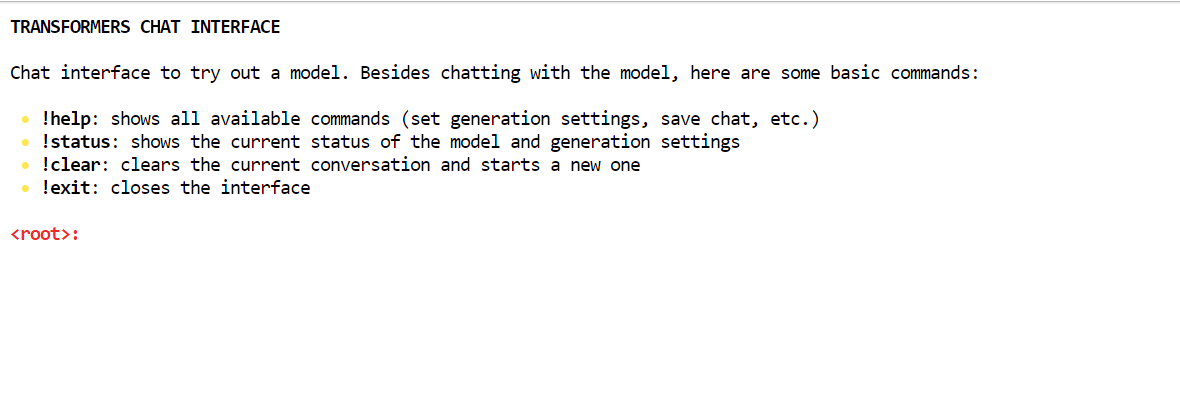
As you can see, we are interacting with the Qwen3-Next model locally using the chat interface.
There are many ways we can interact with the server. You can use the AsyncInferenceClient from Hugging Face Hub, make a CURL command, use Python’s requests library, or access the server via the OpenAI API.
This server is OpenAI compatible, meaning you can integrate it into your VSCode, Agentic workflow, or use it as an MCP server.
First, we will run a simple CURL command in the new terminal to check how many models are available on the server:
curl -s http://localhost:8000/v1/modelsAfter that, we will use the responses API. We will provide it with the model, prompts, and set streaming to false:
curl -s http://localhost:8000/v1/responses \
  -H "Content-Type: application/json" \
  -d '{
    "model": "unsloth/Qwen3-Next-80B-A3B-Instruct-bnb-4bit",
    "input": "One line: what is Qwen3-Next?",
    "stream": false
  }'
As a result, it has generated the response containing information about the Qwen3-Next model.
{"response":{"id":"resp_req_0","created_at":1758494863.6661901,"model":"unsloth/Qwen3-Next-80B-A3B-Instruct-bnb-4bit@main","object":"response","output":[{"id":"msg_req_0","content":[{"annotations":[],"text":"Qwen3-Next is the next-generation large language model in Alibaba's Qwen series, featuring enhanced performance, broader knowledge, and improved reasoning capabilities.","type":"output_text"}],"role":"assistant","status":"completed","type":"message","annotations":[]}],"parallel_tool_calls":false,"tool_choice":"auto","tools":[],"status":"completed","text":{"format":{"type":"text"}}},"sequence_number":40,"type":"response.completed"}Similarly, you can create a Python file, add the following code, and run it.
The code will initialize the OpenAI client with the local server URL. We provide it with the model name, inputs, and generate responses as a stream.
from openai import OpenAI

# Connect to your local server
client = OpenAI(
    base_url="http://localhost:8000/v1",  # transformers serve endpoint
    api_key="not-needed"                  # required by SDK, but can be dummy
)

# Create a streaming response request
response = client.responses.create(
    model="unsloth/Qwen3-Next-80B-A3B-Instruct-bnb-4bit",  # use your loaded model
    instructions="You are a helpful assistant.",
    input="What is love?",
    stream=True,                      # enable SSE streaming
    metadata={"source": "local-test"} # optional metadata
)

# Iterate over server-sent events
for event in response:
    if event.type == "response.output_text.delta":
        # This event contains the incremental text
        print(event.delta, end="", flush=True)
    elif event.type == "response.completed":
        print("\n--- done ---")
We received proper results as a streaming response. This is awesome.
Love is one of the most profound, complex, and universal human experiences -- a powerful emotion that defies simple definition but shapes our lives in countless ways.

At its core, **love** is a deep affection, care, and connection toward another person -- or even a thing, idea, or cause. It can manifest in many forms:

### Types of Love (from ancient Greek philosophy):
- **Eros**: Passionate, romantic, or sexual love.
- **Philia**: Deep friendship and platonic affection.
- **Storge**: Familial love -- the natural affection between parents and children.
- **Agape**: Selfless, unconditional love -- often spiritual or altruistic.
- **Ludus**: Playful, flirtatious love.
- **Pragma**: Long-lasting, committed love built on patience and compromise.
- **Philautia**: Self-love -- healthy self-regard that enables us to love others.

### What Love Feels Like:
- **Emotionally**: Warmth, safety, joy, vulnerability, longing, and sometimes pain.
- **Behaviorally**: Acts of kindness, sacrifice, patience, listening, and presence.
- **Biologically**: Involves neurotransmitters like oxytocin, dopamine, and serotonin -- chemicals that bond us and create attachment.

### Love Is Also a Choice:
Beyond feelings, love is often a decision -- to show up, to forgive, to stay even when it's hard. It's not just a rush of butterflies; it's the quiet commitment to care for someone day after day.

### In Essence:
> **Love is seeing someone's soul -- and choosing to hold it gently.**

It's the reason people write poetry, compose music, risk everything for another, and find meaning in life. Love connects us -- to others, to ourselves, and to something greater than just our individual existence.

So what is love?
It's complicated. It's messy. It's beautiful.
And above all -- it's human. ❤️
--- done ---At the time of writing, the GGUF version of Qwen3-Next is not available, which means it cannot be run locally using Ollama or Llama.cpp. The full model requires four A100 GPUs to operate effectively, so we opted for a quantized version that allows us to run the model on a single A100 GPU with 80GB of VRAM. While it took some time to download and set up the model, we have successfully learned how to run inference.
In this tutorial, we explored the Qwen3-Next model, which competes with other leading proprietary models in terms of speed and accuracy, despite being smaller.
After running the model locally, we accessed it using the curl command and the OpenAI Python SDK. The next step in our journey is to optimize the model for your specific machine. We may explore smaller versions, such as the 1.2-bit models, to enhance inference speed, especially on lower-end GPUs.
Alternatively, you could consider renting a GPU server to set up your own private LLM server, Runpod is a great option to explore in this regard.
Top DataCamp Courses
Track
Course
Course
Tutorial
Abid Ali Awan
7 min
Tutorial
Aashi Dutt
12 min
Tutorial
Aashi Dutt
12 min
Tutorial
Aashi Dutt
12 min
Tutorial
Abid Ali Awan
9 min
Tutorial
Abid Ali Awan
10 min

