
Khóa học
Làm việc với OpenAI API
3 giờ
184.5K
Sau khi DeepSeek R1 ra mắt, OpenAI đã đáp trả bằng mô hình suy luận tiên tiến của riêng mình, o3-mini. Mô hình mới này được thiết kế nhỏ gọn, nhanh và hiệu quả hơn so với phiên bản tiền nhiệm o1, đồng thời vượt trội trong các tác vụ liên quan đến lập trình, STEM và giải quyết vấn đề logic.
OpenAI đã cung cấp miễn phí mô hình này cho tất cả người dùng, bao gồm cả những người dùng ChatGPT và các nền tảng khác, giúp khả năng suy luận nâng cao dễ tiếp cận hơn bao giờ hết.
Để biết thêm chi tiết về o3-mini, bạn có thể tham khảo bài viết blog OpenAI’s O3: Tính năng, So sánh với O1, Ngày phát hành & hơn thế nữa.
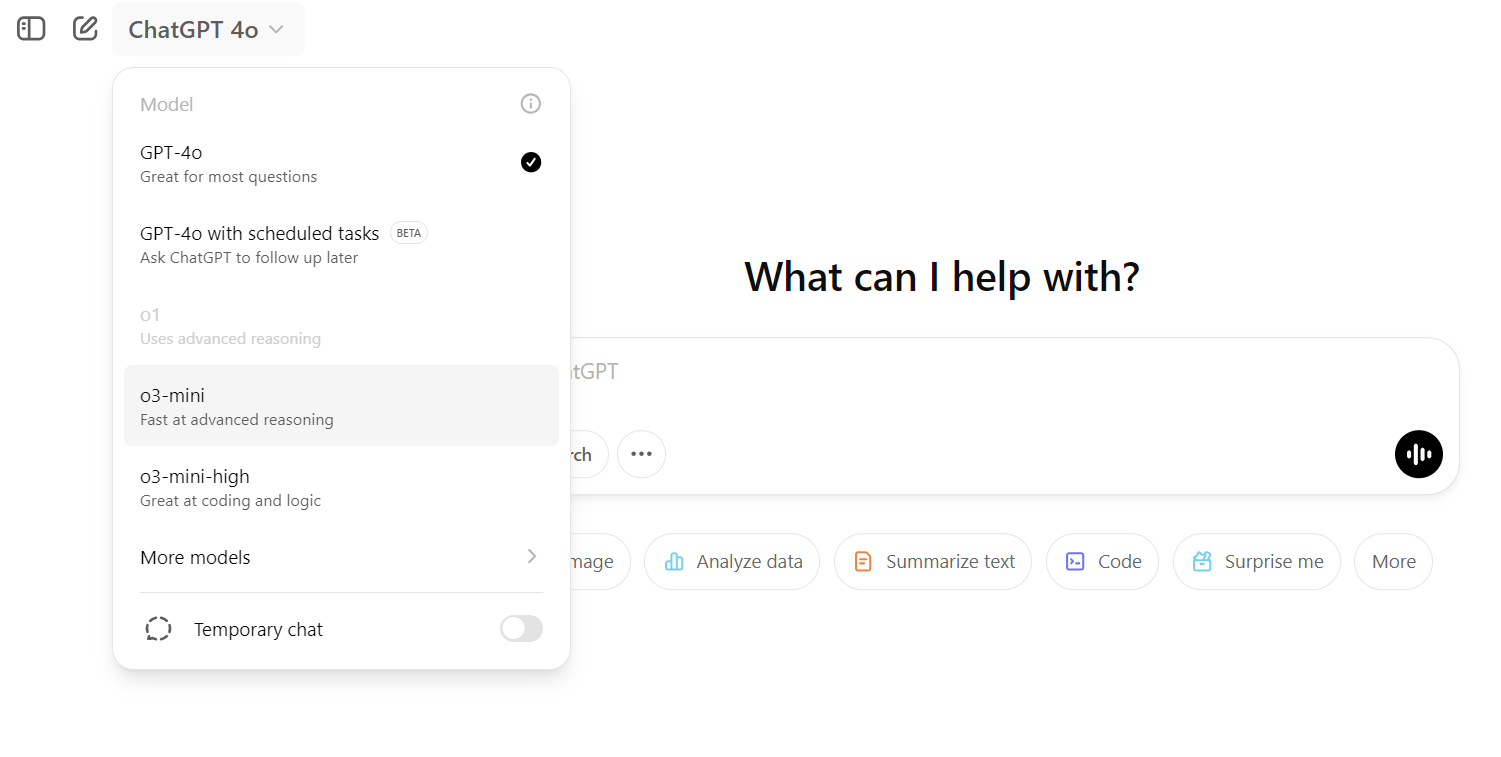
Nguồn: ChatGPT
Trong hướng dẫn này, chúng ta sẽ khám phá các khả năng kỹ thuật của mô hình o3-mini. Cụ thể, chúng ta sẽ kiểm thử khả năng xử lý các tác vụ kỹ thuật phức tạp, tạo mã chính xác, và cung cấp hướng dẫn rõ ràng để xây dựng, kiểm thử và triển khai một mô hình máy học đúng chuẩn. Cuối cùng, chúng ta sẽ đánh giá liệu o3-mini có đáp ứng kỳ vọng như một mô hình suy luận tối tân cho các tác vụ kỹ thuật và giải quyết vấn đề logic hay không.
Hình: Tác giả
Chúng ta sẽ yêu cầu o3-mini sử dụng bộ dữ liệu Placement Prediction để xây dựng một ứng dụng máy học có thể xác định liệu một sinh viên có đủ điều kiện được nhận việc hay không. Từ lập kế hoạch đến triển khai giải pháp, chúng ta sẽ nhờ mô hình o3-mini trên ChatGPT hỗ trợ.
Ở giai đoạn lập kế hoạch, chúng ta sẽ cung cấp cho mô hình o3-mini mọi thông tin cần thiết và phác thảo mục tiêu. Chúng ta sẽ yêu cầu nó tạo tất cả thư mục và tệp cần thiết để xây dựng, huấn luyện và triển khai ứng dụng Placement Prediction.
Cụ thể, chúng ta sẽ:
Đây là lời nhắc:
“I want to build a machine learning project to predict whether a student will be placed or not based on their academic and extracurricular data. The dataset contains the following columns:

- **StudentID**: Unique identifier for each student.

- **CGPA**: The overall grades achieved by the student.

- **Internships**: Number of internships a student has completed.

- **Projects**: Number of projects a student has completed.

- **Workshops/Certifications**: Indicates whether the student has attended workshops or completed certifications to upskill themselves.

- **AptitudeTestScore**: Score achieved in an aptitude test, which evaluates quantitative and logical thinking.

- **SoftSkillRating**: A rating of the student’s communication and interpersonal skills.

- **ExtraCurricularActivities**: Indicates whether the student is active in extracurricular activities (Yes/No).

- **PlacementTraining**: Indicates whether the student has undergone placement training (Yes/No).

- **SSC and HSC**: Senior Secondary and Higher Secondary marks.

- **PlacementStatus**: The target column, which has two classes: "Placed" and "Not Placed."

Here is a sample dataset row:

StudentID,CGPA,Internships,Projects,Workshops/Certifications,AptitudeTestScore,SoftSkillsRating,ExtracurricularActivities,PlacementTraining,SSC_Marks,HSC_Marks,PlacementStatus

1,7.5,1,1,1,65,4.4,No,No,61,79,NotPlaced

I need help creating a structured project with the following components:

1. **Data Analysis**: Perform exploratory data analysis (EDA) to understand the dataset, visualize trends, and identify correlations between features and the target variable.

2. **Model Building**: Create a machine learning pipeline to preprocess the data and train a model to predict the placement status.

3. **Experiment Tracking**: Set up a system to track experiments, including model performance metrics, hyperparameters, and results.

4. **Model Training**: Train the model using appropriate algorithms and evaluate its performance using metrics like accuracy, precision, recall, and F1-score.

5. **Hyperparameter Tuning**: Optimize the model’s performance by tuning hyperparameters using techniques like grid search or random search.

6. **Model Inference Application**: Build an application (e.g., a web app or API) to allow users to input student data and get predictions on placement status.

7. **Dockerfile for Containerization**: Create a Dockerfile to containerize the application for easy deployment.

8. **Cloud Deployment**: Deploy the application on a cloud platform (e.g., AWS, Azure, or Google Cloud) to make it accessible online.

9. **Accessing the Model**: Provide a way to access the deployed model via an API or web interface.

Please provide the following:

- A folder structure for organizing the project files. (Also provide bash command for creating the folders and files.)

- Python scripts or code snippets for each of the above components.

- Suggestions for tools and libraries to use (e.g., pandas, scikit-learn, Flask, Docker, etc.).

- Guidance on setting up experiment tracking (using MLflow).

- Steps for deploying the model on a Hugging Face Space.”
Đổi lại, bạn sẽ nhận được phản hồi chi tiết về cấu trúc dự án và cách xây dựng mọi thứ từ đầu.
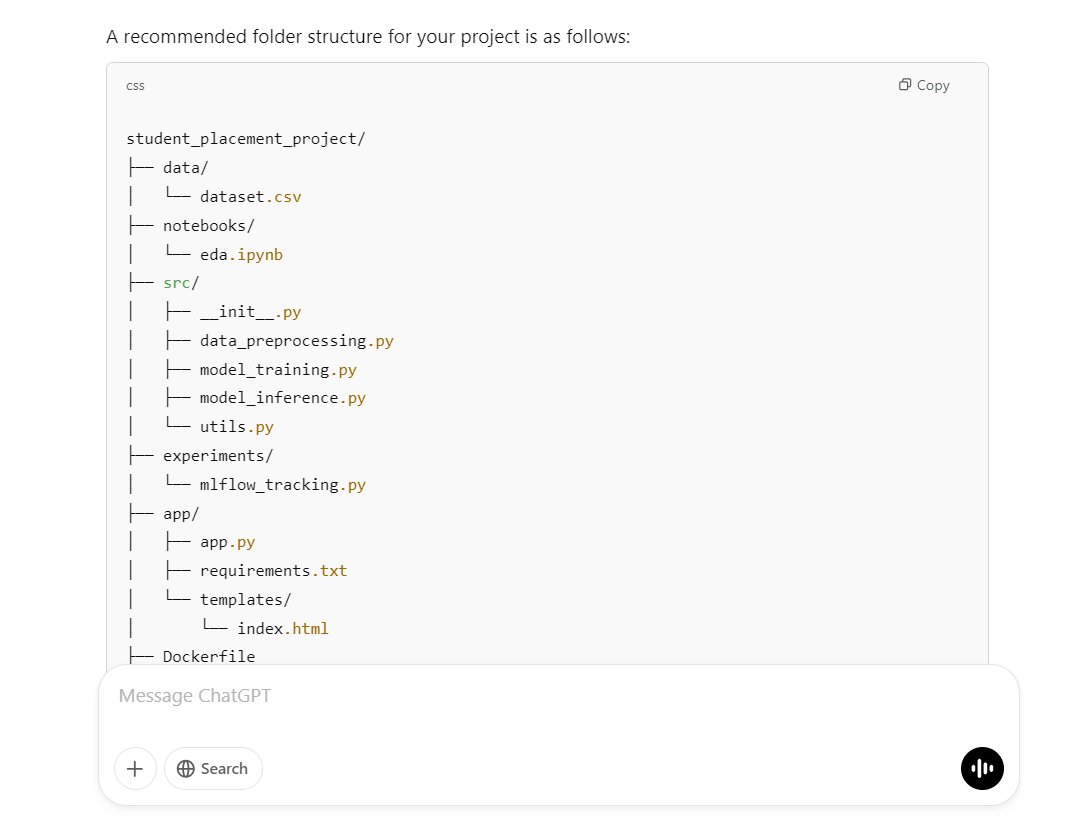
Script được cung cấp sẽ tạo thư mục dự án, các thư mục con và toàn bộ tệp cần thiết:
mkdir -p student_placement_project/{data,notebooks,src,experiments,app/templates}
touch student_placement_project/data/dataset.csv \
      student_placement_project/notebooks/eda.ipynb \
      student_placement_project/src/{__init__.py,data_preprocessing.py,model_training.py,model_inference.py,utils.py} \
      student_placement_project/experiments/mlflow_tracking.py \
      student_placement_project/app/{app.py,requirements.txt} \
      student_placement_project/app/templates/index.html \
      student_placement_project/{Dockerfile,requirements.txt,README.md}
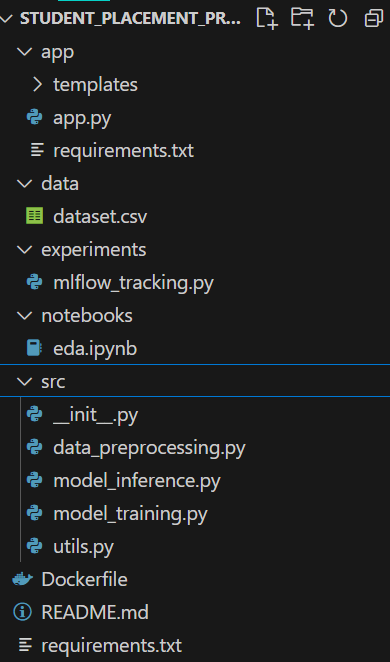
Như ta thấy, script này đã hoàn thành mọi tác vụ cần thiết cho chúng ta.
Phản hồi đã cung cấp mã cho tệp Jupyter notebook. Bạn chỉ cần dán từng đoạn mã và chạy để xem kết quả.
# notebooks/eda.ipynb
import pandas as pd
import seaborn as sns
import matplotlib.pyplot as plt
import numpy as np

# Load dataset
df = pd.read_csv('../data/dataset.csv')

# Basic info and descriptive statistics
print(df.info())
print(df.describe())

# Visualize distributions
sns.histplot(df['CGPA'], bins=20, kde=True)
plt.title('Distribution of CGPA')
plt.show()

# Correlation matrix
plt.figure(figsize=(10, 8))

# Compute correlation matrix only on numeric columns
numeric_df = df.select_dtypes(include=[np.number])
plt.figure(figsize=(10, 8))
corr = numeric_df.corr()
sns.heatmap(corr, annot=True, cmap="coolwarm")
plt.title("Feature Correlation Matrix")


# Count plot for PlacementStatus
sns.countplot(x='PlacementStatus', data=df)
plt.title('Placement Status Count')
plt.show()
Trông như thế này. Toàn bộ phân tích dữ liệu và biểu đồ nằm trong một tệp để bất kỳ ai cũng có thể xem.
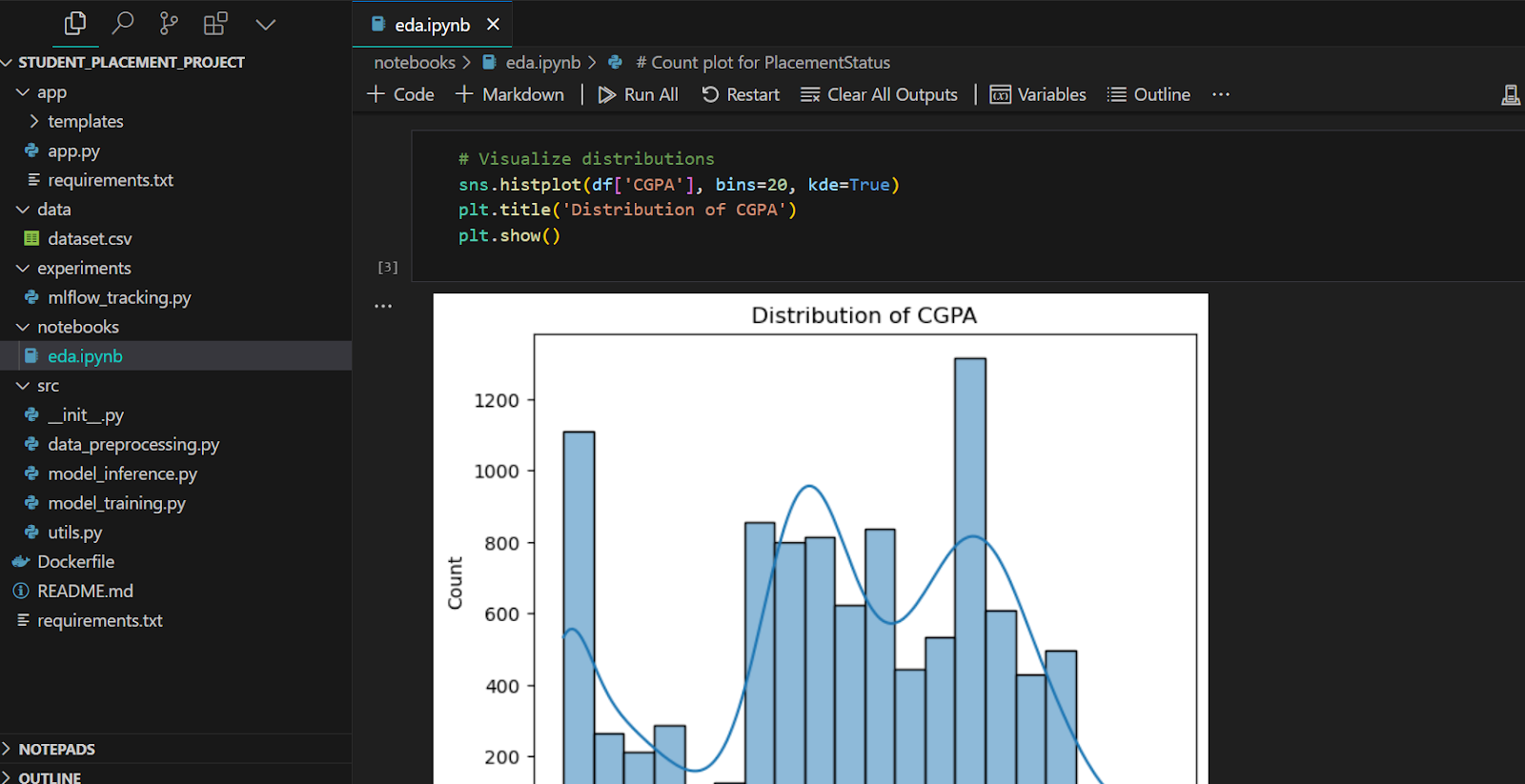
Tiếp theo, chúng ta sẽ tạo tệp tiền xử lý dữ liệu. Ngoại trừ một vài thay đổi nhỏ, đoạn mã này chạy trơn tru.
# src/data_preprocessing.py
import pandas as pd
from sklearn.model_selection import train_test_split
from sklearn.preprocessing import StandardScaler


def load_and_preprocess_data(filepath):
    df = pd.read_csv(filepath)

    # Convert categorical columns
    df["ExtracurricularActivities"] = df["ExtracurricularActivities"].map(
        {"Yes": 1, "No": 0}
    )
    df["PlacementTraining"] = df["PlacementTraining"].map({"Yes": 1, "No": 0})
    df["Workshops/Certifications"] = df["Workshops/Certifications"].astype(
        int
    )  # assuming it's already 0/1

    # Convert target column to binary
    df["PlacementStatus"] = df["PlacementStatus"].map({"Placed": 1, "NotPlaced": 0})

    # Feature selection (excluding StudentID)
    X = df.drop(["StudentID", "PlacementStatus"], axis=1)
    y = df["PlacementStatus"]

    # Split dataset
    X_train, X_test, y_train, y_test = train_test_split(
        X, y, test_size=0.2, random_state=42
    )

    # Scaling numeric features (optional)
    scaler = StandardScaler()
    X_train_scaled = scaler.fit_transform(X_train)
    X_test_scaled = scaler.transform(X_test)

return X_train_scaled, X_test_scaled, y_train, y_test, scalerScript huấn luyện nhập hàm xử lý dữ liệu, xử lý dữ liệu trước rồi huấn luyện mô hình random forest. Cuối cùng, nó hiển thị các chỉ số hiệu năng mô hình.
# src/model_training.py
import joblib
from sklearn.ensemble import RandomForestClassifier
from sklearn.metrics import accuracy_score, precision_score, recall_score, f1_score
from data_preprocessing import load_and_preprocess_data


def train_model(data_path):
    X_train, X_test, y_train, y_test, scaler = load_and_preprocess_data(data_path)

    # Initialize and train classifier
    clf = RandomForestClassifier(n_estimators=100, random_state=42)
    clf.fit(X_train, y_train)

    # Predictions and evaluation
    y_pred = clf.predict(X_test)
    metrics = {
        "accuracy": accuracy_score(y_test, y_pred),
        "precision": precision_score(y_test, y_pred),
        "recall": recall_score(y_test, y_pred),
        "f1_score": f1_score(y_test, y_pred),
    }
    print("Model Evaluation Metrics:", metrics)

    # Save model and scaler
    joblib.dump(clf, "model_rf.joblib")
    joblib.dump(scaler, "scaler.joblib")

    return clf, scaler, metrics


if __name__ == "__main__":
    train_model("data/dataset.csv")
Độ chính xác 78% là không tệ.
$ python .\src\model_training.py

Model Evaluation Metrics: {'accuracy': 0.781, 'precision': 0.7462121212121212, 'recall': 0.7137681159420289, 'f1_score': 0.7296296296296296}
Nếu bạn muốn tìm hiểu thêm các chủ đề liên quan, hãy xem hướng dẫn LLM phổ biến của chúng tôi Fine-Tuning DeepSeek R1 (Reasoning Model). Bài viết đề cập đến tinh chỉnh mô hình suy luận mã nguồn mở đầu tiên trên thế giới bằng bộ dữ liệu chuỗi suy nghĩ y khoa để phát triển các bác sĩ AI tốt hơn trong tương lai.
Chúng ta không muốn giữ các script Python ở thư mục khác. Ta sẽ chuyển tệp mlflow_tracking.py vào thư mục src và xóa thư mục experiments. Lưu ý bạn sẽ cần thực hiện một vài thay đổi nhỏ thủ công thay vì yêu cầu mô hình o3-mini.
# src/mlflow_tracking.py
import mlflow
import mlflow.sklearn
from model_training import train_model


def run_experiment(data_path):
    mlflow.set_experiment("Student_Placement_Prediction")

    with mlflow.start_run():
        # Train the model
        clf, scaler, metrics = train_model(data_path)

        # Log parameters (example)
        mlflow.log_param("model_type", "RandomForest")
        mlflow.log_param("n_estimators", 100)

        # Log metrics
        mlflow.log_metric("accuracy", metrics["accuracy"])
        mlflow.log_metric("precision", metrics["precision"])
        mlflow.log_metric("recall", metrics["recall"])
        mlflow.log_metric("f1_score", metrics["f1_score"])

        # Log the model
        mlflow.sklearn.log_model(clf, "model")

        print("Experiment logged in MLflow.")


if __name__ == "__main__":
    run_experiment("data/dataset.csv")
Script Python chạy mượt và tạo ra toàn bộ thông tin.
$ python .\src\mlflow_tracking.py
Model Evaluation Metrics: {'accuracy': 0.781, 'precision': 0.7462121212121212, 'recall': 0.7137681159420289, 'f1_score': 0.7296296296296296}
2025/02/17 00:03:34 WARNING mlflow.models.model: Model logged without a signature and input example. Please set `input_example` parameter when logging the model to auto infer the model signature.
Experiment logged in MLflow.
Tất cả thí nghiệm máy học được lưu cục bộ, bạn có thể trực quan hóa bằng giao diện MLflow UI.
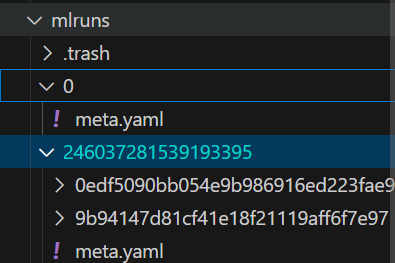
Phản hồi của o3-mini cũng cung cấp một bước tùy chọn mà bạn có thể thêm vào script model_training.py. Chúng tôi đã thêm bước này để xem hiệu năng mô hình có tăng lên hay không.
# src/model_training.py
import joblib
from sklearn.ensemble import RandomForestClassifier
from sklearn.metrics import accuracy_score, precision_score, recall_score, f1_score
from data_preprocessing import load_and_preprocess_data
from sklearn.model_selection import GridSearchCV


def tune_model(X_train, y_train):
    param_grid = {"n_estimators": [50, 100, 150], "max_depth": [None, 5, 10]}
    clf = RandomForestClassifier(random_state=42)
    grid_search = GridSearchCV(clf, param_grid, cv=5, scoring="f1")
    grid_search.fit(X_train, y_train)
    print("Best parameters:", grid_search.best_params_)
    return grid_search.best_estimator_

def train_model(data_path):
    X_train, X_test, y_train, y_test, scaler = load_and_preprocess_data(data_path)

    # Initialize and train classifier
    clf = tune_model(X_train, y_train)

    # Predictions and evaluation
    y_pred = clf.predict(X_test)
    metrics = {
        "accuracy": accuracy_score(y_test, y_pred),
        "precision": precision_score(y_test, y_pred),
        "recall": recall_score(y_test, y_pred),
        "f1_score": f1_score(y_test, y_pred),
    }
    print("Model Evaluation Metrics:", metrics)

    # Save model and scaler
    joblib.dump(clf, "model_rf.joblib")
    joblib.dump(scaler, "scaler.joblib")

    return clf, scaler, metrics


if __name__ == "__main__":
    train_model("data/dataset.csv")
Như bạn thấy, hiệu năng mô hình đã tăng nhẹ nhờ tối ưu siêu tham số.
$ python .\src\model_training.py
Best parameters: {'max_depth': 5, 'n_estimators': 150}
Model Evaluation Metrics: {'accuracy': 0.791, 'precision': 0.7493917274939172, 'recall': 0.7439613526570048, 'f1_score': 0.7466666666666667}Đến lúc tạo phần suy luận mô hình. Chúng ta sẽ phát triển một ứng dụng web Flask.
Trước tiên, cần tải mô hình và scaler. Sau đó, ta xử lý đầu vào người dùng và cung cấp cho mô hình để tạo dự đoán. Đây là một ứng dụng khá đơn giản.
import joblib
import numpy as np

app = Flask(__name__)

# Load the trained model and scaler (update paths as necessary)
model = joblib.load("model_rf.joblib")
scaler = joblib.load("scaler.joblib")


@app.route("/")
def home():
    return render_template("index.html")


@app.route("/predict", methods=["POST"])
def predict():
    try:
        # Expecting form data from the HTML template
        CGPA = float(request.form.get("CGPA"))
        Internships = int(request.form.get("Internships"))
        Projects = int(request.form.get("Projects"))
        Workshops_Certifications = int(request.form.get("Workshops_Certifications"))
        AptitudeTestScore = float(request.form.get("AptitudeTestScore"))
        SoftSkillRating = float(request.form.get("SoftSkillRating"))
        ExtracurricularActivities = request.form.get("ExtracurricularActivities")
        PlacementTraining = request.form.get("PlacementTraining")
        SSC_Marks = float(request.form.get("SSC_Marks"))
        HSC_Marks = float(request.form.get("HSC_Marks"))

        # Convert categorical fields to numerical
        extra_act = 1 if ExtracurricularActivities.lower() == "yes" else 0
        placement_training = 1 if PlacementTraining.lower() == "yes" else 0

        # Construct feature vector
        features = [
            CGPA,
            Internships,
            Projects,
            Workshops_Certifications,
            AptitudeTestScore,
            SoftSkillRating,
            extra_act,
            placement_training,
            SSC_Marks,
            HSC_Marks,
        ]

        # Scale features and make prediction
        features_scaled = scaler.transform(np.array(features).reshape(1, -1))
        prediction = model.predict(features_scaled)
        result = "Placed" if prediction[0] == 1 else "Not Placed"

        return render_template("index.html", prediction=result)
    except Exception as e:
        return render_template("index.html", prediction=f"Error: {e}")


if __name__ == "__main__":
    app.run(host='0.0.0.0', port=5000, debug=True)
Để tạo giao diện người dùng ứng dụng, chúng tôi đã dán mã HTML vào tệp index.html. Tất cả do mô hình o3-mini cung cấp. Bạn thậm chí có thể yêu cầu o3-mini cải thiện giao diện người dùng.
<!-- app/templates/index.html -->
<!DOCTYPE html>
<html>
<head>
    <title>Student Placement Prediction</title>
</head>
<body>
    <h1>Student Placement Prediction</h1>
    <form action="/predict" method="post" id="predictForm">
        <!-- Create inputs for each feature. Example for CGPA: -->
        <label for="CGPA">CGPA:</label>
        <input type="number" step="0.1" id="CGPA" name="CGPA" required><br><br>
        <!-- Add more inputs as per features -->
        <button type="submit">Predict</button>
    </form>
    <div id="result"></div>
    <script>
      document.getElementById('predictForm').addEventListener('submit', async (e) => {
          e.preventDefault();
          const formData = new FormData(e.target);
          const data = Object.fromEntries(formData.entries());
          // Adjust keys to match what the API expects
          data.ExtracurricularActivities = data.ExtracurricularActivities || 'No';
          data.PlacementTraining = data.PlacementTraining || 'No';

          const response = await fetch('/predict', {
              method: 'POST',
              headers: {'Content-Type': 'application/json'},
              body: JSON.stringify(data)
          });
          const result = await response.json();
          document.getElementById('result').innerText = JSON.stringify(result);
      });
    </script>
</body>
</html>
Khi mọi thứ đã sẵn sàng, hãy chạy ứng dụng và nhấp vào URL được Flask tạo ra.
$ python .\app\app.py

 * Running on all addresses (0.0.0.0)
 * Running on http://127.0.0.1:5000
 * Running on http://192.168.100.41:5000
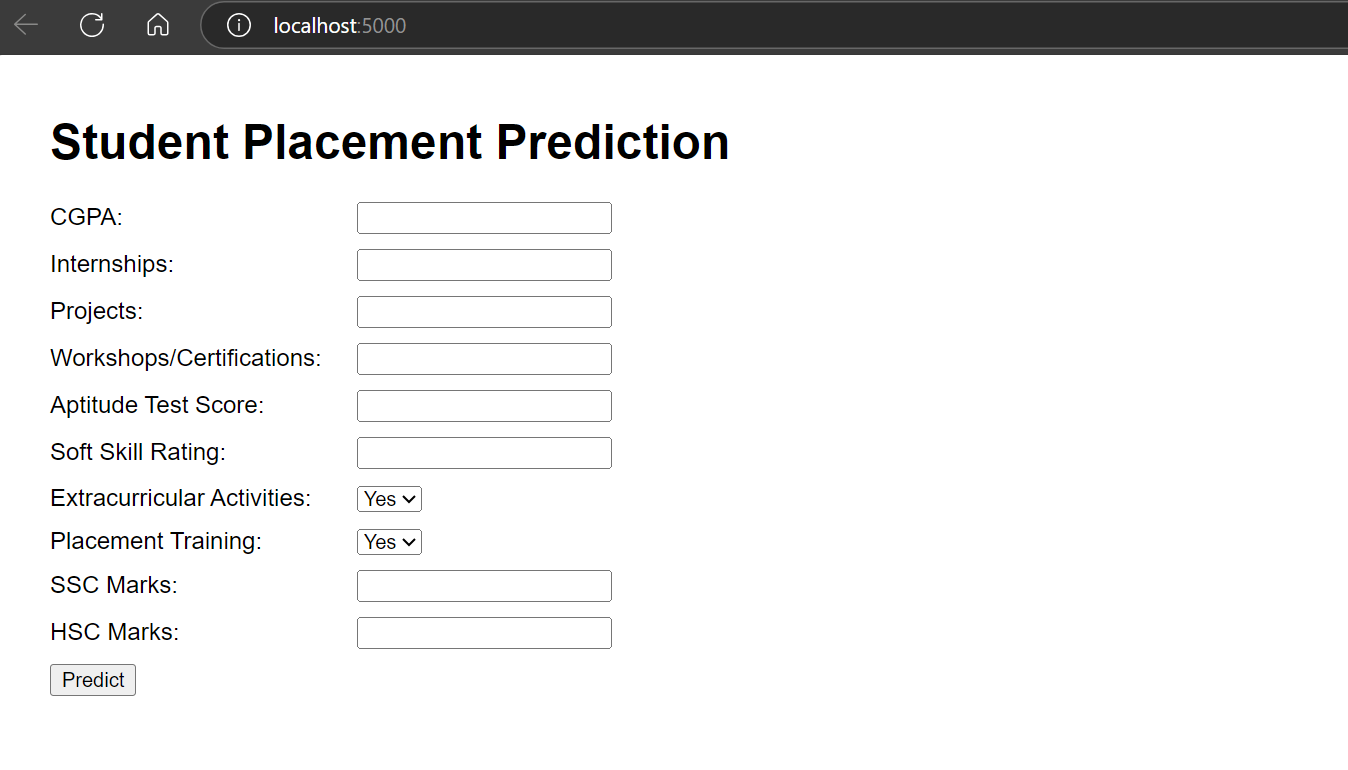
Ứng dụng web của chúng ta đang hoạt động trơn tru.
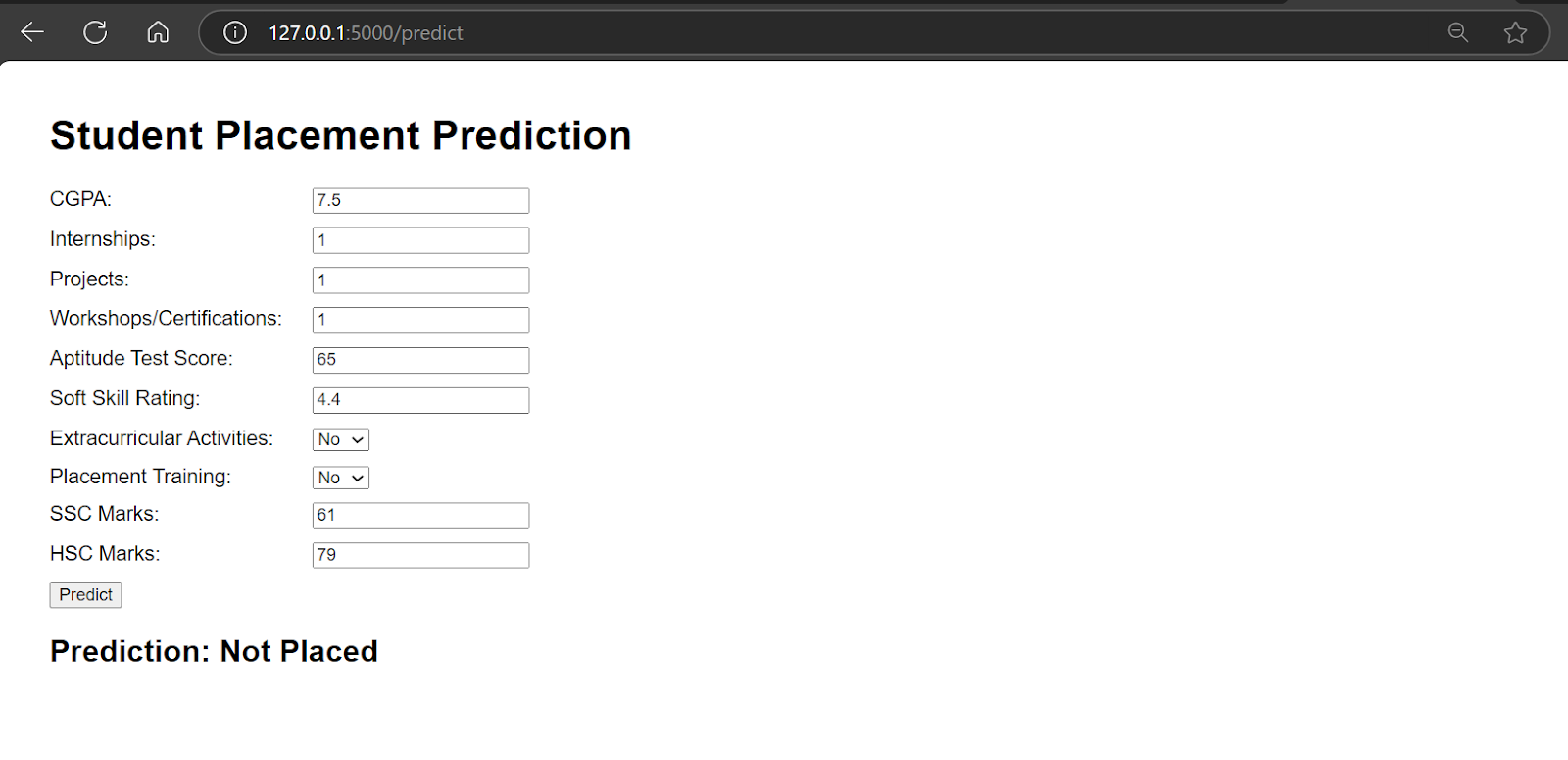
Mô hình o3-mini cũng đã cung cấp Dockerfile, và việc của chúng ta chỉ là build cục bộ và thử nghiệm trước khi triển khai lên đám mây.
# Use an official Python runtime as a parent image
FROM python:3.12-slim

# Set the working directory in the container
WORKDIR /app

# Copy the requirements file and install dependencies
COPY requirements.txt ./
RUN pip install --upgrade pip && pip install -r requirements.txt

# Copy the entire project
COPY . .

# Expose port (adjust as necessary)
EXPOSE 5000

# Command to run the Flask app
CMD ["python", "app/app.py"]
Build image Docker bằng lệnh sau.
$ docker build -t kingabzpro/student_placement . 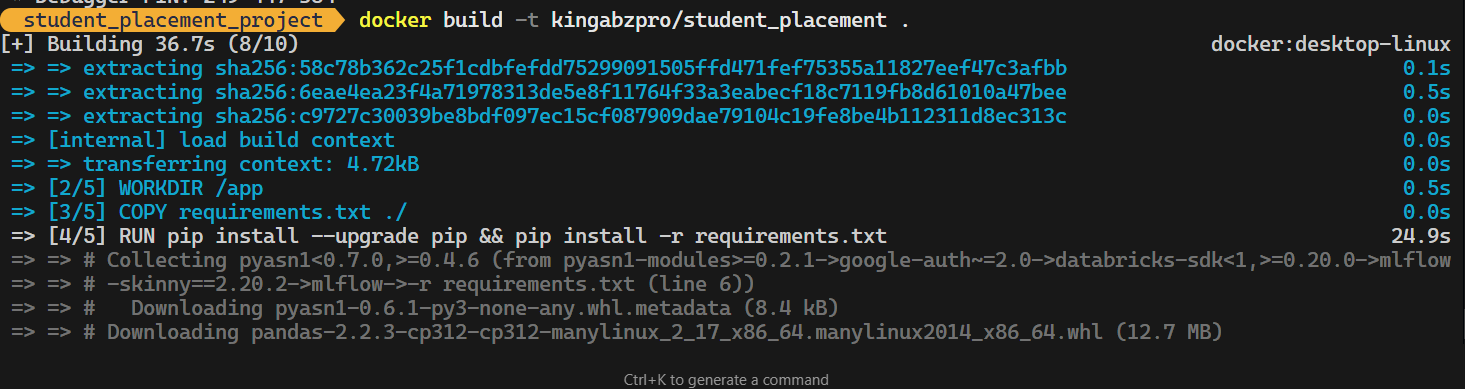
Chạy Docker Image cục bộ.
$ docker run -p 5000:5000 kingabzpro/student_placementBạn có thể thấy Docker của chúng ta chạy hoàn hảo.
Đã đến lúc triển khai ứng dụng máy học của chúng ta lên Hugging Face Cloud (Space).
Để bắt đầu, bạn có thể tạo một space mới. Thêm tất cả thông tin cần thiết về ứng dụng và chọn Docker làm SDK.
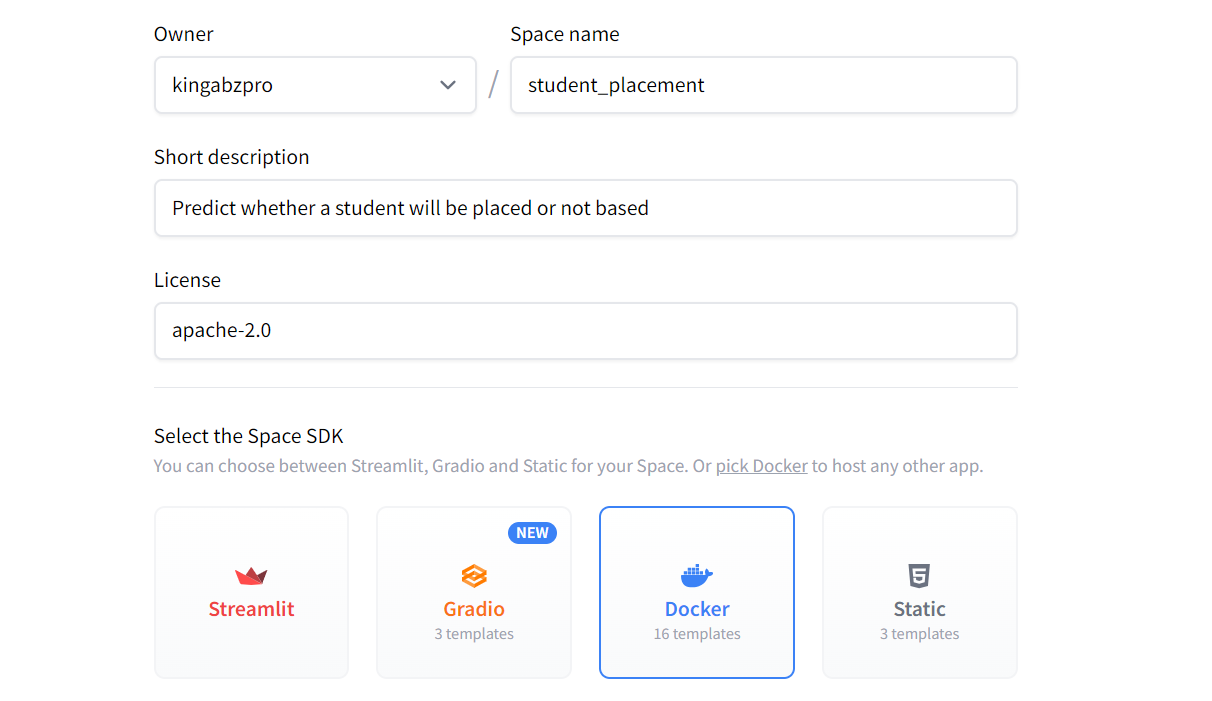
Sau đó, nền tảng sẽ tạo cho bạn một URL để clone ứng dụng về máy.
$ git clone https://huggingface.co/spaces/kingabzpro/student_placementTiếp theo, chuyển mô hình, scaler, thư mục app, Dockerfile và requirements.txt vào kho ứng dụng.
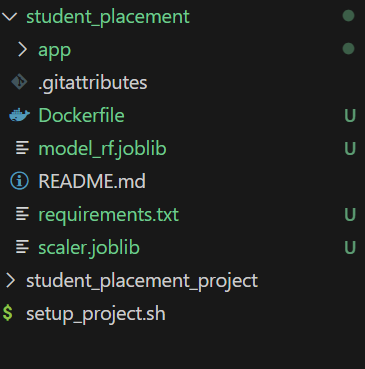
Bạn có thể chỉnh sửa tệp app.py bằng cách cập nhật dòng cuối thành:
app.run(host="0.0.0.0", port=7860, debug=True)Kiểm tra cổng được mở trong Dockerfile. Chúng ta cần làm điều này để tránh lỗi hoặc xung đột cổng:
# Expose port (adjust as necessary)
EXPOSE 7860
Sau khi thực hiện mọi thay đổi, hãy commit cập nhật và đẩy lên kho từ xa:
$ cd .\student_placement\
$ git add .
$ git commit -m "Initial commit of Dockerized student placement app"
$ git push
Ngay khi bạn đẩy thay đổi, hệ thống sẽ bắt đầu build và sau đó triển khai giao diện người dùng cho ứng dụng của bạn.
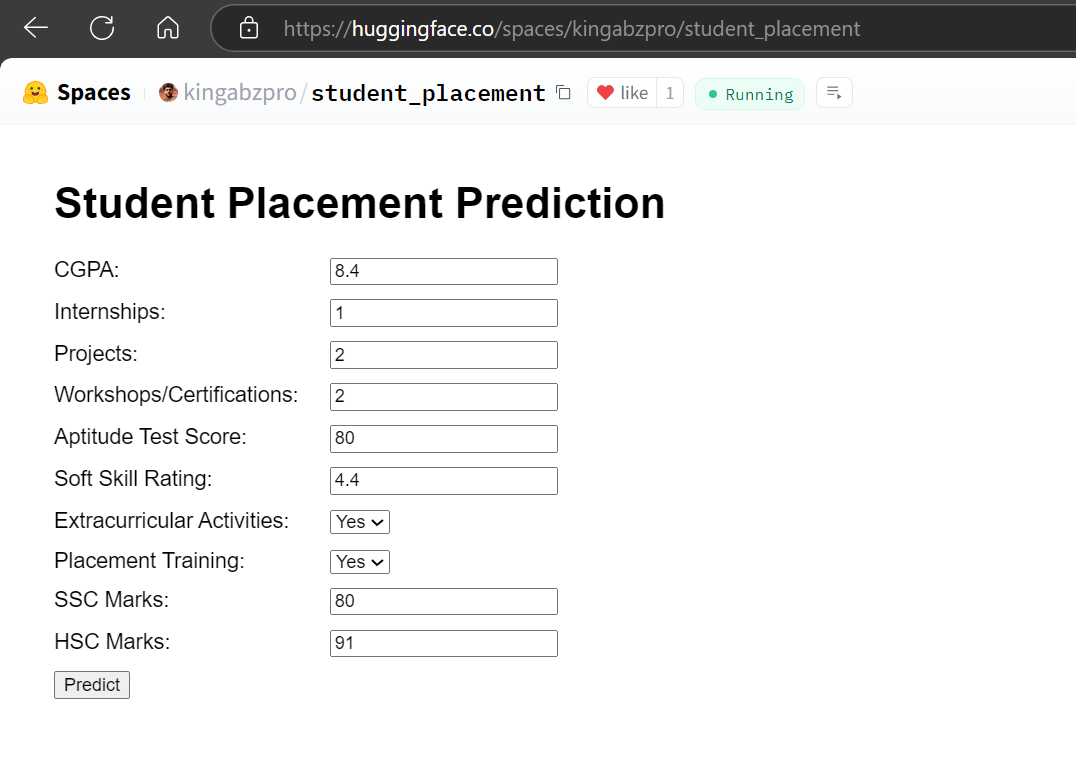
Nguồn: Student Placement
o3-mini đã làm rất tốt, từ quản lý thư mục dự án đến triển khai thành công ứng dụng web lên đám mây.
Bạn cũng có thể đọc về mô hình tối tân của Google và học cách xây dựng ứng dụng AI của riêng bạn bằng cách theo dõi hướng dẫn Building Multimodal AI Application with Gemini 2.0 Pro.
Mô hình o3-mini có những điểm riêng, nghĩa là bạn cần cẩn trọng khi đưa ra yêu cầu tiếp theo và gỡ lỗi mã. Dưới đây là một vài mẹo để làm việc hiệu quả với nó:
Khi cung cấp hướng dẫn, hãy đảm bảo chúng rõ ràng và nhất quán. Nếu bạn đưa nhiều chỉ thị, o3-mini sẽ ưu tiên chỉ thị gần nhất. Nghĩa là lệnh mới nhất trong chuỗi prompt dài sẽ được ưu tiên, có thể ghi đè những chỉ dẫn trước đó.
Một số vấn đề mã cần được xử lý thủ công thay vì trông cậy vào mô hình. Nếu bạn yêu cầu o3-mini sửa một phần mã cụ thể, nó chỉ chỉnh phần đó. Tuy nhiên, điều này có thể khiến các phần liên quan bị hỏng, vì mô hình không phải lúc nào cũng xét đến phụ thuộc hoặc ngữ cảnh rộng hơn.
Bao gồm mọi chi tiết liên quan trong prompt của bạn, như dữ liệu gốc, hàng và cột được định nghĩa rõ, cùng bất kỳ ngữ cảnh bổ sung nào. Điều này giúp mô hình hiểu yêu cầu chính xác hơn và cho ra kết quả tốt hơn.
Nêu rõ bạn muốn mô hình trả về gì. Ví dụ, chỉ định bạn cần thư mục, tệp, lệnh Docker, hay hướng dẫn từng bước để triển khai giải pháp. Điều này đảm bảo đầu ra phù hợp kỳ vọng của bạn.
Bắt đầu bằng một prompt nền tảng được cấu trúc tốt bao quát 90% nhu cầu của bạn. Khi nền tảng đã có, bạn có thể đưa thêm lệnh để tinh chỉnh, sửa, hoặc bổ sung các bước vào quy trình.
Mô hình o3-mini nổi bật như một lựa chọn vượt trội so với GPT-4o, cho hiệu năng nhanh hơn o1 và xuất sắc trong các tác vụ như lập trình Python và HTML. Đáng chú ý, mã Python do o3-mini tạo ra phần lớn chạy mượt mà. Nó còn có thể cải thiện mã HTML, giúp bạn nâng cấp giao diện người dùng và làm nó trực quan hơn.
Trong hướng dẫn này, chúng ta đã khám phá sức mạnh của o3-mini trong bối cảnh một dự án máy học. Mô hình o3-mini chứng tỏ là công cụ tuyệt vời cho các nhà khoa học dữ liệu, kỹ sư máy học và chuyên gia kỹ thuật. Khả năng xử lý hiệu quả các tác vụ phức tạp khiến nó trở thành tài sản quý trong bất kỳ quy trình làm việc nào.
Để đạt kết quả tốt nhất, bạn chỉ cần cung cấp ngữ cảnh toàn diện, bao gồm mọi nội dung và đầu mục bàn giao liên quan, ngay trong prompt ban đầu. Khi mô hình tạo đầu ra, bạn có thể chuyển sang trình soạn thảo mã, bắt đầu chạy script và triển khai mã kèm hướng dẫn đã cung cấp.
Tiếp theo, bạn cần học cách tự triển khai các LLM tối tân của mình lên đám mây. Thay vì phụ thuộc vào OpenAI, điều này giúp bạn toàn quyền kiểm soát chi phí, độ chính xác và khả năng truy cập dữ liệu. Hãy theo dõi hướng dẫn How to Deploy LLMs with BentoML để học mọi thứ về quy trình này.
Khóa học DataCamp hàng đầu
Khóa học
Khóa học
Khóa học
blog
Matt Crabtree
10 phút
