
Course
Fully Automated MLOps
4 hr
6.4K
Automated Machine Learning (AutoML) is often misunderstood.
Many people in tech assume that AutoML tools are only meant for business users or non-technical teams who do not understand how machine learning models are trained or deployed. This assumption is incorrect.
In practice, data scientists and machine learning engineers regularly use AutoML frameworks to reduce experimentation time, improve model performance, and automate repetitive stages of the machine learning lifecycle.
These AutoML tools support tasks such as feature engineering, model selection, hyperparameter tuning, and end-to-end pipeline automation, allowing teams to focus on higher-value work.
In this article, I’ll explore some of the top AutoML frameworks available today, designed for users at different levels of expertise. The tools are grouped into three clear categories:
For each framework, we highlight its key features and provide example code so you can start using it immediately.
AutoML refers to tools and systems that automate the entire machine learning model development process, from raw data to a trained, deployable model.
AutoML frameworks handle many of the repetitive and technical tasks involved in building machine learning models so that both expert practitioners and less technical users can work more efficiently.
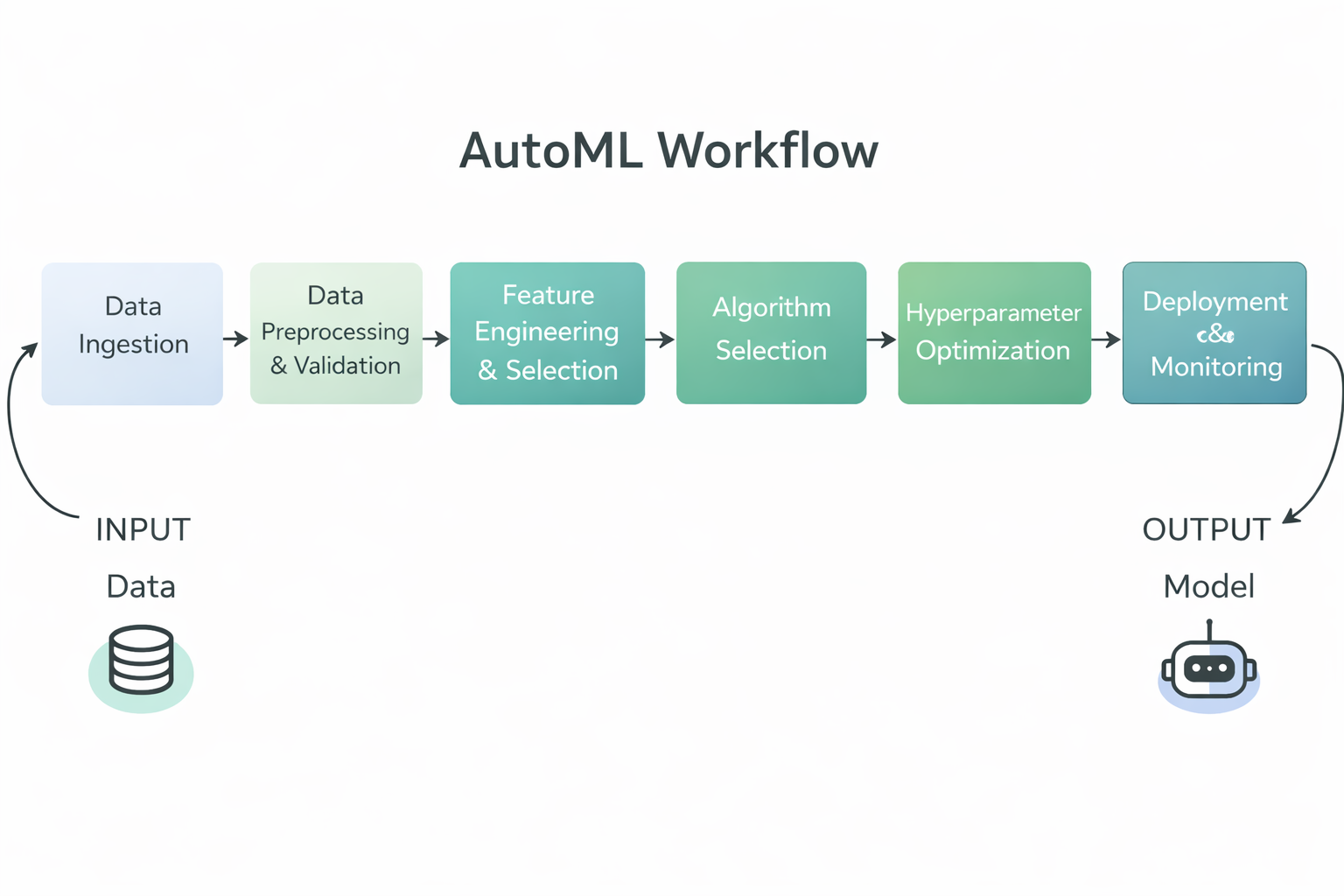
AutoML Workflow Diagram
Specifically, AutoML frameworks typically automate the following steps in the machine learning workflow:
By automating these tasks, AutoML frameworks reduce manual effort, improve consistency and reproducibility, and make it possible for both technical and non-technical teams to build high-quality machine learning models more quickly.
Open source AutoML frameworks provide flexible, transparent, and developer-friendly tools that allow practitioners to automate model building while retaining full control over data, pipelines, and deployment workflows.
TPOT is an open source Python AutoML framework that uses genetic programming to automatically discover and optimize complete machine learning pipelines.
It frames pipeline design as an evolutionary search problem, exploring combinations of preprocessing steps, models, and hyperparameters to identify high-performing solutions.
TPOT is especially effective for tabular data tasks where rapid experimentation and strong baselines are needed, while still allowing practitioners to inspect, export, and reuse the resulting pipelines within standard scikit-learn workflows.
Key Features:
Code Example:
This example demonstrates the minimal setup required to use TPOT. The dataset features and labels are loaded, a TPOTClassifier is initialized with default settings, and the fit method triggers the automated search process.
During training, TPOT evaluates multiple candidate pipelines using genetic programming and selects a high-performing model based on the specified evaluation metric.
import tpot
X, y = load_my_data()
est = tpot.TPOTClassifier()
est.fit(X, y)AutoGluon is an open-source Python AutoML framework developed by AWS AI that automates machine learning tasks with a focus on high accuracy, minimal code, and support for tabular, text, and image data.
It builds a diverse set of models and uses automated model selection, hyperparameter tuning, and ensemble learning to deliver strong predictive performance across different data types.
Key Features:
Code Example:
This code loads the training and test datasets as AutoGluon tabular datasets. It then creates a TabularPredictor object specifying the target label and calls fit to train AutoGluon on the tabular training data. After training completes, it uses the trained model to generate predictions on the test set.
from autogluon.tabular import TabularDataset, TabularPredictor

label = "signature"
train_data = TabularDataset("train.csv")

predictor = TabularPredictor(label=label).fit(train_data)

test_data = TabularDataset("test.csv")
predictions = predictor.predict(test_data.drop(columns=[label]))FLAML (Fast Lightweight AutoML) is an open source Python AutoML library developed by Microsoft Research that is designed to find high-quality machine learning models automatically and efficiently while minimizing computational cost and resource usage, making it ideal for environments where speed and efficiency matter most.
Key Features:
Code Example:
This code example shows how to use FLAML’s AutoML class to perform an automated classification task on the Iris dataset, specifying a time budget and evaluation metric before training and then using the trained model to get prediction probabilities.
from flaml import AutoML
from sklearn.datasets import load_iris

X_train, y_train = load_iris(return_X_y=True)

automl = AutoML()

automl_settings = {
    "time_budget": 1,
    "metric": "accuracy",
    "task": "classification",
    "log_file_name": "iris.log",
}

automl.fit(X_train=X_train, y_train=y_train, **automl_settings)

print(automl.predict_proba(X_train))AutoKeras is an open-source AutoML library built on top of the Keras deep learning framework that automatically searches for and trains high-quality neural networks for a wide range of tasks, including structured data, images, and text, with minimal coding required.
It uses efficient neural architecture search to find suitable model architectures and hyperparameters, making deep learning more accessible to both beginners and experienced practitioners.
Key Features:
StructuredDataClassifier simplify training complex deep learning models with just a few lines of code.Code Example:
This code example imports necessary libraries and loads training and test datasets from provided URLs. It separates features and labels, then creates an ak.StructuredDataClassifier object that automatically searches for a strong deep learning model. The model is trained for a set number of trials and epochs, and the final evaluation result on the test set is printed.
import keras
import pandas as pd
import autokeras as ak

TRAIN_DATA_URL = "https://storage.googleapis.com/tf-datasets/titanic/train.csv"
TEST_DATA_URL = "https://storage.googleapis.com/tf-datasets/titanic/eval.csv"

train_file_path = keras.utils.get_file("train.csv", TRAIN_DATA_URL)
test_file_path = keras.utils.get_file("eval.csv", TEST_DATA_URL)

train_df = pd.read_csv(train_file_path)
test_df = pd.read_csv(test_file_path)

y_train = train_df["survived"].values
x_train = train_df.drop("survived", axis=1).values

y_test = test_df["survived"].values
x_test = test_df.drop("survived", axis=1).values

clf = ak.StructuredDataClassifier(overwrite=True, max_trials=3)
clf.fit(x_train, y_train, epochs=10)

print(clf.evaluate(x_test, y_test))No-code and low-code AutoML platforms simplify model development by abstracting complex workflows, enabling rapid experimentation and deployment for both technical teams and business users.
PyCaret is an open-source, low-code machine learning library in Python that automates the end-to-end machine learning workflow for tasks such as classification, regression, clustering, anomaly detection, and time series forecasting, enabling rapid prototyping with just a few lines of code while also supporting a graphical user interface for those who prefer low-code or click-through experiences.
Key Features:
compare_models function trains and evaluates many models using cross-validation and provides a leaderboard of performance to help choose the best model.Code Example:
This code snippet demonstrates loading a built-in dataset, initializing the PyCaret regression module with setup (which preprocesses the data and initializes the ML environment), and then using compare_models to automatically train, evaluate, and rank a variety of regression models, returning the best performing one.
from pycaret.datasets import get_data
from pycaret.regression import *

data = get_data("insurance")

s = setup(data, target="charges", session_id=123)

best_model = compare_models()MLJAR Studio is a no-code and low-code AutoML environment that lets you train and compare machine learning models through a guided interface, while also offering an optional Python workflow through the open-source mljar-supervised engine.
Key Features:
Code Example:
You do not need code to use MLJAR Studio because you can run AutoML through the GUI. However, the code below shows the optional programmatic approach using the mljar-supervised library. It loads a dataset, splits it into features and target, runs AutoML training, and then generates predictions using the trained model.
import pandas as pd
from supervised.automl import AutoML

df = pd.read_csv(
    "https://raw.githubusercontent.com/pplonski/datasets-for-start/master/adult/data.csv",
    skipinitialspace=True,
)

X = df[df.columns[:-1]]
y = df["income"]

automl = AutoML(results_path="mljar_results")
automl.fit(X, y)

predictions = automl.predict(X)H2O AutoML is an open source AutoML capability within the H2O platform that provides scalable, automated machine learning with support for Python, R, and a no-code graphical interface called H2O Flow, enabling both technical and non-technical users to build, evaluate, and select models with minimal coding. Users can work through the web-based Flow interface to import data, run AutoML experiments, explore results, and export models without writing any code.
Key Features:
Code Example:
This example shows how to use H2O AutoML through Python. It initializes the H2O environment, imports training and test datasets, specifies feature and target columns, starts an AutoML run with a limit on the number of models, and then displays a leaderboard ranking the best performing models.
Note: While this is the programmatic approach, the same tasks can be completed through the H2O Flow web interface without writing any code.
import h2o
from h2o.automl import H2OAutoML

h2o.init()

train = h2o.import_file(
    "https://s3.amazonaws.com/h2o-public-test-data/smalldata/higgs/higgs_train_10k.csv"
)
test = h2o.import_file(
    "https://s3.amazonaws.com/h2o-public-test-data/smalldata/higgs/higgs_test_5k.csv"
)

x = train.columns
y = "response"
x.remove(y)

train[y] = train[y].asfactor()
test[y] = test[y].asfactor()

aml = H2OAutoML(max_models=20, seed=1)
aml.train(x=x, y=y, training_frame=train)

aml.leaderboardEnterprise-grade AutoML solutions provide scalable, secure, and governed machine learning platforms designed for production deployment, compliance, and large-scale operational use.
DataRobot is an enterprise-grade no-code and low-code AutoML platform that enables business users, analysts, and data teams to build, deploy, and manage machine learning models without extensive programming.
The platform automates the full machine learning lifecycle, from data ingestion and feature engineering to model training, deployment, and monitoring, while providing strong governance, explainability, and operational controls required in regulated environments.
Key Features:
Code Example:
Although DataRobot is primarily used through its no-code interface, it also provides a Python API for programmatic control and automation. The example below shows how to authenticate with DataRobot, create a project from a dataset, and run AutoPilot to automatically train and evaluate models.
import datarobot as dr
dr.Client(config_path="./drconfig.yaml")

dataset = dr.Dataset.create_from_file("auto-mpg.csv")

project = dr.Project.create_from_dataset(
    dataset.id,
    project_name="Auto MPG Project"
)

from datarobot import AUTOPILOT_MODE
project.analyze_and_model(
    target="mpg",
    mode=AUTOPILOT_MODE.QUICK
)

project.wait_for_autopilot()Amazon SageMaker Autopilot is a fully managed AutoML solution from AWS that enables users to automate the end-to-end machine learning workflow with no code or low code, especially through a web interface in Amazon SageMaker Canvas or SageMaker Studio.
Users can import data, configure the target variable, evaluate candidate models, and deploy models with a few clicks in the console, while the Python SDK and APIs remain available as an optional way to make experiments reproducible or to integrate with other systems.
Key Features:
Code Example:
The code below shows how to run Amazon SageMaker Autopilot programmatically using the Python SDK. This approach is optional and can be used to reproduce results or integrate into automated pipelines.
from sagemaker import AutoML, AutoMLInput

automl = AutoML(
    role=execution_role,
    target_attribute_name=target_attribute_name,
    sagemaker_session=pipeline_session,
    total_job_runtime_in_seconds=3600,
    mode="ENSEMBLING",
)

automl.fit(
    inputs=[
        AutoMLInput(
            inputs=s3_train_val,
            target_attribute_name=target_attribute_name,
            channel_type="training",
        )
    ]
)Google Cloud AutoML is part of Vertex AI, Google Cloud’s unified machine learning platform that enables users to build, train, evaluate, and deploy high-quality models using fully managed infrastructure.
Vertex AI AutoML supports tabular data, natural language processing, computer vision, and video tasks, and is designed to be accessible through a no-code web interface in the Google Cloud Console.
All core steps, such as dataset creation, task selection, training, evaluation, and deployment, can be completed through the UI without writing any code.
Key Features:
Code Example:
Although Vertex AI AutoML is primarily designed for no-code workflows, the Python SDK can be used to make experiments reproducible or integrate AutoML training into automated pipelines.
The following short snippet initializes a Vertex AI project, creates an image dataset from a CSV index stored in Cloud Storage, and launches an AutoML image training job.
from google.cloud import aiplatform

aiplatform.init(
    project="YOUR_PROJECT_ID",
    location="us-central1",
    staging_bucket="gs://YOUR_BUCKET",
)

dataset = aiplatform.ImageDataset.create(
    display_name="flowers",
    gcs_source=["gs://cloud-samples-data/ai-platform/flowers/flowers.csv"],
    import_schema_uri=aiplatform.schema.dataset.ioformat.image.single_label_classification,
)

training_job = aiplatform.AutoMLImageTrainingJob(
    display_name="flowers_automl",
    prediction_type="classification",
)

model = training_job.run(
    dataset=dataset,
    model_display_name="flowers_model",
    budget_milli_node_hours=8000,
)This table compares popular AutoML frameworks based on their level of automation, interface style, and suitability for open source experimentation, low-code workflows, and enterprise-scale deployment.
|
Framework |
Category |
Code Level |
Interface Options |
Primary Use Case |
|
TPOT |
Open Source |
High |
Python API |
Automated pipeline discovery and optimization for tabular data |
|
AutoGluon |
Open Source |
Low |
Python API |
Fast, high-accuracy production-ready models across modalities |
|
FLAML |
Open Source |
Low |
Python API |
Cost-efficient and resource-aware model tuning |
|
AutoKeras |
Open Source |
Medium |
Python API |
Neural architecture search and deep learning automation |
|
PyCaret |
Low Code |
Very Low |
Python API, optional GUI tools |
Rapid experimentation and analytics-driven workflows |
|
MLJAR Studio |
No Code |
None |
Web UI, optional Python |
Business-friendly AutoML experimentation and model comparison |
|
H2O AutoML |
Hybrid |
Low |
Web UI (H2O Flow), Python, R |
Scalable AutoML for large datasets and enterprise deployment |
|
DataRobot |
Enterprise |
None to Low |
Web UI, Python API |
Enterprise ML with governance, explainability, and MLOps |
|
SageMaker Autopilot |
Enterprise |
None to Low |
AWS Console, Python SDK |
AWS native AutoML integrated with production pipelines |
|
Google Cloud AutoML |
Enterprise |
None |
Vertex AI Console, optional SDK |
Vision, NLP, and tabular AutoML on managed GCP infrastructure |
AutoML frameworks have matured into production-grade tools that support teams across the entire machine learning lifecycle. In practical settings, they are not limited to experimentation or prototyping.
I have used AutoML frameworks to participate in Kaggle competitions, to build complete end to end machine learning pipelines for real projects, and even to prepare for and succeed in technical interviews.
From a data scientist’s perspective, AutoML is a powerful way to establish a strong and unbiased baseline model with very little overhead.
By simply providing the data, these frameworks take care of feature engineering, model selection, hyperparameter tuning, and evaluation. This allows practitioners to focus on understanding the problem, validating assumptions, and improving results, rather than spending excessive time researching and testing models from scratch.
AutoML does not replace expertise. Instead, it accelerates the workflow by providing a reliable starting point that can be iteratively improved.
Building the model is only step one. Learn how to deploy and monitor your AutoML models in production with the MLOps Concepts course.
Top DataCamp Courses
Course
Course
Course
blog
Yuliya Melnik
15 min
blog
Vikash Singh
13 min
blog
Bexruz (Bex) Tuychiev
15 min
blog
Kurtis Pykes
12 min
Tutorial
Sayak Paul
11 min
Tutorial
Mark Pedigo
13 min