
Across 15 seconds, the camera never cuts. After passing through the hoop, the marble strikes the first domino and starts a chain reaction that ends at the bell.
Marble continuity is the clear error. An additional rounded red shape appears behind the first domino, though the frames do not establish whether it is a separate object. Later, the tracked marble leaves the frame and reappears behind the fallen row without visibly traveling there.
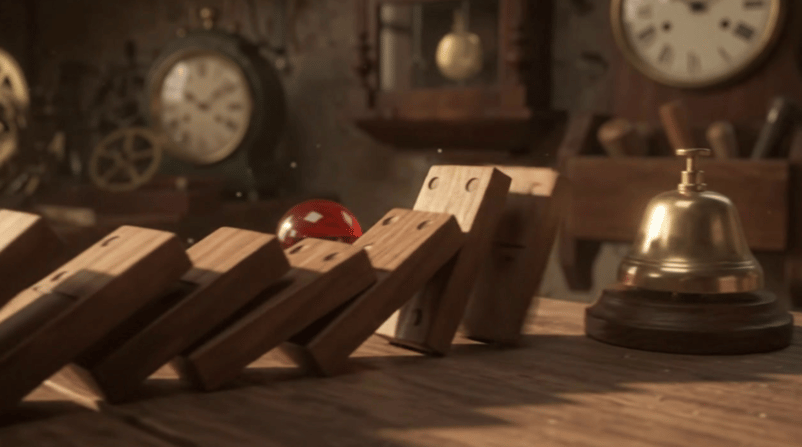
Marble reappears behind the fallen dominoes. Image by Author.
Sound timing is mixed: The first domino click matches the visible contact, but the bell rings about 0.15 seconds late. Because the action finishes early, the final few seconds are almost still.
I also think the way the marble crossed the hoop wasn’t fully believable.
Editing one object without changing the scene
Next, I changed one attribute and asked for everything else to stay.
Change the red glass marble to a deep sapphire blue. Keep its size, transparency, reflections, and movement the same.
Preserve the wooden track, brass hoop, dominoes, bell, lighting, camera movement, and original sound effects. The chain reaction should happen at exactly the same moments as in the original video.Color is the only intended change: the marble turns deep blue but keeps the same size, transparency, position, and highlights. Everything else, including the scene and event timing, remains unchanged.
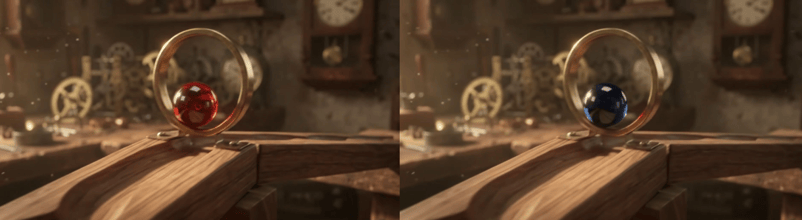
Matched frames: red versus blue marble. Image by Author.
It kept the mistakes too: the ambiguous rounded shape and the marble's later reappearance are now blue at the same moments. You have to notice these things because unmentioned flaws carry into the next edit.
The edit generated a new audio track. Those effects return in the same pattern, but about 45 milliseconds later, roughly one video frame. That delay becomes more noticeable across later edits.
Motion through a full style change
For the final edit, I asked for handmade stop-motion while keeping the blue marble and timing.
Re-render the entire marble-run scene as a handcrafted stop-motion animation made from painted paper, cardboard, and textured fabric.
The wooden track becomes layered cardboard, the brass objects become painted miniature props, and the blue glass marble keeps its recognizable color and shape.
Preserve the original sequence and timing: the marble rolls down the track, passes through the hoop, strikes the dominoes, and the bell rings at the end. Keep the original camera movement and sound effects, with the tactile imperfections of handmade stop-motion animation.Blue color and glass texture survived, while the track and dominoes became layered cardboard. Camera path and event timing stayed unchanged.

Brass bell becomes a painted prop. Image by Author.
Only part of the restyle landed. The bell looks painted, but the hoop and workshop background remain realistic, and no fabric appears. A frame-by-frame comparison shows steady movement between frames, with no stepped stop-motion rhythm.
The comic lines around the bell were unrequested but leave the sequence intact. Compared with the original, the soundtrack shifted by about 85 milliseconds, placing the bell roughly 0.23 seconds after impact.
Test results, generation time, and cost
Generation finished in under a minute, while each edit took around two minutes. The three completed videos totaled about $3.55, calculated from returned usage at Google's published rates.

Same rounded shape survives both edits. Image by Author.
Edits cost slightly more because Google processes the source video again.
Gemini Omni 1.2 Flash Pricing and Availability
Gemini Omni 1.2 Flash costs about $0.07 per second at 720p, and the API has no free tier. Google apps use their own plans and quotas. I used 720p for the test; higher resolutions cost more.
Gemini Omni 1.2 Flash pricing by resolution
At that public rate, a 15-second clip costs roughly $1 before the cost of processing its source material. The 1080p and 4K options cost more because the model enlarges a lower-resolution video:
|
Resolution |
Approximate cost for 15 seconds |
|
360p |
$0.35 |
|
720p |
$1 |
|
1080p (enlarged) |
$1.55 |
|
4K (enlarged) |
$3.15 |
Google also charges for processing a source video during an edit. Google app subscriptions use separate pricing.
Where can you access Gemini Omni 1.2 Flash?
Developers can use Gemini Omni 1.2 Flash through the paid Gemini API, Google AI Studio, or Google Cloud.
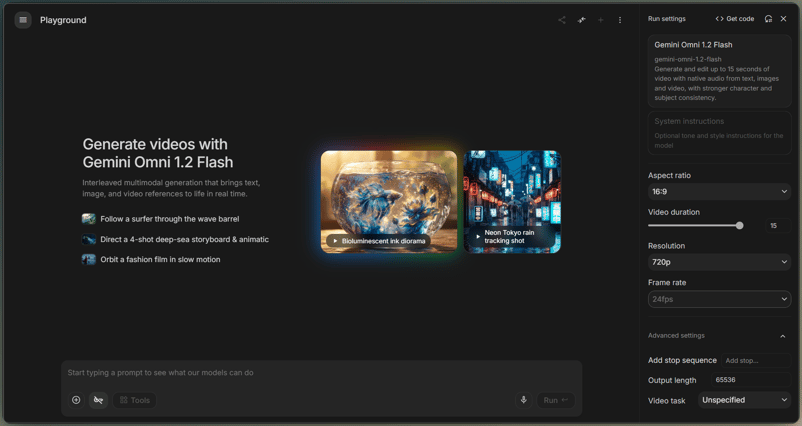
AI Studio video settings for Omni. Image by Author.
Google also offers the model through several apps. Each product uses its own plan and quota:
- Flow, for directing scenes and making follow-up edits
- Google Vids, which gives up to three 15-second videos per month at no cost to anyone with a Google account or Workspace subscription, per the Vids announcement
- The Gemini app, with 15-second videos rolling out to Google AI Ultra subscribers
- Google Ads, for video campaigns
Gemini for business is where Google's posts disagree: the launch post calls it generally available there, and the Cloud post says "coming soon." Uploaded video editing is unavailable in the European Economic Area (EEA), Switzerland, and the UK, while videos generated by the model remain editable there.
Gemini Omni 1.2 Flash Limitations and Early Reviews
Google names sports with rapid movement, quick script changes, and complex physics as remaining limits. The Gemini API guide adds that negative instructions belong in the main prompt and only English has full support. The domino sequence falls under complex physics, but one marble run cannot test every claim in the announcement.
Most early reviews come from companies that sell access to the model. A Segmind test published on launch day reports that explainers and simple edits followed its prompts, while chart points were placed at the wrong heights and some instructions were skipped.
My test contains no dialogue, speech matched to mouth movement, text shown in the video, or numbers, so it says nothing about those areas. I also used detailed edit prompts, while Google's prompt guide recommends simple instructions.
Final Thoughts: Is Gemini Omni 1.2 Flash Worth Using?
Gemini Omni 1.2 Flash answered the central question in pieces. The sequence and color change held, while the marble jump and late bell carried into later versions. The style request changed materials, but the motion still looked like the original.
There’s room for improvement: The model fits draft clips and simple variations that someone will review. Long edit chains make less sense when continuity or exact timing carries the idea, because old mistakes survive and cost rises with each turn. The blue marble survived; so did the flaw beside it.

I’m a data engineer and community builder who works across data pipelines, cloud, and AI tooling while writing practical, high-impact tutorials for DataCamp and emerging developers.
FAQs
How long can Gemini Omni 1.2 Flash videos be?
Standard clips can run for up to 15 seconds, but the API defaults to 10 seconds when duration is left unset. A request with both a starting and ending frame also stops at 10 seconds. Gemini Developer API extensions stop at 30 seconds total, while Google Cloud documents up to 40 seconds.
Can Gemini Omni 1.2 Flash edit existing videos?
Yes. On Google Cloud, the input and output duration must match and fall between 3 and 15 seconds. You can also add up to two reference images to guide the change. Regional limits still apply to uploaded clips in the European Economic Area, Switzerland, and the UK.
Does Gemini Omni 1.2 Flash generate video with audio?
Yes. A generated clip can include speech, music, and sound effects in the same output. Voice editing remains unavailable, and the model ignores audio inside a reference video. Using uploaded audio as a separate guide requires an approved Google Cloud account.
How much does a 15-second Gemini Omni 1.2 Flash clip cost?
Budget about $1 for a new 15-second 720p output, or roughly $3 at 4K. Editing adds a charge for processing the source clip. Upscaling a finished 720p video to 4K adds about $2 in output cost, so the final bill depends on generation, editing, and resolution changes.
Is Gemini Omni 1.2 Flash free to use?
No, direct Gemini API use is paid. Google Vids gives Google account and Workspace users up to three 15-second video generations per month at no cost; the official post confirms generation only and leaves editing access unspecified. The Gemini app requires a Google AI Ultra subscription for 15-second clips.






AI video updates usually promise longer clips or more control over edits. Google's Gemini Omni 1.2 Flash does both: It creates short videos from text, images, or video, then lets users revise the result with later prompts. The standard limit is now 15 seconds, and the model generates sound in the same clip.
What interested me was whether an edit could change one detail while keeping the rest of the scene intact, sinceI’ve had issues with previous versions. So, I tested that with a marble run, first changing the marble from red to blue, then restyling the same clip as stop-motion.
My Findings
Here is the short version of the article and my big discoveries using the new model.
The color edit is the clearest result. The next sections show where the original clip and style change break down.
What Is Gemini Omni 1.2 Flash?
Gemini Omni 1.2 Flash accepts text, image, and video inputs, then returns video with sound.
Unlike Gemini text models, it produces video and sound together. Google says each video also carries an invisible SynthID watermark. Our Gemini Omni overview covers the wider model family.
If you want the API setup, our Python media pipeline guide for Gemini Omni covers it. This article stays with the videos and what they show.
What's New in Gemini Omni 1.2 Flash?
The update touches four parts of a video workflow: clip length, follow-up edits, generated sound, and resolution pricing.
15-second video generation and editing
Generated and edited clips can be 3 to 15 seconds long, in one-second increments; Omni 1.1 Flash stopped at 10 seconds. Videos created from a first and last frame are limited to 10 seconds. Extension limits differ: Gemini API caps the finished video at 30 seconds, while Google Cloud documents up to 40 seconds total.
Reference images and conversational video editing
The model can use images and short videos as guides when generating a clip. It can also edit a full 15-second video through later prompts.
Generated audio and camera movement
Every Gemini Omni 1.2 Flash video can include speech, music, or sound effects. Using uploaded audio as a guide requires approval from Google Cloud and is unavailable in the public Gemini API. Prompts can also specify camera movement.
360p drafts and 4K upscaling
The model can create 360p and 720p video, then increase the resolution to 1080p or 4K. Google's documentation lists the supported paths: 360p to 720p or 1080p, and 720p to 1080p or 4K.
Gemini Omni 1.2 Flash vs. 1.1: What Changed?
The feature list above mixes new limits with claims about the output. Two published changes can be compared directly: clip length and video price.
Spec
Gemini Omni 1.1 Flash
Gemini Omni 1.2 Flash
Generation and editing length
Up to 10 seconds
3 to 15 seconds
Effective 720p price
About $0.10 per second
About $0.07 per second
Legacy model after the transition period
Requests route to 1.2
Current version
Only duration and price are hard numbers here. Evidence for Google's reference claim is limited to its own demos.
Testing Gemini Omni 1.2 Flash: Video Generation and Editing
My test uses one clip generated from text, a color edit, and a style edit of the version with the blue marble. All three videos are 15 seconds long, 720p, and 16:9. I judged them on four checks:
The first video puts all four into one scene. Each later edit shows what changes and what stays.
Motion and sound in the original clip
This only partly worked: The events stay in order, but the marble disappears, and the bell arrives late.
For the first test, I asked for physics, a camera that follows the action, and sound tied to each impact.