
Curso
Combinación de datos en SQL
4 h
341.7K
Al trabajar con SQL, ordenar datos es sencillo porque puedes usar ORDER BY para reordenar las filas. Sin embargo, ordenar no te dice en qué posición queda cada fila dentro de ese orden. Ahí es donde entran los rankings. En lugar de solo ver los datos ordenados, puede que quieras asignar una posición como 1.º, 2.º o 3.º a cada fila según un criterio concreto.
La función RANK() resuelve este problema asignando un rango numérico a cada fila según el orden definido. RANK() forma parte de las funciones de ventana de SQL, que te permiten hacer cálculos sobre un conjunto de filas y, aun así, devolver resultados fila a fila.
En este tutorial, verás la sintaxis de RANK(), ejemplos prácticos, cómo gestiona los empates y en qué se diferencia de funciones similares como DENSE_RANK() y ROW_NUMBER().
Si eres nuevo en SQL, empieza con nuestro curso Introduction to SQL, o con Intermediate SQL si ya tienes algo de experiencia.
La función RANK() de SQL es una función de ventana que asigna un rango a cada fila según un orden especificado. El ranking viene determinado por el ORDER BY dentro de la función de ventana. Así, da a cada fila una posición como 1, 2, 3, etc., de acuerdo con la cláusula ORDER BY.
Ten en cuenta que cuando usas RANK():
La sintaxis básica de la función RANK() es:
RANK() OVER (ORDER BY column)Donde:
OVER: Define la ventana (conjunto de filas) sobre la que opera la función.
ORDER BY: Determina cómo se aplica el ranking, por ejemplo, de mayor a menor.
PARTITION BY (opcional): Divide los datos en grupos y calcula el rango por separado dentro de cada grupo.
A continuación, la sintaxis de RANK() con la cláusula PARTITION BY:
RANK() OVER (PARTITION BY column1 ORDER BY column2)La función RANK() está ampliamente soportada en las principales bases de datos: PostgreSQL, MySQL (8.0+), Microsoft SQL Server y Oracle Database. La sintaxis es muy similar entre sistemas porque forma parte del estándar ANSI SQL.
Ahora que ya conoces la sintaxis de RANK(), veamos un ejemplo sencillo de cómo funciona.
Imagina que tienes la tabla employees con la información salarial de cada empleado.
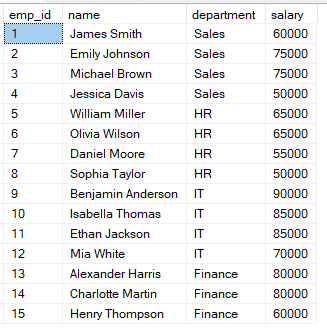
Puedes usar la siguiente consulta para clasificar a los empleados según su salario.
-- Clasifica a los empleados por salario
SELECT
    name,
    salary,
    RANK() OVER (ORDER BY salary DESC) AS rank_position
FROM employees;
En esta consulta, las filas se ordenan por salario de mayor a menor, así que el salario más alto obtiene el rango 1. Si dos filas tienen el mismo salario, reciben el mismo rango.
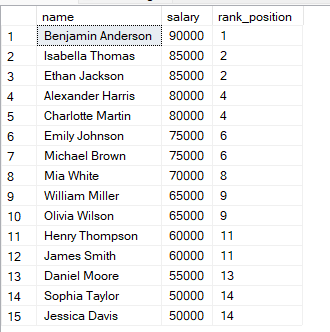
Verás que, si dos filas tienen los mismos valores, reciben el mismo rango.
La siguiente posición se salta. SQL tiene en cuenta el empate y omite el rango siguiente.
Te recomendamos el curso Introduction to SQL Server para aprender más sobre agrupación y agregación de datos.
Como hemos visto, la cláusula PARTITION BY te permite aplicar el ranking dentro de grupos en lugar de sobre todo el conjunto de datos.
En el ejemplo siguiente, los empleados se agrupan por department y el ranking se reinicia en cada departamento. Así, cada grupo tiene su propia secuencia independiente.
-- Clasifica a los empleados dentro de cada departamento
SELECT
    name,
    department,
    salary,
    RANK() OVER (PARTITION BY department ORDER BY salary DESC) AS dept_rank
FROM employees;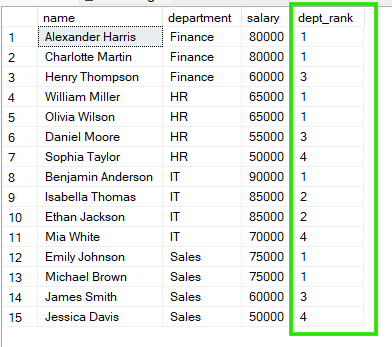
En los resultados, vemos que en «Sales» Emily Johnson y Michael Brown comparten el rango 1, y en «HR» William Miller y Olivia Wilson también comparten el rango 1.
Al clasificar datos en SQL, puedes usar RANK(), DENSE_RANK() o ROW_NUMBER(). Parecen similares, pero se comportan así:
RANK(): Los empates comparten rango y, por tanto, quedan huecos tras los empates.
DENSE_RANK(): Los empates comparten rango, pero no hay huecos en la secuencia.
ROW_NUMBER(): Cada fila obtiene un número único sin empates, aunque los valores sean iguales.
Para entender mejor las diferencias, hagamos una comparación directa con la consulta siguiente:
-- Comparar RANK() vs DENSE_RANK() vs ROW_NUMBER()
SELECT
    name,
    salary,

    RANK() OVER (ORDER BY salary DESC) AS rank_val,          -- permite huecos tras empates

    DENSE_RANK() OVER (ORDER BY salary DESC) AS dense_rank1,  -- sin huecos, rangos consecutivos

    ROW_NUMBER() OVER (ORDER BY salary DESC) AS row_num      -- siempre secuencia única

FROM employees;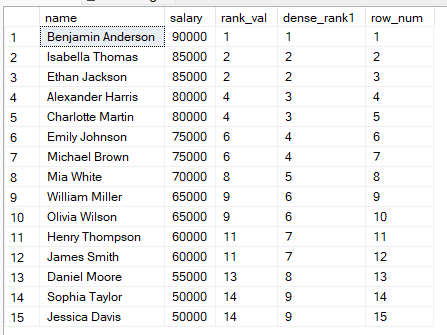
A partir de estos resultados, puedes:
Usar RANK() cuando importe la posición y aceptes huecos.
Usar DENSE_RANK() cuando quieras una numeración continua.
Usar ROW_NUMBER() cuando cada fila deba tener un número único, por ejemplo, en paginación.
La función RANK() es especialmente útil cuando quieres ordenar datos gestionando los empates de forma natural. También resulta clave en estos casos de uso:
Aquí tienes errores habituales al usar RANK() en SQL y cómo evitarlos:
Olvidar el ORDER BY: sin la cláusula ORDER BY, el ranking no tiene lógica definida y puede dar resultados inesperados.
No entender los empates: como principiante puedes esperar 1, 2, 2, 3, pero RANK() genera huecos (1, 2, 2, 4).
Usar RANK() cuando necesitas ROW_NUMBER(): si necesitas valores secuenciales únicos, ROW_NUMBER() es la mejor opción.
No usar PARTITION BY cuando hace falta: sin particionar, el ranking se aplica de forma global en lugar de por grupos.
Para mantener tus consultas claras y obtener los resultados esperados, sigue estas buenas prácticas al usar RANK() en SQL:
Define siempre un orden claro: sé explícito con la cláusula ORDER BY, como DESC, para evitar rankings ambiguos.
Elige la función adecuada: usa RANK(), DENSE_RANK() o ROW_NUMBER() según cómo quieras tratar los empates.
Prueba escenarios con empates: antes de pasar a producción, verifica qué ocurre cuando hay valores duplicados.
Combínalo con filtros: como no puedes usar RANK() directamente en un WHERE, envuelve tu consulta con ranking en una subconsulta o en un CTE cuando quieras filtrar un «Top N».
RANK() es una herramienta útil para hacer comparaciones ordenadas en SQL, sobre todo cuando necesitas reflejar escenarios reales como valores iguales. Entender cómo gestiona los empates y por qué los rangos pueden repetirse y saltar números es clave para un análisis preciso. Una vez domines este comportamiento, sabrás cuándo elegirla frente a alternativas como DENSE_RANK() y ROW_NUMBER(), según lo que mejor encaje con tu caso de uso.
Ahora que ya sabes cómo clasificar datos en SQL, te recomendamos el itinerario Associate Data Analyst in SQL si quieres convertirte en un analista de datos competente y aprender las habilidades necesarias. Nuestro curso Reporting in SQL también es ideal si quieres aprender a crear paneles profesionales con SQL.
Aprende SQL con DataCamp
Curso
Curso
Curso
Tutorial
Travis Tang
3 min
Tutorial
Sejal Jaiswal
15 min
Tutorial
Travis Tang
3 min
Tutorial
Olivia Smith
6 min
Tutorial
Abid Ali Awan
13 min
Tutorial
Eugenia Anello
6 min


