
Cours
Assembler des données en SQL
4 h
341.7K
Avec SQL, trier des données est simple grâce à ORDER BY, qui permet d’ordonner les lignes. Mais un simple tri ne vous indique pas la position de chaque ligne dans cet ordre. C’est là que le classement devient utile. Au lieu de seulement voir des données triées, vous pouvez vouloir attribuer une position comme 1er, 2e ou 3e à chaque ligne selon des critères précis.
La fonction RANK() répond à ce besoin en attribuant un rang numérique à chaque ligne selon l’ordre défini. RANK() fait partie des fonctions de fenêtre SQL, qui permettent d’effectuer des calculs sur un ensemble de lignes tout en renvoyant des résultats ligne par ligne.
Dans ce tutoriel, je vous présente la syntaxe de RANK(), des exemples pratiques, la gestion des ex æquo et une comparaison avec des fonctions proches comme DENSE_RANK() et ROW_NUMBER().
Si vous débutez en SQL, commencez par notre cours Introduction to SQL, ou le cours Intermediate SQL si vous avez déjà des bases.
La fonction SQL RANK() est une fonction de fenêtre qui attribue un rang à chaque ligne selon un ordre spécifié. Le classement est entièrement déterminé par le ORDER BY à l’intérieur de la fonction de fenêtre. Chaque ligne reçoit ainsi une position 1, 2, 3, etc., conformément à la clause ORDER BY.
À noter lorsque vous utilisez RANK() :
La syntaxe de base de la fonction RANK() est :
RANK() OVER (ORDER BY column)Où :
OVER : définit la fenêtre (ensemble de lignes) sur laquelle la fonction opère.
ORDER BY : détermine la logique d’attribution des rangs, par exemple du plus élevé au plus faible.
PARTITION BY (optionnel) : segmente les données en groupes et classe indépendamment dans chaque groupe.
Voici la syntaxe de RANK() avec la clause PARTITION BY :
RANK() OVER (PARTITION BY column1 ORDER BY column2)La fonction SQL RANK() est largement prise en charge par les principales bases de données, notamment PostgreSQL, MySQL (8.0+), Microsoft SQL Server et Oracle Database. La syntaxe est globalement cohérente entre ces systèmes, car elle fait partie de la norme ANSI SQL.
Maintenant que vous avez vu la syntaxe de RANK(), voyons un exemple simple de son fonctionnement.
Supposons que vous disposiez de la table employees contenant le salaire de chaque employé.
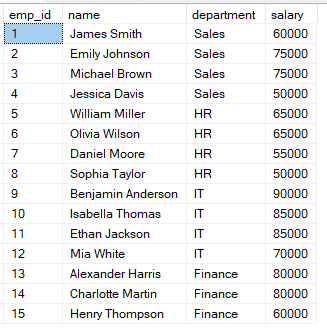
Vous pouvez utiliser la requête suivante pour classer les employés selon leur salaire.
-- Classer les employés par salaire
SELECT
    name,
    salary,
    RANK() OVER (ORDER BY salary DESC) AS rank_position
FROM employees;
Dans cette requête, les lignes sont ordonnées du salaire le plus élevé au plus faible, donc le salaire le plus élevé obtient le rang 1. Lorsque deux lignes ont le même salaire, elles reçoivent le même rang.
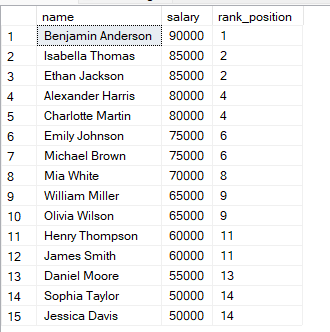
Vous observerez que si deux lignes ont la même valeur, elles partagent le même rang.
Le rang suivant est alors sauté. SQL tient compte de l’ex æquo en passant au rang suivant approprié.
Je vous recommande notre cours Introduction to SQL Server pour approfondir le regroupement et l’agrégation de données.
Comme nous l’avons vu, la clause PARTITION BY permet d’appliquer le classement au sein de groupes plutôt que sur l’ensemble du jeu de données.
Dans l’exemple ci-dessous, les employés sont regroupés par department, et le classement redémarre dans chaque service. Chaque groupe a donc sa propre séquence de rangs.
-- Classer les employés au sein de chaque service
SELECT
    name,
    department,
    salary,
    RANK() OVER (PARTITION BY department ORDER BY salary DESC) AS dept_rank
FROM employees;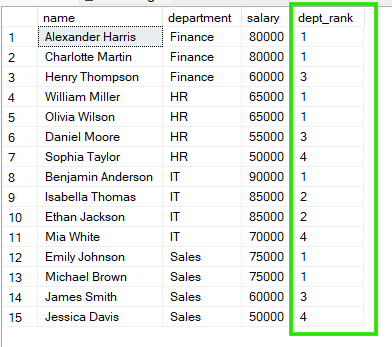
D’après ces résultats, dans « Sales », Emily Johnson et Michael Brown partagent le rang 1, tandis que dans « HR », William Miller et Olivia Wilson partagent également le rang 1.
Pour classer des données en SQL, vous pouvez utiliser RANK(), DENSE_RANK() ou ROW_NUMBER(). Ces fonctions se ressemblent, mais se comportent comme suit :
RANK() : les ex æquo partagent le même rang, d’où des trous après les ex æquo.
DENSE_RANK() : les ex æquo partagent le même rang, mais sans trou dans la séquence.
ROW_NUMBER() : chaque ligne reçoit un numéro unique, sans ex æquo, même si les valeurs sont identiques.
Pour mieux comprendre ces différences, réalisons une comparaison côte à côte avec la requête ci-dessous :
-- Comparer RANK() vs DENSE_RANK() vs ROW_NUMBER()
SELECT
    name,
    salary,

    RANK() OVER (ORDER BY salary DESC) AS rank_val,          -- autorise des trous après les ex æquo

    DENSE_RANK() OVER (ORDER BY salary DESC) AS dense_rank1,  -- pas de trous, rangs consécutifs

    ROW_NUMBER() OVER (ORDER BY salary DESC) AS row_num      -- séquence toujours unique

FROM employees;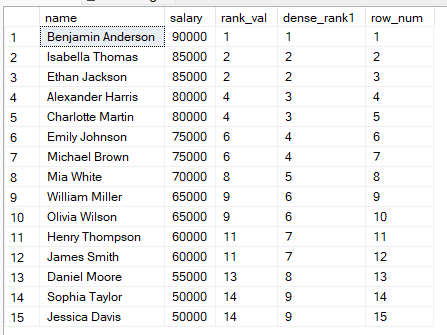
À partir de ces résultats, vous pouvez :
Utiliser RANK() lorsque la position compte et que les trous sont acceptables.
Utiliser DENSE_RANK() si vous souhaitez un classement continu.
Utiliser ROW_NUMBER() lorsque chaque ligne doit avoir un numéro unique, par exemple pour la pagination.
La fonction SQL RANK() est particulièrement utile lorsque vous souhaitez ordonner des données tout en gérant naturellement les ex æquo. Elle est également pertinente dans les cas d’usage suivants :
Voici des erreurs courantes rencontrées avec la fonction SQL RANK(), et comment les éviter :
Oublier ORDER BY : sans clause ORDER BY, le classement n’a pas de logique définie et peut produire des résultats inattendus.
Mal comprendre la gestion des ex æquo : en tant que débutant, vous pouvez vous attendre à 1, 2, 2, 3, alors que RANK() crée des trous (1, 2, 2, 4).
Utiliser RANK() au lieu de ROW_NUMBER() lorsque nécessaire : si vous avez besoin d’une séquence unique et continue, ROW_NUMBER() est plus adaptée.
Ne pas utiliser PARTITION BY quand il le faut : sans partitionnement, le classement s’applique globalement et non par groupe.
Pour garder des requêtes claires et obtenir des résultats fiables, je vous recommande les bonnes pratiques suivantes lors de l’utilisation de SQL RANK() :
Toujours définir un ordre explicite : précisez la clause ORDER BY, par exemple avec DESC, pour éviter toute ambiguïté.
Choisir la bonne fonction de classement : optez pour RANK(), DENSE_RANK() ou ROW_NUMBER() selon la manière dont vous souhaitez gérer les ex æquo.
Tester les scénarios d’égalité : avant la mise en production, vérifiez le comportement de vos données en présence de doublons.
Combiner avec un filtrage : comme vous ne pouvez pas utiliser RANK() directement dans une clause WHERE, encapsulez votre requête de classement dans une sous-requête ou une CTE pour filtrer un « Top N ».
RANK() est un outil précieux pour comparer des données ordonnées en SQL, surtout lorsqu’il faut refléter des cas réels comme des valeurs égales. Comprendre sa gestion des ex æquo, et pourquoi des rangs peuvent se répéter ou sauter des numéros, est essentiel pour des analyses fiables. Une fois ce comportement maîtrisé, vous saurez quand le privilégier ou lui préférer DENSE_RANK() ou ROW_NUMBER() selon votre cas d’usage.
Maintenant que vous savez classer des données en SQL, découvrez notre Associate Data Analyst in SQL career track si vous souhaitez devenir un analyste de données confirmé et acquérir les compétences nécessaires. Notre cours Reporting in SQL est également idéal si vous voulez apprendre à construire des tableaux de bord professionnels en SQL.
Apprenez SQL avec DataCamp
Cours
Cours
Cours
Tutoriel
Josef Waples
3 min
Tutoriel
Aditya Sharma
7 min
Tutoriel
Laiba Siddiqui
14 min
Tutoriel
Sejal Jaiswal
6 min
Tutoriel
DataCamp Team
3 min
Tutoriel
Mark Pedigo
10 min