

क्षेत्र और उद्देश्य
यह लेख LangChain टूल्स की बुनियादी जानकारी और उन्हें Python में उपयोग करने के तरीके को कवर करता है। हम एक Jupyter Notebook का उपयोग करेंगे जिसमें openai और langchain दोनों लाइब्रेरी इंस्टॉल हों। यदि आप पहले LangChain फ्रेमवर्क के बारे में सीखने में रुचि रखते हैं, तो मैं आपको Introduction to LangChain for Data Engineering & Data Applications लेख देखने की सिफारिश करता/करती हूं।
इस ट्यूटोरियल में, हम मौजूदा LangChain टूल्स में से चार का उपयोग करना सीखेंगे ताकि डिफ़ॉल्ट GPT मॉडल को विभिन्न बाहरी स्रोत उपलब्ध कराए जा सकें जिनसे वह उपयोगकर्ता अनुरोधों को पूरा करते समय परामर्श कर सके। विशेष रूप से, हम निम्नलिखित स्रोतों का उपयोग करने वाले टूल्स को एक्सप्लोर करेंगे:
- दो प्रसिद्ध सर्च इंजन: Google SERP और DuckDuckGo सर्च।
- Wikipedia एक व्यापक और व्यापक रूप से मान्य सूचना डेटाबेस के रूप में।
- मॉडल से वीडियो सुझाव प्राप्त करने के लिए YouTube स्रोत।
इन टूल्स को सेटअप करने के बाद, हम आम तौर पर किसी भी LangChain टूल का उपयोग करना और सभी को एक टूलकिट में संयोजित करना सीख चुके होंगे, जिससे मॉडल को ब्राउज़िंग क्षमताएं मिलेंगी।
LangChain टूल्स का परिचय
जैसा कि हमने भूमिका में चर्चा की, LangChain टूल्स किसी मॉडल की क्षमताओं को बढ़ा सकते हैं, उसे उपयोगकर्ता के प्रॉम्प्ट का उत्तर देते समय बाहरी स्रोतों से परामर्श करने में सक्षम बनाकर। ये टूल्स ReAct Prompting नामक एक प्रॉम्प्टिंग तकनीक में महत्वपूर्ण हैं। ReAct, यानी Reasoning और Acting, मॉडल की प्रोसेसिंग को दो चरणों में विभाजित करता है:
- Reasoning चरण: इस चरण में, मॉडल प्रतिक्रिया तक पहुंचने के लिए सर्वोत्तम रणनीति पर विचार करता है।
- Acting चरण: यहां, मॉडल पिछले चरण में बनाए गए प्लान को क्रियान्वित करता है ताकि वास्तविक उत्तर प्राप्त किया जा सके।
यह प्रक्रिया ऐसी reasoning ट्रेस जनरेट करती है जो मॉडल को स्वयं सही उत्तर की ओर मार्गदर्शन कर सकती हैं। यह तकनीक दिखाती है कि बड़े भाषा मॉडल (LLMs) विशेषकर ज्ञान-गहन और निर्णय-निर्धारण कार्यों में अधिक सटीक और विश्वसनीय उत्तर दे सकते हैं। इसका एक कारण यह भी है कि यह मॉडल को सोचने के लिए अतिरिक्त समय देती है।
LangChain टूल्स पूरक सूचना स्रोत प्रदान करके ReAct प्रॉम्प्टिंग तकनीक को और मजबूत कर सकते हैं। हमारे दृष्टिकोण में, reasoning चरण में मॉडल उपयोगकर्ता की क्वेरी के आधार पर तय करता है कि किस टूल का उपयोग करना है। वहीं, action चरण मॉडल को चुने गए बाहरी स्रोत के साथ इंटरफेस करने और अतिरिक्त जानकारी एकत्र करने में सक्षम बनाता है।
यदि आप LangChain के साथ ReAct प्रॉम्प्टिंग का गहन परिचय चाहते हैं, तो ChatGPT ReAct Prompting लेख आपके लिए है!
ReAct प्रॉम्प्टिंग के लिए LangChain तत्व
इस प्रॉम्प्टिंग तकनीक का उपयोग करने के लिए LangChain फ्रेमवर्क में दो महत्वपूर्ण तत्व हैं: एजेंट और टूल्स।
तथाकथित एजेंट वे इकाइयां हैं जो वास्तविक reasoning और acting चरणों को निष्पादित करने के लिए जिम्मेदार होती हैं। वे परिणामों को वापस मॉडल तक पहुंचाते हैं, जिससे LLM अतिरिक्त जानकारी के साथ प्राकृतिक भाषा में उत्तर जनरेट कर सके। विभिन्न प्रकार के एजेंट होते हैं, जिनमें से प्रत्येक उस अलग-अलग कार्य के लिए उपयुक्त होता है जो आप LLM से करवाना चाहते हैं। विभिन्न एजेंट प्रकारों का विस्तृत अवलोकन आधिकारिक LangChain डाक्यूमेंटेशन के Agents पेज पर उपलब्ध है।
टूल्स पर हम पहले ही काफी चर्चा कर चुके हैं। तकनीकी रूप से, टूल्स वे फंक्शन हैं जिन्हें कोई एजेंट कॉल कर सकता है। LangChain कई प्रकार के टूल्स प्रदान करता है जैसे Google यूटिलिटीज (Search, Drive और Scholar), Wikipedia सर्च, ArXiV डेटाबेस, शेल एक्सटेंशन, और नेटिव ChatGPT प्लगइन्स इत्यादि। इस लेख में, हम इनमें से चार को जानेंगे। सभी उपलब्ध टूल्स की पूरी सूची के लिए आधिकारिक LangChain साइट देखें।
LangChain टूल्स के साथ हाथों-हाथ
चलिए सीधे अभ्यास से शुरू करते हैं!
OpenAI एन्वायरनमेंट सेटअप करना
जैसे किसी भी अन्य प्रोजेक्ट में जो GPT मॉडल का उपयोग करता है, पहला कदम होगा हमारे एन्वायरनमेंट में OpenAI API कुंजी लोड करना। इसके लिए, हम os और openai मॉड्यूल का उपयोग करेंगे।
import openai
import os
os.environ["OPENAI_API_KEY"] = os.getenv("OPENAI_API_KEY")यदि आपके पास अभी तक OpenAI API कुंजी नहीं है, तो यह लेख A Beginner’s Guide to the OpenAI API आपके लिए है!
क्योंकि हम LangChain फ्रेमवर्क का उपयोग करेंगे, हम langchain लाइब्रेरी से वास्तविक gpt मॉडल भी लोड करेंगे:
from langchain.llms.openai import OpenAI
llm = OpenAI(model_name="gpt-3.5-turbo")इस मामले में, हम gpt-3.5-turbo मॉडल को बिना-लागत विकल्प के रूप में उपयोग कर रहे हैं, लेकिन आप अपनी पसंद का कोई भी मॉडल इस्तेमाल कर सकते हैं।
अगले भाग में, हम अपना पहला टूल सेटअप करना सीखेंगे। उदाहरण के रूप में हम DuckDuckGo सर्च टूल का उपयोग करेंगे, लेकिन आप देखेंगे कि सभी टूल्स समान चरणों का पालन करते हैं!
अपना पहला LangChain टूल सेटअप करना: DuckDuckGo
DuckDuckGo एक सर्च इंजन है जो उपयोगकर्ताओं की गोपनीयता की रक्षा पर जोर देता है। कुछ अन्य सर्च इंजनों के विपरीत, DuckDuckGo अपने उपयोगकर्ताओं के सर्च इतिहास को ट्रैक नहीं करता, जिसका मतलब है कि यह अपने उपयोगकर्ताओं की कोई व्यक्तिगत प्रोफ़ाइल नहीं बनाता या बनाए रखता।
इसके लिए एक Python लाइब्रेरी है जिसे हमें सर्च इंजन का उपयोग करने के लिए इंस्टॉल करना होगा। यह pip के जरिए इंस्टॉल की जा सकती है:
!pip install duckduckgo-searchइसके अलावा, हमें langchain लाइब्रेरी से DuckDuckGo टूल इम्पोर्ट करना होगा:
from langchain.tools import DuckDuckGoSearchRun
ddg_search = DuckDuckGoSearchRun()
मेथड DuckDuckGoSearchRun() अपने आप में ही किसी भी LLM से इंटरफेस किए बिना इंटरनेट ब्राउज़ करने की अनुमति देता है। एक साधारण उदाहरण देखते हैं:
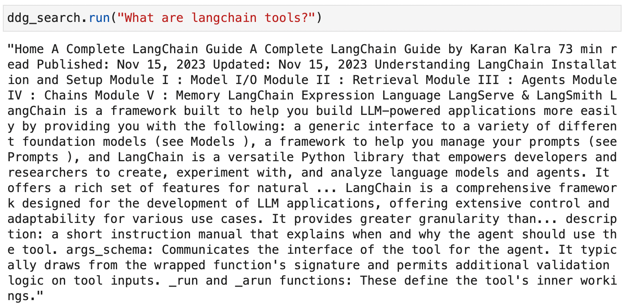
DuckDuckGo के साथ इंटरनेट ब्राउज़ करने हेतु ddg_search.run() के निष्पादन का स्क्रीनशॉट
टूल्स के पीछे का विचार इस ब्राउज़िंग क्षमता को किसी LLM में एकीकृत करना है, ताकि हमें केवल कच्ची जानकारी के बजाय प्राकृतिक भाषा में एक सुसंगत उत्तर मिल सके। ऐसा करने के लिए, हमें इस मेथड को langchain की Tool क्लास के एक इंस्टेंस में इस प्रकार एम्बेड करना होगा:
from langchain.agents import Tool
tools = [
Tool(
name="DuckDuckGo Search",
func=ddg_search.run,
description="Useful to browse information from the Internet.",
)
]
किसी भी टूल को एक नाम (name) चाहिए जिसका उपयोग LangChain एजेंट उसे संदर्भित करने के लिए करेगा, एक फंक्शन (func) जिसे एजेंट बाहरी स्रोतों से परामर्श करने के लिए निष्पादित कर सके (जैसे ऊपर ddg_search.run) और एक विवरण (description) जो एजेंट को यह जानकारी देने के लिए उपयोग किया जा सके कि इसे कब उपयोग करना है।
इस उदाहरण में, हमने यह विवरण चुना है: “Useful to browse information from the Internet”. टूल्स की परिभाषा पर और भी कई वैकल्पिक पैरामीटर होते हैं जिन्हें आवश्यकता के अनुसार कस्टमाइज़ किया जा सकता है।
अन्य ब्राउज़िंग टूल्स का अन्वेषण
एक बार जब हमने अपना पहला टूल सेटअप करना सीख लिया, तो बाकी सेटअप करना काफी सीधा होना चाहिए क्योंकि वे सभी एक ही संरचना का पालन करते हैं।
Google Serper टूल
Google Serper एक कम-लागत वाला Google Search API है जो हमें DuckDuckGo की तरह इंटरनेट ब्राउज़ करने की अनुमति देता है।
इस टूल के लिए हमें एक API कुंजी की आवश्यकता होगी जो हम https://serper.dev/ पर एक मुफ्त खाता बनाकर प्राप्त कर सकते हैं।

Google Serper API के मुख्य पेज का स्क्रीनशॉट।
एक बार जब हम अपने Serper खाते में होते हैं, तो हमें बाएं पैनल में API कुंजी विकल्प दिखाई देना चाहिए:
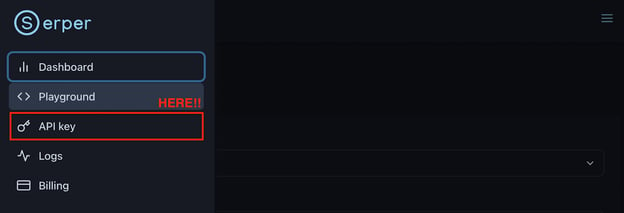
Google Serper API के एक अकाउंट पेज का स्क्रीनशॉट। बाएं पैनल में API कुंजी विकल्प।
इस पर क्लिक करके, हमें API कुंजी मिल जाएगी जिसे हम आसानी से कॉपी कर अपने Python स्क्रिप्ट्स में एकीकृत कर सकते हैं:
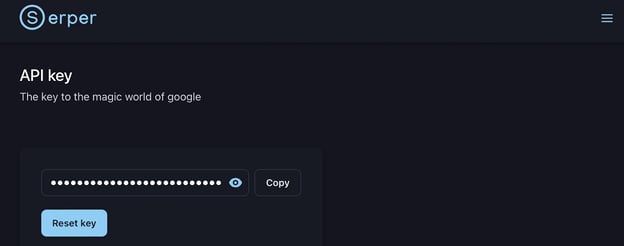
Google Serper पेज पर API कुंजी जेनरेशन का स्क्रीनशॉट।
कोड पर वापस आते हुए, हम कुंजी को अपने एन्वायरनमेंट में आसानी से इम्पोर्ट कर सकते हैं:
serper_api_key = os.environ["SERPER_API_KEY"]Google Serper API का उपयोग करने के लिए, हमें पहले आवश्यक Python लाइब्रेरी इंस्टॉल करनी होगी (pip install google-serp-api)। इसके अलावा, हमें langchain लाइब्रेरी से GoogleSerper टूल इम्पोर्ट करना होगा:
from langchain.utilities import GoogleSerperAPIWrapper
google_search = GoogleSerperAPIWrapper()पिछले मामले की तरह, google_search.run() भी एक ऐसा मेथड है जो स्वतंत्र रूप से इंटरनेट ब्राउज़ करेगा। फिर भी, विचार इसे इस प्रकार एक LangChain टूल के रूप में एकीकृत करना है:
tools.append(
Tool(
name="Google Search",
func=google_search.run,
description="Useful to search in Google. Use by default.",
)
)
ध्यान दें कि इस मामले में, हम tools सूची में एक नया टूल जोड़ रहे हैं। इसलिए, हमारी tools सूची में अब दोनों सर्च इंजन शामिल हैं।
Wikipedia टूल
चलिए पिछले टूल्स की तरह ही प्रक्रिया का पालन करते हुए प्रसिद्ध Wikipedia स्रोतों के साथ अपने टूल्स सेट को पूरक करते हैं।
पहला कदम है wikipedia Python लाइब्रेरी को pip (pip install wikipedia) के जरिए इंस्टॉल करना, और LangChain लाइब्रेरी से आवश्यक मॉड्यूल लोड करना। Wikipedia API आर्किटेक्चर के कारण इस टूल को वास्तव में दो मॉड्यूल की आवश्यकता होती है:
from langchain.tools import WikipediaQueryRun
from langchain.utilities import WikipediaAPIWrapper
wikipedia = WikipediaQueryRun(api_wrapper=WikipediaAPIWrapper())अंत में, हम wikipedia.run() मेथड चलाने वाले फंक्शन के साथ Tool क्लास का एक नया इंस्टेंस जोड़ सकते हैं:
tools.append(
Tool(
name="Wikipedia Search",
func=wikipedia.run,
description="Useful when users request biographies or historical moments.",
)
)
YouTube टूल
अंत में, मुझे YouTube स्रोतों को एकीकृत करना बहुत दिलचस्प लगा ताकि मॉडल केवल लिखित टेक्स्ट ही नहीं, बल्कि वीडियो के रूप में भी उत्तर दे सके। पहले की ही प्रक्रिया का पालन करते हुए:
!pip install youtube
from langchain.tools import YouTubeSearchTool
youtube = YouTubeSearchTool()
tools.append(
Tool(
name="Youtube Search",
func=youtube.run,
description="Useful for when the user explicitly asks you to look on Youtube.",
)
)
अब हम तैयार हैं!
हमने चार टूल्स के साथ एक टूलकिट (tools सूची) बना लिया है जो हमारे मॉडल को ब्राउज़िंग क्षमताएं प्रदान करता है। फिर भी, हमने अब तक मॉडल के साथ इंटरैक्ट नहीं किया है।
देखते हैं यह उन स्रोतों का उपयोग कैसे कर सकता है!
ब्राउज़िंग क्षमताओं का परीक्षण
जैसा कि हमने पहले ही उल्लेख किया, तथाकथित एजेंट टूल्स का उपयोग करने के लिए जिम्मेदार इकाइयां हैं। इसलिए, हमें उन्हें भी langchain लाइब्रेरी से इम्पोर्ट करना होगा:
from langchain.agents import initialize_agentinitialize_agent मेथड हमें अपना एजेंट सेटअप करने की अनुमति देगा:
agent = initialize_agent(
tools, llm, agent="zero-shot-react-description", verbose=True
)
इनीशियलाइज़ेशन से हम देख सकते हैं कि हमें एजेंट को उपलब्ध टूल्स की सूची (tools), उपयोग करने के लिए LLM (llm), और एजेंट का प्रकार (agent=”zero-shot-react-description”) प्रदान करना होता है। इस उदाहरण में, हम Zero-shot ReAct एजेंट प्रकार का उपयोग सबसे सामान्य-उद्देश्य वाले एक्शन एजेंट के रूप में करेंगे। इस मामले में, हमने एजेंट की reasoning प्रक्रिया देखने के लिए verbose=True भी सेट किया है।
एक बार एजेंट इनीशियलाइज़ हो जाने पर, हम agent.run() मेथड का उपयोग करके कोई भी उपयोगकर्ता प्रॉम्प्ट चला सकते हैं।
उदाहरण 1: जीवनी
सिद्धांततः, एक बार जब हम उपयोगकर्ता प्रॉम्प्ट सबमिट करते हैं, एजेंट टूल्स के विवरण का विश्लेषण करेगा और उस टूल का उपयोग करेगा जो उपयोग केस के लिए सबसे उपयुक्त है। इसके अलावा, यदि चयनित टूल का उपयोग करते समय उपयुक्त जानकारी नहीं मिलती है, तो एजेंट अभी भी अन्य टूल्स पर डिफ़ॉल्ट कर सकता है।
चलिए पहली टेस्ट रन एक जीवनी पूछकर करते हैं। इस मामले में, ऐसी स्थिति के लिए एक उपयुक्त टूल कॉन्फ़िगर किया गया है—जीवनी और ऐतिहासिक क्षण—तो हमें उम्मीद है कि एजेंट कॉन्फ़िगर किए गए टूल का चयन करेगा:
agent.run(
"Harry Styles biography"
)
हम reasoning प्रक्रिया देख सकते हैं:
> Entering new AgentExecutor chain...
I should look for a biography of the singer
Action: Wikipedia Search
Action Input: Harry Styles biography
Observation:
Page: Harry Styles
Summary: Harry Edward Styles (born 1 February 1994) is an English singer. His musical career began in 2010 as part of One Direction, a boy band formed on the British music competition series The X Factor after each member of the band had been eliminated from the solo contest. They became one of the best-selling boy groups of all time before going on an indefinite hiatus in 2016.
Styles released his self-titled debut solo album through Columbia Records in 2017. It debuted at number one in the UK and the US and was one of the world's top-ten best-selling albums of the year, while its lead single, "Sign of the Times", topped the UK Singles Chart. Styles' second album, Fine Line (2019), debuted atop the US Billboard 200 with the biggest ever first-week sales by an English male artist, and was the most recent album to be included in Rolling Stone's "500 Greatest Albums of All Time" in 2020. Its fourth single, "Watermelon Sugar", topped the US Billboard Hot 100. Styles' third album, Harry's House (2022), broke several records and was widely acclaimed, receiving the Grammy Award for Album of the Year in 2023. Its lead single, "As It Was", became the number-one song of 2022 globally according to Billboard.
Styles has received various accolades, including six Brit Awards, three Grammy Awards, an Ivor Novello Award, and three American Music Awards. His film roles include Dunkirk (2017), Don't Worry Darling (2022), and My Policeman (2022). Aside from music and acting, Styles is known for his flamboyant fashion. He is the first man to appear solo on the cover of Vogue.
Page: Debbie Harry
Summary: Deborah Ann Harry (born Angela Trimble; July 1, 1945) is an American singer, songwriter and actress, best known as the lead vocalist of the band Blondie. Four of her songs with the band reached No. 1 on the US charts between 1979 and 1981.
Born in Miami, Florida, Harry was adopted as an infant and raised in Hawthorne, New Jersey. After college she worked various jobs—as a dancer, a Playboy Bunny, and a secretary (including at the BBC in New York)—before her breakthrough in the music industry. She co-formed Blondie in 1974 in New York City. The band released its eponymous debut studio album in 1976 and released three more studio albums between then and 1979, including Parallel Lines, which spawned six singles, including "Heart of Glass". Their fifth studio album, Autoamerican (1980), spawned such hits as a cover of "The Tide Is High", and "Rapture", which is considered the first rap song to chart at number one in the United States.Harry released her debut solo studio album, KooKoo, in 1981. During a Blondie hiatus, she embarked on an acting career, appearing in lead roles in the neo-noir Union City (1980) and in David Cronenberg's body horror film Videodrome (1983). She released her second solo studio album, 1986's Rockbird, and starred in John Waters's cult dance film Hairspray (1988). She released two more solo albums between then and 1993, before returning to film with roles in a John Carpenter-directed segment of the horror film Body Bags (1993), and in the drama Heavy (1995).
Blondie reunited in the late 1990s, releasing No Exit (1999), followed by The Curse of Blondie (2003). Harry continued to appear in independent films throughout the 2000s, including Deuces Wild (2002), My Life Without Me (2003) and Elegy (2008). With Blondie, she released the group's ninth studio album, Panic of Girls, in 2011, followed by Ghosts of Download (2014). The band's eleventh studio album, 2017's Pollinator, charted at number 4 in the United Kingdom.
Page: Harry Potter
Summary: Harry Potter is a series of seven fantasy novels written by British author J. K. Rowling. The novels chronicle the lives of a young wizard, Harry Potter, and his friends Hermione Granger and Ron Weasley, all of whom are students at Hogwarts School of Witchcraft and Wizardry. The main story arc concerns Harry's conflict with Lord Voldemort, a dark wizard who intends
Thought: I now know the final answer
Final Answer: Harry Styles is an English singer, songwriter and actor. He rose to fame as a member of the boy band One Direction, and later embarked on a solo career. He released his debut solo album, Harry Styles, in 2017, and his second album, Fine Line, in 2019. He has also had success in film, appearing in Dunkirk (2017), Don't Worry Darling (2022) and My Policeman (2022).
> Finished chain.
"Harry Styles is an English singer, songwriter and actor. He rose to fame as a member of the boy band One Direction, and later embarked on a solo career. He released his debut solo album, Harry Styles, in 2017, and his second album, Fine Line, in 2019. He has also had success in film, appearing in Dunkirk (2017), Don't Worry Darling (2022) and My Policeman (2022)."
हम देख सकते हैं कि जैसे ही हम .run() मेथड निष्पादित करते हैं, एजेंट उपयोगकर्ता प्रॉम्प्ट को प्रोसेस करता है और reasoning चरण शुरू करता है, जो इस निष्कर्ष पर पहुंचता है: "I should look for a biography of the singer"। ऐसा करने के लिए, यह एक एक्शन प्लान तैयार करता है, जो हमारे टूल डेफिनिशन के अनुसार Wikipedia Search टूल का उपयोग करने पर आधारित है, इनपुट: "Harry Styles biography"। फिर, एक्शन प्लान शुरू होता है, और एजेंट Wikipedia डेटाबेस से संबंधित जानकारी पुनः प्राप्त करता है, निष्कर्षों को प्रोसेस करता है, और प्राकृतिक भाषा में उपयुक्त उत्तर जनरेट करता है।
उदाहरण 2: रैंडम ब्राउज़िंग
अब एक सामान्य ब्राउज़िंग कार्य का अनुरोध करते हैं ताकि एजेंट के पास टूलकिट विवरण में कोई विशिष्ट टूल उल्लिखित न हो:
agent.run(
"Yesterday's latest news in Spain"
)
इस मामले में reasoning प्रक्रिया का अवलोकन करते हैं:
> Entering new AgentExecutor chain...
I should look for news from yesterday
Action: Google Search
Action Input: "Yesterday's news in Spain"
Observation: The latest breaking news, comment and features from The Independent. All the latest content about Spain from the BBC. Find all national and international information about spain. Select the subjects you want to know more about on euronews.com. Latest Spain news stories including accidents, crime and policing, politics, and Spanish sport news headlines. Latest news, essential insights and practical guides to life in Spain from The Local, Europe's leading independent voice. Missing: Yesterday's | Show results with:Yesterday's. Stay on top of Spain latest developments on the ground with Al Jazeera's fact-based news, exclusive video footage, photos and updated maps. Missing: Yesterday's | Show results with:Yesterday's. Spain · Shakira due to go on trial in Spain over tax fraud claims · The Observer view on Pedro Sánchez's election deal to take power: it undermines democracy. Missing: Yesterday's | Show results with:Yesterday's. Latest News · Hundreds leave Al-Shifa hospital as Israeli forces take control of facility · F1 fans file class-action suit over being forced to exit Las Vegas ... Missing: Yesterday's | Show results with:Yesterday's. Follow the latest Spain news stories and headlines. Get breaking news alerts when you download the ABC News App and subscribe to Spain notifications. Missing: Yesterday's | Show results with:Yesterday's. Get the latest breaking news and top news headlines at Reuters ... Spain Headlines. Shakira stands trial in Spain for alleged tax fraud. Shakira ... Missing: Yesterday's | Show results with:Yesterday's.
Thought: I found a lot of news sources with yesterday's news, so the final answer should be about that.
Final Answer: The latest news in Spain from yesterday is that Shakira is standing trial in Spain for alleged tax fraud, hundreds of people have left Al-Shifa hospital as Israeli forces take control, and F1 fans have filed a class-action suit over being forced to exit Las Vegas. Other news includes insights and practical guides to life in Spain, Pedro Sánchez's election deal to take power, and the top news headlines from Reuters.
> Finished chain.
"The latest news in Spain from yesterday is that Shakira is standing trial in Spain for alleged tax fraud, hundreds of people have left Al-Shifa hospital as Israeli forces take control, and F1 fans have filed a class-action suit over being forced to exit Las Vegas. Other news includes insights and practical guides to life in Spain, Pedro Sánchez's election deal to take power, and the top news headlines from Reuters."
इस मामले में, एजेंट सफलतापूर्वक डिफ़ॉल्ट Google Serper टूल पर जाता है और स्पेन की ताज़ा खबरें ढूंढता है। यह ब्राउज़िंग उदाहरण विशेष रूप से रोचक है क्योंकि हम एक ऐसे LLM से एक बहुत ही मौजूदा प्रॉम्प्ट पूछने में सफल होते हैं जिसका प्रशिक्षण डेटा सितंबर 2021 में कट गया था, फिर भी हमें अप-टू-डेट प्रतिक्रिया मिलती है।
उदाहरण 3: वीडियो रिट्रीवल
अंत में, मान लीजिए कि हम किसी वीडियो संसाधन में रुचि रखते हैं। देखें कि क्या मॉडल वास्तव में हमें उस तक इंगित कर सकता है। हम verbose मोड बंद करेंगे और मॉडल की वास्तविक प्रतिक्रिया देखेंगे:
agent = initialize_agent(
tools, llm, agent="zero-shot-react-description"
)
agent.run(
"Can you point me to the Procrastination TED talk by Tim Urban?"
)
और, उम्मीद के मुताबिक, हमें सफलतापूर्वक निम्नलिखित उत्तर मिलता है:
'The TED Talk "Procrastination" by Tim Urban can be found at
https://www.youtube.com/watch?v=arj7oStGLkU'
यह काम करता है! इन तीन उदाहरणों के साथ, हमने दिखाया है कि हमारा LLM हमारी मांगों को पूरा करने के लिए अलग-अलग स्रोतों का कैसे उपयोग कर सकता है।
यदि आप अपने टूलकिट में और टूल्स शामिल करने में रुचि रखते हैं, तो मैं लेख ReAct: 3 LangChain Tools To Enhance the Default GPT Capabilities की सिफारिश करता/करती हूं।
निष्कर्ष
इस ट्यूटोरियल में, हमने LLMs में ब्राउज़िंग क्षमताओं को बढ़ाने के लिए LangChain टूल्स के उपयोग के बारे में सीखा। LangChain का केंद्र इसकी यह क्षमता है कि वह LLM-आधारित एप्लिकेशन के विकास को सुगम बनाता है, जिसमें बिल्ट-इन मेमोरी, पूर्ण चैटबॉट्स, और इस लेख में खोजे गए टूल्स सहित कई शक्तिशाली फीचर शामिल हैं।
जबकि OpenAI अपने नवीनतम GPT मॉडलों के लॉन्च के साथ कस्टमाइज़्ड AI के क्षेत्र में प्रगति कर रहा है, मुझे लगता है कि अभी भी विकास और नवाचार के लिए पर्याप्त गुंजाइश है।
इस संदर्भ में, LangChain टूल्स उन उपयोगकर्ताओं के लिए इस तकनीकी दौड़ में महत्वपूर्ण बढ़त रखते हैं जो अक्सर Python और OpenAI API के माध्यम से GPT मॉडलों के साथ इंटरैक्ट करते हैं। यह GPTs के विपरीत है, जो गैर-कोडिंग दर्शकों के लिए अनुकूलित लगते हैं। GPT उपयोगकर्ता ChatGPT यूजर इंटरफेस से आसानी से एक विशेष इंस्टेंस कॉन्फ़िगर कर सकते हैं और आवश्यकता पड़ने पर उसे एक्सेस कर सकते हैं—यह उपयोगकर्ता-अनुकूल है लेकिन लचीलेपन में सीमित।
इसके अलावा, Google या Wikipedia जैसे बाहरी सूचना स्रोतों की जांच करने की LangChain टूल्स की क्षमता मॉडल के ज्ञान आधार को बहुत बढ़ाती है। यह GPTs पर एक उल्लेखनीय लाभ प्रस्तुत करता है, जो सूचना अपलोड का समर्थन तो करते हैं लेकिन छोटे पैमाने पर।
निष्कर्षतः, मेरी राय में LangChain टूल्स मॉडल की क्षमताओं को बढ़ाने और व्यापक रूप से उपलब्ध सार्वजनिक डेटा का उपयोग करके हमारी अपनी इंस्टेंसेस को कस्टमाइज़ करने के लिए सबसे शक्तिशाली फीचर्स हैं। अब कल्पना कीजिए कि टूल्स को अपनी प्राइवेट डेटाबेस के साथ जोड़ने की शक्ति क्या होगी?
LLMs की दुनिया में नए हैं? तेज़ी से आगे बढ़ने के लिए हमारा Large Language Models Concepts कोर्स देखें!

एंड्रिया वेलेंज़ुएला वर्तमान में जेनेवा, स्विट्ज़रलैंड में स्थित कण त्वरक (CERN) पर CMS प्रयोग में कार्यरत हैं। पिछले छह वर्षों से डेटा इंजीनियरिंग और विश्लेषण में विशेषज्ञता के साथ, उनकी जिम्मेदारियों में डेटा विश्लेषण और सॉफ्टवेयर विकास शामिल हैं। वह फिलहाल Medium प्रकाशन ForCode'Sake के माध्यम से डेटा-संबंधित तकनीकों के सीखने को लोकतांत्रिक बनाने की दिशा में काम कर रही हैं।
उन्होंने पॉलीटेक्निक यूनिवर्सिटी ऑफ कैटालोनिया से इंजीनियरिंग फ़िज़िक्स में बीएस और पोम्पेउ फ़ाब्रा यूनिवर्सिटी से इंटेलिजेंट इंटरेक्टिव सिस्टम्स में एमएस किया है। उनके शोध अनुभव में छवि जनरेशन के लिए Normalizing Flows जैसे पूर्व OpenAI एल्गोरिदम पर व्यावसायिक कार्य शामिल है।
ChatGPT की एक नई सुविधा जो मुझे वाकई पसंद है, वह है जरूरत पड़ने पर उपयोगकर्ताओं के अनुरोधों को पूरा करने के लिए इंटरनेट ब्राउज़ करने की इसकी क्षमता। फिर भी, अब तक मुझे दो समस्याएं मिली हैं:
पता चलता है कि LangChain ने इन समस्याओं का समाधान तथाकथित LangChain टूल्स जारी करके कर दिया है!
इस ट्यूटोरियल में, हम सीखेंगे कि ब्राउज़िंग क्षमताओं वाला अपना GPT मॉडल बनाने के लिए LangChain टूल्स का उपयोग कैसे करें। यहां, ब्राउज़िंग क्षमताओं से तात्पर्य है मॉडल को बाहरी स्रोतों से परामर्श करने की अनुमति देना ताकि वह अपने ज्ञान भंडार का विस्तार कर सके और केवल पूर्व-निहित ज्ञान पर निर्भर रहने की तुलना में उपयोगकर्ता अनुरोधों को अधिक प्रभावी ढंग से पूरा कर सके।
और सबसे अच्छी बात? LangChain टूल्स Python और OpenAI API के साथ बखूबी एकीकृत हो जाते हैं!
चलिए शुरू करते हैं!