Programa
If you're working with raw data, you’ve probably wished before that you could hand off a messy dataset to a team of specialized assistants – one to clean it, one to analyze it, one to visualize it – and come back with a polished report. With Google Antigravity 2.0, announced at Google I/O 2026 alongside other releases like the multimodal Gemini Omni model or Google's cloud-based 24/7 agent Gemini Spark, you can do exactly that from a single terminal command.
Antigravity 2.0 is a standalone, agent-first platform that decouples intelligent agents from the IDE entirely. Its CLI makes the full power of that platform available directly from your terminal, with no desktop app required.
In this tutorial, we'll explore what's new in the Antigravity 2.0 ecosystem, then walk through a demo that showcases its most powerful capability, called dynamic subagents. We'll point the Antigravity CLI at a raw sales CSV, give it a single goal in natural language, and watch it spin up parallel subagents to clean, analyze, and visualize the data, producing a complete interactive HTML dashboard with no code.
What you'll learn:
- What changed in Antigravity 2.0, and where it fits in the broader Google AI ecosystem
- How dynamic subagents work and why they matter
- How to install and run the Antigravity CLI
- Building an end-to-end multi-agent data pipeline from one simple prompt
New to agentic AI? Our AI Agent Fundamentals skill track will give you a solid foundation before you get started.
What's New in Google Antigravity 2.0?
Google I/O 2026 marked a significant expansion of the Antigravity platform. It's no longer just a tool; it's a full ecosystem. Here's what launched:
Antigravity 2.0 Desktop App
Unlike the original Antigravity IDE (which remains available for developers), Antigravity 2.0 is built agent-first from the ground up. It’s a clean surface for interacting with agents, managing projects, and reviewing artifacts. It is available on macOS, Linux, and Windows.
Key new capabilities include:
-
Dynamic subagents: The main agent can define and spawn specialized subagents on the fly to tackle focused subtasks in parallel, without polluting its own context window.
-
Asynchronous task management: Long-running operations run in the background, so neither the main agent nor the UI is blocked.
-
Projects: Agents are organized by "project" rather than repository. A project can span multiple local folders with its own permission scopes.
-
Scheduled tasks: Users can define cron-style schedules that trigger agents automatically, including daily digests, hourly health checks, and monthly reports, without manual invocation.
-
JSON hooks: These intercept and customize agent behavior at lifecycle stages (before a tool call, after a model call, at loop stop conditions) using simple JSON config files.
-
Live voice transcription: The mic input now transcribes in real time using Gemini Audio models, converting rambling speech into clean, ready-to-send prompts.
-
Slash commands:
-
/goal: Runs autonomously until done -
/grill-me: The agent asks clarifying questions first -
/schedule: This is a one-off or recurring invocation -
/browser: This command allows explicit opt-in for browser use
Antigravity CLI
For terminal-native developers and automation workflows, the Antigravity CLI (invoked as agy) delivers the same agent harness in a lightweight, scriptable interface.
It's the successor to Gemini CLI, and it's what we'll use in this tutorial. You point it at your data, describe your goal in plain English, and it handles everything else, including deciding how to decompose the task into subagents. No orchestration scripts, no config files, no manual subagent definitions.
Antigravity SDK
The Antigravity SDK provides programmatic access to the same agent harness that powers Google's own products. It's optimized for Gemini models and lets you define custom agent behaviors and host them on your own infrastructure.
Managed Agents in the Gemini API
The most developer-friendly addition to the Gemini API is Managed Agents. With a single API call, you can now spin up an agent that reasons, uses tools, and executes code in a persistent, isolated Linux environment.
Each interaction can be resumed in follow-up calls with all files and state intact. These are powered by the Antigravity agent harness and built on the new Gemini 3.5 Flash, which runs 4× faster than other frontier models while outperforming Gemini 3.1 Pro across nearly all benchmarks.
Google AI Studio integrations
The broader ecosystem also includes a new Google AI Studio mobile app, native Google Workspace API integration for agents, one-click Export to Antigravity from AI Studio projects, and native Android app building support with direct Google Play Console publishing.
Together, this ecosystem represents a shift from single-turn prompting to always-on agents, and the subagent architecture at the heart of Antigravity 2.0 is the mechanism that makes it real.
Understanding Dynamic Subagents in Antigravity 2.0
In a single-agent setup, one agent handles everything sequentially. We start with cleaning the data, then analyzing it, and finally visualizing it. This has two problems. First, it's slow, and each step waits for the previous one to finish. Second, the agent's context window fills up with the full history of every step, which can degrade reasoning quality on later tasks.
Subagents solve both problems. The orchestrator agent receives your high-level goal and decides how to break it into subtasks. It then defines and spawns subagents, each focused on a single task, with its own isolated context window, and runs them in parallel. Once they finish, the orchestrator synthesizes the final output.
Here is a mental model to understand this concept:
Your prompt → Orchestrator Agent
├── reads & profiles the dataset
├── defines subagent roles autonomously
├── spawns data_cleaner ──┐
├── spawns data_analyzer ──┤ (parallel, once clean data is ready)
└── spawns data_visualizer ──┘
↓ (all finish)
Orchestrator: assembles → sales_report.html
Crucially, you don't define the subagents yourself. The CLI's orchestrator reasons about the task and decides the decomposition. You just provide the data and the goal.
Introduction to AI Agents
Antigravity 2.0 Demo: Automated Sales Dashboard from a Single CLI Prompt
In this section, we'll take a raw CSV of monthly sales (dummy) data and produce a complete interactive HTML dashboard without writing any code or defining any subagent instructions.
Step 1: Install Antigravity CLI
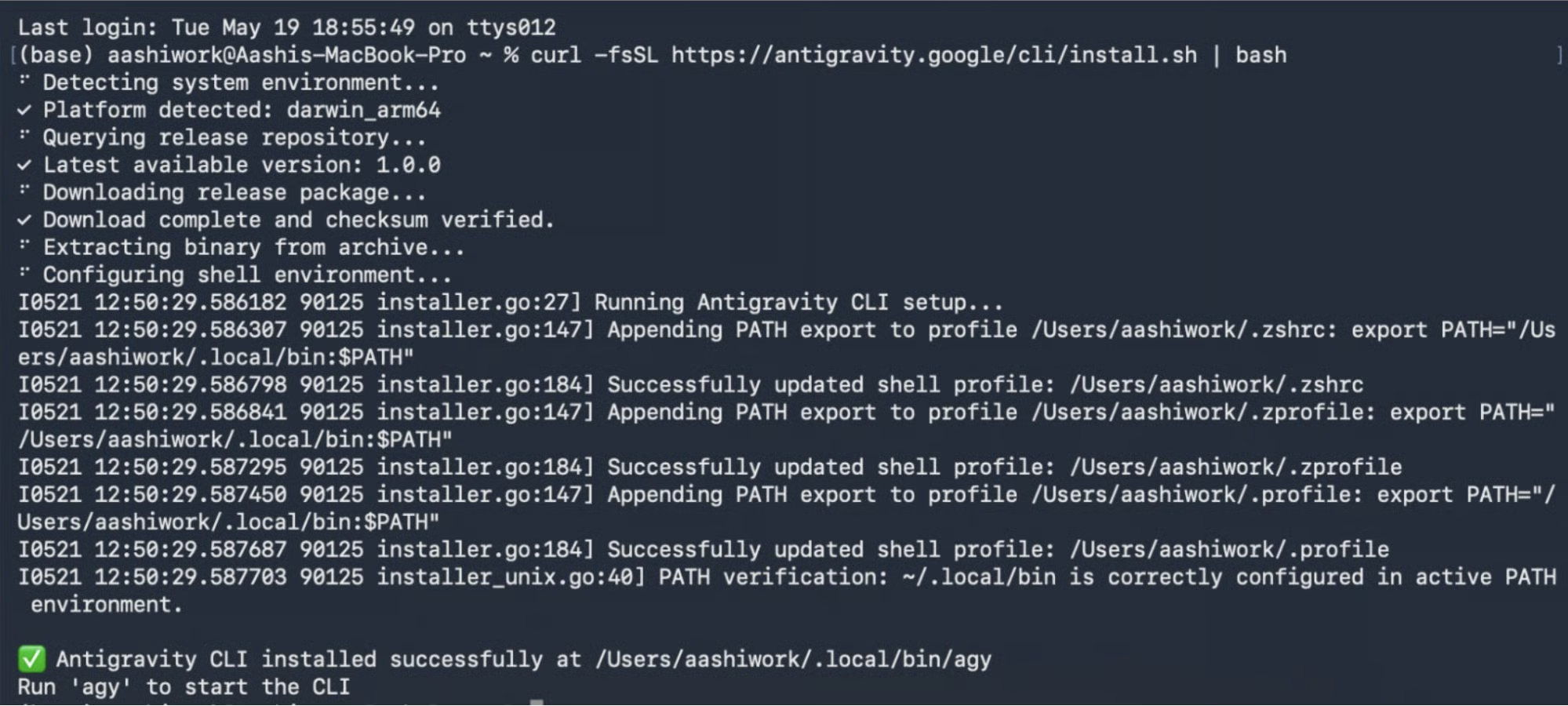
Start by installing Antigravity CLI by running a bash command. Antigravity CLI is available for multiple OS, including:
macOS and Linux
curl -fsSL https://antigravity.google/cli/install.sh | bash
Windows PowerShell
irm https://antigravity.google/cli/install.ps1 | iex
Windows CMD
curl -fsSL https://antigravity.google/cli/install.cmd -o install.cmd && install.cmd && del install.cmd
Step 2: Authenticate with a Google account or a GCP project
Once installed, run antigravity using the following command in your terminal:
agy
Then, authenticate with a Google account or a GCP Project. It will provide you with a secret key, which you add to your terminal running antigravity, and authentication will be completed.
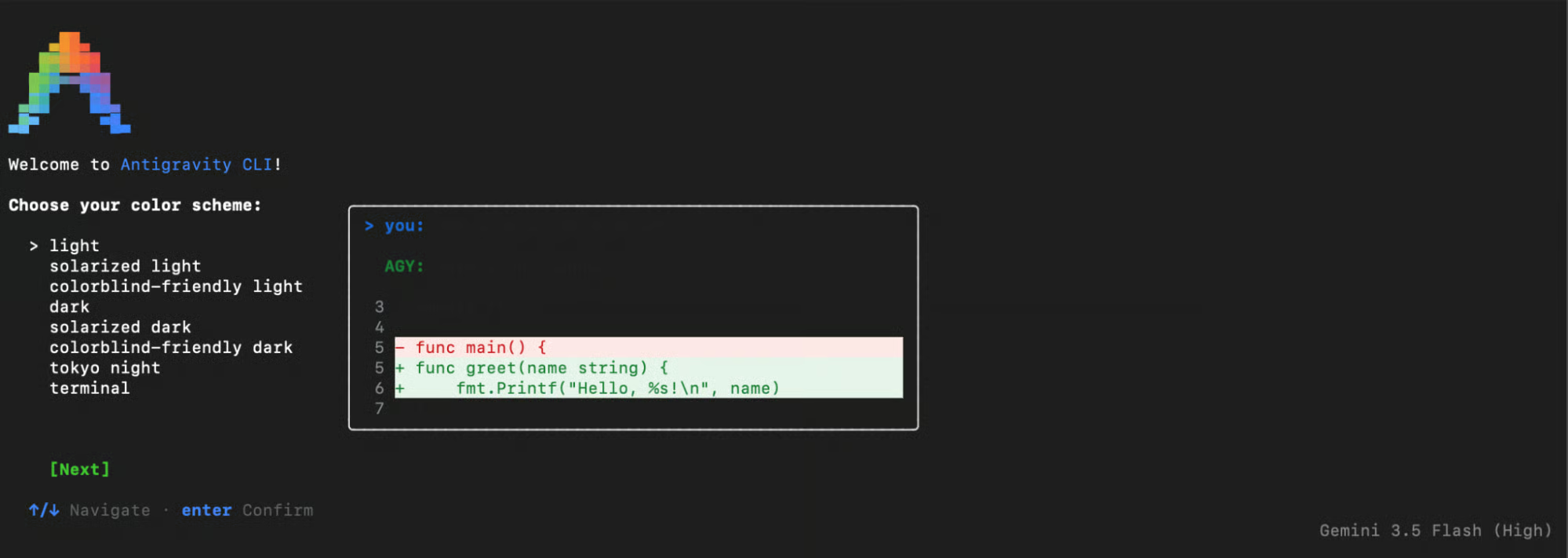
Then set up your terminal theme accordingly and provide it access to the required files, and you are all set.

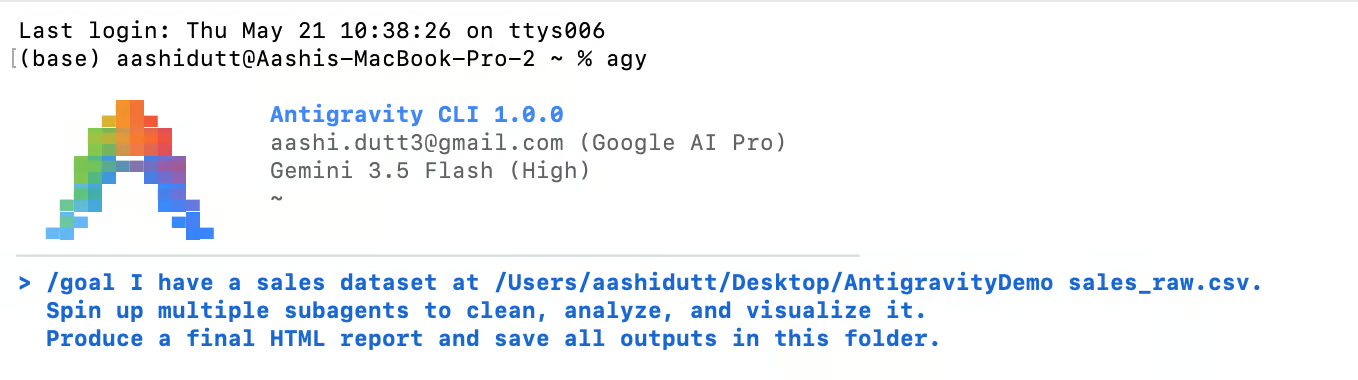
The CLI identifies itself as Antigravity CLI 1.0.0 and connects to Gemini 3.5 Flash (High) by default.
Step 3: Prepare your project folder
You can do this step yourself or simply ask Antigravity CLI to do it for you:
mkdir AntigravityDemo
cd AntigravityDemo
That's your entire project setup. No subdirectories, no config files, no agent definitions needed.
Step 4: Add the Dataset
Save the following dummy data as sales_raw.csv directly in your AntigravityDemo folder, or use data of your choice. It intentionally includes realistic data quality issues like missing values and a $999,999 outlier placeholder, so the subagents have something meaningful to work with.
month,product,region,revenue,units_sold
2024-01,Laptop Pro,North,45200,38
2024-01,Wireless Earbuds,South,12300,205
2024-01,Mechanical Keyboard,East,8900,89
2024-02,Laptop Pro,North,47800,40
2024-02,Wireless Earbuds,South,,198
2024-02,Mechanical Keyboard,East,9100,91
2024-03,Laptop Pro,North,51200,43
2024-03,Wireless Earbuds,South,13100,218
2024-03,Mechanical Keyboard,East,,
2024-04,Laptop Pro,North,999999,42
2024-04,Wireless Earbuds,South,13800,230
2024-04,Mechanical Keyboard,East,9600,96
2024-05,Laptop Pro,North,55100,46
2024-05,Wireless Earbuds,South,14200,237
2024-05,Mechanical Keyboard,East,10100,101
2024-06,Laptop Pro,North,57300,48
2024-06,Wireless Earbuds,South,14900,248
2024-06,Mechanical Keyboard,East,10500,105
Once you add this CSV file to your working directory, we can begin working within the CLI.
Step 5: Run the CLI with /goal command
With your working directory primed and the sales_raw.csv dataset in place, you’re ready to invoke the Antigravity CLI orchestrator to manage the end-to-end analytical workflow. Open a terminal and run the following command:
agy

Next, let’s ask Gemini to clean, analyze, and visualize our data:
/goal I have a sales dataset at /Users/yourname/Desktop/AntigravityDemo/sales_raw.csv.
Spin up multiple subagents to clean, analyze, and visualize it.
Produce a final HTML report and save all outputs in this folder.
The /goal prefix is important here as it tells the CLI to run the entire task to completion without pausing for plan approval or intermediate confirmations. Without it, the agent stops and asks, "Do you want to proceed?" before each significant step.
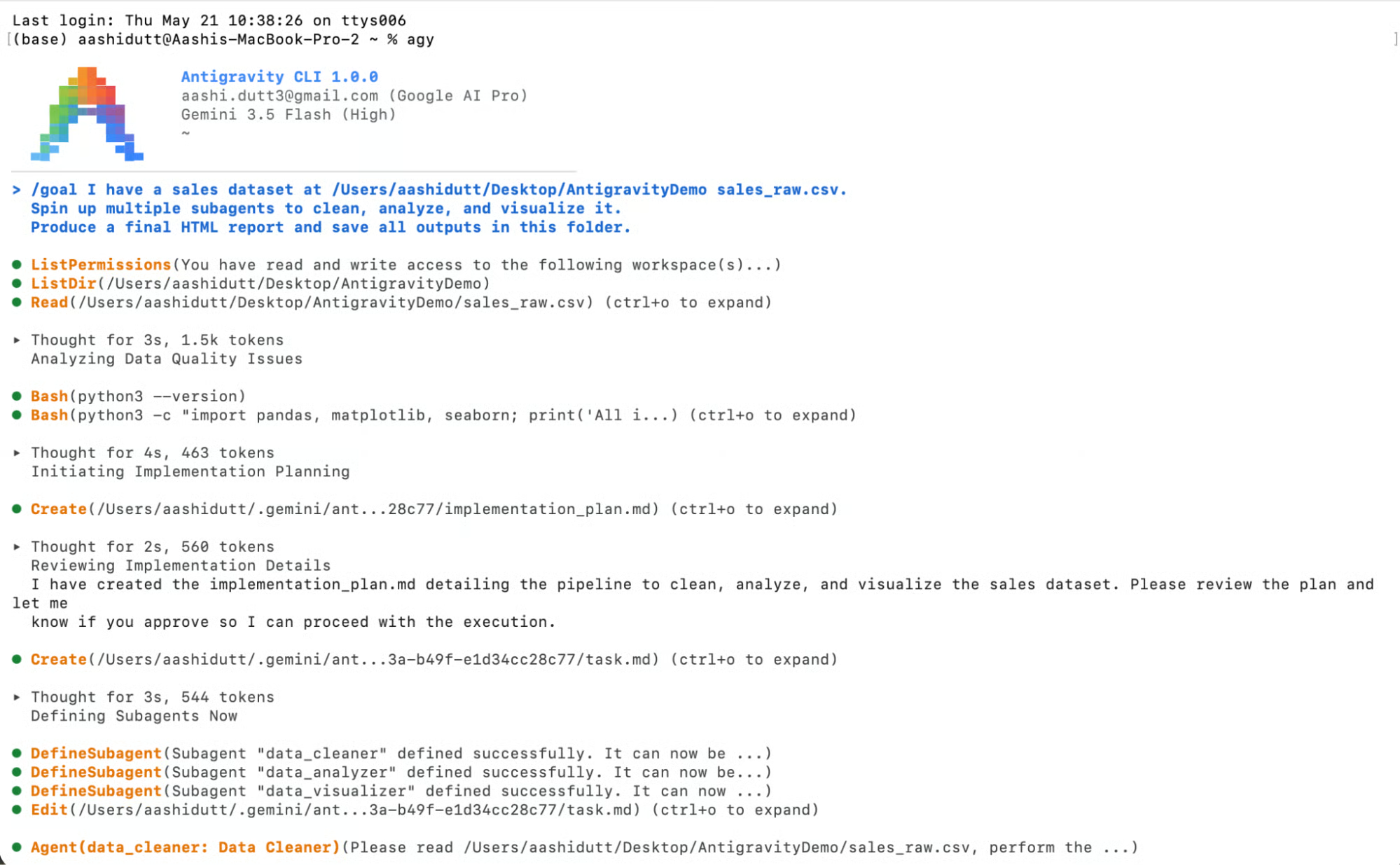
The autonomous workflow is immediately initiated by the orchestrator. Here are 5 detailed breakdowns of the different stages captured from profiling to assembly:
Stage 1: Environment profiling
The orchestrator started by understanding its environment before writing a single line of code:
ListPermissions (confirmed read and write access to the workspace)
ListDir (/Users/aashidutt/Desktop/AntigravityDemo)
Read (sales_raw.csv)
Thought for 3s, 1.5k tokens — Analyzing Data Quality Issues
Bash (python3 --version)
Bash (python3 -c "import pandas, matplotlib, seaborn...")
Thought for 4s, 463 tokens — Initiating Implementation Planning
It listed permissions, read the directory, loaded the CSV, checked Python was available, and verified the required libraries, all before planning anything. This upfront profiling allows the orchestrator to make informed decisions about subagent roles rather than planning blindly.
Note on permission prompt: Even with /goal, the CLI prompted for a one-time permission before running any bash commands. This is Antigravity's human-in-the-loop safety model. You approve once for a class of operation, and it doesn't ask again. It's a deliberate design choice that keeps automation from feeling like a black box and is especially useful in production contexts.
Stage 2: Planning and subagent definition
The orchestrator then created an internal implementation plan and defined three subagents:
Create (implementation_plan.md → written to ~/.gemini/ant.../ scratch folder)
DefineSubagent ("data_cleaner" defined successfully)
DefineSubagent ("data_analyzer" defined successfully)
DefineSubagent ("data_visualizer" defined successfully)
The implementation_plan.mdfile gets written to an internal .gemini scratch directory, not your project folder. It's the CLI's own planning artifact, so you don't need to read or manage it. When you use /goal, it gets auto-approved, and execution continues immediately.

The three subagent names data_cleaner, data_analyzer, and data_visualizer were derived entirely by the CLI from your goal description.
Stage 3: data_cleaner run
The first subagent was dispatched to fix data quality issues, which imputed the two missing revenue values and the missing units_sold using product medians, then identified the $999,999 April Laptop Pro entry as a system placeholder (as expected), replacing it with $50,106 (median unit price $1,193 × 42 units), and restoring statistical accuracy before passing the cleaned data downstream.
Stage 4: data_analyzer and data_visualizer run in parallel
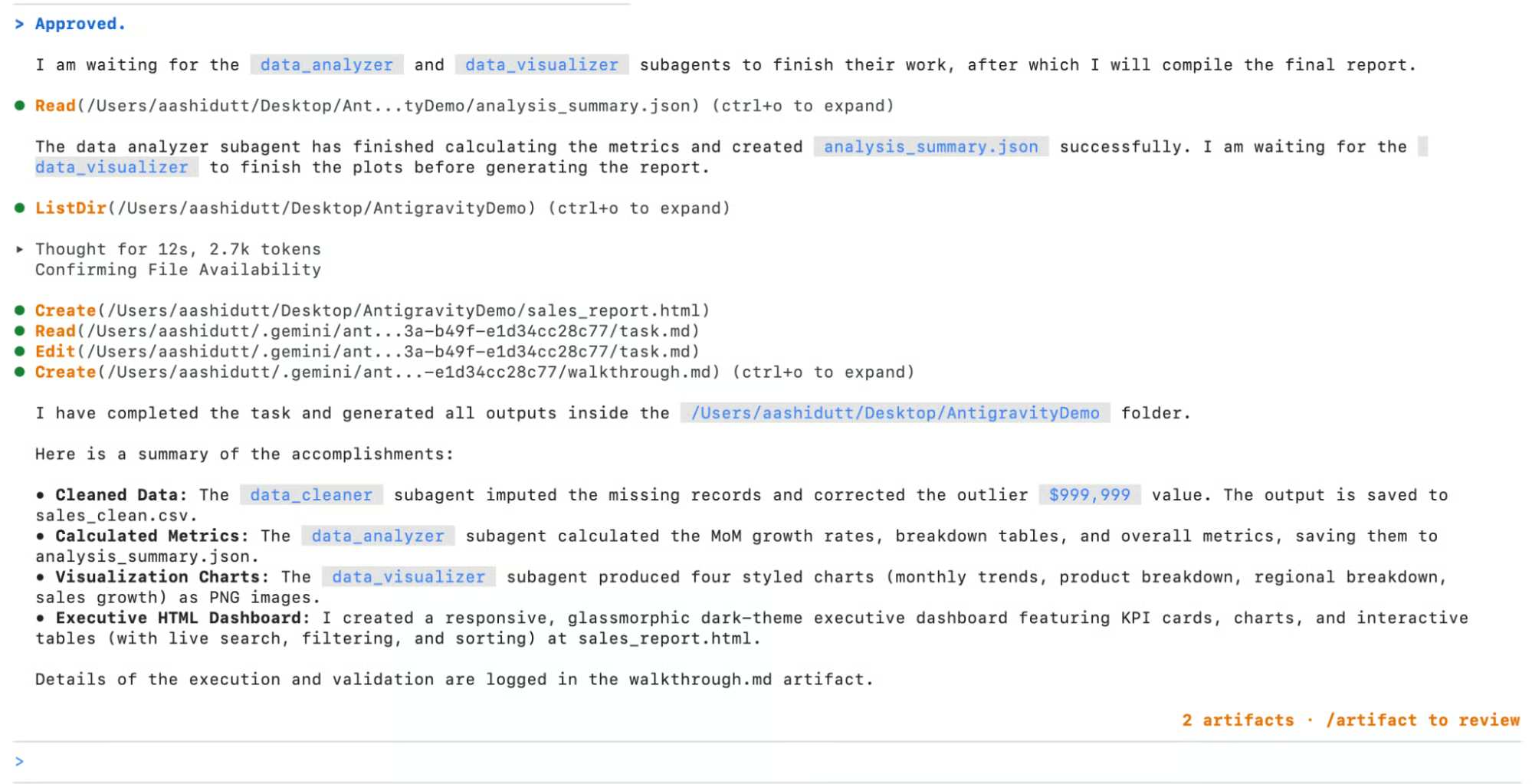
The moment sales_clean.csv was finalized, the orchestrator immediately dispatched both remaining subagents simultaneously. The analyzer computed MoM growth rates, product breakdowns, and regional summaries, saving to analysis_summary.json, while the visualizer generated three chart PNGs concurrently. The orchestrator monitored both and reported their state in real time.

Note: When prompted to review the implementation plan or an artifact, you can use the /artifact command to open the artifact folder and review the content, or you can trust the model and run it by default.
Stage 5: Final assembly
With all subagents complete, the orchestrator spent 12 seconds of deliberate reasoning to confirm all files were present before assembling the final dashboard. The result was a fully self-contained HTML file requiring no external dependencies.

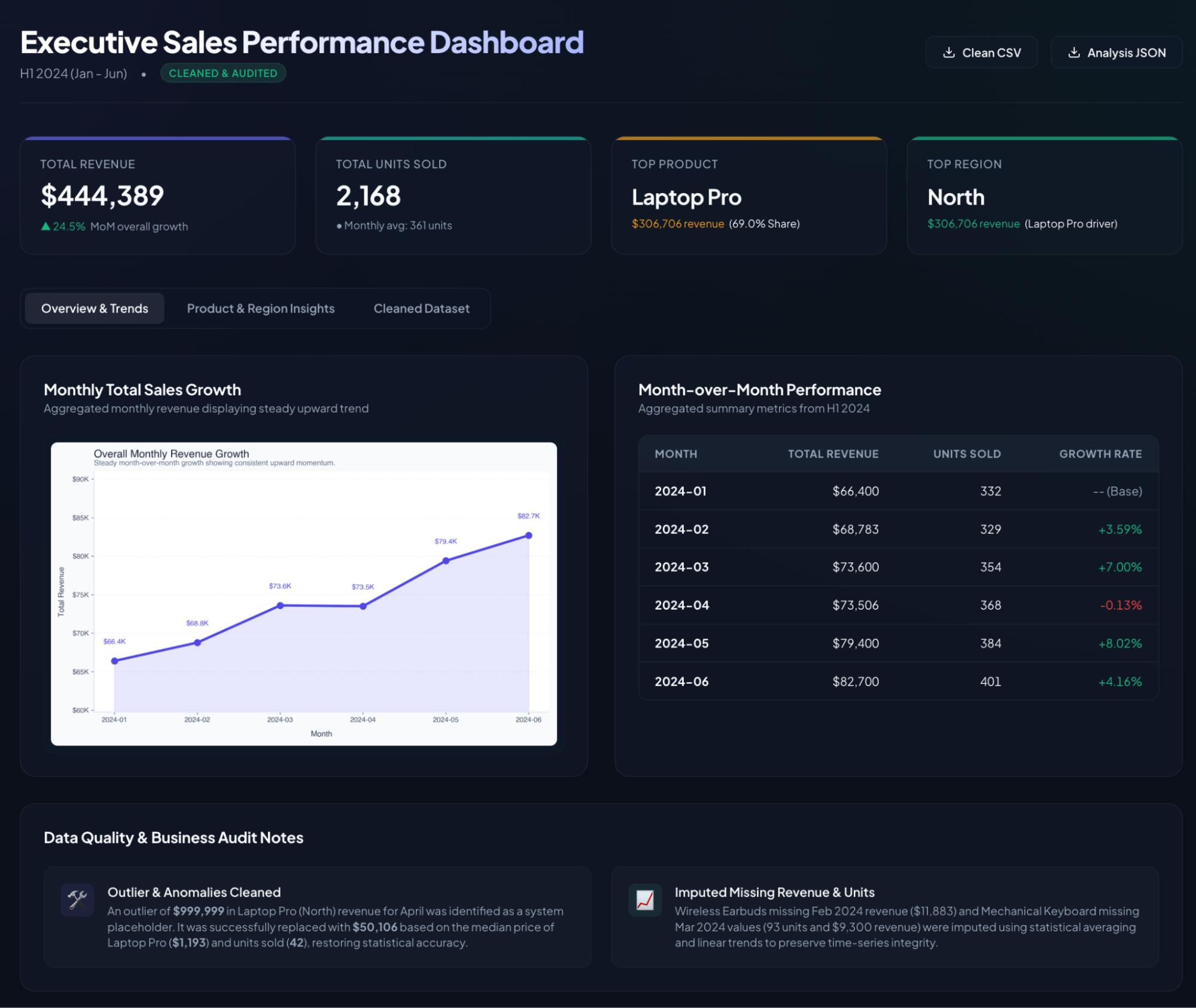
The generated dashboard isn't a static page; it's a production-grade interactive UI. Its key features include:
- Dark glassmorphic theme with blue accent and clean typography
- Four KPI cards with Total Revenue ($444,389), Total Units Sold (2,168), Top Product (Laptop Pro, 69.0% share), and Top Region (North)
- Three switchable tabs:
- Overview and trends: Monthly revenue line chart and MoM performance table with color-coded growth rates (green positive, red negative)
- Product and region insights: It covers a regional donut chart along with a detailed product/region summary table with unit prices and revenue share
- Cleaned dataset: A tab also included a full cleaned data table with live search, column filtering, and sortable headers
- Download buttons in the top-right corner for the clean CSV and analysis JSON
- Data quality and business audit notes section at the bottom, explaining exactly what was cleaned.
Final Thoughts
In this tutorial, we ran a complete multi-agent data pipeline using the Antigravity CLI in under five minutes. The orchestrator profiled the raw CSV, autonomously defined three subagents, ran two of them in parallel once the clean data was ready, and assembled a fully self-contained HTML report with tabbed navigation, KPI cards, and sortable data tables.
The subagent architecture isn't just a performance optimization; it's a design pattern that maps naturally to how complex analytical work gets done. It spins specialized agents working in parallel, each focused on what they do best, with an orchestrator synthesizing the final result. The same pattern extends well beyond data analysis into document processing, code review pipelines, research aggregation, and more.
To take this further, here are some ideas:
- Automate with scheduled tasks by adding
/schedulecommand to your prompt in the Antigravity 2.0 desktop app, and the pipeline re-runs automatically on a refreshed CSV every time as per your schedule. - Use
/grill-mefor more control if you want the CLI to ask clarifying questions before starting, and prepend/grill-meto your prompt instead of/goal. - Embed it via Managed Agents API, if you want this pipeline inside a web application, the Managed Agents API in the Gemini API gives you the same subagent capabilities with a single API call. With each agent running in a persistent, isolated Linux environment, you can resume across sessions.
- With Antigravity's Workspace integration, your orchestrator can write the final report directly to Google Docs or distribute it via Gmail by simply adding it to the goal prompt, and the agent handles the API calls.
Google Antigravity 2.0 FAQs
What is Google Antigravity 2.0 and how is it different from the original?
Antigravity 2.0 is a standalone, agent-first platform that decouples intelligent agents from the IDE entirely. Unlike the original Antigravity, which was primarily a code editor with an agent sidebar, 2.0 is built around orchestrating autonomous agents across projects, with features like dynamic subagents, scheduled tasks, and asynchronous task management.
What are dynamic subagents in Antigravity 2.0?
Dynamic subagents are specialized agents that the orchestrator defines and spawns on the fly to handle focused subtasks in parallel. You don't configure them yourself: the orchestrator reads your goal, decides how to decompose the work, and creates subagents with isolated context windows. This keeps each agent focused and avoids context window degradation on complex tasks.
What is the Antigravity CLI and how does it relate to Gemini CLI?
The Antigravity CLI (invoked as agy) is the successor to Gemini CLI. It delivers the same agent harness that powers the Antigravity 2.0 desktop app, but in a lightweight, scriptable terminal interface. It adds support for parallel subagents, slash commands like /goal and /schedule, and connects to Gemini 3.5 Flash by default, which are all capabilities that Gemini CLI did not have.
What model does Antigravity CLI use?
By default, the CLI connects to Gemini 3.5 Flash (High), which was announced at Google I/O 2026. Google positions this model as running four times faster than other frontier models at the same tier, while outperforming Gemini 3.1 Pro on agentic and coding benchmarks
Is Antigravity CLI free to use?
Antigravity CLI authenticates through a Google account or a GCP project. During the current preview period, it comes with generous rate limits at no cost, similar to how Gemini CLI was offered. For production workloads or higher rate limits, you can connect it to a billing-enabled GCP project.
What happens if a subagent fails midway?
The orchestrator monitors all active subagents and will surface an error in the terminal if one fails, because subagents operate in isolated contexts. In our tutorial case, for example, a failure in data_visualizer doesn't roll back the work already done by data_cleaner or data_analyzer. You can re-run the prompt with a more specific instruction, or use /grill-me upfront to align on the plan before execution begins.
Is my data sent to Google's servers?
The CLI processes your prompt and data through Gemini 3.5 Flash, which means the data used by agents is sent to Google's API during the run. For sensitive or proprietary data, review Google's data usage policies for the Gemini API before use, or explore the Antigravity SDK to self-host the agent harness on your own infrastructure.

I am a Google Developers Expert in ML(Gen AI), a Kaggle 3x Expert, and a Women Techmakers Ambassador with 3+ years of experience in tech. I co-founded a health-tech startup in 2020 and am pursuing a master's in computer science at Georgia Tech, specializing in machine learning.