Kurs
OpenAI API ile Çalışmak
3 sa
175.5K
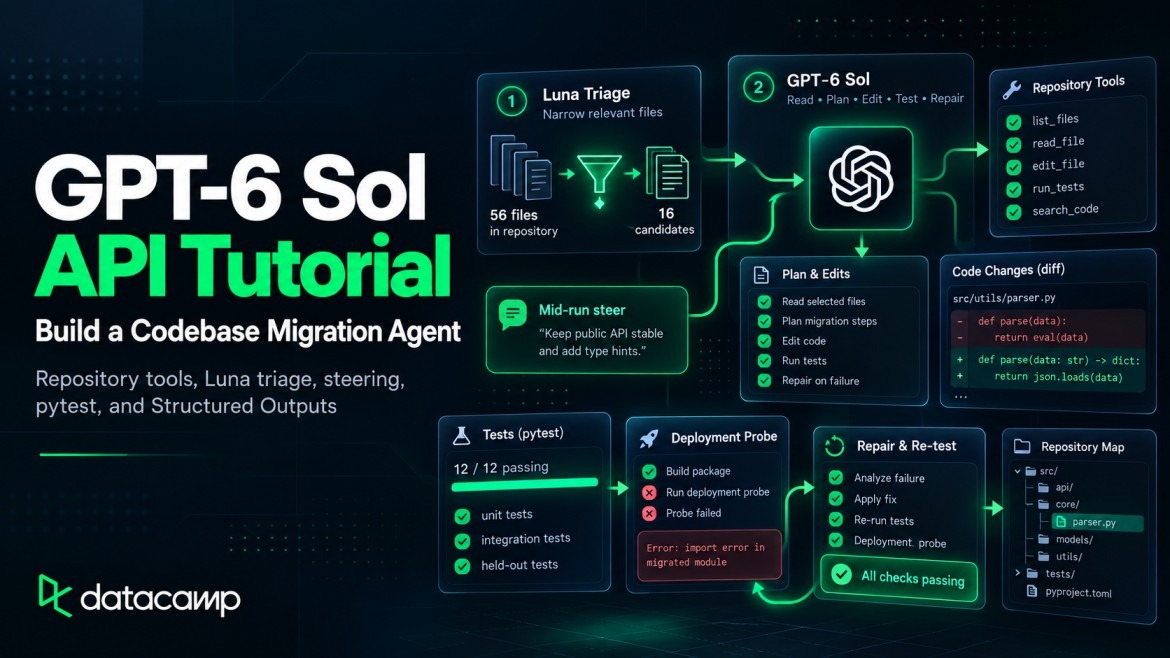
Here, we'll use GPT-6 Sol to migrate Northstar Checkout, a small fictional Python checkout service, from a local v1 payment adapter to v2.
More specifically, we'll cover how to:
Make a first GPT-6 Sol API call and read its usage fields
Define the migration contract before the model sees the repository
Give GPT-6 Sol restricted file and test tools, then stage access with allowed_tools
Use GPT-6 Luna for triage and make GPT-6 Sol verify the shortlist
Return a structured migration plan and check it against files already read by GPT-6 Sol
Run the migration over WebSocket and steer it after editing starts
Raise the reasoning effort after an independent deployment probe fails
Calculate the recorded cost from API usage
Four findings changed how I'd build the next version:
GPT-6 Sol is the middle tier of OpenAI's GPT-6 family, and its API model ID is gpt-6-sol. Our guide to the GPT-6 model tiers covers the launch and benchmarks. OpenAI's GPT-6 guidance places GPT-6 Astra first, GPT-6 Sol in the middle, and GPT-6 Luna lowest in cost.
GPT-6 Sol has a 1,050,000-token context window and returns up to 128,000 output tokens. Reasoning effort runs from none through max and defaults to medium. Chat Completions supports GPT-6 Sol's function calling only at none, so every request here uses the Responses API.
Pricing and API support determine how the harness sends each request.
GPT-6 Sol costs $2 per million input tokens and $10 per million output tokens for requests up to 272,000 input tokens, according to OpenAI's pricing page. Cached input costs $0.20 per million, and cache writes cost $2.50. GPT-6 Luna's rates for the same four categories are $0.10, $0.01, $0.125, and $0.50.
Above 272,000 input tokens, the whole request is billed at 2x the input and cache rates and 1.5x the output rate. No request in this project came close.
The harness, meaning the Python code around the model, uses these GPT-6 controls:
Mid-turn steering updates a response while it is running
configuration_update changes reasoning effort without rewriting the cached prefix
allowed_tools sets the callable subset for a request
Structured Outputs sets the fields in the plan and report
All four controls stay inside the same Responses API response chain.
We'll build an agent that moves Northstar Checkout from Payments Adapter v1 to v2. Both adapters are local stand-ins I wrote for this experiment, not real payment SDKs. The complete code, fixtures, and recorded run are in this GitHub repository.
The repository mixes payment code with unrelated modules, so GPT-6 Sol has to find the affected files itself. V2 breaks four adapter contracts:
Payment creation moves from client.charge(...) to client.payments.create(...)
Result dictionaries become typed objects with Money amounts
Declined cards return a state instead of raising an exception
Webhooks change their names, envelope, and signature header
Search-and-replace handles the method rename. It handles none of the behavior changes.
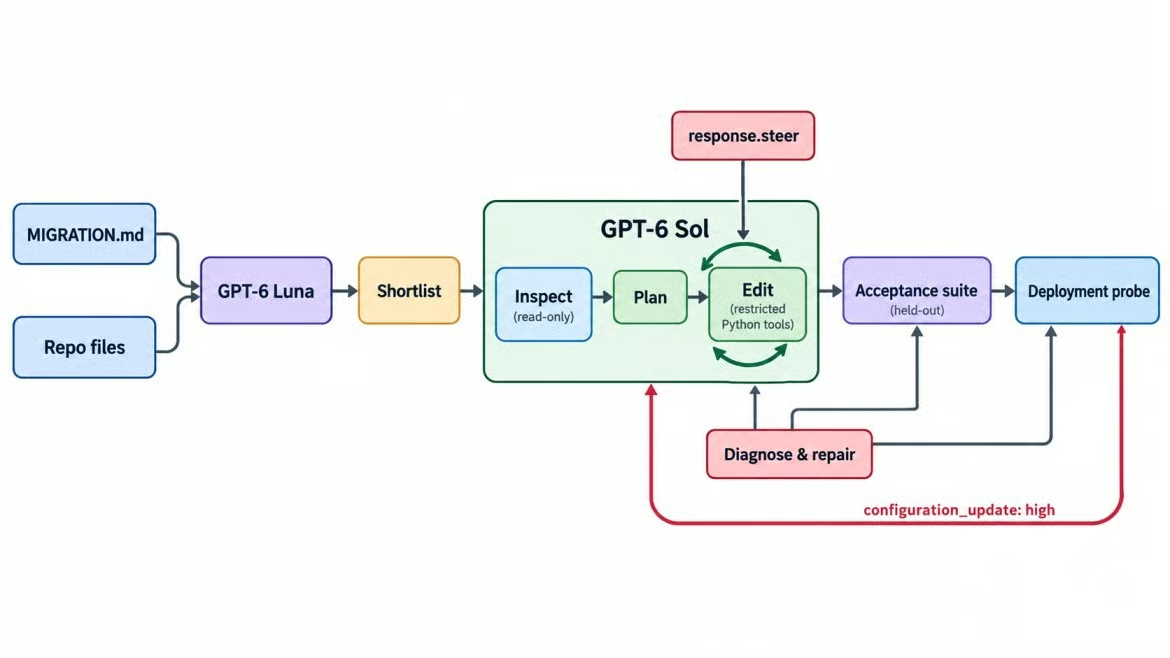
One migration loop, two GPT-6 models. Image by Author.
GPT-6 Sol gets the spec, the file tree, and restricted tools that become callable in stages. It doesn't know which files need changes or that a requirement will change.
Two parts of the spec are traps. Neither is a planted bug; both come from v2 behavior meeting existing code:
Idempotency. v2 compares parameters when it sees a repeated request_id, but checkout puts a fresh order_id in the metadata on every attempt, so a naive retry gets rejected instead of deduplicated.
Refund totals. v2's payment.refunded webhook reports the total refunded so far, while the old handler adds each value with +=.
Both survive a type checker. You only catch them by running checkout and refunds end to end.
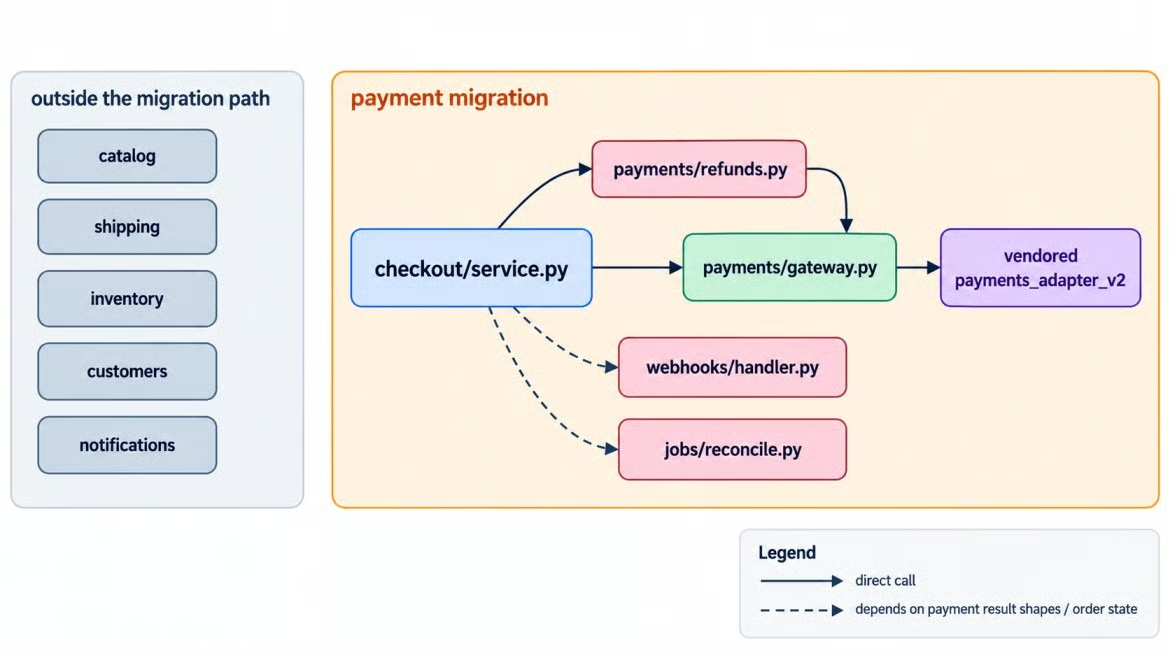
Payment changes cross several Northstar modules. Image by Author.
The map separates direct adapter imports from modules that depend on payment behavior. Those indirect links are why an answer key for the whole repository matters.
A held-out acceptance suite, written before any model call, decides the result. GPT-6 Sol never sees it; the harness runs it with pytest against the migrated copy. It checks that:
Checkout succeeds through v2, and a retry with the same idempotency key charges once
A declined card still raises the public CheckoutDeclined error
A full refund, two partial refunds, and a redelivered webhook all leave correct totals
CheckoutClient method signatures are unchanged
No v1 references remain, vendor/ and MIGRATION.md are untouched, and the visible tests pass
The original code already passes checks for unchanged interfaces and protected files; the remaining checks measure the migration. A separate answer key lists the required changes, but only the harness reads it.
The acceptance/ and probes/ directories sit outside the copied repository exposed to both models. The answer key lives under acceptance/, so it cannot enter GPT-6 Luna's input, the file tree, or any repository tool.
The read gate can return paths from GPT-6 Sol's own plan. The answer-key coverage result is recorded for evaluation only; it never sends missing ground-truth paths back to GPT-6 Sol.
A deployment probe runs after that suite. Neither check accepts the model's "done" message as evidence.
You need Python 3.10 or newer and an API key with access to both models. The requirements include the realtime extra that steering needs:
git clone https://github.com/KhalidAbdelaty/gpt-6-sol-api.git
cd gpt-6-sol-api
python -m venv .venv
.venv\Scripts\Activate.ps1
pip install -r requirements.txt
Copy-Item .env.example .env
On macOS or Linux, use source .venv/bin/activate and cp .env.example .env, then put OPENAI_API_KEY=... in .env.
If your key already works with the Responses API, skip the next subsection.
The smallest useful request confirms the key, the model ID, and the usage fields the cost section needs:
from dotenv import load_dotenv
from openai import OpenAI

load_dotenv()
client = OpenAI()
response = client.responses.create(
    model="gpt-6-sol",
    input="In one sentence, why is a breaking API migration harder than renaming a function?",
)
print(response.reasoning.effort, response.output_text)
print(response.usage)
The response reports medium effort, and usage includes cached_tokens and cache_write_tokens. Leave out temperature and top_p. Both return a 400 whenever effort isn't none.

First GPT-6 Sol request returns usage. Image by Author.
Start at medium, the default, and keep the request-level setting there for the whole run. Most migration turns are reads and small edits. The deployment probe later provides a reason to raise effort.
The tool layer owns the agent's permissions. GPT-6 Sol gets these function tools with strict: true:
list_files and search_code locate relevant code
read_file returns one repository file
edit_file changes one exact occurrence
run_tests executes an allowed pytest target
Strict schemas check argument shape, not path safety, so Python enforces the write boundary:
READ_ONLY = ("vendor/", "MIGRATION.md", "conftest.py")

if write:
    if rel_posix.startswith(READ_ONLY) or rel_posix in READ_ONLY:
        raise ToolError(f"{rel_posix} is read-only")  # the spec and both adapters
    if not rel_posix.startswith(("northstar/", "tests/")) or not rel_posix.endswith(".py"):
        raise ToolError("writes are limited to Python files under northstar/ and tests/")
The path is resolved first, so ../ and absolute paths fail. edit_file replaces one exact match, and run_tests accepts only targets under tests/.
The harness returns a blocked call as an ERROR: tool output, and the loop keeps going. Our agent harness engineering guide explains why these checks belong in the harness rather than the prompt.
Call each tool with an input it must reject:
A path containing ..
An absolute path
A write under vendor/
A test target containing a shell command
None should get through. An edit that matches more than one location should ask for more context, and keeping the rules in custom functions puts them in one testable place.
Repository triage is a narrow classification job: rate each file's relevance and quote v1 references. GPT-6 Luna gets this job and nothing else, and it runs first, before GPT-6 Sol has searched anything.
class FileVerdict(BaseModel):
    path: str
    relevance: Literal["high", "medium", "low", "none"]
    legacy_references: list[str]

triage = client.responses.parse(model="gpt-6-luna", input=spec_and_all_files,
                                text_format=TriageResult)  # a list of FileVerdict
The input is the spec plus every Python file under northstar/ and tests/. Anything rated high or medium goes on the shortlist GPT-6 Sol receives next.
Check the shortlist against the answer key from earlier, and look at recall first. GPT-6 Luna retained every affected file and added a few that didn't need changes.
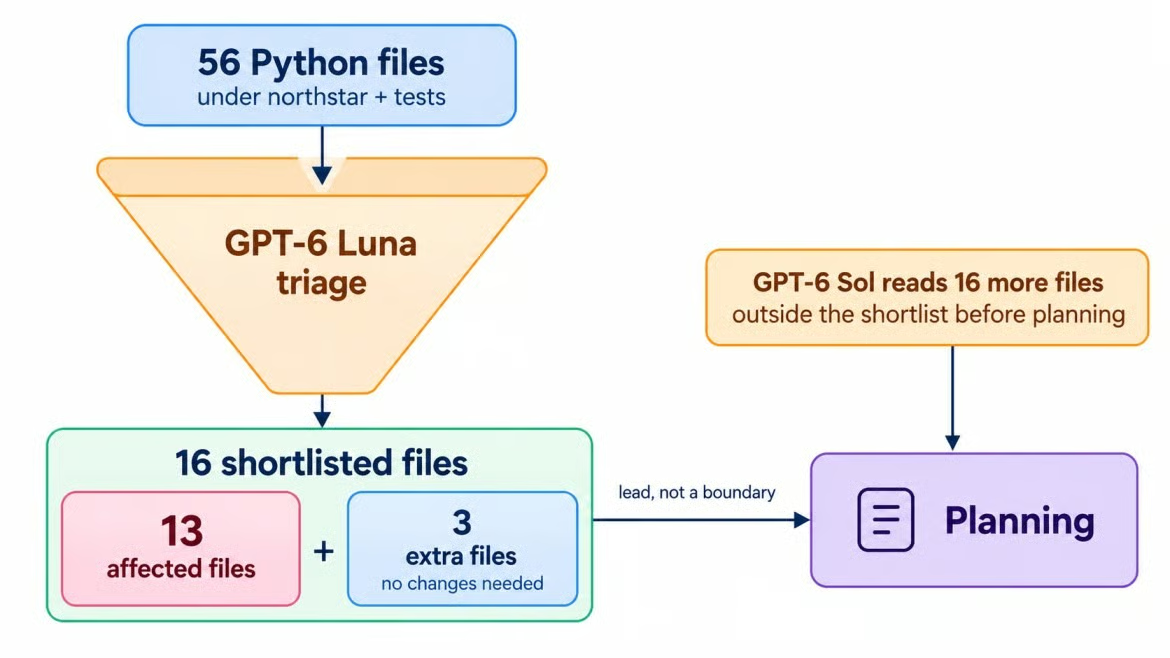
GPT-6 Luna narrows 56 to 16. Image by Author.
A shortlist is a lead, not a boundary.
allowed_tools for Staged Permissionsallowed_tools is a tool_choice mode that limits which tools the model can call while the full tool list stays in place. That's how GPT-6 Sol's first pass stays read-only: the full list is defined on every request, but only listing and searching are callable.
def allowed(names):
    return {"type": "allowed_tools", "mode": "auto",
            "tools": [{"type": "function", "name": n} for n in names]}

response = client.responses.create(
    model="gpt-6-sol", instructions=INSTRUCTIONS, tools=TOOLS,  # full list, every time
    tool_choice=allowed(["list_files", "search_code"]),
    reasoning={"effort": "medium"}, input=inspect_prompt, store=True,
)
Changing tools between phases rewrites the cached prefix. The function calling guide recommends allowed_tools when only the callable subset should change.
A read-only pass separates diagnosis from action. GPT-6 Sol got GPT-6 Luna's shortlist with a plain warning that it could be wrong, and its searches for v1 imports, charge calls, and webhook names surfaced every affected file on their own.
It also went past the list, flagging order models, the order store, serializers, and the ledger export as downstream dependencies to check. None of them turned out to require changes, but reading them is how you find that out. I'd keep allowed_tools for any agent that edits files.
A migration plan is where the agent commits to specific files before it gets write access. Planning adds read_file, and the plan comes back through Structured Outputs with tools switched off:
plan = client.responses.parse(
    model="gpt-6-sol", instructions=INSTRUCTIONS, tools=TOOLS, tool_choice="none",
    reasoning={"effort": "medium"}, previous_response_id=last_id,
    input=PLAN_REQUEST, text_format=MigrationPlan,  # files, evidence, risks
)
The plan covered every required change and warned that a fresh order ID would change v2 metadata on retry. That warning returns later.
Before granting write access, the harness checks the plan's structure, evidence, and coverage.
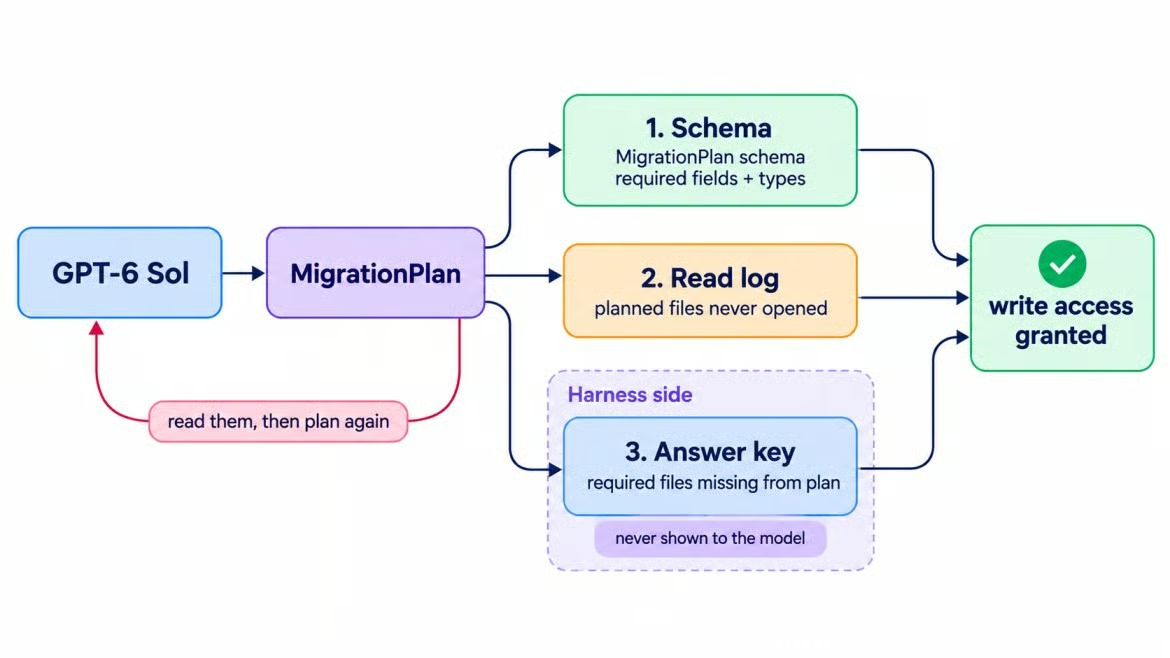
Three checks test one migration plan. Image by Author.
The plan passed each gate. It also proposed renaming a public client.py parameter to match v2's naming, which the spec's cleanup section suggested. That proposal becomes the steering test.
A GPT-6 Sol coding agent uses a tool loop: wait for a response, run its function calls, and return the outputs. Our OpenAI Responses API guide explains the request and tool-result formats. This migration keeps the loop on one WebSocket connection because steering needs it.
with client.responses.connect() as conn:
    conn.response.create(**base, previous_response_id=plan_id, input=[start_message])
    for event in conn:
        if event.type == "response.incomplete":
            reason = getattr(event.response.incomplete_details, "reason", None)
            if reason == "steered":
                continue  # keep reading for the automatic successor
            raise RuntimeError(reason or "response incomplete")
        if event.type != "response.completed":
            continue
        calls = [i for i in event.response.output if i.type == "function_call"]
        if not calls:
            break  # GPT-6 Sol says it's done here; the held-out tests decide whether it is
        outputs = [{"type": "function_call_output", "call_id": c.call_id,
                    "output": tools.run(c.name, c.arguments)} for c in calls]
        conn.response.create(**base, previous_response_id=event.response.id,
                             input=outputs)
base keeps the model, instructions, tools, and medium effort fixed for prompt caching. GPT-6 Sol ran the visible tests as it worked, but it also wrote most of the new tests, so they can't serve as an independent check.
Mid-turn steering adds an instruction to a response that's still running, without cancelling it. After response.created, you send response.steer on the same connection with that response's ID, and the server applies the instruction in a successor response.
The new requirement came from the storefront team: CheckoutClient signatures "must stay exactly as they are today," because another service calls them. I didn't want a timer to decide when that arrives, so the harness watches the repository instead. After each batch of tool calls, it compares the public signatures on disk with the originals, and the first difference arms the steer:
if steer_state == "idle" and signature_changes(repo):  # CheckoutClient, compared with ast
    steer_state = "armed"

if event.type == "response.created" and steer_state == "armed":
    conn.response.steer(previous_response_id=event.response.id, input=STEER_TEXT)
    steer_state = "sent"
That guarantees the steer lands after the rename it contradicts, which is the situation worth testing. Sent earlier, it's just a longer prompt.
The server then reported the steering lifecycle:
response.steer.accepted meant the update was queued, not applied
response.incomplete ended the original response with the reason steered
A successor response.created continued with the new requirement
If the response is waiting on a tool result, the server sends response.steer.pending and holds the steer until the harness returns it. Keep answering tool calls while a steer is pending.
Steering changes what the model does next. OpenAI's guide is direct about the rest: a steer doesn't rewrite output already sent, undo earlier actions, or cancel tools that have already started.
When the steer arrived, the rename was already on disk in client.py. GPT-6 Sol reverted it, and a held-out signature check later confirmed the final interface.
An edit can be reverted. A tool that had already called an external system would leave nothing to revert, so record the repository state when each steer arrives.
In this repository, yes, though not in one pass. The first migration met its original contract, then the deployment probe exposed a missing case.
When GPT-6 Sol reported the migration complete, the held-out suite passed without a repair round. For refunds, GPT-6 Sol replaced the addition with a cumulative read that also ignores out-of-order webhooks:
-        order.refunded_cents += data["amount_refunded"]
+        order.refunded_cents = max(order.refunded_cents, refunded["cents"])
For idempotency, GPT-6 Sol kept a fresh order_id per attempt and added a request cache in the order store that answers repeated requests before they reach v2. That cache lives in process memory, which matters in a moment.
Yes. The first report called an updated webhook test a regression and omitted the risk from retries across servers, even though the plan had named that trap.
Structured Outputs validates the schema, not those claims. Check report fields against recorded evidence, and do not treat an empty risk list as proof that no risk remains.
The suite missed a retry routed to another app instance. I added a deployment probe with two clients that share one payment processor but not their process memory.
The probe failed. The retry on the second instance raised payments_adapter_v2.IdempotencyConflict, an adapter exception the storefront was never meant to see.
Only a deployment with more than one process exposes this failure, which triggers the reasoning escalation.
A configuration_update input item changes reasoning effort for the next response and every later one, until another update replaces it. Request-level effort stays put, so the cached prefix survives. When the probe failed, the harness sent this request, following the reasoning guide:
The migration requests use store=True, so after the WebSocket closes the harness can continue the stored response chain with a regular Responses API request.
response = client.responses.create(
    model="gpt-6-sol", reasoning={"effort": "medium"},  # unchanged, so the prefix survives
    instructions=INSTRUCTIONS, tools=TOOLS, tool_choice=allowed(DIAGNOSE_TOOLS),
    previous_response_id=last_id,
    input=[{"type": "configuration_update", "reasoning": {"effort": "high"}},
           {"role": "user", "content": probe_failure + DIAGNOSE_FIRST}],
)
active_effort = "high"  # the harness records it; the response won't
GPT-6 Sol receives the failure and deployment shape, but no hint about the fix. DIAGNOSE_TOOLS allows reading and testing, not editing. Keeping tools and text.format unchanged preserves the cached prefix.
One API detail is annoying: response.reasoning.effort still reports the request-level setting after an update. The harness can't read the active effort back from the response, so it records the value itself when it sends the update and tags every later response with it.
high effort work?It did. GPT-6 Sol traced the failure to the second server's local store, then followed the fresh order ID into payment metadata. The shared processor saw different parameters for the same request_id.
The fix made the order ID a function of the request ID, so every server computes the same one:
-def new_order_id() -> str:
+def new_order_id(request_id: str | None = None) -> str:
+    if request_id:
+        stable = uuid.uuid5(uuid.NAMESPACE_URL, f"northstar.checkout.order:{request_id}")
+        return f"ord_{stable.hex[:12]}"
     return f"ord_{uuid.uuid4().hex[:12]}"
GPT-6 Sol also added a visible test for the case. The probe and acceptance suite passed, then a configuration_update returned effort to medium. The final report described the real failure accurately this time.
The project's Streamlit app replays the saved run without making API calls. The video moves from the overview to the steering events and then the acceptance and probe results.
Learn withi DataCamp
Kurs
Kurs
Kurs
blog
Dario Radečić
15 dk.
blog
Abid Ali Awan
14 dk.
Eğitim
Kurtis Pykes
8 dk.
Eğitim
Adel Nehme