
Course
Fine-Tuning with Llama 3
2 hr
4K
In this tutorial, we’ll explore FunctionGemma, a lightweight function-calling language model from Google DeepMind, and I’ll explain why fine-tuning is essential for achieving reliable and schema-compliant tool use.
We’ll begin by setting up a GPU-enabled Kaggle environment, then load and prepare both the dataset and the base FunctionGemma model.
Next, we’ll perform pre-fine-tuning evaluations to establish a baseline for tool selection and function-call accuracy. We’ll then fine-tune FunctionGemma using supervised training and evaluate its performance after training to verify that fine-tuning has been applied correctly.
If you’re looking for some hands-on exercises to help you learn fine-tuning, I recommend checking out the Fine-Tuning with Llama 3 course.
FunctionGemma is a specialized version of Google’s Gemma 3 270M open model, designed specifically for function calling and tool use rather than general conversation.
It uses the same architecture as Gemma 3 but includes a dedicated format and training focus that allows it to generate structured outputs representing function calls.
FunctionGemma is released as a base model that developers can fine-tune for specific use cases. Its size and design make it lightweight, efficient, and deployable on devices with limited resources, such as laptops and edge hardware.
Although FunctionGemma is trained for function calling, models of this size perform best when they are specialized through fine-tuning on task-specific data.
Fine-tuning helps the model learn stable patterns for selecting the correct function from a set of tools and formatting the corresponding arguments correctly for real use cases.
This process leads to more consistent and predictable structured outputs, which in turn improves reliability in practical workflows.
Let’s walk through the steps needed to fine-tune FunctionGemma.
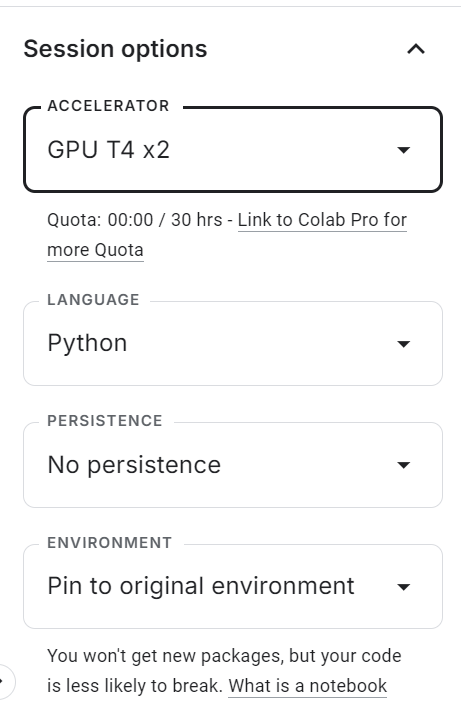
Start by going to Kaggle and creating a new notebook. Once the notebook is open, locate the Session options panel on the right-hand side and set the Accelerator to GPU (T4 ×2).
This enables GPU acceleration for the session and allows you to fine-tune the model using Kaggle’s free compute resources.
After enabling the GPU, create a new code cell and run the following command to install all required Python dependencies. The kernel may take a short while to start, after which the packages will be installed automatically.
%pip -q install -U datasets accelerate trl kagglehub sentencepiece huggingface_hub tqdm evaluate jiwerNext, add your Hugging Face access token securely.
From the top menu, open Add-ons → Secrets, then click Add Secret. Set the secret name to HUGGINGFACE_TOKEN and paste your Hugging Face API key as the value.
Using Kaggle Secrets is safer than hard-coding environment variables or tokens directly in the notebook.
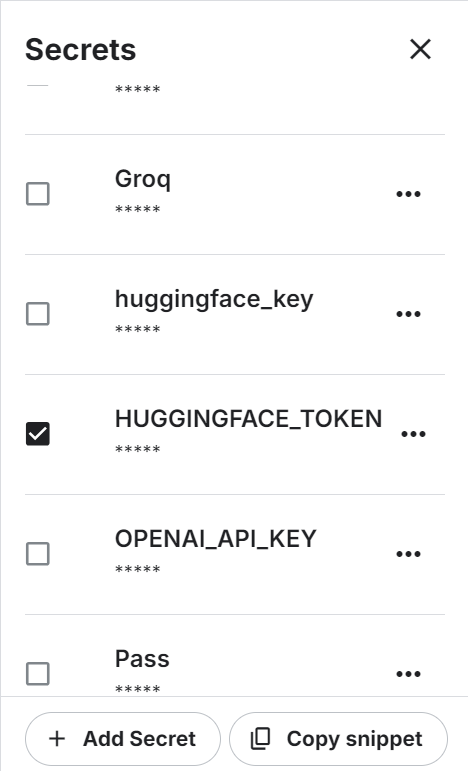
Once the secret is saved, Kaggle will provide a snippet to access it programmatically.
Use the following code to authenticate with the Hugging Face Hub:
from kaggle_secrets import UserSecretsClient
from huggingface_hub import login

hf_token = UserSecretsClient().get_secret("HUGGINGFACE_TOKEN")
if not hf_token:
    raise ValueError("HUGGINGFACE_TOKEN not found in Kaggle Secrets.")
login(token=hf_token)
After successful authentication, you will be able to access gated models and datasets, as well as push your fine-tuned FunctionGemma model to the Hugging Face Hub for sharing and reuse.
The Hermes Reasoning Tool-Use dataset is an open English dataset in a tool-use reasoning format with structured examples designed for training and evaluating models on tool selection and JSON-style function calling tasks.
It contains tens of thousands of tool-use reasoning samples with natural language prompts and tool schemas in a format suitable for supervised fine-tuning.
In this tutorial, we will use a subset of the dataset for faster experimentation.
First, define a random seed and the total number of examples to use. Then split the data into training and evaluation splits:
from datasets import load_dataset

SEED = 40
N_TOTAL = 3000
N_EVAL  = 300
N_TRAIN = N_TOTAL - N_EVAL
Next, load the dataset, shuffle it, and create the train and eval subsets:
raw = load_dataset("interstellarninja/hermes_reasoning_tool_use", split="train")
raw = raw.shuffle(seed=SEED).select(range(N_TOTAL))
train_ds = raw.select(range(N_TRAIN))
eval_ds  = raw.select(range(N_TRAIN, N_TOTAL))

print("train:", len(train_ds), "eval:", len(eval_ds))
This gives you 2,700 training samples and 300 evaluation samples, which are sufficient to demonstrate fine-tuning while keeping compute requirements manageable.
train: 2700 eval: 300In this tutorial, we use KaggleHub to load the FunctionGemma model directly into the Kaggle notebook.
KaggleHub automatically resolves the model location and makes it available in the notebook environment, removing the need for manual downloads from Hugging Face.
import kagglehub
from transformers import AutoProcessor, AutoModelForCausalLM

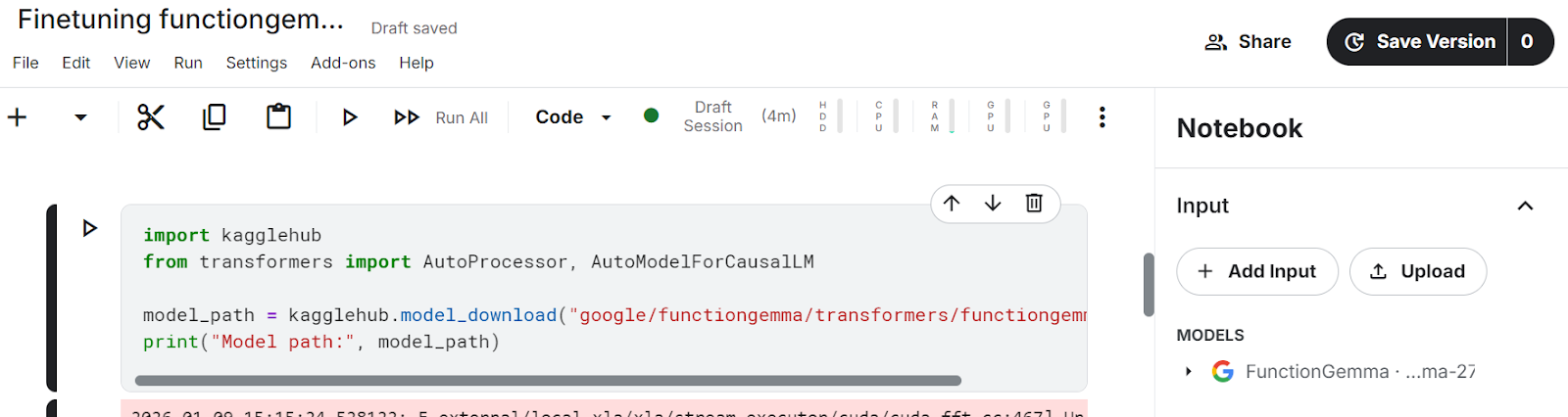
model_path = kagglehub.model_download("google/functiongemma/transformers/functiongemma-270m-it")
After running the cell above, the model files will appear in the Input section of the Kaggle notebook, confirming that the model has been successfully loaded and is available locally.
Once the model is available, we load both the processor and the model into GPU memory.
The processor handles chat templates and tool schema formatting, while the model is responsible for generating structured function calls.
Setting device_map="auto" ensures the model is placed on the available GPU, and dtype="auto" selects an efficient precision supported by the hardware.
processor = AutoProcessor.from_pretrained(model_path, device_map="auto")
model = AutoModelForCausalLM.from_pretrained(model_path, dtype="auto", device_map="auto")
tokenizer = processor.tokenizer if hasattr(processor, "tokenizer") else processor

print("dtype:", model.dtype, "| device:", model.device)
This confirms that FunctionGemma is loaded correctly, placed on the GPU, and ready for evaluation and fine-tuning.
dtype: torch.bfloat16 | device: cuda:1Before fine-tuning FunctionGemma, we need to standardize how tools are represented and reliably extract the correct (gold) function calls from the dataset.
The Hermes Reasoning Tool-Use dataset can store tool definitions in multiple formats, so this step converts everything into a consistent structure that we can use for supervised fine-tuning.
We start by normalizing the tools field. In the dataset, tools may appear as a Python list, a JSON string, or may be missing entirely.
The helper function below converts all valid representations into a clean Python list and safely ignores malformed or empty entries.
import re, json

def normalize_tools_field(tools):
    if tools is None:
        return []
    if isinstance(tools, list):
        return tools
    if isinstance(tools, str):
        s = tools.strip()
        if not s:
            return []
        try:
            parsed = json.loads(s)
            return parsed if isinstance(parsed, list) else []
        except Exception:
            return []
return []Next, we normalize parameter types. Hermes tool definitions often use informal type annotations such as str,int, or container types like List[str]. The function below converts these into valid JSON Schema types that are compatible with Hugging Face function calling.
def _parse_hermes_type(t) -> dict:
    if t is None:
        return {"type": "string"}
    if isinstance(t, dict):
        return t if "type" in t else {"type": "object"}
    if isinstance(t, list):
        return {"type": "array"}
    if not isinstance(t, str):
        return {"type": "string"}

    t = t.strip()
    prim = {
        "str": "string", "string": "string",
        "int": "integer", "integer": "integer",
        "float": "number", "number": "number",
        "bool": "boolean", "boolean": "boolean",
        "dict": "object", "object": "object",
        "list": "array", "array": "array",
    }
    if t.lower() in prim:
        return {"type": prim[t.lower()]}

    m = re.match(r"List\[(.+)\]$", t)
    if m:
        return {"type": "array", "items": _parse_hermes_type(m.group(1).strip())}

    m = re.match(r"Dict\[(.+),\s*(.+)\]$", t)
    if m:
        return {"type": "object", "additionalProperties": _parse_hermes_type(m.group(2).strip())}

return {"type": "string"}Using these utilities, we convert Hermes-style tool definitions into Hugging Face {"type": "function", "function": {...}} schemas. This function supports two formats:
For the per-argument format, this implementation treats listed parameters as required if a required list is not explicitly provided.
def hermes_tools_to_hf_schema(tools_field):
    """
    Handles both:
    - Hermes per-arg style: {"parameters": {"x":{"type":"str"}, ...}}
    - Already-JSON-schema style: {"parameters":{"type":"object","properties":...,"required":[...]}}
    """
    hermes_tools = normalize_tools_field(tools_field)
    out = []

    for tool in hermes_tools:
        if not isinstance(tool, dict):
            continue

        name = tool.get("name")
        desc = tool.get("description", "")
        params = tool.get("parameters", {}) or {}

        # If params already look like JSON schema (best case)
        if isinstance(params, dict) and "type" in params and "properties" in params:
            json_schema_params = params
            if "required" not in json_schema_params:
                json_schema_params["required"] = []
        else:
            props, req = {}, []
            if isinstance(params, dict):
                for p_name, p_spec in params.items():
                    p_spec = p_spec or {}
                    if isinstance(p_spec, dict):
                        p_desc = p_spec.get("description", "")
                        p_type = p_spec.get("type", "str")
                    else:
                        p_desc, p_type = "", "str"

                    frag = dict(_parse_hermes_type(p_type))
                    if p_desc:
                        frag["description"] = p_desc
                    props[p_name] = frag
                    req.append(p_name)

            json_schema_params = {"type": "object", "properties": props, "required": req}

        out.append({
            "type": "function",
            "function": {
                "name": name,
                "description": desc,
                "parameters": json_schema_params,
            }
        })

return outWe define a small helper to retrieve the converted tool schemas for each dataset example:
def get_tools_hf(ex):
return hermes_tools_to_hf_schema(ex.get("tools"))We then extract the gold tool call from the conversation. Hermes conversations may contain multiple turns, so we parse <tool_call>{...}</tool_call> blocks and extract the first valid tool call object (name + arguments). This keeps the supervision simple and consistent.
TOOL_CALL_RE = re.compile(r"<tool_call>\s*(\{.*?\})\s*</tool_call>", re.DOTALL)

def extract_first_tool_call_obj(text: str):
    if not text:
        return None
    m = TOOL_CALL_RE.search(text)
    if not m:
        return None
    try:
        obj = json.loads(m.group(1))
        if isinstance(obj, dict) and "name" in obj and "arguments" in obj:
            return obj
    except Exception:
        return None
return NoneTo align the tool call with the correct user task, we scan the conversation history, find the user message that matches the dataset task, and then take the assistant response immediately after it. If the assistant response contains a tool call, we return it as the gold label.
def _role(turn):
    return (turn.get("from") or "").lower().strip()

def get_gold_tool_call_task_aligned(ex):
    task = (ex.get("task") or "").strip()
    conv = ex.get("conversations") or []
    if not conv:
        return None

    idx = None
    if task:
        for i, t in enumerate(conv):
            if _role(t) in ["human", "user"]:
                val = (t.get("value") or "").strip()
                if val == task or task in val or val in task:
                    idx = i
                    break
    if idx is None:
        for i in range(len(conv)-1, -1, -1):
            if _role(conv[i]) in ["human", "user"]:
                idx = i
                break
    if idx is None:
        return None

    for j in range(idx+1, len(conv)):
        if _role(conv[j]) in ["gpt", "assistant", "model"]:
            gold = extract_first_tool_call_obj(conv[j].get("value", ""))
            if gold:
                return gold
        if _role(conv[j]) in ["human", "user"]:
            break
    return None
At the end of this step, each usable dataset example has:
Now we need to convert those into Supervised Fine-Tuning (SFT) training samples in the exact format FunctionGemma expects, using the above helper functions.
The goal is to create examples where the input contains:
And the target is a single, structured FunctionGemma call in this format:
<start_function_call>call:TOOL_NAME{args:<escape>{...}<escape>}<end_function_call>We start by iterating through the dataset and filtering out any examples that cannot be used for training.
This function keeps only examples where:
from datasets import Dataset

def build_simple_rows(ds, max_rows=None):
    rows = []
    for ex in ds:
        # 1) task-aligned gold tool call
        gold = get_gold_tool_call_task_aligned(ex)
        if not gold:
            continue

        # 2) tools -> HF schema
        hf_tools = get_tools_hf(ex)
        if not hf_tools:
            continue

        # 3) build required_map: tool_name -> required fields
        required_map = {}
        for t in hf_tools:
            if t.get("type") == "function":
                fn = t.get("function", {})
                name = fn.get("name")
                req = (fn.get("parameters", {}) or {}).get("required", []) or []
                if name:
                    required_map[name] = req

        # 4) guard: gold tool must be in tool list
        tool_names = set(required_map.keys())
        if gold["name"] not in tool_names:
            continue

        # 5) force {} when no required params
        gold_args = gold.get("arguments", {})
        if not isinstance(gold_args, dict):
            gold_args = {}

        req = required_map.get(gold["name"], [])
        if len(req) == 0:
            gold_args = {}  # key fix

        rows.append({
            "user_content": ex.get("task", ""),
            "tool_name": gold["name"],
            "tool_arguments": json.dumps(gold_args, ensure_ascii=False),
            "hf_tools": hf_tools,
        })

        if max_rows and len(rows) >= max_rows:
            break

    return rows
Now we generate training and evaluation rows:
simple_train = build_simple_rows(train_ds, max_rows=N_TRAIN)
simple_eval  = build_simple_rows(eval_ds,  max_rows=N_EVAL)
print("usable train:", len(simple_train), "usable eval:", len(simple_eval))
In our case, we end up with 961 training samples and 109 evaluation samples out of the original 3,000. This drop is expected because the filtering is strict. It removes examples with missing tool calls, invalid tool definitions, mismatched tool names, or malformed arguments.
usable train: 961 usable eval: 109This cleaning step matters a lot. Before applying it, the dataset contained noisy and misaligned samples, which led to unstable function-calling behavior and poor results even after fine-tuning. After filtering down to only high-quality, task-aligned examples, FunctionGemma becomes far more consistent, and the fine-tuning results improve significantly.
Next, we format each row into the exact prompt-plus-target structure FunctionGemma needs. We use the processor’s apply_chat_template to inject tool declarations correctly, then append the gold function call as the target.
def format_row_as_text(row):
    messages = [
        {"role": "developer", "content": "You are a model that can do function calling with the following functions"},
        {"role": "user", "content": row["user_content"]},
    ]
    prompt = processor.apply_chat_template(
        messages,
        tools=row["hf_tools"],
        add_generation_prompt=True,
        tokenize=False,
    )
    target = (
        f"<start_function_call>call:{row['tool_name']}"
        f"{{args:<escape>{row['tool_arguments']}<escape>}}"
        f"<end_function_call>"
    )
    return prompt + target
Now we convert the rows into Hugging Face Dataset objects:
train_text_ds = Dataset.from_list([{"text": format_row_as_text(r)} for r in simple_train])
eval_text_ds = Dataset.from_list([{"text": format_row_as_text(r)} for r in simple_eval])Some TRL versions require formatting_func to return a string, and training can break if any sample becomes a list or non-string value. This helper forces text to always be a clean string.
# ensure text is always a string
def force_text_string(ds):
    def fix(ex):
        t = ex.get("text", "")
        if isinstance(t, list):
            t = "\n".join(map(str, t))
        return {"text": str(t)}
    return ds.map(fix)

train_text_ds = force_text_string(train_text_ds)
eval_text_ds  = force_text_string(eval_text_ds)
Finally, print one sample to confirm formatting:
print(train_text_ds[0]["text"])You should see a fully rendered prompt containing tool declarations, followed by a gold function call similar to:
<bos><start_of_turn>developer
You are a model that can do function calling with the following functions<start_function_declaration>declaration:get_pollution_levels{description:<escape>Retrieve pollution levels information<escape>,parameters:{properties:{location:{description:<escape>The location for which you want to get the pollution levels (e.g., Beijing, London, New York)<escape>,type:<escape>STRING<escape>},pollutant:{description:<escape>Specify a pollutant for pollution levels (e.g., PM2.5, PM10, ozone)<escape>,type:<escape>STRING<escape>}},required:[<escape>location<escape>],type:<escape>DICT<escape>}}<end_function_declaration><start_function_declaration>declaration:get_water_quality{description:<escape>Retrieve water quality information<escape>,parameters:{properties:{location:{description:<escape>The location for which you want to get the water quality (e.g., river, lake, beach)<escape>,type:<escape>STRING<escape>}},required:[<escape>location<escape>],type:<escape>DICT<escape>}}<end_function_declaration><end_of_turn>
<start_of_turn>user
I'm planning a beach cleanup at Zuma Beach this weekend and need to ensure safety. Can you provide the current water quality and if it's poor, check the pollution level of PM2.5 there?<end_of_turn>
<start_of_turn>model
<start_function_call>call:get_water_quality{args:<escape>{"location": "Zuma Beach"}<escape>}<end_function_call>Before training, you should measure how well the base FunctionGemma model performs on function calling. This baseline helps you confirm that fine-tuning actually improves tool selection and function-call formatting.
In this section, we evaluate two things:
We use two regular expressions to extract the predicted tool name and the full function-call block from the model output, then compare them against the gold labels.
import re
import evaluate
import torch
from tqdm.auto import tqdm

cer_metric = evaluate.load("cer")

# Gemma / FunctionGemma-style only
FG_BLOCK_RE = re.compile(r"<start_function_call>.*?<end_function_call>", re.DOTALL)
FG_NAME_RE  = re.compile(r"call:([a-zA-Z0-9_]+)\{", re.DOTALL)

def extract_tool_name(gen: str):
    gen = gen or ""
    m = FG_NAME_RE.search(gen)
    return m.group(1) if m else None

def extract_call_block(gen: str):
    gen = gen or ""
    m = FG_BLOCK_RE.search(gen)
    return m.group(0) if m else ""

def gold_call_block(r):
    return (
        f"<start_function_call>call:{r['tool_name']}"
        f"{{args:<escape>{r['tool_arguments']}<escape>}}"
        f"<end_function_call>"
)The function below runs inference on a subset of evaluation examples and computes both metrics. We keep sampling disabled (do_sample=False) to make results deterministic and easier to compare before and after fine-tuning.
@torch.inference_mode()
def eval_tool_and_cer(proc, mdl, rows, n=50, max_new_tokens=128):
    mdl.eval()
    n = min(n, len(rows))
    tool_ok = 0
    preds, refs = [], []

    for i in tqdm(range(n)):
        r = rows[i]
        messages = [
            {"role": "developer", "content": "You are a model that can do function calling with the following functions"},
            {"role": "user", "content": r["user_content"]},
        ]

        inputs = proc.apply_chat_template(
            messages,
            tools=r["hf_tools"],
            add_generation_prompt=True,
            return_dict=True,
            return_tensors="pt",
        )
        inputs = {k: v.to(mdl.device) for k, v in inputs.items()}

        out = mdl.generate(
            **inputs,
            do_sample=False,
            max_new_tokens=max_new_tokens,
            pad_token_id=proc.eos_token_id,
        )

        gen = proc.decode(out[0][inputs["input_ids"].shape[-1]:], skip_special_tokens=True).strip()

        if extract_tool_name(gen) == r["tool_name"]:
            tool_ok += 1

        preds.append(extract_call_block(gen))
        refs.append(gold_call_block(r))

    return {
        "n_eval": n,
        "tool_accuracy": tool_ok / n,
        "TC-CER (lower is better)": cer_metric.compute(predictions=preds, references=refs),
    }
Run the baseline evaluation:
pre_metrics = eval_tool_and_cer(processor, model, simple_eval, n=50, max_new_tokens=128)
print("PRE metrics:", pre_metrics)
Even before fine-tuning, FunctionGemma shows strong baseline performance on this task.
On a subset of 50 evaluation examples, the model achieves 88% tool-name accuracy, meaning it selects the correct function in the majority of cases.
In addition, the Tool-Call Character Error Rate (TC-CER) is approximately 33% for the full function-call block, indicating that while the correct tool is often chosen, the generated arguments and formatting still deviate from the gold target.
PRE metrics: {'n_eval': 50, 'tool_accuracy': 0.88, 'TC-CER (lower is better)': 0.33399307273626916}These results confirm that the base FunctionGemma model already understands the mechanics of function calling.
However, the relatively high character error rate highlights the need for fine-tuning to improve argument completeness, formatting consistency, and overall structural correctness of the generated function calls.
Metrics are useful, but it is also important to look at qualitative outputs. The helper below runs inference for one example and prints the predicted function call alongside the gold reference.
import torch

@torch.inference_mode()
def infer_one(proc, mdl, rows, idx=0, max_new_tokens=128):
    r = rows[idx]

    messages = [
        {"role": "developer", "content": "You are a model that can do function calling with the following functions"},
        {"role": "user", "content": r["user_content"]},
    ]

    inputs = proc.apply_chat_template(
        messages,
        tools=r["hf_tools"],
        add_generation_prompt=True,
        return_dict=True,
        return_tensors="pt",
    )
    inputs = {k: v.to(mdl.device) for k, v in inputs.items()}

    out = mdl.generate(
        **inputs,
        do_sample=False,
        max_new_tokens=max_new_tokens,
        pad_token_id=proc.eos_token_id,
    )

    gen = proc.decode(
        out[0][inputs["input_ids"].shape[-1]:],
        skip_special_tokens=True
    ).strip()

    pred_tool = extract_tool_name(gen)

    return {
        "task": r["user_content"],
        "tool_match": (pred_tool == r["tool_name"]),
        "predicted": extract_call_block(gen),
        "gold": gold_call_block(r),
    }
Run it on one example:
pre = infer_one(processor, model, simple_eval, idx=15)


print(f"""
TASK:
{pre['task']}

TOOL MATCH: {pre['tool_match']}

--- PREDICTED ---
{pre['predicted']}

--- GOLD ---
{pre['gold']}
""")
Output:
TASK:
I'm reviewing the schedule in the surgical unit. Can you fetch the surgical nursing details for patient ID 12345 undergoing a 'Cardiac Bypass' today? If the procedure is handled by Nurse Ratched, let's record a post-operative care task for this evening.

TOOL MATCH: True

--- PREDICTED ---
<start_function_call>call:get_surgical_nursing_information{nurse_id:<escape>Ratched<escape>,patient_id:<escape>12345<escape>,procedure_type:<escape>Cardiac Bypass<escape>}<end_function_call>

--- GOLD ---
<start_function_call>call:get_surgical_nursing_information{args:<escape>{"patient_id": "12345", "procedure_type": "Cardiac Bypass"}<escape>}<end_function_call>
In this example, the model correctly selects the appropriate function, which is why the tool match is True.
However, the generated call includes extra arguments and does not follow the exact target structure used in training.
While these arguments are semantically reasonable, they do not match the gold function call format, which contributes to a higher character error rate. This illustrates why fine-tuning is needed to improve structural consistency and schema compliance, not just tool selection.
Now that we have clean SFT datasets, the next step is to configure the trainer that will fine-tune FunctionGemma. We use TRL’s SFTTrainer, which is a lightweight and reliable way to fine-tune chat-style models on text examples.
We also set an output directory so Kaggle saves the fine-tuned checkpoint to a persistent location.
from trl import SFTConfig, SFTTrainer

OUT_DIR = "/kaggle/working/functiongemma-hermes-ft"
To reduce VRAM usage during training, we enable gradient checkpointing and disable the KV cache.
# VRAM savings
model.gradient_checkpointing_enable()
model.config.use_cache = FalseWe define the training configuration using SFTConfig. These settings are chosen to balance stability and efficiency on Kaggle GPUs, while keeping training time short.
cfg = SFTConfig(
    output_dir=OUT_DIR,
    max_length=512,
    packing=False,
    num_train_epochs=1,
    per_device_train_batch_size=2,
    gradient_accumulation_steps=8,
    learning_rate=5e-5,
    lr_scheduler_type="cosine",
    warmup_ratio=0.03,
    logging_steps=10,
    eval_strategy="steps",
    eval_steps=10,
    report_to="none",
    fp16=(model.dtype == torch.float16),
    bf16=(model.dtype == torch.bfloat16),
    optim="adamw_torch_fused",
)
The formatting function ensures that each training example is returned as a single string, which is required by the current TRL version.
def formatting_func(example):
    # MUST return a STRING (not list) for your TRL version
    t = example.get("text", "")
    if isinstance(t, list):
        t = "\n".join(map(str, t))
return str(t)Finally, we initialize the SFTTrainer with the model, configuration, datasets, and tokenizer.
trainer = SFTTrainer(
    model=model,
    args=cfg,
    train_dataset=train_text_ds,
    eval_dataset=eval_text_ds,
    processing_class=tokenizer,
    formatting_func=formatting_func,
)With the trainer configured, we can now start fine-tuning the model. This step runs supervised training on the prepared dataset and evaluates the model periodically during training.
trainer.train()
trainer.save_model(OUT_DIR)
processor.save_pretrained(OUT_DIR)
print("Saved to:", OUT_DIR)
After training completes, we save both the fine-tuned model and the processor to the output directory so they can be reused for inference or uploaded to the Hugging Face Hub.
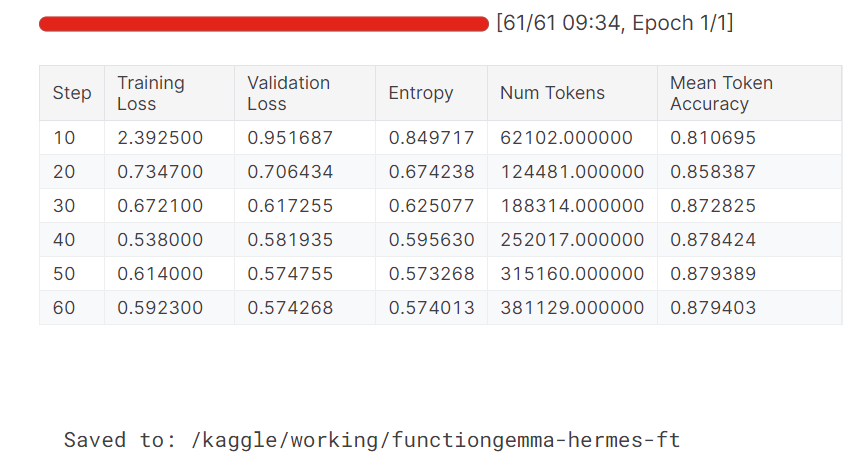
During training, both the training and validation loss decrease steadily. The mean token accuracy also improves over time, indicating that the model has successfully learned to produce more accurate and consistent function-call outputs.
Once fine-tuning is complete, we can publish the model so it can be reused, shared, or deployed easily. Pushing the model to the Hugging Face Hub allows others to load it directly using standard Transformers APIs.
HF_REPO_ID = "kingabzpro/functiongemma-hermes-3k-ft"
model.push_to_hub(HF_REPO_ID)
processor.push_to_hub(HF_REPO_ID)
print("Pushed to:", HF_REPO_ID)
After the upload completes, the fine-tuned model is publicly available on Hugging Face:
Pushed to: kingabzpro/functiongemma-hermes-3k-ft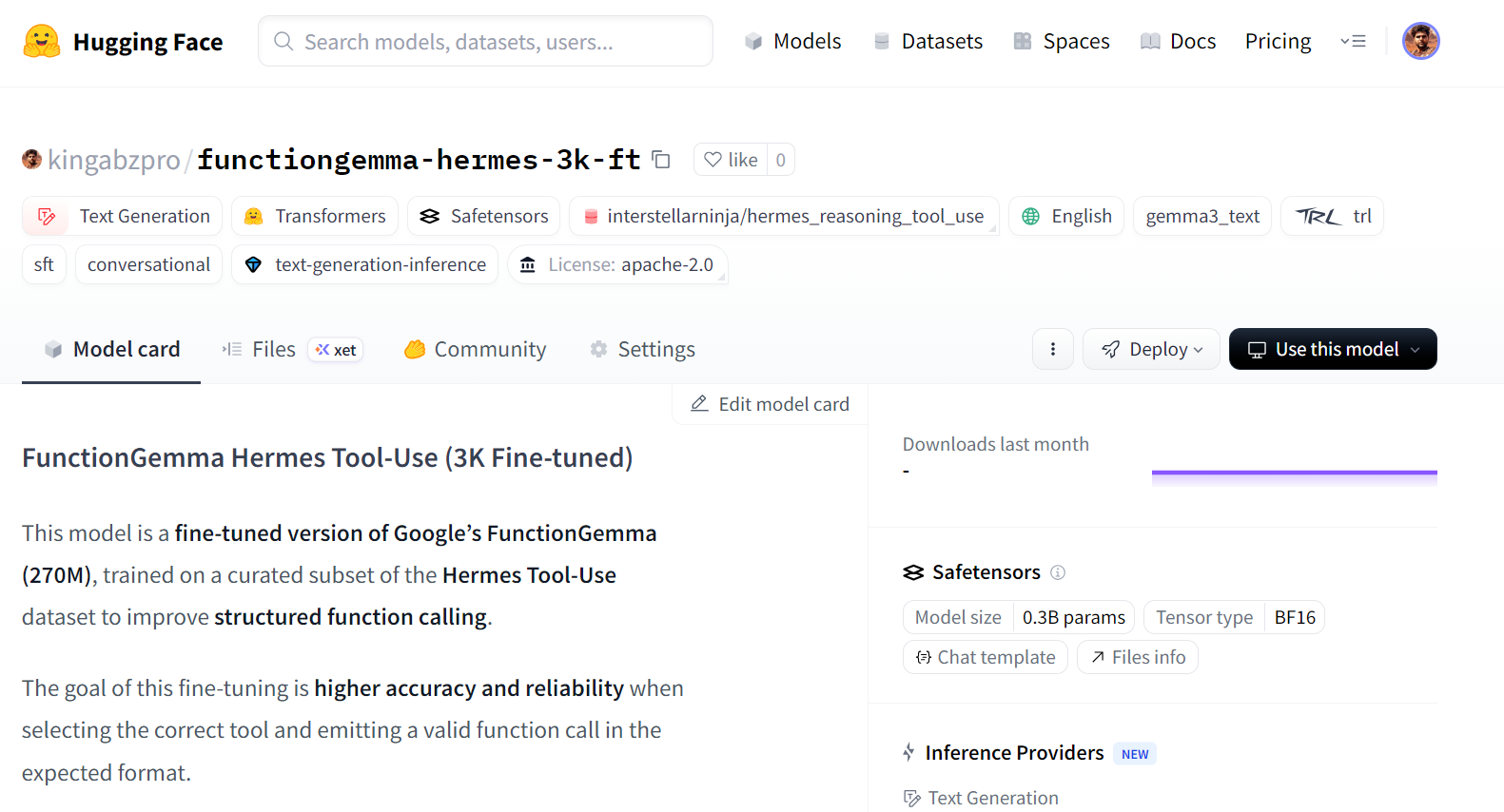
Source: kingabzpro/functiongemma-hermes-3k-ft · Hugging Face
After fine-tuning completes, we reload the saved model and processor from disk and run the same evaluation pipeline used before training. This ensures that the comparison between pre- and post-fine-tuning performance is fair and consistent.
from transformers import AutoProcessor, AutoModelForCausalLM

ft_processor = AutoProcessor.from_pretrained(OUT_DIR, device_map="auto")
ft_model = AutoModelForCausalLM.from_pretrained(OUT_DIR, dtype="auto", device_map="auto")
We then evaluate the fine-tuned model on the evaluation set using tool-name accuracy and TC-CER.
post_metrics = eval_tool_and_cer(ft_processor, ft_model, simple_eval, n=50, max_new_tokens=64)
print("POST metrics:", post_metrics)
The results show a clear improvement over the baseline:
POST metrics: {'n_eval': 50, 'tool_accuracy': 0.98, 'TC-CER (lower is better)': 0.1454725383473528}Tool-name accuracy improves from 88 percent to 98 percent, and the character error rate for the full function-call block is reduced by more than half. This indicates that the model not only selects the correct tool more reliably, but also produces outputs that more closely match the target schema.
To better understand the improvements, we inspect individual predictions. In the example below, the model selects the correct function and produces a well-structured call with more complete arguments.
post = infer_one(ft_processor, ft_model, simple_eval, idx=15)

print(f"""
TASK:
{post['task']}

TOOL MATCH: {pre['tool_match']}

--- PREDICTED ---
{post['predicted']}

--- GOLD ---
{post['gold']}
""")
Although the predicted call may include additional arguments that go beyond the gold target, the overall structure and argument formatting are significantly more consistent than before fine-tuning. This reflects improved schema awareness and stronger alignment between user intent and generated function calls.
TASK:
I'm reviewing the schedule in the surgical unit. Can you fetch the surgical nursing details for patient ID 12345 undergoing a 'Cardiac Bypass' today? If the procedure is handled by Nurse Ratched, let's record a post-operative care task for this evening.

TOOL MATCH: True

--- PREDICTED ---
<start_function_call>call:get_surgical_nursing_information{args:<escape>{"patient_id": "12345", "procedure_type": "Cardiac Bypass", "nurse_id": "Ratched", "task": "Post-operative care"}<escape>}<end_function_call>

--- GOLD ---
<start_function_call>call:get_surgical_nursing_information{args:<escape>{"patient_id": "12345", "procedure_type": "Cardiac Bypass"}<escape>}<end_function_call>
Let’s explore another sample.
post = infer_one(ft_processor, ft_model, simple_eval, idx=25)

print(f"""
TASK:
{post['task']}

TOOL MATCH: {pre['tool_match']}

--- PREDICTED ---
{post['predicted']}

--- GOLD ---
{post['gold']}
""")
A second example shows a clean and correct function call for a URL extraction task, demonstrating that the fine-tuned model generalizes well across different tools.
TASK:
I would like to extract details from a LinkedIn company page. Could you assist me in fetching the information from this URL: https://www.linkedin.com/company/abc-corporation?

TOOL MATCH: True

--- PREDICTED ---
<start_function_call>call:extract{args:<escape>{"url": "https://www.linkedin.com/company/abc-corporation"}<escape>}<end_function_call>

--- GOLD ---
<start_function_call>call:extract{args:<escape>{"url": "https://www.linkedin.com/company/abc-corporation", "html": true}<escape>}<end_function_call>
Overall, these results confirm that fine-tuning successfully improves both accuracy and structural correctness for function-calling tasks.
The full Kaggle notebook for this tutorial is available at:https://www.kaggle.com/code/kingabzpro/finetuning-functiongemma
If you encounter any issues, you can clone the notebook, add your Hugging Face secret, and run it end-to-end.
If you are trying to train FunctionGemma on generic text-generation datasets, it is best to stop early. FunctionGemma is not designed to behave like a general-purpose language model.
For open-ended text generation, the Gemma 3 model family is a better choice.
FunctionGemma is purpose-built for function calling, where the goal is to select the correct tool, produce schema-compliant arguments, and interact reliably with external systems such as APIs, databases, and services.
FunctionGemma’s small size is a deliberate design choice. At 270 million parameters, it is optimized for low-latency, resource-efficient deployments, including local machines, edge devices, and private infrastructure. This makes it well-suited for real-time function calling and agentic workflows, where correctness and structure matter more than fluent prose.
In this tutorial, we learned how to fine-tune FunctionGemma on the Hermes Reasoning Tool-Use dataset. A key takeaway is that data preparation and evaluation matter more than raw training time.
By carefully cleaning the dataset, aligning tasks with gold tool calls, and enforcing strict schema consistency, we were able to dramatically improve model behavior with a relatively small number of high-quality samples.
The results clearly show the impact of fine-tuning. Tool-name accuracy improved from 88 percent to 98 percent, and the character error rate for full function-call blocks was reduced by more than half. More importantly, the model became far more consistent in producing well-structured, predictable function calls that align with real-world usage.
Top DataCamp Courses
Course
Course
Course
Tutorial
Abid Ali Awan
11 min
Tutorial
Abid Ali Awan
12 min
Tutorial
Abid Ali Awan
Tutorial
Abid Ali Awan
Tutorial
Abid Ali Awan
12 min
Tutorial
Abid Ali Awan
12 min