
Khóa học
Làm việc với Llama 3
2 giờ
15.7K
Llama 4 Scout được quảng bá là có cửa sổ ngữ cảnh khổng lồ 10 triệu token, nhưng quá trình huấn luyện của nó bị giới hạn ở kích thước đầu vào tối đa 256k token. Điều này có nghĩa hiệu năng có thể suy giảm với đầu vào lớn. Để ngăn điều đó, chúng ta có thể dùng Llama 4 cùng pipeline retrieval-augmented generation (RAG).
Trong hướng dẫn này, tôi sẽ giải thích từng bước cách xây dựng một pipeline RAG bằng hệ sinh thái LangChain và tạo một ứng dụng web cho phép người dùng tải tài liệu lên và đặt câu hỏi về chúng.
Chúng tôi luôn cập nhật cho độc giả những tin tức AI mới nhất qua The Median, bản tin miễn phí mỗi thứ Sáu tóm lược các câu chuyện chính trong tuần. Đăng ký và nắm bắt thông tin chỉ trong vài phút mỗi tuần:
Llama 4 có cửa sổ ngữ cảnh 10 triệu token, nghĩa là ta có thể nạp vào 100 cuốn sách và nhận câu trả lời có ngữ cảnh về chúng. Tuy nhiên, dù tính năng này rất ấn tượng, vẫn có những lý do thuyết phục để ghép Llama 4 với RAG. Lý do như sau:
Dù Llama 4 hỗ trợ cửa sổ ngữ cảnh cực lớn, quá trình huấn luyện chỉ dùng tối đa 256k token đầu vào. Hiệu năng của mô hình có thể suy giảm khi đầu vào tiến gần hoặc vượt ngưỡng này. RAG khắc phục bằng cách chỉ truy xuất thông tin liên quan nhất, đảm bảo đầu vào ngắn gọn và tập trung.
RAG cho phép truy xuất thông tin có mức liên quan cao từ cơ sở dữ liệu vector, giúp Llama 4 xử lý các đầu vào nhỏ gọn và có mục tiêu hơn. Cách tiếp cận này cải thiện cả hiệu quả lẫn độ chính xác.
Xử lý đầu vào khổng lồ với toàn bộ cửa sổ ngữ cảnh của Llama 4 có thể tốn kém tài nguyên tính toán. Với RAG, chỉ dữ liệu liên quan nhất được truy xuất và xử lý, giúp giảm đáng kể tải tính toán và chi phí đi kèm.
Trong hướng dẫn này, tôi sẽ giải thích từng bước cách xây dựng một pipeline retrieval-augmented generation đơn giản cho phép bạn tải tệp .docx và đặt câu hỏi về nội dung của nó.
Trước tiên, chúng ta cần tạo khóa API GroqCloud và lưu dưới dạng biến môi trường. Tiếp theo, chúng ta sẽ cài tất cả gói Python cần thiết để tải, tách, vector hóa và truy xuất ngữ cảnh, cũng như tạo phản hồi.
%%capture
%pip install langchain
%pip install langchain-community
%pip install langchainhub
%pip install langchain-chroma
%pip install langchain-groq
%pip install langchain-huggingface
%pip install unstructured[docx]Chúng ta sẽ thiết lập đối tượng mô hình bằng Groq API, cung cấp tên mô hình và khóa API. Tương tự, ta sẽ tải mô hình embedding từ Hugging Face và nạp làm mô hình embedding của chúng ta.
from langchain_groq import ChatGroq
from langchain_huggingface import HuggingFaceEmbeddings

llm = ChatGroq(model="meta-llama/llama-4-scout-17b-16e-instruct", api_key=groq_api_key)

embed_model = HuggingFaceEmbeddings(model_name="mixedbread-ai/mxbai-embed-large-v1")Chúng ta sẽ tải tệp .docx từ thư mục gốc và tách thành các đoạn 1000 ký tự.
from langchain_community.document_loaders import DirectoryLoader
from langchain.text_splitter import RecursiveCharacterTextSplitter

# Initialize the text splitter
text_splitter = RecursiveCharacterTextSplitter(
    chunk_size=1000,
    chunk_overlap=100,
    separators=["\n\n", "\n"]
)

# Load the .docx files
loader = DirectoryLoader("./", glob="*.docx", use_multithreading=True)
documents = loader.load()

# Split the documents into chunks
chunks = text_splitter.split_documents(documents)

# Print the number of chunks
print(len(chunks))29Khởi tạo Chroma vector store và cung cấp các đoạn văn bản cho cơ sở dữ liệu vector. Văn bản sẽ được chuyển thành embedding trước khi lưu. Sau đó, ta sẽ chạy tìm kiếm tương đồng để kiểm tra vector store đã được nạp đúng chưa.
from langchain_chroma import Chroma

vectorstore = Chroma.from_documents(
    documents=chunks,
    embedding=embed_model,
    persist_directory="./Vectordb",
)

query = "What is this tutorial about?"
docs = vectorstore.similarity_search(query)
print(docs[0].page_content)
Learn how to Fine-tune Stable Diffusion XL with DreamBooth and LoRA on your personal images.
Let's try another prompt:
Prompt:Tiếp theo, chúng ta sẽ chuyển vector store thành retriever và tạo mẫu nhắc (prompt template) cho pipeline RAG.
# Create retriever
retriever = vectorstore.as_retriever()

# Import PromptTemplate
from langchain_core.prompts import PromptTemplate

# Define a clearer, more professional prompt template
template = """You are an expert assistant tasked with answering questions based on the provided documents.
Use only the given context to generate your answer.
If the answer cannot be found in the context, clearly state that you do not know.
Be detailed and precise in your response, but avoid mentioning or referencing the context itself.

Context:
{context}

Question:
{question}

Answer:"""

# Create the PromptTemplate
rag_prompt = PromptTemplate.from_template(template)
Cuối cùng, chúng ta sẽ tạo RAG chain cung cấp cả ngữ cảnh và câu hỏi vào prompt RAG, truyền qua mô hình Llama 4, rồi tạo phản hồi sạch.
from langchain_core.output_parsers import StrOutputParser
from langchain_core.runnables import RunnablePassthrough

rag_chain = (
    {"context": retriever, "question": RunnablePassthrough()}
    | rag_prompt
    | llm
    | StrOutputParser()
)
Giờ chúng ta sẽ hỏi RAG chain về tài liệu.
from IPython.display import display, Markdown

response = rag_chain.invoke("What this tutorial about?")
Markdown(response)
This tutorial is about setting up and using the Janus project, specifically Janus Pro, a multimodal model that can understand images and generate images from text prompts, and building a local solution to use the model privately on a laptop GPU. It covers learning about the Janus Series, setting up the Janus project, building a Docker container to run the model locally, and testing its capabilities with various image and text prompts.Như bạn thấy, phản hồi rất chính xác và có nhận thức ngữ cảnh. Nếu gặp vấn đề khi chạy đoạn mã trên, vui lòng tham khảo workbook DataLab này: Pipeline RAG với Llama 4.
Trong phần này, chúng ta sẽ chuyển mã pipeline RAG ở trên thành một ứng dụng chat hoạt động bằng gói Gradio. Để bắt đầu, bạn cần cài Gradio với lệnh pip sau:
$ pip install gradioỨng dụng được thiết kế đơn giản, dễ dùng, cho phép người dùng tải một tệp .docx, nhiều tệp .docx, hoặc một tệp .zip chứa các tệp .docx. Người dùng sau đó có thể đặt câu hỏi về nội dung của tất cả các tệp đã tải lên, mang lại cách truy xuất thông tin nhanh chóng và hiệu quả.
Ứng dụng bao gồm:
Hãy ghép mọi thứ lại với nhau:
main.py:
# ========== Standard Library ==========
import os
import tempfile
import zipfile
from typing import List, Optional, Tuple, Union
import collections


# ========== Third-Party Libraries ==========
import gradio as gr
from groq import Groq
from langchain.text_splitter import RecursiveCharacterTextSplitter
from langchain_community.document_loaders import DirectoryLoader, UnstructuredFileLoader
from langchain_core.output_parsers import StrOutputParser
from langchain_core.prompts import PromptTemplate
from langchain_core.runnables import RunnablePassthrough
from langchain_core.vectorstores import InMemoryVectorStore
from langchain_groq import ChatGroq
from langchain_huggingface import HuggingFaceEmbeddings

# ========== Configs ==========
TITLE = """<h1 align="center">🗨️🦙 Llama 4 Docx Chatter</h1>"""
AVATAR_IMAGES = (
    None,
    "./logo.png",
)

# Acceptable file extensions
TEXT_EXTENSIONS = [".docx", ".zip"]

# ========== Models & Clients ==========
GROQ_API_KEY = os.getenv("GROQ_API_KEY")
client = Groq(api_key=GROQ_API_KEY)
llm = ChatGroq(model="meta-llama/llama-4-scout-17b-16e-instruct", api_key=GROQ_API_KEY)
embed_model = HuggingFaceEmbeddings(model_name="mixedbread-ai/mxbai-embed-large-v1")

# ========== Core Components ==========
text_splitter = RecursiveCharacterTextSplitter(
    chunk_size=1000,
    chunk_overlap=100,
    separators=["\n\n", "\n"],
)

rag_template = """You are an expert assistant tasked with answering questions based on the provided documents.
Use only the given context to generate your answer.
If the answer cannot be found in the context, clearly state that you do not know.
Be detailed and precise in your response, but avoid mentioning or referencing the context itself.
Context:
{context}
Question:
{question}
Answer:"""
rag_prompt = PromptTemplate.from_template(rag_template)


# ========== App State ==========
class AppState:
    vectorstore: Optional[InMemoryVectorStore] = None
    rag_chain = None


state = AppState()

# ========== Utility Functions ==========


def load_documents_from_files(files: List[str]) -> List:
    """Load documents from uploaded files directly without moving."""
    all_documents = []

    # Temporary directory if ZIP needs extraction
    with tempfile.TemporaryDirectory() as temp_dir:
        for file_path in files:
            ext = os.path.splitext(file_path)[1].lower()

            if ext == ".zip":
                # Extract ZIP inside temp_dir
                with zipfile.ZipFile(file_path, "r") as zip_ref:
                    zip_ref.extractall(temp_dir)

                # Load all docx from extracted zip
                loader = DirectoryLoader(
                    path=temp_dir,
                    glob="**/*.docx",
                    use_multithreading=True,
                )
                docs = loader.load()
                all_documents.extend(docs)

            elif ext == ".docx":
                # Load single docx directly
                loader = UnstructuredFileLoader(file_path)
                docs = loader.load()
                all_documents.extend(docs)

    return all_documents


def get_last_user_message(chatbot: List[Union[gr.ChatMessage, dict]]) -> Optional[str]:
    """Get last user prompt."""
    for message in reversed(chatbot):
        content = (
            message.get("content") if isinstance(message, dict) else message.content
        )
        if (
            message.get("role") if isinstance(message, dict) else message.role
        ) == "user":
            return content
    return None


# ========== Main Logic ==========


def upload_files(
    files: Optional[List[str]], chatbot: List[Union[gr.ChatMessage, dict]]
):
    """Handle file upload - .docx or .zip containing docx."""
    if not files:
        return chatbot

    file_summaries = []  # <-- Collect formatted file/folder info
    documents = []

    with tempfile.TemporaryDirectory() as temp_dir:
        for file_path in files:
            filename = os.path.basename(file_path)
            ext = os.path.splitext(file_path)[1].lower()

            if ext == ".zip":
                file_summaries.append(f"📦 **{filename}** (ZIP file) contains:")
                try:
                    with zipfile.ZipFile(file_path, "r") as zip_ref:
                        zip_ref.extractall(temp_dir)
                        zip_contents = zip_ref.namelist()

                        # Group files by folder
                        folder_map = collections.defaultdict(list)
                        for item in zip_contents:
                            if item.endswith("/"):
                                continue  # skip folder entries themselves
                            folder = os.path.dirname(item)
                            file_name = os.path.basename(item)
                            folder_map[folder].append(file_name)

                        # Format nicely
                        for folder, files_in_folder in folder_map.items():
                            if folder:
                                file_summaries.append(f"📂 {folder}/")
                            else:
                                file_summaries.append(f"📄 (root)")
                            for f in files_in_folder:
                                file_summaries.append(f"   - {f}")

                    # Load docx files extracted from ZIP
                    loader = DirectoryLoader(
                        path=temp_dir,
                        glob="**/*.docx",
                        use_multithreading=True,
                    )
                    docs = loader.load()
                    documents.extend(docs)

                except zipfile.BadZipFile:
                    chatbot.append(
                        gr.ChatMessage(
                            role="assistant",
                            content=f"❌ Failed to open ZIP file: {filename}",
                        )
                    )

            elif ext == ".docx":
                file_summaries.append(f"📄 **{filename}**")
                loader = UnstructuredFileLoader(file_path)
                docs = loader.load()
                documents.extend(docs)

            else:
                file_summaries.append(f"❌ Unsupported file type: {filename}")

    if not documents:
        chatbot.append(
            gr.ChatMessage(
                role="assistant", content="No valid .docx files found in upload."
            )
        )
        return chatbot

    # Split documents
    chunks = text_splitter.split_documents(documents)
    if not chunks:
        chatbot.append(
            gr.ChatMessage(
                role="assistant", content="Failed to split documents into chunks."
            )
        )
        return chatbot

    # Create Vectorstore
    state.vectorstore = InMemoryVectorStore.from_documents(
        documents=chunks,
        embedding=embed_model,
    )
    retriever = state.vectorstore.as_retriever()

    # Build RAG Chain
    state.rag_chain = (
        {"context": retriever, "question": RunnablePassthrough()}
        | rag_prompt
        | llm
        | StrOutputParser()
    )

    # Final display
    chatbot.append(
        gr.ChatMessage(
            role="assistant",
            content="**Uploaded Files:**\n"
            + "\n".join(file_summaries)
            + "\n\n✅ Ready to chat!",
        )
    )
    return chatbot


def user_message(
    text_prompt: str, chatbot: List[Union[gr.ChatMessage, dict]]
) -> Tuple[str, List[Union[gr.ChatMessage, dict]]]:
    """Add user's text input to conversation."""
    if text_prompt.strip():
        chatbot.append(gr.ChatMessage(role="user", content=text_prompt))
    return "", chatbot


def process_query(
    chatbot: List[Union[gr.ChatMessage, dict]],
) -> List[Union[gr.ChatMessage, dict]]:
    """Process user's query through RAG pipeline."""
    prompt = get_last_user_message(chatbot)
    if not prompt:
        chatbot.append(
            gr.ChatMessage(role="assistant", content="Please type a question first.")
        )
        return chatbot

    if state.rag_chain is None:
        chatbot.append(
            gr.ChatMessage(role="assistant", content="Please upload documents first.")
        )
        return chatbot

    chatbot.append(gr.ChatMessage(role="assistant", content="Thinking..."))

    try:
        response = state.rag_chain.invoke(prompt)
        chatbot[-1].content = response
    except Exception as e:
        chatbot[-1].content = f"Error: {str(e)}"

    return chatbot


def reset_app(
    chatbot: List[Union[gr.ChatMessage, dict]],
) -> List[Union[gr.ChatMessage, dict]]:
    """Reset application state."""
    state.vectorstore = None
    state.rag_chain = None
    return [
        gr.ChatMessage(
            role="assistant", content="App reset! Upload new documents to start."
        )
    ]


# ========== UI Layout ==========

with gr.Blocks(theme=gr.themes.Soft()) as demo:
    gr.HTML(TITLE)
    chatbot = gr.Chatbot(
        label="Llama 4 RAG",
        type="messages",
        bubble_full_width=False,
        avatar_images=AVATAR_IMAGES,
        scale=2,
        height=350,
    )

    with gr.Row(equal_height=True):
        text_prompt = gr.Textbox(
            placeholder="Ask a question...", show_label=False, autofocus=True, scale=28
        )
        send_button = gr.Button(
            value="Send",
            variant="primary",
            scale=1,
            min_width=80,
        )
        upload_button = gr.UploadButton(
            label="Upload",
            file_count="multiple",
            file_types=TEXT_EXTENSIONS,
            scale=1,
            min_width=80,
        )
        reset_button = gr.Button(
            value="Reset",
            variant="stop",
            scale=1,
            min_width=80,
        )

    send_button.click(
        fn=user_message,
        inputs=[text_prompt, chatbot],
        outputs=[text_prompt, chatbot],
        queue=False,
    ).then(fn=process_query, inputs=[chatbot], outputs=[chatbot])

    text_prompt.submit(
        fn=user_message,
        inputs=[text_prompt, chatbot],
        outputs=[text_prompt, chatbot],
        queue=False,
    ).then(fn=process_query, inputs=[chatbot], outputs=[chatbot])

    upload_button.upload(
        fn=upload_files, inputs=[upload_button, chatbot], outputs=[chatbot], queue=False
    )
    reset_button.click(fn=reset_app, inputs=[chatbot], outputs=[chatbot], queue=False)

demo.queue().launch()Bây giờ, chúng ta sẽ chạy ứng dụng web và kiểm thử các chức năng của nó. Để khởi động ứng dụng, chạy lệnh sau trong terminal:
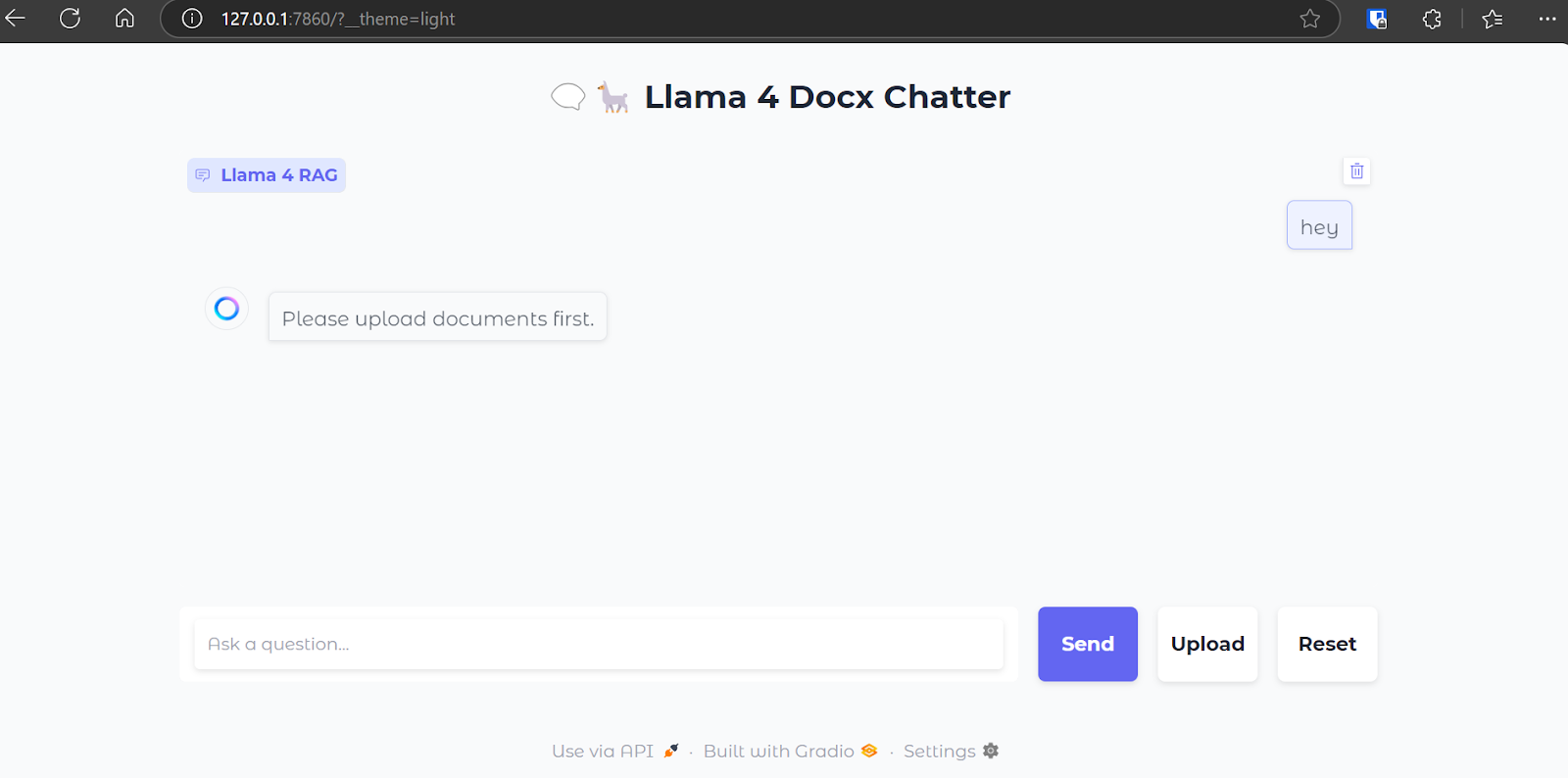
$ python main.py Khi máy chủ web đã chạy, hãy truy cập URL sau hoặc sao chép và dán thủ công vào trình duyệt để mở giao diện web: http://127.0.0.1:7860
Giao diện chat của chúng ta trông như sau:
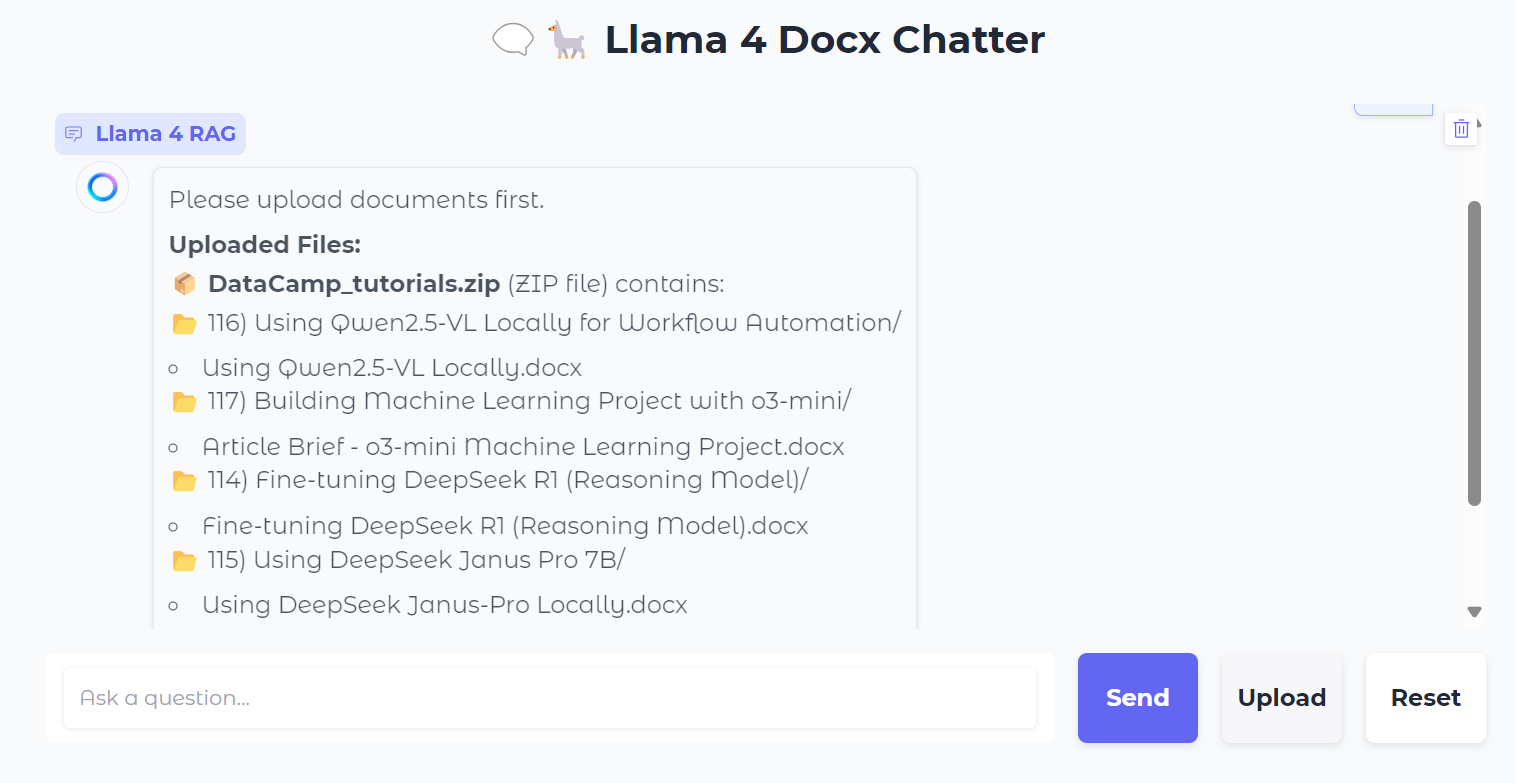
Chúng ta sẽ tải lên một tệp .zip chứa các tệp .docx, và khi làm vậy, bạn sẽ thấy tất cả thư mục và tệp trong file zip.
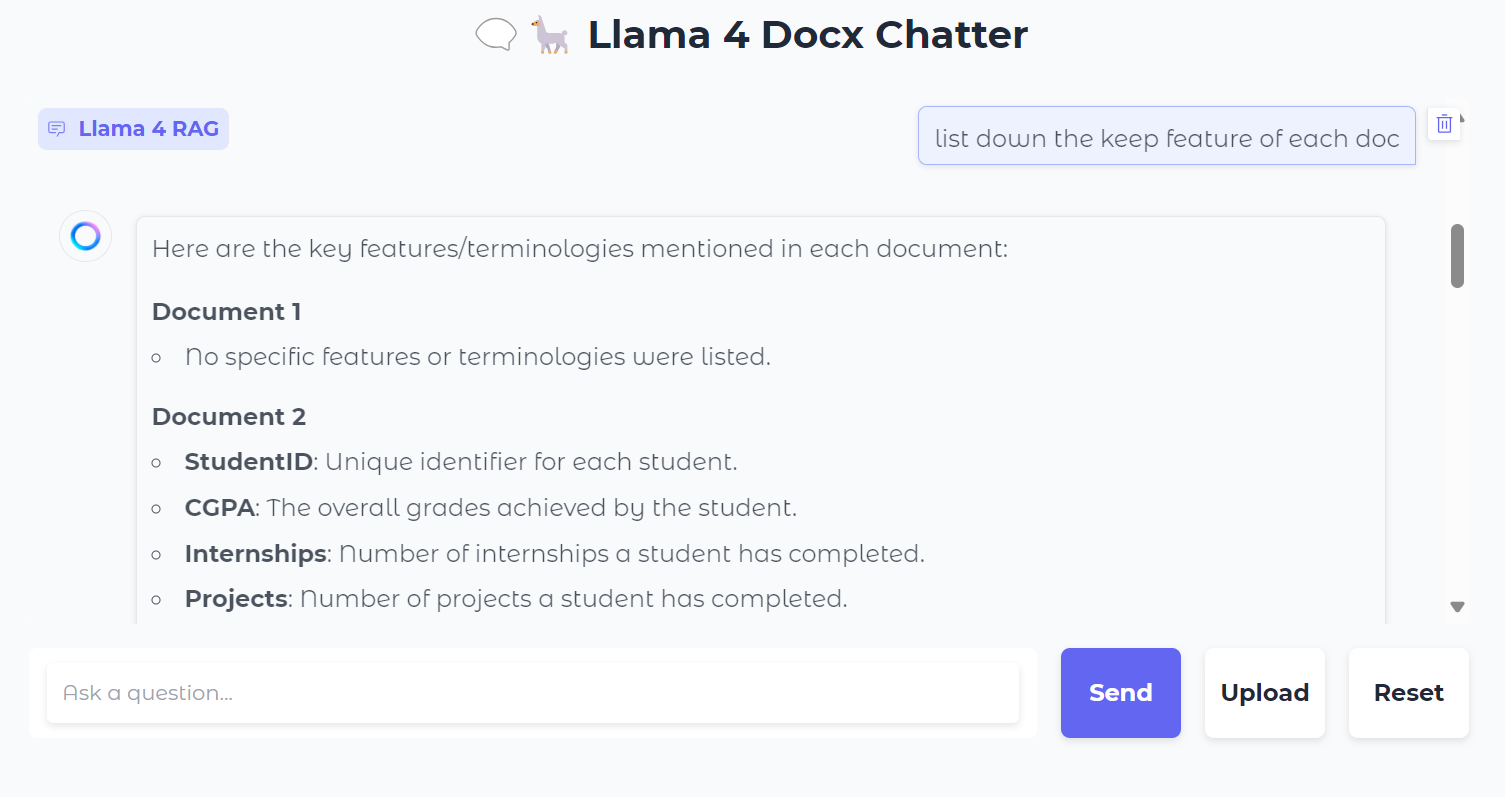
Tiếp theo, ta có thể hỏi các câu cụ thể về tài liệu:
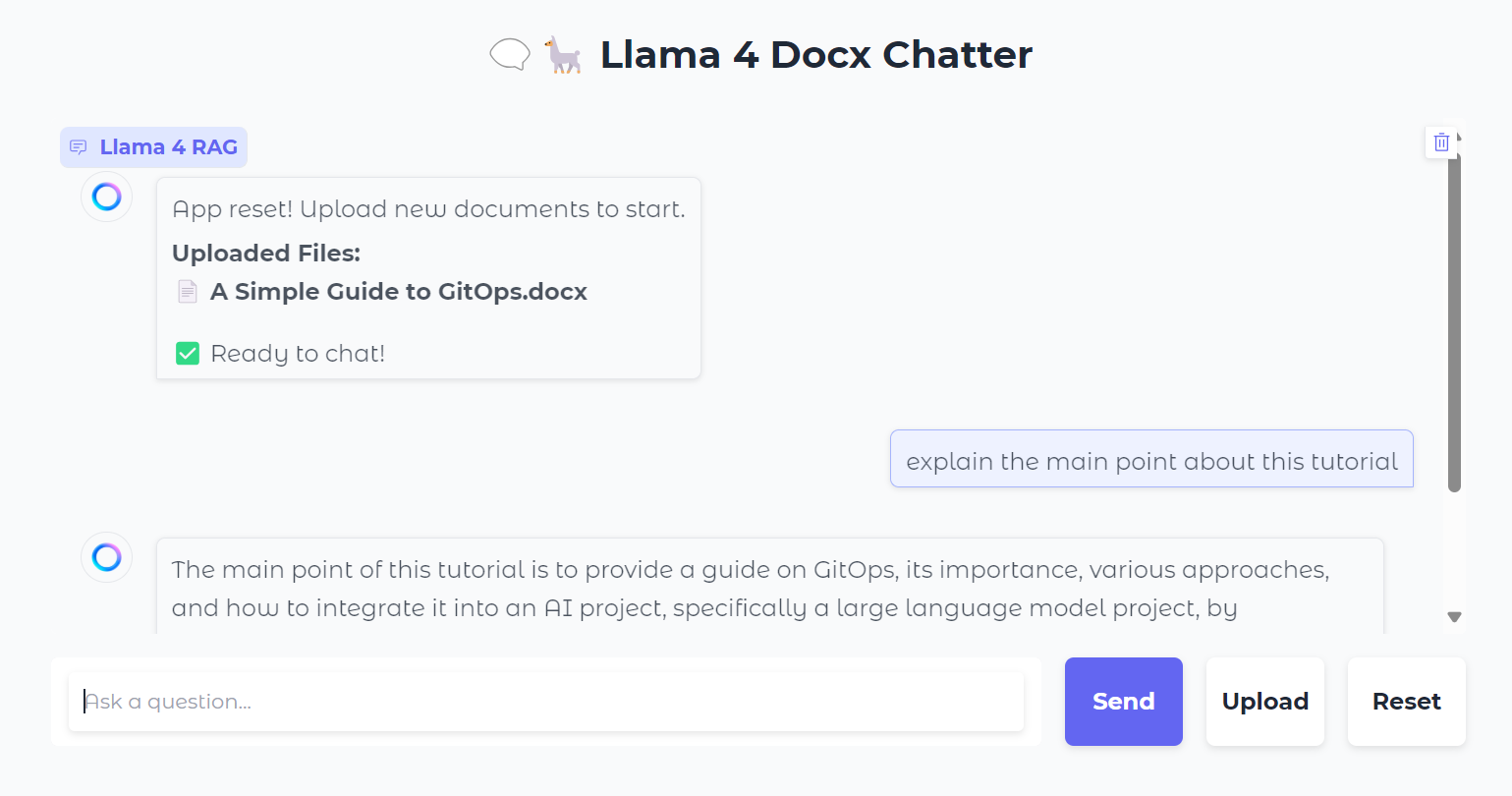
Bạn cũng có thể nhấn nút “Reset” để tải tệp mới và trò chuyện về nó chỉ trong vài giây.
Sau khi kiểm thử cục bộ, bạn có thể dễ dàng triển khai ứng dụng web lên Hugging Face Space miễn phí. Đây là liên kết đến ứng dụng đã triển khai: kingabzpro/Llama-4-RAG
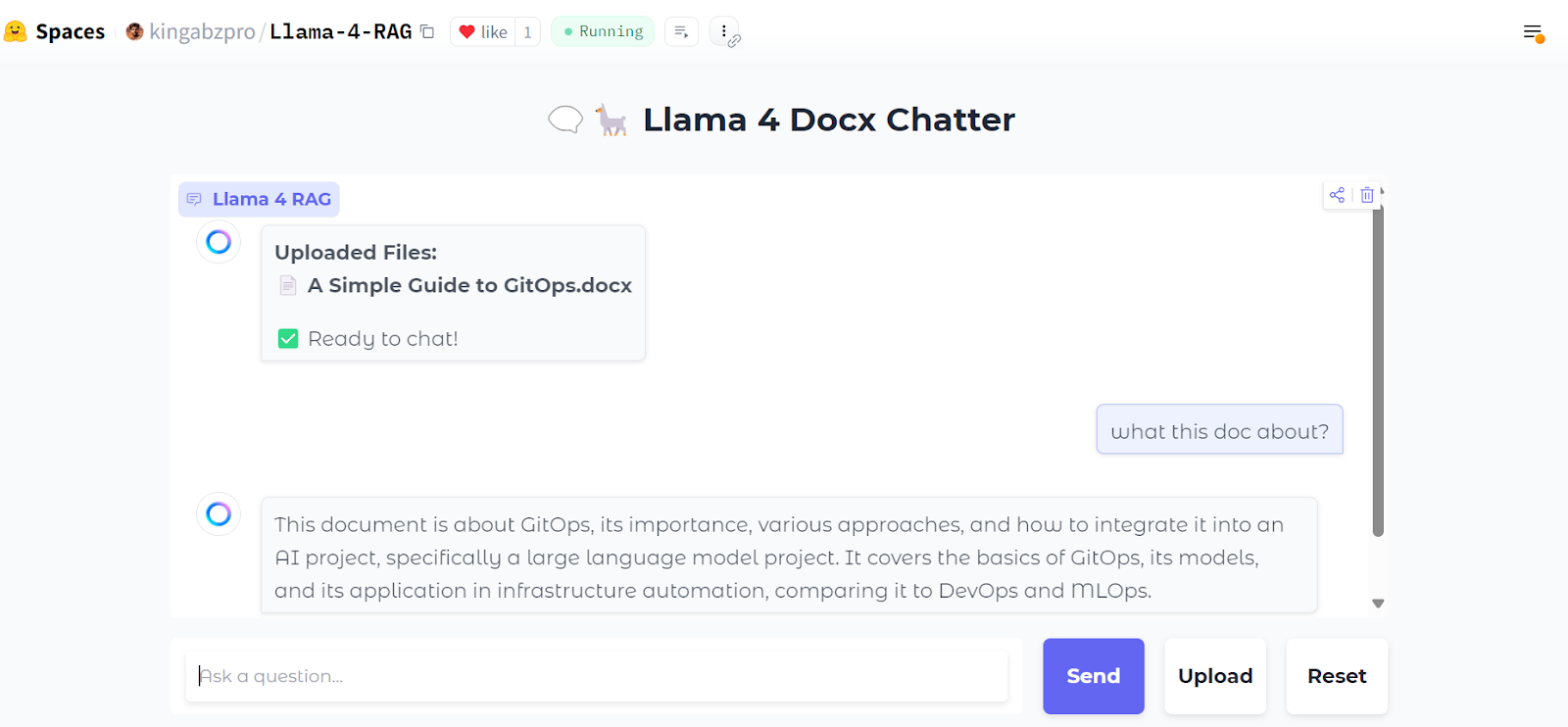
Nguồn: kingabzpro/Llama-4-RAG
Mã nguồn, notebook và các tệp cấu hình có tại kho kingabzpro/Llama-4-RAG.
Ngay cả khi các mô hình có cửa sổ ngữ cảnh dài xuất hiện, RAG sẽ không bao giờ lỗi thời. RAG vẫn là phương pháp hiệu quả và tiết kiệm để truy xuất thông tin từ nguồn bên ngoài, cung cấp ngữ cảnh bổ sung cho mô hình.
Hơn nữa, vận hành hệ thống RAG vốn dĩ kinh tế hơn so với việc nạp trực tiếp ngữ cảnh đồ sộ vào mô hình, vốn đòi hỏi tài nguyên tính toán đáng kể. Điều này khiến RAG trở thành giải pháp thực tiễn và có khả năng mở rộng cho nhiều trường hợp sử dụng.
Để tìm hiểu thêm về Llama 4, hãy xem các tài nguyên sau:
Học AI với những khóa học này!
Khóa học
Khóa học
Lộ trình
blog
Matt Crabtree
10 phút
