Course
Containerization and Virtualization Concepts
2 hr
21.7K
In the container ecosystem, a common source of confusion arises when developers compare Docker (a comprehensive platform) to containerd, which is actually a focused runtime component. This comparison is like comparing a complete automobile to its engine: both are essential, but they serve different purposes at different levels of abstraction.
In this guide, I will clarify the relationship between these two technologies, exploring their architectures, Kubernetes integration, and the specific scenarios where each tool excels. Whether you're building containers locally or managing production Kubernetes clusters, understanding when to use Docker versus containerd can significantly impact your infrastructure decisions.
By the end of this article, you'll have a clear understanding of how Docker and containerd complement each other, and how to choose the right tool for your specific needs, whether that's rapid local development or large-scale production deployments.
If you are new to containerization, I highly recommend taking our Containerization and Virtualization Concepts course.
Docker revolutionized the software development landscape by making containerization accessible and practical for everyday developers. As a comprehensive platform, Docker provides everything needed to build, ship, and run containerized applications.
For beginners, this Practical Guide to Containers provides a great primer on Docker and containers.
Docker functions as an all-in-one container platform, offering an integrated tooling stack that covers most of the container lifecycle. At its core, Docker packages applications with all their dependencies into portable, self-contained images that can run consistently across any environment, from a developer's laptop to production servers.
This comprehensive approach has made Docker the industry standard for local development and developer experience. Some of the key benefits include:
Docker's architecture consists of several interconnected components that work together seamlessly.
The Docker CLI provides the user-facing interface where developers issue commands. When you run a command like docker run, the CLI communicates with the Docker daemon (dockerd), which serves as the core service that manages containers, images, networks, and volumes.
For Windows and macOS users, Docker Desktop provides an additional layer of convenience with a graphical interface, making container management accessible even to those less comfortable with command-line tools. This integrated environment includes everything needed for local development, from Kubernetes support to volume management.
The typical workflow follows a clear pattern:
What many developers don't realize is that Docker doesn't execute containers directly. Instead, dockerd delegates the actual container execution to containerd, which runs in the background as a separate process.
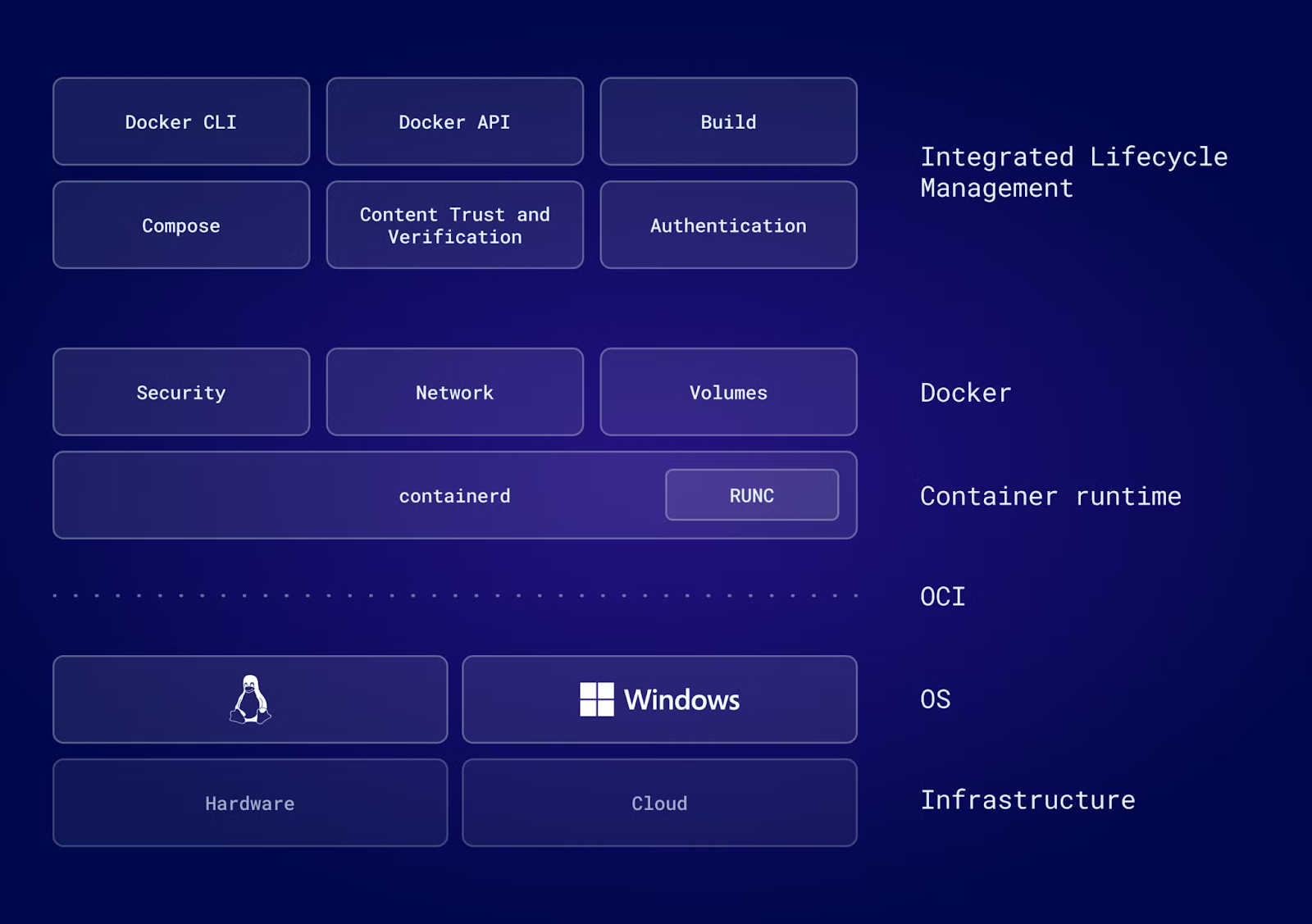
This modular design, where Docker uses containerd for low-level operations, allows each component to focus on what it does best: Docker provides the developer-friendly interface and ecosystem, while containerd handles the nitty-gritty details of container execution.
Whether you are just getting started with Docker or want to take the next step, check out our 10 Docker Project Ideas for all kinds of levels.
Having explored Docker's comprehensive platform approach, let's now examine containerd, the specialized runtime that powers container execution both within Docker and across the broader ecosystem.
Containerd is a lightweight, industry-standard core container runtime that has graduated from the Cloud Native Computing Foundation (CNCF), which indicated its maturity, reliability, and widespread adoption. Originally part of Docker, containerd was extracted in 2017 and donated to CNCF to enable broader ecosystem adoption.

Unlike Docker's comprehensive feature set, containerd’s scope is deliberately limited: it manages core container lifecycle operations such as start, stop, pause, and delete, and handles image transfer and storage. This focused approach makes containerd exceptionally stable and efficient, qualities essential for production environments.
Think of containerd as "plumbing": infrastructure designed to be embedded into larger systems rather than used directly by humans. Major platforms like Kubernetes, AWS Fargate, and Google Kubernetes Engine all rely on containerd to execute containers, even though users interact with these platforms through their own interfaces.
To understand why containerd is so widely adopted in production systems, we need to examine its architectural principles.
Containerd's architecture exemplifies modular design principles. Built with the Open Container Initiative (OCI) standards at its core, containerd ensures compatibility across the entire container ecosystem. It means that any OCI-compliant image will work with containerd, regardless of which tool created it.
The architecture consists of a few key layers:
When containerd needs to start a container, it spawns runc, which performs the actual work of creating isolated namespaces, setting up cgroups for resource limits, and launching the container process.
This separation of concerns makes containerd highly extensible. Organizations can customize nearly every aspect without touching the core containerd code.
With a solid understanding of what each tool does, let's explore how they differ in practice, from architecture to integration patterns.
The fundamental difference lies in scope and purpose.
Docker uses a centralized daemon architecture in which dockerd coordinates many different aspects, such as:
This all-in-one design simplifies developer experience but introduces overhead through multiple layers of abstraction.
Containerd, by contrast, focuses narrowly on container execution. It doesn't include image building capabilities, orchestration features, or a graphical interface. For networking, Docker includes Libnetwork built into its daemon, while containerd relies on external Container Network Interface (CNI) plugins that can be swapped based on requirements.
This architectural difference has performance implications. In high-churn environments where containers start and stop frequently, such as autoscaling Kubernetes clusters, containerd's streamlined design can result in faster startup times and lower resource consumption. The reduced overhead means containerd uses less memory and CPU, which becomes significant at scale.
Speaking of Kubernetes, the relationship between container runtimes and orchestration platforms has evolved significantly, particularly around how Kubernetes connects to containerd.
The relationship between Kubernetes and container runtimes underwent a major shift with Kubernetes 1.24, released back in 2022. This version removed "Dockershim", a compatibility layer that allowed Kubernetes to use Docker as its container runtime.
Dockershim was always intended as a temporary bridge. When Kubernetes introduced the Container Runtime Interface (CRI) to standardize communication with runtimes, Docker couldn't implement it directly because Docker predated CRI's design. Dockershim translated between Kubernetes and Docker, adding an eventually unnecessary translation layer.
Modern Kubernetes versions communicate directly with containerd through CRI, eliminating the Docker translation layer entirely. This simplification brings concrete benefits:
For Kubernetes users, this change is largely transparent. Docker images remain fully compatible because they adhere to OCI standards. The practical impact is that production Kubernetes clusters now run more efficiently by using containerd directly, while developers can continue using Docker locally for building and testing.
If you’re unsure about the pros and cons of using Kubernetes in the first place, check out this comparison piece on Docker Compose vs Kubernetes.
While runtime integration is crucial for orchestration, the developer workflow depends heavily on how each tool handles image creation and storage. Image building represents a significant capability gap between Docker and containerd.
Docker provides an integrated build system through Dockerfiles and BuildKit, allowing developers to construct complex multi-stage builds with caching, parallelization, and advanced features like build secrets and SSH agent forwarding.
Containerd, by design, includes no native image build workflow. To build images with containerd, developers must use external tools. Options include running BuildKit as a separate daemon and using buildctl for command-line builds, or adopting nerdctl, a Docker-compatible CLI that integrates BuildKit.
Storage mechanisms also differ in philosophy. Docker's volume management provides an abstraction that feels natural to developers, with named volumes that persist data independent of container lifecycles. Containerd uses a more low-level snapshotter system, where different snapshot drivers can be plugged in to handle layered filesystems differently based on underlying storage requirements.
This difference reflects the tools' intended audiences:
Beyond architecture and features, the daily developer experience is shaped most directly by the command-line interface each tool provides. The command-line experience reveals the different design philosophies most clearly.
Docker's CLI is renowned for its user-friendliness. Commands like docker run, docker build, and docker logs are intuitive, well-documented, and designed for humans. The CLI includes helpful defaults, clear error messages, and extensive options that cover most use cases.
Containerd ships with ctr, a minimal CLI intended purely for debugging and testing low-level containerd functionality. The ctr tool is deliberately developer-unfriendly. It lacks common features such as port-mapping shorthand, automatic restart policies, and integration with credential helpers. It's designed for containerd developers, not application developers.
This usability gap led to the creation of nerdctl, a Docker-compatible CLI for containerd. Using nerdctl feels identical to using Docker, the same command syntax, the same flags, the same workflow, but with containerd as the underlying runtime. This makes nerdctl an excellent bridge for teams transitioning from Docker to containerd in development environments.
In practice, developers rarely interact with containerd directly. When they do need to, nerdctl provides the familiar interface they expect, while platform operators and administrators use containerd's APIs programmatically through orchestration systems like Kubernetes.
To illustrate the differences in practice, here's how common container operations compare across the three CLI tools:
|
Task |
Docker |
nerdctl |
ctr |
|
Run container |
|
|
|
|
List containers |
|
|
|
|
Build image |
|
|
Not supported |
|
View logs |
|
|
Not supported |
|
Inspect container |
|
|
|
|
Pull image |
|
|
|
|
Compose support |
|
|
Not supported |
Note: ctr lacks port mapping (-p) and requires host networking (--net-host) to expose services. It also does not automatically pull images.
Before we get into recommendations for specific use cases, let’s recap the differences we covered so far. The following table summarizes the key functional differences between Docker and containerd, highlighting their distinct capabilities and target audiences:
|
Feature |
Docker |
Containerd |
|
Image Building |
Integrated (Dockerfiles, BuildKit) |
Requires external tools (buildctl, nerdctl) |
|
Orchestration |
Docker Swarm / Kubernetes |
None (used by Kubernetes) |
|
Storage Management |
Volume management |
Snapshotter system |
|
Graphical Interface |
Docker Desktop |
None |
|
Container Lifecycle |
Full management (via containerd) |
Core focus (CRI-compatible) |
|
Primary Users |
Application Developers |
Cluster Operators, Platform Builders |
Now that we've covered the technical differences, let's explore practical scenarios where each tool excels. Despite the rise of containerd in production environments, Docker remains the superior choice for specific scenarios where developer experience and comprehensive tooling matter most.
Docker excels when you need an "all-in-one" solution for writing and testing code. The integrated toolchain means developers can go from zero to running containers in minutes, without assembling multiple components or configuring complex networking.
The Docker ecosystem provides immense productivity benefits:
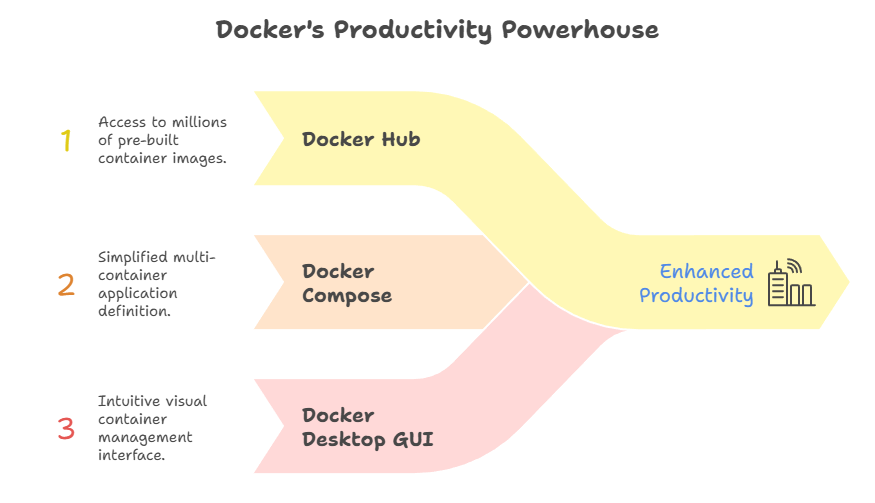
For teams using Docker Desktop, the GUI provides additional conveniences that significantly accelerate onboarding and day-to-day workflows.
Beyond development, Docker's build capabilities make it the natural choice for sophisticated continuous integration and deployment workflows.
Docker's integrated BuildKit provides advanced features essential for modern CI/CD pipelines. Multi-stage builds minimize image sizes while keeping Dockerfiles readable. BuildKit's caching mechanisms intelligently reuse layers across builds, dramatically reducing build times in continuous integration environments.
Most automation platforms, such as GitHub Actions, GitLab CI, Jenkins, and others, have mature, battle-tested Docker integrations. These integrations handle authentication, caching, and image publication without any friction.
While other tools can achieve similar results, Docker's ubiquity means solutions and troubleshooting help are readily available, which is another big plus.
Containerd shines in production scenarios where minimalism, performance, and stability outweigh the convenience of integrated tooling.
Using containerd as the runtime for Kubernetes nodes brings measurable benefits:
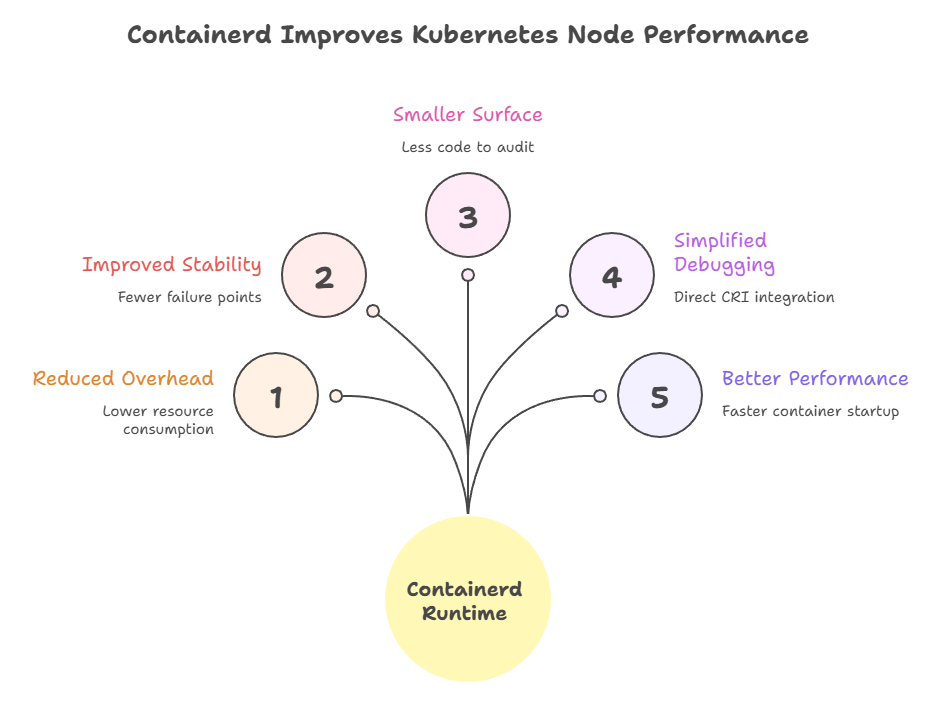
Containerd's CNCF graduation status signals its maturity and reliability. Major cloud providers, including AWS, Google Cloud, and Azure, have standardized on containerd for their managed Kubernetes offerings, demonstrating confidence in its production-readiness for critical infrastructure.
While Kubernetes is the most common production use case, containerd's lightweight nature opens the door to deployment scenarios where Docker would be impractical.
Edge computing and IoT devices often operate under severe resource constraints. Containerd's lightweight design makes it viable in these environments where Docker's full stack would be prohibitive. Every megabyte of memory and every CPU cycle matters when running on embedded hardware.
Advanced security scenarios benefit from containerd's modular runtime architecture. Organizations can integrate sandboxed runtimes for workloads requiring additional security boundaries. Examples include:
These integrations plug into containerd without requiring extensive modifications.
Understanding when to use each tool is important, but knowing how to transition between them is equally crucial. Transitioning from Docker to containerd in existing environments requires careful planning, but the process is well-documented and straightforward.
The operational steps for migrating Kubernetes nodes from Docker to containerd follow a standard pattern:
Cordon the node: Prevent new pods from being scheduled (kubectl cordon <node-name>)
Drain existing pods: Migrate workloads to other nodes (kubectl drain <node-name>)
Update Kubelet configuration: Point to containerd's CRI socket at /run/containerd/containerd.sock
Verify CNI plugins: Ensure containerd has the necessary networking plugins installed
Restart Kubelet: Register with the new runtime and rejoin the cluster
Testing the migration on non-production nodes first helps identify environment-specific issues before rolling out cluster-wide changes. To avoid common pitfalls, make sure to follow the following best practices:
Once your infrastructure is migrated, developers need to adapt their daily workflows to work with the new runtime.
For developers accustomed to Docker commands, nerdctl provides a nearly identical experience. Commands like nerdctl run, nerdctl build, and nerdctl compose up work exactly as their Docker equivalents, making the transition seamless.
For debugging, understanding how to map Docker debugging workflows to containerd is essential. Where you might use docker inspect to examine a container, ctr containers info provides similar information, though in a different format. Similarly, ctr tasks list shows running containers.
Most developers find that nerdctl eliminates the need to learn ctr's syntax for everyday tasks. The low-level ctr remains useful for troubleshooting runtime-specific issues or when working directly with containerd's APIs.
The relationship between Docker and containerd is a perfect example of successful modular design in software infrastructure. Docker remains the optimal tool for humans writing code, since it provides the integrated experience, comprehensive ecosystem, and developer-friendly interfaces that make building containerized applications productive (and enjoyable).
Containerd, meanwhile, excels as the runtime for machines executing code, offering the stability, performance, and minimalism required for production orchestration platforms. The fact that Docker Engine uses containerd under the hood demonstrates how both tools complement rather than compete with each other.
I recommend a pragmatic approach for most organizations: continue using Docker on developer laptops where its tooling accelerates development workflows, but consider migrating production Kubernetes clusters to containerd directly for the operational benefits of reduced overhead and simplified runtime stacks.
Whether you choose Docker's comprehensive platform or containerd's focused runtime, both remain essential components of the modern container ecosystem, each optimized for different stages of the application lifecycle.
To keep learning, be sure to enrol in our Containerization and Virtualization with Docker and Kubernetes skill track.
Docker Courses
Course
Course
Track
blog
Jake Roach
9 min
blog
Moez Ali
15 min
blog
Aashish Nair
10 min
blog
Derrick Mwiti
9 min
blog
Dario Radečić
15 min
blog
Laiba Siddiqui
15 min