
Our biggest-ever sale. 60% off AI & data skills
Buy Now

Practice and track your progress.
Continue with GoogleBy continuing, you accept our Terms of Use, our Privacy Policy and that your data is stored in the USA.Now that we've covered basic dbt questions, here are some intermediate-level dbt questions. These focus on specific technical aspects and concepts.
In dbt, sources are the raw data tables. We don't directly write SQL queries on those raw tables — we specify the schema and table name and define them as sources. This makes it easier to refer to data objects in tables.
Imagine you have a raw data table in your database called orders in the sales schema. Instead of querying this table directly, you would define it as a source in dbt like this:
Define the source in your sources.yml file:
version: 2
sources:
- name: sales
tables:
- name: ordersUse the source in your dbt models:
Once defined, you can refer to the raw orders table in your transformations like this:
SELECT *
FROM {{ source('sales', 'orders') }}This approach abstracts the raw table definition, making it easier to manage and ensuring that if the underlying table structure changes, you can update it in one place (the source definition) rather than every query.
Benefits of using sources in dbt:
A dbt model is essentially a SQL or Python file that defines the transformation logic for raw data. In dbt, models are the core component where you write your transformations, whether aggregations, joins, or any kind of data manipulation.
SELECT statements to define transformations and are saved as .sql files..py files and allow you to use Python libraries like pandas to manipulate data.SQL model example:
A SQL model transforms raw data using SQL queries. For example, to create a summary of orders from an orders table:
--orders_summary.sql
WITH orders_cte AS (
SELECT
customer_id,
COUNT(order_id) AS total_orders,
SUM(order_amount) AS total_revenue
FROM {{ ref('orders') }}
GROUP BY customer_id
)
SELECT *
FROM orders_cteIn this example:
orders_summary.sql model creates a summary of total orders and revenue for each customer using SQL.orders table (already defined as a dbt model or source).Python model example:
A Python model manipulates raw data using Python code. It can be especially helpful for complex logic that might be cumbersome in SQL.
# orders_summary.py
import pandas as pd
def model(dbt, session):
# Load the source data
orders = dbt.ref("orders").to_pandas()
# Perform transformations using pandas
orders_summary = orders.groupby('customer_id').agg(
total_orders=('order_id', 'count'),
total_revenue=('order_amount', 'sum')
).reset_index()
return orders_summaryIn this example:
Here’s how to create a dbt model:
models folder in the dbt project. .sql extension within the directory (or .py if it’s a Python model).dbt run command to apply the transformation and create the model.dbt manages model dependencies using the ref() function, which creates a clear dependency chain between models.
When you define a transformation in dbt, rather than directly referencing tables in your warehouse, you reference other dbt models using the ref() function. This ensures that dbt builds the models in the correct order by identifying which models depend on others.
For example, if you have a model orders_summary that depends on the orders model, you would define it like this:
WITH orders AS (
SELECT * FROM {{ ref('orders') }}
)
SELECT
customer_id,
COUNT(order_id) AS total_orders,
SUM(order_amount) AS total_revenue
FROM orders
GROUP BY customer_idIn this example, the {{ ref('orders') }} function ensures that the orders model is built before orders_summary, since orders_summary relies on the data in the orders model.
Macros in dbt are reusable blocks of SQL code written using the Jinja templating engine. They allow you to automate repetitive tasks, abstract complex logic, and reuse SQL code across multiple models, making your dbt project more efficient and maintainable.
Macros can be defined in .sql files within the macros directory of your dbt project.
Macros are particularly useful when you need to perform similar transformations across multiple models or need environment-specific logic, such as using different schemas or modifying date formats based on deployment environments (e.g., development, staging, or production).
Example of creating macros:
-- macros/date_format.sql
{% macro format_date(column) %}
FORMAT_TIMESTAMP('%Y-%m-%d', {{ column }})
{% endmacro %}Usage in a model:
SELECT
customer_id,
{{ format_date('order_date') }} AS formatted_order_date
FROM {{ ref('orders') }}In this example, the format_date macro is used to standardize the order_date column's format in any model where it's called.
-- macros/custom_schema.sql
{% macro custom_schema_name() %}
{% if target.name == 'prod' %}
'production_schema'
{% else %}
'dev_schema'
{% endif %}
{% endmacro %}Usage in a model:
SELECT *
FROM {{ custom_schema_name() }}.ordersHere, the macro checks if the environment (target.name) is "prod" and returns the correct schema name based on that.
How to run macros:
Macros are not run directly like SQL models. Instead, they are referenced in your models or other macros and executed when the dbt project runs. For example, if you use a macro within a model, the macro will execute when you run the dbt run command.
dbt run-operation command. This is typically used for one-off tasks, like seeding data or performing maintenance operations.Singular tests and generic tests are the two test types in dbt:
Example: Let’s say you want to ensure no orders have a negative order_amount. You can write a singular test in the tests directory as follows:
-- tests/no_negative_order_amount.sql
SELECT *
FROM {{ ref('orders') }}
WHERE order_amount < 0If this test fails, dbt will return all rows from the orders table where the order_amount is negative.
|
Generic tests |
Definition |
|
Unique |
Checks for unique values in the column. |
|
Not null |
Checks for any empty fields. |
|
Available values |
Verifies that column values match a list of expected values to maintain standardization. |
|
Relationships |
Checks referential integrity between tables to remove any inconsistent data. |
Example: You can easily apply a generic test to ensure that customer_id in the customers table is unique and not null by defining it in your schema.yml file:
version: 2
models:
- name: customers
columns:
- name: customer_id
tests:
- unique
- not_nullIn this example:
customer_id in the customers table is unique.customer_id values are missing or null.As you progress, you may encounter more complex scenarios and advanced concepts. So here are a few challenging interview questions to help you gauge your expertise and prepare for senior-level data engineering positions.
Incremental models in dbt are used to only process new or changed data instead of reprocessing the entire dataset each time. This is especially useful when working with large datasets where rebuilding the entire model from scratch would be time-consuming and resource-intensive.
An incremental model allows dbt to append only new data (or update changed data) based on a condition, typically a timestamp column (like updated_at).
How to create an incremental model:
1. Define the model as incremental by specifying it in the model’s config:
{{ config(
materialized='incremental',
unique_key='id' -- or another unique column
) }}2. Use the is_incremental() function to filter out new or changed rows:
SELECT *
FROM source_table
{% if is_incremental() %}
WHERE updated_at > (SELECT MAX(updated_at) FROM {{ this }})
{% endif %}3. When dbt runs this model for the first time, it will process all the data. For subsequent runs, it will only process rows where updated_at is greater than the most recent value already in the model.
When to use incremental models:
Jinja makes our SQL code more flexible. With Jinja, we can define reusable templates for common SQL patterns. And since the requirements keep changing, we can use Jinja's if statements to adjust our SQL queries depending on the conditions. Doing so usually improves SQL code by breaking down complex logic, which makes it easier to understand.
For example, if you want to convert the date format from "YYYY-MM-DD" to "MM/DD/YYYY", here's a sample dbt macro for this, which we saw in a previous question:
{% macro change_date_format(column_name) %}
to_char({{ column_name }}::date, 'MM/DD/YYYY')
{% endmacro %}In this code example, {{ column_name }} is where a Jinja inserts the actual column name when you use the macro. It will be replaced with the actual column name during runtime. As we have seen in previous examples, Jinja uses {{ }} to show where the replacement will occur.
Here's how to create custom materialization in dbt:
materialization_name: {% materialization materialization_name, default -%}adapter.get_relation to set up the target table. This is where data will be loaded. {% set sql %}
SELECT * FROM {{ ref('your_source_table') }}
WHERE your_conditions = true
{% endset %}
{{ adapter.execute(sql) }}{{ return(target_relation) }}
{% endmaterialization %}Here are two ways to debug our dbt models:
1. Access the compiled SQL files in the target folder to identify and track errors.
When you run a dbt project, dbt compiles your models (written using Jinja templating) into raw SQL queries and saves them in the target directory. This compiled SQL is exactly what dbt runs against your data platform, so reviewing these files can help you identify where issues are occurring:
dbt run or dbt test).target/compiled/ folder in your dbt project directory.2. Use dbt Power User Extension for VS Code to review query results directly.
The dbt Power User Extension for Visual Studio Code (VS Code) is a helpful tool for debugging dbt models. This extension allows you to review and test your queries directly within your IDE, reducing the need to switch between dbt, the terminal, and your database.
dbt compiles queries through the following steps:
target/compiled directory.dbt run, queries are prepared for execution, potentially with additional wrapping.This process transforms modular, templated SQL into executable queries specific to your data warehouse. We can use dbt compile or check the target/compiled directory to view and debug the final SQL for each model.
Most data engineers' jobs revolve around building and integrating data warehouses with dbt. Questions related to these scenarios are very common in interviews — that’s why I've compiled the most commonly asked ones:
Integrating dbt with Airflow helps build a streamlined data pipeline. Here are some of its advantages:
The semantic layer of dbt allows us to translate raw data into the language we understand. We can also define metrics and query them with a command line interface (CLI).
This allows us to optimize the cost as data preparation takes less time. In addition, everyone works with the same data definitions because it makes metrics consistent across the organization.
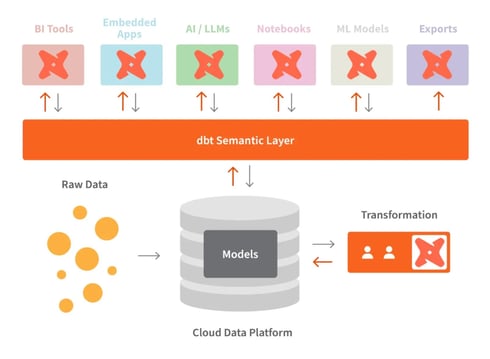
dbt and the semantic layer. Image source: dbt
While BigQuery is quite helpful and can handle many transformations natively, dbt may still be necessary. Here's why:
ref() function and macros allow more modular and reusable SQL code.dbt comes in two versions: dbt Core and dbt Cloud, as seen in a previous question. dbt Core is open source and serves as a free version. That's why it does not offer any built-in security feature, and users are responsible for its deployment and security.
However, dbt Cloud is designed to provide complete security. It complies with HIPAA and other common frameworks to ensure no privacy is harmed. So, depending on our needs, we must choose a dbt version that suits our business compliance needs.
Optimizing dbt transformations for large datasets is critical for improving performance and reducing costs, especially when dealing with cloud-based data warehouses like Snowflake, BigQuery, or Redshift. Here are some key techniques to optimize dbt performance:
1. Use incremental models
Incremental models allow dbt to only process new or updated data instead of reprocessing the entire dataset every time. This can significantly reduce run times for large datasets. This process limits the amount of data processed, speeding up transformation times.
2. Leverage partitioning and clustering (for databases like Snowflake and BigQuery)
Partitioning and clustering large tables in databases like Snowflake or BigQuery help improve query performance by organizing data efficiently and reducing the amount of data scanned during queries.
Partitioning ensures that only the relevant portions of a dataset are queried while clustering optimizes the physical layout of the data for faster retrieval.
3. Optimize materializations (table, view, incremental)
Use appropriate materializations to optimize performance:
4. Use LIMIT during development
When developing transformations, adding a LIMIT clause to queries is useful to restrict the number of rows processed. This speeds up development cycles and avoids working with huge datasets during testing.
5. Run queries in parallel
Leverage your data warehouse’s ability to execute queries in parallel. For example, dbt Cloud supports parallelism, which can be adjusted based on your infrastructure.
6. Use database-specific optimization features
Many cloud data warehouses provide performance optimization features like:
To optimize dbt runs in Snowflake:
1. Use table clustering:
{{ config(
cluster_by = ["date_column", "category_column"]
) }}
SELECT ...2. Leverage Snowflake's multi-cluster warehouses for parallel model execution:
models:
my_project:
materialized: table
snowflake_warehouse: transforming_wh3. Use incremental models where appropriate:
{{ config(materialized='incremental', unique_key='id') }}
SELECT *
FROM source_table
{% if is_incremental() %}
WHERE updated_at > (SELECT MAX(updated_at) FROM {{ this }})
{% endif %}These optimizations may improve the performance and cost-effectiveness of dbt runs in Snowflake.
At the end of the interview process, interviewers usually test your problem-solving skills. They may ask you questions to see how you will respond to real-life issues.
Remember this quoter egarding the soft skills required for the role from Deepak Goyal, CEO & Founder at Azurelib Academy, when he spoke on the DataFramed podcast:
As a Data Engineer, you should be able to communicate. A data engineer has to communicate because they have to talk to a lot of stakeholders to understand what kind of output or result they are looking for.
Here are a few behavioral and problem-solving questions:
Here’s how you can manage dbt deployment across environments:
1. Environment-specific configurations
dbt allows you to define different configurations for each environment (dev, staging, and production) in the dbt_project.yml file. You can specify different settings for things like schema, database, and data warehouse configurations.
Example in dbt_project.yml:
models:
my_project:
dev:
schema: dev_schema
staging:
schema: staging_schema
prod:
schema: prod_schemaIn this example, dbt automatically selects the correct schema based on the target environment (dev, staging, or prod) when running the project.
2. Using the target variable
The target variable in dbt is used to define which environment you're working in (dev, staging, production). You can reference this variable in your models or macros to customize behavior based on the environment.
Example in a model:
{% if target.name == 'prod' %}
SELECT * FROM production_table
{% else %}
SELECT * FROM {{ ref('staging_table') }}
{% endif %}This logic ensures that different tables or schemas are used depending on the environment.
3. Branching and Version Control
Each environment should have its own branch in version control (e.g., Git). Developers work on the dev branch, testers and analysts use staging, and only approved changes are merged into the prod branch.
4. Continuous Integration (CI) & Continuous Deployment (CD)
In production, it’s important to have an automated deployment pipeline that runs tests and validations before deploying models. In dbt Cloud, you can set up job schedules to run specific tasks based on the environment. For dbt Core, this can be achieved through CI/CD tools like GitHub Actions or Jenkins.
Version control is essential when working on dbt projects, especially in a team environment where multiple people contribute to the same codebase. Here’s how I handle version control in dbt:
1. Use Git for version control
We use Git as the primary tool for version control in our dbt projects. Each team member works on their own branch for any changes or features they are implementing. This allows for isolated development and avoids conflicts between team members working on different tasks simultaneously.
Example: I create a new feature branch like feature/customer_order_transformation when working on a new dbt model.
2. Branching strategy
We follow a Git branching strategy where:
dev branch is used for ongoing development and testing.staging branch is used to prepare changes for production.main or prod branch is reserved for the production environment.Team members push their changes to the dev branch and open pull requests (PRs) for code reviews. Once the changes are reviewed and approved, they are merged into staging for further testing and then promoted to production.
3. Continuous integration (CI)
We have integrated a CI pipeline (e.g., GitHub Actions, CircleCI) that automatically runs dbt tests on each pull request. This ensures that any new code passes the required tests before it’s merged into the main branch.
The CI process runs dbt run to build models and dbt test to validate the data and check for any errors or inconsistencies.
4. Resolve merge conflicts
When multiple team members make changes to the same model or file, merge conflicts can occur. To handle this, I first review the conflict markers in the code and decide which changes to keep:
After resolving the conflict, I run tests locally to ensure the conflict resolution did not introduce any new errors. Once confirmed, I push the resolved changes back to the branch.
5. Documentation and collaboration
We ensure that each merge or pull request includes proper documentation of the changes made. We update the auto-generated dbt documentation so that everyone on the team has a clear understanding of the new or updated models.
Here’s how I’d implement dbt in an existing pipeline:
When encountering a "relation does not exist" error in dbt, this typically means the model is trying to reference a table or model that hasn’t been created or is misspelled. Here’s how I would debug it:
ref() function, and verify the correct model or table is being referenced.SELECT * FROM {{ ref('orders') }} -- Ensure 'orders' is the correct model namedbt debug and check the logs for detailed information about what dbt tried to do and why it failed.dbt run --models orders) to verify they exist and are built correctly before the failing model.dbt is a new framework that is gradually improving. It may overwhelm you to keep up with the new updates while still learning the old material. That's why you should take a balanced approach and start with the core features. Once you master them, explore the additions to understand what has changed.
I know interviews can be nerve-wracking, especially for a specialized tool like dbt. But don't worry — I've put together some tips to help you prepare and feel confident:
I can't stress this enough — get comfortable with the fundamental concepts of dbt, including models, tests, documentation, and how they all fit together. A solid grasp of these basics will serve you well in technical discussions.
DataCamp has the perfect course for this: Introduction to dbt
DataCamp also offers some beginner-friendly courses that cover other data engineering topics in-depth:
Reading about something is good, but doing is even better. This is one of the most effective ways to master dbt skills. You can find a huge list of raw datasets online to do transformations and run tests. Set up your own dbt project and play around with different features. This will make you feel much more confident talking about dbt when you've actually used it.
Interviewers love hearing about practical applications. Can you think of a problem you've solved using dbt or how you might use it in a hypothetical scenario? Have a few of these examples ready to share. To collect some examples, you can even study multiple case studies from dbt's official site or get ideas from public dbt projects on Git.
We covered a wide spectrum of basic to advanced dbt interview questions that will help you on your job-hunting journey. By understanding how to integrate dbt with cloud data warehouses, you will be well-equipped with advanced data transformation skills, which is the core of any data integration process.
However, learning dbt and SQL go hand in hand. So, if you're new to SQL, check out DataCamp's SQL courses.
It may take a few months to master dbt skills fully. But if you dedicate a few hours daily, you can learn it quickly.
You can use online resources such as DataCamp’s courses, YouTube tutorials, and blog posts. In addition, try to build your projects by rewriting existing projects. This will strengthen your hands-on skills.
No, dbt does not eliminate the role of data engineers. Instead, it assists them in their work. They can use this framework to automate the tasks such as transformations and tests.
I'm a content strategist who loves simplifying complex topics. I’ve helped companies like Splunk, Hackernoon, and Tiiny Host create engaging and informative content for their audiences.

blog
 Kurtis Pykes • 15 min

blog
 Dario Radečić• 15 min

blog
 Kevin Babitz• 14 min
Learn more about data engineering with these courses!
Course
Discover how data engineers lay the groundwork that makes data science possible. No coding involved!
Course
This course introduces dbt for data modeling, transformations, testing, and building documentation.
Practice and track your progress.
Continue with GoogleBy continuing, you accept our Terms of Use, our Privacy Policy and that your data is stored in the USA.






dbt (data build tool) has become a widely used development framework in modern data engineering and analytics workflows. Data analysts mostly rely on data engineers to write transformations in SQL. But with dbt, they can write transformations and have more control over data. It also allows integration with popular version control systems such as Git, which improves team collaboration.
If you're preparing for a data warehouse role, such as data engineer, data analyst, or data scientist, you should be well-versed in basic and advanced dbt questions!
In this article, I've outlined the most commonly asked interview questions to build your basic concepts and advanced problem-solving skills.
What is dbt?
dbt is an open-source data transformation framework that allows you to transform data, test it for accuracy, and track changes within a single platform. Unlike other ETL (extract, transform, load) tools, dbt only does the transformation part (the T).
Some other ETL tools extract data from various sources, transform it outside the warehouse, and then load it back. This often requires specialized knowledge of coding and additional tools. But dbt makes this easier — it allows transformations in the warehouse using only SQL.
More than 40,000 big companies use dbt to streamline data — so recruiters list it as one of the most important skills for data-related roles. So, if you master it even as a beginner data practitioner, it may open up many career opportunities!
The dbt semantic layer. Image source: dbt
Basic dbt Interview Questions
The interviewer will test your basic knowledge at the beginning of the interview process. For that, they may ask you some foundational questions like these:
What are the common uses of dbt?
dbt brings a data team on one page, where they can transform, document, and test their data. It helps ensure data is reliable and easy to understand. The common uses of dbt include:
Is dbt a programming language?
No, dbt is not a programming language. It's a tool that helps with data transformation jobs in the warehouse. If you know how to write SQL, you can easily work with dbt. It has also started supporting Python for specific tasks. But at its core, it manages and runs SQL-based transformations.
Can you explain how dbt compares with Spark?
dbt and Spark serve different purposes and target different types of workflows. Here’s a comparison of their role in data infrastructure:
Feature
dbt
Spark
Role
SQL-based data transformations and modeling
Distributed data processing and analytics
Core language
SQL -first, with limited Python support
Supports SQL, Python, Scala, Java, R
Data governance
Documentation and lineage support
Provides access control, auditing, and data lineage
Target users
SQL users, analysts, and teams without engineering skills
Data engineers, data scientists, developers
Transformation complexity
Focuses only on SQL transformations and modeling
Can handle complex transformations in other languages, too
Testing and validation
Has built-in testing capabilities
Need custom testing strategies (unit and integration)
What are the challenges with dbt?
Although dbt brings a lot of value to data teams, it also could present some challenges, particularly when the scale and complexity increase. So some of the most common challenges are:
Knowing how to work around the above potential challenges is something that employers look for, so don’t overlook the importance of this question.
What is the difference between dbt Core and dbt Cloud?
There are two main versions of dbt:
dbt Core is the free and open-source version of dbt that allows users to write, run, and manage SQL-based transformations locally. It provides a command-line interface (CLI) for executing dbt projects, testing models, and building data pipelines. Since it’s open-source, dbt Core requires users to handle their own deployment, orchestration, and infrastructure setup, usually integrating with tools like Airflow or Kubernetes for automation.
dbt Cloud, on the other hand, is a managed service provided by the creators of dbt (Fishtown Analytics). It offers all the capabilities of dbt Core, along with additional features like a web-based interface, integrated scheduling, job management, and collaboration tools. dbt Cloud also includes built-in CI/CD (continuous integration and deployment) features, API access, and enhanced security compliance like SOC 2 and HIPAA for organizations with more rigorous security needs.