Course
The AI industry is moving beyond "Generative AI" (tools that write code or draft emails) to "Personal Intelligence" (systems that understand the context of your life). For years, the limitation of AI was memory. You had to explain who you were and what you needed every time you started a new session. Close the tab, and the chatbot forgets everything.
Google is now pushing past that limitation. By integrating Gemini with Gmail, Google Photos, YouTube, and Search, Google is betting that context matters more than raw power. The idea is simple: instead of you copying and pasting information into the chat, the AI already knows what is in your inbox and photo library.
This launch arrived in January 2026, just one week after OpenAI introduced ChatGPT Health, a specialized agent for medical insights. While OpenAI doubles down on vertical expertise in healthcare, Google is playing a different game: horizontal integration across your entire digital life.
In this article, I will show you how Gemini Personal Intelligence works, how it connects to your Google apps, and how to think about the privacy trade-offs.
Defining "Personal Intelligence" (Memory and Context)
Personal Intelligence is not about answering a query in isolation. It is about answering based on historical data you did not have to manually copy and paste into the chat. The system operates on two distinct layers of memory.
Active memory
This is explicit. You tell the AI facts, and it remembers them. If you say, "I am a vegetarian" or "I prefer Python over R for data tasks," Gemini stores this in a "Saved Info" bank. You can access it at gemini.google.com/saved-info or through Settings, where you can add, edit, or delete individual items. This is similar to ChatGPT's custom instructions but integrated into the broader Google identity.
Passive context
This is where the shift happens. Passive Context allows the model to pull information from connected apps without you explicitly stating it. It can find your license plate number because it appears in a photo you took three years ago. It can know your flight details because a confirmation email hit your inbox yesterday. You never told it these things directly; it found them by searching your connected accounts.
Google describes this as solving the "context packing problem." That means figuring out which personal information is relevant to a given query without overwhelming the model with irrelevant data. When you ask about tire recommendations for your Honda minivan, Gemini can search your Gmail for purchase receipts to determine the exact trim level and look through your Google Photos to identify patterns suggesting what kind of tires would be practical.
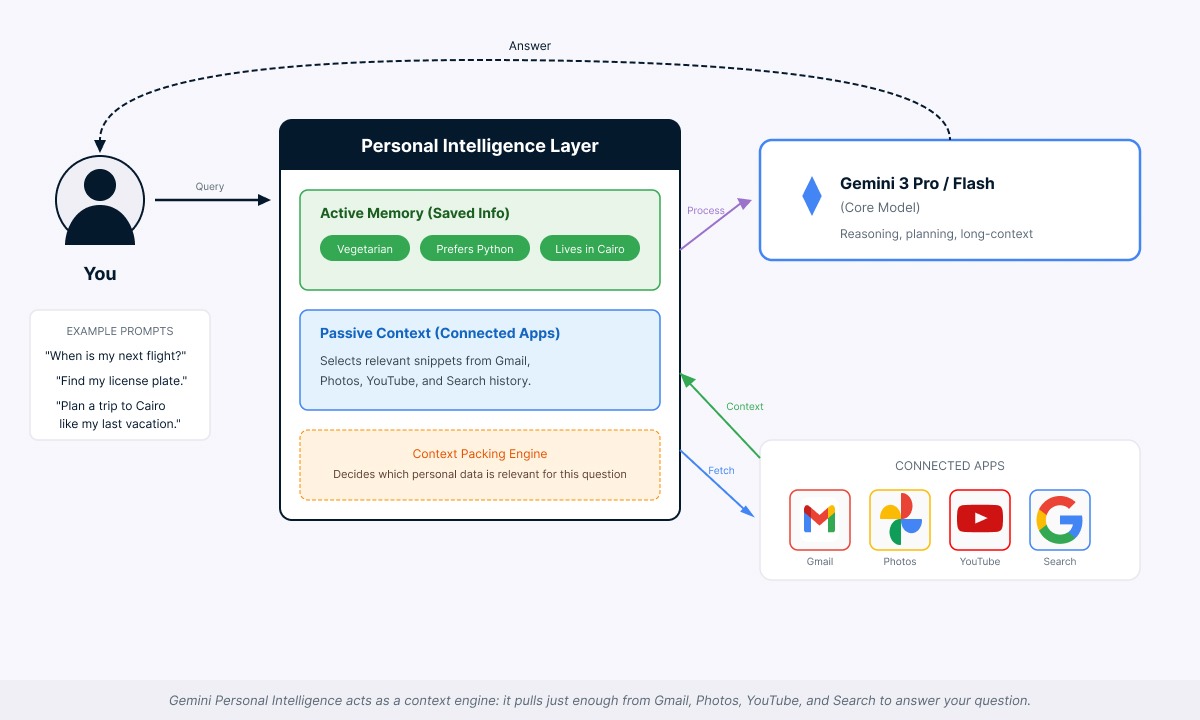
Context engine pulling from connected apps. Image by Author.
User control
I want to be clear here: this is a utility, not a magic trick. Personal Intelligence is opt-in. You must explicitly grant permission for Gemini to access these apps. You can review what it knows, disconnect specific apps, or delete individual memories in the settings at any time. Gemini will also reference the source of its information, so you can verify the data it pulls.
Setup note
The interface is currently rolling out. If you do not see a specific "Personal Intelligence" menu in your settings, check for "Connected Apps" or "Extensions." Toggling on Gmail or Drive there effectively enables the feature. You can verify it is working by asking a question only your email would know, like "When is my next flight?"
The Model Behind Gemini Personal Intelligence
This capability is not just a UI update. It is built on the Gemini 3 model family, which Google announced in late 2025.
Gemini 3 as the core model
Personal Intelligence runs on Gemini 3 Pro and Gemini 3 Flash. Google markets these models as designed for tasks that require planning, reasoning, and understanding across text, images, and documents. The models offer long-context capabilities, meaning they can process large amounts of email threads, photo metadata, and conversation history in a single session.
Google says Gemini 3 Pro scores competitively on public reasoning benchmarks and handles more complex, multi-step instructions than earlier Gemini generations. Gemini 3 Flash is positioned as faster and more cost-efficient for everyday tasks.
Why model improvements matter
Previous models often got lost when handling complex instructions with multiple steps. Gemini 3's improved reasoning allows it to connect several pieces of information to answer one question.
If you ask, "Organize next week's work around my meetings, travel, and sleep schedule," the model has to fetch meeting times from Calendar, identify flight times from Gmail, consider any health data (if connected), and synthesize a schedule that respects all three constraints.
This cross-app reasoning is only possible because the model can hold and work with that much context without making up connections that do not exist.
Google says personal data is referenced rather than absorbed into model weights. The company put it this way: "We don't train our systems to learn your license plate number; we train them to understand that when you ask for one, we can locate it."
Google’s structural advantage
Standalone chatbots like Claude or the standard ChatGPT have a "cold start" problem. They know nothing about you until you tell them. Google processes billions of searches, emails, and calendar events daily. For a Google user, the context available to Gemini effectively includes their entire digital history.
At launch, Google says Personal Intelligence works with Gmail, Google Photos, YouTube watch history, and Google Search history. While Calendar and Drive data are often used in "Passive Context" scenarios (like pulling flight times from Gmail confirmations or meeting dates), the full, cross-app reasoning capabilities for these services are still in a rolling beta phase. The company has indicated that deeper integration is planned over time.
Getting Started with Gemini Personal Intelligence
Allow me now to show you two scenarios where Personal Intelligence can deliver immediate value:
Example 1: Managing your inbox
Here is a prompt you could use:
Give me a weekend inbox brief: what are the 10 emails from this week I should care about most, and what can I safely ignore?
Execution:
- Gemini reads this week's emails in Gmail and clusters them by topic: work, personal, promos, newsletters
- It cross-references your Calendar and previous replies to see which threads are tied to actual meetings, deadlines, or ongoing projects
- It checks which senders you usually reply to quickly versus which newsletters you almost never open, so it can down-rank "noise"
Result: You get a short "inbox brief" with the top 10 emails, each with a one-line summary and suggested replies, plus a section of "Low-priority promos and newsletters" you can archive in one click.
This reduces the friction of "app switching," where you jump between tabs to copy dates and prices. The AI becomes an assistant that already knows what it needs.
Example 2: Surfacing overlooked photos and memories
Here is a prompt for this second example:
Show me a few meaningful photos from the last year that I've probably forgotten about, and explain why you picked them.
Execution:
- Gemini looks across your Google Photos library for pictures from the last 12 months that you have not opened recently but that seem important based on patterns like face recognition, events, and locations
- It combines that with timestamps and basic context (for example, repeated appearances of the same people or places) to choose a small set of photos that likely represent key moments rather than random screenshots
Result: You get a short list of "forgotten but important" photos with one-line explanations, like "first meetup with your current team" or "family gathering you only photographed once this year," without scrolling through your entire gallery.
Privacy Concerns with Gemini Personal Intelligence
Centralizing "Personal Intelligence" means handing the keys to your entire digital life to one entity. This raises immediate and valid privacy concerns.
The concern
If one system can read your emails, see your photos, and know your location history, the potential for misuse is real. Security researchers and academic studies in 2025 criticized how AI providers handle retention and sensitive data. Google says it has patched reported issues, but the episode highlights the new attack surface created by deeply integrated assistants.
Enterprise reality
Consumer and enterprise users face different data policies.
- Consumer accounts: Google says a subset of anonymized conversations may be retained for quality review for an extended period, even if you clear your history. The company warns: "Please don't enter confidential information that you wouldn't want a reviewer to see."
- Enterprise/Workspace accounts: Customer data is not used for training and is not human-reviewed without explicit permission. Session data is not retained after sessions end.
As I mentioned earlier, Personal Intelligence data from Gmail and Photos is "referenced to generate responses, not stored for training."
Trust controls
Google provides several controls:
- My Activity dashboard: View what Gemini accessed at myactivity.google.com/product/gemini
- Temporary Chat mode: Conversations are not saved and are excluded from training
- Auto-deletion settings: Choose how long your history is kept
Using Personal Intelligence is a calculation: you are trading data privacy for convenience.
What Developers Should Know with Gemini Personal Intelligence
Here is the disappointing news: there is currently no public API for Personal Intelligence. You cannot call an endpoint to query a user's Gmail or Photos via Gemini's personal context system. Google has locked this capability to its first-party app, likely to control the privacy narrative and build trust.
Developers can achieve partial functionality through workarounds:
- Use standard Google APIs (Gmail API, Photos API) with OAuth authentication to access user data
- Send retrieved content to Gemini or Vertex AI for processing
- Build custom retrieval pipelines
However, this manual integration lacks the cross-service reasoning and relevance filtering that makes Personal Intelligence distinctive. A key challenge for third-party developers is that they cannot tap into the internal reasoning traces Gemini uses to keep context across apps; that layer is completely private to Google. Google has not announced any timeline for third-party developer access.
The Gemini 3 API is available for building your own workflows. Developers can access advanced parameters and context caching, which lets you upload large documents and query them repeatedly. You can build stateful assistants within your own application. But direct Personal Intelligence access remains off-limits.
For hands-on API work, check out Gemini 3 API Tutorial: Automating Data Analysis With Gemini 3 and Gemini 3 Flash Tutorial: Build a UI Studio With Function Calling.
Gemini Personal Intelligence Availability and Pricing
Personal Intelligence is currently available to paid subscribers in the United States through Google's AI Pro and AI Ultra subscription tiers. The feature is rolling out across web, Android, and iOS platforms. It is not available for Workspace business, enterprise, education, or supervised accounts. Only personal Google accounts for users 18 and older qualify.
Regional Restrictions: Availability varies even within the US. Users in Illinois and Texas are blocked from using the Google Photos integration due to local biometric privacy laws.
Google has mentioned plans to expand to more countries and eventually offer free tier access, though no specific timeline has been provided.
Where Personal Intelligence Fits in Google's AI Strategy
The journey to Personal Intelligence spans Google's AI evolution over the past few years.
|
Period |
Development |
|
December 2023 |
Gemini 1.0 launched |
|
February 2024 |
Bard rebranded to Gemini; mobile app launched |
|
May 2024 |
Project Astra unveiled as a research prototype for a universal AI assistant |
|
2025 |
"Personal context" features began rolling out (learning from past chats) |
|
Late 2025 |
Gemini 3 family announced |
|
January 2026 |
Personal Intelligence beta launched |
Project Astra, announced at Google I/O 2024, demonstrated real-time visual perception through smartphone cameras and prototype glasses. Personal Intelligence represents the consumer-facing deployment of similar personalization concepts that Astra prototyped.
Around the same time as the Personal Intelligence launch, Apple announced a multi-year partnership involving Gemini to support next-generation Siri and Apple's AI features. That announcement is widely seen as a vote of confidence in Gemini's capabilities and positions Google to potentially reach a much larger user base through iOS.
Conclusion
I recognize that many of you aren't going to hand over the keys to your entire digital life immediately. The privacy trade-offs are real, and trusting one company with your emails, photos, and search history is a significant leap. For high-stakes medical advice or sensitive enterprise data, specialized solutions might still be your preferred choice.
But understanding Personal Intelligence matters even if you keep the toggle off. It serves as a case study for this new era of AI assistants. When you evaluate future assistants from Apple, OpenAI, or Microsoft, understanding the distinction between Active Memory and Passive Context (as I explained earlier) gives you better judgment. You will recognize exactly why integration, not just raw intelligence, is the new competitive advantage.
Gemini's trajectory illustrates the industry's pivot from generation to context. It proves that the most powerful AI isn't necessarily the one with the highest benchmark score, but the one that has good access to your info and can help with your life goals.
If you want to dive deeper into building these systems, check out our Introduction to AI Agents and Building Scalable Agentic Systems courses.
Introduction to AI Agents
I’m a data engineer and community builder who works across data pipelines, cloud, and AI tooling while writing practical, high-impact tutorials for DataCamp and emerging developers.
Gemini Personal Intelligence FAQs
Can I delete what Personal Intelligence remembers about me?
Yes. You have full control. Go to gemini.google.com/saved-info to delete specific memories, or use the My Activity dashboard to clear conversation history. You can also disconnect any app (Gmail, Photos, etc.) at any time, and Gemini stops using it immediately.
What happens if I enable this on a shared family account?
Don't. Personal Intelligence is designed for individual accounts only. If multiple people use the same Google account, the AI will mix everyone's data together, which creates privacy issues and confusing answers. Each person needs their own account.
Does this work if I use Gmail but not Google Photos?
Absolutely. You pick which apps to connect. If you only enable Gmail, Gemini will only pull from your email. You are not forced into an all-or-nothing setup. Connect what you trust, skip what you don't.
Why is Illinois blocking the Photos integration?
Illinois has strict biometric privacy laws (from a lawsuit years ago). Since Google Photos uses face recognition to identify people in your pictures, the entire Photos integration is blocked for Illinois and Texas residents to avoid legal issues.
If I turn this off, does Google delete what it already learned?
Turning off Personal Intelligence stops new data collection, but it does not auto-delete past conversation history. You need to manually clear your Gemini activity at myactivity.google.com if you want that data gone.