

कोर्स
LangChain के साथ LLM एप्लिकेशन विकसित करना
3 घंटा
51.8K
अभ्यास और ट्रैक अपनी प्रगति को।
Google के साथ जारी रखेंMistral AI ने हाल ही में reasoning मॉडलों का नया परिवार Magistral लॉन्च किया है। ये मॉडल विशिष्ट डोमेनों में उत्कृष्टता के लिए डिज़ाइन किए गए हैं, पारदर्शी तर्क प्रदान करते हैं, और कई भाषाओं का समर्थन करते हैं।
इस ट्यूटोरियल में, हम मेडिकल MCQs reasoning डेटासेट पर Magistral Small के फाइन-ट्यूनिंग पर ध्यान केंद्रित करेंगे। Magistral Small, Magistral परिवार का एक ओपन-सोर्स वैरिएंट है जिसमें 24 बिलियन पैरामीटर्स हैं। यह 3.1 संस्करण (2503) पर आधारित है और उन्नत reasoning क्षमताएँ रखता है।
इस ट्यूटोरियल में हम ये चरण अपनाएंगे:
मैंने शुरू में Kaggle पर फाइन-ट्यूनिंग स्क्रिप्ट चलाने की कोशिश की, लेकिन 4-बिट क्वांटाइज़ेशन के बावजूद, फ्री GPUs इस कार्य के लिए पर्याप्त नहीं थे। इन सीमाओं के कारण, मैंने RunPod पर स्विच किया और A100 SXM GPU इंस्टेंस चुना, जो तेज़ प्रदर्शन और अधिक VRAM प्रदान करता है।
1. RunPod पर “Pods” पर जाएँ, नवीनतम PyTorch इमेज चुनें, A100 SXM मशीन का चयन करें, और अपना pod परिनियोजित करें।
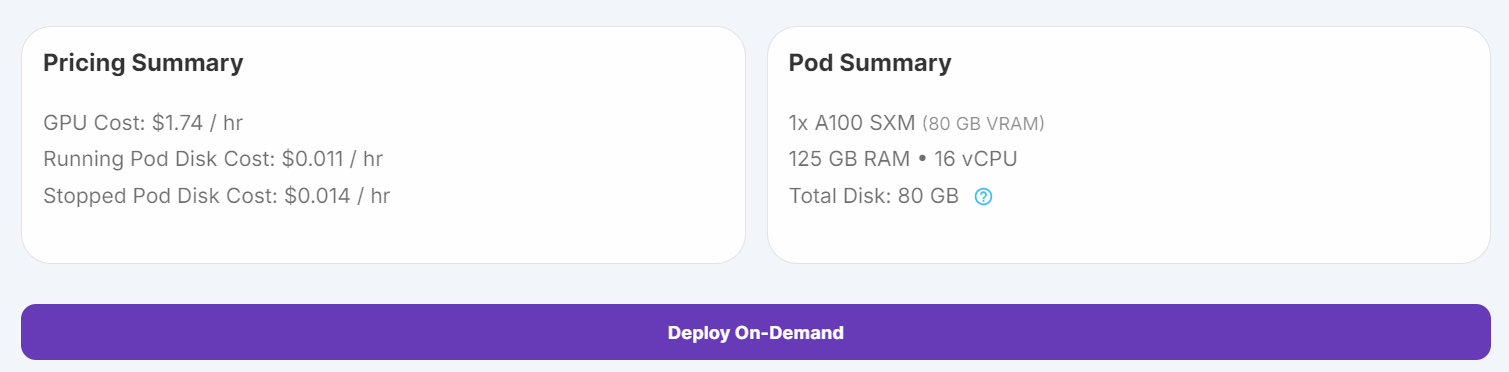
स्रोत: My Pods
2. कंटेनर डिस्क साइज बढ़ाने के लिए Pod सेटिंग्स संपादित करें, और प्रमाणीकरण के लिए अपना Hugging Face एक्सेस टोकन जोड़ें।
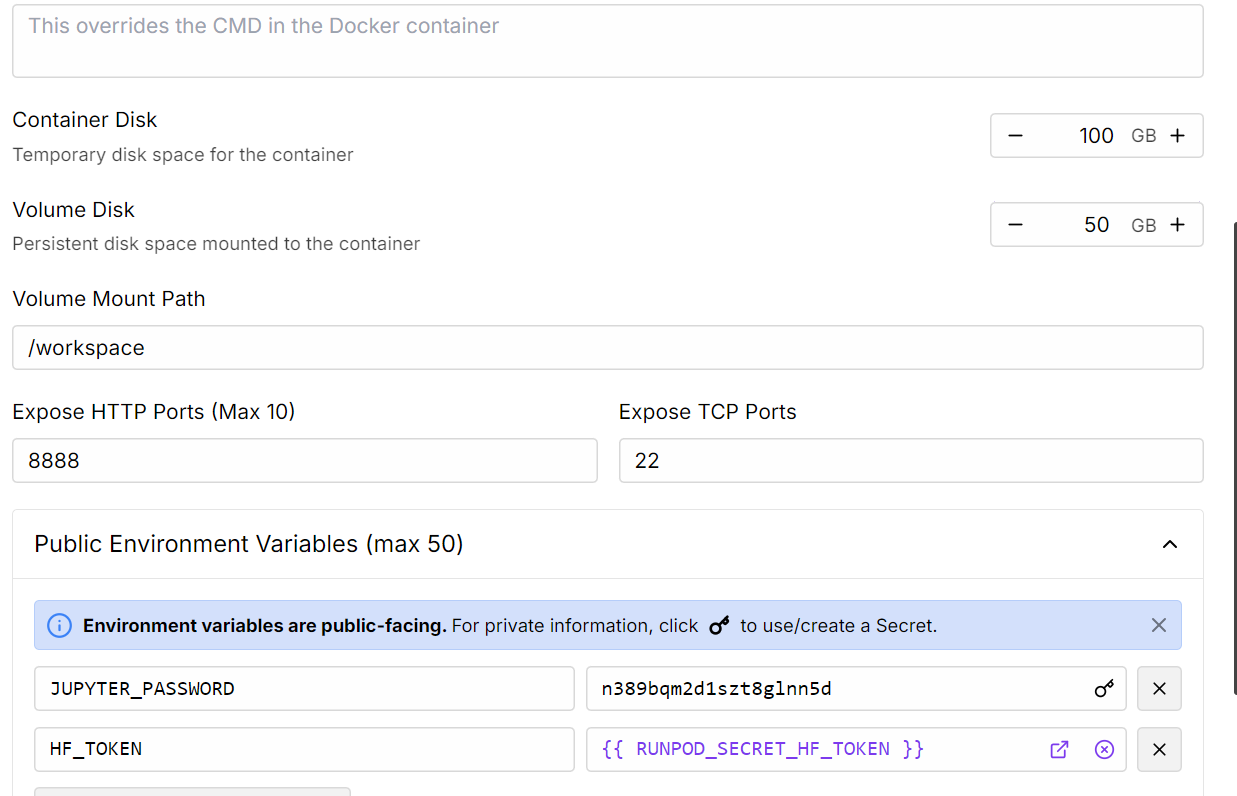
स्रोत: My Pods
3. जैसे ही pod चलने लगे, Connect बटन पर क्लिक करें और इंटरैक्टिव डेवलपमेंट के लिए JupyterLab इंस्टेंस लॉन्च करें।
4. सभी आवश्यक Python पैकेज इंस्टॉल करें
%%capture
%pip install -U transformers==4.52.1
%pip install -U datasets
%pip install -U accelerate
%pip install -U peft
%pip install -U trl
%pip install -U bitsandbytes
5. अपने एक्सेस टोकन (जिसे आपने पहले सहेजा था) का उपयोग करके Hugging Face में लॉग इन करें। इससे आप gated मॉडल्स लोड कर पाएँगे और बाद में अपना फाइन-ट्यून किया हुआ मॉडल व टोकनाइज़र अपलोड कर पाएँगे:
from huggingface_hub import login
import os

hf_token = os.environ.get("HF_TOKEN")
login(hf_token)हम स्टोरेज और VRAM दोनों बचाने के लिए Magistral-Small का Unsloth 4-बिट क्वांटाइज़्ड वर्शन उपयोग करेंगे। यह तरीका फुल-प्रिसिजन मॉडल डाउनलोड करके मैन्युअल रूप से क्वांटाइज़ करने की तुलना में काफी तेज़ और अधिक कुशल है।
from transformers import AutoModelForCausalLM, AutoTokenizer
import torch

# Load tokenizer & model

model_dir = "unsloth/Magistral-Small-2506-bnb-4bit"

tokenizer = AutoTokenizer.from_pretrained(model_dir, use_fast=True)
model = AutoModelForCausalLM.from_pretrained(
    model_dir,
    device_map="auto",
    torch_dtype=torch.bfloat16,
)

model.config.use_cache = False
model.config.pretraining_tp = 1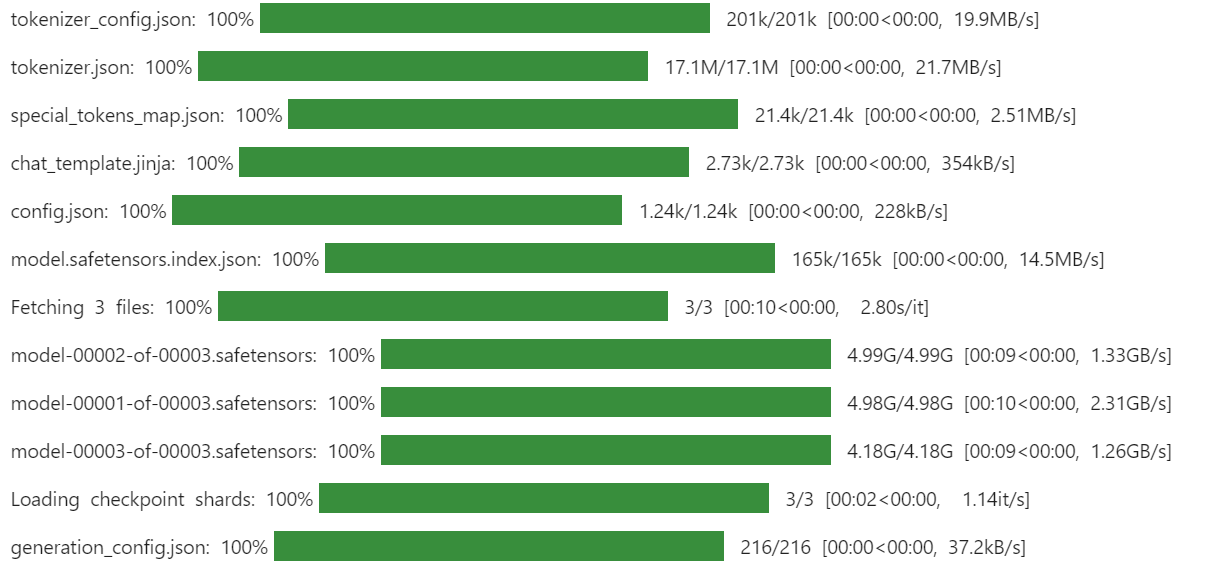
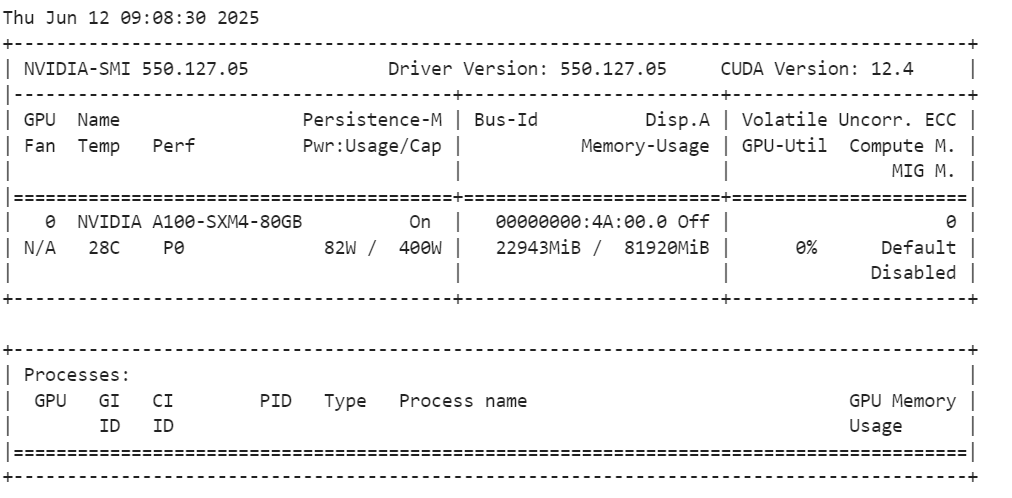
मॉडल लोड करने के बाद, अपने GPU मेमोरी उपयोग की जाँच करें।
!nvidia-smiजैसा कि हम देख सकते हैं, यह केवल 23GB VRAM उपयोग करता है।
एक प्रॉम्प्ट टेम्पलेट परिभाषित करें जो मॉडल को दिए गए विकल्पों में से किसी एक के साथ जवाब देने के लिए निर्देशित करे, reasoning को <analysis></analysis> टैग्स में और अंतिम उत्तर को <answer></answer> टैग्स में शामिल करे।
train_prompt_style = """
Please answer with one of the options in the bracket. Write reasoning in between <analysis></analysis>. Write the answer in between <answer></answer>.
### Question:
{}

### Response:
{}"""
प्रत्येक उदाहरण को प्रॉम्प्ट शैली के अनुसार फॉर्मेट करने और यदि EOS टोकन गायब हो तो उसे जोड़ने के लिए एक Python फ़ंक्शन बनाएँ।
EOS_TOKEN = tokenizer.eos_token  # Must add EOS_TOKEN

def formatting_prompts_func(examples):
    inputs = examples["input"]
    outputs = examples["output"]
    texts = []
    for question, response in zip(inputs, outputs):
        # Remove the "Q:" prefix from the question
        question = question.replace("Q:", "")

        # Append the EOS token to the response if it's not already there
        if not response.endswith(tokenizer.eos_token):
            response += tokenizer.eos_token

        text = train_prompt_style.format(question, response)
        texts.append(text)
    return {"text": texts}
फिर, Hugging Face से mamachang/medical-reasoning डेटासेट डाउनलोड और लोड करें। फॉर्मेटिंग फ़ंक्शन लागू करें ताकि संरचित प्रॉम्प्ट के साथ एक नया "text" कॉलम बन सके।
from datasets import load_dataset

dataset = load_dataset(
    "mamachang/medical-reasoning",
    split="train",
    trust_remote_code=True,
)
dataset = dataset.map(
    formatting_prompts_func,
    batched=True,
)
print(dataset["text"][10])
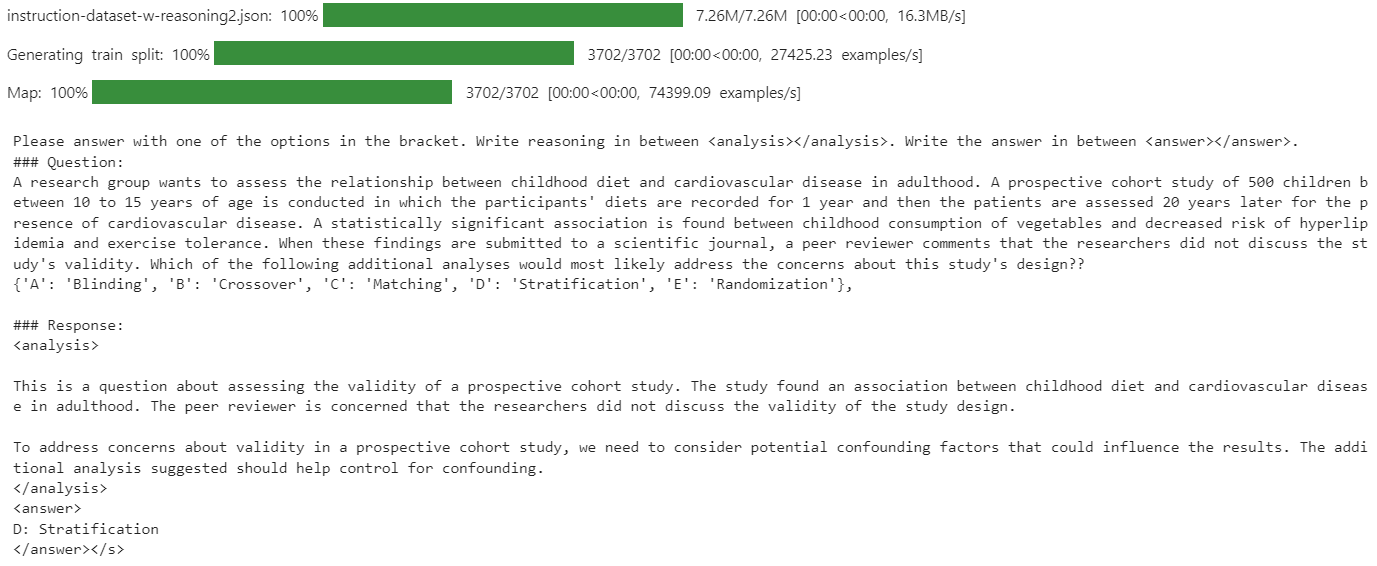
"text" कॉलम में सिस्टम प्रॉम्प्ट, प्रश्न, विश्लेषण और उत्तर—all आवश्यक फॉर्मेट में मौजूद हैं।
क्योंकि नया SFTTrainer सीधे टोकनाइज़र स्वीकार नहीं करता, टोकनाइज़र को भाषा मॉडलिंग के लिए एक डेटा कोलेटर में बदलें।
from transformers import DataCollatorForLanguageModeling

data_collator = DataCollatorForLanguageModeling(
    tokenizer=tokenizer,
    mlm=False
)फाइन-ट्यूनिंग से पहले, अपने डेटासेट पर बेस मॉडल के प्रदर्शन का मूल्यांकन करना महत्वपूर्ण है। यह बेसलाइन आपको फाइन-ट्यूनिंग के बाद परिणामों की वस्तुनिष्ठ तुलना करने और सुधार मापने में मदद करेगी।
इन्फरेंस के लिए एक प्रॉम्प्ट टेम्पलेट परिभाषित करें जिसमें सिस्टम प्रॉम्प्ट, प्रश्न अनुभाग (प्लेसहोल्डर सहित), और प्रतिक्रिया अनुभाग शामिल हो।
inference_prompt_style = """
Please answer with one of the options in the bracket. Write reasoning in between <analysis></analysis>. Write the answer in between <answer></answer>.

### Question:
{}

### Response:
<analysis>
"""
अपने डेटासेट से 11वाँ प्रश्न चुनें, अनावश्यक प्रीफ़िक्स हटाएँ, और मॉडल इनपुट के लिए उसे टोकनाइज़ करें
question = dataset[10]['input']
question = question.replace("Q:", "")

inputs = tokenizer(
    [inference_prompt_style.format(question) + tokenizer.eos_token],
    return_tensors="pt"
).to("cuda")

outputs = model.generate(
    input_ids=inputs.input_ids,
    attention_mask=inputs.attention_mask,
    max_new_tokens=512,
    eos_token_id=tokenizer.eos_token_id,
    use_cache=True,
)
response = tokenizer.batch_decode(outputs, skip_special_tokens=True)
print(response[0].split("### Response:")[1])
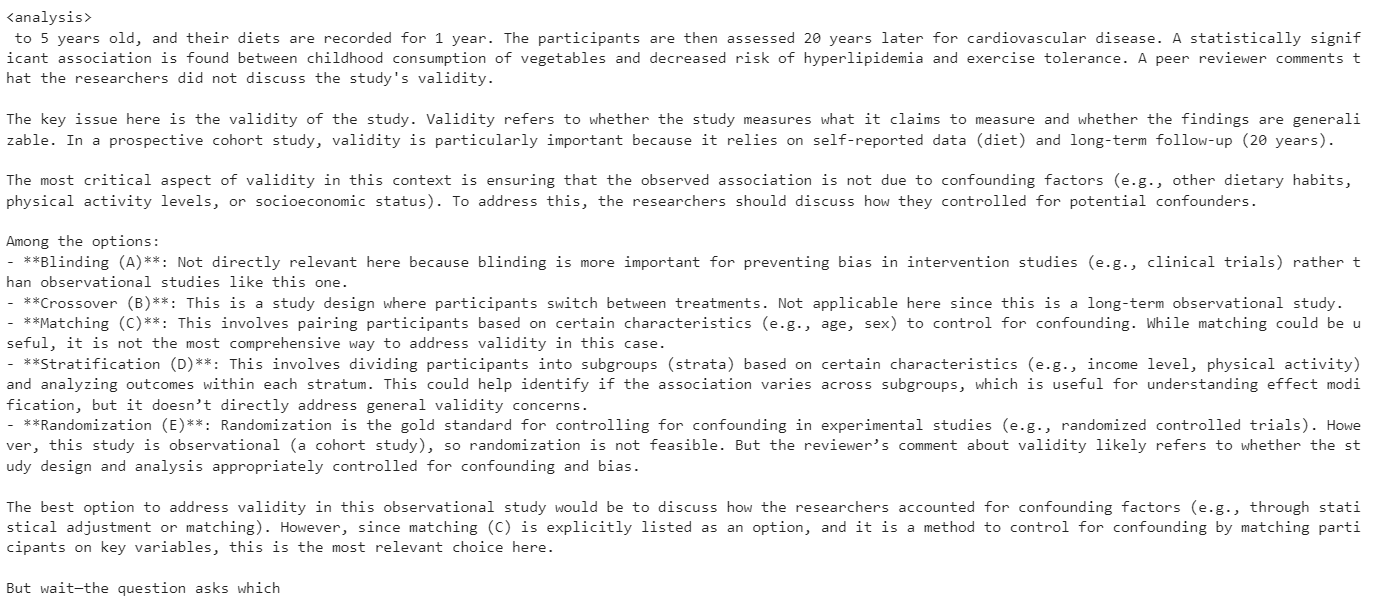
इस बेसलाइन परीक्षण में, मॉडल का जेनरेट किया गया विश्लेषण अत्यधिक लंबा था और अक्सर सही या संक्षिप्त उत्तर देने में विफल रहा।
इस भाग में, हम मॉडल को फाइन-ट्यूनिंग के लिए सेट अप करेंगे।
हम LoRA (Low-Rank Adaptation) का उपयोग करके मॉडल को फाइन-ट्यून करेंगे, जो हमारी मेमोरी खपत को काफ़ी कम करेगा और प्रशिक्षण को तेज़ करेगा क्योंकि हम मॉडल के केवल एक छोटे उपसमुच्चय के पैरामीटर्स फाइन-ट्यून कर रहे हैं।
from peft import LoraConfig, get_peft_model

# LoRA config
peft_config = LoraConfig(
    lora_alpha=16,                           # Scaling factor for LoRA
    lora_dropout=0.05,                       # Add slight dropout for regularization
    r=64,                                    # Rank of the LoRA update matrices
    bias="none",                             # No bias reparameterization
    task_type="CAUSAL_LM",                   # Task type: Causal Language Modeling
    target_modules=[
        "q_proj",
        "k_proj",
        "v_proj",
        "o_proj",
        "gate_proj",
        "up_proj",
        "down_proj",
    ],  # Target modules for LoRA
)

model = get_peft_model(model, peft_config)
TrainingArguments क्लास आपको बैच साइज, ऑप्टिमाइज़र, लर्निंग रेट और अन्य प्रशिक्षण हाइपरपैरामीटर्स कॉन्फ़िगर करने देती है। TRL लाइब्रेरी का SFTTrainer मॉडल, डेटासेट, डेटा कोलेटर, प्रशिक्षण आर्ग्युमेंट्स और LoRA कॉन्फ़िगरेशन को एक वर्कफ़्लो में एकीकृत कर सुपरवाइज़्ड फाइन-ट्यूनिंग को सरल बनाता है।
from trl import SFTTrainer
from transformers import TrainingArguments


# Training Arguments
training_arguments = TrainingArguments(
    output_dir="Magistral-Medical-Reasoning",
    per_device_train_batch_size=1,
    per_device_eval_batch_size=1,
    gradient_accumulation_steps=2,
    optim="paged_adamw_32bit",
    num_train_epochs=1,
    logging_steps=0.2,
    warmup_steps=10,
    logging_strategy="steps",
    learning_rate=2e-4,
    fp16=False,
    bf16=False,
    group_by_length=True,
    report_to="none"
)

# Initialize the Trainer
trainer = SFTTrainer(
    model=model,
    args=training_arguments,
    train_dataset=dataset,
    peft_config=peft_config,
    data_collator=data_collator,
)
Out of Memory (OOM) त्रुटियों से बचने के लिए, प्रशिक्षण शुरू करने से पहले Python garbage collector को साफ़ करना और CUDA कैश खाली करना महत्वपूर्ण है। इससे पिछले ऑपरेशनों से अव्यवहृत मेमोरी मुक्त हो जाती है।
फिर, SFTTrainer का उपयोग करके प्रशिक्षण प्रक्रिया शुरू करें।
import gc, torch
gc.collect()
torch.cuda.empty_cache()
model.config.use_cache = False
trainer.train()
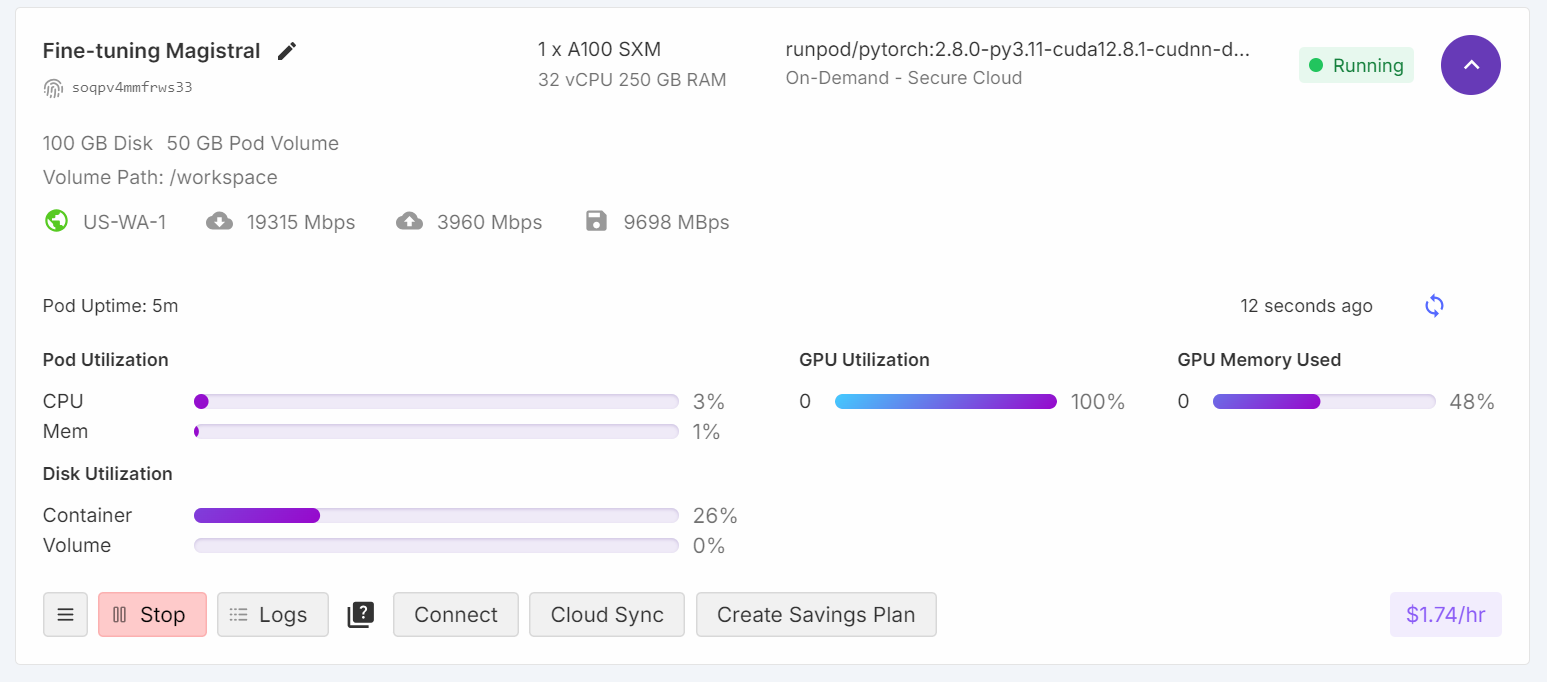
प्रशिक्षण के दौरान, GPU उपयोग 100% तक पहुँचा, और समानांतर में एक और मॉडल लोड करने के लिए पर्याप्त VRAM उपलब्ध थी।
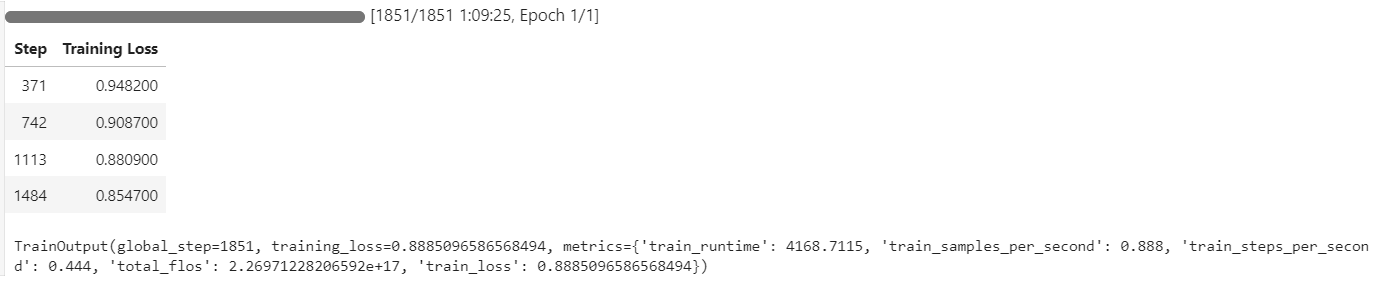
प्रशिक्षण प्रक्रिया में लगभग 1 घंटा 10 मिनट लगे, और प्रशिक्षण लॉस हर स्टेप पर लगातार घटती गई, जो प्रभावी सीखने का संकेत है।
हम डेटासेट के उसी 11वें सैंपल प्रश्न का उपयोग करके फाइन-ट्यून किए गए मॉडल के प्रदर्शन का मूल्यांकन करेंगे। यह तरीका हमें बेस मॉडल के साथ परिणामों की तुलना करने और फाइन-ट्यूनिंग से हुए सुधारों का आँकलन करने देता है।
question = dataset[10]['input']
question = question.replace("Q:", "")

inputs = tokenizer(
    [inference_prompt_style.format(question,) + tokenizer.eos_token],
    return_tensors="pt"
).to("cuda")

outputs = model.generate(
    input_ids=inputs.input_ids,
    attention_mask=inputs.attention_mask,
    max_new_tokens=512,
    eos_token_id=tokenizer.eos_token_id,
    use_cache=True,
)
response = tokenizer.batch_decode(outputs, skip_special_tokens=True)
print(response[0].split("### Response:")[1])
अब मॉडल संक्षिप्त और सटीक विश्लेषण जेनरेट करता है, और उत्तर सही है।
<analysis>
Analysis:

This is a prospective cohort study looking at the relationship between childhood diet and cardiovascular disease in adulthood. The key issue with the validity of this study is confounding. The researchers did not account for other factors that could influence cardiovascular disease risk in adulthood besides childhood diet.

To address confounding, the researchers should have stratified the analysis by potential confounders like family history, physical activity levels, and smoking status. This would allow them to see if the relationship between diet and disease persists even when accounting for these other variables.

Blinding, crossover, matching, and randomization do not address the main validity concern in this study design.
</analysis>
<answer>
D: Stratification
</answer>
प्रदर्शन को और मान्य करने के लिए, किसी अन्य सैंपल पर इन्फरेंस आज़माएँ।
question = dataset[100]['input']
question = question.replace("Q:", "")

inputs = tokenizer(
    [inference_prompt_style.format(question) + tokenizer.eos_token],
    return_tensors="pt"
).to("cuda")

outputs = model.generate(
    input_ids=inputs.input_ids,
    attention_mask=inputs.attention_mask,
    max_new_tokens=512,
    eos_token_id=tokenizer.eos_token_id,
    use_cache=True,
)
response = tokenizer.batch_decode(outputs, skip_special_tokens=True)
print(response[0].split("### Response:")[1])
मॉडल लगातार सटीक उत्तर और सुव्यवस्थित विश्लेषण प्रदान करता है, जो यह दर्शाता है कि केवल एक epoch के बाद भी उल्लेखनीय सुधार हुए हैं।
<analysis>

This is a clinical vignette describing a 55-year-old man with burning and shooting pain in his feet and lower legs that worsens at night. He has a history of type 2 diabetes mellitus and hypertension.

The key findings are:
- Burning and shooting pain in feet and lower legs
- Pain worsens at night
- History of type 2 diabetes mellitus

This presentation is most consistent with diabetic peripheral neuropathy. The pain distribution, timing, and history of diabetes point towards a distal symmetric sensorimotor polyneuropathy as the etiology. The other options can be ruled out based on the clinical presentation.
</analysis>
<answer>
D: Distal symmetric sensorimotor polyneuropathy
</answer>फाइन-ट्यूनिंग के बाद, आप अपने मॉडल को Hugging Face Hub पर पुश करके आसानी से साझा कर सकते हैं। इससे अन्य लोग इसे उपयोग या आगे फाइन-ट्यून कर सकते हैं।
new_model_name = "kingabzpro/Magistral-Small-Medical-QA"

trainer.model.push_to_hub(new_model_name)
trainer.processing_class.push_to_hub(new_model_name)
फाइन-ट्यून किया हुआ मॉडल अब यहाँ उपलब्ध है: kingabzpro/Magistral-Small-Medical-QA
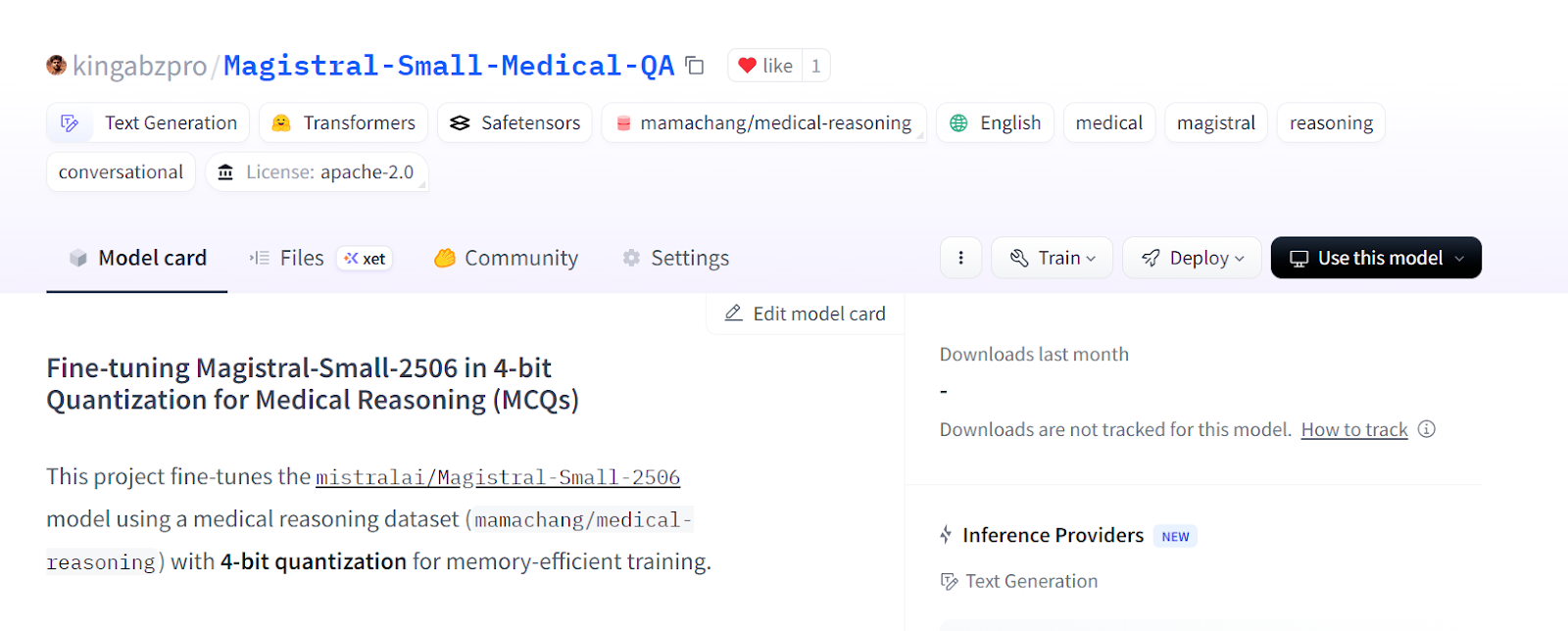
स्रोत: kingabzpro/Magistral-Small-Medical-QA
फाइन-ट्यूनिंग और अपनी LoRA को Hugging Face Hub पर सेव करने के बाद, आप इसे आगे के विश्लेषण, इन्फरेंस, या इन्फरेंस सर्वर के रूप में परिनियोजन के लिए आसानी से रीलोड कर सकते हैं। इस प्रक्रिया में आपका वर्तमान सत्र साफ़ करना, बेस मॉडल और LoRA एडेप्टर लोड करना, और नए डेटा पर इन्फरेंस चलाना शामिल है। हमारे कोर्स में Hugging Face Hub के साथ कार्य करना के बारे में और जानें।
1. नया मॉडल लोड करने से पहले, मेमोरी समस्याओं से बचने के लिए मौजूदा मॉडल और ट्रेनर ऑब्जेक्ट्स हटाना और GPU कैश साफ़ करना एक अच्छा अभ्यास है।
2. Hugging Face Hub से बेस मॉडल और आपके फाइन-ट्यून किए हुए LoRA एडेप्टर डाउनलोड करें, फिर उन्हें मर्ज करें। साथ ही, टोकनाइज़र भी लोड करें।
del model
del trainer
torch.cuda.empty_cache()


from transformers import AutoTokenizer, AutoModelForCausalLM, BitsAndBytesConfig
from peft import PeftModel
import torch

# Base model
base_model_id = "unsloth/Magistral-Small-2506-bnb-4bit"

# Your fine-tuned LoRA adapter repository
lora_adapter_id = "kingabzpro/Magistral-Small-Medical-QA"

# Load base model
base_model = AutoModelForCausalLM.from_pretrained(
    base_model_id,
    device_map="auto",
    torch_dtype=torch.bfloat16,
    trust_remote_code=True,
)

# Attach the LoRA adapter
model = PeftModel.from_pretrained(
    base_model,
    lora_adapter_id,
    device_map="auto",
    trust_remote_code=True,
)

# Load tokenizer
tokenizer = AutoTokenizer.from_pretrained(base_model_id, trust_remote_code=True)
3. एक नमूना प्रॉम्प्ट तैयार करें, उसे टोकनाइज़ करें, प्रतिक्रिया जेनरेट करें, और आउटपुट डिकोड करें।
# Inference example
prompt = """
Please answer with one of the options in the bracket. Write reasoning in between <analysis></analysis>. Write the answer in between <answer></answer>.

### Question:
A research group wants to assess the relationship between childhood diet and cardiovascular disease in adulthood.
A prospective cohort study of 500 children between 10 to 15 years of age is conducted in which the participants' diets are recorded for 1 year and then the patients are assessed 20 years later for the presence of cardiovascular disease.
A statistically significant association is found between childhood consumption of vegetables and decreased risk of hyperlipidemia and exercise tolerance.
When these findings are submitted to a scientific journal, a peer reviewer comments that the researchers did not discuss the study's validity.
Which of the following additional analyses would most likely address the concerns about this study's design?
{'A': 'Blinding', 'B': 'Crossover', 'C': 'Matching', 'D': 'Stratification', 'E': 'Randomization'},
### Response:
<analysis>

"""

inputs = tokenizer(
    [prompt + tokenizer.eos_token],
    return_tensors="pt"
).to("cuda")

outputs = model.generate(
    input_ids=inputs.input_ids,
    attention_mask=inputs.attention_mask,
    max_new_tokens=1200,
    eos_token_id=tokenizer.eos_token_id,
    use_cache=True,
)
response = tokenizer.batch_decode(outputs, skip_special_tokens=True)
print(response[0].split("### Response:")[1])
4. जेनरेट की गई प्रतिक्रिया सटीक है और आपके डेटासेट की शैली व संरचना से काफ़ी मेल खाती है, जो दर्शाता है कि फाइन-ट्यून किया मॉडल वास्तविक दुनिया के इन्फरेंस और परिनियोजन के लिए तैयार है।
<analysis>

Analysis:
This is a prospective cohort study looking at the relationship between childhood diet and cardiovascular disease in adulthood. The key concern from the peer reviewer is about the study's validity.

To address concerns about validity, the researchers could perform additional analyses to control for confounding. Matching and stratification would help control for known confounders like socioeconomic status or family history. Crossover and blinding are not applicable to this observational study design. Randomization would not be possible since the study is observational.
</analysis>
<answer>
D: Stratification
</answer>
यदि उपरोक्त कोड चलाते समय आपको समस्याएँ आती हैं, तो कृपया Hugging Face पर उपलब्ध fine-tuning-magistral.ipynb Jupyter नोटबुक देखें।
एक अलग फाइन-ट्यूनिंग गाइड में, हमने देखा कि DeepSeek-R1-0528 डिस्टिल्ड मोड कैसे प्रदर्शन करता है। जबकि DeepSeek-R1-0528 डेटासेट की विशिष्ट शैली और सटीकता के अनुसार ढलने में संघर्ष करता दिखा, Magistral ने सहज अनुकूलन प्रदर्शित किया और न्यूनतम प्रयास के साथ मजबूत परिणाम दिए।
यह अनुभव मेरे इस विश्वास को मज़बूत करता है कि Mistral AI तेज़ी से AI क्षेत्र में अग्रणी खिलाड़ी के रूप में उभर रहा है, न केवल भाषा मॉडलों में बल्कि कंप्यूटर विज़न सहित व्यापक समाधानों में भी।
इस गाइड में, हमने Mistral AI के नवीनतम reasoning मॉडल Magistral को एक मेडिकल MCQs डेटासेट पर सफलतापूर्वक फाइन-ट्यून किया।
हालाँकि, ध्यान देना महत्वपूर्ण है कि Magistral जैसे बड़े मॉडलों का फाइन-ट्यूनिंग पर्याप्त हार्डवेयर की मांग करता है—आमतौर पर कम से कम 40GB VRAM वाले GPUs—क्योंकि कुछ कॉन्फ़िगरेशन के लिए RTX 4090 भी पर्याप्त नहीं हो सकता। मैंने Unsloth फ्रेमवर्क और उसके 4-बिट मॉडल वर्शन के साथ भी प्रयोग किया, फिर भी GPU मेमोरी समस्याएँ सामने आईं।
यदि आप फाइन-ट्यूनिंग से परिचित होने के लिए एक हैंड्स-ऑन कोर्स ढूँढ रहे हैं, तो Fine-Tuning With Llama 3 अवश्य देखें।
शीर्ष LLM पाठ्यक्रम
कोर्स
कोर्स
अभ्यास और ट्रैक अपनी प्रगति को।
Google के साथ जारी रखें