Course
Writing Efficient Python Code
4 hr
155.5K
Every time you hit Ctrl+Z to undo a mistake, click the back button in your browser, or watch a recursive function unspool its results, you are relying on a stack. Because they are so deeply embedded in the software you use daily, you often interact with Stacks without even realizing it.
In this article, we’ll take a look at what a stack is, the core logic behind stacks, compare different implementation strategies using Python’s built-in libraries, and apply them to solve algorithmic problems.
I recommend taking our course on Writing Efficient Python Code to pair your data structure knowledge with performance best practices, and keeping the Python Basics Cheat Sheet handy as a quick reference.
Before looking into code, it is important to understand the conceptual foundation that makes the Python stack such a powerful tool. Let’s take a look at the core principle behind stacks and see how they differ from other common data structures.
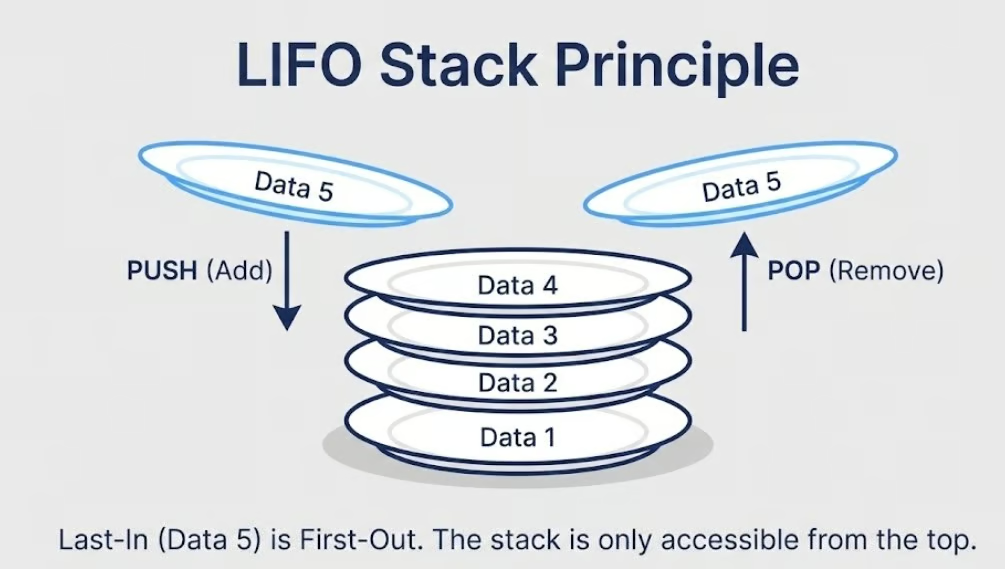
A stack is a linear data structure that follows the Last-In-First-Out (LIFO) principle. This means the most recently added element is always the first one to be removed. Think of it like a stack of plates in a cafeteria. You place new plates on top and always pick up the topmost plate first. You never pull a plate from the middle or the bottom. Access is restricted entirely to the top.
This single constraint, top-only access, is what gives stacks their predictability and efficiency. Every element enters and exits through the same end, which keeps operations simple and fast.
One thing worth noting early on is that Python does not ship with a dedicated, primitive stack type the way some other languages do. There is no stack keyword or built-in class. Instead, Python offers robust built-in alternatives like lists, collections.deque, and queue.LifoQueue that can all behave as stacks. We will look at each of these implementations in detail later in the article.
Understanding what a stack is becomes much clearer when you see what it is not. The two structures most commonly compared against stacks are queues and standard Python lists.
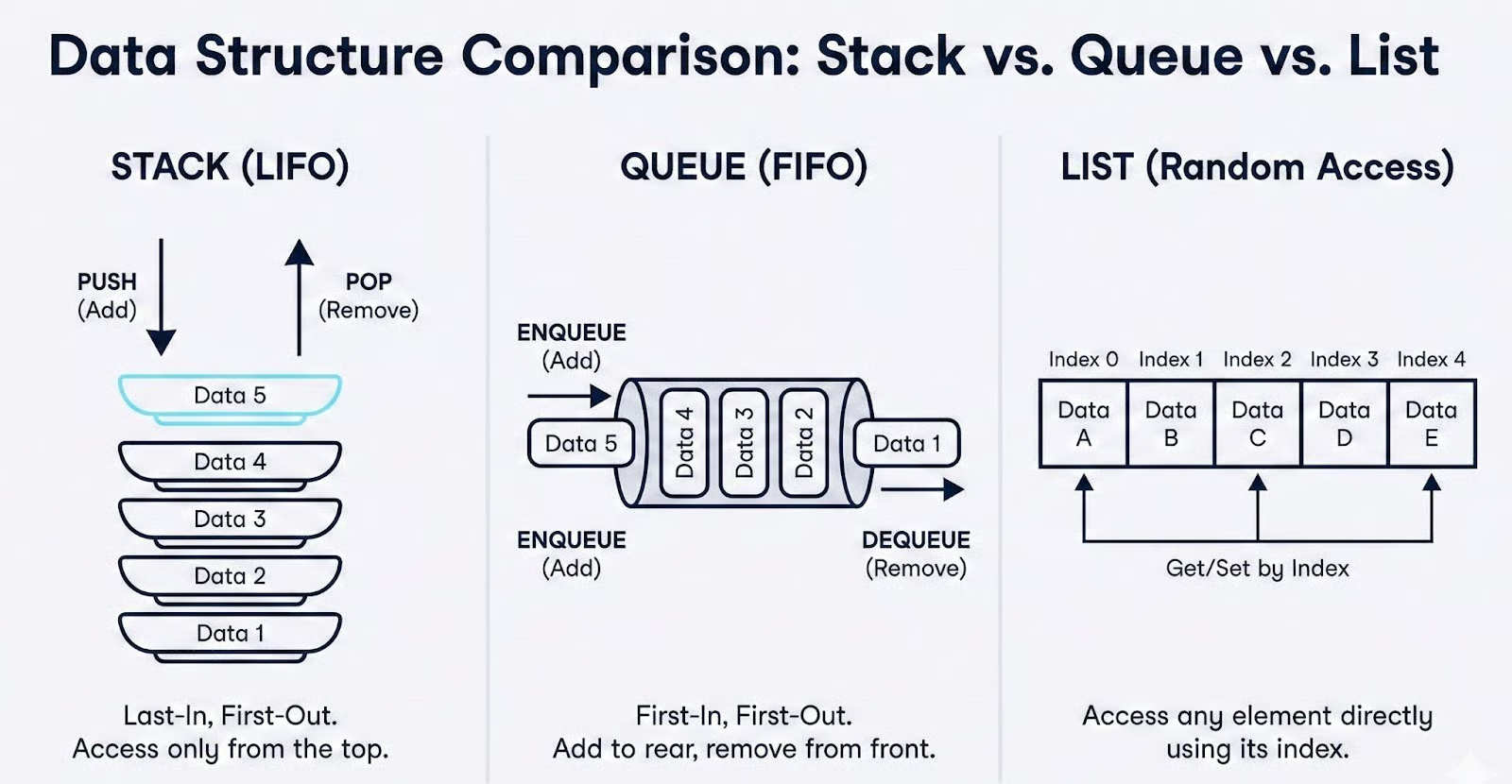
A queue follows the First-In-First-Out (FIFO) principle, the opposite of a stack. In a queue, elements are added at the back and removed from the front, like a line of people waiting at a ticket counter. Stacks and queues are both linear and both restrict how you access elements, but they do so in opposite directions.
Choosing the wrong one can silently break an algorithm's logic. For example, replacing a stack with a queue in a depth-first search would turn it into a breadth-first search, producing entirely different results.
A standard Python list, on the other hand, provides random access. You can read, insert, or delete elements at any index using operations like my_list[3] or my_list.insert(2, value). This flexibility is useful in many contexts, but it also means there is nothing preventing you from accidentally accessing or modifying elements in the middle of the structure.
When you are implementing an algorithm that depends on strict LIFO ordering, such as backtracking, syntax parsing, or undo functionality, the unrestricted nature of a list can introduce subtle bugs.
This is exactly why the restricted access pattern of a stack is a feature, not a limitation. By only allowing interaction with the top element, a Python stack enforces correctness by design. You cannot accidentally dequeue from the wrong end or overwrite an element buried deep in the structure.
In algorithm design, constraints like these are what keep your logic clean and your code predictable.
Now that we understand what a Python stack is and how it differs from other structures, let's take a look at the fundamental operations that every stack supports and analyze how efficiently each one performs.
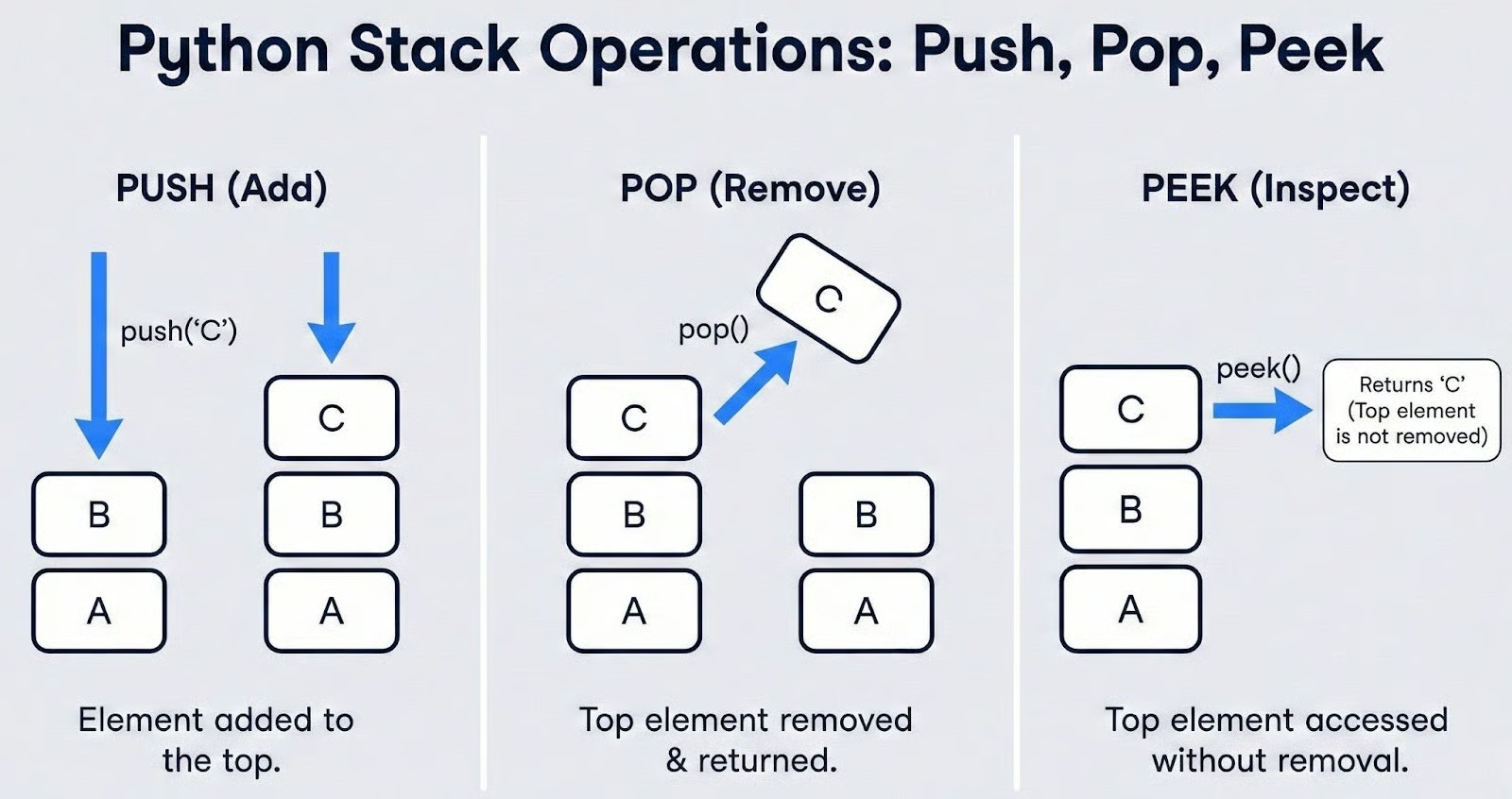
Every stack implementation is based on a small set of standard operations, regardless of the programming language. These are the building blocks you will use every time you work with a stack.
Push adds an element to the top of the stack. If the stack contains [A, B] and you push C, the stack becomes [A, B, C], with C now sitting on top.
Pop removes and returns the element currently at the top. Continuing the example above, popping from [A, B, C] returns C and leaves the stack as [A, B].
Peek (sometimes called top) lets you view the element at the top without removing it. This is useful when your logic needs to inspect the current top value before deciding whether to pop, a pattern that comes up frequently in expression parsing and balanced parentheses problems.
On top of those three core operations, two helper methods are important for writing safe, error-free stack code:
is_empty() checks whether the stack contains any elements. Calling pop or peek on an empty stack is a common source of runtime errors, so checking emptiness first is a defensive programming habit you should build early.
size() returns the current number of elements in the stack. This is helpful when you need to track how deep a recursion has gone or how many items still have to be processed.
Finally, it is worth defining a term you will encounter in textbooks and interviews: Stack Underflow. It is the error condition that occurs when you attempt to pop or peek from an empty stack. There is nothing to remove or view, so the operation is invalid.
The exact exception or behavior this produces depends on the implementation. We will see how Python handles it concretely when we look at list, deque, and LifoQueue in the next section.
One of the biggest reasons stacks are so widely used in algorithms is their efficiency. Let's break down the time and space complexity of each operation.
Push is O(1). In an efficient stack implementation, adding an element to the top is a constant-time operation. The stack does not need to shift or rearrange any existing elements. It simply places the new item at the end. This holds true for both collections.deque and, in the amortized case, Python's built-in list.
Pop is O(1). Removing the top element is equally fast. The stack accesses the last position directly, returns the value, and decrements its internal size tracker. Again, no shifting of other elements is required.
Peek is O(1). Viewing the top element without removal is a direct index lookup, making it constant-time as well.
Search is O(n). This is where stacks reveal their deliberate trade-off. If you need to find out whether a specific value exists somewhere in the stack, you have no choice but to scan through all n elements from top to bottom.
Stacks are not designed for arbitrary lookups. They sacrifice search capability in exchange for fast, predictable push and pop. If your use case requires frequent searches, a different data structure, like a set or a dictionary, would be a better fit.
Space complexity is O(n). A stack holding n elements requires memory proportional to n. There is no hidden overhead beyond what is needed to store the elements themselves, plus a small constant for the structure's internal bookkeeping.
Here is a quick summary:
|
Operation |
Time Complexity |
Notes |
|
Push |
O(1) |
Constant time. Amortized O(1) for Python lists |
|
Pop |
O(1) |
Constant time |
|
Peek |
O(1) |
Direct access to the top element |
|
Search |
O(n) |
Must scan all elements |
|
Space |
O(n) |
Linear in the number of stored elements |
The key takeaway is that a Python stack is optimized for fast insertion and removal at one end. As long as you use it for what it is designed to do, like managing ordered, LIFO access, it delivers excellent performance. The moment you find yourself searching through a stack regularly, it is a signal to reconsider your choice of data structure.
With the theory and complexity analysis behind us, it is time to write actual code. Python offers three primary ways to implement a stack, each with its own strengths and trade-offs. Let’s walk through all three and see how to decide which one fits our use case.
The most straightforward way to create a Python stack is with the built-in list. Since lists are dynamic arrays that support adding and removing elements from the end, they map naturally to stack behavior.
The .append() method serves as a push, and .pop() without an argument removes and returns the last element. Let’s see this with a code example below:
# Creating a stack using a Python list
stack = []

# Push elements
stack.append(10)
stack.append(20)
stack.append(30)
print(stack)

# Pop the top element
top = stack.pop()
print(top)
print(stack)

# Peek at the top element
print(stack[-1])
[10, 20, 30]
30
[10, 20]
20This works well, but you need to handle the empty stack case carefully. In Python, both .pop() and stack[-1] raise an IndexError when the list is empty. This is how Python surfaces the Stack Underflow condition we defined earlier.
The best practice is to wrap these calls in a try/except block or check emptiness before accessing the top, like in the following example:
# Handling Stack Underflow with try/except
stack = []

try:
    stack.pop()
except IndexError:
    print("Stack Underflow: cannot pop from an empty stack")

try:
    top = stack[-1]
except IndexError:
    print("Stack Underflow: cannot peek at an empty stack")

# Alternatively, check before accessing
if stack:
    top = stack.pop()
else:
    print("Stack is empty")
Stack Underflow: cannot pop from an empty stack
Stack Underflow: cannot peek at an empty stack
Stack is emptyThere is one performance nuance worth understanding. Python lists are backed by dynamic arrays. When you call .append(), the operation is usually instant O(1). However, when the internal array runs out of pre-allocated space, Python must allocate a new, larger block of memory and copy all existing elements over to it.
This occasional reallocation makes .append() an amortized O(1) operation rather than a strict O(1). In practice, the delay is rare and brief, but in latency-sensitive or real-time applications, this unpredictability can matter.
Despite this caveat, .append() and .pop() on a list are the preferred approach for most simple stack tasks. The zero-import requirement, familiar syntax, and broad developer familiarity make it a good default choice, especially for scripting, prototyping, and interview problems where simplicity counts.
If you need consistent O(1) performance without the occasional reallocation lag, collections.deque is the recommended upgrade. The name stands for "double-ended queue," but it works perfectly as a high-performance Python stack. Our earlier example looks like this with the deque syntax:
from collections import deque

# Creating a stack using deque
stack = deque()

# Push elements
stack.append(10)
stack.append(20)
stack.append(30)
print(stack)

# Pop the top element
top = stack.pop()
print(top)
print(stack)

# Peek at the top element
print(stack[-1])
deque([10, 20, 30])
30
deque([10, 20])
20Notice that the interface is identical to the list-based approach. .append(), .pop(), and [-1] all work the same way. The IndexError behavior on empty access is also unchanged, so your error-handling code does not need any modification:
from collections import deque

stack = deque()

try:
    stack.pop()
except IndexError:
    print("Stack Underflow: cannot pop from an empty deque stack")
Stack Underflow: cannot pop from an empty deque stackThe critical difference is under the hood. A deque is implemented as a doubly-linked list of fixed-size blocks rather than a single array. This means it never needs to reallocate and copy the entire structure when it grows.
Every .append() and .pop() is a true, guaranteed O(1) operation, not amortized, but consistent. For algorithm-heavy work where you are pushing and popping thousands or millions of times, this consistency adds up.
Python's standard library also includes the queue.LifoQueue, a stack implementation designed specifically for multi-threaded programs. The "LIFO" in the name confirms it follows Last-In-First-Out ordering, but the interface and behavior are quite different from the previous two approaches. Let’s see this with a code example:
from queue import LifoQueue

# Creating a thread-safe stack
stack = LifoQueue()

# Push elements using .put()
stack.put(10)
stack.put(20)
stack.put(30)
print(stack.qsize())

# Pop the top element using .get()
top = stack.get()
print(top)
print(stack.qsize())
3
30
2The first thing to notice is the syntax change. Push becomes .put(), and pop becomes .get(). This naming comes from the queue module's producer-consumer design pattern, where one thread "puts" items and another "gets" them.
There are two important behavioral differences to be aware of.
First, LifoQueue has no safe peek method. There is no built-in way to view the top element without removing it. You could access internal attributes, but doing so in a multi-threaded context defeats the purpose of using a thread-safe class and risks race conditions.
Second, LifoQueue does not raise IndexError when you attempt to get from an empty stack. By default, .get() blocks. It pauses the calling thread and waits indefinitely until another thread puts an item onto the stack. If you want non-blocking behavior, you can pass block=False, which raises a queue.Empty exception instead. Let’s see this with an example:
from queue import LifoQueue, Empty

stack = LifoQueue()

# Non-blocking get raises Empty, not IndexError
try:
    stack.get(block=False)
except Empty:
    print("Stack is empty — no items to get")
Stack is empty — no items to getBecause of the internal locking mechanism that makes LifoQueue thread-safe, its operations carry more overhead than list or deque. This makes it a poor choice for single-threaded code. Use LifoQueue strictly when you have multiple threads producing and consuming data concurrently, and reach for deque or list in every other situation.
With three options available, here is a side-by-side comparison to guide your decision:
|
Feature |
|
|
|
|
Import required |
No |
Yes ( |
Yes ( |
|
Push method |
|
|
|
|
Pop method |
|
|
|
|
Peek method |
|
|
No safe method |
|
Empty error |
|
|
Blocks or |
|
Push/Pop speed |
Amortized O(1) |
True O(1) |
O(1) with lock overhead |
|
Thread-safe |
No |
No |
Yes |
|
Best for |
Simple scripts, prototyping |
Algorithms, performance-critical code |
Multi-threaded producer-consumer |
Here’s my decision framework to choose the best implementation:
Use list when you need a quick stack with no imports, like in scripts, notebooks, and interview whiteboards.
Use collections.deque when you are writing algorithmic code, processing large datasets, or building anything where performance matters.
Use queue.LifoQueue only when you have a natural multi-threaded scenario with concurrent access.
You may also come across tutorials that implement a Python stack from scratch using a custom linked list class, where each node holds a value and a pointer to the node below it. In my opinion, that’s definitely a valuable educational exercise that can deepen your understanding of how stacks work internally and how memory references chain together.
However, in production Python code, a linked list stack is almost always slower than a deque due to the overhead of creating individual node objects. For real-world Python work, collections.deque gives you the best combination of speed, clarity, and reliability.
Understanding how to implement a Python stack is only half the picture. The real value of stacks becomes clear when you see them solve problems that would be far more complex without LIFO ordering. Let’s take a look at the three classic applications that appear constantly in coding interviews, software systems, and algorithm design.
The balanced parentheses problem is one of the most frequently asked stack questions in technical interviews. Given a string containing brackets, such as (), [], and {}, you need to determine whether every opening bracket has a corresponding closing bracket in the correct order.
The logic maps perfectly onto a stack. As you scan the string from left to right, push every opening bracket onto the stack. When you encounter a closing bracket, pop the top of the stack and check if it matches.
If the stack is empty when you try to pop, or if the popped bracket does not match, the string is unbalanced. After processing the entire string, the stack should be empty. Any leftover opening brackets mean something was never closed. Let’s see this in action:
from collections import deque

def is_balanced(expression):
    stack = deque()
    matching = {')': '(', ']': '[', '}': '{'}

    for char in expression:
        if char in '([{':
            stack.append(char)
        elif char in ')]}':
            if not stack:
                return False  # closing bracket with nothing to match
            if stack.pop() != matching[char]:
                return False  # mismatched pair

    return len(stack) == 0  # stack should be empty if balanced

# Test cases
print(is_balanced("([])"))
print(is_balanced("{[()]}"))
print(is_balanced("([)]"))
print(is_balanced("(("))
print(is_balanced(""))
True
True
False
False
TrueLet's trace through "{[()]}" step by step to see the stack in action:
|
Character |
Action |
Stack State |
|
|
Push |
|
|
|
Push |
|
|
|
Push |
|
|
|
Pop |
|
|
|
Pop |
|
|
|
Pop |
|
The stack is empty at the end, so the expression is balanced.
This same logic extends well beyond interview problems. Compilers and interpreters use it to validate syntax, ensuring that every opening tag, bracket, or delimiter in source code has a proper match.
If you have ever seen a SyntaxError: unexpected EOF message in Python, you have seen a form of this check in action. HTML validators, JSON parsers, and even configuration file linters all rely on variations of this stack-based approach.
Depth-first search is one of the foundational graph traversal algorithms, and a stack is the data structure that drives it. The idea is simple. Start at a node, explore as far as possible along one branch before backtracking to try the next. The LIFO nature of a Python stack is what makes this "go deep first" behavior happen naturally.
Most introductory courses teach DFS using recursion, where the call stack implicitly manages the traversal order. However, the recursive approach has a practical limitation. Python's default recursion limit is 1,000 frames.
For large or deeply nested graphs, this leads to a RecursionError. The iterative version, which uses an explicit stack, avoids this problem and gives you full control over the traversal.
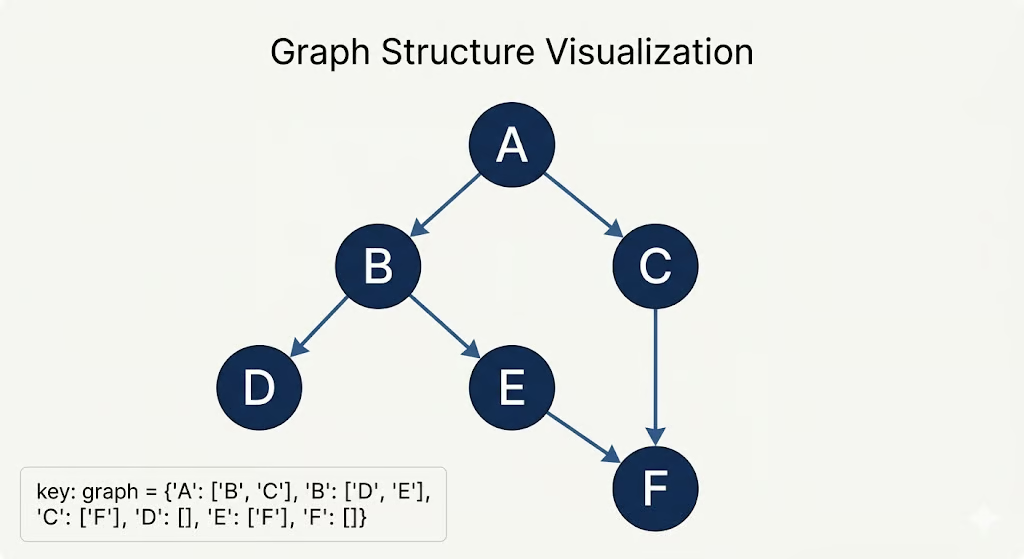
Let’s see a code example of this. We will do a DFS through the following graph:
from collections import deque

def dfs_iterative(graph, start):
    visited = set()
    stack = deque()
    stack.append(start)
    traversal_order = []

    while stack:
        node = stack.pop()
        if node not in visited:
            visited.add(node)
            traversal_order.append(node)
            # Push neighbors onto the stack
            # Reverse to maintain left-to-right order after LIFO popping
            for neighbor in reversed(graph[node]):
                if neighbor not in visited:
                    stack.append(neighbor)

    return traversal_order

# Example graph represented as an adjacency list
graph = {
    'A': ['B', 'C'],
    'B': ['D', 'E'],
    'C': ['F'],
    'D': [],
    'E': ['F'],
    'F': []
}

print(dfs_iterative(graph, 'A'))
['A', 'B', 'D', 'E', 'F', 'C']Let's trace through the execution to see how the stack governs the traversal:
|
Step |
Pop |
Push neighbors |
Stack |
Visited |
|
1 |
A |
B, C |
|
|
|
2 |
B |
D, E |
|
|
|
3 |
D |
(none) |
|
|
|
4 |
E |
F |
|
|
|
5 |
F |
(none) |
|
|
|
6 |
C |
F (already visited) |
|
|
Notice how the LIFO ordering forces the algorithm to fully explore the A → B → D and A → B → E → F branches before it ever backtracks to visit C. This is precisely what distinguishes depth-first search from breadth-first search, which uses a queue and explores all neighbors at the current depth before going deeper.
The iterative DFS pattern shown here works for trees, directed graphs, and undirected graphs alike. It is also the foundation for more advanced algorithms like topological sorting, cycle detection, and solving maze and puzzle problems.
If you have ever used a text editor, drawing application, or spreadsheet, you have relied on undo and redo without thinking about how it works underneath. The mechanism is elegant, and it runs on exactly two stacks.
An undo stack stores every action or state as the user makes changes. When the user triggers undo, the current state is popped from the undo stack and pushed onto a redo stack.
If the user then triggers redo, the state is popped from the redo stack and pushed back onto the undo stack. If the user makes a brand new change after undoing, the redo stack is cleared. You cannot redo something that has been overwritten by a new action. Let’s see this with a code example:
from collections import deque

class TextEditor:
    def __init__(self):
        self.content = ""
        self.undo_stack = deque()
        self.redo_stack = deque()

    def type_text(self, text):
        """Record current state and apply new text."""
        self.undo_stack.append(self.content)
        self.content += text
        self.redo_stack.clear()  # new action invalidates redo history

    def undo(self):
        """Revert to the previous state."""
        if not self.undo_stack:
            print("Nothing to undo")
            return
        self.redo_stack.append(self.content)
        self.content = self.undo_stack.pop()

    def redo(self):
        """Re-apply the last undone action."""
        if not self.redo_stack:
            print("Nothing to redo")
            return
        self.undo_stack.append(self.content)
        self.content = self.redo_stack.pop()

    def show(self):
        print(f'Content: "{self.content}"')

# Demonstrate the undo/redo flow
editor = TextEditor()
editor.type_text("Hello")
editor.show()

editor.type_text(" World")
editor.show()

editor.type_text("!")
editor.show()

editor.undo()
editor.show()

editor.undo()
editor.show()

editor.redo()
editor.show()

editor.type_text(" Python")
editor.show()

editor.redo()
Content: "Hello"
Content: "Hello World"
Content: "Hello World!"
Content: "Hello World"
Content: "Hello"
Content: "Hello World"
Content: "Hello World Python"
Nothing to redoThe flow of states between the two stacks follows a clear pattern:
|
Action |
Undo Stack |
Content |
Redo Stack |
|
Type "Hello" |
|
|
|
|
Type " World" |
|
|
|
|
Type "!" |
|
|
|
|
Undo |
|
|
|
|
Undo |
|
|
|
|
Redo |
|
|
|
|
Type " Python" |
|
|
|
This two-stack pattern is not limited to text editors. It appears anywhere users need the ability to step backward and forward through a sequence of changes (which is pretty much everywhere):
The underlying principle is always the same. One Python stack tracks history, the other tracks the future, and LIFO ordering ensures you always return to the most recent state first.
Stacks also play an important role beneath the surface of every Python program you run, and they power optimization techniques that can dramatically reduce the time complexity of certain problems. Let’s take a look at both of these advanced dimensions.
Every time you call a function in Python, something happens behind the scenes that you do not directly control. Python pushes a new frame onto an internal data structure known as the call stack. This frame holds the function's local variables, its parameters, and a pointer back to the line of code that initiated the call.
When the function finishes executing, its frame is popped off the call stack, and control returns to the caller.
You can actually inspect this behavior using a simple example:
def function_c():
    print("Inside function_c")
    # At this point, the call stack holds:
    # [main → function_a → function_b → function_c]  (top)

def function_b():
    print("Inside function_b")
    function_c()

def function_a():
    print("Inside function_a")
    function_b()

function_a()
Inside function_a
Inside function_b
Inside function_cWhen function_c executes, the call stack has four frames stacked on top of each other. As each function completes, its frame is popped in LIFO order. function_c finishes first, then function_b, then function_a, and finally the main module scope.
This is exactly the mechanism that makes recursion work. Each recursive call pushes a new frame with its own local variables, and the results unwind as frames are popped. Let’s see this with an example:
def factorial(n):
    if n <= 1:
        return 1
    return n * factorial(n - 1)

print(factorial(5))

# Call stack at deepest point:
# factorial(1)  ← top (returns 1)
# factorial(2)  ← waiting for factorial(1)
# factorial(3)  ← waiting for factorial(2)
# factorial(4)  ← waiting for factorial(3)
# factorial(5) ← waiting for factorial(4)120The problem arises when recursion goes too deep. Python sets a default recursion limit of 1,000 frames to prevent the call stack from consuming all available memory. If your recursive function exceeds this limit, Python raises a RecursionError. Let’s see this with an example:
def infinite_recursion(n):
    return infinite_recursion(n + 1)

try:
    infinite_recursion(0)
except RecursionError:
    print("RecursionError: maximum recursion depth exceeded")
RecursionError: maximum recursion depth exceededYou can check and modify this limit using the sys module, though increasing it should be done cautiously:
import sys

print(sys.getrecursionlimit())
sys.setrecursionlimit(5000) # Increase with caution5000The important distinction to keep in mind is that the call stack is a system-level structure managed by the Python interpreter itself. You cannot push to or pop from it directly. The list, deque, and LifoQueue stacks we built in earlier sections are user-defined data structures that live in your program's heap memory. They serve different purposes, but both follow the same LIFO principle.
A monotonic stack is a specialized variation where the elements are maintained in non-decreasing or non-increasing order (or sometimes strictly increasing/decreasing, depending on the problem). Every time you push a new element, you first pop all elements that would violate the ordering constraint. It is the key to solving an entire class of optimization problems in linear time.
The classic example is the Next Greater Element problem: Given an array of integers, find the first element to the right that is greater than each element. A brute-force approach using nested loops runs in O(n²). For each element, you scan everything to its right. A monotonic stack solves it in O(n).
The insight is that you traverse the array from right to left, maintaining a decreasing stack. For each element, you pop everything from the stack that is smaller than or equal to it. Those values can never be the "next greater element" for any future element to the left.
Whatever remains on top of the stack after popping is the answer for the current element. Then you push the current element onto the stack. Let’s see this with a code example. Note that -1in this case means there is no bigger element to the right of that number:
from collections import deque

def next_greater_element(nums):
    n = len(nums)
    result = [-1] * n  # default: no greater element found
    stack = deque()     # monotonic decreasing stack (stores values)

    # Traverse from right to left
    for i in range(n - 1, -1, -1):
        # Pop elements that are not greater than current
        while stack and stack[-1] <= nums[i]:
            stack.pop()

        # If stack is not empty, top is the next greater element
        if stack:
            result[i] = stack[-1]

        # Push current element onto the stack
        stack.append(nums[i])

    return result

nums = [4, 5, 2, 25, 7, 18]
print(next_greater_element(nums))
[5, 25, 25, -1, 18, -1]Let's trace through the execution to see how the monotonic property is maintained:
|
Step (right to left) |
Current |
Stack before |
Pop |
Next greater |
Stack after |
|
|
18 |
|
— |
-1 |
|
|
|
7 |
|
— |
18 |
|
|
|
25 |
|
7,18 |
-1 |
|
|
|
2 |
|
— |
25 |
|
|
|
5 |
|
2 |
25 |
|
|
|
4 |
|
— |
5 |
|
Notice that every element is pushed onto the stack exactly once and popped at most once across the entire traversal. This is why the total time complexity is O(n) despite the inner while loop. The cumulative number of push and pop operations across all iterations never exceeds 2n.
As I mentioned before, there are many similar problems that the monotonic stack pattern speeds up from O(n²) to O(n), too. Among those are:
In each case, the core idea is the same: the monotonic constraint lets you discard elements that can no longer influence future results, which effectively prunes the search space from quadratic to linear.
The stack is one of the first data structures every programmer learns and one of the last they stop finding new uses for, which ironically is the opposite of its Last-In-First-Out nature.
In this article, we have seen how this LIFO constraint can be helpful in many different scenarios, from validating nested brackets and driving depth-first search traversals to managing undo/redo state and optimizing array problems with monotonic stacks.
If there is one recommendation to take away, it is this: use collections.deque as your go-to Python stack implementation unless you have a specific reason not to.
As a next step, I recommend taking our course on Data Structures and Algorithms in Python.
Python Courses
Course
Course
Track
Tutorial
Sejal Jaiswal
15 min
Tutorial
Natassha Selvaraj
9 min
Tutorial
Oluseye Jeremiah
5 min
Tutorial
Allan Ouko
7 min
Tutorial
Amberle McKee
8 min
Tutorial
François Aubry
15 min