
Track
Snowflake Foundations
7 hr
Snowflake is a popular and powerful cloud-based data platform, and Streamlit is an open-source Python framework designed to build data web apps. Streamlit in Snowflake (SiS) is an integrated solution that lets you build and deploy data apps directly within the Snowflake ecosystem. Instead of juggling separate tools, you can use Python and Snowflake’s infrastructure to create interactive applications quickly.
This tutorial will walk you through what Streamlit in Snowflake is, its key features, setup steps, deployment strategies, security, performance tips, and real-world use cases. By the end, you’ll have a clear roadmap for building and launching your first data app. Make sure to review Snowflake foundations and its interface. I also recommend trying out Streamlit in Python outside of Snowflake to better understand its functionality with this Streamlit tutorial.
Streamlit in Snowflake makes it possible to build interactive applications directly connected to your Snowflake data without leaving the platform.
Streamlit in Snowflake combines the simplicity of Streamlit with the scalability of Snowflake. Traditionally, building apps required external servers, APIs, and complex integrations. Streamlit boils down the core functionality to a few object-oriented APIs and Python integrations. The deployment is then offloaded to Snowflake using Snowsight.
This eliminates the need for extra infrastructure and provides a unified environment that integrates seamlessly with Snowpark, Cortex AI, and your Snowflake data. This means Python developers and data teams are working from the same source without having the additional overhead of transferring data or code.
In 2022, Snowflake acquired Streamlit to bring interactive app development closer to enterprise data. It maintains Streamlit's open source vision of providing developers with the ability to use Python to create beautiful web apps while integrating with one of the most powerful data platforms currently available. It allows enterprises to flexibly utilize Streamlit with less security concerns and unifies app development.
The philosophy of SiS focuses on maintaining the same level of security and governance you’d expect from Snowflake while providing the ease of using Streamlit to build data web apps. Since all the data remains within Snowflake, you have the same security and safety guarantees you would expect.
The main plus is the focus on making sure the Python framework remains the same and provides a similar experience on Snowflake as you would get off Snowflake. This should make SiS approachable for developers who have worked with Streamlit in the past or even those who have Python experience, looking to leverage their existing skills to build web apps for Snowflake data.
Streamlit in Snowflake keeps the key cloud features of Snowflake, like being fully managed and easy collaboration. It also has Streamlit’s functionality of visualization and rapid iteration while being integrated with the infrastructure.
Snowflake manages all infrastructure behind the scenes, which means you never need to worry about servers, scaling, or stability. Applications run with real-time interactivity, scale automatically based on usage, and benefit from Snowflake’s built-in reliability.
Streamlit apps inside Snowflake connect natively with Snowpark, Cortex AI, and databases. For instance, you can integrate the Cortex AI Analyst into your Streamlit app, allowing users to ask natural language questions about the data and get answers natively in the dashboard.
Other Snowflake features, like built-in caching, minimize redundant queries, while UI enhancements, such as dark mode and custom components, improve user experiences. Authentication and secure connections are handled automatically through Snowflake’s authentication protocols. Data sensitivity can be managed using Snowflake’s role-based controls.
This simplifies the task of data management and allows developers to focus on building tools.
One of the biggest strengths of Streamlit is the ability to transform a simple Python script into an interactive app in minutes. In Snowflake, you can preview and iterate on apps directly, updating code and seeing live results without waiting for lengthy deployments.
Streamlit apps can be shared directly with users inside Snowflake. This makes it easy to share the app to different teams using roles or individual members. Collaboration is built into the workflow, enabling multiple team members to work on, test, and deploy apps together.
Getting started with SiS is straightforward, and you can create your first app within minutes. We just need to make sure you have the right permissions and knowledge.
To build a Streamlit app in Snowflake, you need an active Snowflake account with access to Snowsight, the web interface. This introduction to Snowflake can show you how to navigate Snowsight. You should have a basic knowledge of Python. It might even be worth it to go over this introduction to Python course to brush up on your knowledge.
Once you have access to Snowflake, make sure you have the following permissions:
USAGEUSAGE, CREATE STREAMLIT, CREATE STAGEStart by logging into Snowsight and choosing or creating a database and schema where your app will live. Start by going to My Workspace and opening a new SQL file. Let’s make a role called streamlit_creator that will have access to our streamlit_schema on our streamlit_database. In addition, we’ll create a warehouse called streamlit_wh which will be the primary compute source for our Streamlit app.
CREATE ROLE streamlit_creator;
CREATE DATABASE streamlit_db;
USE DATABASE streamlit_db;
CREATE SCHEMA streamlit_schema;
CREATE WAREHOUSE streamlit_wh WITH WAREHOUSE_SIZE = ‘XSMALL’;
GRANT USAGE ON SCHEMA streamlit_db.streamlit_schema TO ROLE streamlit_creator;
GRANT USAGE ON DATABASE streamlit_db TO ROLE streamlit_creator;
GRANT USAGE ON WAREHOUSE streamlit_wh TO ROLE streamlit_creator;
GRANT CREATE STREAMLIT ON SCHEMA streamlit_db.streamlit_schema TO ROLE streamlit_creator;
GRANT CREATE STAGE ON SCHEMA streamlit_db.streamlit_schema TO ROLE streamlit_creator;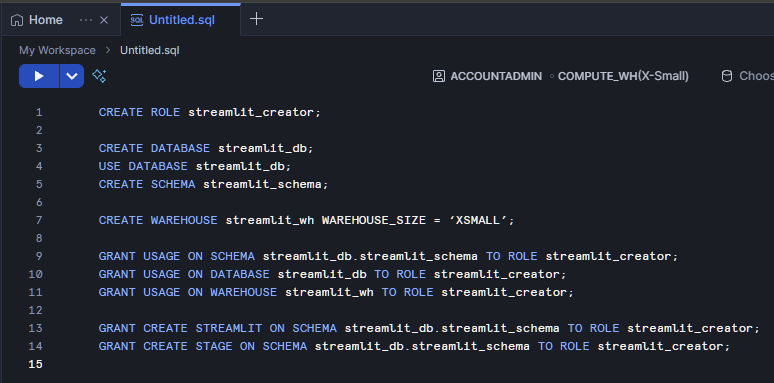
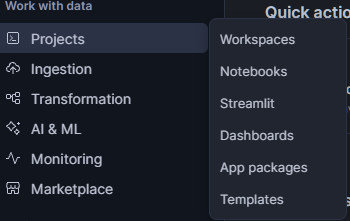
To make this concrete, let’s walk through a simple app. Once your Snowflake account and permissions are set, on Snowsight navigate to PROJECTS >> Streamlit. In this window click + Streamlit App on the top right.
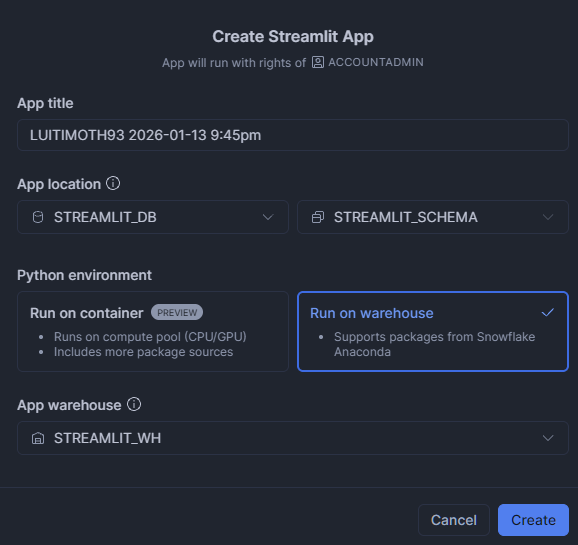
Fill in an App name with any name you’d like. Update the app location to use STREAMLIT_DB and STREAMLIT_SCHEMA. Then choose “Run on warehouse” then choose “STREAMLIT_WH” as the App Warehouse.
This opens the editor. That comes with a small script by default. It will also automatically run the app and show you a preview.
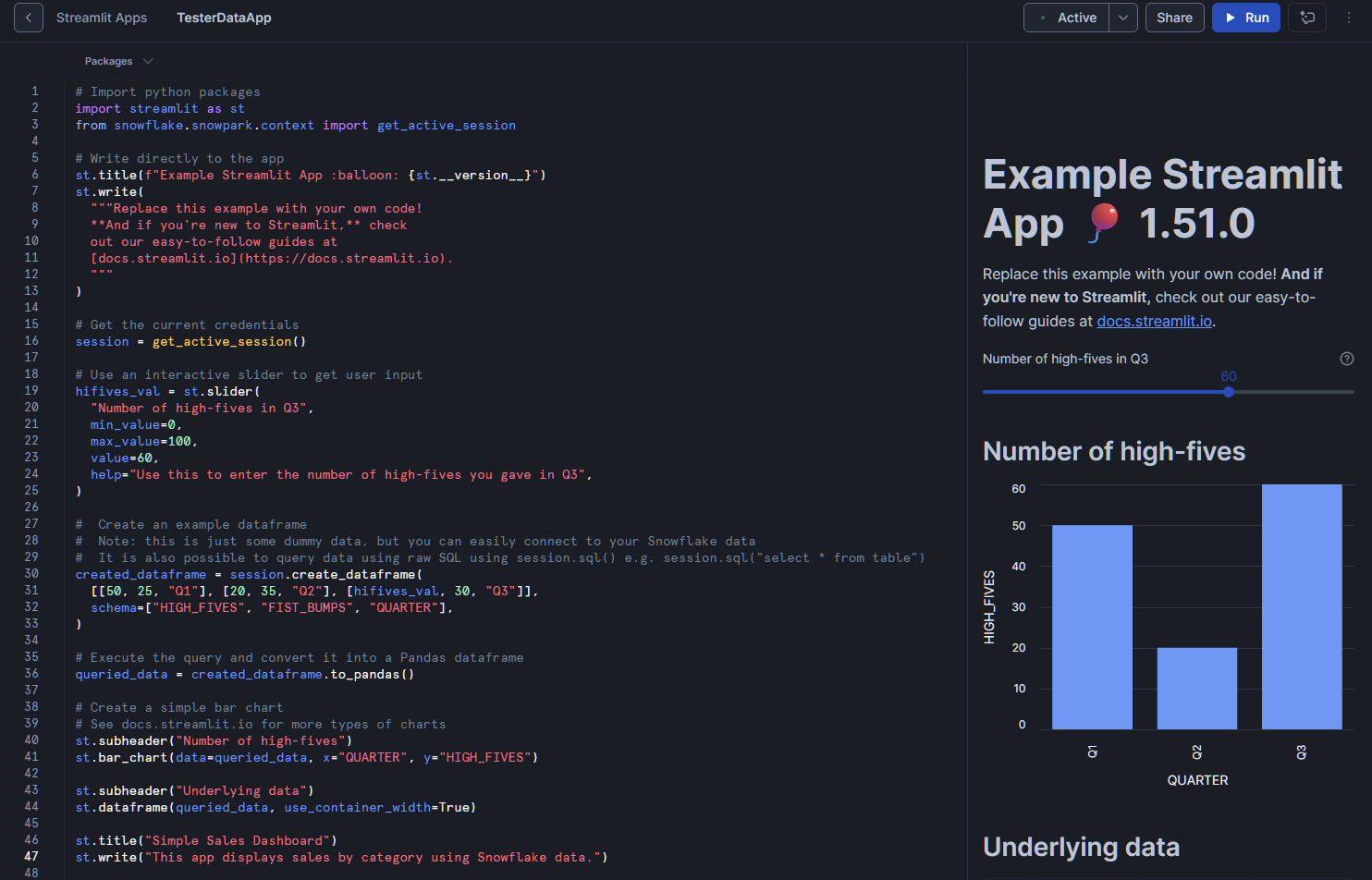
Let’s try to add a little bit of our own data of interest to the app. Let’s put this little snippet at the bottom of our existing code:
	from snowflake.snowpark.functions import sum as sf_sum
	st.title("Simple Sales Dashboard")
	st.write("This app displays sales by part using Snowflake data.")

	# Query sample dataset
	df = (
	    session.table("SNOWFLAKE_SAMPLE_DATA.TPCH_SF1.LINEITEM")
	    .group_by("L_PARTKEY")
	    .agg(sf_sum("L_QUANTITY").alias("TOTAL_SALES"))
	    .limit(10)
	    .order_by("TOTAL_SALES", ascending=False)
	    .to_pandas()
	)

	# Plot chart
	st.bar_chart(data=df, x="L_PARTKEY", y="TOTAL_SALES")

	# Show table
	st.dataframe(df)
Then hit the “Run” button on the top right. The preview in this app will update and process the data provided by the sample table. It should show both a data table and a bar chart. From here, you can customize the queries, add filters, or enhance the UI with Streamlit widgets.
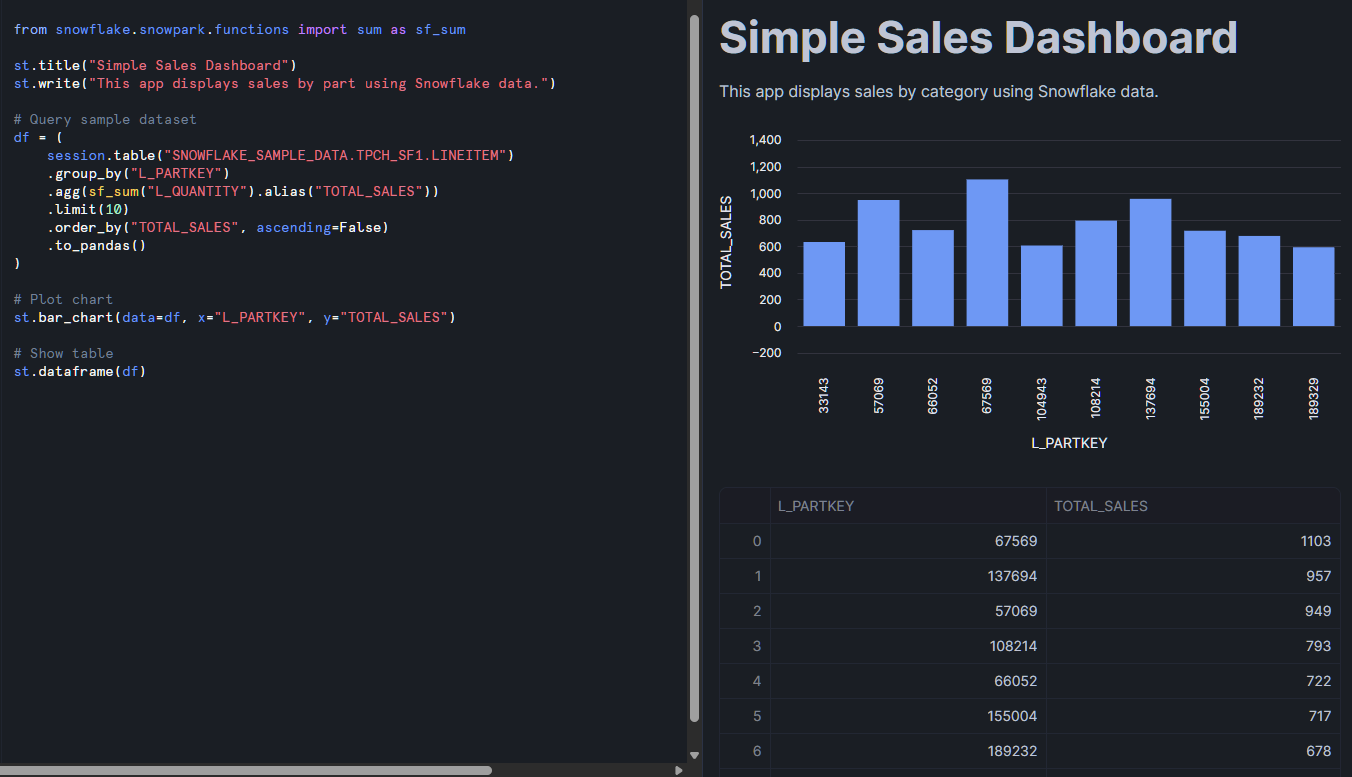
What you will notice here is the usage of Snowpark. If you haven’t used it, Snowpark is Snowflake’s library which allows you to process Snowflake data using programming languages such as Python. I highly recommend this introduction to Snowpark as pulling data into Streamlit often requires the usage of Snowpark to interface with your Snowflake databases.
There are a few different ways to deploy Streamlit in Snowflake. The easiest is using Snowsight, the web interface, but you can also use command-line interface (CLI) tools. Additionally, you can add workflow tools to help with project organization and scaling your deployment.
As shown in the previous section, the simplest method is through Snowsight, Snowflake’s web interface. The added bonus here is the split-screen view for editing and previewing your app in real time. This setup is ideal for developers who want immediate feedback as they develop.
For more advanced scenarios, CLI tools allow you to deploy apps programmatically. This is especially useful when integrating app deployment into continuous integration and continuous delivery (CI/CD) pipelines. By following a more structured developer’s approach, apps can be stored in project folders as .py files like normal Streamlit apps alongside .yml files which control any environment and Snowflake commands. This means we can use GitHub to track changes, run automated checks, and deploy seamlessly.
Another option is to combine Streamlit apps with workflow tools such as dbt (data build tool), which Snowflake naturally supports. For instance, dbt can manage your core ETL workflow which flows into your Streamlit app. Within the same dbt project, you can automatically redeploy Streamlit as needed to fit your dbt workflow. This allows you to organize complex data workflows neatly into projects and scale your deployment alongside your workflow.
Let’s talk about how Streamlit in Snowflake actually functions.
Streamlit in Snowflake apps run in a secure, container-based environment fully managed by Snowflake. This design ensures that applications remain isolated while maintaining a secure connection to Snowflake data sources and services. As the complexity of your app increases or database sizes grow, Snowflake manages the scaling in the backend.
When you launch an app, it consumes compute resources from your configured warehouse. Just like your SQL queries, warehouse size affects both performance and cost, so resource planning is important. Developers find it useful to have a warehouse tied to their Streamlit apps for simplified tracking. Additionally, Snowflake uses internal stages for secure file storage, which prevents data from leaking outside the platform. This simplifies feeding data into your app while maintaining the security of your data.
Python environments in SiS are managed and curated for security. Only approved packages are available, and external package installation is restricted. Additionally, some things like scripts, styles, fonts, and iframe embedding is restricted for safety reasons. If you require functionality outside of what’s provided, you may need to implement it through Snowpark UDFs or rely on existing Python libraries supported by Snowflake.
Thankfully, SiS uses many of Snowflake’s existing security infrastructure, such as role-based access control, sharing, and network security.
Snowflake utilizes a role-based access control (RBAC) system for Streamlit apps and its data. Accessing the data requires the USAGE privilege for any Streamlit app and its underlying data. Only roles with CREATE STREAMLIT privileges can build apps, and ownership of apps is tied to schema-level permissions. This ensures clear control over who can develop and manage applications.
App sharing is equally controlled. You can grant or restrict access to apps based on user roles. For SQL execution, it follows the same role-based permissions. It runs SQL through the Streamlit app and does not allow developers to run SQL queries on databases without proper permissions.
On the network side, Snowflake enforces strict content security policies (CSP). These prevent apps from loading unauthorized external scripts, styles, or resources, reducing the risk of data exfiltration or unsafe integrations. By minimizing what external libraries get imported into the environment, it reduces the risk of security holes and protects the privacy of the data and the user.
As your app becomes more complex, proper optimization is important to maintain proper functionality.
Building efficient apps requires attention to both queries and compute resources. It helps to test your queries outside of your Streamlit app (on a similar warehouse) to understand the computational effort needed by your query. Writing optimized SQL queries is essential to prevent bottlenecks.
Streamlit’s built-in caching functions st.cache_data and st.cache_resource help reduce repeated computations and reloading of data. However, one caveat is that st.cache_data and st.cache_resource are not fully supported. They only allow for session-based caching, which means every time the user opens a new session, the query and data will need to be reloaded. Keep that in mind and make sure to optimize your queries as much as possible.
Warehouse selection plays a major role in app responsiveness. Larger warehouses improve speed but also increase costs. For high-traffic apps, dedicated warehouses may be the best option. On the other hand, lightweight apps can often run on smaller warehouses without performance issues.
Application architecture also matters. Progressive data loading and state management can make apps more responsive, especially when working with large datasets. Try not to load your entire app at once if there are multiple components. Load only what is needed by the user at any given moment. Designing apps with resource constraints in mind prevents issues like hitting message size or memory limits.
Beyond simple dashboards and data apps, Streamlit in Snowflake can leverage some powerful tools for machine learning, AI, business intelligence, and NLP. Let’s highlight a few use cases.
For analytics teams, Streamlit in Snowflake is a way to build interactive dashboards and reporting tools. Being connected to your Snowflake databases allows for real-time updates to dashboards for better decision-making. You can deploy similar apps geared towards different departments and teams quickly and easily. Examples include inventory trackers, compute usage dashboards, or executive performance summaries. For example, we can build out call center analytics with Snowflake Cortex and Snowpark integration into the Streamlit app by taking call data transcriptions and generating analytics on calls.
To really leverage your data, Streamlit apps can be designed for machine learning and AI insights. For example, machine learning teams can deploy interactive apps that serve models for demand forecasting, customer segmentation, or anomaly detection. With Cortex AI, developers can also create retrieval augmented generation (RAG) apps or conversational AI tools. One great implementation adds PyTorch models that provide targeted upsells for customers based on their individual profiles, all wrapped in a visual inference app.
To get insights about text-based feedback like chats and emails, natural language processing is the way to go. Using libraries like spaCy, NLTK, or Snowflake’s internal Cortex AI text processing, we can take all this text information and build tools for sentiment analysis, named entity recognition, and other NLP solutions. For instance, we can use Snowflake Cortex to handle the bulk of the NLP analysis, such as summarization and sentiment analysis. This then feeds a database that provides analytics on reviews and support chat using Streamlit in Snowflake.
Streamlit apps also work well for data collection and quality management, such as annotation tools or collaborative input interfaces. While data uploads are limited to 200MB, we can provide a place where users can potentially upload small datasets or documents for processing or summarization in our app. The possibilities are endless!
Having Streamlit in Snowflake is powerful due to the numerous integrations you get within the ecosystem like Snowpark and data sharing.
Snowpark makes doing analysis in Python with Snowflake a breeze. It enables advanced data processing, distributed computations, and custom functions. Since we can use Snowpark dataframes natively in our Streamlit in Snowflake app, we can leverage this easily with very little overhead. Using things like stored procedures and UDFs in your Snowflake environment becomes a breeze with Snowpark’s udfobject.
Sharing data inside Snowflake is simple, and with the Snowsight UI, it only takes a few clicks. Adding in Snowflake Tasks and event-driven features, developers can also easily automate workflows. For example, you can trigger app updates when new data arrives, perform data checks to ensure nothing breaks, and keep data fresh.
When combined with dbt, you can create end-to-end workflows where data transformations flow directly into Streamlit apps, ensuring real-time updates for users.
As with all cloud platforms, billing and cost considerations are important. An expensive Streamlit app is less likely to be used, so thinking about costs in advance ensures a smooth development process.
Costs for Streamlit in Snowflake are just like any other processes in Snowflake. If you have a specific database/schema for Streamlit, you will have the usual storage costs associated with that data. As we mentioned earlier, you will most likely want to create a warehouse specifically allocated to your Streamlit in Snowflake services so you can also track the computation costs. Larger warehouse sizes, app concurrency (multiple user sessions), and data volume are going to be the primary drivers of your costs.
To control spending, right-sizing warehouses is important. Small apps with light workloads should avoid using unnecessarily large warehouses. Streamlit caching helps minimize repeated queries within sessions, which lowers compute usage. Snowflake also provides monitoring tools that track consumption so you can make data-driven cost adjustments.
While Streamlit in Snowflake is powerful, there are a few restrictions to be aware of, particularly relating to external packages and file uploads.
The platform enforces strict content security policies to ensure data safety. Things like custom scripts, styles, and things that require an external domain are more likely to be blocked. Make sure any components you use don’t require external calls. This greatly improves the safety of your app, but does limit some of the customizability you may be used to if you’re coming from your own Streamlit implementations.
Handling large datasets can be a challenge due to some limitations in caching and message transfer. The key limitation of caching is that it is session-based and not user-based. So users who revisit apps and start new sessions will have to reload data. Carefully consider your users and whether they’ll have to start new sessions multiple times. If so, think about how you can minimize the data load between sessions.
While there is no explicit limit on the size of queries or the amount of data in memory, messages have a 32-MB limit. This means that displaying large dataframes and extremely complex maps may be a limiting factor. Consider what is vital to show users and what can be streamlined.
File uploads can work, but are limited to 200MB in size. You also will be unable to work directly with external stages and will need to move the data into Snowflake first. So pulling directly from Apache Iceberg will not work, but pulling from an internal data lake for that data does.
Additionally, file upload functionality is limited in size, and external stages are not currently supported, restricting how apps handle files.
Streamlit in Snowflake offers a powerful, integrated way to build and deploy interactive data apps without leaving your Snowflake environment. It combines security, scalability, and ease of use while supporting advanced integrations with Snowpark, Cortex AI, and dbt.
Although there are limitations, such as restrictions on external resources and file uploads, the benefits of rapid iteration, managed infrastructure, and seamless sharing make SiS a transformative platform for data teams. Junior practitioners can start small—experimenting with simple dashboards—and scale up to enterprise-ready AI and analytics applications. For more information about Snowflake, check out the following:
Top DataCamp Courses
Track
Track
Track
blog
Tim Lu
12 min
Tutorial
Nadia mhadhbi
15 min
Tutorial
Bexruz (Bex) Tuychiev
12 min
Tutorial
Tim Lu
10 min
Tutorial
Tim Lu
12 min
Tutorial
Bexruz (Bex) Tuychiev
15 min