

Primi passi con DeepEval
Per questo tutorial useremo Kaggle come ambiente di sviluppo. Per iniziare, crea un nuovo notebook.
Useremo anche la OpenAI API. Per proseguire, crea una chiave API. Poi imposta la variabile d’ambiente per la chiave OpenAI API usando la funzione "Secrets" di Kaggle.
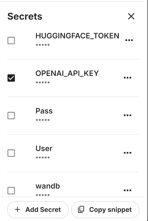
Dopodiché, installa le librerie Python DeepEval e BitsandBytes usando il comando pip:
%%capture
%pip install -U deepeval
%pip install -U bitsandbytesCarica la chiave OpenAI API dai secrets:
import os
from kaggle_secrets import UserSecretsClient
user_secrets = UserSecretsClient()
secret_value_0 = user_secrets.get_secret("OPENAI_API_KEY")
os.environ['OPENAI_API_KEY'] = secret_value_0Scrivi il seguente file Python usando la magic function di Jupyter Notebook.
Il file test_relevancy.py definisce una funzione di test che valuta la rilevanza dell’output di un LLM usando il modello GPT-4o. Lo fa confrontando la risposta del modello a un input dato con un contesto di retrieval, assicurandosi che l’output sia in linea con le informazioni fornite.
%%file test_relevancy.py
from deepeval import assert_test
from deepeval.test_case import LLMTestCase
from deepeval.metrics import AnswerRelevancyMetric
def test_relevancy():
relevancy_metric = AnswerRelevancyMetric(threshold=0.5, model="gpt-4o")
test_case_1 = LLMTestCase(
input="Can I return these shoes after 30 days?",
actual_output="Unfortunately, returns are only accepted within 30 days of purchase.",
retrieval_context=[
"All customers are eligible for a 30-day full refund at no extra cost.",
"Returns are only accepted within 30 days of purchase.",
],
)
assert_test(test_case_1, [relevancy_metric])Esegui il test di rilevanza nel terminale:
!deepeval test run test_relevancy.pyIl seguente risultato mostra che il test case LLM è stato superato con successo e ha ottenuto un punteggio perfetto di rilevanza pari a 1.0, indicando che la risposta del modello era completamente pertinente.
La valutazione è stata completata in 3,04 secondi con un costo totale stimato in token di $0,0027425 USD:
Evaluating 1 test case(s) in parallel: |█|100% (1/1) [Time Taken: 00:03, 3.00s/
.Running teardown with pytest sessionfinish...
============================= slowest 10 durations =============================
3.03s call test_relevancy.py::test_relevancy
(2 durations < 0.005s hidden. Use -vv to show these durations.)
1 passed, 2 warnings in 3.04s
Test Results
┏━━━━━━━━━━━━━━━━┳━━━━━━━━━━━━━━━━━┳━━━━━━━━━━━━━━━━┳━━━━━━━━┳━━━━━━━━━━━━━━━━━┓
┃ ┃ ┃ ┃ ┃ Overall Success ┃
┃ Test case ┃ Metric ┃ Score ┃ Status ┃ Rate ┃
┡━━━━━━━━━━━━━━━━╇━━━━━━━━━━━━━━━━━╇━━━━━━━━━━━━━━━━╇━━━━━━━━╇━━━━━━━━━━━━━━━━━┩
│ test_relevancy │ │ │ │ 100.0% │
│ │ Answer │ 1.0 │ PASSED │ │
│ │ Relevancy │ (threshold=0.... │ │ │
│ │ │ evaluation │ │ │
│ │ │ model=gpt-4o, │ │ │
│ │ │ reason=The │ │ │
│ │ │ score is 1.00 │ │ │
│ │ │ because the │ │ │
│ │ │ response was │ │ │
│ │ │ perfectly │ │ │
│ │ │ relevant and │ │ │
│ │ │ addressed the │ │ │
│ │ │ question │ │ │
│ │ │ directly │ │ │
│ │ │ without any │ │ │
│ │ │ irrelevant │ │ │
│ │ │ information. │ │ │
│ │ │ Great job!, │ │ │
│ │ │ error=None) │ │ │
└────────────────┴─────────────────┴────────────────┴────────┴─────────────────┘
Total estimated evaluation tokens cost: 0.0027425 USD
✓ Tests finished 🎉! Run 'deepeval login' to save and analyze evaluation results
on Confident AI.
‼️ Friendly reminder 😇: You can also run evaluations with ALL of deepeval's
metrics directly on Confident AI instead.Puoi anche valutare gli LLM usando l’ecosistema Hugging Face seguendo la guida HumanEval: A Benchmark for Evaluating LLM Code Generation Capabilities.
Testare gli LLM con la metrica G-Eval
G-Eval è un framework di valutazione per LLM che utilizza il ragionamento chain-of-thought (CoT) per valutare gli output degli LLM in base a criteri personalizzati. Come metrica più adattabile di DeepEval, G-Eval può gestire quasi qualsiasi caso d’uso con un’accuratezza simile a quella umana, diventando uno strumento essenziale per valutare le prestazioni degli LLM.
In questa sezione, valuteremo il dataset di risposte degli LLM utilizzando la metrica G-Eval.
1. Configurare la metrica G-Eval
Creeremo la metrica G-eval e forniremo un’istruzione personalizzata per testare la risposta del modello su contraddizioni fattuali, penalizzare le omissioni e concentrarsi sull’idea principale tollerando un linguaggio vago o opinioni divergenti:
from deepeval.metrics import GEval
from deepeval.test_case import LLMTestCaseParams
correctness_metric = GEval(
name="Correctness",
model="gpt-4o",
evaluation_params=[
LLMTestCaseParams.EXPECTED_OUTPUT,
LLMTestCaseParams.ACTUAL_OUTPUT],
evaluation_steps=[
"Check whether the facts in 'actual output' contradicts any facts in 'expected output'",
"You should also lightly penalize omission of detail, and focus on the main idea",
"Vague language, or contradicting OPINIONS, are OK"
],
)2. Creare i test case per la valutazione
Crea tre test case LLM su argomenti diversi. Ogni test case ha un prompt di input, un output generato effettivo e un output atteso. Il modello GPT-4o li confronterà e genererà risultati dettagliati alla fine:
from deepeval.test_case import LLMTestCase
from deepeval.dataset import EvaluationDataset
first_test_case = LLMTestCase(input="What are the main causes of deforestation?",
actual_output="The main causes of deforestation include agricultural expansion, logging, infrastructure development, and urbanization.",
expected_output="The main causes of deforestation include agricultural expansion, logging, infrastructure development, and urbanization.")
second_test_case = LLMTestCase(input="Define the term 'artificial intelligence'.",
actual_output="Artificial intelligence is the simulation of human intelligence by machines.",
expected_output="Artificial intelligence refers to the simulation of human intelligence in machines that are programmed to think and learn like humans, including tasks such as problem-solving, decision-making, and language understanding.")
third_test_case = LLMTestCase(input="List the primary colors.",
actual_output="The primary colors are green, orange, and purple.",
expected_output="The primary colors are red, blue, and yellow.")3. Creare il dataset di valutazione
Creeremo il dataset di valutazione combinando tutti e tre i test case:
test_cases = [first_test_case, second_test_case, third_test_case]
dataset = EvaluationDataset(test_cases=test_cases)4. Eseguire la metrica G-Eval
Esegui il test di valutazione G-Eval sul dataset:
evaluation_output = dataset.evaluate([correctness_metric])Output:
I risultati di ogni test includono un riepilogo delle metriche, il test case e l’esito complessivo di superamento delle metriche.
Evaluating 3 test case(s) in parallel: |██████████|100% (3/3) [Time Taken: 00:02, 1.08test case/s]
======================================================================
Metrics Summary
- ✅ Correctness (GEval) (score: 1.0, threshold: 0.5, strict: False, evaluation model: gpt-4o, reason: The actual output matches the expected output exactly with no contradictions or omissions., error: None)
For test case:
- input: What are the main causes of deforestation?
- actual output: The main causes of deforestation include agricultural expansion, logging, infrastructure development, and urbanization.
- expected output: The main causes of deforestation include agricultural expansion, logging, infrastructure development, and urbanization.
- context: None
- retrieval context: None
======================================================================
Metrics Summary
- ✅ Correctness (GEval) (score: 0.7, threshold: 0.5, strict: False, evaluation model: gpt-4o, reason: The main idea of AI as the simulation of human intelligence is present, but details like problem-solving, decision-making, and language understanding are omitted., error: None)
For test case:
- input: Define the term 'artificial intelligence'.
- actual output: Artificial intelligence is the simulation of human intelligence by machines.
- expected output: Artificial intelligence refers to the simulation of human intelligence in machines that are programmed to think and learn like humans, including tasks such as problem-solving, decision-making, and language understanding.
- context: None
- retrieval context: None
======================================================================
Metrics Summary
- ❌ Correctness (GEval) (score: 0.01681606382274469, threshold: 0.5, strict: False, evaluation model: gpt-4o, reason: The actual output directly contradicts the expected output by listing green, orange, and purple as primary colors instead of red, blue, and yellow., error: None)
For test case:
- input: List the primary colors.
- actual output: The primary colors are green, orange, and purple.
- expected output: The primary colors are red, blue, and yellow.
- context: None
- retrieval context: None
======================================================================
Overall Metric Pass Rates
Correctness (GEval): 66.67% pass rate
======================================================================Impara a valutare gli LLM con uno strumento molto apprezzato, MLflow, seguendo il tutorial Valutare gli LLM con MLflow.
5. Analizzare i risultati dei test case
La valutazione di tre test case con la metrica G-Eval ha ottenuto un tasso di successo del 66,67%, con una corrispondenza perfetta, una corrispondenza parziale per dettagli mancanti e un fallimento dovuto a una contraddizione diretta. Questo evidenzia i punti di forza del modello nell’accuratezza fattuale, ma anche i suoi limiti nella gestione di output sfumati o dettagliati.
Benchmark MMLU di Qwen 2.5
MMLU (Massive Multitask Language Understanding) è un benchmark ampiamente utilizzato per valutare i large language model tramite domande a scelta multipla. Copre 57 materie diverse, tra cui matematica, storia, diritto ed etica, rendendolo un test completo delle capacità di conoscenza e ragionamento di un LLM. Grazie all’ampia copertura delle materie e alla qualità delle domande, MMLU è diventato uno standard per valutare le prestazioni degli LLM.
Faremo un passo avanti e valuteremo il nostro LLM personalizzato (Qwen 2.5 7B) sul dataset MMLU. Il dataset contiene prompt di input e risultati (A, B, C, D). Alla fine, usa il numero di risposte corrette per generare una percentuale di accuratezza.
1. Creare la classe del modello LLM personalizzato
Definiremo una classe personalizzata chiamata QwenModel che estende DeepEvalBaseLLM per generare risposte usando il language model e il tokenizer.
L’obiettivo è produrre output brevi di due token a partire da un prompt. Inoltre, gestiremo l’allocazione del device e ci occuperemo del preprocessing del prompt di input e del testo in output.
from deepeval.models.base_model import DeepEvalBaseLLM
import torch, logging
from transformers import AutoModelForCausalLM, AutoTokenizer, BitsAndBytesConfig
class QwenModel(DeepEvalBaseLLM):
def __init__(self, model, tokenizer):
self.model = model
self.tokenizer = tokenizer
self.device = "cuda"
def load_model(self):
return self.model
def generate(self, prompt: str) -> str:
prompt = prompt.replace("Output 'A', 'B', 'C', or 'D'. Full answer not needed.","")
model_inputs = self.tokenizer([prompt], return_tensors="pt").to(self.device)
generated_ids = self.model.generate(
**model_inputs,
max_new_tokens=2,
do_sample=True,
pad_token_id=self.tokenizer.eos_token_id
)
prompt_length = len(model_inputs[0])
generated_tokens = generated_ids[0][prompt_length:]
clean_output = tokenizer.decode(generated_tokens, skip_special_tokens=True).strip()
return clean_output.replace(".","")
async def a_generate(self, prompt: str) -> str:
return self.generate(prompt)
def get_model_name(self):
return "Qwen2.5 7B"2. Caricare il modello e il tokenizer
Creeremo due funzioni che caricano il modello LLM e il tokenizer direttamente in locale. Carichiamo il modello in 8 bit e inizializziamo un tokenizer per lo stesso modello, impostando padding e token speciali:
def load_model(model_name: str):
quant_config = BitsAndBytesConfig(
load_in_8bit=True,
bnb_4bit_quant_type="nf4",
bnb_4bit_compute_dtype=torch.float16,
bnb_4bit_use_double_quant=False
)
model = AutoModelForCausalLM.from_pretrained(
model_name,
quantization_config=quant_config,
device_map="auto"
)
model.config.use_cache = False
model.config.pretraining_tp = 1
return model
def load_tokenizer(model_name):
tokenizer = AutoTokenizer.from_pretrained(model_name, trust_remote_code=True)
tokenizer.pad_token = tokenizer.eos_token
tokenizer.padding_side = "right"
return tokenizer3. Costruire l’LLM personalizzato
Aggiungi il modello Qwen 2.4 7b instruct al notebook Kaggle usando il pulsante “+ Add Input”.
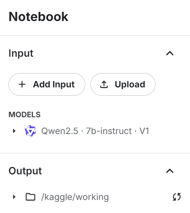
Usa direttamente il modello per caricare modello e tokenizer, quindi passali alla classe LLM personalizzata per creare un generatore di risposte LLM:
# Load model and tokenizer
qwen_model_name = "/kaggle/input/qwen2.5/transformers/7b-instruct/1"
model = load_model(qwen_model_name)
tokenizer = load_tokenizer(qwen_model_name)
custom_model = QwenModel(model, tokenizer)4. Testare l’LLM personalizzato
Metti alla prova l’LLM personalizzato prima di generare i risultati del benchmark:
# Test model generation
prompt = """
The following are multiple choice questions (with answers) about abstract algebra.
Find all c in Z_3 such that Z_3[x]/(x^2 + c) is a field.
A. 0
B. 1
C. 2
D. 3
Answer:"""
print(custom_model.generate(prompt))Abbiamo fornito all’LLM un prompt di esempio dal dataset, e ha risposto correttamente con una lettera.
C5. Eseguire il benchmark MMLU
Ora caricheremo il benchmark MMLU, definiremo i task e poi eseguiremo il benchmark sul modello personalizzato:
from deepeval.benchmarks import MMLU
from deepeval.benchmarks.tasks import MMLUTask
# Define benchmark with specific tasks and shots
benchmark = MMLU(
tasks=[MMLUTask.HIGH_SCHOOL_COMPUTER_SCIENCE, MMLUTask.ASTRONOMY],
n_shots=5
)
benchmark.evaluate(model=custom_model, batch_size=5)Abbiamo ottenuto ottimi risultati con l’83% di accuratezza!
Processing astronomy: 100%|██████████| 152/152 [01:51<00:00, 1.36it/s]
MMLU Task Accuracy (task=astronomy): 0.8157894736842105
Overall MMLU Accuracy: 0.8293650793650794Rivediamo i risultati di ciascun task:
benchmark.task_scores
Puoi anche consultare i risultati completi, che mostrano quali esempi sono corretti e quali no. Questo fornisce un’analisi granulare delle prestazioni del modello.
benchmark.predictions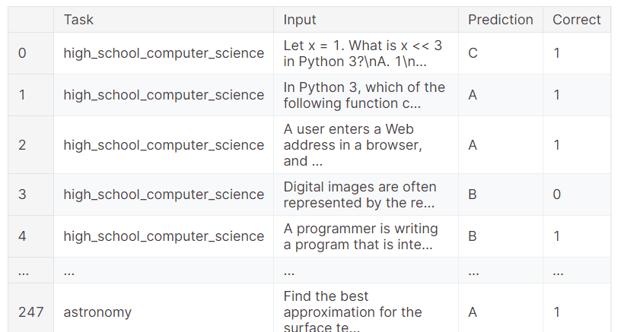
Se riscontri problemi nell’eseguire il codice qui sopra, fare rifimento al Evaluating LLMs with DeepEval notebook su Kaggle. Contiene sorgenti del codice, dataset e risultati di valutazione.
Conclusione
Valutare i modelli linguistici può essere impegnativo, soprattutto in produzione. A volte, semplici metriche di valutazione non sono sufficienti. È essenziale eseguire una suite di benchmark e test per valutare le prestazioni del tuo LLM su vari compiti e funzioni, così da ottenere una comprensione completa e individuare le aree di miglioramento.
In questo tutorial abbiamo configurato DeepEval in un notebook Kaggle ed eseguito test sugli LLM in stile Pytest. Abbiamo poi costruito G-Eval con istruzioni personalizzate ed eseguito la valutazione sul dataset. Infine, abbiamo testato il modello Qwen 2.5 7B con il benchmark MMLU per analizzarne le prestazioni in informatica delle scuole superiori e astronomia.
Il prossimo passo nel tuo percorso è esplorare strumenti e metodologie LLMOps e imparare a distribuire facilmente un LLM in produzione. Per approfondire, considera il corso LLMOps Concepts.

In quanto data scientist certificato, sono appassionato di sfruttare tecnologie all’avanguardia per creare applicazioni di machine learning innovative. Con una solida esperienza in riconoscimento vocale, analisi e reportistica dei dati, MLOps, AI conversazionale e NLP, ho affinato le mie competenze nello sviluppo di sistemi intelligenti in grado di avere un impatto concreto. Oltre alla mia expertise tecnica, sono anche un comunicatore efficace, con il talento di rendere chiari e sintetici concetti complessi. Di conseguenza, sono diventato un blogger molto seguito in ambito data science, condividendo idee ed esperienze con una community in crescita di professionisti dei dati. Attualmente mi concentro sulla creazione e sull’editing di contenuti, lavorando con large language model per sviluppare contenuti potenti e coinvolgenti che possano aiutare aziende e singoli a valorizzare al meglio i propri dati.





Nel mondo del machine learning esistono pochi framework di valutazione in grado di testare in modo efficace i large language model (LLM) su diverse proprietà. Con la crescita esponenziale dello sviluppo degli LLM, è diventato fondamentale valutarne le prestazioni su vari compiti e analizzarne punti di forza, debolezze e limiti.
DeepEval interviene come soluzione completa e affidabile a questa esigenza, offrendo un framework solido per testare gli LLM su più dimensioni, come accuratezza, ragionamento, coerenza e allineamento etico.
In questo tutorial imparerai a configurare DeepEval e a creare un test di rilevanza simile all’approccio Pytest. Poi testerai gli output degli LLM usando la metrica G-eval ed eseguirai il benchmarking MMLU sul modello Qwen 2.5. È un tutorial semplice e adatto ai principianti, pensato per chi ha un background tecnico e vuole comprendere meglio l’ecosistema DeepEval.
Se sei agli inizi con gli LLM, ti consiglio vivamente il corso Master Large Language Models (LLMs) Concepts per imparare le basi.
Capire DeepEval
DeepEval è un framework di valutazione open source progettato specificamente per i large language model, che consente agli sviluppatori di creare, migliorare, testare e monitorare con efficienza applicazioni basate su LLM. Semplifica il processo di valutazione degli output permettendo di eseguire "unit test" sui modelli, in modo analogo a Pytest per il testing del software tradizionale.
DeepEval offre un’ampia gamma di funzionalità per garantire una valutazione completa, tra cui 14 metriche di valutazione degli LLM supportate dalla ricerca, generazione di dataset sintetici, benchmark per LLM, red teaming e valutazioni in tempo reale in produzione. Con queste caratteristiche, DeepEval non solo semplifica i test, ma assicura anche sicurezza e affidabilità per le applicazioni basate su LLM.
Leggi il blog LLM Evaluation per scoprire come valutare i large language model usando metriche chiave, metodologie e best practice.