
Course
Introduction to dbt
4 hr
33.4K
dbt Cloud has emerged as the leading managed service for data transformation, powering modern analytics teams with scalable, reliable, and collaborative workflows.
It extends the power of dbt Core, offering a hosted environment that automates deployments, orchestrates jobs, manages credentials, and provides collaboration features for data teams.
This enables organizations to manage SQL-based transformations in a secure, automated, and team-friendly environment.
In this introductory tutorial, we’ll go through what dbt Cloud is, how to set it up, and examples of how it can be used.
If you are new to the framework and prefer a structured learning path, I recommend starting with our Introduction to dbt course.
Let’s first start with an overview of what dbt Cloud is and some of its features.
At its core, dbt Cloud empowers teams to follow the ELT (Extract, Load, Transform) approach. Unlike traditional ETL processes, where transformations happen before loading data into the warehouse, dbt performs transformations inside the warehouse using its compute power and scalability.
Source: dbt
dbt Cloud simplifies the data transformation process, as it:
dbt Cloud consists of the same concepts as dbt Core.
These include:
A typical dbt Cloud workflow looks like this: Develop models > Test transformations > Commit to Git > Deploy via dbt Cloud jobs > Monitor runs on dbt Cloud.
To explain how dbt Cloud works, let’s look at a practical example of how to set up an environment yourself.
Getting started with dbt Cloud is simple, as it is designed for fast onboarding. Here are the steps you need to take:
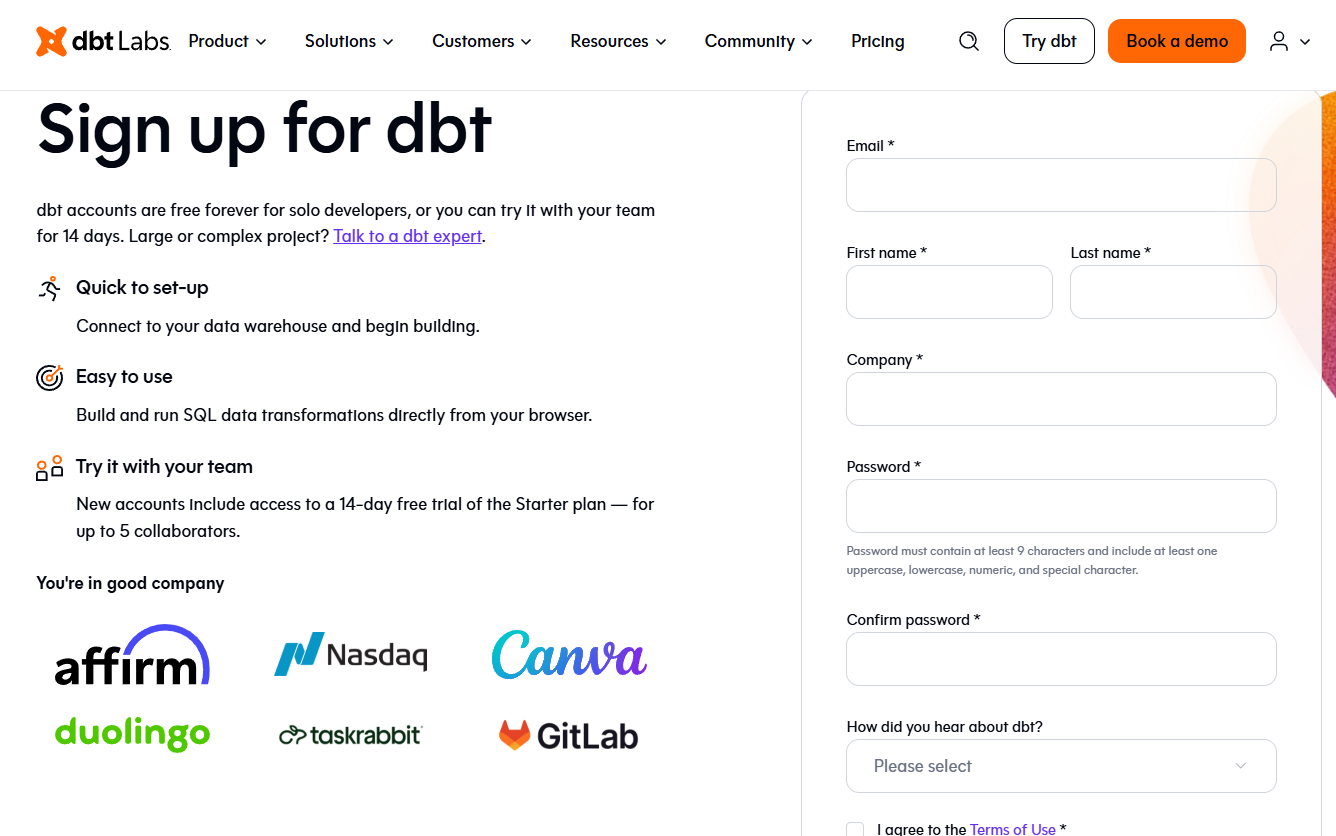
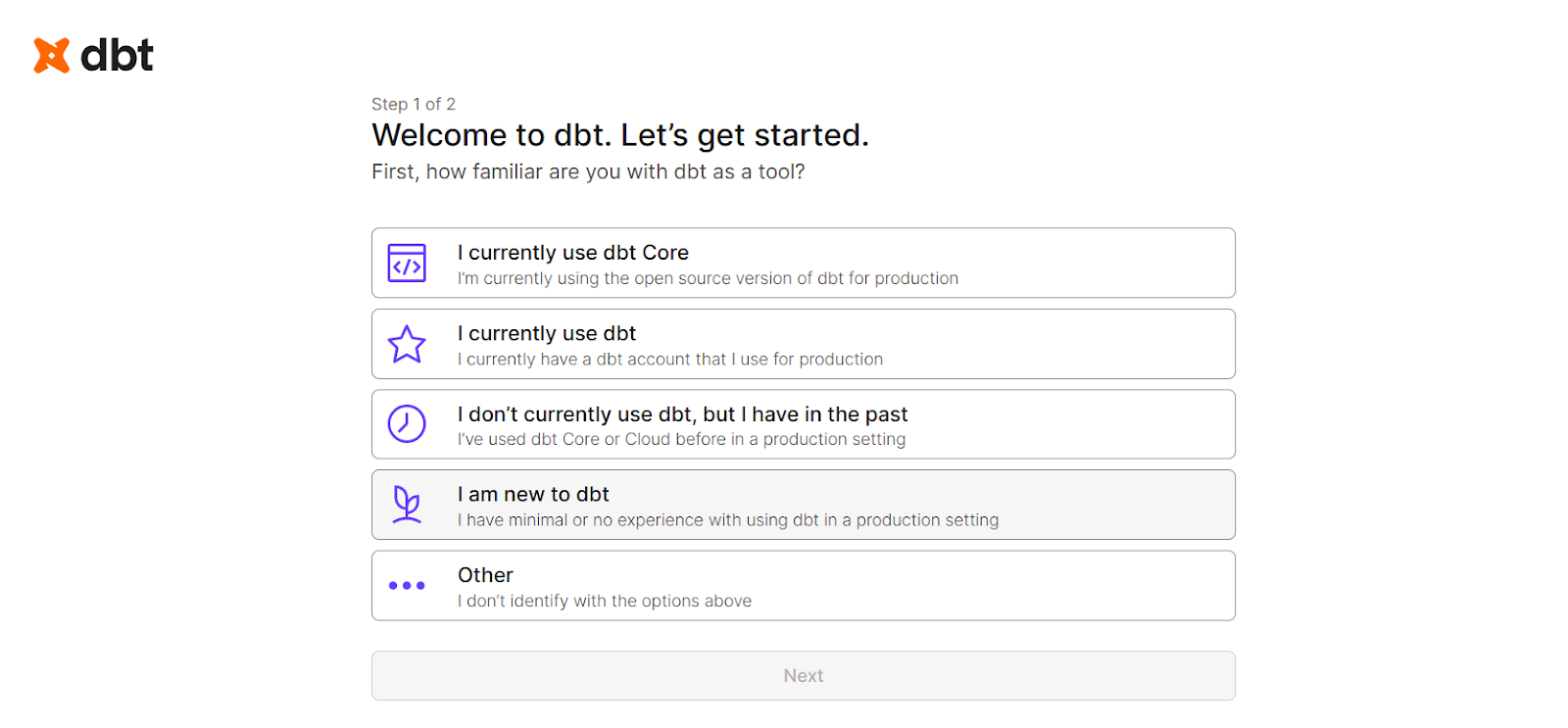
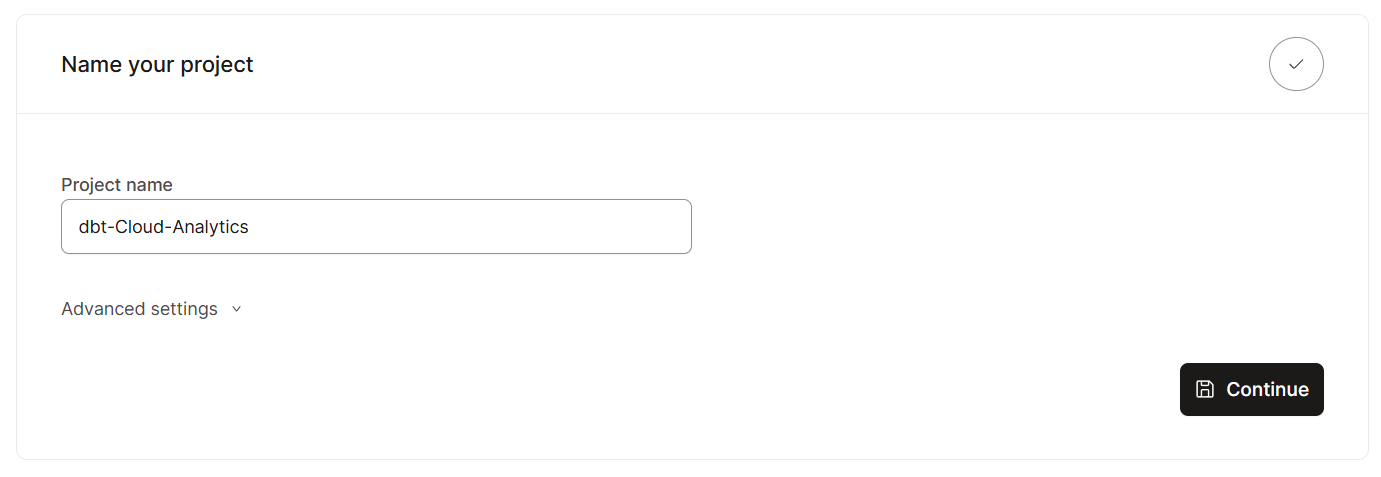
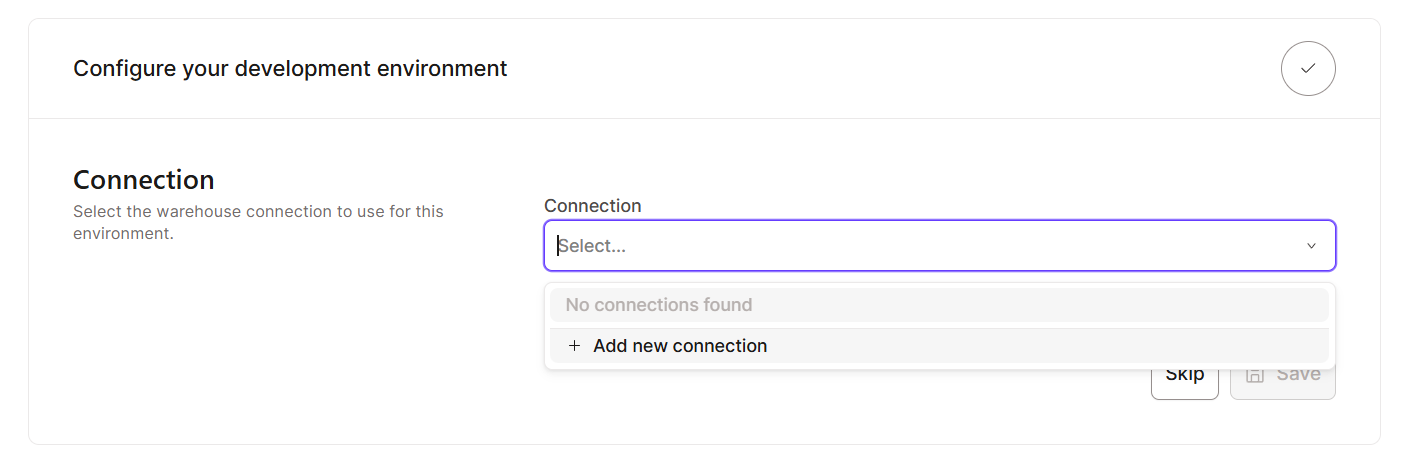
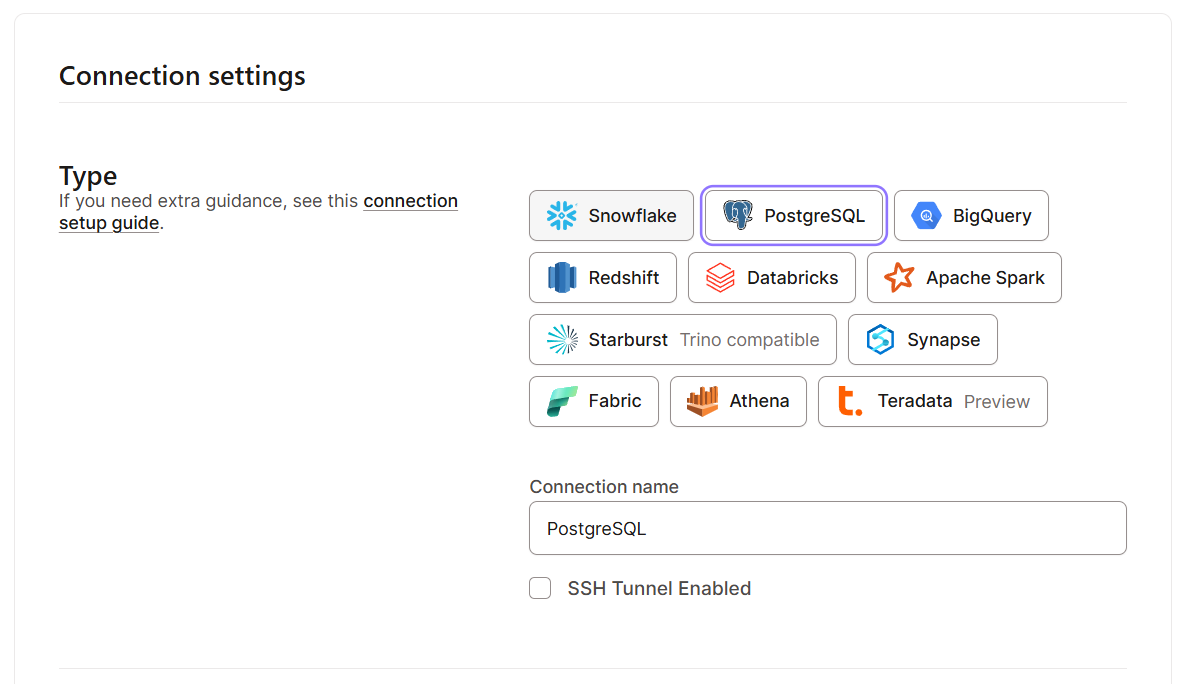
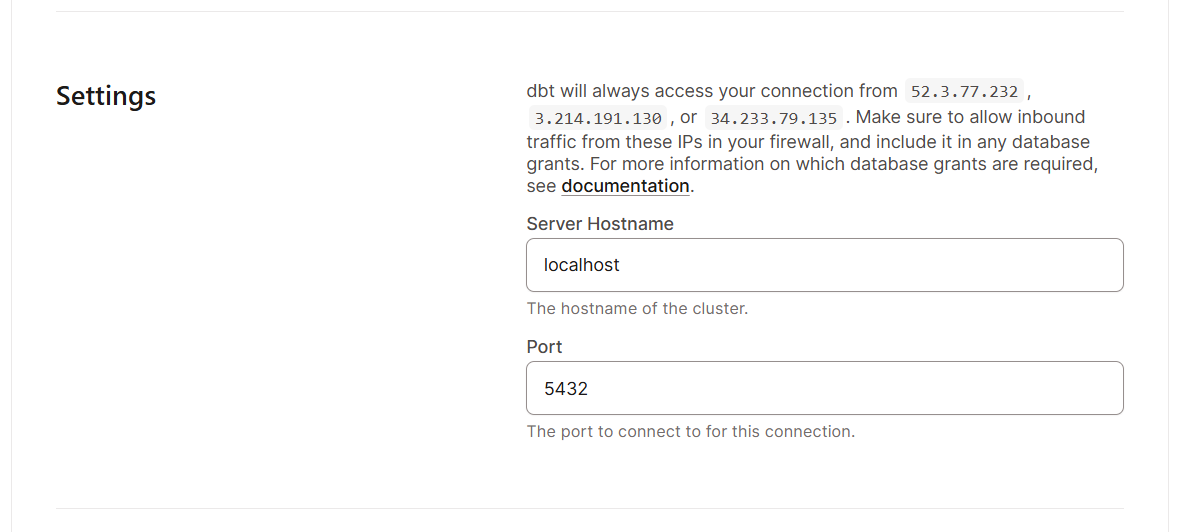
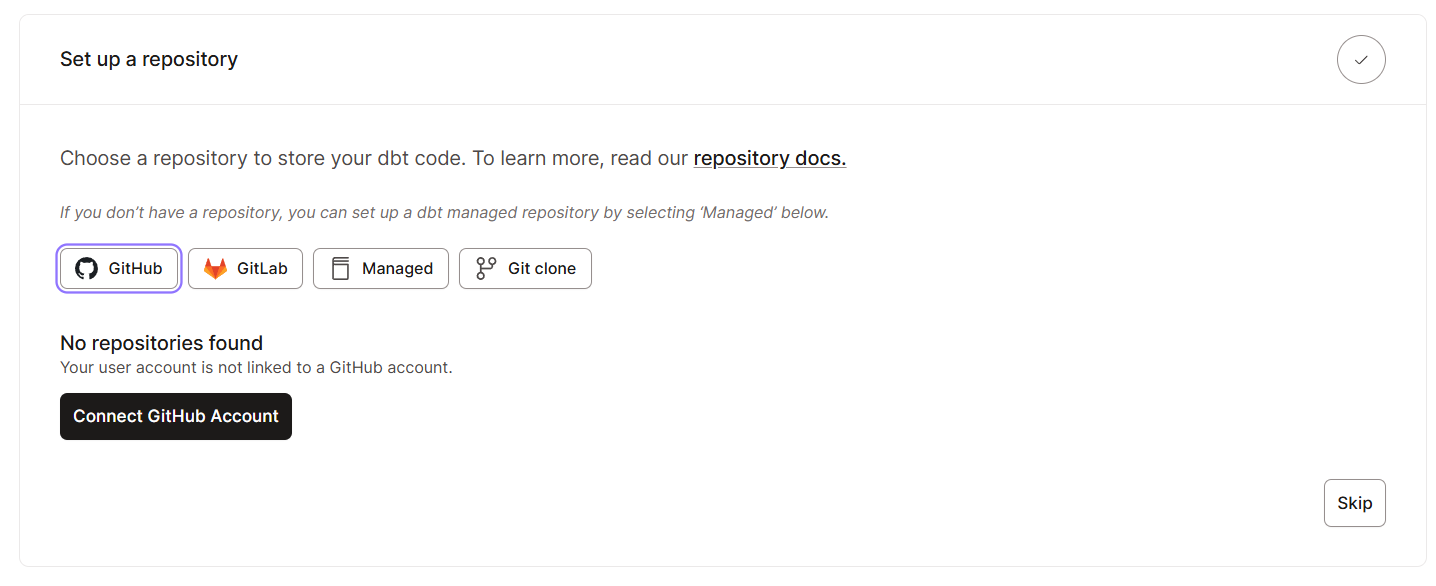
Once you have all the basic setups in place, let’s explore the interface. Here’s what you should expect to see in the dbt Cloud interface:
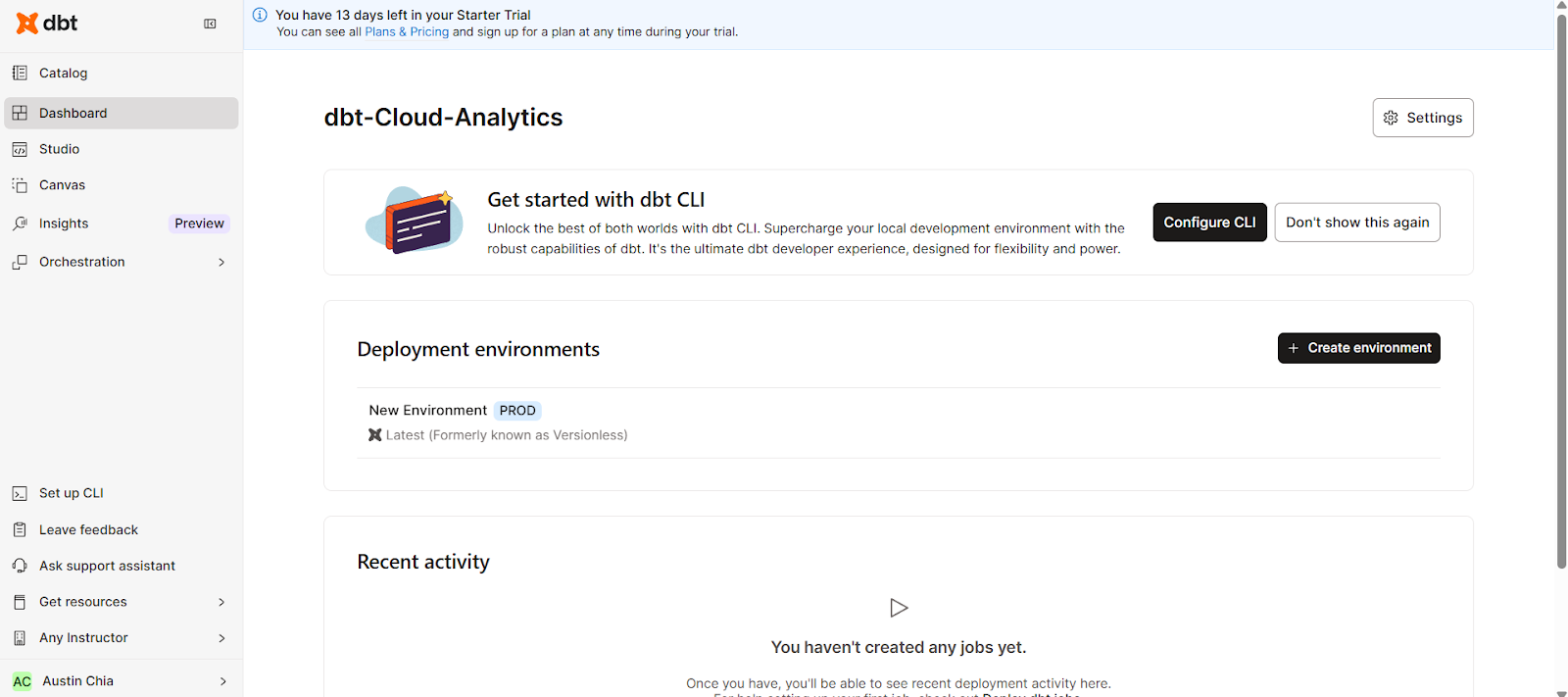
The dbt Cloud UI organizes your workflow efficiently. By using the navigation bar, you can access the following key areas:
This consolidates all necessary information, coding studio, and configuration settings in one web interface.
dbt Cloud also provides a browser-based IDE purpose-built for analytics engineering with GitHub integration. It was made to build, run, test, and version control dbt projects from your browser.
The dbt Cloud IDE requires no local setup, easing onboarding for analysts. To access it, you can click on the Studio tab on the left side of the interface.
This should bring up a simple interface for writing, compiling, and running code.
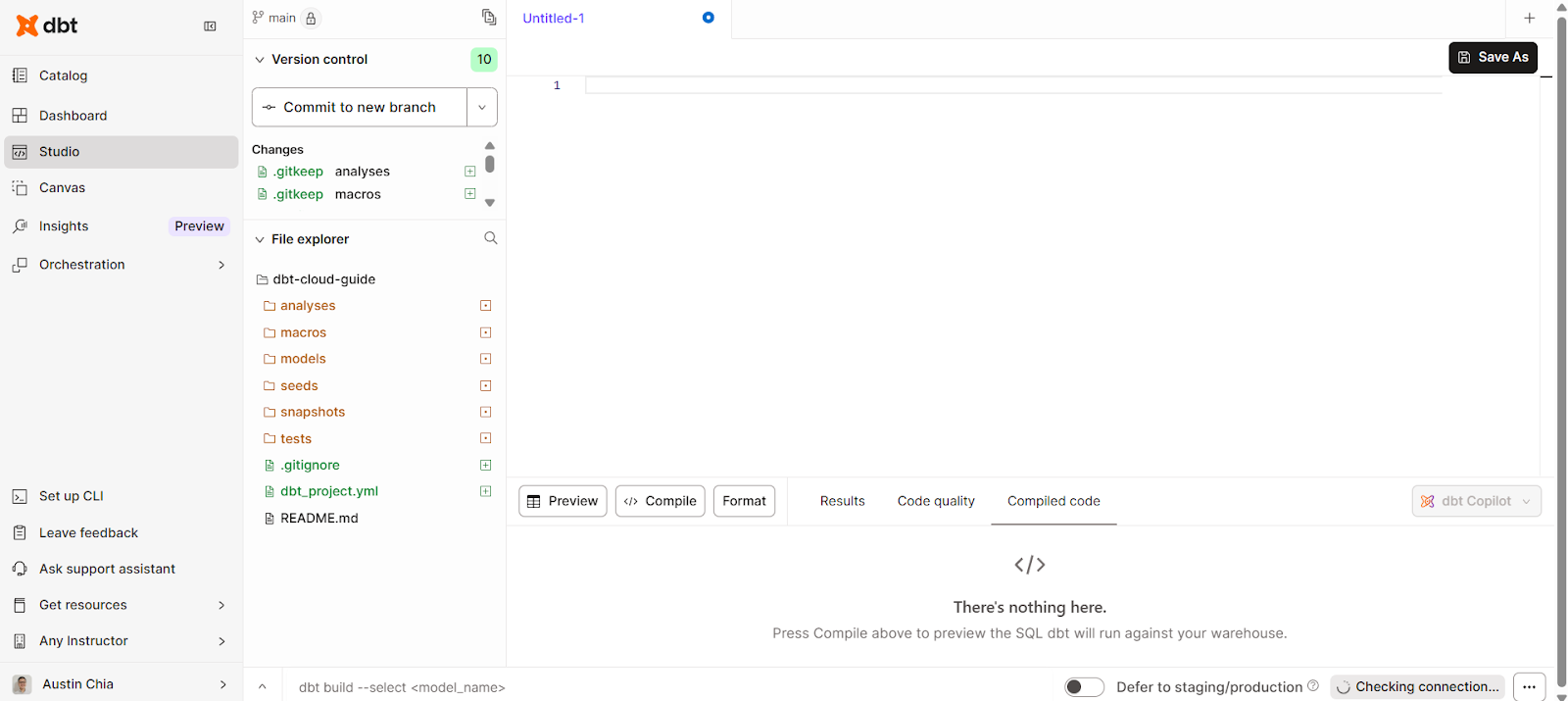
The dbt Cloud IDE allows you to perform these tasks:
Additionally, dbt Cloud also allows you to integrate with GitHub for version control integration.
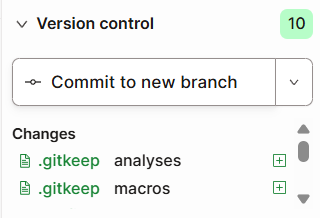
This feature allows you to:
Just like in dbt Core, you’ll also be able to build and test data models from within dbt Cloud. Let’s look at some ways that can be done.
When working with data models, you’re likely going to need to do some transformations. In the dbt Cloud IDE, we can write SQL statements within the Studio.
You can create a data model to transform like this:
with source as (
    select * from {{ source('raw', 'orders') }}
)
select
    id as order_id,
    user_id,
    order_date,
    status
from source
This is how the interface looks:
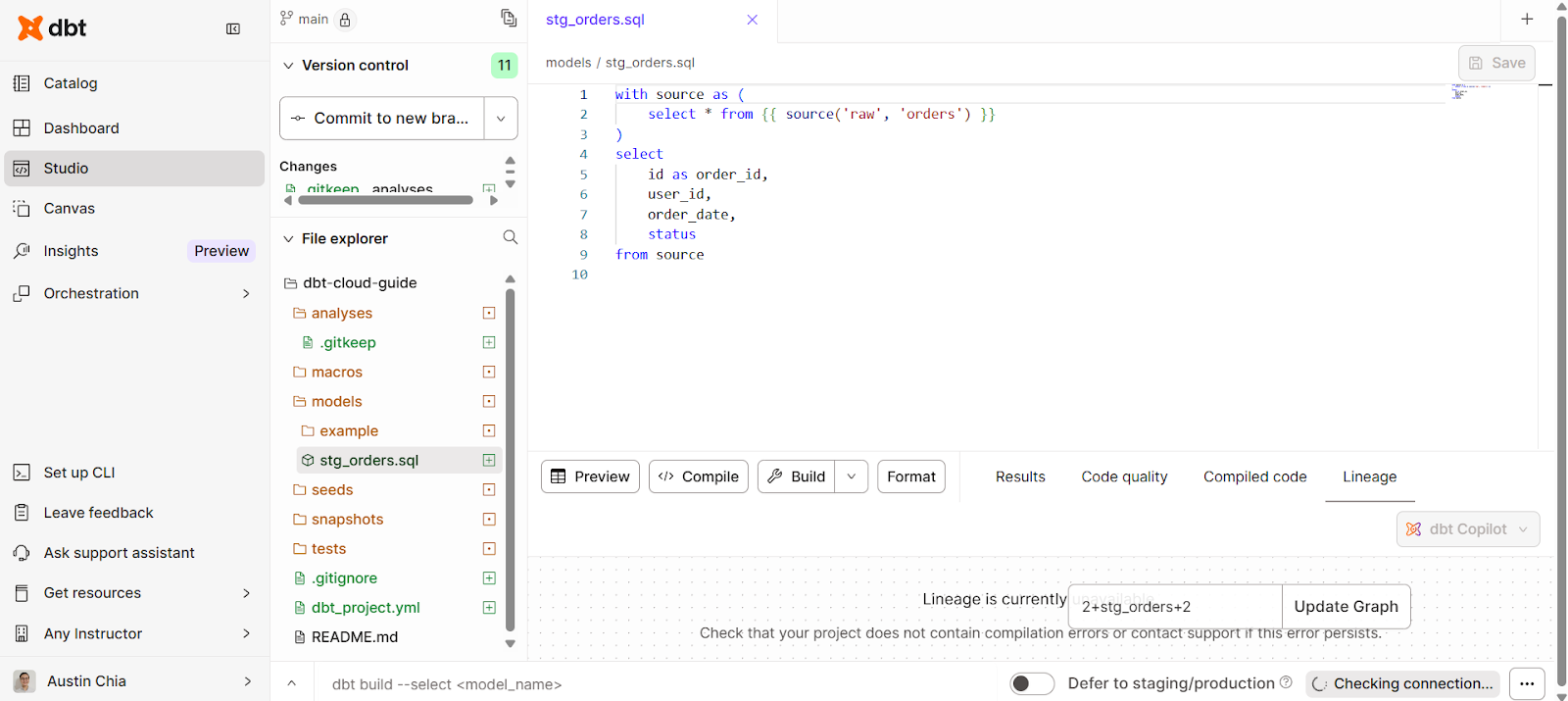
Some best practices you should take note of:
In addition, you can also define tests in YAML for automated checks:
models:
  - name: stg_orders
    columns:
      - name: order_id
        tests:
          - not_null
          - unique
      - name: status
        tests:
          - accepted_values:
              values: ['completed', 'pending', 'cancelled']
Testing your data enforces trust in transformations. This ensures that any jobs you run will have tests built into them to maintain integrity.
If you’re an advanced user, you can also define custom tests using Jinja and SQL.
In dbt Cloud, job scheduling and orchestration help support analytics automation. They ensure that your transformations run consistently, on time, and in the right environment with minimal manual intervention.
This section covers how to schedule jobs, trigger them automatically, and monitor their performance in real time.
Within the dbt Cloud interface, you can:
To create a job schedule in dbt Cloud:
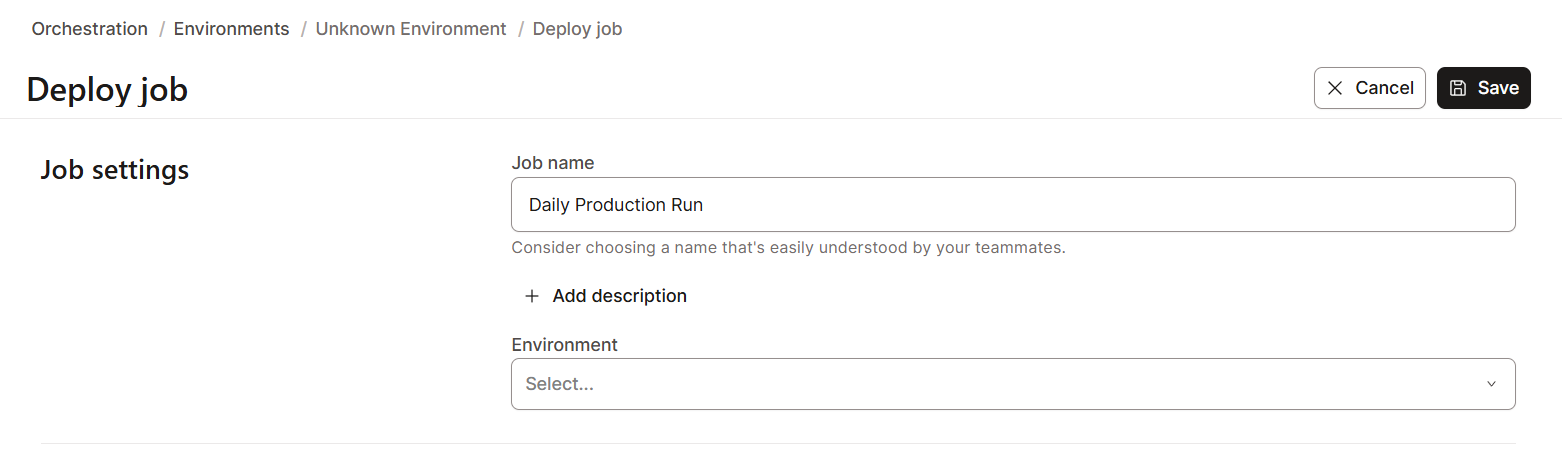
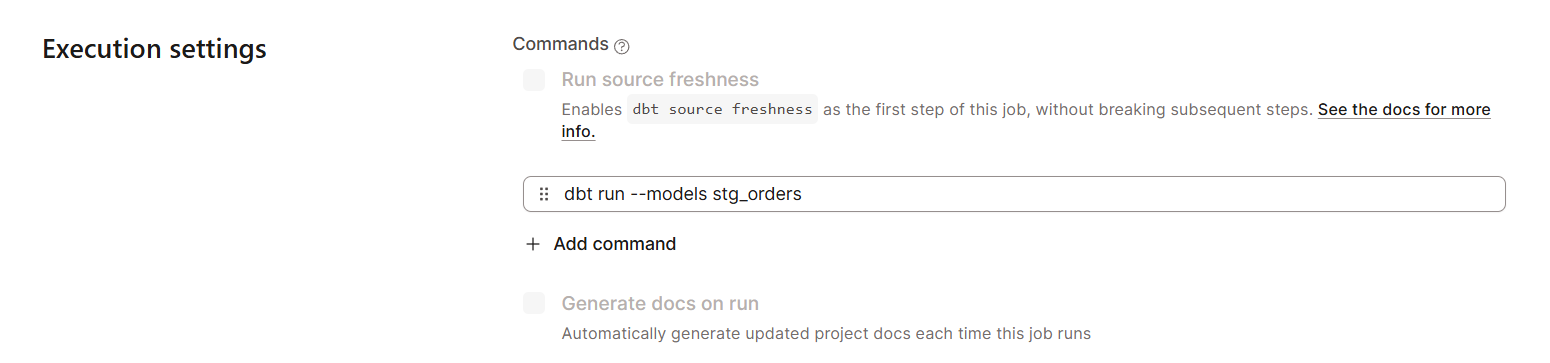
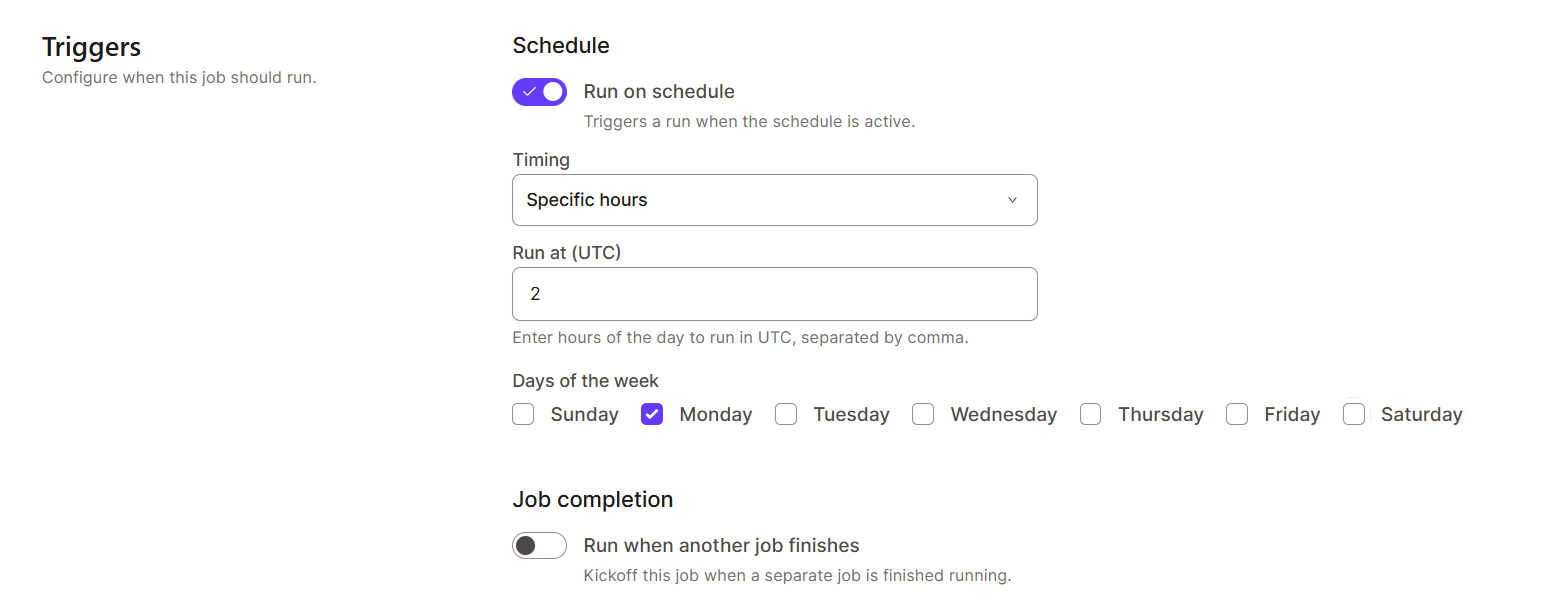
dbt Cloud supports monitoring and logging features for better data observability. This is essential for troubleshooting failures and optimizing performance.
It enables you to:
Beyond its core modeling and orchestration capabilities, dbt Cloud offers advanced features that bring intelligence, consistency, and automation to modern analytics workflows.
They can be found in two main features: the dbt Semantic Layer and AI-powered tools like dbt Copilot and Fusion.
The dbt Semantic Layer provides a central, governed layer where teams can define, manage, and serve business metrics in a consistent and version-controlled way.
It helps:
This unified layer bridges the gap between data transformation and visualization through its connections with common BI tools.
For a hands-on example, check out this tutorial on implementing a semantic layer with dbt.
One of dbt’s latest features, dbt Copilot, is an AI assistant built directly into dbt Cloud’s IDE. It helps developers write, debug, and optimize dbt code using natural language prompts and context-aware suggestions.
With dbt Copilot, you can:
The Fusion engine is a new engine written in Rust to replace dbt Core, with many more features.
It brings some use cases, such as:
In data transformation workflows, security and governance are non-negotiable. That’s why dbt Cloud is also built with enterprise-grade security controls to protect sensitive information, maintain compliance, and ensure accountability across teams.
dbt Cloud uses role-based access control (RBAC) to manage user permissions and restrict access to critical assets like projects, environments, and credentials.
Possible roles include:
To configure access control in dbt Cloud:
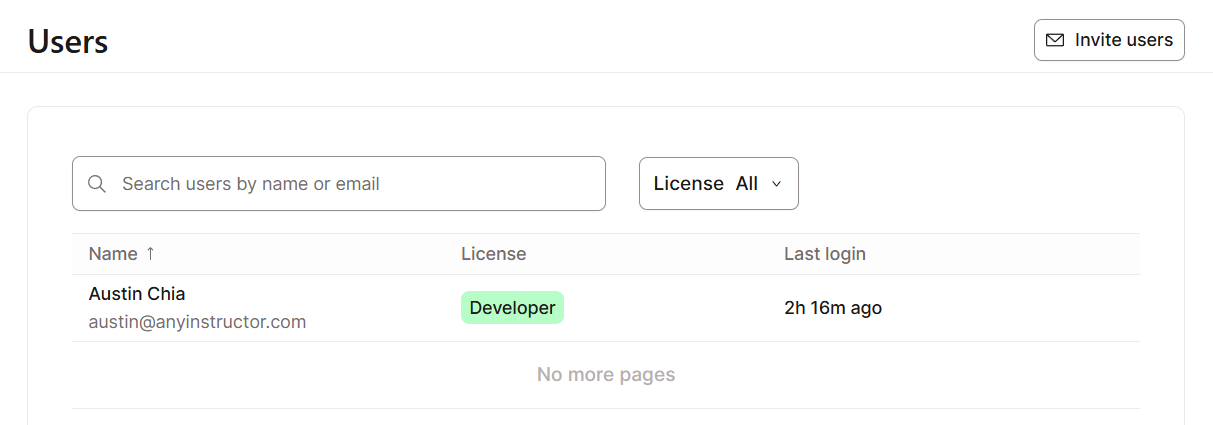
dbt Cloud includes comprehensive audit logging and compliance features designed to help organizations meet stringent data governance requirements, which comply with standards such as SOC 2, GDPR, and others.
Audit logs also enable the investigation of issues, and SCIM support improves identity management integration.
One of dbt Cloud’s greatest strengths lies in its ability to connect seamlessly with the broader data ecosystem. It integrates effortlessly with leading data warehouses, APIs, orchestration tools, and monitoring platforms.
This makes it a good choice for building a unified and automated analytics workflow, from ingestion to visualization. Let’s explore these aspects below:
dbt Cloud supports all major cloud data warehouses and lakehouses, allowing teams to run transformations natively within the environments where their data already resides.
This eliminates the need for data movement or duplication, using each platform’s performance and scalability instead.
dbt Cloud integration options include:
You can also have multiple authentication options per platform, such as key pair authentication, OAuth, or username/password.
For organizations that require extensibility and automation, dbt Cloud also provides a powerful REST API and webhook framework.
The dbt Cloud API enables developers to:
dbt Cloud webhooks provide event-based integration, allowing external systems to respond to key dbt events such as job completion, run failures, or deployment updates.
The webhooks can be used for:
As data pipelines grow in scale and complexity, observability becomes essential for maintaining reliability, performance, and trust.
But what does dbt Cloud have to offer? It comes down to two aspects: monitoring pipelines and model optimization.
Every job run is logged, tracked, and visualized within the platform, allowing you to understand the end-to-end state of your transformations.
For example, within the Run History dashboard, dbt Cloud displays detailed information like:
dbt Cloud is also easily integrated with data monitoring tools like Datadog.
Large monolithic transformations are difficult to maintain and optimize. dbt promotes modular development, where complex logic is broken into smaller, reusable models and each performing a focused task.
To optimize performance, you can follow these best practices:
stg_, int_, fct_, dim_) to clarify the model's purpose.dbt deps and dbt docs generate regularly to validate dependencies and documentation.You can also use incremental materializations to reduce compute costs, as shown in the following example.
{{ config(materialized='incremental') }}

select *
from {{ source('raw', 'events') }}
{% if is_incremental() %}
  where event_timestamp > (select max(event_timestamp) from {{ this }})
{% endif %}As data teams require more sharing of data within an organization, you’ll also need to consider the collaboration options dbt Cloud has.
dbt Mesh enables scalable collaboration across large organizations through centralized governance of the entire data lineage. It enables your team to create multiple interdependent projects, with each owned by different business units or data domains.
Key benefits of dbt Mesh include:
At its core, dbt Mesh allows teams to reference models across projects while preserving autonomy.
For example, a finance team might maintain a “core financial metrics” project, while the marketing team builds a separate project that references those financial models without duplicating code or logic.
dbt Mesh enables cross-project references through the ref() function, extended with project namespaces. For instance:
SELECT *
FROM {{ ref('finance_project', 'fct_revenue') }}
This enables the marketing model to query the fct_revenue model from the finance project directly, using the canonical version defined by that team.
To guarantee backward compatibility and trust across projects, dbt Mesh introduces two essential mechanisms: model versioning and model contracts.
Model versioning is one of the methods that allows teams to modify their models without breaking existing dependencies. You can define multiple versions of the same model using the versions: property in the model’s YAML file.
For example:
models:
  - name: fct_revenue
    versions:
      - v: 1
        description: "Initial revenue aggregation"
      - v: 2
        description: "Includes new discount and refund logic"
Model contracts define the structure, data types, and constraints of a model. It acts as an agreement between data producers and consumers.
When a model includes a contract, dbt validates it before execution, ensuring that schema changes (like column deletions or type mismatches) don’t propagate unintended errors downstream.
Example of a simple contract:
models:
  - name: fct_revenue
    contract:
      enforced: true
    columns:
      - name: customer_id
        data_type: string
      - name: total_revenue
        data_type: numeric
      - name: report_date
        data_type: date
If someone attempts to remove or alter a contracted column, dbt will raise an error, protecting dependent models and dashboards.
dbt Cloud extends the functionality of dbt Core by providing an end-to-end managed platform for analytics engineering.
Throughout this guide, we explored how it centralizes development through the Studio IDE, handles orchestration, and supports newer tools like dbt Mesh and the Semantic Layer.
By integrating these tools into a single platform, dbt Cloud allows teams to handle the entire data lifecycle, from ingestion to documentation, without needing to manage underlying infrastructure.
If you’re interested to get hands-on experience using dbt, our dbt Fundamentals skill track offers a practical way to start building your first project.
dbt Courses
Course
Track
Course
Tutorial
Austin Chia
9 min
Tutorial
Tim Lu
15 min
Tutorial
Moez Ali
8 min
Tutorial
Bexruz (Bex) Tuychiev
11 min
Tutorial
Mike Shakhomirov
13 min
Tutorial
Austin Chia
11 min