

Course
Introduction to Docker
4 hr
51.5K
As generative AI continues to transform software development, I've noticed a persistent challenge: running AI models locally remains more complex than it should be.
Developers face fragmented tooling, hardware compatibility issues, and workflows that feel disconnected from their everyday development environment. Docker Model Runner was launched in April 2025 to address these challenges, making it easier to run and test AI models locally within existing Docker workflows.
Docker Model Runner represents a shift from cloud-based AI to local, containerized workflows, offering benefits like data privacy, cost reduction, and faster iteration, all while being integrated with the Docker ecosystem. In my experience working with AI deployments, these advantages are critical for teams building production-ready applications while maintaining control over sensitive data.
If you are new to Docker, I recommend taking this introductory Docker course.
Traditional AI model serving presents several challenges that I've encountered firsthand.
AI models contain mathematical weights that don't benefit from compression, unlike traditional Docker images. This creates storage inefficiencies when models are packaged with their runtime. Additionally, setting up inference engines, managing hardware acceleration, and maintaining separate tooling for models versus application containers creates unnecessary complexity.
This is precisely where Docker Model Runner steps in. Instead of adding yet another tool to your stack, it makes it easy to pull, run, and distribute Large Language Models (LLMs) directly from Docker Hub in an OCI-compliant (Open Container Initiative) format or from Hugging Face if models are available in GPT-Generated Unified Format (GGUF). The platform addresses the fragmentation problem by bringing model management into the same workflow developers use for containers.
The historical context here is important. As generative AI adoption accelerated, the industry witnessed a growing trend toward secure, local-first AI workflows. Organizations became increasingly concerned about data privacy, API costs, and vendor lock-in associated with cloud-based AI services.
Docker partnered with influential names in AI and software development, including Google, Continue, Dagger, Qualcomm Technologies, Hugging Face, Spring AI, and VMware Tanzu AI Solutions, recognizing that developers needed a better way to work with AI models locally without sacrificing the conveniences of modern development practices.
Before diving into Docker Model Runner, let me walk you through the system requirements you'll need. The good news is that if you're already using Docker, you're halfway there. Docker Model Runner is now generally available and works in all Docker versions, supporting macOS, Windows, and Linux platforms.
While Docker Model Runner was released exclusively on Docker Desktop, as of December 2025, it is compatible with any platform that supports Docker Engine.
Here's what you'll need across different platforms:
|
Component |
Requirement |
Notes |
|
Operating System |
macOS, Windows, Linux |
All major platforms are supported |
|
Docker Version |
Docker Desktop Docker Engine |
Desktop for macOS/Windows Engine for Linux |
|
RAM |
8 GB minimum 16 GB+ recommended |
Larger models need more memory |
|
GPU (optional) |
Apple Silicon NVIDIA ARM/Qualcomm |
Provides 2-3x performance boost |
Docker Model Runner System Requirements
For GPU acceleration, Docker Model Runner now supports multiple backends:
Apple Silicon (M1/M2/M3/M4): Uses Metal API for GPU acceleration, configured automatically.
NVIDIA GPUs: Requires NVIDIA Container Runtime, supports CUDA acceleration.
ARM/Qualcomm: Hardware acceleration available on compatible devices.
Additionally, Docker Model Runner supports Vulkan since October 2025, enabling hardware acceleration on a much wider range of GPUs, including integrated GPUs and those from AMD, Intel, and other vendors.
While you can run models on a CPU alone, GPU support dramatically improves inference performance. We're talking about the difference between waiting 10 seconds versus 3 seconds for responses.
One important note: Some llama.cpp features might not be fully supported on the 6xx series GPUs, and support for additional engines such as MLX or vLLM will be added in the future.
This is where things get really interesting. The architectural design of Docker Model Runner breaks from traditional containerization in ways that might surprise you. Let me explain how it actually works under the hood.
Docker Model Runner implements a hybrid approach that combines Docker's orchestration capabilities with native host performance for AI inference. What makes this architecture distinctive? It fundamentally rethinks how we run AI workloads.
Unlike standard Docker containers, the inference engine doesn't actually run inside a container at all. Instead, the inference server uses llama.cpp as the engine, running as a native host process that loads models on demand and performs inference directly on your hardware.
Why does this matter? This design choice enables direct access to Apple's Metal API for GPU acceleration and avoids the performance overhead of running inference inside virtual machines. The separation of model storage and execution is intentional: models are stored separately and loaded into memory only when needed, then unloaded after a period of inactivity.
Now, let's zoom out and look at how these pieces fit together. At a higher level, Docker Model Runner consists of three high-level components: the model runner, the model distribution tooling, and the model CLI plugin. This modular architecture allows for faster iteration and cleaner API boundaries between different concerns.
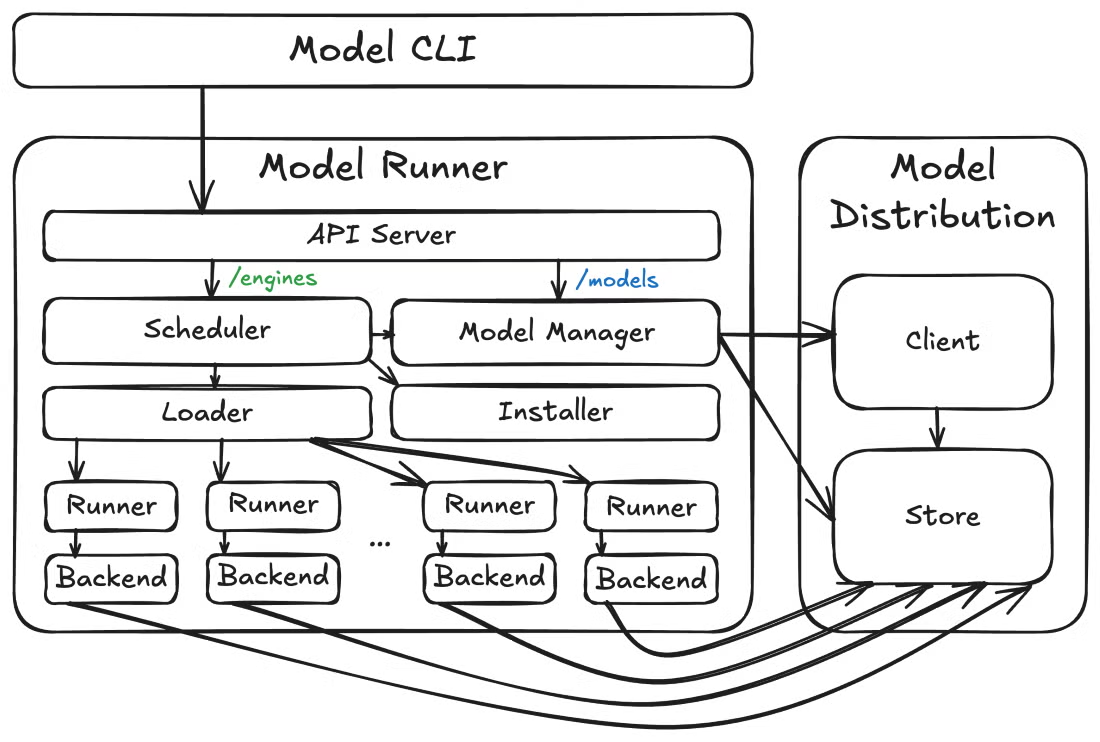
Docker Model Runner Architecture
Beyond the core architecture, Docker Model Runner also anticipates operational needs. The Model Runner exposes metrics endpoints at /metrics, allowing you to monitor model performance, request statistics, and track resource usage. This built-in observability is crucial for production deployments where you need visibility into model behavior and resource consumption.
With the architecture making sense, you're probably wondering: what can I actually do with this thing? Let me walk you through the features that have made Docker Model Runner compelling for my AI development workflows.
Here's a quick overview of the standout capabilities:
|
Feature |
Benefit |
Ideal For |
|
Open Source & Free |
No licensing costs Full transparency |
Experimentation Learning Production use |
|
Docker CLI Integration |
Familiar commands (docker model pull/run/list) |
Docker users who want zero new tools to learn |
|
OCI-Compliant Packaging |
Standard model distribution via registries |
Version control Access management |
|
OpenAI API Compatibility |
Drop-in replacement for cloud APIs |
Easy migration from cloud to local |
|
Sandboxed Execution |
Isolated environment for security |
Enterprise compliance requirements |
|
GPU Acceleration |
2-3x faster inference |
Real-time applications High throughput |
Docker Model Runner Core Features
The command-line interface integrates smoothly with existing Docker workflows. You'll use commands like docker model pull, docker model run, and docker model list, following the same patterns you already know from working with containers.
The graphical user interface in Docker Desktop provides guided onboarding to help even first-time AI developers start serving models smoothly, with automatic handling of available resources like RAM and GPU.
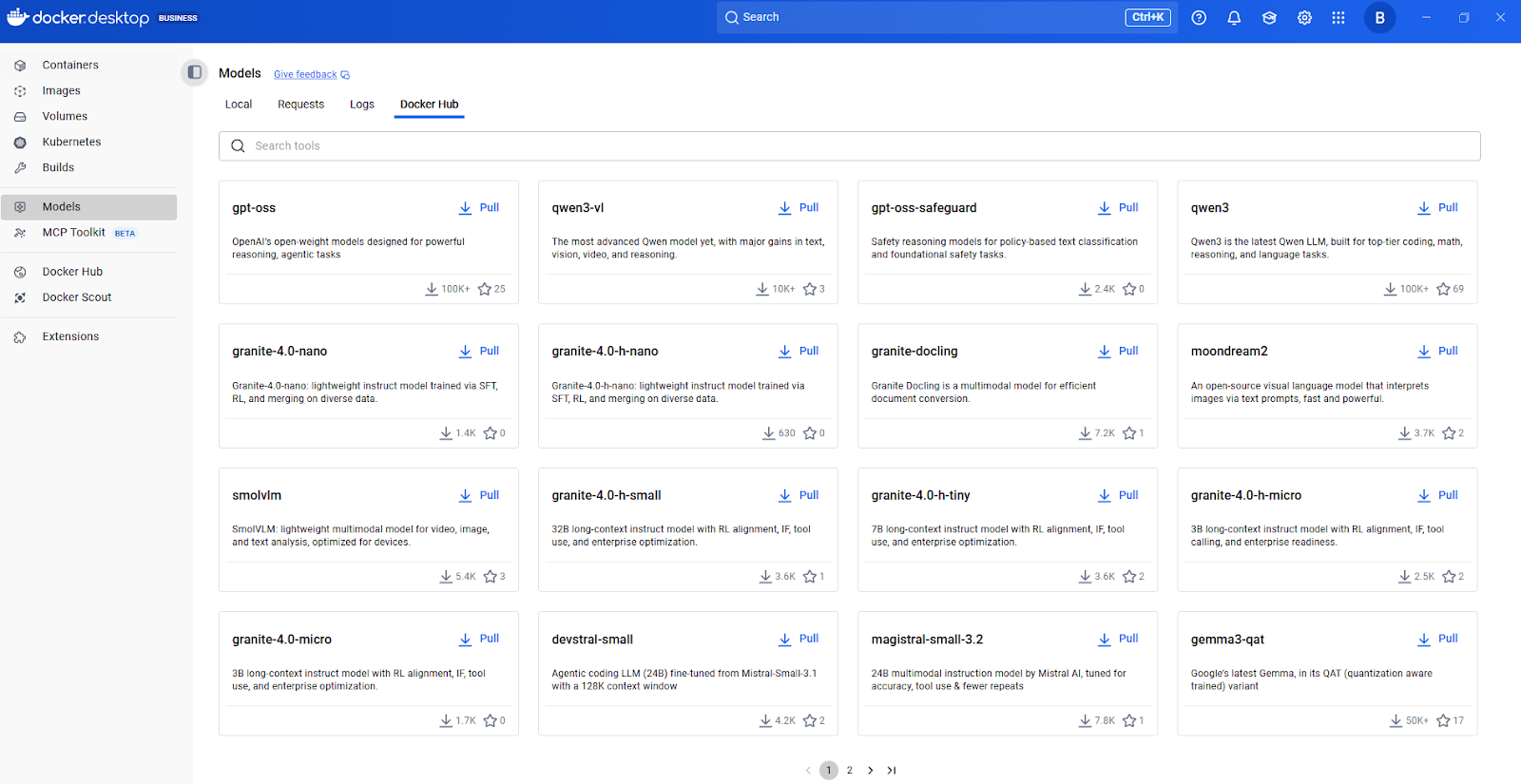
Docker Model Hub
Now, let's talk about how models are packaged and distributed. Docker Model Runner supports OCI-packaged models, allowing you to store and distribute models through any OCI-compatible registry, including Docker Hub. This standardized packaging approach means you can apply the same versioning, access control, and distribution patterns used for container images.
When it comes to integrating with applications, the REST API capabilities are particularly valuable for application integration. Docker Model Runner includes an inference engine built on top of llama.cpp and accessible through the familiar OpenAI API.
This OpenAI compatibility means existing code written for OpenAI's API can work with local models with minimal changes—simply point your application to the local endpoint instead of the cloud API. This flexibility alone can save weeks of refactoring.
Let me guide you through getting Docker Model Runner up and running on your system. The installation process is straightforward, but there are some platform-specific considerations worth knowing upfront.
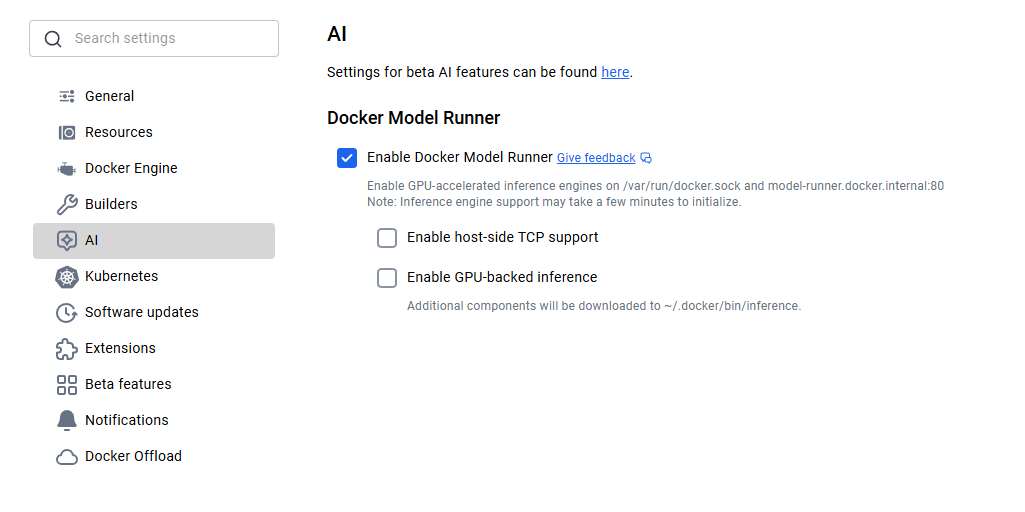
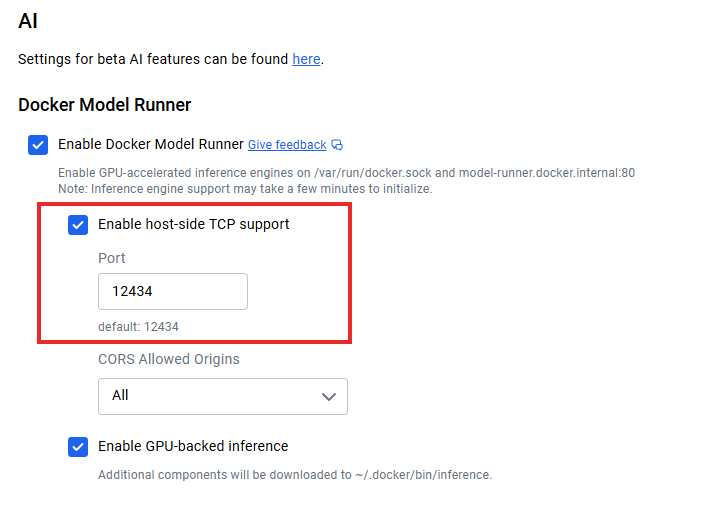
For macOS and Windows users, Docker Model Runner comes included with Docker Desktop 4.40 or later. Simply download the latest version from Docker's official website and install it. Once installed, you'll need to enable Docker Model Runner in the settings. Navigate to Settings > AI, and select the Docker Model Runner option and GPU-backend inference in case your computer supports NVIDIA GPU.
Docker Model Runner Activation
Linux users get an even more streamlined experience. Update your system and install the Docker Model Runner plugin using the following commands.
sudo apt-get update
sudo apt-get install docker-model-plugin
After installation, verify it's working by running docker model version.
If you're on Apple Silicon, GPU acceleration through Metal is automatically configured, and no additional setup is required. For NVIDIA GPUs, ensure you have the NVIDIA Container Runtime installed.
With Vulkan support, you can now leverage hardware acceleration on AMD, Intel, and other GPUs that support the Vulkan API. The system intelligently detects your hardware and applies the appropriate acceleration.
Once installed, downloading a model becomes very easy. You just need to pull the model first and then run it to interact with it:
docker model pull ai/smollm2
docker model run ai/smollm2
If everything has been set up properly, you should see the model in the list:
docker model listMODEL NAME
ai/smollm2After you've installed Docker Model Runner and understand how to pull models, the natural next question is: where do these models come from, and how do I manage them at scale? This is where Docker Model Runner's approach becomes particularly elegant.
Docker packages models as OCI Artifacts, an open standard allowing distribution through the same registries and workflows used for containers. Teams already using private Docker registries can use the same infrastructure for AI models. Docker Hub provides enterprise features like Registry Access Management for policy-based access controls.
The integration with Hugging Face deserves special mention. Developers can use Docker Model Runner as the local inference engine for running models on Hugging Face and filter for supported models (GGUF format is required) directly in the Hugging Face interface. This makes model discovery significantly easier.
docker model pull hf.co/bartowski/Llama-3.2-1B-Instruct-GGUFWhat's really clever is how this integration works under the hood. When you pull a model from Hugging Face in GGUF format, Docker Model Runner automatically packages it as an OCI artifact on the fly. This seamless conversion eliminates manual packaging steps and accelerates the path from model discovery to deployment.
Understanding the distribution mechanism is great, but what models can you actually run? Let me show you what's available out of the box and how to find more.
Docker Model Runner features a curated selection of models ready for immediate use. SmolLM2 is a popular choice, perfect for chat assistants, text extraction, rewriting, and summarization tasks, with 360 million parameters. I've found this model particularly useful for development and testing due to its small size and fast inference.
For discovering additional models, I recommend starting with Docker Hub's AI model catalog. Browse available models, check their documentation for supported tasks and hardware requirements, then pull them with a simple docker model pull command.
Models are pulled from Docker Hub the first time you use them and are stored locally, loading into memory only at runtime when a request is made and unloading when not in use to optimize resources.
This approach keeps your system responsive even when you have multiple models downloaded. You're not forced to keep everything in RAM simultaneously.
Each model listing includes information about quantization levels (like Q4_0, Q8_0), which affects model size and inference quality.
|
Quantization Level |
Description |
File Size |
Quality |
Best For |
|
Q8_0 |
8-bit quantization |
Largest |
Highest quality |
Production use, accuracy-critical tasks |
|
Q5_0 |
5-bit quantization |
Medium |
Good balance |
General-purpose, balanced performance |
|
Q4_0 |
4-bit quantization |
Smallest |
Acceptable |
Development, testing, resource-constrained environments |
Model Quantization
One important consideration is model versioning. You can specify exact versions using tags (like Q4_0 or latest), similar to Docker images. This ensures reproducible deployments and prevents unexpected changes when models are updated.
Once you've got models running locally, the question becomes: how do I connect my applications? When host-side TCP support is enabled (e.g., via Docker Desktop’s TCP settings), the default API endpoint runs on localhost:12434, exposing OpenAI-compatible endpoints.
Docker Model Runner API Integration
Here's a simple example for making a request:
curl http://localhost:12434/engines/llama.cpp/v1/chat/completions \
  -H "Content-Type: application/json" \
  -d '{
    "model": "ai/smollm2",
    "messages": [{"role": "user", "content": "Explain containerization"}],
    "stream": false
  }'
For microservice architectures, your application containers can communicate with the model service using standard HTTP protocols—no special SDKs required. Response streaming is supported for real-time applications by setting "stream": true.
The REST API documentation provides complete endpoint specifications, parameter options, and response schemas. I recommend referencing the official Docker documentation for the most current API details, as the platform continues evolving rapidly.
Getting optimal performance from Docker Model Runner requires understanding several key strategies. Let me share what I've learned from working with local model deployments.
By running as a host-level process with direct GPU access, Model Runner achieves better performance optimization than containerized solutions. This architectural decision pays dividends in terms of throughput and latency, but you still need to tune things properly to get the most out of it.
Hardware acceleration is your first optimization lever. Enabling GPU support typically provides 2-3x performance improvements over CPU-only inference. Beyond hardware, model quantization is your second major dial. I typically start with Q8_0 for best quality, then move to Q5_0 or Q4_0 if I need better performance.
The built-in metrics endpoint at /metrics allows monitoring with Prometheus or your existing monitoring stack. For scaling, configure context length based on actual needs rather than using maximum values. If your application only needs 2048 tokens of context, don't configure for 8192.
One of Docker Model Runner's strongest advantages is how it integrates with the broader Docker ecosystem.
Docker Model Runner supports Docker Compose. This means you can define multi-service applications where one service is an AI model, managing the entire stack with familiar Docker Compose files. Here's how that looks:
services:
  app:
    image: my-app:latest
    models:
      - llm
      - embedding

models:
  llm:
    model: ai/smollm2
  embedding:
    model: ai/embeddinggemma
You can also automate CI/CD workflows: spin up models in your test environment, run integration tests against them, and tear everything down, all within your existing pipeline infrastructure. This removes the "it works on my machine" problem for AI features.
Another interesting integration is Docker Offload, which extends your local workflow to the cloud when needed. Although it is still a Beta feature, it lets you develop locally with Docker Model Runner, then offload resource-intensive inference to cloud infrastructure when requirements exceed local capacity.
Docker Offload
Support for running in Kubernetes is also available as a Helm chart and a static YAML file. This opens possibilities for production-scale deployments where you need horizontal scaling, load balancing, and high availability.
While still experimental, Kubernetes integration represents Docker Model Runner's evolution toward enterprise-grade deployments where you're serving thousands of requests per second across multiple replicas.
With all these integration options, you might wonder: but is it secure? Docker Model Runner runs in an isolated, controlled environment, providing sandboxing for security. This isolation prevents models from accessing sensitive system resources beyond what's explicitly provided.
The primary security benefit is data privacy. Your inference requests never leave your infrastructure, eliminating data exfiltration risks. For organizations handling sensitive data, this local execution model is essential for compliance with GDPR, HIPAA, and other privacy regulations.
Admins can configure host-side TCP support and CORS for granular security control. Model licensing metadata in registries enables compliance tracking and audit trails for enterprise governance.
By now, you might be thinking: how does this stack up against tools I'm already using? Here's how Docker Model Runner compares to Ollama and NVIDIA NIM:
|
Feature |
Docker Model Runner |
Ollama |
NVIDIA NIM |
|
Performance |
1.00-1.12x faster than Ollama |
Baseline performance |
Highly optimized for NVIDIA GPUs |
|
Ecosystem Integration |
Native Docker workflow, OCI artifacts |
Standalone tool, separate workflow |
Containerized, NVIDIA-specific |
|
Model Customization |
Pre-packaged models from Docker Hub |
Custom Modelfiles, GGUF/Safetensors import |
NVIDIA-optimized models only |
|
Platform Support |
macOS, Windows, Linux |
macOS, Windows, Linux, Docker |
Linux with NVIDIA GPUs only |
|
Hardware Requirements |
Any GPU (Metal, CUDA, Vulkan) or CPU |
Any GPU or CPU |
NVIDIA GPUs required |
|
Community & SDKs |
Growing, Docker ecosystem focus |
Mature, extensive |
NVIDIA ecosystem, enterprise-focused |
|
Best For |
Teams with Docker infrastructure |
Standalone AI projects, rapid experimentation |
NVIDIA-focused production deployments |
The key differentiator for Docker Model Runner is ecosystem integration. It treats AI models as first-class citizens alongside containers, reducing tool sprawl for Docker-centric teams.
Ollama offers more model customization and a mature community with extensive SDKs. NVIDIA NIM provides the highest performance for NVIDIA GPUs but lacks the flexibility and cross-platform support of the other options.
Before we wrap up, let's address what happens when things don't work.
This error usually indicates that the Docker CLI cannot locate the plugin executable.
Cause: Docker cannot find the plugin in the expected CLI plugin directory.
Solution: You likely need to create a symbolic link (symlink) to the executable. Please refer back to the installation section for the specific commands.
Currently, using specific digests to pull or reference models may fail.
Workaround: Refer to models by their tag name (e.g., model:v1) instead of their digest.
Status: The engineering team is actively working on proper digest support for a future release.
If your models are running slowly or not utilizing the GPU, perform the following checks:
Verify Drivers: Ensure your host machine's GPU drivers are up to date.
Check Permissions: Confirm that Docker has permissions to access GPU resources.
Linux (NVIDIA): Ensure the NVIDIA Container Runtime is installed and configured.
Verification: Run the following command to confirm the GPU is visible to the system: nvidia-smi
If you encounter an issue not listed here:
File an Issue: Report bugs or request features at the official GitHub repository.
Community: There is an active community that often provides quick workarounds for edge cases.
Docker Model Runner represents a significant step forward in making AI development more accessible. By bringing model management into the Docker ecosystem, it eliminates the friction that has historically slowed AI adoption.
The strategic importance extends beyond convenience. In an era where data privacy, cost control, and development velocity matter more than ever, local AI execution becomes increasingly critical. Docker Model Runner makes it easier to experiment and build AI applications using the same Docker commands and workflows developers already use daily.
Looking ahead, the platform continues evolving with support for additional inference libraries, advanced configuration options, and distributed deployment capabilities. The convergence of containerization and AI represents where the industry is heading, and Docker Model Runner stands at this intersection, making privacy-focused, cost-effective AI development a reality for millions of developers already using Docker.
Now that you have models running in your local Docker environment, the next step is building a reliable pipeline around them. Master the principles of model versioning, deployment, and lifecycle management with the MLOps Fundamentals Skill Track on DataCamp.
Docker Courses
Course
Track
Track
Tutorial
Dario Radečić
9 min
Tutorial
Abid Ali Awan
9 min
Tutorial
François Aubry
12 min
Tutorial
Abid Ali Awan
7 min
Tutorial
Abid Ali Awan
6 min
Tutorial
Rajesh Kumar
15 min


