
Course
Retrieval Augmented Generation (RAG) with LangChain
3 hr
20.3K
Imagine you’re assembling IKEA furniture. You stare at step 14 in the instructions, but can't figure out which screw goes where. The diagram shows something, but it's not clicking.
If you were to ask: "What's the small metal piece in step 14 for?", a standard text-based retrieval-augmented generation (RAG) system can't help here. The answer lives in the diagram itself, not in any text on the page. IKEA instructions are famously wordless.
This is where multimodal RAG comes in.
In this tutorial, I'll walk you through building a multimodal RAG system that can answer questions about documents containing images, diagrams, and mixed content. We'll use IKEA assembly instructions as our test case because they're a good stress test: mostly visual, minimal text, and the kind of thing people actually need help with.
We'll use OpenAI's models throughout: GPT-4o for understanding images and generating answers, and text-embedding-3-small for creating searchable vectors. To learn how to build RAG pipelines with a different framework, I recommend our RAG with LangChain course.
By the end, you'll have a working system you can run locally and adapt for your own documents.
Multimodal RAG extends the standard RAG pattern to handle more than just text. The core idea stays the same, but "context" now includes images, tables, diagrams, and other non-text content.
Why does this matter? Because real documents aren't just text.
Think about what you actually work with:
A system that only processes text is working with incomplete information. It's like trying to understand a recipe by reading only the ingredient list and ignoring the photos showing what "fold gently" actually looks like.
Traditional RAG treats a PDF as a stream of characters. It extracts text, chunks it, embeds those chunks, and calls it done. Any images get skipped entirely, or maybe converted to [IMAGE] placeholder tokens. Tables become mangled rows of text that lose their structure.
Multimodal RAG takes a different approach: Images are described or embedded directly, and tables get parsed into structured formats. The retrieval system can match a query like "network topology diagram" to both text descriptions of network architecture and actual visual diagrams. The generation model can examine an image and reason about what it depicts.
|
Aspect |
Text-Only RAG |
Multimodal RAG |
|
Input types |
Plain text, maybe markdown |
Text, images, tables, diagrams, mixed documents |
|
What gets embedded |
Text chunks |
Text chunks plus image descriptions or image embeddings |
|
Generation model |
Any LLM |
Vision-language model (GPT-4o, Claude, Gemini) |
|
Best for |
Text-heavy documents |
Manuals, reports, slides, anything with visual content |
If “multimodal” still feels like a fuzzy umbrella term, this blog on Multimodal AI is a tight explainer with concrete examples.
The pipeline has more moving parts than text-only RAG, but the structure is similar. Data is processed and embedded, lands in a vector store, and gets retrieved when someone asks a question.
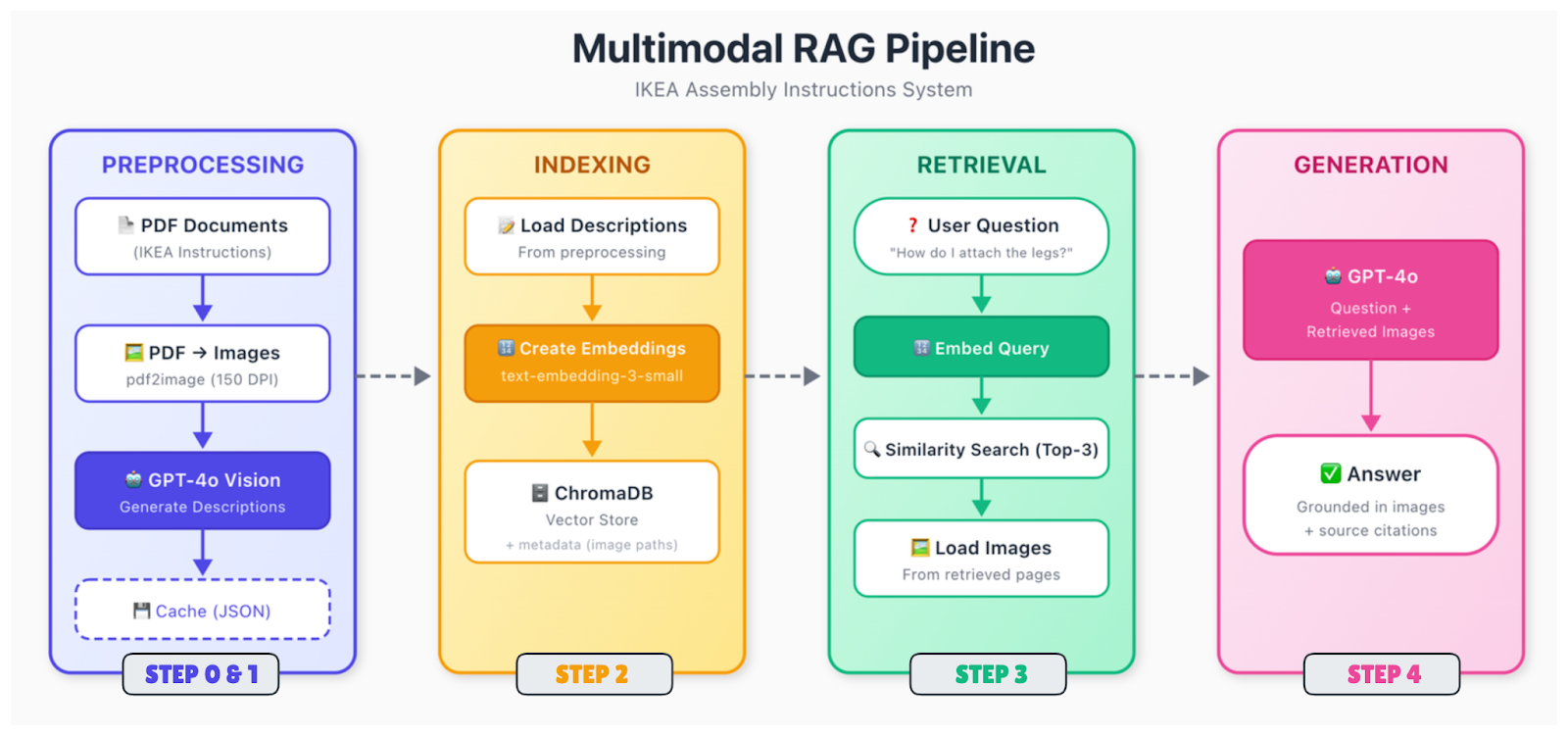
Here's the flow:
Raw documents (PDFs, images, slides) get broken down into their component parts. You extract text, identify images, parse tables, and figure out how everything relates spatially. A diagram on page 5 might have a caption below it and a reference in the text on page 4. You need to capture those relationships.
Different content types need different treatment. For images, you have two main options: generate text descriptions using a vision model (like GPT-4o), or embed images directly using a multimodal encoder (like CLIP). The description approach is more straightforward and works with standard text embeddings. Tables get converted to structured formats or summarized in natural language.
After this, everything gets converted to vectors. If you're using the description approach, you just embed all your text (original text plus generated image descriptions) with a standard text embedding model. The key is that queries about visual content can now match those descriptions.
Vectors are stored in a database with metadata, including the source document, page number, content type, and, for images, the path to the original file. You'll need that image path later when you want to show it to the generation model.
When a query is received, embed it using the same model, search for the nearest neighbors, and return the top matches. The retrieved chunks might reference text, images, or both.
Pass the query, along with the retrieved context, to a vision-language model. If retrieved chunks reference images, load those images and include them in the prompt. The model sees both the text context and the actual images, then generates an answer.
The generation step is where GPT-4o really shines. It can look at an IKEA diagram showing screw placement and explain what's happening in plain language. It can read a chart and summarize the trend. It can notice details in technical drawings that a text description might miss.
Let's build this thing. We'll create a system that can answer questions about IKEA assembly instructions, going step by step from setup to a working query interface.
For this tutorial, we're keeping it simple:
|
Component |
Choice |
Why |
|
Embeddings |
text-embedding-3-small |
Cheap, good quality, same API |
|
Vector store |
ChromaDB |
Runs locally, no setup, persistent |
|
Vision model |
GPT-4o |
Best-in-class for image understanding |
|
Generation |
GPT-4o |
Same model, handles both tasks |
You could swap in alternatives. Pinecone or Weaviate for the vector store if you need scale. Claude or Gemini are good alternatives for the generation. The general architecture stays the same in those cases.
Why not use CLIP or ColPali for embeddings? You could. Those let you embed images directly without generating text descriptions first. But they add complexity and often require a GPU. The description approach works well for document-style content where you want to capture semantic details, not just visual similarity.
Let’s get started with dependencies and environment variables to set up our project environment.
First, you need poppler installed to handle the PDF processing.
Ubuntu/Debian: sudo apt-get install poppler-utils
macOS (using Homebrew): brew install poppler
Windows: Download from the release page and add to PATH
Next, install the Python packages. Besides ChromaDB, we need pdf2image for converting PDFs to images, pillow for image processing, and requests for downloading the PDF files.
pip install openai chromadb pdf2image pillow requestsTo use the models, set your OpenAI API key as an environment variable.
Unix/Linux/macOS:
export OPENAI_API_KEY="your-api-key-here"Windows:
setx OPENAI_API_KEY="your-api-key-here"Now, let’s set up the project structure and pull the sample data. The script already includes the download URLs, but if you want to peek at the PDFs first, here are the direct links to both the MALM desk and MALM bed frame.
Create a file called step1_setup.py:
"""
Step 1: Setup and Download Sample Data
"""
import os
import requests

# Create directories
for d in ["data", "data/images", "data/cache"]:
    os.makedirs(d, exist_ok=True)
print("✓ Created directories")

# Download IKEA assembly instructions
SAMPLE_PDFS = {
    "malm_desk.pdf": "https://www.ikea.com/us/en/assembly_instructions/malm-desk-white__AA-516949-7-2.pdf",
    "malm_bed.pdf": "https://www.ikea.com/us/en/assembly_instructions/malm-bed-frame-low__AA-75286-15_pub.pdf",
}

for filename, url in SAMPLE_PDFS.items():
    filepath = f"data/{filename}"
    if not os.path.exists(filepath):
        print(f"Downloading {filename}...")
        response = requests.get(url, timeout=30)
        with open(filepath, "wb") as f:
            f.write(response.content)
        print(f"  ✓ Saved ({len(response.content) / 1024:.1f} KB)")
    else:
        print(f"✓ {filename} already exists")
To finish the initial setup, run the script:
python step1_setup.pyYou should see the IKEA PDFs download to your data/ folder.
IKEA instructions are tricky. They're mostly diagrams with minimal text. We need to convert PDF pages to images, then use GPT-4o to describe what each page shows.
Create step2_preprocess.py:
"""
Step 2: Preprocess Documents
Convert PDFs to images and generate descriptions with GPT-4o
"""
import os
import json
import base64
from pdf2image import convert_from_path
from openai import OpenAI

client = OpenAI()

DATA_DIR = "data"
IMAGES_DIR = "data/images"
CACHE_FILE = "data/cache/descriptions.json"


def convert_pdf_to_images(pdf_path):
    """Convert a PDF to page images."""
    pdf_name = os.path.splitext(os.path.basename(pdf_path))[0]
    images = convert_from_path(pdf_path, dpi=150)

    image_paths = []
    for i, image in enumerate(images):
        image_path = f"{IMAGES_DIR}/{pdf_name}_page_{i+1:03d}.png"
        image.save(image_path, "PNG")
        image_paths.append(image_path)

    return image_paths


def describe_page(image_path):
    """Use GPT-4o to describe an instruction page."""
    with open(image_path, "rb") as f:
        base64_image = base64.b64encode(f.read()).decode("utf-8")

    response = client.chat.completions.create(
        model="gpt-4o",
        messages=[
            {
                "role": "system",
                "content": """Describe this IKEA assembly instruction page in detail.
Include: step numbers, parts shown, tools needed, actions demonstrated,
quantities (like "2x"), warnings, and part numbers if visible.
This description will help people find this page when they have questions."""
            },
            {
                "role": "user",
                "content": [
                    {"type": "image_url", "image_url": {"url": f"data:image/png;base64,{base64_image}"}},
                    {"type": "text", "text": "Describe this instruction page."}
                ]
            }
        ],
        max_tokens=500
    )
    return response.choices[0].message.content


def main():
    # Load cache if exists
    cache = {}
    if os.path.exists(CACHE_FILE):
        with open(CACHE_FILE, "r") as f:
            cache = json.load(f)

    all_pages = []

    # Process each PDF
    for pdf_file in os.listdir(DATA_DIR):
        if not pdf_file.endswith(".pdf"):
            continue

        print(f"\nProcessing {pdf_file}...")
        pdf_path = f"{DATA_DIR}/{pdf_file}"

        # Convert to images
        print("  Converting to images...")
        image_paths = convert_pdf_to_images(pdf_path)
        print(f"  ✓ {len(image_paths)} pages")

        # Generate descriptions
        print("  Generating descriptions with GPT-4o...")
        for i, image_path in enumerate(image_paths):
            if image_path in cache:
                description = cache[image_path]
                status = "cached"
            else:
                description = describe_page(image_path)
                cache[image_path] = description
                # Save cache after each page
                with open(CACHE_FILE, "w") as f:
                    json.dump(cache, f, indent=2)
                status = "generated"

            all_pages.append({
                "source_pdf": pdf_file,
                "page_number": i + 1,
                "image_path": image_path,
                "description": description
            })
            print(f"    Page {i+1}/{len(image_paths)} [{status}]")

    # Save all page data
    with open("data/cache/all_pages.json", "w") as f:
        json.dump(all_pages, f, indent=2)

    print(f"\n✓ Processed {len(all_pages)} pages total")


if __name__ == "__main__":
    main()
Here's what the functions are doing:
convert_pdf_to_images(pdf_path): renders each PDF page as a PNG image at 150 DPI using pdf2image. This extracts diagrams that lack selectable text, saving them with consistent naming like malm_desk_page_001.png.
describe_page(image_path): encodes the image as base64 and sends it to GPT-4o with a tailored system prompt. The model returns a detailed text description capturing steps, parts, and quantities for semantic search.
main(): orchestrates everything: It loads cached descriptions to avoid reprocessing, converts PDFs to images, generates new descriptions as needed, saves incremental cache, and outputs all_pages.json with metadata for indexing.
Run the script like this:
python step2_preprocess.pyThis step takes a few minutes. GPT-4o analyzes each page and generates a detailed description. The descriptions get cached, so if you run it again, it skips pages that were already processed.
What's happening here? We're converting visual content into text that can be searched. When someone asks, "How do I attach the legs?", the retriever will search these descriptions and find pages that mention leg attachment, even though the original page has no text at all.
Once you’ve built the basic pipeline, the next wins come from retrieval tricks, such as hybrid search, reranking, or query rewriting. To get familiar with them, read this blog on Advanced RAG Techniques.
Now we embed the descriptions and store them in ChromaDB.
Create step3_index.py:
"""
Step 3: Create Embeddings and Index
"""
import os
import json
from openai import OpenAI
import chromadb

client = OpenAI()

PAGES_FILE = "data/cache/all_pages.json"
CHROMA_DIR = "data/chroma_db"
COLLECTION_NAME = "ikea_instructions"


def get_embedding(text):
    """Get embedding from OpenAI."""
    response = client.embeddings.create(
        model="text-embedding-3-small",
        input=text
    )
    return response.data[0].embedding


def main():
    # Load page descriptions
    with open(PAGES_FILE, "r") as f:
        pages = json.load(f)
    print(f"Loaded {len(pages)} pages")

    # Initialize ChromaDB with persistent storage
    chroma_client = chromadb.PersistentClient(path=CHROMA_DIR)

    # Delete existing collection if present
    try:
        chroma_client.delete_collection(name=COLLECTION_NAME)
    except:
        pass

    collection = chroma_client.create_collection(
        name=COLLECTION_NAME,
        metadata={"hnsw:space": "cosine"}
    )
    print(f"Created collection: {COLLECTION_NAME}")

    # Index each page
    print("\nCreating embeddings...")
    for i, page in enumerate(pages):
        # Combine source info with description
        text_to_embed = f"Source: {page['source_pdf']}, Page {page['page_number']}\n\n{page['description']}"

        embedding = get_embedding(text_to_embed)

        collection.add(
            ids=[f"page_{i}"],
            embeddings=[embedding],
            documents=[page["description"]],
            metadatas=[{
                "source_pdf": page["source_pdf"],
                "page_number": page["page_number"],
                "image_path": page["image_path"]
            }]
        )

        if (i + 1) % 5 == 0 or i == len(pages) - 1:
            print(f"  Indexed {i + 1}/{len(pages)} pages")

    print(f"\n✓ Index created with {collection.count()} documents")

    # Quick retrieval test
    print("\nTesting retrieval...")
    test_query = "How do I attach the legs?"
    query_embedding = get_embedding(test_query)
    results = collection.query(query_embeddings=[query_embedding], n_results=2)

    print(f"Query: '{test_query}'")
    for meta in results["metadatas"][0]:
        print(f"  → {meta['source_pdf']}, Page {meta['page_number']}")


if __name__ == "__main__":
    main()
Here, the get_embedding(text) function converts text from the description and source info into a dense vector using OpenAI's text-embedding-3-small model. Being 1536-dimensional, those vectors are able to capture semantic meaning for similarity search.
main() loads processed pages from all_pages.json from the previous step, initializes ChromaDB with persistent storage, deletes/recreates the collection, generates embeddings for each page, stores them with rich metadata (source, page number, image path), and runs a quick retrieval test to verify indexing works.
Run it:
python step3_index.pyThe metadata is important here. We store the image_path so we can retrieve the actual image later and show it to GPT-4o during generation. The description is what gets searched, but the image is what gets shown.
Here's the full multimodal RAG pipeline. A query gets embedded, relevant pages are retrieved, images loaded, and GPT-4o generates an answer based on text descriptions and visuals.
Create step4_query.py:
"""
Step 4: Query the Multimodal RAG System
"""
import os
import sys
import base64
from openai import OpenAI
import chromadb

client = OpenAI()

CHROMA_DIR = "data/chroma_db"
COLLECTION_NAME = "ikea_instructions"
TOP_K = 3

# Initialize ChromaDB
chroma_client = chromadb.PersistentClient(path=CHROMA_DIR)


def get_embedding(text):
    """Get embedding from OpenAI."""
    response = client.embeddings.create(
        model="text-embedding-3-small",
        input=text
    )
    return response.data[0].embedding


def retrieve(query, top_k=TOP_K):
    """Find relevant instruction pages."""
    collection = chroma_client.get_collection(name=COLLECTION_NAME)
    query_embedding = get_embedding(query)

    results = collection.query(
        query_embeddings=[query_embedding],
        n_results=top_k,
        include=["documents", "metadatas"]
    )
    return results


def generate_answer(query, retrieved_results):
    """Generate answer using GPT-4o with retrieved images."""
    if not retrieved_results["ids"][0]:
        return "No relevant pages found.", []

    # Build image content for GPT-4o
    image_content = []
    sources = []

    for doc, metadata in zip(retrieved_results["documents"][0], retrieved_results["metadatas"][0]):
        image_path = metadata["image_path"]

        if not os.path.exists(image_path):
            continue

        with open(image_path, "rb") as f:
            base64_image = base64.b64encode(f.read()).decode("utf-8")

        image_content.append({
            "type": "image_url",
            "image_url": {"url": f"data:image/png;base64,{base64_image}"}
        })
        image_content.append({
            "type": "text",
            "text": f"[Page {metadata['page_number']} from {metadata['source_pdf']}]"
        })

        sources.append(f"{metadata['source_pdf']}, Page {metadata['page_number']}")

    # Generate with GPT-4o
    response = client.chat.completions.create(
        model="gpt-4o",
        messages=[
            {
                "role": "system",
                "content": """You answer questions about IKEA assembly based on instruction pages.
Be specific, reference page numbers when helpful, and say if something isn't clear from the images."""
            },
            {
                "role": "user",
                "content": [
                    {"type": "text", "text": f"Question: {query}\n\nRelevant instruction pages:"},
                    *image_content,
                    {"type": "text", "text": "Answer based on these pages."}
                ]
            }
        ],
        max_tokens=600
    )

    return response.choices[0].message.content, sources


def answer_question(query):
    """Full RAG pipeline."""
    print(f"\nQuery: {query}")
    print("-" * 50)

    print("Retrieving relevant pages...")
    results = retrieve(query)
    print(f"  Found {len(results['ids'][0])} pages")

    print("Generating answer...")
    answer, sources = generate_answer(query, results)

    return answer, sources


def main():
    # Check index exists
    try:
        collection = chroma_client.get_collection(name=COLLECTION_NAME)
        print(f"Connected to index ({collection.count()} documents)")
    except:
        print("ERROR: Index not found. Run step2_index.py first.")
        return

    # Single query from command line
    if len(sys.argv) > 1:
        query = " ".join(sys.argv[1:])
        answer, sources = answer_question(query)
        print(f"\nAnswer:\n{answer}")
        print(f"\nSources: {', '.join(sources)}")
        return

    # Interactive mode
    print("\nAsk questions about IKEA assembly. Type 'quit' to exit.\n")

    while True:
        try:
            query = input("Question: ").strip()
        except KeyboardInterrupt:
            break

        if not query or query.lower() in ["quit", "exit"]:
            break

        answer, sources = answer_question(query)
        print(f"\nAnswer:\n{answer}")
        print(f"\nSources: {', '.join(sources)}\n")


if __name__ == "__main__":
    main()
Key functions explained:
get_embedding(text): generates a vector embedding for the query using text-embedding-3-small, enabling semantic similarity search in ChromaDB.
retrieve(query, top_k=TOP_K): embeds the query, queries the collection for top-k nearest neighbors, and returns documents and metadata (e.g., image paths) via include=["documents", "metadatas"].
generate_answer(query, retrieved_results): loads top images as base64, builds a multimodal GPT-4o prompt interleaving page labels and images, and generates a detailed response with IKEA-specific instructions.
answer_question(query): orchestrates retrieval and generation, with progress logging.
main(): validates the index exists, supports CLI single queries or interactive chat mode (“quit”, “exit” or Ctrl+C to stop).
You can run it and type in your question, or directly run it with a specific question, like this:
python step4_query.py "How do I attach the legs to the desk?"Retrieving relevant pages...
Found 3 pages
Generating answer...
Answer:
To attach the legs to the MALM desk, follow these steps shown on pages 5-6:
1. First, insert the wooden dowels into the pre-drilled holes on the leg
pieces (you'll see "4x" indicating four dowels are needed)
2. Apply the cam locks to the desk top using the Phillips screwdriver
3. Align each leg with the corresponding holes on the underside of the desk
4. Tighten the cam locks by rotating them clockwise until the legs are
firmly attached
The instructions show this should be done with the desk top face-down on
a soft surface to avoid scratching.
Sources: malm_desk.pdf, Page 5, malm_desk.pdf, Page 6, malm_desk.pdf, Page 7Looks good! The system retrieves pages based on the descriptions, loads the actual images, and GPT-4o generates an answer by looking at the diagrams directly.
Building a multimodal RAG system is one thing. Knowing if it works well is another. And getting it to run reliably in production adds another layer of challenges.
The standard RAG metrics still apply, but you need to extend them for visual content.
Precision@k measures how many of your retrieved pages were actually relevant. It would penalize irrelevant pages in top-k, but for generation, having the key image matters more than achieving perfect top-k.
Recall@k measures how often the correct pages appear in your top k results. It is more relevant for your IKEA RAG use case because we want the system to find at least one relevant page in the top-k (e.g., k=3) results. This way, GPT-4o gets visual context to answer correctly, even if other results are noise.
For our IKEA system, you'd build a test set with maybe 50 questions and label the "correct" pages for each. Then, you could evaluate them using the following function:
def evaluate_retrieval(test_cases, top_k=3):
    """
    test_cases: [{"query": str, "relevant_pages": ["image_path1", ...]}]
    """
    hits = 0
    for test in test_cases:
        results = retrieve(test["query"], top_k=top_k)
        retrieved = [m["image_path"] for m in results["metadatas"][0]]
        if any(p in retrieved for p in test["relevant_pages"]):
            hits += 1
return hits / len(test_cases)Something that is harder to measure automatically is generation quality.
You could have people rate answers for accuracy and helpfulness, or use an LLM as a judge to evaluate whether answers are correct given the source images.
For diagrams with numbered steps, verify that the model assigns the correct step numbers.
Further evaluations could answer the following questions:
Does the system find image-based answers when the answer is visual?
When the model references something in an image, is that reference accurate?
These require manual review, at least for a sample of queries.
If you want to build a production-ready multimodal RAG pipeline, there are a few things to keep in mind:
Preprocessing costs add up: Vision calls for image description are the expensive part. For a large document corpus, batch process during off-peak hours and cache descriptions aggressively. Consider a cheaper model (in our case, e.g., GPT-4o-mini) for description generation if the quality is acceptable for your use case.
Query latency matters: GPT-4o with images takes 5 to 10 seconds per query. Streaming helps users see partial results quickly, and caching common queries helps with repeated questions. Retrieving 2 pages instead of 5 can make a difference token–wise if that's already enough context.
Monitor the right stuff: Track retrieval latency (should be under 100ms for small collections), generation latency (expect 5 to 10 seconds with images), API costs per query, and user feedback if you're collecting it.
Error handling saves you: Things break. Build fallbacks, like in the following code snippet.
def answer_question_safe(query):
    """Wrapper with error handling."""
    try:
        return answer_question(query)
    except Exception as e:
        print(f"Error: {e}")
        # Fall back to text-only using descriptions
        results = retrieve(query)
        if results["documents"][0]:
            context = results["documents"][0][0][:500]
            return f"Based on the instructions: {context}...", []
        return "Sorry, couldn't process that question.", []
When your pipeline needs to take multiple steps (search → verify → re-search → answer), agentic RAG patterns help you structure it cleanly.
Multimodal RAG extends retrieval-augmented generation to handle the full range of content in real-world documents, including images, diagrams, tables, and charts.
We successfully used it to query IKEA instructions, which are notoriously visual, where a text-only approach wouldn’t have worked. The whole pipeline runs locally except for the API calls.
The key insight is that you don't need complex multimodal embeddings to make this work. By generating good text descriptions of visual content, you can use standard text retrieval to find relevant images, then let a vision-language model do the heavy lifting at generation time.
If you want to build on what we covered here, start your journey with the AI Engineer career track today!
RAG Courses
Course
Track
Course
blog
Stanislav Karzhev
12 min
blog
Natassha Selvaraj
10 min
Tutorial
Bhavishya Pandit
12 min
Tutorial
Abid Ali Awan
12 min
Tutorial
Aashi Dutt
12 min
code-along
Abi Aryan