
Course
Working with the OpenAI API
3 hr
172.6K
Your AI application works great with OpenAI until the bills hit $2,000 for the month. You add Anthropic for better reasoning and Google for cost savings, and now you’re juggling three different APIs, each with separate billing and monitoring. When OpenAI goes down, your application breaks. When you hit rate limits, your users see errors. You need a more reliable approach.
Requesty solves this by providing a unified gateway with automatic failovers and cost optimization tools. Configure your failover chains and caching preferences once in the dashboard, then every API request uses those policies automatically.
When a provider goes down, Requesty switches to your backup model. When you enable caching on supported providers like Anthropic, you cut costs on repetitive queries.
In this tutorial, I’ll cover Requesty’s core capabilities. I’ll start with basic API calls through the unified gateway and response streaming. Then we’ll configure automatic failovers for guaranteed uptime, enable provider caching to reduce costs when queries repeat, and use the analytics dashboard to monitor spending and optimize your usage. These features work the same whether you’re building your first AI prototype or deploying production systems at scale.
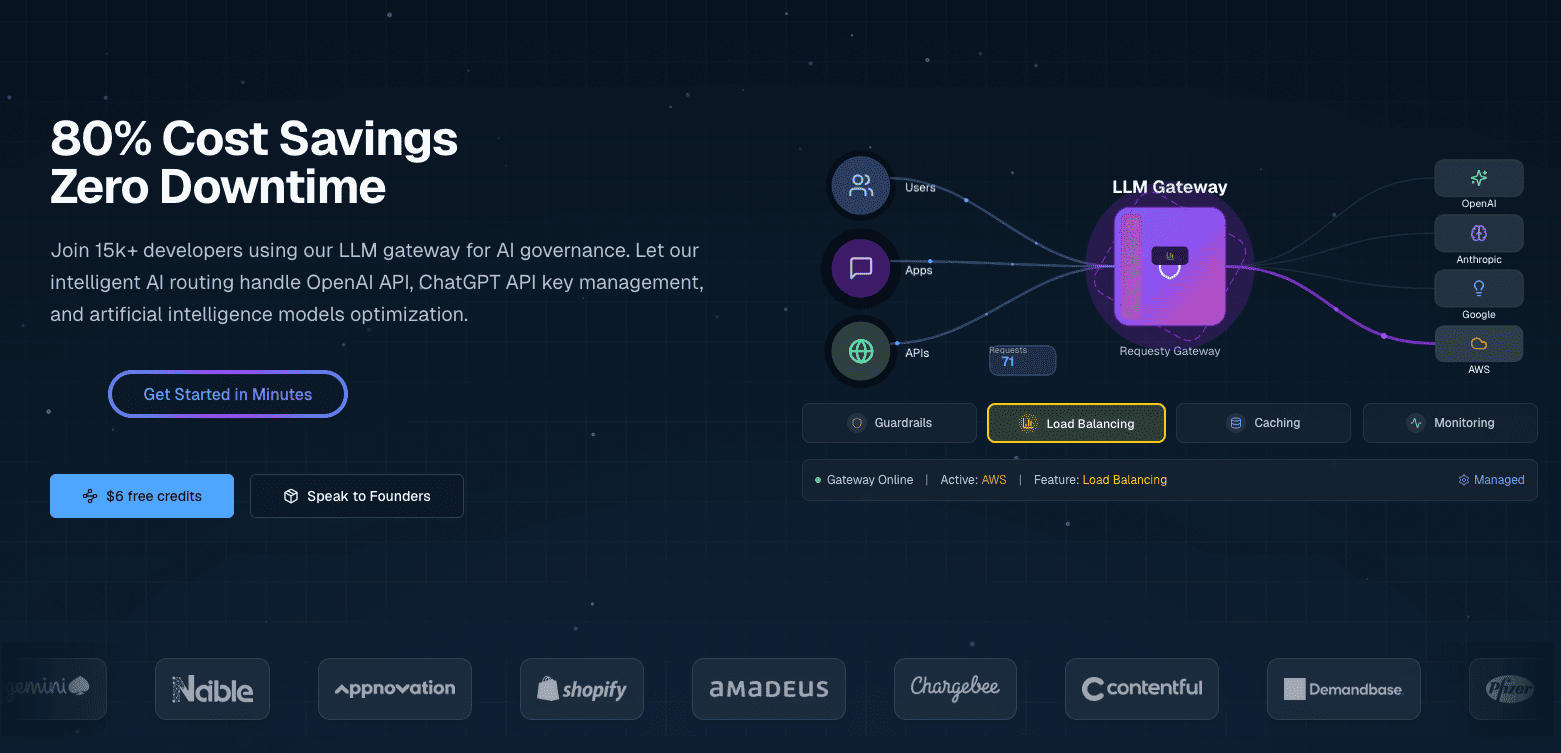
Requesty is a unified LLM gateway that connects you to over 300 models from providers like OpenAI, Anthropic, Google, Meta, and AWS through a single API. It’s a managed service, so you don’t need to host anything yourself.
Requesty configures routing policies through a dashboard instead of code or configuration files. You set up failover chains, load balancing weights, and caching preferences through a web interface, and these policies apply to all API requests automatically.
Dashboard-based configuration enables:
These capabilities combine with flexible routing policies (fallback chains, load balancing, latency optimization), built-in security guardrails for PII and prompt injection, and detailed cost tracking.
OpenRouter provides similar unified access to multiple LLMs but with basic routing and no analytics dashboard. LiteLLM offers comparable features but requires self-hosting and manual YAML configuration for routing policies. Requesty sits between these as a managed service with dashboard-driven configuration.
If you’re running enterprise systems with strict uptime requirements, the 99.99% SLA matters. When your application goes down, you’re losing money. Built-in security features like PII redaction and prompt injection detection handle compliance requirements without building these systems yourself. Teams operating under GDPR can enable EU hosting to keep data in the right jurisdictions.
Development teams building production AI applications avoid vendor lock-in by switching providers through configuration instead of rewriting code. Automatic failovers mean you don’t build custom reliability infrastructure.
Budget-conscious projects benefit from provider caching and strategic load balancing. Instead of writing optimization logic yourself, you configure policies once and let Requesty handle the cost reduction.
Set up your development environment. This takes about 5 minutes and covers the Python packages, API key, and basic configuration.
You’ll need Python 3.7 or newer installed on your system. Verify your version:
import sys
print(f"Python {sys.version_info.major}.{sys.version_info.minor}")
Install the required packages using pip or uv:
pip install openai python-dotenv
# or with uv: uv add openai python-dotenv
You need the openai package to interact with Requesty's API. The python-dotenv package handles environment variables securely.
Create a Requesty account at app.requesty.ai. Once you’re logged in, go to the API Keys section and generate a new key. Copy this key for authentication. Don’t forget to add some dollars to your account as well.
Store your API key in a .env file in your project directory:
REQUESTY_API_KEY=your_api_key_hereThis keeps your credentials out of your code and makes it safer to share your project without exposing secrets.
Verify everything works by loading your environment variables and checking that the API key is accessible:
import os
from dotenv import load_dotenv
from openai import OpenAI

load_dotenv()
api_key = os.getenv("REQUESTY_API_KEY")

# Check your setup
if api_key:
   print("✓ API key loaded")
   client = OpenAI(
       api_key=api_key,
       base_url="https://router.requesty.ai/v1"
   )
   print("✓ Client configured")
else:
   print("✗ API key not found")
If you see both checkmarks, you’re ready to make your first request.
With your environment configured and API key ready, you can make your first API call. Requesty works as a drop-in replacement for the OpenAI SDK. If you’ve used OpenAI before, this will feel familiar. The only difference is pointing your client to Requesty’s router.
Here’s how to set up your client:
import os
from openai import OpenAI
from dotenv import load_dotenv

load_dotenv()

client = OpenAI(
   api_key=os.getenv("REQUESTY_API_KEY"),
   base_url="https://router.requesty.ai/v1"
)
That base_url parameter is what routes your requests through Requesty instead of directly to OpenAI. You can test it with a call to GPT-5:
response = client.chat.completions.create(
   model="openai/gpt-5",
   messages=[
       {"role": "user", "content": "Explain recursion in one sentence"}
   ]
)

print(response.choices[0].message.content)
Output:
Recursion is a technique where a function solves a problem by calling itself on smaller inputs until it reaches a base case.The model parameter uses the format provider/model-name. Here it's openai/gpt-5, which accesses OpenAI's latest model with native reasoning capabilities and improved performance across coding and math tasks. Other than the model format and base URL, the SDK works identically to OpenAI's.
Note: Each API call costs money. Requesty adds a 5% markup on top of the provider’s base pricing, so GPT-5 costs slightly more through Requesty than calling OpenAI directly. You’re paying for the reliability, failover capabilities, and unified dashboard. Monitor your usage through the Requesty dashboard to track spending.
The response object contains useful metadata beyond just the message content:
print(f"Model used: {response.model}")
print(f"Total tokens: {response.usage.total_tokens}")
print(f"Response: {response.choices[0].message.content}")
Output:
Model used: gpt-5-2025-08-07
Total tokens: 108
Response: Recursion is a technique where a function solves a problem by calling itself on smaller inputs until it reaches a base case.
The token count helps you track costs, since pricing is typically per token.
Switch to a different provider by changing the model name:
response = client.chat.completions.create(
   model="anthropic/claude-sonnet-4",
   messages=[
       {"role": "user", "content": "Explain recursion in one sentence"}
   ]
)

print(f"Claude says: {response.choices[0].message.content}")
Output:
Claude says: Recursion is a programming technique where a function calls itself to solve a problem by breaking it down into smaller, similar subproblems until it reaches a base case that stops the repetition.Claude 4 offers extended context windows and improved reasoning that make it particularly strong for complex code analysis. All available models follow the same provider/model-name pattern:
# OpenAI GPT-4o
model = "openai/gpt-4o"

# Anthropic Claude
model = "anthropic/claude-sonnet-4"
Wrap your API calls in error handling before moving to production:
try:
   response = client.chat.completions.create(
       model="openai/gpt-5",
       messages=[{"role": "user", "content": "Hello!"}]
   )
   print(response.choices[0].message.content)
except Exception as e:
   print(f"Error: {e}")
This catches network timeouts, invalid API keys, or unavailable models without crashing your application.
When you make a request for a long response, the screen freezes for several seconds while the model generates thousands of tokens. Then everything dumps at once.
Users stare at a blank screen, wondering if anything is happening.
Streaming solves this by sending response chunks as the model generates them, so users see words appear progressively, just like ChatGPT. This makes applications feel responsive, especially for longer responses like explanations, code generation, or creative writing.
To enable streaming in Requesty, set the stream parameter to True:
response = client.chat.completions.create(
   model="openai/gpt-4o",
   messages=[
       {"role": "user", "content": "Explain recursion like I'm five years old"}
   ],
   stream=True
)

for chunk in response:
   if chunk.choices[0].delta.content is not None:
       print(chunk.choices[0].delta.content, end="", flush=True)
The response streams word by word:
Okay! Imagine you have a big basket of toys, and you're trying to find your favorite teddy bear.
But instead of looking through the whole basket all at once, you call your little sibling and say,
"Can you look in here and find my teddy bear? If you see more baskets inside, ask someone else to help in the same way!" …
The stream=True parameter changes the response from a single object to an iterator that yields chunks. Each chunk contains a piece of text in delta.content. The end="" parameter prevents newlines between chunks, and flush=True forces immediate display instead of buffering.
Production applications often need both the streaming experience and the complete text for logging or analysis. A helper function handles both:
def stream_and_capture(model, messages):
   """Stream response to user while capturing complete text."""
   response = client.chat.completions.create(
       model=model,
       messages=messages,
       stream=True
   )

   complete_text = ""

   for chunk in response:
       if chunk.choices[0].delta.content is not None:
           text = chunk.choices[0].delta.content
           complete_text += text
           print(text, end="", flush=True)

   print()  # Final newline
   return complete_text

# Use it
full_response = stream_and_capture(
   "anthropic/claude-sonnet-4",
   [{"role": "user", "content": "Write a haiku about debugging code at 3 AM"}]
)

print(f"\nCaptured {len(full_response)} characters")
Output:
Blinking cursor waits
Coffee cold, eyes burning red,
One missing bracket.

Captured 74 characters
Streaming isn’t always the right choice. For short responses or structured outputs like JSON data, regular requests are simpler and faster since the overhead of processing chunks outweighs the user experience benefit.
Streams can fail partway through due to network issues, rate limits, or provider outages. Wrap your streaming code in basic error handling:
try:
   response = client.chat.completions.create(
       model="openai/gpt-4o",
       messages=[{"role": "user", "content": "Explain quantum entanglement in one sentence"}],
       stream=True
   )

   for chunk in response:
       if chunk.choices[0].delta.content is not None:
           print(chunk.choices[0].delta.content, end="", flush=True)
except Exception as e:
   print(f"\nError: {e}")
If a stream fails, you catch the error and can retry manually or fall back to a different model.
Production applications can’t afford downtime. When OpenAI hits rate limits during peak hours, your users see errors. When Anthropic has an outage, your chatbot stops working. These failures are inevitable when you depend on external providers.
Requesty handles this through automatic failovers. When your primary model fails, Requesty switches to your backup in under 50 milliseconds.
A failover system detects when your primary model is unavailable and redirects your request to a backup model without requiring any changes to your code. The detection happens automatically when a provider returns an error, hits rate limits, or times out. Requesty then routes your request to the next model in your configured chain.
Requesty guarantees 99.99% uptime through this system. That’s about 4 minutes of downtime per month maximum, compared to potentially hours if you’re using a single provider without backup options.
Three policy types control how failovers work:
Most teams start with Fallback Chain because it’s predictable. You get your preferred model when it’s available and automatic backups when it’s not.
Setting up failovers happens in the Requesty dashboard. Go to the API Keys section, then click on Policies. Create a new Fallback Chain policy. You’ll see a form where you add models in order of preference.
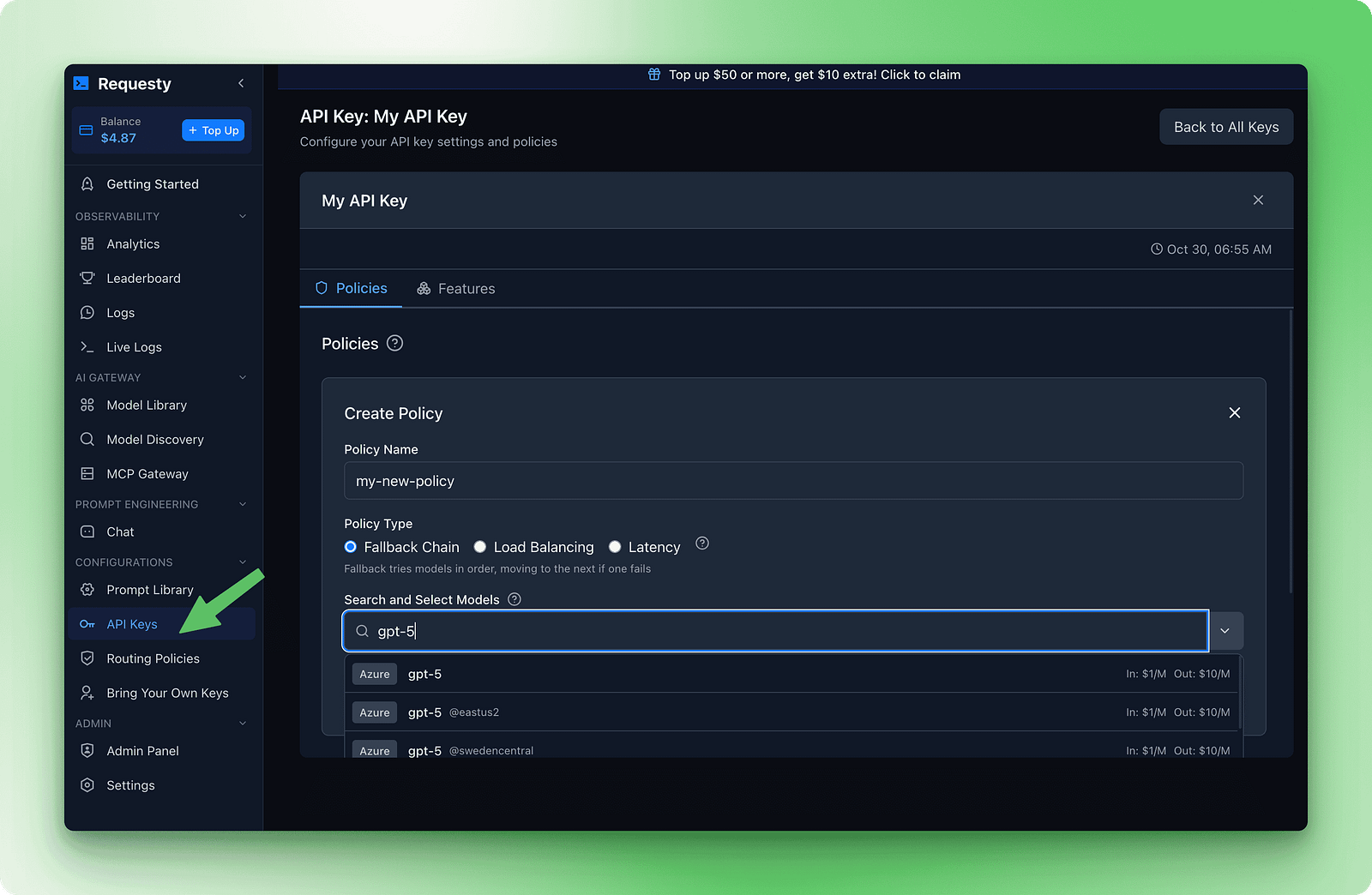
Here’s an example chain that balances quality, cost, and availability:
1. openai/gpt-5
2. anthropic/claude-sonnet-4
3. deepseek/deepseek-r1:free
This chain tries GPT-5 first because it’s fast and capable. If that fails, it tries Claude Sonnet 4 for similar quality. If both premium models are down, it falls back to DeepSeek R1, which is free and almost always available.
Once you save this policy and attach it to your API key, failovers happen without code changes:
response = client.chat.completions.create(
   model="openai/gpt-5",
   messages=[{"role": "user", "content": "Explain how DNS works"}]
)

print(f"Model used: {response.model}")
print(response.choices[0].message.content)
The response.model field shows which model actually handled your request. The dashboard tracks failover frequency so you can see when backup models are being used.
Output:
Model used: gpt-5-2025-08-07
DNS (Domain Name System) translates human-readable website addresses like "google.com" into IP addresses (like 142.250.80.46) that computers use to locate and connect to servers. This translation happens through a hierarchical system of DNS servers that cache and distribute this information globally for fast lookups.
If all models in your chain fail, Requesty returns an error after trying each one. You’ll get a standard API error response indicating that no models were available. This is rare but possible during widespread outages.
A few guidelines work well when building failover chains:
openai/gpt-5 and openai/gpt-4o in your chain, both might go down during an OpenAI outage. Mix providers for better reliability.While LiteLLM requires manual YAML configuration for failovers, Requesty handles everything through dashboard policies.
Running the same query over and over costs money. If you have a documentation chatbot that answers the same questions repeatedly, or a coding assistant with the same system prompt for every request, you’re paying full price each time. Caching fixes this by reusing parts of your prompts that don’t change.
Some providers support prompt caching natively. Anthropic and Gemini let you cache unchanged portions of your prompts and reuse them across requests. This cuts costs when you have repeated patterns because you only pay full price for the new parts.
When you send a request with a long system prompt, the provider stores that prompt in their cache. On the next request with the same system prompt, they retrieve it from cache instead of processing it again. You pay a reduced cache read fee instead of full processing costs.
Pass auto_cache in the extra_body field with a nested requesty object:
response = client.chat.completions.create(
   model="anthropic/claude-sonnet-4",
   messages=[
       {"role": "system", "content": "You are a helpful documentation assistant. You answer questions about Python's asyncio library based on the official docs. Be concise and include code examples."},
       {"role": "user", "content": "How do I create a basic event loop?"}
   ],
   extra_body={
       "requesty": {
           "auto_cache": True
       }
   }
)

print(response.choices[0].message.content)
The system prompt stays the same across requests. With auto_cache: True, Anthropic caches it after the first request. Subsequent requests reuse the cached prompt and only process the user question.
The caching parameter accepts three values:
True: Enable caching for this requestFalse: Explicitly bypass caching even if the provider supports it (useful for sensitive data or time-sensitive content where you want to ensure fresh processing)Only Anthropic and Gemini currently support prompt caching. Using auto_cache with other providers will silently fall back to normal processing without errors.
Caching works best when you have long system prompts that stay the same across requests. Documentation bots and coding assistants are good examples. FAQ bots and customer support systems also benefit when users ask similar questions. Knowledge bases with large reference docs that don’t change are another strong use case.
Skip caching when every request needs fresh data. Weather apps and stock prices fall into this category. Personalized recommendations with prompts unique to each user won’t benefit. Real-time monitoring and live feeds change too frequently to gain from caching.
This example shows a documentation chatbot for a Python library. The system prompt includes the entire API reference. Users ask different questions, but the system prompt stays the same:
# Simulate a long API documentation string
long_api_documentation = """
Python AsyncIO Library Reference:
- asyncio.run(): Execute async functions
- asyncio.create_task(): Schedule coroutines
- asyncio.gather(): Run multiple tasks
... (this continues for 5,000+ tokens)
"""

# First request - cache miss, pays full price
response = client.chat.completions.create(
   model="anthropic/claude-sonnet-4",
   messages=[
       {"role": "system", "content": long_api_documentation},
       {"role": "user", "content": "How do I authenticate?"}
   ],
   extra_body={"requesty": {"auto_cache": True}}
)

print(f"Tokens: {response.usage.total_tokens}")
# Output: Tokens: 5,247 (full processing)
The second request with the same system prompt hits the cache:
# Second request - cache hit, reduced cost
response = client.chat.completions.create(
   model="anthropic/claude-sonnet-4",
   messages=[
       {"role": "system", "content": long_api_documentation},
       {"role": "user", "content": "What are rate limits?"}
   ],
   extra_body={"requesty": {"auto_cache": True}}
)

print(f"Tokens: {response.usage.total_tokens}")
# Output: Tokens: 312 (only new content processed, 5,000 tokens served from cache)
Cache read fees reduce expenses by 50 to 90% for cached portions.
Check your cache hit rate in the Requesty dashboard under the Analytics section. If it’s below 40%, your prompts are changing too frequently to benefit from caching.
Look for patterns where you can standardize system prompts or extract variable content into user messages instead. The dashboard also shows your total savings from caching, broken down by provider and model, so you can see exactly where your optimization efforts are paying off.
Your dashboard is nearly empty right now. You’ve made a few test requests, spent maybe $0.10. There’s not much to analyze yet. This section shows you what to set up now and what becomes useful later when you move to production.
Setting spending limits is good practice even for testing. Go to the API Keys section in your dashboard, click on your key, and find “API Limits.” Set a $5 monthly budget threshold. Requesty will alert you at 50%, 75%, and 90% of that limit. For stricter protection, set a usage cap that stops all requests when you hit the limit. This prevents accidents during testing and protects you in production.
As your usage grows, Requesty tracks five key metrics:
After a few weeks of production traffic, these metrics show patterns that help you optimize. Use the dashboard to find expensive workflows and switch to cheaper models, spot repeated queries and enable caching with auto_cache: true, and monitor failover patterns to adjust your fallback chains. A documentation chatbot reduced costs from $500 to $200 per month by enabling caching after the dashboard showed 70% of queries were identical.
Monitoring, scaling, and operational best practices become critical as you move from prototype to production. LLMOps covers the full lifecycle of managing large language models in production environments, including cost optimization strategies that complement Requesty’s built-in analytics.
You’ve learned how Requesty works as a unified gateway to 300+ AI models through a single API. The setup is simple: install the OpenAI SDK, point it to Requesty’s base URL, and you’re connected. From there, streaming delivers progressive responses, failover chains guarantee uptime even when providers fail, and caching can cut your costs in half when you handle repeated prompts.
The choice between Requesty, LiteLLM, and OpenRouter depends on your priorities. If you need managed infrastructure with automatic failovers and built-in analytics, Requesty handles the complexity for you. Teams comfortable with self-hosting and wanting granular control can use LiteLLM’s open-source approach. OpenRouter provides basic unified access when you’re comfortable with manual model selection and don’t need advanced routing policies.
Start by configuring a fallback chain with three models from different providers, then enable caching on requests with repeated system prompts. For more sophisticated use cases, explore Claude Sonnet 4’s reasoning capabilities or apply LLMOps practices for production deployments.
Top DataCamp Courses
Course
Course
Track
Tutorial
Bexruz (Bex) Tuychiev
12 min
Tutorial
Abid Ali Awan
12 min
Tutorial
Bexruz (Bex) Tuychiev
15 min
Tutorial
Abid Ali Awan
12 min
Tutorial
Bexruz (Bex) Tuychiev
12 min
Tutorial
Aashi Dutt
10 min


