
Course
End-to-End RAG with Weaviate
2 hr
853
Self-RAG introduces iterative reasoning and self-evaluation, allowing the system to dynamically adjust retrieval and generation until a high-quality response is achieved. Instead of treating RAG as a one-shot process, self-RAG incorporates feedback loops to make smarter decisions at every step.
The Self-RAG process involves four key decisions:
By introducing self-reflection at every step, Self-RAG makes retrieval more reliable, preventing hallucinations and ensuring the final answer is grounded and relevant to the user’s question.
In this section, I will explain step by step how to implement self-RAG using LangGraph. You'll learn how to set up your environment, create a basic knowledge vector store, and configure the key components needed for self-RAG, like the retrieval evaluator, question rewriter, and web search tool.
We'll also learn how to build a LangGraph workflow that brings all these parts together, demonstrating how self-RAG can manage various types of queries for more accurate and reliable results.
First, install the required packages. This step sets up the environment to run the Self-RAG pipeline.
%pip install -U langchain_community tiktoken langchain-openai langchainhub chromadb langchain langgraphNext, configure your API keys for OpenAI:
import os
os.environ["OPENAI_API_KEY"] = "YOUR_OPENAI_API_KEY"To perform RAG, we first need a knowledge base filled with documents. In this step, we'll scrape some sample documents from a Substack newsletter to create a vector store, which acts as our proxy knowledge base. This vector store helps us find relevant documents based on user queries.
We start by loading documents from the provided URLs and splitting them into smaller sections using a text splitter. These sections are then embedded using OpenAIEmbeddings and stored in a vector database (Chroma) for efficient document retrieval.
from langchain.text_splitter import RecursiveCharacterTextSplitter
from langchain_community.document_loaders import WebBaseLoader
from langchain_community.vectorstores import Chroma
from langchain_openai import OpenAIEmbeddings
urls = [
    "<https://ryanocm.substack.com/p/123-how-tiny-experiments-can-lead>",
    "<https://ryanocm.substack.com/p/122-life-razor-the-one-sentence-that>",
    "<https://ryanocm.substack.com/p/121-warren-buffetts-255-strategy>",
    "<https://ryanocm.substack.com/p/120-30-years-on-earth-11-habits-that>",
]
docs = [WebBaseLoader(url).load() for url in urls]
docs_list = [item for sublist in docs for item in sublist]
text_splitter = RecursiveCharacterTextSplitter.from_tiktoken_encoder(
    chunk_size=250, chunk_overlap=0
)
doc_splits = text_splitter.split_documents(docs_list)
# Add to vectorDB
vectorstore = Chroma.from_documents(
    documents=doc_splits,
    collection_name="rag-chroma",
    embedding=OpenAIEmbeddings(),
)
retriever = vectorstore.as_retriever()To implement Self-RAG effectively, we need multiple LLMs with different roles, each using specific prompts and data models. Instead of duplicating code, here we are setting up helper functions to create LLMs and structured outputs in a consistent, reusable way.
With the create_structured_llm helper function, we can initialize an LLM with a predefined structured output schema.
def create_structured_llm(model, schema):
    llm = ChatOpenAI(model=model, temperature=0)
    return llm.with_structured_output(schema)
The create_grading_prompt helper function makes it easy to generate prompts for all the LLMs used in self-RAG. By taking a system message and a human template, it creates a structured prompt for evaluating document relevance, hallucinations, and response quality.
def create_grading_prompt(system_message, human_template):
    return ChatPromptTemplate.from_messages([
        ("system", system_message),
        ("human", human_template),
    ])
Lastly, we streamline the process by using a simple binary scoring model for many of our LLM models. Instead of creating a separate data model for each evaluator, we define a single BinaryScoreModel that standardizes outputs across different grading tasks.
class BinaryScoreModel(BaseModel):
binary_score: str = Field(description="Binary score: 'yes' or 'no'")Now that we have our helper functions in place, we can create the key LLM components needed for Self-RAG. These components evaluate retrieved documents, detect hallucinations, grade response usefulness, and refine queries when needed.
The retrieval evaluator determines whether a retrieved document is relevant to the user's question. Using a structured binary scoring model, it assigns a simple "yes" or "no" based on keyword matching and semantic meaning. This step ensures that only useful documents are used for generation.
retrieval_evaluator_llm = create_structured_llm("gpt-4o-mini", BinaryScoreModel)
retrieval_evaluator_prompt = create_grading_prompt(
    "You are a document retrieval evaluator responsible for checking the relevancy of a retrieved document to the user's question. \\n If the document contains keyword(s) or semantic meaning related to the question, grade it as relevant. \\n Output a binary score 'yes' or 'no'.",
    "Retrieved document: \\n\\n {document} \\n\\n User question: {question}"
)
retrieval_grader = retrieval_evaluator_prompt | retrieval_evaluator_llmEven with relevant documents, LLMs can still produce unsupported claims. The hallucination grader checks whether the generated response is grounded in the retrieved facts, filtering out any hallucinations. It also follows a binary grading model.
hallucination_grader = create_grading_prompt(
    "You are a grader assessing whether an LLM generation is grounded in / supported by a set of retrieved facts. \\n Give a binary score 'yes' or 'no'. 'Yes' means that the answer is grounded in / supported by the set of facts.",
    "Set of facts: \\n\\n {documents} \\n\\n LLM generation: {generation}"
) | create_structured_llm("gpt-4o-mini", BinaryScoreModel)A relevant and fact-based response isn’t enough if it doesn’t fully answer the user’s question. The answer grader evaluates whether the generated response directly addresses the user’s intent, again using a binary "yes" or "no" score.
answer_grader = create_grading_prompt(
    "You are a grader assessing whether an answer addresses / resolves a question. \\n Give a binary score 'yes' or 'no'. 'Yes' means that the answer resolves the question.",
    "User question: \\n\\n {question} \\n\\n LLM generation: {generation}"
) | create_structured_llm("gpt-4o-mini", BinaryScoreModel)When relevant documents are missing, reformulating the query can improve retrieval. The question rewriter takes the original user input and optimizes it for better document retrieval, ensuring the system has the best chance of finding useful context.
question_rewriter = create_grading_prompt(
    "You are a question re-writer that converts an input question to a better version optimized for vectorstore retrieval. Look at the input and try to reason about the underlying semantic intent / meaning.",
    "Here is the initial question: \\n\\n {question} \\n Formulate an improved question."
) | ChatOpenAI(model="gpt-4o-mini", temperature=0) | StrOutputParser()Lastly, the RAG chain handles the core retrieval-augmented generation process. It formats retrieved documents, feeds them into an LLM prompt, and extracts the generated response.
rag_prompt = hub.pull("rlm/rag-prompt")
rag_llm = ChatOpenAI(model_name="gpt-4o-mini", temperature=0)
def format_docs(docs):
    return "\\n\\n".join(doc.page_content for doc in docs)
rag_chain = rag_prompt | rag_llm | StrOutputParser()To build the Self-RAG workflow with LangGraph, follow these four main steps:
Create a shared state to store data as it moves between nodes during the workflow. This state will hold all the variables, such as the user's question, retrieved documents, and generated answers.
from typing import List

from typing_extensions import TypedDict

class GraphState(TypedDict):
    """
    Represents the state of our graph.

    Attributes:
        question: question
        generation: LLM generation
        documents: list of documents
    """

    question: str
    generation: str
documents: List[str]In the LangGraph workflow, each function node handles a specific task in the Self-RAG pipeline, such as retrieving documents, evaluating document relevance, hallucination checks, etc. Here's a breakdown of each function:
The retrieve function finds documents from the knowledge base that are relevant to the user's question. It uses a retriever object, which is usually a vector store created from pre-processed documents. This function takes the current state, including the user's question, and uses the retriever to get relevant documents. It then adds these documents to the state.
def retrieve(state):
    print("---RETRIEVE---")
    question = state["question"]
    documents = retriever.invoke(question)
    return {"documents": documents, "question": question}
The generate function creates a response to the user's question using the retrieved documents. It works with the RAG chain, which combines a prompt with a language model. This function takes the retrieved documents and the user’s question, processes them through the RAG chain, and then adds the answer to the state.
def generate(state):
    print("---GENERATE---")
    return {
        "documents": state["documents"],
        "question": state["question"],
        "generation": rag_chain.invoke({"context": state["documents"], "question": state["question"]})
    }
The grade_documents function checks how relevant each retrieved document is to the user's question using the retrieval evaluator. This helps make sure only useful information is used for the final answer. This function rates each document's relevance and filters out those that aren't useful. It also updates the state with a flag web_search to show if a web search is needed when most documents aren't relevant.
def grade_documents(state):
    print("---CHECK DOCUMENT RELEVANCE TO QUESTION---")
    question = state["question"]
    documents = state["documents"]

    filtered_docs = [d for d in documents if retrieval_grader.invoke({"question": question, "document": d.page_content}).binary_score == "yes"]

    for d in documents:
        grade = retrieval_grader.invoke({"question": question, "document": d.page_content}).binary_score
        print(f"---GRADE: DOCUMENT {'RELEVANT' if grade == 'yes' else 'NOT RELEVANT'}---")

    return {"documents": filtered_docs, "question": question}
The transform_query function improves the user’s question to get better search results, especially if the original query doesn’t find relevant documents. It uses a question rewriter to make the question clearer and more specific. A better question increases the chances of finding useful documents from both the knowledge base and web searches.
def transform_query(state):
    print("---TRANSFORM QUERY---")
return {"documents": state["documents"], "question": question_rewriter.invoke({"question": state["question"]})}In self-RAG, edge functions control the flow of execution by making key decisions at each step of the retrieval and generation process. Unlike traditional RAG, which follows a fixed pipeline, self-RAG adapts dynamically based on the quality of retrieved documents and generated responses. These conditional edges are as follows:
decide_to_generate)This edge function assesses whether the retrieved documents are sufficiently relevant to proceed with generation. If no useful documents are found, it triggers query transformation to refine the search before another retrieval attempt. Otherwise, it moves forward to answer generation.
def decide_to_generate(state):
    print("---ASSESS GRADED DOCUMENTS---")
    if not state["documents"]:
        print("---DECISION: ALL DOCUMENTS ARE NOT RELEVANT TO QUESTION, TRANSFORM QUERY---")
        return "transform_query"
    print("---DECISION: GENERATE---")
return "generate"grade_generation_v_documents_and_question)This edge function evaluates the accuracy and usefulness of the generated response. It first checks for hallucinations; if the response isn’t fully supported by retrieved documents, it retries generation. If the response is grounded but doesn’t fully answer the question, it loops back to query refinement to improve retrieval.
def grade_generation_v_documents_and_question(state):
    print("---CHECK HALLUCINATIONS---")

    hallucination_score = hallucination_grader.invoke({"documents": state["documents"], "generation": state["generation"]}).binary_score
    if hallucination_score == "yes":
        print("---DECISION: GENERATION IS GROUNDED IN DOCUMENTS---")
        answer_score = answer_grader.invoke({"question": state["question"], "generation": state["generation"]}).binary_score
        if answer_score == "yes":
            print("---DECISION: GENERATION ADDRESSES QUESTION---")
            return "useful"
        print("---DECISION: GENERATION DOES NOT ADDRESS QUESTION---")
        return "not useful"
    print("---DECISION: GENERATION IS NOT GROUNDED IN DOCUMENTS, RE-TRY---")
return "not supported"Once all the nodes and edges have been defined, we can now link all of them together in the LangGraph workflow to build the Self-RAG pipeline. This means connecting the nodes with edges to manage the flow of information and decisions, making sure the workflow runs correctly based on each step's results.
from langgraph.graph import END, StateGraph, START

workflow = StateGraph(GraphState)

# Define the nodes
workflow.add_node("retrieve", retrieve)  # retrieve
workflow.add_node("grade_documents", grade_documents)  # grade documents
workflow.add_node("generate", generate)  # generatae
workflow.add_node("transform_query", transform_query)  # transform_query

# Build graph
workflow.add_edge(START, "retrieve")
workflow.add_edge("retrieve", "grade_documents")
workflow.add_conditional_edges(
    "grade_documents",
    decide_to_generate,
    {
        "transform_query": "transform_query",
        "generate": "generate",
    },
)
workflow.add_edge("transform_query", "retrieve")
workflow.add_conditional_edges(
    "generate",
    grade_generation_v_documents_and_question,
    {
        "not supported": "generate",
        "useful": END,
        "not useful": "transform_query",
    },
)

# Compile
app = workflow.compile()
from IPython.display import Image, display
try:
display(Image(app.get_graph(xray=True).draw_mermaid_png()))
except Exception:
# This requires some extra dependencies and is optional
pass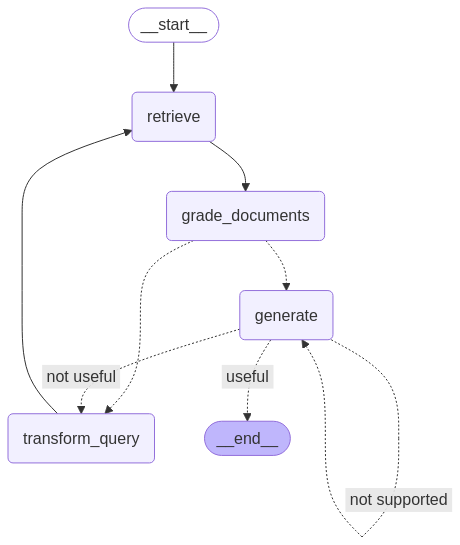
To test our setup, we run the workflow with sample queries to check how it retrieves information, evaluates document relevance, and generates responses.
The first query checks how well Self-RAG finds answers within its knowledge base.
res = app.invoke({"question": "How to improve relationships"})
print(res['generation'])
---RETRIEVE---
---CHECK DOCUMENT RELEVANCE TO QUESTION---
---GRADE: DOCUMENT NOT RELEVANT---
---GRADE: DOCUMENT NOT RELEVANT---
---GRADE: DOCUMENT RELEVANT---
---GRADE: DOCUMENT NOT RELEVANT---
---ASSESS GRADED DOCUMENTS---
---DECISION: GENERATE---
---GENERATE---
---CHECK HALLUCINATIONS---
---DECISION: GENERATION IS GROUNDED IN DOCUMENTS---
---DECISION: GENERATION ADDRESSES QUESTION---
To improve relationships, consider seeking therapy or life coaching,
as these can provide valuable insights and challenge your perspectives.
Engaging in one-on-one or group therapy can help you reflect on how your
past experiences shape your current interactions. Finding a therapist you
connect with can significantly enhance your understanding and growth in
relationships.And the second query tests Self-RAG's ability to reflect by rewriting query when the knowledge base doesn’t have the relevant documents. Note that given the way we have set up the LangGraph flow, there’s a risk of the system getting stuck in an infinite loop. To prevent this, we have set the recursion limit to 10.
A better approach could be to implement a retry limit; after N attempts, if no useful documents are found, the system should exit and inform the user that an answer couldn’t be found. This would be a better user experience instead of looping indefinitely.
res = app.invoke({"question": "How to cook a bagel?"}, {"recursion_limit": 10})---RETRIEVE---
---CHECK DOCUMENT RELEVANCE TO QUESTION---
---GRADE: DOCUMENT NOT RELEVANT---
---GRADE: DOCUMENT NOT RELEVANT---
---GRADE: DOCUMENT NOT RELEVANT---
---GRADE: DOCUMENT NOT RELEVANT---
---ASSESS GRADED DOCUMENTS---
---DECISION: ALL DOCUMENTS ARE NOT RELEVANT TO QUESTION, TRANSFORM QUERY---
---TRANSFORM QUERY---
---RETRIEVE---
---CHECK DOCUMENT RELEVANCE TO QUESTION---
---GRADE: DOCUMENT NOT RELEVANT---
---GRADE: DOCUMENT NOT RELEVANT---
---GRADE: DOCUMENT NOT RELEVANT---
---GRADE: DOCUMENT NOT RELEVANT---
---ASSESS GRADED DOCUMENTS---
---DECISION: ALL DOCUMENTS ARE NOT RELEVANT TO QUESTION, TRANSFORM QUERY---
---TRANSFORM QUERY---
---RETRIEVE---
---CHECK DOCUMENT RELEVANCE TO QUESTION---
---GRADE: DOCUMENT NOT RELEVANT---
---GRADE: DOCUMENT NOT RELEVANT---
---GRADE: DOCUMENT NOT RELEVANT---
---GRADE: DOCUMENT NOT RELEVANT---
---ASSESS GRADED DOCUMENTS---
---DECISION: ALL DOCUMENTS ARE NOT RELEVANT TO QUESTION, TRANSFORM QUERY---
---TRANSFORM QUERY---
---RETRIEVE---
GraphRecursionError: Recursion limit of 10 reached without hitting a stop condition. You can increase the limit by setting the recursion_limit config key.While self-RAG improves on traditional RAG, it does come with its own challenges.
One main challenge is its computational speed and cost. The repeated cycles of retrieving and refining require significant processing power, which can slow things down, especially in real-time applications.
In addition, since Self-RAG relies on a fixed knowledge base rather than web searches, it may struggle when the needed information isn’t available. In such cases, the system wastes time and resources repeatedly searching for something that simply isn’t there.
Another challenge is maintaining factual accuracy. Even though Self-RAG is designed to refine its own responses, it can still retrieve and generate irrelevant information. Fine-tuning the system to strike a balance between being too vague and overly detailed is also tricky, since it requires a lot of high-quality data and computational power.
Overall, self-RAG is a big step forward in RAG, making it more focused on being self-driven and more agentic. By introducing a feedback loop that transforms queries, filters out irrelevant documents, and iterates on its own answers, self-RAG overcomes many limitations of traditional RAG.
To learn more about self-RAG, check out the original paper here.
Learn AI with these courses!
Course
Course
blog
Stanislav Karzhev
12 min
blog
Natassha Selvaraj
10 min
blog
Bhavishya Pandit
6 min
Tutorial
Ryan Ong
14 min
Tutorial
Bhavishya Pandit
8 min
Tutorial
Abid Ali Awan
12 min