

What Is Artificial Intelligence (AI)?
Artificial intelligence (AI) is the field of computer science that builds systems able to do tasks that normally need human intelligence, such as understanding language, recognizing patterns, making decisions, and learning from experience. The AI tools most people now use at work, such as ChatGPT, Claude, and Gemini, run on large language models (LLMs). Our full guide, What Is AI?, covers the definition in more depth.
You'll hear several overlapping terms. Here's how they fit together:
| Term | What it means | Example |
|---|---|---|
| Artificial intelligence | Systems that behave intelligently, reason, and learn | A virtual assistant |
| Machine learning | A subset of AI: algorithms that learn from data without being explicitly programmed | A spam filter |
| Deep learning | A subset of machine learning that uses neural networks, strong with images, audio, and text | Image recognition |
| Generative AI | Deep learning models that create new text, images, code, or audio | ChatGPT, Claude |
| AI agents | Systems that use a model to plan steps and take actions with tools | An assistant that books meetings |
Data science is the cross-disciplinary field that uses all of these, along with statistics and data visualization, to get insights from data. The diagram shows how the fields overlap.
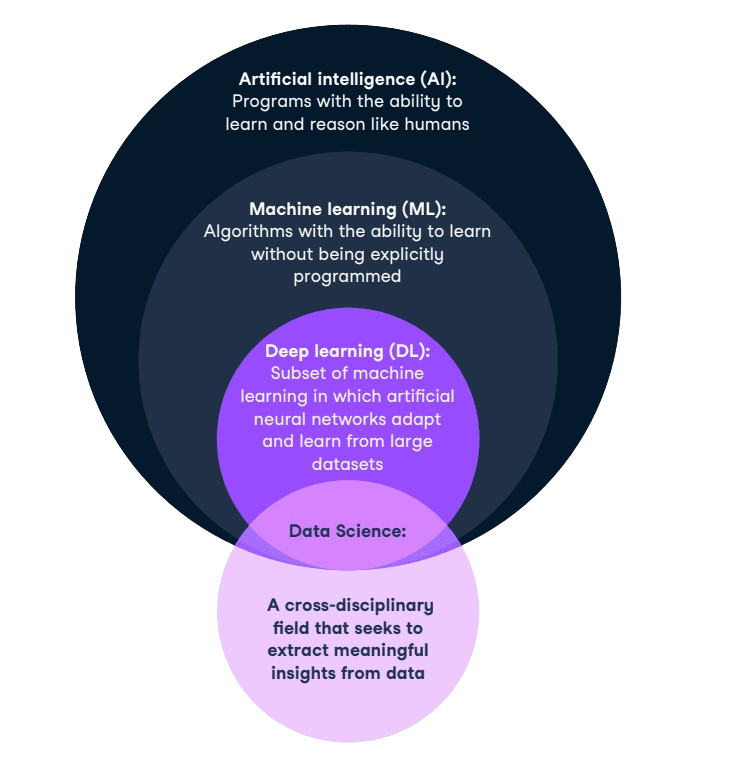
You'll also see AI described by capability. Artificial narrow intelligence (ANI) does specific tasks and covers every AI system in use today.
Artificial general intelligence (AGI), which would match humans across most tasks, and artificial superintelligence (ASI) remain theoretical. For a closer look at where machine learning ends and AI begins, see our guide to AI vs machine learning.
Why Should You Learn AI in 2026?
Employers are reorganizing work around AI, and they need people who can use it well. In the World Economic Forum's Future of Jobs Report 2025, 86% of employers expect AI and information processing to reshape their business by 2030. That makes AI skills relevant far beyond technical roles.
The money and the skills gap point the same way. The WEF reports that investment flows into AI have increased nearly eightfold since ChatGPT's release in November 2022. In our State of Data & AI Literacy 2026 research, 72% of leaders say AI literacy is important for day-to-day work, and 59% report an AI skills gap in their organization.
The technical roles pay well, too. Glassdoor puts the average AI engineer salary in the United States at $169,319 per year, and the U.S. Bureau of Labor Statistics reports a median annual wage of $120,230 for data scientists in May 2025. The BLS also projects data scientist employment to grow 35% from 2025 to 2035, much faster than average.
Beyond the numbers, AI is intellectually demanding in a good way. The field changes every few months, so there's always a new problem to solve or a better approach to learn. If you enjoy that kind of challenge, it's a rewarding field to work in.
How Long Does It Take to Learn AI?
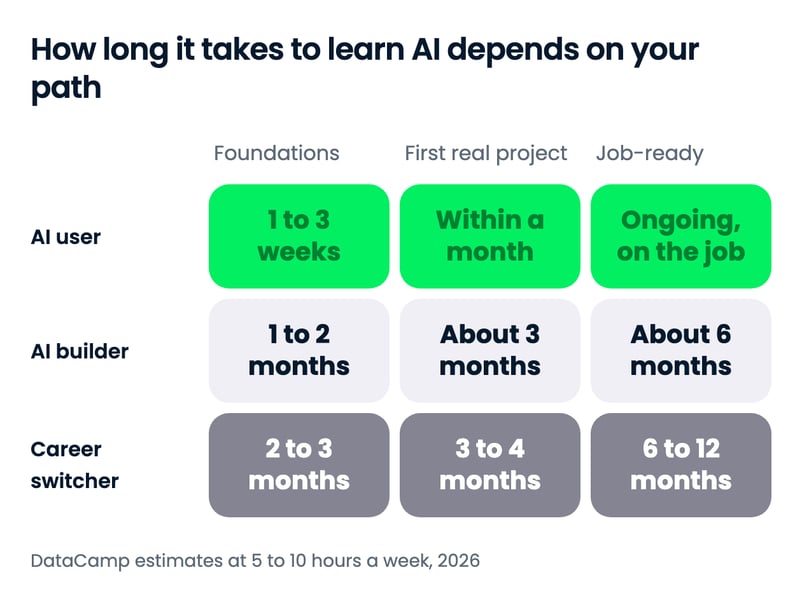
There's no universal timeline, but as a rough guide you can learn to use AI tools well in a few weeks, build your first AI application in about 3 months, and reach job-ready skills in 6 to 12 months. The range depends on your path, how many hours a week you study, and whether you already code.
| Goal | AI user | AI builder | Career switcher |
|---|---|---|---|
| Foundations | 1 to 3 weeks | 1 to 2 months (Python + basics) | 2 to 3 months |
| First real project | Within a month | About 3 months | 3 to 4 months |
| Job-ready | Ongoing, on the job | About 6 months | 6 to 12 months |
Data and ML practitioners usually move at the builder pace or faster, since they already work with code and data.
These are our estimates, based on the listed hours of our tracks for each path at about 5 to 10 hours a week, plus time for projects. Prior coding experience shortens the builder timeline considerably, while starting with no programming background adds time at the beginning. A university degree in computer science or data science takes 3 to 4 years, but it isn't required for most AI jobs.
What speeds you up and what slows you down
- Speeds you up: a clear goal, a fixed weekly schedule, prior coding or data experience, and a project you care about
- Slows you down: switching courses often, learning frameworks before fundamentals, and studying without building anything
The fastest learners aren't the ones who study the most hours. They're the ones who build something small after every new concept.
How to Learn AI From Scratch: A Step-by-Step Guide
Here's what to learn in AI, and in what order: foundations first, then core machine learning ideas, then generative AI, then agents and tools, with projects throughout. AI users can skip step 4 and focus on tools, builders can go light on step 2 at first, and data professionals and career switchers should cover every step.
1. Learn Python coding, data skills, and just enough maths
Python is the language of AI: almost every library, model, and tutorial you'll use is Python-first. Learn variables, functions, loops, and working with data in pandas before anything else. Our Introduction to Python for Developers course is a good first stop, and our guide on how to learn Python maps out the rest.
Do you need maths? To use AI tools or build applications on top of existing models, you need concepts more than calculus: probability, averages, how to judge whether an answer is good. To train your own models or work in research, you'll need linear algebra, calculus, and statistics, and you can learn them alongside the code rather than before it.
| Path | Maths you need |
|---|---|
| AI user | Percentages, averages, and a feel for probability and uncertainty |
| AI builder | Basic statistics and probability; vectors help with embeddings and RAG |
| Data and ML practitioner | Statistics, probability, and the intuition behind linear algebra and gradients |
| Research | Linear algebra, calculus, probability theory, and optimization in depth |
Basic statistics pays off on every path. Understanding distributions, correlation, and statistical significance helps you spot when a model's answer, or a benchmark claim, doesn't hold up.
You're ready to move on when you can load a dataset with pandas, clean it, summarize it, and write a function that does it again on new data.
2. Understand core machine learning ideas
Machine learning is how computers learn patterns from data, and its core ideas sit underneath every AI system, including LLMs. Learn the difference between supervised learning (predicting a label from examples) and unsupervised learning (finding structure without labels), and how models are trained, tested, and evaluated.
Start with classic models in scikit-learn: linear and logistic regression, decision trees, and clustering. Then learn the basics of neural networks and deep learning, which power image recognition, speech, and language models. Our Machine Learning Fundamentals in Python track and our guide on how to learn machine learning go deeper.
Generative AI or machine learning first? If you're on the AI user or builder path, you can go straight to generative AI after step 1 and pick up machine learning ideas as you need them. If you want a data science or ML engineering job, learn machine learning first, because interviews and real projects depend on it.
You're ready to move on when you can train a model, split data into training and test sets, and explain why a model with near-perfect training accuracy might still be useless.
3. Learn generative AI and large language models
Generative AI is the part of AI most people use today, and understanding how it works makes you far better at using it. Learn what large language models are, why they sometimes make things up, and how prompts, context, and examples change their answers. Our Generative AI Concepts course covers this without code.
Then practice prompt engineering on real tasks: summarizing documents, drafting emails, analyzing spreadsheets, and checking the results. For builders, this is also where you learn retrieval-augmented generation (RAG), which lets a model answer questions using your own documents.
Learn the limits as carefully as the capabilities. Models can state false facts confidently, reflect biases in their training data, and miss anything that happened after their training cutoff, so build the habit of checking sources and testing outputs. Our guide to AI hallucinations shows the common failure patterns.
You'll also meet models that work with images, audio, and video as well as text. You don't need to master every type, but knowing they exist helps you pick the right tool for a task.
You're ready to move on when you can get reliably good results from an assistant on a task you do every week, and explain when its answer needs checking.
4. Build with AI: APIs, agents, and AI engineering
This is the core of the AI builder path. Learn to call a model from Python through an API, ask for structured outputs, and add your own data with RAG. Then move to AI agents: systems where a model plans steps and uses tools, such as searching the web, querying a database, or running code.
Start simple. A direct model call that solves a real problem beats a complicated multi-agent system that doesn't, and most production systems add tools and orchestration only when they need them. Learn the Model Context Protocol (MCP), the open standard for connecting models to tools and data, and use human approval for any action that matters.
Every agent follows the same loop, and understanding it makes any framework easier to learn:
- Instructions: what the agent is for and the rules it must follow
- Model: the LLM that decides what to do next
- Tools: the actions it can take, such as search, code, or an API
- Memory and state: what it remembers between steps
- Evaluation and approval: how you check its work and when a human signs off
Evaluation is the skill most beginners skip and most employers ask about. Learn to build a small test set for your application, measure whether answers are correct and grounded in your data, and track cost and speed. Our guide to LLM evaluation covers the main methods.
Our Developing AI Applications track covers the OpenAI API, Hugging Face, and LangChain in about 21 hours. Treat framework names as details that will change; the concepts underneath, such as context, tools, evaluation, and permissions, are what last.
You're ready to move on when you've built an app that answers questions about your own documents and an agent that completes a 2- or 3-step task with a tool.
5. Learn the essential AI tools
The tools you need depend on your path. AI users should learn one general assistant (ChatGPT, Claude, or Gemini) in depth, plus the AI features inside the software they already use, such as Microsoft Copilot or Google Workspace with Gemini.
Which assistant should you learn first? The one your workplace approves, if it has one, because that's where you'll use it every day. If you're choosing freely, pick ChatGPT, Claude, or Gemini and stick with it for a month; the skills transfer, so the choice matters less than the practice.
Builders need a wider kit:
- Python libraries: pandas and NumPy for data, scikit-learn for machine learning, PyTorch for deep learning
- Model access: the OpenAI and Anthropic APIs, and Hugging Face for open models
- Frameworks: LangChain or LangGraph for RAG and agents
- AI coding assistants: tools like Claude Code and GitHub Copilot, which speed up development once you understand the code they write
- Engineering basics: Git, the command line, and a cloud platform
Learn AI coding assistants after you can code, not instead of it. You need to read and judge their output, and that's impossible without the fundamentals from step 1.
6. Build projects from day one
Projects are how you learn and how you prove what you know. After each step, build something small with real data: a data analysis, a model that predicts something useful, a chatbot over your own notes, an agent that automates a chore.
Here's a project ladder for each path. Start at level 1 and climb as your skills grow:
| Level | AI user | AI builder | Data and ML practitioner |
|---|---|---|---|
| 1 | A reusable prompt library for your weekly tasks | A script that summarizes articles through a model API | A model that predicts a simple outcome from a public dataset |
| 2 | An AI-assisted analysis of a real spreadsheet, with checked results | A chatbot that answers questions about your own documents (RAG) | A model comparison with proper evaluation and a written summary |
| 3 | A documented AI workflow your team adopts | An agent that completes a multi-step task with tools and human approval | A deployed model or AI feature with monitoring |
Make each project a little harder than the last, and write up what you did and why. Our list of AI projects for all levels and machine learning projects has ideas with datasets.
Your First Week Learning AI: A Day-by-Day Plan
If you're starting from zero, here's a week that gets you moving, with something concrete to show for each day. Plan on about an hour a day.
- Day 1: Learn what AI, machine learning, and LLMs are. Start our Understanding Artificial Intelligence course and write down 3 tasks in your job AI could help with.
- Day 2: Pick one assistant and use it on your first task. Compare its answer with what you'd have done, and note where it went wrong.
- Day 3: Learn prompt basics: give context, show an example, ask for a format. Redo Day 2's task and compare the results.
- Day 4: Builders: write your first Python script that loads and summarizes a small dataset. AI users: use the assistant to analyze a spreadsheet you work with.
- Day 5: Learn how LLMs can be wrong (hallucinations, outdated knowledge, bias) and how to check answers. Fact-check one answer from earlier in the week.
- Day 6: Build a tiny project: a reusable prompt that saves you time every week, or, for builders, a script that sends a question to a model through an API.
- Day 7: Review what you learned, choose your path from the table above, and schedule the next 4 weeks.
At the end of the week you'll have used AI on real work, understood its limits, and picked a direction, which is a solid foundation for everything that follows.
AI Learning Roadmap at a Glance
Our AI learning roadmap lays out the full route from zero to AI engineering in 4 stages. It's the fundamentals-first route, so it fits the data and ML practitioner and career switcher paths, at a from-scratch pace of about 5 to 10 hours a week.
- Stage 1, foundations (months 1 to 3): AI concepts, statistics and the maths behind AI, and Python.
- Stage 2, core machine learning and data science (months 4 to 6): data manipulation and classic machine learning.
- Stage 3, deep learning and modern LLMs (months 7 to 9): neural networks, Hugging Face, and prompt engineering with LLMs.
- Stage 4, AI engineering and agents (month 10 on): building AI systems with APIs, RAG, MCP, and agents.
Not every path needs every stage. AI users only need the AI concepts from stage 1 plus the tools in step 5, and developers can follow the builder timeline above, reaching generative AI and agents within a few months.
For a month-by-month plan with resources for each phase, see our AI learning roadmap.
Can You Learn AI on Your Own?
Yes. Most AI skills can be self-taught with structured courses, official documentation, and projects, and many people working in AI today entered without a degree in it. The trade-off is discipline: without a structure, it's easy to jump between tutorials and never finish anything.
| Route | Best for | Time | Trade-off |
|---|---|---|---|
| Self-study with free resources | Testing your interest on a tight budget | Flexible | No structure or feedback; easy to stall |
| Online courses and tracks | Most learners, alongside a job | Weeks to months | You still need to build your own projects |
| University degree | Research roles and deep theory | 3 to 4 years | Expensive and slow to update |
| Bootcamp | Fast, intensive career switches | A few months full-time | Costly; quality varies |
Free or paid? Free resources are great for testing your interest and filling specific gaps. Paid courses and tracks earn their cost when you want a clear sequence, hands-on practice, and feedback, which is usually what keeps people going past the first month.
Structured online learning suits most people because it combines a path with practice. On DataCamp, that's 24 AI tracks covering everything from AI literacy to agent development, and some courses now include our AI tutor, which builds unique lessons based on every learner's role, skill level, and goals.
How to structure self-study
If you go it alone, borrow the structure a course would give you. Set a weekly time budget, follow one path from start to finish, and end every week with something you built or wrote.
Keep a learning log of what you studied, what you built, and what confused you. It shows your progress on slow weeks, and it becomes material for your portfolio and interviews later.
If you want to compare options, our guides to the best AI courses and the best free resources to learn AI list the strongest choices. A certification can help you stand out once you have the skills; our guide to the top AI certifications compares them.
Tips for Beginners Learning AI (and Mistakes to Avoid)
Most people who give up on AI make the same few mistakes. Here's what to watch for and what to do instead.
Mistake 1: Tutorial hell
Watching tutorial after tutorial feels productive, but you only learn when you build. After each concept, close the tutorial and make something with your own data, even if it's small and messy.
Mistake 2: Skipping the fundamentals
It's tempting to jump straight to agents and AI coding assistants. Without basic Python and data skills, you can't tell when the code or the answer is wrong, and debugging becomes guesswork.
Mistake 3: The "magic wand" fallacy
AI tools are confident even when they're wrong. Treat every output as a first draft: check facts, test code, and keep a human in the loop for anything that matters.
Mistake 4: Ignoring security, privacy, and ethics
Pasting customer data into a public chatbot or giving an agent unrestricted access to your systems can cause real harm. Learn your organization's AI policy, keep sensitive data out of tools that aren't approved, and understand how bias gets into models. Our introduction to AI ethics is a good start.
Mistake 5: Learning everything at once
AI is too big to learn in one go. Choose one path, one assistant, and one framework, go deep, and add more once you've finished a project.
Mistake 6: Chasing every new model release
New models and tools launch every week, and trying each one keeps you busy without making you better. Follow the major releases at a distance, and switch tools only when a new one clearly solves a problem you have.
Tip: Build the soft skills too
Communication, problem framing, and judgment matter as much as technical skill. The people who get the most out of AI are the ones who can explain a problem clearly, decide what good looks like, and tell others what the AI found.
Tip: Join a community and keep iterating
Learning alongside others keeps you motivated and exposes you to problems you wouldn't meet alone. Share your projects, ask questions in AI communities, and revisit your learning plan every few months as the field moves.
How to Start a Career in AI: Roles to Consider
AI has created several career paths, each with its own mix of skills and tools. These 4 are the most common entry points.
AI engineer
AI engineers build applications on top of AI models: chatbots, RAG systems, agents, and AI features inside products. They work in Python, call model APIs, and handle evaluation, cost, and security. Glassdoor puts the average US salary at $169,319, and our guide on how to become an AI engineer covers the path in detail.
- Key skills: Python, APIs, prompt engineering, RAG, agents, evaluation, software engineering
- Tools: OpenAI and Anthropic APIs, LangChain or LangGraph, vector databases, Git, cloud platforms
Data scientist
Data scientists find insights in data and build models that predict outcomes, such as which customers might leave or what demand will look like next quarter. They explain results to non-technical teams, which makes communication as important as code. The BLS reports a median wage of $120,230 in May 2025 and projects 35% growth from 2025 to 2035.
- Key skills: Python or R, SQL, statistics, machine learning, data visualization, communication
- Tools: pandas, NumPy, scikit-learn, Matplotlib, Tableau, Spark, Git
Machine learning engineer
Machine learning engineers design, train, and deploy models in production, and keep them running reliably. The role leans more toward software engineering and mathematics than data science does.
- Key skills: Python, machine learning frameworks, data structures, software architecture, linear algebra and statistics
- Tools: scikit-learn, PyTorch, TensorFlow, cloud platforms, MLOps tooling, Git
Research scientist
Research scientists invent new algorithms and models and publish their findings. Most roles expect a postgraduate degree and deep mathematical knowledge.
- Key skills: deep learning, mathematical theory, experimentation, scientific writing
- Tools: PyTorch, JAX, scientific computing tools, LaTeX, cloud compute
AI product and governance roles
Not every AI career is technical. AI product managers decide what to build and how to measure whether it works, and AI governance specialists make sure systems are safe, fair, and compliant with rules such as the EU AI Act. These roles reward people who combine AI literacy with domain experience, and our guide to AI governance explains the field.
How to Get Into AI and Land Your First Job
A degree helps, but it isn't the only way in. More professionals now enter AI through self-taught and online routes, and what gets them hired is evidence they can do the work.
Keep learning about the field
AI changes fast, so follow practitioners, read release notes and research summaries, and listen to podcasts such as our DataFramed podcast. Webinars, meetups, and conferences are also a good way to meet people already working in the field.
Develop a portfolio
A portfolio of real projects makes you stand out more than any certificate. Choose problems that matter to a business or community, and show the result, not just the code. As Nick Singh, author of Ace the Data Science Interview, said on the DataFramed Careers Series podcast:
The key to standing out is to show your project made an impact and show that other people cared. Why are we in data? We're trying to find insights that actually impact a business, or we're trying to find insights that will actually shape society or create something novel. We're trying to improve profitability or improve people's lives using and analyzing data, so if you don’t somehow quantify the impact, then you are lacking impact.
Include a variety of projects that show your proficiency with the key tools on your path, and explain the impact of each one. Our guide on how to build a great portfolio has examples.
Write a resume that gets past the filters
Your resume must pass through applicant tracking systems (ATS), the software many companies use to filter applications before anyone reads them. Tailor it to each role, use the job description's own terms for your skills, and lead with results. According to Jen Bricker, former Head of Career Services at DataCamp:
60% to 70% of applications get shifted out of consideration before humans actually look at the application.
That makes structure and keywords as important as experience. Our guide to building a stand-out resume walks through it.
Prepare for technical interviews
AI interviews usually combine coding, concepts, and a project discussion. Practice explaining your projects end to end: the problem, your approach, how you evaluated it, and what you'd improve.
For AI engineering roles, expect questions on RAG, agents, evaluation, and cost. For data science and ML roles, expect statistics, model selection, and how you'd handle messy data.
Get noticed by hiring managers
Sharing your work publicly is one of the fastest ways to get noticed. Post your projects and what you learned on LinkedIn, contribute to open-source projects, and take part in AI communities.
Sadie St. Lawrence, CEO of Women in Data, explained why on the DataFramed Careers Series:
If you want to be seen, then you have to share your work. The analogy I like to use is a music box. If you've ever seen a music box, when it's closed and just sitting on the table, you never actually get to hear what the beautiful sound is inside of it. It’s similar for data scientists that lack communication skills. They may have these amazing skills, but they're all locked in this box, and no one ever knows about them. You have to open the box, and you do that by being able to tell those stories and communicate those skills. So, it's really up to you. Do you want people to hear your story and experience your amazing skills and ability? Then you're going to need the communication skills so that you can open your box.
How to Learn AI for Your Job (No Coding Needed)
You don't need to become an engineer to benefit from AI. For most professionals, the biggest gains come from using AI tools well in the work they already do: writing, analysis, research, planning, and customer communication.
AI is also arriving inside the software you already use, from email to spreadsheets to CRMs. Noelle Silver Russell, Global AI Solutions & Generative AI & LLM Industry Lead at Accenture, described the shift on the DataFramed podcast:
Large Language Models like ChatGPT are revolutionizing the way we interact with software. Whether it's customer service, project management, or data analysis, these AI tools are enhancing efficiency, accuracy, and productivity across all sectors.
The skills that matter most for non-technical professionals are the same ones from the AI user path: knowing what AI tools can do, giving clear instructions, checking the results, and protecting sensitive data. Here's how to build them in the context of your job.
Learn how generative AI tools work
Start by understanding what today's AI tools can and can't do in your field, whether that's marketing, sales, operations, or analysis. Our AI Fundamentals track covers the concepts, and ChatGPT Fundamentals focuses on getting good results from an assistant.
Apply AI tools to your own work
Pick 2 or 3 recurring tasks and try AI on each: summarizing long documents, drafting first versions, analyzing data, or preparing for meetings. Keep what saves time and drop what doesn't. If agents interest you, our AI Agent Fundamentals track explains what they can do for your team in about 6 hours, no coding required.
Measure what AI saves you
Track the time each AI-assisted task takes before and after, and note the quality of the result. A few weeks of notes tells you where AI genuinely helps and gives you evidence to share with your team.
Keep human oversight
AI can be wrong, biased, or out of date, so review every output before it reaches a customer, a manager, or a decision. Set clear rules for what data can go into which tools, and make a person accountable for anything AI helps produce.
Upskill your team with DataCamp for Business
Organizations get the most from AI when everyone understands it, not just a few specialists. DataCamp for Business gives teams structured AI learning paths, from AI literacy to technical AI engineering, with progress tracking and reporting so you can see the impact. You can request a demo to start your team's upskilling.
Final Thoughts
To learn AI from scratch, choose your path, learn the foundations for it, and build something after every step. AI users can be productive in weeks; builders and career switchers should plan on months, with projects throughout.
The field moves fast, but the fundamentals hold: Python, data, how models work, and the judgment to check what they produce. Learn those well and new tools become easy to pick up.
If you're ready to start, our AI Fundamentals track is the quickest way in, and builders can go straight to the Associate AI Engineer for Developers track.

Adel is a Data Science educator, speaker, and VP of Media at DataCamp. Adel has released various courses and live training on data analysis, machine learning, and data engineering. He is passionate about spreading data skills and data literacy throughout organizations and the intersection of technology and society. He has an MSc in Data Science and Business Analytics. In his free time, you can find him hanging out with his cat Louis.

A senior editor in the AI and edtech space. Committed to exploring data and AI trends.
FAQs
How long does it take to learn AI?
It depends on your goal. You can learn to use AI tools well in a few weeks, build your first AI application in about 3 months, and reach job-ready skills in 6 to 12 months, assuming 5 to 10 hours of study a week. Prior coding experience shortens the timeline for building AI applications.
Is AI hard to learn?
Using AI tools is easy to start and takes practice to do well. Building AI applications is harder because it needs programming, but it's very learnable with a structured path and regular projects. Research-level AI is the hardest, as it requires advanced mathematics.
Can I get a job in AI without a degree?
Yes. Many people now enter AI through self-taught and online routes. What gets you hired is evidence you can do the work: a portfolio of real projects, a resume tailored to the role, and the ability to explain how you built and evaluated your projects.
Can I move into AI from a non-technical background?
Yes. Start on the AI user path to learn how AI tools work and apply them to your current job, then decide whether to move into a technical role or an AI product or governance role. Your domain experience is an advantage: people who combine AI skills with knowledge of a field are easier to hire.
Where should I start learning AI?
Start by choosing a path. If you want to use AI tools at work, begin with AI fundamentals and practice one assistant on real tasks. If you want to build AI applications, start with Python, then learn to call a model through an API. Career switchers should pick a target role first, then learn Python and data skills.
Can I learn AI on my own?
Yes. Most AI skills can be self-taught with structured courses, official documentation, and projects. The hardest part is staying consistent, so follow one path from start to finish, set a weekly time budget, and build something small after every new concept.
Do I need to know maths to learn AI?
Not to start. Using AI tools and building applications on existing models needs basic statistics and a feel for probability. Training your own models or working in research needs linear algebra, calculus, and probability, which you can learn alongside the code.
Can I learn AI without coding?
Yes, if your goal is to use AI tools well. You can learn how AI works, write effective prompts, check outputs, and apply AI to your job without writing code. To build AI applications or agents, you'll need Python.




To learn AI from scratch, pick a path that matches your goal, learn the foundations for that path, and build small projects as you go. If you want to use AI tools at work, you can be productive within a few weeks. If you want to build AI applications, start with Python and plan on several months: at 5 to 10 hours a week, our tracks for this path add up to roughly 3 to 6 months with projects.
Choosing a path matters more than it used to. Searches on DataCamp tell the story: AI went from about 1 in 8 of all searches in spring 2025 to nearly 1 in 5 by autumn 2026, and Claude is now our third most-searched term, behind only SQL and Python.
People no longer want to learn "AI" in general. They want to use specific tools well, or build applications and agents with them, and those are different journeys.
This guide is for complete beginners and career switchers as much as for developers and data professionals. I'll help you choose a path, then walk through each step, a first week you can start today, the mistakes to avoid, and how to turn your skills into a job, with advice from industry experts along the way.
TL;DR
How to Start Learning AI: Pick Your Path
The best place to start depends on what you want AI to do for you. Most beginners fall into one of 4 paths, and each has a different first step.
The times are our estimates, based on the listed hours of our tracks at 5 to 10 hours of study a week, plus time for projects. The table is a starting point, not a contract. Many people begin as AI users, discover they enjoy it, and move on to the builder path a few months later.
Path 1: AI user (no coding)
This path is about using AI tools well: writing clear instructions, checking outputs, protecting data, and knowing when not to trust an answer. It's the fastest path, and it's where most professionals should start. Our AI Fundamentals track covers the core concepts in about 10 hours, and nearly 200,000 learners have enrolled in it.
What you'll learn on this path:
Claude now ranks among the most-searched terms on DataCamp, and whichever assistant you choose, learning one in depth beats dabbling in five. Claude 101 takes about 2 hours, and our Introduction to AI for Work course shows how to use AI responsibly in everyday tasks.
Path 2: AI builder (developers)
This path is for people who want to build AI applications: chatbots that answer questions about your documents, tools that call AI models from code, and agents that take actions. You'll need Python, APIs, and an understanding of how to give models the right context. Searches for AI engineering on DataCamp have grown several-fold since 2025, while searches for TensorFlow and NLP have faded.
What you'll learn on this path:
Builders don't need to master classic machine learning before building with AI, so their timeline runs faster than the full roadmap later in this guide. Here's a typical builder timeline from scratch; if you already code, the first stage takes weeks rather than months.
The Associate AI Engineer for Developers track takes about 29 hours. If you already code, AI Engineering with LangChain goes from prompt engineering to agentic systems in about 21 hours, with an AI tutor by your side.
Path 3: Data and ML practitioner
If you already work with data, you have a head start. This path adds machine learning, model evaluation, and then the AI engineering skills to put models into production.
You'll also learn when a classic machine learning model is a better fit than an LLM, such as predicting a number from structured data like sales figures. Start with Machine Learning Fundamentals in Python, then move to Associate AI Engineer for Data Scientists (about 40 hours).
Path 4: Career switcher
Choose a target role first, such as data scientist, machine learning engineer, AI engineer, or an AI product or governance role, rather than "AI" as a whole. Each role needs a different mix of skills, and a clear target keeps you from learning everything at once. Start with Python Programming Fundamentals, then follow the builder or practitioner path, and build a portfolio from the first month.
Your existing experience is an asset, not something to leave behind. A marketer who can build AI tools for marketing, or a finance analyst who can automate reporting with AI, is easier to hire than a generalist with the same technical skills.
Whichever path you choose, the rest of this guide follows the same order: the basics you need, why it's worth it, how long it takes, and then the steps.