Course
AI-Assisted Coding for Developers
1 hr 30 min
10.7K
OpenClaw is arguably the most popular agentic tool so far in 2026. However, as we highlight in our OpenClaw guide, it has some serious security vulnerabilities that enterprises and individuals can’t afford to ignore.
Many of the issues stem from the fact that giving any autonomous agent broad access to your system without restrictions can lead to serious problems, as we saw when OpenClaw went rogue and deleted the entire inbox for a Meta AI executive.
OpenClaw’s security challenges have even been raised by top security firms such as CrowdStrike. Given the massive popularity of the tool, NVIDIA saw this as an opportunity to create a solution and continue asserting its dominance in the AI space. They called the tool NemoClaw.
In this article, I will take you through what the tool is, what it does, and NVIDIA's vision for a secure agentic tool.
NemoClaw is a secure runtime layer that sits on top of OpenClaw to control the agent's actions. The agent can still write code, browse the web, and manage files, but its actions now go through policy checks enforced by NVIDIA's OpenShell runtime.
OpenShell provides sandboxed execution environments for protecting your data and infrastructure using policies that are defined in YAML files. The policies prevent unauthorized network activity, access to certain files, and data exfiltration.
Let’s start with enterprise-grade security. With OpenShell, the agent’s actions have to pass through existing policies. If a specific command is not allowed, it is flagged for manual review.
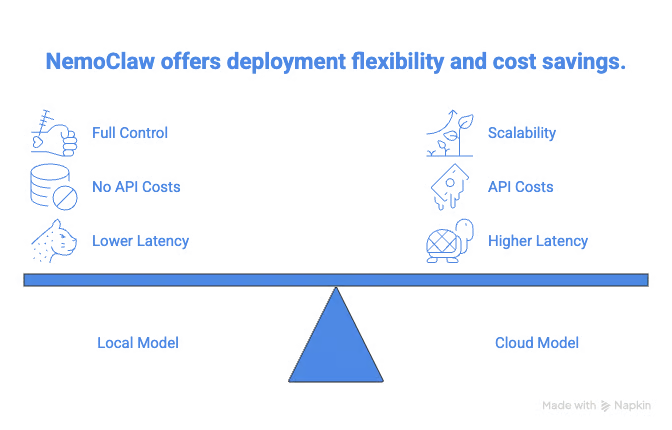
Next is hybrid deployment during setup. NemoClaw allows you to choose between using a local model and API-based cloud providers such as OpenAI and Anthropic.
NemoClaw also natively integrates with NVIDIA's Nemotron model family. They provide Nemotran 3 Super 12b-a12 as an option during setup, and you can use it for free with an NVIDIA API key.
You can discover how Nemotron 3's architecture enables efficient AI agent coordination and reduces inference costs from our Nemotron 3: Architecture, Benchmarks, and Open-Model Comparisons tutorial.
SecurityScorecard's research from February 2026 found tens of thousands of exposed OpenClaw instances. This research validates the fact that a secure way of setting up OpenClaw is needed.
The security layer of NemoClaw via OpenShell ensures that your agent will not perform any tasks that are not already allowed.
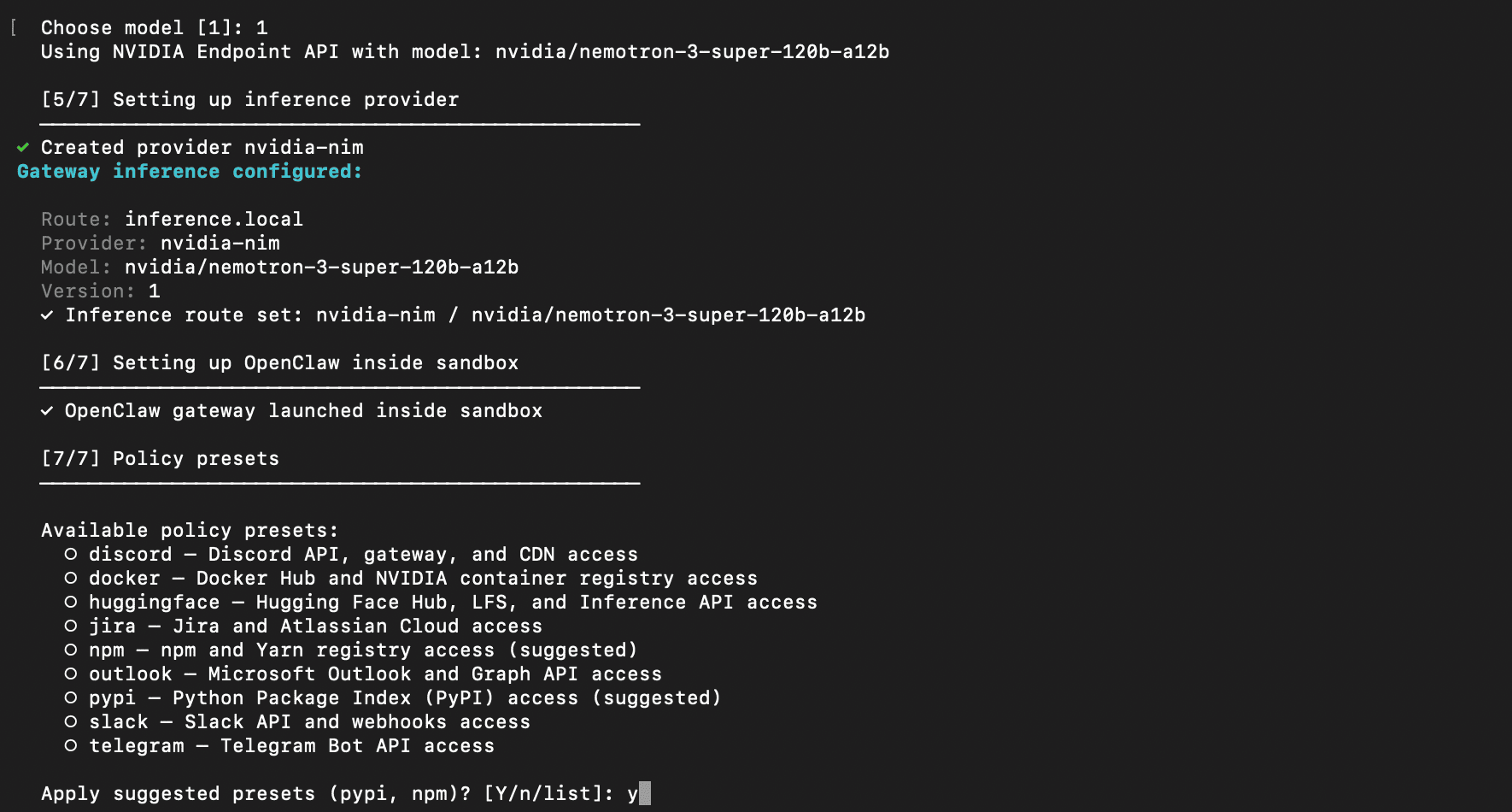
As you can see from the image below, NemoClaw allows you to choose some policies via the provided presets when setting up.
Next, the idea that you can set up a secure OpenClaw via a single command makes it easy for people to configure their agents.
I recommend checking out how to set up OpenClaw and talk to the agent on WhatsApp from our OpenClaw Tutorial.
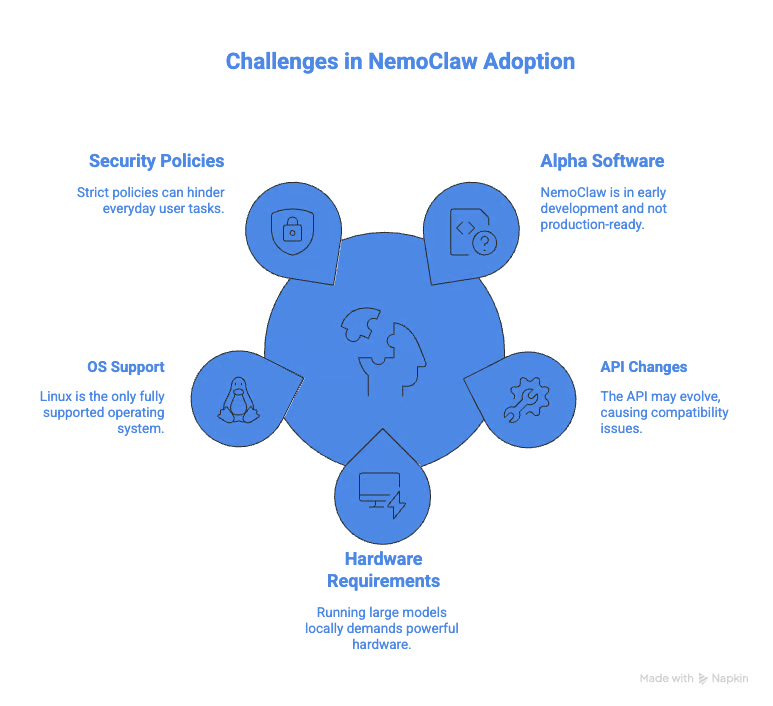
NemoClaw is alpha software at the moment, so it is not production-ready. The sandbox environment is also fully supported only in Linux, with partial support for macOS and Windows, requiring WSL2.
NemoClaw also requires at least 8GB of RAM and at least 4 vCPUs to run without memory issues. Although natively supported, running the 120B Nemotron model locally requires powerful GPUs that are not accessible to everyday users.
Running NemoClaw for daily use is also incredibly difficult. When running it, I bumped into numerous permission issues that a normal OpenClaw user wouldn’t know how to fix. This is more of a business tool where there are people to configure and monitor these permission policies.

Let’s look at how to install NemoClaw.
The installation of NemoClaw can be done by running a single command on the terminal:
curl -fsSL https://www.nvidia.com/nemoclaw.sh | bashThis will download and run the installation script, which sets up all the required dependencies.
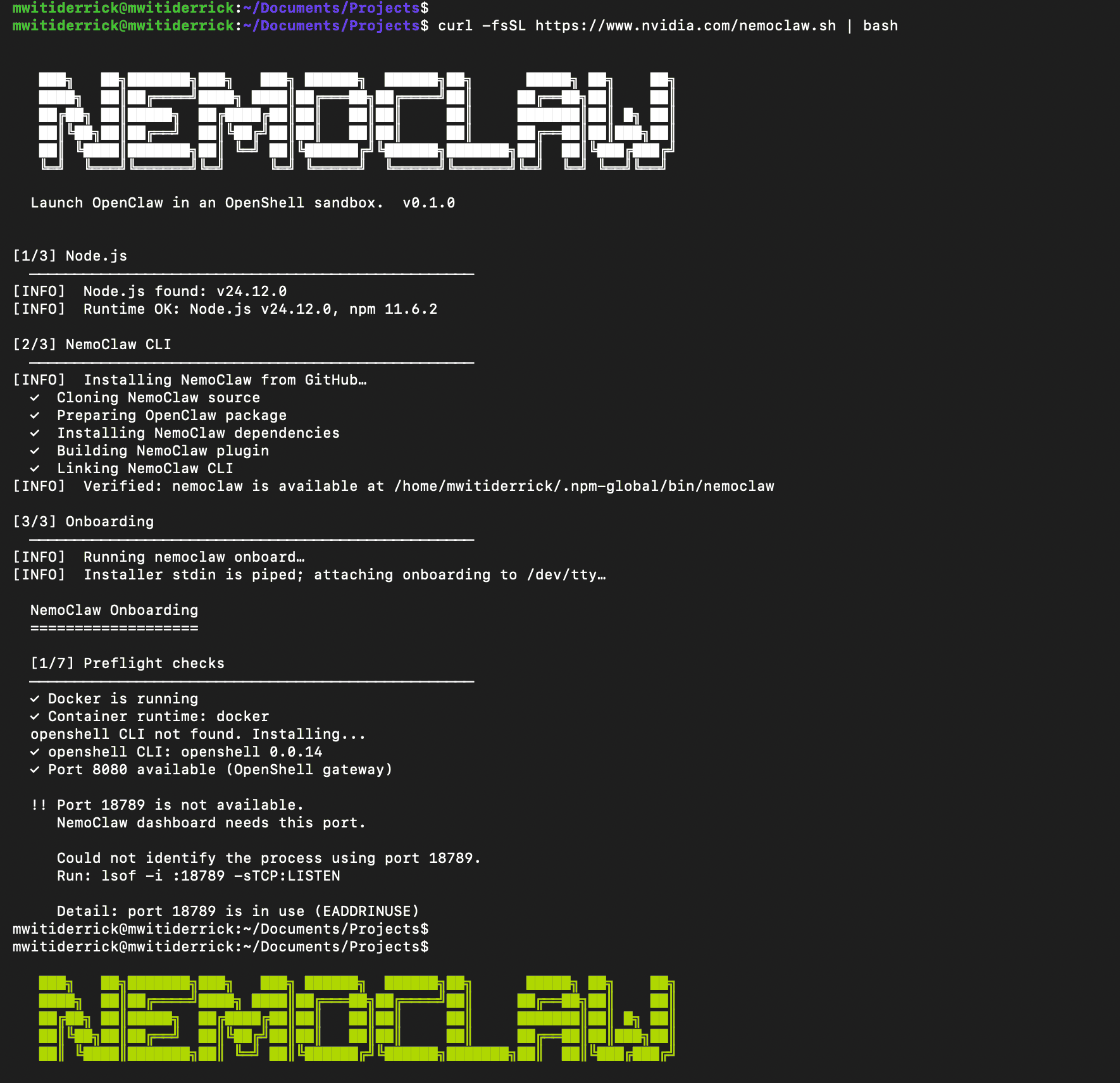
Once installation is complete, type nemoclaw onboard to launch an onboarding wizard that walks you through the process of configuring your sandbox and setting security polices. It will allow you to:
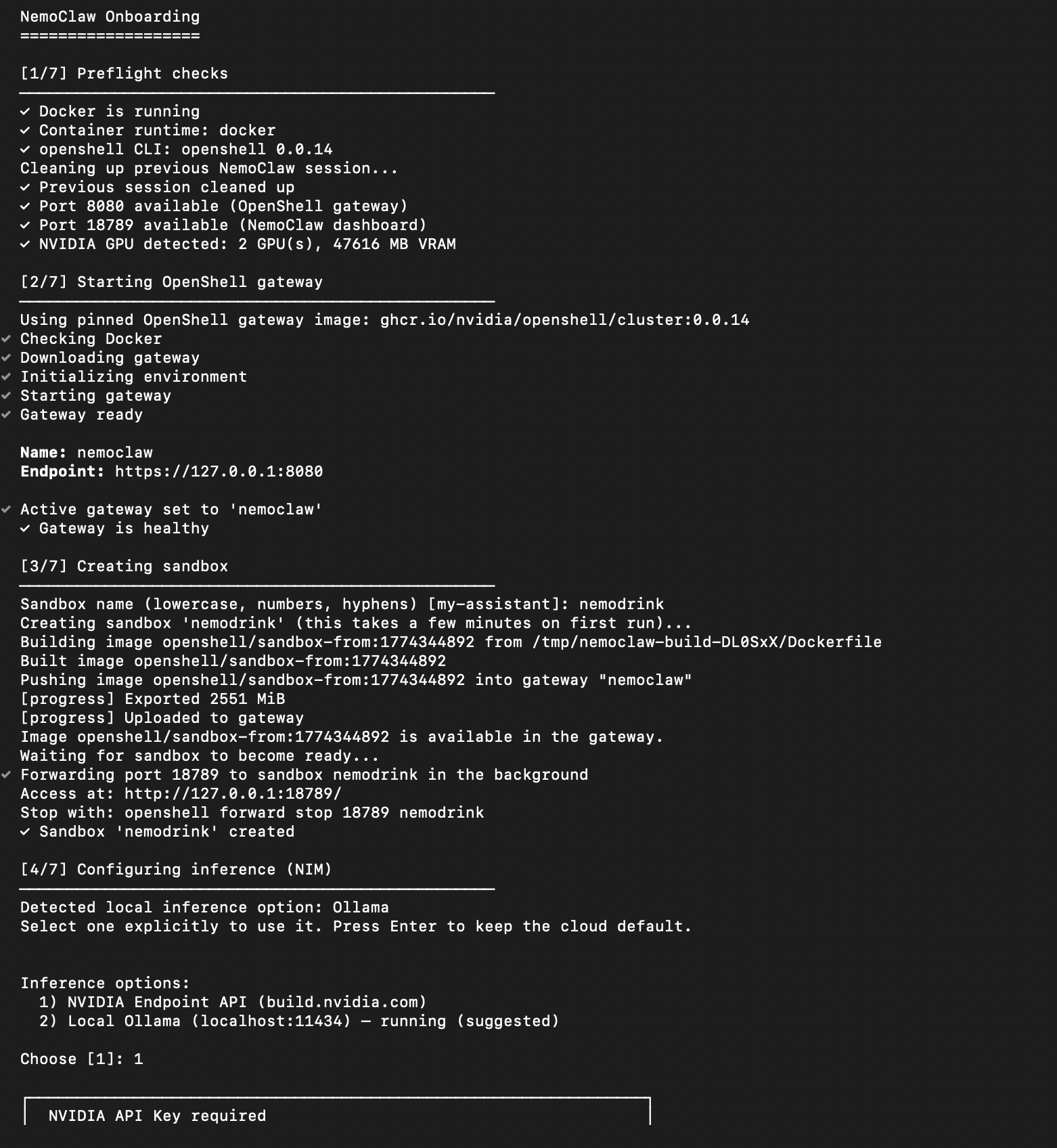
Discover how to set up and use local models with OpenClaw in our Using OpenClaw with Ollama tutorial.
Once onboarding is complete, you can interact with your agent using the sandbox you configured above. First, you need to connect to it:
nemoclaw sand_box_name connectYou can now talk to the OpenClaw agent inside the sandbox:
 openclaw agent --agent main --local -m "Who is the founder of NVIDIA?"
🦞 OpenClaw 2026.3.11 (29dc654) — Hot reload for config, cold sweat for deploys.
NVIDIA was founded in 1993 by three engineers:
- **Jensen Huang** (CEO)
- **Chris Malachowsky**
- **Curtis Priem**
Jensen Huang is the most publicly recognized co‑founder and has served as the company’s CEO since its inception.
You can also run openclaw onboard inside the sandbox to configure your favorite messaging platform, such as Telegram.
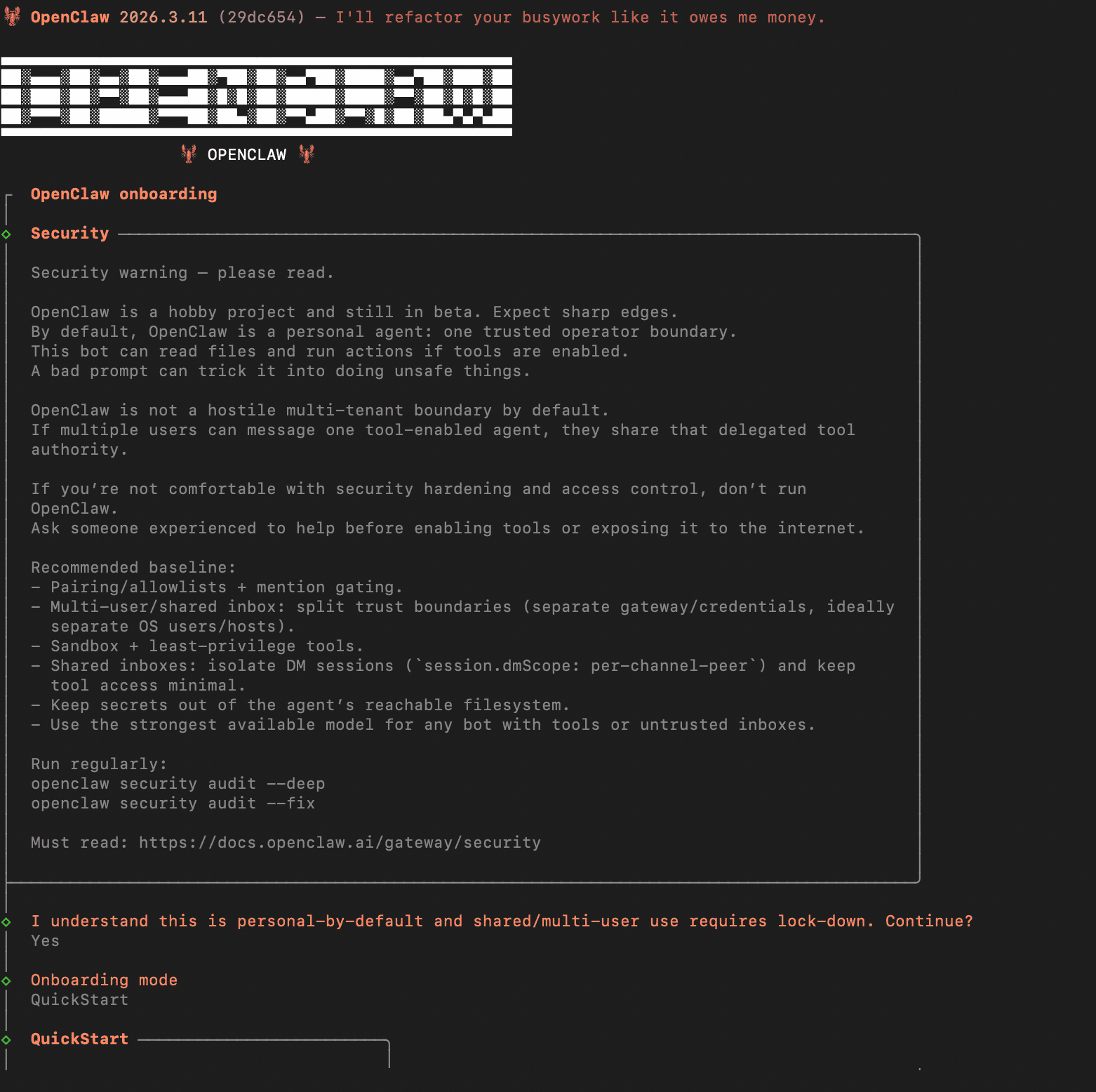 NemoClaw's Standout Capabilities
There are a few key differences between NemoClaw and OpenClaw. Let’s discuss those in this section.
NemoClaw uses the OpenShell runtime to block unauthorized network connections and restrict file input and output operations to specific folders. It also blocks all outbound connections apart from those you have allowed. This prevents the agent from potentially getting a prompt injection from a malicious website.
NemoClaw also restricts reads and writes to the sandbox environment and prevents privilege escalation.
This feature ensures that the agent can’t try to grant new permissions apart from those already given. You can achieve similar results while using OpenClaw in a Docker environment, but NemoClaw’s approach is stricter, while giving you the option to approve individual requests.
With NemoClaw, you have to manually approve any request that is not already allowed by the policy. When, for example, OpenClaw tries to ping an endpoint that is not allowed, OpenShell will block the request and provide a prompt on the terminal for you to approve.
When you are setting up NemoClaw, you get the option to use it with Nemotron 3 Super 120B locally or with an NVIDIA API. This means you can use the model for free if you have the hardware to run it locally.
The NVIDIA API also provided limited free usage. Local models are a strong selling point for industries with strict privacy concerns, such as healthcare. Like OpenClaw, NemoClaw is model agnostic, meaning you can use it with any of the supported local or API-based providers.
By default, NemoClaw has strict policies that prevent the agent from executing dangerous code or leaking sensitive data.
The policies are defined in YAML files, which you can edit to adjust or add new policies. When an action is rejected, you can allow it, and it will only persist within that session. To make it permanent, you will have to edit the policies.
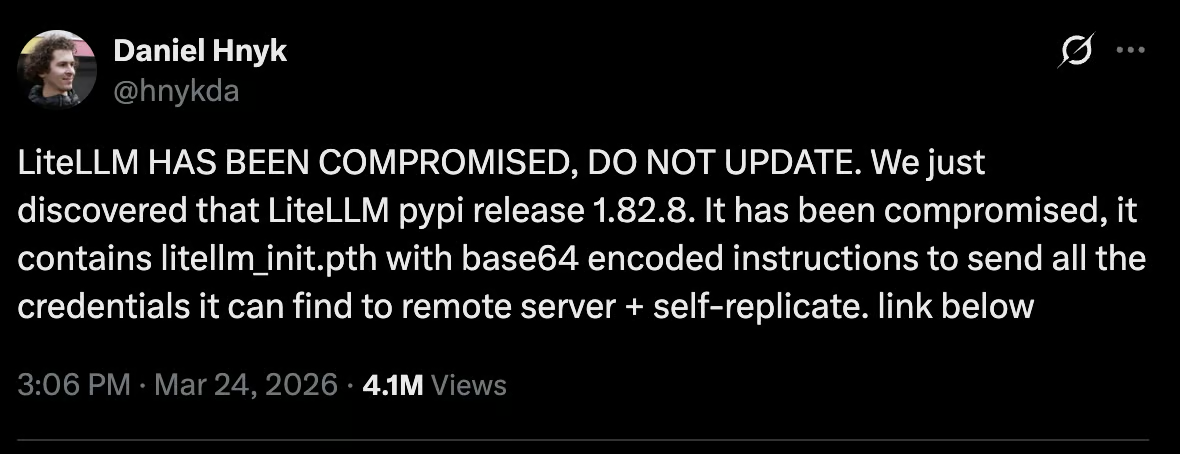
For example, as you can see in the image below, the LiteLLM Python package was compromised, leaving thousands of users vulnerable.
With NemoClaw running in a sandbox and policies that control access to certain folders in a computer, it would be impossible for this compromised package to grab all your credentials and dump them online.
NemoClaw can be used to automate research using sensitive enterprise data. The agent can summarize internal documents and create reports without the data ever leaving the sandbox.
Network policies ensure that the agent can access only approved services, and file system restrictions prevent it from accessing files outside the sandbox.
However, NemoClaw has the following limitations:
During this year's GTC keynote, Jensen Huang compared OpenClaw to Linux, stating that OpenClaw achieved in a few weeks what Linux did in 30 years. According to him, every company should have an OpenClaw strategy.
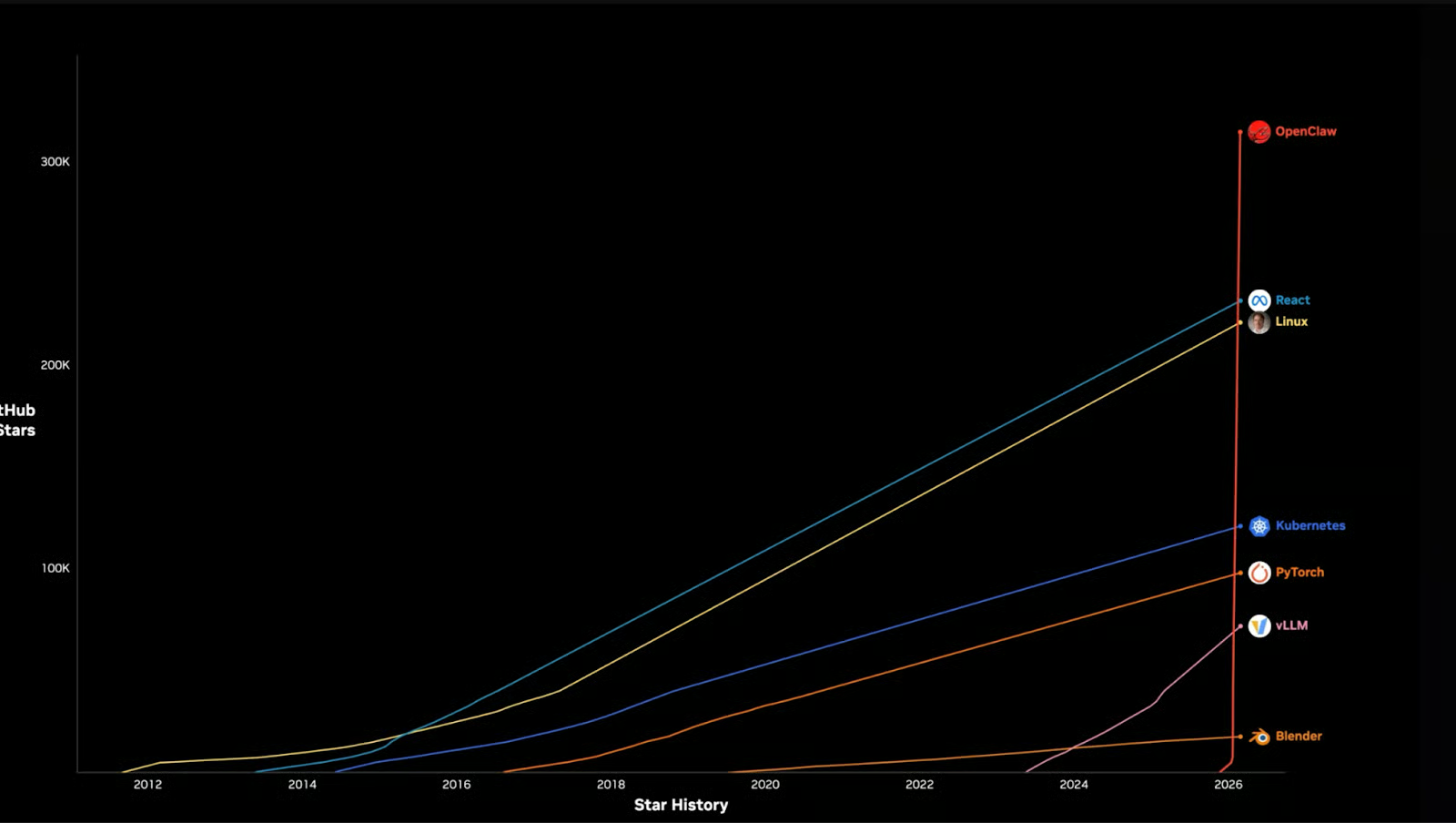
Given that every company needs an agentic computing strategy, the potential for OpenClaw is huge.
But that comes with serious challenges around security.
When I was setting up my own OpenClaw, I had to set it up in a Docker with limited permissions and an inability to escalate privileges.
The security issues for OpenClaw are not just limited to businesses; even normal users have to look at OpenClaw’s security seriously.
Therefore, NemoClaw will likely evolve into a product that even normal users can use to secure their installations, not just businesses. This will make it possible for people to comfortably run OpenClaw on their personal computers without the need to purchase another computer to prevent harm to their main computer.
The fact that an agentic tool like OpenClaw needs guardrails to prevent it from executing dangerous commands is not debatable.
We have seen numerous supply chain attacks recently, like the one with LiteLLM, to convince everyone that they can't afford to run an agent without restrictions.
The only question is if NemoClaw will be the tool that we all use to secure those OpenClaw installations. That remains to be seen as the tool is developed further and enters a stable release.
To learn more about working with AI tools, I recommend checking out our guide to the best free AI tools. For broader AI coding skills, try our AI-Assisted Coding for Developers course to develop the skills that make AI assistants more reliable partners in your development workflow.
You can also discover how to build AI-powered applications using LLMs, prompts, chains, and agents in LangChain from our Developing LLM Applications with LangChain course.
Top AI Courses
Course
Course
Course
blog
Derrick Mwiti
8 min
blog
Austin Chia
12 min
blog
Derrick Mwiti
9 min
Tutorial
Austin Chia
12 min
Tutorial
Derrick Mwiti
6 min
code-along
Amit Shafnir