Track
AI Agent Fundamentals
6 hr
Autonomous AI agents are powerful systems, but it is exactly this power that can make them dangerous.
OpenClaw and similar agent frameworks go beyond just generating text. They execute code, modify files, call APIs, and interact directly with other systems. This means that there’s a shift from "thinking" to "acting" that fundamentally changes the security model.
Each mistake made can result in actual consequences. Any system actions run by OpenClaw resemble backend services with real operational privileges rather than a simple conversational interface.
In this guide, I’ll cover the security aspects of running OpenClaw and best practices to ensure your deployment accounts for potential risks.
If you are not yet familiar with the concepts behind tools like OpenClaw, I recommend taking our Introduction to AI Agents course.
OpenClaw (formerly known as Clawdbot and briefly Moltbot) is an open-source autonomous agent framework that connects a large language model (LLM) to a set of executable tools. These tools may include:
Unlike a basic chatbot that only returns text, OpenClaw enables the model to take real actions inside your environment. In practice, this makes it closer to an automation engine or DevOps utility than to a basic conversational assistant.
The core risk follows naturally from that capability: text is generally harmless, but actions are not.
Actions performed by an agent might include:
If the agent is influenced by malicious input or poorly structured prompts, those actions can produce unintended consequences. Simple LLM safeguards such as keyword filtering or response moderation are not sufficient in this context.
A prompt injection attack, for example, could trick the model into retrieving sensitive files or misusing an API token.
If you are evaluating alternative frameworks to OpenClaw, you can check out our comparison guide here.
Let’s have a closer look at what can be done to boost security for your deployment.
To start, you should always ensure there’s clarity in your OpenClaw instance. Without a clear understanding of what exists and what it can access, meaningful protection is impossible.
Before modifying firewall rules or container settings, take time to map the current environment. Many security incidents stem not from advanced exploits but from forgotten test servers or overly permissive credentials left in place.
Begin by identifying every running instance of OpenClaw:
It’s actually common to discover forgotten cloud servers, containers exposed with -p 0.0.0.0:3000:3000, or temporary tunnels such as Ngrok that were never shut down. Such experimental setups often outlive their intended purpose and should not be kept alive.
Next, you should identify your "crown jewels". These are the sensitive assets the agent can access, such as:
Each credential should be evaluated for scope and privilege. For example, administrator-level access carries far greater risk than read-only access. Having a clear picture of these privileges helps quantify potential damage.
A question I find helpful to ask yourself is: “If the agent were fully compromised today, what could realistically happen?”
Immediate risks should also be documented, including:
Writing these findings down establishes a baseline and makes improvements measurable.
A good practice to have for more established deployments is to adopt a security tier model.
A tiered model provides structure and clarity. Although not every deployment requires enterprise-grade controls, every deployment should be intentionally categorized.
Here are the 3 main tiers:
This tier is appropriate for experimentation and learning environments where no sensitive data is involved.
At this level, the agent may interact with shared repositories or internal APIs, requiring stronger guardrails.
This tier is designed for environments handling regulated data or financial operations.
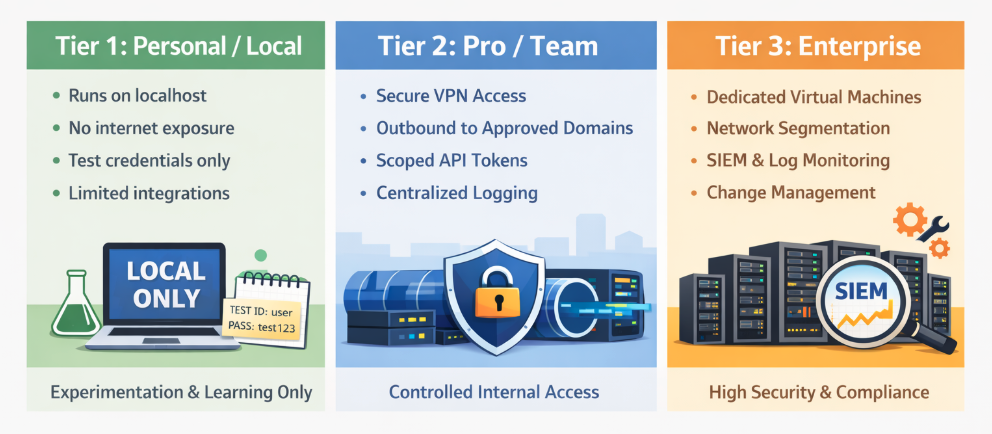
The key is not to default to the highest tier, but to clearly understand which tier applies and why.
A staging or “safe lab” environment provides a space to test security changes without risking production systems. This should be a simple test bed where any changes made would not have real-world consequences.
However, this environment should still mirror production architecture, all while using sandbox or dummy credentials. For example, test cloud accounts, mock APIs, and internal email sandboxes allow realistic testing without risk in the real world.
A documented “break glass” procedure is also recommended. A “break glass” procedure is a recovery plan that explains how to restore access if firewall rules or container restrictions accidentally block administrators.
If an agent can be reached from the outside, it can be targeted. This is why you’ll need to manage inbound access. This will act as your first visible layer of defense.
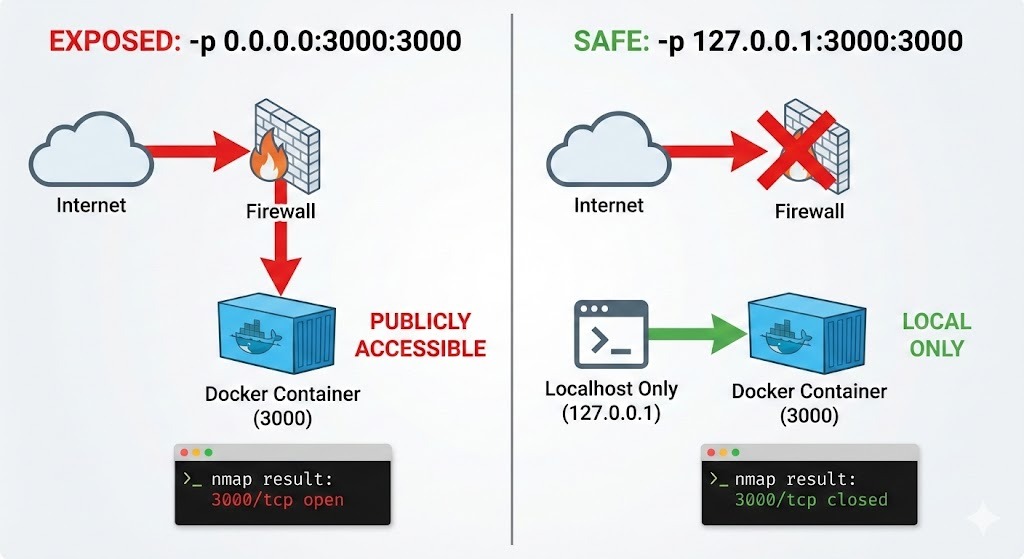
The safest default configuration binds the application to the localhost IP of 127.0.0.1, making it accessible only from the local machine.
app.listen(3000, "127.0.0.1");Additionally, having some verification is important. A port scan from another device using nmap should confirm that no ports are exposed.
sudo nmap -p- -sS <target_IP>You should also take note that Docker can bypass UFW on Linux hosts or other host firewalls because it directly manipulates networking rules.
When you publish a port with -p 0.0.0.0:3000:3000, Docker may expose that port even if your host firewall appears to block it. In other words, relying only on firewalls is not enough when Docker is involved.
A quick way to verify what Docker is actually exposing is to check the published ports:
docker port <container_name>
Look for 0.0.0.0:3000->3000/tcp (exposed publicly) versus 127.0.0.1:3000->3000/tcp (localhost-only).
Linux users can also inspect active Docker iptables rules:
```bash
sudo iptables -L DOCKER -n -v
If you see 0.0.0.0:PORT bindings or ACCEPT rules in the DOCKER chain, that port is reachable externally unless explicitly restricted.
You can also confirm externally from another machine using nmap:
nmap -p 3000 <target_IP>This command scans your target from the outside to confirm port 3000 is actually closed/filtered, proving no external access exists.
Best practice is to bind explicitly to localhost (127.0.0.1) in the Docker run command:
docker run -p 127.0.0.1:3000:3000 openclawThen confirm with both docker port and an external nmap scan from another machine.
When remote access is necessary, exposing the application directly to the public internet is rarely justified.
A VPN such as Tailscale or WireGuard can be used to establish encrypted, authenticated connectivity between trusted devices. This approach should dramatically reduce exposure compared to leaving ports open.
Where browser access is required, a reverse proxy such as Nginx can terminate HTTPS connections and enforce authentication before traffic reaches the application.
Session management is also where you’ll need careful attention. Weak session controls can undermine otherwise strong perimeter defenses.
Using strong passwords, regularly rotating credentials, and rate limiting on login endpoints helps defend against brute-force attacks. Short session lifetimes also reduce the usefulness of stolen tokens.
Secure cookies, SameSite attributes, and CSRF protections remain relevant even when the backend is an AI-powered agent. The surrounding web infrastructure must be hardened just like any other application.
Even with strong perimeter controls, the possibility of misuse remains. Containment and isolation strategies will be really helpful in determining how far an incident can spread.
Running the container as a non-root user reduces the impact of potential escape vulnerabilities.
Unnecessary Linux capabilities should also be dropped to shrink the attack surface. Containers often run with more privileges than required, and removing unused capabilities limits what an attacker can do.
Each of these measures reinforces the same idea: even if the agent misbehaves, it should not control the host system.
Below is a simple docker run example that demonstrates the syntax for setting a non-root user, without the specific Linux capabilities, and mounting the filesystem as read-only.
docker run \
  --name openclaw-secure \
  --user 1000:1000 \
  --read-only \
  --cap-drop=CAP_SYS_ADMIN \
  --cap-drop=CAP_NET_RAW \
  -v openclaw-workspace:/app/workspace \
  -p 127.0.0.1:3000:3000 \
  openclaw:latest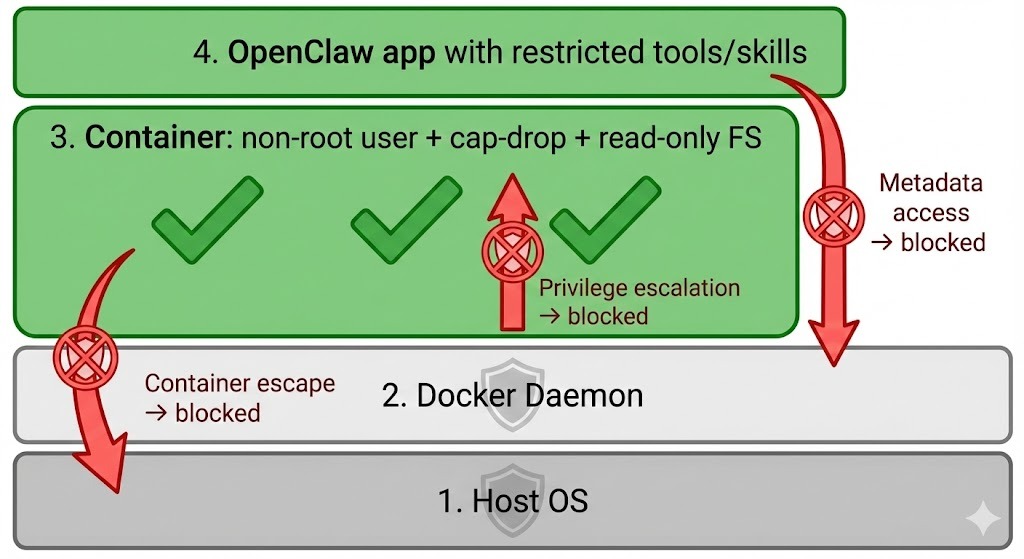
For teams using Docker Compose, the same principles apply. A minimal hardened docker-compose.yml snippet might look like this:
version: "3.9"

services:
  openclaw:
    image: openclaw:latest
    user: "1000:1000"
    read_only: true
    cap_drop:
      - CAP_SYS_ADMIN
      - CAP_NET_RAW
    ports:
      - "127.0.0.1:3000:3000"
    volumes:
      - openclaw-workspace:/app/workspace

volumes:
  openclaw-workspace:
One important clarification is that these Linux capability restrictions remain mandatory even when running Docker on macOS or Windows. Although those systems are not Linux, Docker Desktop runs containers inside a hidden Linux virtual machine.
In other words, being on macOS or Windows does not eliminate the need for container hardening.
Outbound filtering is frequently overlooked, yet it is crucial. Serious incidents, such as data exfiltration, occur through such outbound channels.
A default “deny all” outbound policy forces administrators to explicitly allow approved domains. Limiting traffic to necessary endpoints, such as API providers and internal services, dramatically reduces this risk.
Blocking access to cloud metadata services also prevents accidental exposure of instance credentials.
Linux cloud instances (AWS/GCP/Azure) expose temporary credentials via the link-local IP 169.254.169.254. OpenClaw could accidentally query this endpoint and leak instance metadata. You can explicitly drop outbound traffic to the metadata IP:
sudo iptables -A OUTPUT -d 169.254.169.254 -j DROPTo verify, run the following:
sudo iptables -L -n -vThis ensures that even if the agent tries to reach the metadata service, the traffic never leaves the host.
If you want to scope the rule specifically to Docker traffic, you can block it in the DOCKER-USER chain (which is evaluated before Docker’s own rules):
sudo iptables -I DOCKER-USER -d 169.254.169.254 -j DROPThis approach is often safer because Docker modifies iptables rules dynamically. The DOCKER-USER chain is specifically designed for user-defined restrictions.
You can confirm the rule is active with:
sudo iptables -L DOCKER-USER -n -vSensitive host directories such as ~/.ssh or /etc should never be mounted unless absolutely necessary.
Ephemeral containers should also be used to provide an additional layer of protection.
They act as a fresh container for each task, and are destroyed afterward. This makes long-term persistence far more difficult. Temporary environments like these help reduce the attacker’s ability to establish a foothold.
Every additional tool expands capability. However, with this expanded capability comes added risk.
Secrets should be injected at runtime through environment variables or a secret management system. Embedding credentials in source code, prompts, or container images would create unnecessary exposure.
Periodic audits of connected integrations can also help ensure that unused credentials are removed. Credentials that serve no purpose only increase the attack surface.
Autonomous agents can be expanded through skills and additional components. With that expansion comes additional risk. Securing the skill supply chain means treating third-party extensions with the same caution you would apply to production dependencies in a backend application.
Allowing plugins to auto-update without control introduces supply-chain risk.
In this scenario, a new release could unintentionally introduce vulnerabilities, or in the worst case, a compromised package could include malicious behavior.
To reduce this risk, you’ll need to pin skills to specific versions and, where possible, to exact hashes.
For example:
"web-browser-skill": "1.4.2#sha256:abc123"Pinning ensures that the exact code you tested in staging is the code running in production. It prevents silent upgrades and reduces the chance of supply-chain poisoning through dependency hijacking or malicious updates.
This approach mirrors best practices in software development, where production systems lock dependency versions to avoid unexpected behavior.
Before enabling any new skill, you should take time to review its source code. Autonomous agents often operate with API tokens, file access, or network permissions.
If the skill source code is poorly written, a malicious plugin can quietly misuse those privileges.
Pay close attention to behaviors such as:
Even a seemingly harmless browsing tool could exfiltrate data if it includes hidden network calls. A quick code review can uncover obvious red flags and significantly reduce risk.
Many agent frameworks ship with multiple built-in tools, such as shell access, Python execution, file editors, or web browsers. While flexibility is useful during experimentation, production deployments should be kept to a minimum.
Every enabled tool represents a capability that could be abused. Removing unnecessary tools reduces the attack surface and limits what the agent can do if compromised.
AI systems introduce new and unique behavioral risks that differ from traditional software vulnerabilities. Let’s look at some of the potential risks and solutions associated with OpenClaw.
Because OpenClaw depends on prompt engineering for its output, external content should always be treated as untrusted input. For example, webpages, emails, and documents may contain hidden instructions designed to influence the model. This can result in a malicious outcome.
Prompt injection exploits the model’s instruction-following nature. Hidden HTML comments or carefully crafted text may attempt to override system rules or extract sensitive data.
We can take on some defensive measures to prevent this, including:
Clearing memory between unrelated tasks can also further reduce the chances of unintended data leakage.
For longer-term deployments, you need greater observability and monitoring to ensure your models are performing as expected.
Comprehensive logging should capture prompts, model outputs, tool calls, file modifications, and API interactions. A centralized log storage would also help prevent tampering and support incident investigation.
I would recommend some form of alerts for unusual behavior (such as unexpected outbound traffic or access to system files) to enable faster response times.
Since security isn’t a one-time configuration, you should also consider updating OpenClaw to the latest version where necessary.
OpenClaw brings big potential for local deployment of LLMs. Because most are run on local machines, the security of your own machine is important.
As such, a hardened OpenClaw deployment should remain inaccessible to the public internet, operate within a restricted runtime, use narrowly scoped credentials, and maintain comprehensive logging.
To implement this for yourself, I challenge you to determine your specific tier status and work on security measures accordingly.
Want to explore more on the latest AI, LLM, and agent technologies? Our AI Agent Fundamentals track is the best way to start.
AI Courses
Track
Course
Course
blog
Khalid Abdelaty
15 min
blog
Derrick Mwiti
8 min
blog
Austin Chia
12 min
blog
Derrick Mwiti
9 min
Tutorial
Derrick Mwiti
8 min
Tutorial
Bexruz (Bex) Tuychiev
11 min