

Track
AI Agent Fundamentals
6 hr
Practice and track your progress.
Continue with GoogleMercury 2 is Inception Lab’s fast reasoning model designed for production workloads where latency compounds agent loops, retrieval pipelines, and high-concurrency applications.
Unlike standard autoregressive LLMs that decode one token at a time, Mercury 2 uses a diffusion-style generation process that refines text in parallel, which is the core reason it can push extremely high throughput under the right serving setup.
Key capabilities of Mercury 2 include:
Mercury 2 exposes an OpenAI-compatible API, which means you can use existing OpenAI client libraries by simply changing the base URL and model name. This allows it to drop into existing applications, agent frameworks, and production pipelines without requiring SDK or architectural changes.
The model supports a context window of about 128K tokens, making it suitable for workflows that need to pass large evidence bundles, multi-step tool outputs, conversation traces, or structured intermediate state.
Mercury 2 handles schema-constrained JSON reliably and supports tool-style interactions. This enables use cases such as query planning, tool argument generation, structured state passing between steps, and verification pipelines where deterministic formatting matters.
Unlike most general-purpose models, Mercury 2 exposes operational controls such as reasoning_effort (instant to high), optional reasoning summaries, streaming output, and diffusion-style streaming. These knobs allow you to tune the trade-off between speed, depth, and interactivity on a per-call basis depending on the stage of the pipeline.
The pricing structure is optimized for high-frequency workloads, with low input token costs and significantly discounted cached input tokens. This is beneficial for agent loops and multi-step pipelines where system prompts and context are reused across multiple model calls.
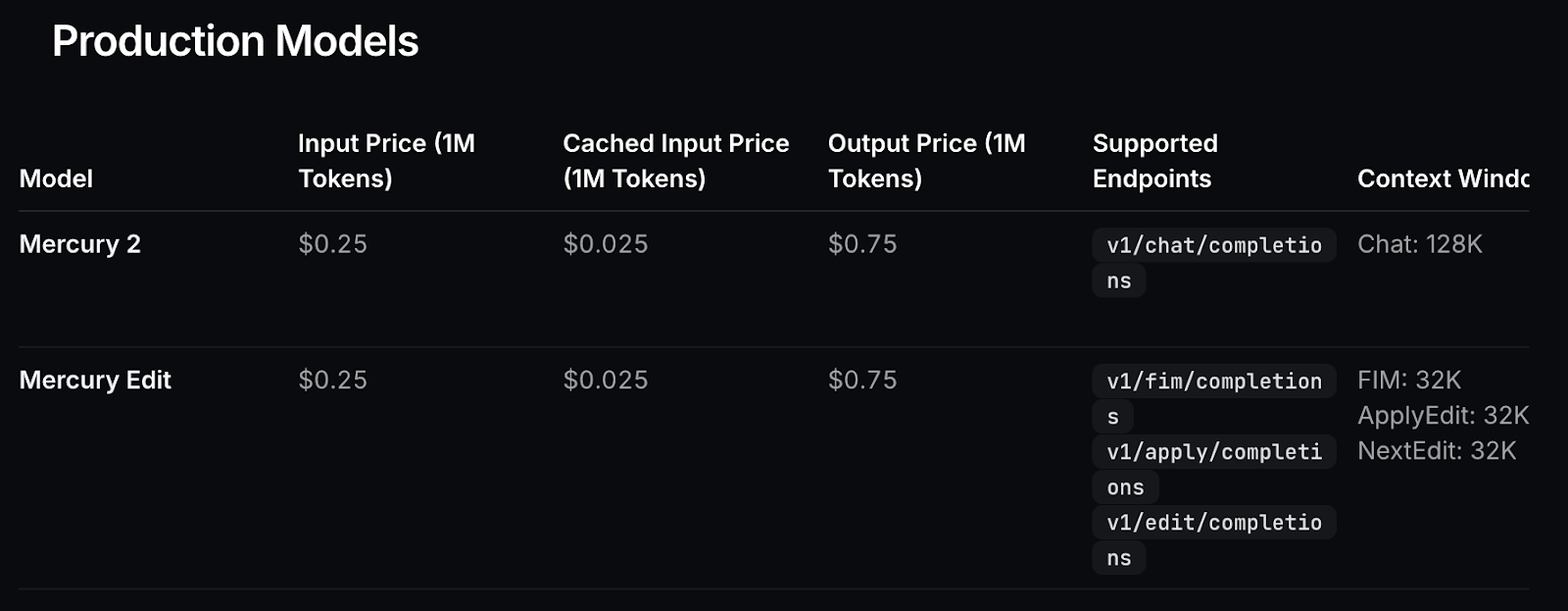
Figure: Model pricing
Traditional LLMs generate text autoregressively, producing one token at a time in sequence.
token 1 - token 2 - token 3… This makes latency tightly coupled to output length since each token depends on the previous one, so latency grows linearly with output length. This becomes a bottleneck in agent systems where you may run multiple model calls per user request.
Mercury 2 takes a different approach. Instead of sequential decoding, it uses a diffusion-inspired parallel refinement process. The model generates an initial draft and then refines multiple tokens simultaneously over a small number of steps.
Generation behaves more like iterative editing than step-by-step typing, which improves throughput and reduces end-to-end latency in multi-call pipelines.
This refinement process also enables diffusing mode, where intermediate drafts are streamed and progressively improved in the UI. Users can watch the text evolve toward its final form in real time, which is especially useful for demos, interactive applications, and live research interfaces.
This architecture makes Mercury 2 best suited for systems where latency compounds across multiple reasoning stages rather than single-shot prompts.
In this section, we’ll build a real-time research assistant using Mercury 2 that can take a complex question, search the web, reason across multiple sources, and return a grounded answer within a few seconds. Instead of a single prompt-response interaction, the system runs a fast multi-step agent loop, where each step refines the information needed to produce a reliable result.
At a high level, the application performs five core tasks:
[S1], [S2].The application produces two main outputs:
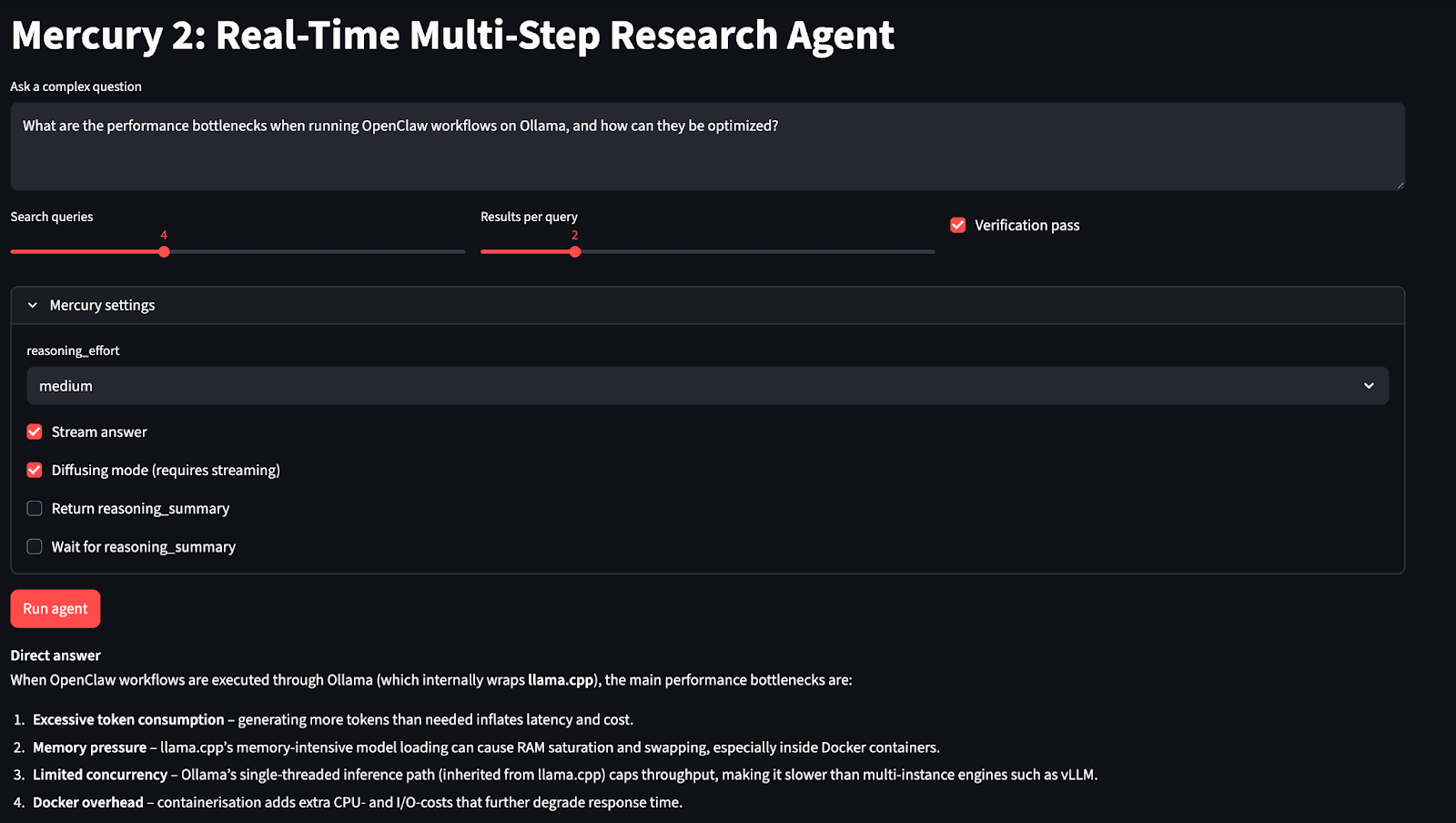
Before we build the research agent, we first need access to the Mercury 2 API. Since Mercury 2 is currently available through early access, this step ensures you have the credentials and endpoint configuration required to make inference calls from your application.
You can request access here: https://www.inceptionlabs.ai/early-access.
Once your account is approved:
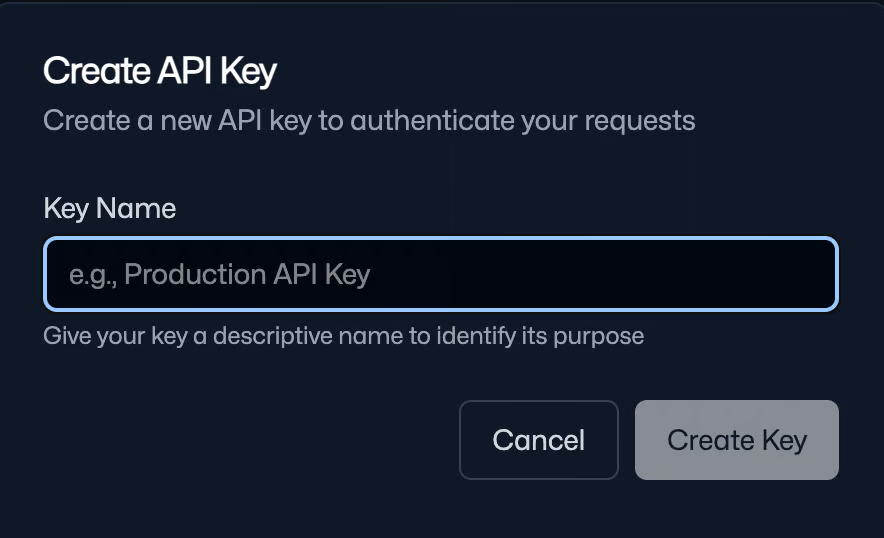
Save this key securely as you’ll use it to authenticate all API requests.
Note: You get 10,000,000 free tokens on initial sign-up, which are enough to run this experiment.
Now that you have API access, the next step is to prepare the local environment for building and running the Mercury 2 research agent. Since the Inception API is OpenAI-compatible, we can use the standard OpenAI Python client along with a set of libraries for the web interface and search pipeline. We also store our saved API key as an environment variable.
pip install streamlit openai aiohttp beautifulsoup4 lxml
export INCEPTION_API_KEY="Your_API_Key”
We install the core dependencies required to run the Mercury 2 research agent and configure secure API access. We use the standard OpenAI client for model calls, Streamlit to build the interactive interface, aiohttp to run parallel web searches for low-latency retrieval, and beautifulsoup4 with lxml to parse search results.
After installing the packages, set your INCEPTION_API_KEY as an environment variable to keep credentials secure and allow the application to authenticate automatically during runtime.
In the next step, we’ll implement the Mercury client and build the core multi-step agent pipeline.
This step wires up three things: importing the libraries we’ll use throughout the app, loading the API key securely from the environment, and initializing an OpenAI client pointed at Inception’s base URL.
import os
import json
import asyncio
import time
import re
from dataclasses import dataclass
from typing import List, Dict, Any
import aiohttp
from bs4 import BeautifulSoup
import streamlit as st
from openai import OpenAI
INCEPTION_API_KEY = os.environ.get("INCEPTION_API_KEY", "").strip()
INCEPTION_BASE_URL = "https://api.inceptionlabs.ai/v1"
MODEL = "mercury-2"
if not INCEPTION_API_KEY:
    st.error("Missing INCEPTION_API_KEY. Set it in your shell: export INCEPTION_API_KEY='...'.")
    st.stop()
client = OpenAI(api_key=INCEPTION_API_KEY, base_url=INCEPTION_BASE_URL)
The above code snippet initializes a Mercury 2 client and imports the supporting stack for the application, including Streamlit for the UI, aiohttp for asynchronous web requests, BeautifulSoup for parsing search results, and standard Python utilities for JSON handling, timing, and data structures.
We then read the INCEPTION_API_KEY from the environment variable and the Inception base URL is configured to route requests correctly, and the model name is set to "mercury-2" so all subsequent calls use the intended reasoning model.
Finally, the OpenAI client is initialized with the custom base URL, allowing Mercury 2 to be called using the standard chat.completions interface.
Next, we need a retrieval step that can fetch fresh information from the web. In this tutorial, we’ll implement a search tool using DuckDuckGo’s HTML endpoint and parse the results directly because it requires no extra API keys and is fast enough for prototyping.
At a high level, we implement three things:
SearchResult formatDDG_HTML = "https://duckduckgo.com/html/"
@dataclass
class SearchResult:
title: str
url: str
snippet: str
def clean_text(s: str) -> str:
return re.sub(r"\s+", " ", s or "").strip()
async def ddg_search(session: aiohttp.ClientSession, query: str, max_results: int = 4) -> List[SearchResult]:
headers = {"User-Agent": "Mozilla/5.0 (compatible; MercuryResearchAgent/1.0)"}
async with session.get(DDG_HTML, params={"q": query}, headers=headers, timeout=10) as resp:
html = await resp.text()
soup = BeautifulSoup(html, "lxml")
out: List[SearchResult] = []
for res in soup.select("div.result"):
a = res.select_one("a.result__a")
snippet = res.select_one("a.result__snippet") or res.select_one("div.result__snippet")
if not a:
continue
title = clean_text(a.get_text())
url = a.get("href", "")
snip = clean_text(snippet.get_text() if snippet else "")
if title and url:
out.append(SearchResult(title=title, url=url, snippet=snip))
if len(out) >= max_results:
break
return out
def dedupe_results(results: List[SearchResult]) -> List[SearchResult]:
seen = set()
uniq = []
for r in results:
key = r.url.split("#")[0].rstrip("/")
if key in seen:
continue
seen.add(key)
uniq.append(r)
return uniq
def pack_evidence(results: List[SearchResult], max_items: int = 18) -> List[Dict[str, str]]:
evidence = []
for i, r in enumerate(results[:max_items], start=1):
evidence.append({"id": f"S{i}", "title": r.title, "url": r.url, "snippet": r.snippet[:320]})
return evidenceThe above utilities define four key components:
ddg_search() function queries DuckDuckGo’s HTML endpoint using aiohttp and parses the response with BeautifulSoup and lxml. Each result is extracted into a structured format, and the function stops after max_results entries to keep latency low. This allows multiple searches to execute in parallel asynchronously.clean_text() helper removes extra whitespace and formatting artifacts so snippets remain compact and readable. Results are then stored using the SearchResult dataclass, which standardizes the output and keeps later stages independent of raw HTML structure.dedupe_results() function removes duplicates by normalizing URLs, ensuring the evidence set stays diverse and efficient within the context window.pack_evidence() function converts results into a compact JSON structure with stable identifiers. Snippets are trimmed to ~320 characters so the combined evidence fits within the model’s context and can be referenced later using inline citations.If you want a production-ready version, swap this out for a stable Search API (SerpAPI, Bing Web Search, Google Programmable Search, Brave Search, etc.) and keep the rest of the agent unchanged.
Next, we’ll connect this retrieval layer to Mercury 2 so the model can generate search queries, reason over the collected evidence, and produce a source-grounded answer.
In this step, we wrap Mercury 2 behind a small, reusable interface that supports both strict structured outputs (for planning) and streamed text generation (for synthesis and the diffusing demo).
The goal is to keep every model call consistent, while still exposing Mercury’s “reasoning knobs” and streaming modes through a single settings object.
def mercury_settings(
    reasoning_effort: str = "medium",
    reasoning_summary: bool = False,
    reasoning_summary_wait: bool = False,
    diffusing: bool = False,
) -> Dict[str, Any]:
    return {
        "reasoning_effort": reasoning_effort,
        "reasoning_summary": reasoning_summary,
        "reasoning_summary_wait": reasoning_summary_wait,
        "diffusing": diffusing,
    }

def mercury_json(
    system: str,
    user: str,
    max_tokens: int = 400,
    reasoning_effort: str = "medium",
) -> Dict[str, Any]:
    def _call(messages) -> str:
        resp = client.chat.completions.create(
            model=MODEL,
            messages=messages,
            max_tokens=max_tokens,
            temperature=0.0,
            stream=False,
            extra_settings=mercury_settings(
                reasoning_effort=reasoning_effort,
                reasoning_summary=False,
                reasoning_summary_wait=False,
                diffusing=False,
            ),
        )
        return (resp.choices[0].message.content or "").strip()

    text = _call(
        [{"role": "system", "content": system}, {"role": "user", "content": user}]
    )
    try:
        return json.loads(text)
    except json.JSONDecodeError:
        pass
    m = re.search(r"\{.*\}", text, flags=re.DOTALL)
    if m:
        try:
            return json.loads(m.group(0))
        except json.JSONDecodeError:
            pass
    repair_system = "You are a JSON repair tool. Return ONLY valid JSON. No markdown, no commentary."
    repair_user = (
        "Fix the following so it is valid JSON and matches the required schema.\n\n"
        "REQUIRED SCHEMA:\n"
        "{\"queries\": [string], \"subquestions\": [string], \"must_cover\": [string]}\n\n"
        "BROKEN OUTPUT:\n"
        f"{text}"
    )
    fixed = _call(
        [{"role": "system", "content": repair_system}, {"role": "user", "content": repair_user}]
    )
    try:
        return json.loads(fixed)
    except json.JSONDecodeError:
        m2 = re.search(r"\{.*\}", fixed, flags=re.DOTALL)
        if not m2:
            raise ValueError(f"Non-JSON from model even after repair:\n{fixed[:1000]}")
        return json.loads(m2.group(0))

def mercury_text(
    system: str,
    user: str,
    max_tokens: int = 950,
    temperature: float = 0.3,
    reasoning_effort: str = "medium",
    reasoning_summary: bool = False,
    reasoning_summary_wait: bool = False,
    stream: bool = False,
    diffusing: bool = False,
    stream_callback=None,
) -> str:
    if diffusing:
        stream = True
    extra_settings = mercury_settings(
        reasoning_effort=reasoning_effort,
        reasoning_summary=reasoning_summary,
        reasoning_summary_wait=reasoning_summary_wait,
        diffusing=diffusing,
    )
    messages = [{"role": "system", "content": system}, {"role": "user", "content": user}]
    if not stream:
        resp = client.chat.completions.create(
            model=MODEL,
            messages=messages,
            max_tokens=max_tokens,
            temperature=temperature,
            stream=False,
            extra_settings=extra_settings,
        )
        return (resp.choices[0].message.content or "").strip()
    full = ""
    stream_resp = client.chat.completions.create(
        model=MODEL,
        messages=messages,
        max_tokens=max_tokens,
        temperature=temperature,
        stream=True,
        extra_settings=extra_settings,
    )
    for event in stream_resp:
        choices = getattr(event, "choices", None) or []
        if not choices:
            continue
        delta = getattr(choices[0], "delta", None)
        chunk = (getattr(delta, "content", None) or "") if delta is not None else ""
        if not chunk:
            continue
        if diffusing:
            full = chunk
        else:
            full += chunk
        if stream_callback:
            stream_callback(full, {"delta": chunk})
    return full.strip()
In this step, we define helper functions with three key components:
mercury_settings() function centralizes Mercury-specific parameters such as reasoning_effort, reasoning_summary, reasoning_summary_wait, and diffusing. This keeps the pipeline consistent and makes it easy to wire Streamlit toggles directly into every model call without duplicating config.mercury_json() is used when the agent needs structured outputs. It runs with temperature=0.0 and disables streaming/diffusion to maximize format stability. The function tries to parse JSON directly, then attempts to extract a JSON block via regex, and finally falls back to a repair pass that forces the model to return valid JSON matching our required schema.mercury_text() function supports both non-streaming and streaming modes. If diffusing=True, it automatically forces stream=True, and updates the displayed text by overwriting the current buffer. In normal streaming mode, it appends deltas to build the final response. The optional stream_callback() hook lets the UI render updates live.In the next step, we’ll use these helpers to implement structured query expansion and connect them to the web search and evidence packing pipeline.
Now, we connect Mercury 2 and web search into an end-to-end research loop. The key idea is to first generate a structured search plan, then force the final answer to be grounded in the evidence payload, to showcase Mercury’s reasoning controls and streaming/diffusing modes in the UI.
def expand_query(question: str, n_queries: int = 6, reasoning_effort: str = "medium") -> Dict[str, Any]:
    system = (
        "Return ONLY valid JSON. No markdown.\n"
        "Schema: {\"queries\": [string], \"subquestions\": [string], \"must_cover\": [string]}\n"
        "Rules:\n"
        f"- MUST produce at least {max(3, n_queries-2)} queries\n"
        "- queries <= 12 words, diverse\n"
        "- include: definitions, official docs, benchmarks, edge deployment, counterarguments\n"
        "Output must start with '{' and end with '}'."
    )
    user = f"Question: {question}\nReturn {n_queries} queries."
    out = mercury_json(system, user, max_tokens=320, reasoning_effort=reasoning_effort)
    queries = (out.get("queries") or [])
    subqs = (out.get("subquestions") or [])
    must = (out.get("must_cover") or [])
    if len(queries) == 0:
        queries = [
            f"{question} benchmarks",
            "vLLM edge inference benchmarks",
            "llama.cpp edge inference benchmarks",
            "vLLM vs llama.cpp quantization",
            "llama.cpp Metal CUDA Vulkan performance",
            "vLLM KV cache paged attention memory",
        ][:n_queries]
    out["queries"] = queries[:n_queries]
    out["subquestions"] = subqs[: min(6, n_queries)]
    out["must_cover"] = must[:6]
    return out
def answer_with_citations(
    question: str,
    evidence: List[Dict[str, str]],
    *,
    reasoning_effort: str,
    reasoning_summary: bool,
    reasoning_summary_wait: bool,
    stream: bool,
    diffusing: bool,
    stream_callback=None,
) -> str:
    system = (
        "You are a fast research synthesizer.\n"
        "Use ONLY the provided evidence.\n"
        "Add inline citations like [S1], [S2] using evidence ids.\n"
        "If evidence is insufficient, say what's missing."
    )
    user = (
        f"Question:\n{question}\n\n"
        f"Evidence JSON:\n{json.dumps(evidence, ensure_ascii=False)}\n\n"
        "Deliver:\n1) Direct answer\n2) Key insights (3-6 bullets)\n3) Caveats/unknowns"
    )
    return mercury_text(
        system,
        user,
        max_tokens=950,
        temperature=0.3,
        reasoning_effort=reasoning_effort,
        reasoning_summary=reasoning_summary,
        reasoning_summary_wait=reasoning_summary_wait,
        stream=stream,
        diffusing=diffusing,
        stream_callback=stream_callback,
    )
def verify_answer(
    question: str,
    evidence: List[Dict[str, str]],
    draft: str,
    *,
    reasoning_effort: str,
) -> str:
    system = (
        "You are a verifier.\n"
        "Remove/soften any claim not supported by evidence.\n"
        "Keep citations [S#]. Return revised answer."
    )
    user = (
        f"Question:\n{question}\n\n"
        f"Evidence JSON:\n{json.dumps(evidence, ensure_ascii=False)}\n\n"
        f"Draft:\n{draft}"
    )
    return mercury_text(
        system,
        user,
        max_tokens=950,
        temperature=0.2,
        reasoning_effort=reasoning_effort,
        reasoning_summary=False,
        reasoning_summary_wait=False,
        stream=False,
        diffusing=False,
    )
async def run_agent(
    question: str,
    n_queries: int,
    max_results_per_query: int,
    do_verify: bool,
    *,
    reasoning_effort: str,
    stream_answer: bool,
    diffusing: bool,
    reasoning_summary: bool,
    reasoning_summary_wait: bool,
    stream_callback=None,
) -> Dict[str, Any]:
    t0 = time.perf_counter()
    plan = expand_query(question, n_queries=n_queries, reasoning_effort=reasoning_effort)
    t1 = time.perf_counter()
    queries = plan.get("queries", [])
    async with aiohttp.ClientSession() as session:
        tasks = [ddg_search(session, q, max_results=max_results_per_query) for q in queries]
        lists = await asyncio.gather(*tasks)
    flat = dedupe_results([r for lst in lists for r in lst])
    evidence = pack_evidence(flat, max_items=18)
    t2 = time.perf_counter()
    draft = answer_with_citations(
        question,
        evidence,
        reasoning_effort=reasoning_effort,
        reasoning_summary=reasoning_summary,
        reasoning_summary_wait=reasoning_summary_wait,
        stream=stream_answer,
        diffusing=diffusing,
        stream_callback=stream_callback,
    )
    t3 = time.perf_counter()
    final = verify_answer(question, evidence, draft, reasoning_effort=reasoning_effort) if do_verify else draft
    t4 = time.perf_counter()
    return {
        "plan": plan,
        "evidence": evidence,
        "answer": final,
        "timings_sec": {
            "expand": round(t1 - t0, 3),
            "search_parallel": round(t2 - t1, 3),
            "synthesize": round(t3 - t2, 3),
            "verify": round(t4 - t3, 3),
            "total": round(t4 - t0, 3),
        },
    }
This step wires together four core stages:
expand_query() function generates a structured research plan by asking Mercury 2 to return strict JSON containing queries, subquestions, and must_cover. The output is parsed using mercury_json(), which includes automatic JSON repair, and a fallback query set that ensures the agent continues even if the model returns an empty plan.answer_with_citations() function produces the initial response using only the packed evidence from the search stage. The prompt explicitly restricts the model to the provided evidence and requires inline citations. The output includes a direct answer, key insights, and caveats, ensuring the response remains concise and traceable to sources.verify_answer() function implements the Generate-Critique-Fix pattern. It re-evaluates the draft answer against the same evidence and removes or softens any unsupported claims while preserving citation markers. This additional pass reduces overgeneralization and improves factual grounding with minimal latency overhead.run_agent() function coordinates the full workflow, including expanding the query plan, executing parallel DuckDuckGo searches using aiohttp and asyncio.gather(), deduplicating and packing results into compact evidence JSON, generating the synthesized answer, and optionally running verification. Finally, we’ll connect the agent runtime (run_agent) to a Streamlit interface so users can enter a question, tune how the agent searches, and inspect the full execution trace—final answer, timings, the generated query plan, and the evidence bundle.
st.set_page_config(page_title="Mercury 2 Research Agent", layout="wide")
st.title("Mercury 2: Real-Time Multi-Step Research Agent")
question = st.text_area(
    "Ask a complex question",
    height=120,
    placeholder="e.g., Compare vLLM vs llama.cpp for edge inference...",
)
col1, col2, col3 = st.columns(3)
with col1:
    n_queries = st.slider("Search queries", 2, 8, 4)
with col2:
    max_results = st.slider("Results per query", 1, 6, 2)
with col3:
    do_verify = st.checkbox("Verification pass", value=False)
with st.expander("Mercury settings", expanded=False):
    reasoning_effort = st.selectbox("reasoning_effort", ["instant", "low", "medium", "high"], index=2)
    stream_answer = st.checkbox("Stream answer", value=False)
    diffusing = st.checkbox("Diffusing mode (requires streaming)", value=False)
    reasoning_summary = st.checkbox("Return reasoning_summary", value=False)
    reasoning_summary_wait = st.checkbox("Wait for reasoning_summary", value=False)
    if diffusing and not stream_answer:
        st.info("Diffusing requires streaming. Enabling streaming automatically.")
        stream_answer = True
run = st.button("Run agent", type="primary")
if run:
    if not question.strip():
        st.warning("Enter a question.")
        st.stop()
    answer_placeholder = st.empty()
    status_placeholder = st.empty()
    def _stream_cb(text: str, meta: Dict[str, Any]):
        answer_placeholder.markdown(text)
    with st.spinner("Running…"):
        status_placeholder.caption("Planning → searching → synthesizing…")
        out = asyncio.run(
            run_agent(
                question.strip(),
                n_queries,
                max_results,
                do_verify,
                reasoning_effort=reasoning_effort,
                stream_answer=stream_answer,
                diffusing=diffusing,
                reasoning_summary=reasoning_summary,
                reasoning_summary_wait=reasoning_summary_wait,
                stream_callback=_stream_cb if stream_answer else None,
            )
        )
    status_placeholder.empty()
    st.subheader("Answer")
    st.write(out["answer"])
    st.subheader("Timings (sec)")
    st.json(out["timings_sec"])
    with st.expander("Plan (queries / subquestions)"):
        st.json(out["plan"])
    with st.expander("Evidence (search results)"):
        st.json(out["evidence"])
The above code defines how the Streamlit layer turns run_agent() function into an interactive research workflow. User enters a question, controls search breadth and depth, and optionally enables a verification pass that removes unsupported claims.
An additional “Mercury settings” panel exposes model knobs like reasoning_effort, streaming output, and diffusing mode, which requires streaming and updates the answer placeholder in-place as new chunks arrive.
On run, the app validates input, streams partial output into a placeholder, then renders the final answer along with timings and expandable debug views for the generated plan and evidence bundle.
To try it yourself, save the code as app.py and launch:
streamlit run app.pyIn this tutorial, we built a latency-aware research agent powered by Mercury 2. The system generates a structured search plan for a user query, then executes parallel web retrieval, normalizes results into a compact evidence format, and produces a grounded answer with citations.
We also added an optional verification pass that re-checks the draft against the same evidence and softens unsupported claims. This simple Generate–Critique–Fix pattern significantly improves factual grounding while adding minimal latency.
Beyond the core pipeline, the application exposes Mercury 2’s runtime controls, including reasoning effort, streaming output, reasoning summaries, and diffusing mode. To extend this project further, you could:
To keep learning more about using AI for development tasks, I recommend the AI-Assisted Coding for Developers course.
Top DataCamp Courses
Track
Course
Practice and track your progress.
Continue with GoogleTutorial
Aashi Dutt
9 min
Tutorial
Aashi Dutt
12 min
Tutorial
Abid Ali Awan
11 min
Tutorial
Tim Lu
6 min
Tutorial
Abid Ali Awan
10 min
Tutorial
François Aubry
12 min


