
{count, plural, one {Course} other {Courses}}
Practical AI with Google Gemini and NotebookLM
{hours} hr
10K
Nano Banana 2.1 is Google's October update to its image generation and editing model. It replaces Nano Banana 2, which we covered in our earlier guide.
The headline changes are image quality, prompt accuracy, text rendering, and subject consistency. Nano Banana 2 already did all four, so I wanted to see whether the update was visible in normal use. To that end, I'm giving both models the same four prompts for generation and editing, and I'll render a verdict.
Nano Banana 2.1 is the current version of Google's Nano Banana image model. Its application programming interface (API) ID is gemini-nano-banana-2.1.
The naming is the confusing part. Nano Banana 2 is also called Gemini 3.1 Flash Image, while Nano Banana Pro is a separate model in the same family. Nano Banana 2 still works, but Google has deprecated it without announcing a shutdown date.
Version 2.1 focuses on reliability rather than new tools.
Google reports changes to realism at 1K, 2K, and 4K, prompt accuracy, text, and infographic layouts. Its model card still lists blurry small text and errors with left and right.
Google lists subject consistency as another change in 2.1. Here, that means changing one element without altering the character, objects, or scene around it.
Nano Banana 2 already supported:
Version 2.1 fixes tiling in wide images and drops the 512px option.
Google reports two types of scores. Overall preference, infographic design, and general editing come from human side-by-side comparisons converted into Elo; higher means raters preferred the model more often. Infographic factuality uses a separate AutoRater metric, so its decimal score is not Elo.
The card labels both models as "Thinking" without naming minimal, medium, or high. That does not establish that Google used the same high setting as my hands-on test.
If you only care about the images, skip this table and go to the hands-on test.
|
Benchmark |
Nano Banana 2.1 (Thinking) |
Nano Banana 2 (Thinking) |
|
Overall preference (Elo) |
1050 ± 14 |
990 ± 7 |
|
Infographic design (Elo) |
1048 ± 17 |
961 ± 12 |
|
Infographic factuality (AutoRater) |
0.521 |
0.179 |
|
General editing (Elo) |
1026 ± 12 |
938 ± 11 |
The Elo rows show gaps in infographic design and general editing. These averages still do not guarantee that 2.1 will win on any single prompt.
I used Google AI Studio to give both models the same four prompts: create a scene, make a small edit, move the scene, and turn it into an infographic. I set Thinking to high for both models.
Each model worked from its own earlier image during the edits. All four comparisons below come from that test, with Nano Banana 2 on the left and Nano Banana 2.1 on the right.
I started with a scene that makes object count and placement easy to check.
A photorealistic image inside a sunlit greenhouse: a small copper robot waters three sunflowers with a yellow watering can. An orange cat sleeps on a wooden bench behind the robot, and a blue bucket sits to the robot's left.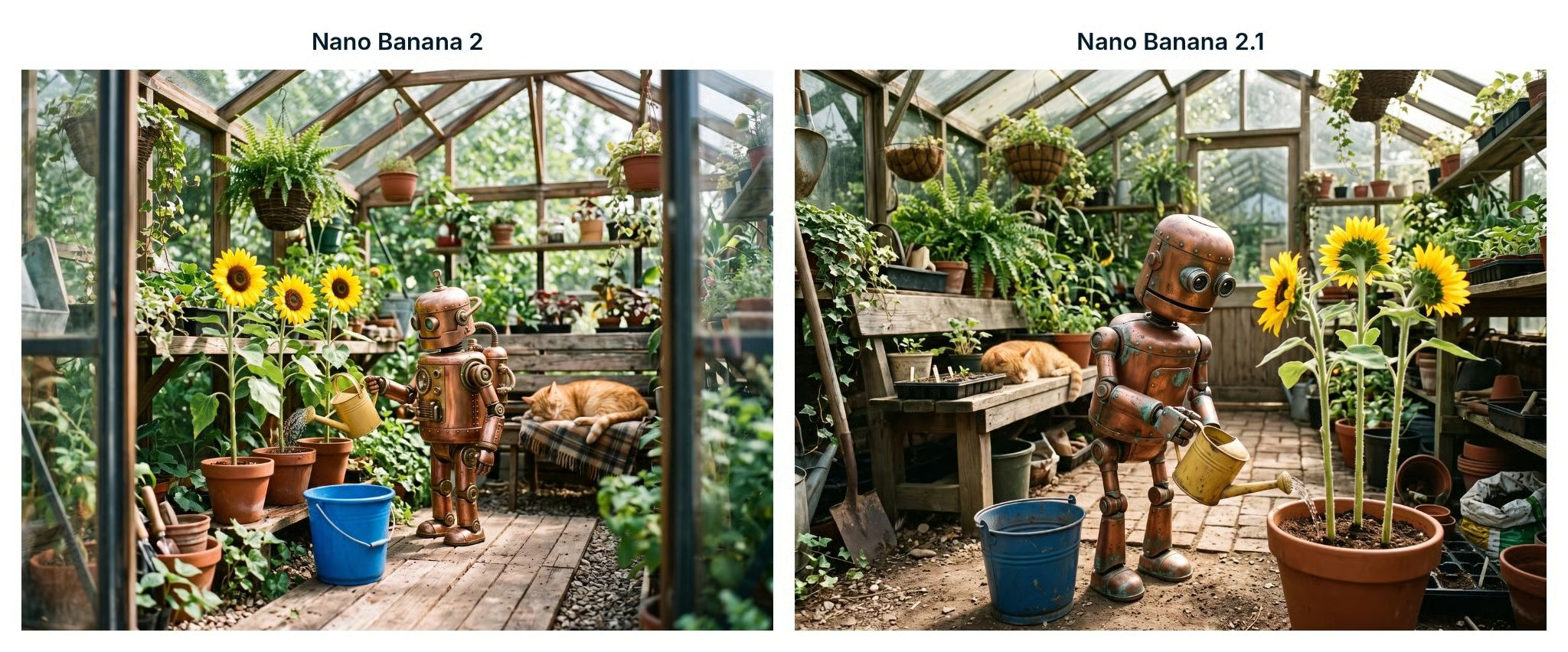
Both show three sunflowers and a cat behind the robot. In Nano Banana 2.1, the blue bucket appears on the viewer's left.
Both pass as photos, and both put the cat behind the robot. Nano Banana 2 made a polished copper robot, three flowers in separate pots, and hard sunlight. Nano Banana 2.1 made a weathered robot with green marks, three stalks in one pot, and softer light.
The bucket placement is not clear enough to score against the prompt's "robot's left" requirement. In Nano Banana 2.1, the bucket appears on the viewer's left, but the robot is turned toward the flowers. Nano Banana 2 places the bucket in front of its robot, which is also ambiguous.
Next, I asked each model to change one object and leave everything else alone. Our ChatGPT Images guide uses the same kind of targeted edit.
Change only the watering can from yellow to bright red. Keep the robot, cat, flowers, bucket, lighting, and everything else unchanged.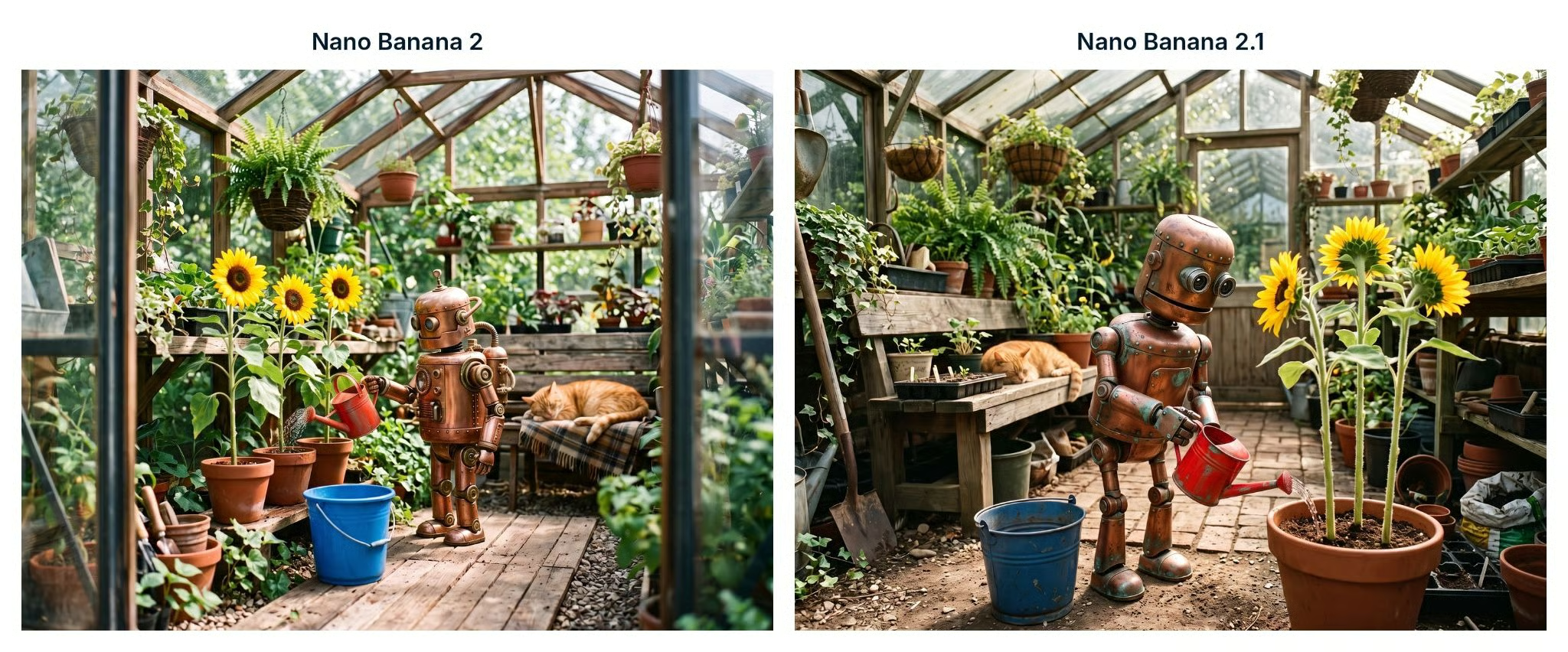
Both models turned the can red and kept the rest of their own first image in place.
Both models turned the can red and left the rest of the scene alone. Nano Banana 2's smooth can came back slightly scuffed. That's a preference, not an error, so this test is a tie.
The third prompt is harder: move the scene outdoors but keep its subjects recognizable.
Move this scene to a rainy rooftop garden. Keep the same robot, cat, sunflowers, red watering can, and blue bucket. Adjust the lighting, shadows, and reflections to match the rain.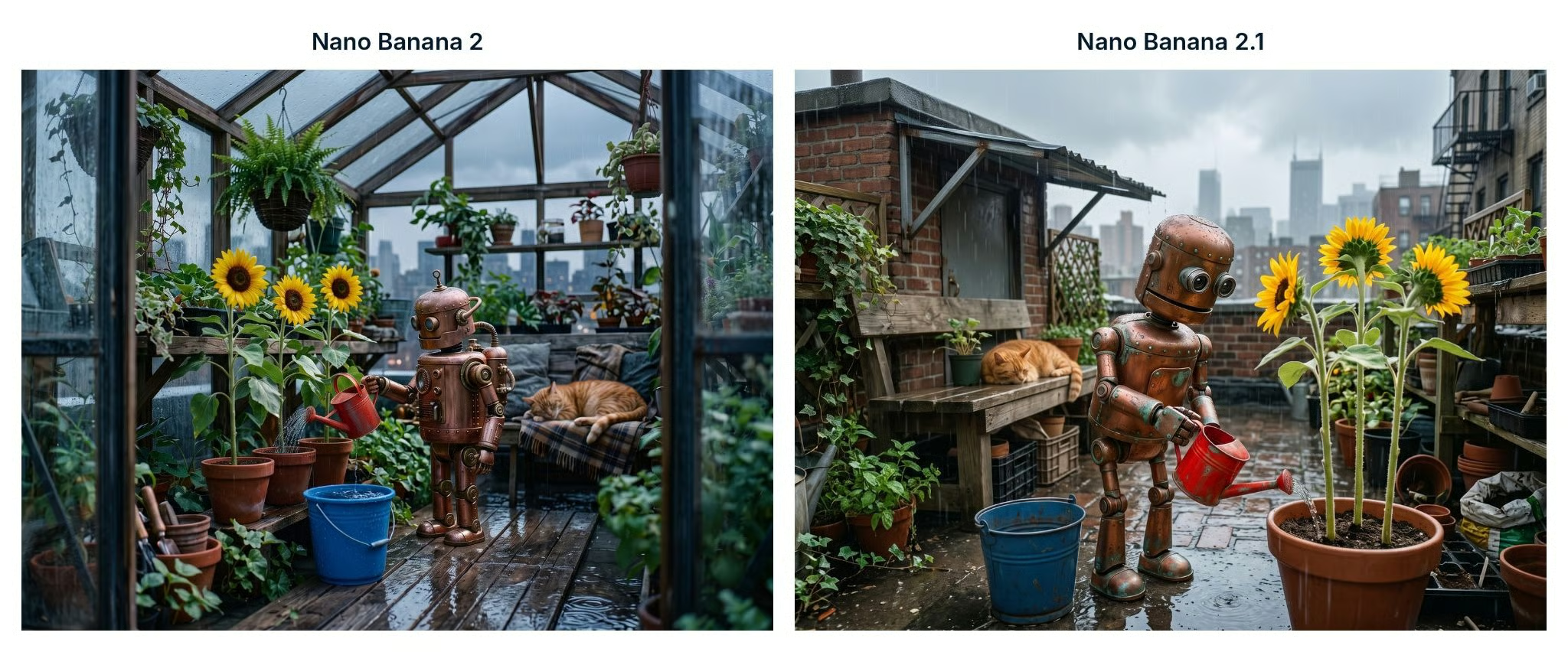
Nano Banana 2 (left) kept the greenhouse roof but put puddles inside; Nano Banana 2.1 (right) moved the scene outdoors.
Nano Banana 2 kept the greenhouse, glass roof included, and added a skyline behind the glass. Its subjects match and the wet, reflective deck looks right, but rain puddles sit inside a roofed building, so it reads as a leaky greenhouse, not a rooftop garden.
Nano Banana 2.1 moved outdoors to a brick rooftop with a fire escape. Its subjects match its previous image down to the pose, and the robot doesn't look pasted in: the copper is wet and its feet reflect in a puddle. This test goes to Nano Banana 2.1.
For the last test, I stayed in the same chat but switched from photography to a diagram.
Create a clean horizontal infographic titled "How a Sunflower Grows", with four numbered stages: Seed, Sprout, Seedling, Flower. Use flat vector illustrations, clear arrows, and readable sans-serif labels. Include a small illustration of the same copper robot in the corner. No extra text.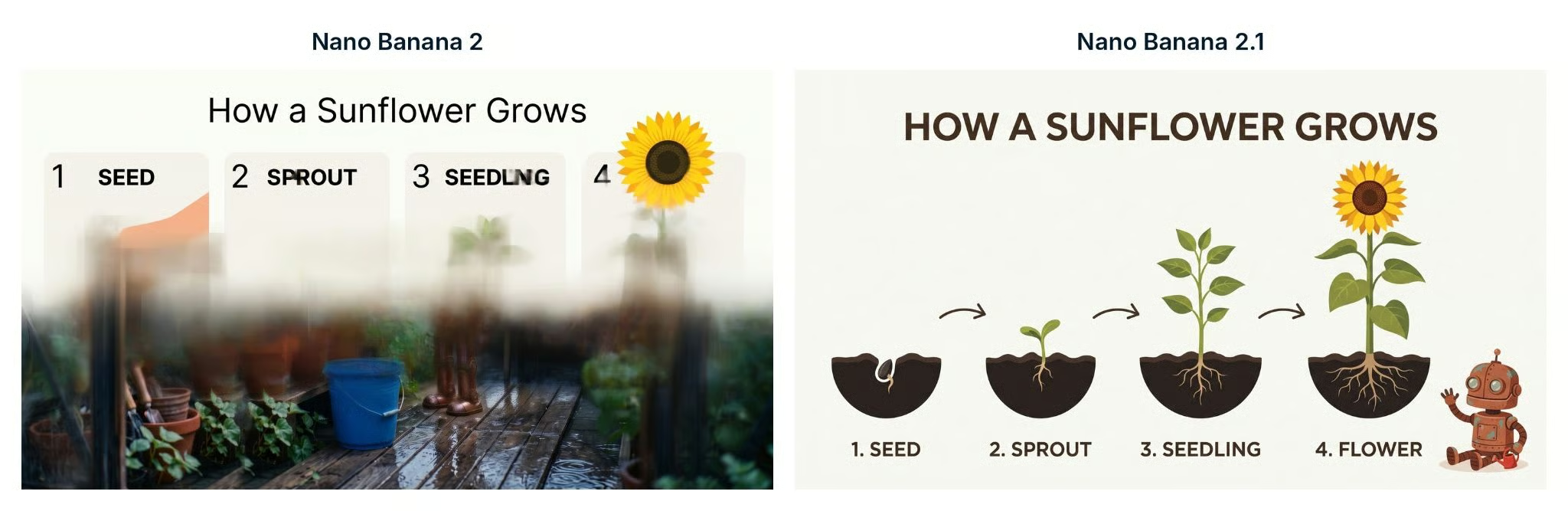
Nano Banana 2 (left) blended an unfinished layout into its earlier photo; Nano Banana 2.1 (right) produced a complete infographic.
This is where the gap opened. Nano Banana 2 laid an unfinished card layout over a blurred copy of its rainy greenhouse: the title is right, but "SPROUT" has a smudged P, "SEEDLING" smears, stage 4 has no label, there are no arrows, and the robot appears only as a pair of blurry feet.
Nano Banana 2.1 produced a complete infographic: title spelled correctly in all caps, four numbered stages in order, three arrows, and no extra text. Its corner robot resembles the earlier copper robot, though it gained an antenna, and the red can sits beside it. Because this prompt stayed in the same chat, the result applies to this edit chain; I did not test Nano Banana 2 in a fresh conversation.
Google does not charge one flat fee per picture in the Gemini API. Images got cheaper in 2.1, while prompts and reasoning cost more.
Google's pricing page lists no free API tier for either model.
|
Standard rate |
Nano Banana 2.1 |
Nano Banana 2 |
|
Input, per 1M tokens |
$1.50 |
$0.50 |
|
Text and reasoning output, per 1M tokens |
$7.50 |
$3 |
|
1K image |
$0.0336 |
$0.067 |
|
2K image |
$0.0504 |
$0.101 |
|
4K image |
$0.113 |
$0.151 |
At 1K and 2K, the image charge is roughly half the price of Nano Banana 2. At 4K, it is about 25% lower. Input costs 3 times more and reasoning costs 2.5 times more, so long prompts or many reference images can reduce that saving.
Nano Banana 2.1 is available through the Gemini app, Flow, AI Studio, and the API. Subscription access and API billing are separate.
Model names can vary by account and region. AI Studio or the API lets you select both versions by name.
Nano Banana 2.1 fits work that depends on repeated edits, infographics, layouts with short text, several reference images, or wide 2K and 4K output. The rooftop and infographic prompts produced the largest differences in my test, though small text, long passages, and exact placement remain limits.
Nano Banana 2 can still matter when an existing workflow depends on 512px output or its lower input and reasoning rates. Because Google has deprecated it, this is a temporary reason to stay on the old model while testing 2.1, not a reason to start new work on it.
Nano Banana 2.1 did not win every prompt, but it completed the two harder tasks that Nano Banana 2 missed. That follows the pattern in Google's editing and infographic scores, while the close first two prompts and higher input and reasoning rates keep the conclusion narrow.
For a broader look at Gemini beyond image generation, our Practical AI with Google Gemini and NotebookLM course covers prompting, Gemini Canvas, and NotebookLM.
Learn with DataCamp
{count, plural, one {Course} other {Courses}}
{count, plural, one {Course} other {Courses}}
{count, plural, one {Course} other {Courses}}
{count, plural, one {blog} other {blogs}}
Josef Waples
7 min
{count, plural, one {Tutorial} other {Tutorials}}
Bexruz (Bex) Tuychiev
9 min
{count, plural, one {Tutorial} other {Tutorials}}
François Aubry
11 min
{count, plural, one {Tutorial} other {Tutorials}}
Bexruz (Bex) Tuychiev
15 min
{count, plural, one {Tutorial} other {Tutorials}}
François Aubry
12 min
{count, plural, one {Tutorial} other {Tutorials}}
François Aubry
11 min


