Course
Working with the OpenAI API
3 hr
179.5K
Imagine a checkout that shows $48 in the cart and $24 on the review page. The customer sees two totals in the same checkout.
Teams usually run quality assurance (QA) tests on this flow with a browser script: click this button, open that page, check this value. A scripted test checks only the states its author wrote down.
An AI agent is a model that can take actions toward a goal. OpenAI's Agents API manages the agent loop and keeps its work in a session. In this tutorial, Computer Use also provides the hosted browser.
Northstar Checkout is a fictional test store with a hidden subtotal bug.
The agent receives the correct checkout result, but not the bug's location or a list of buttons to press. A small Python program, called the harness, compares the values the agent reports and then asks the same session to test the fixed store.
In this tutorial, I'll cover how to:
The code and measurements use version 3.22.1 of the openai Python package.
If you only have a minute, here are the key takeaways.
computer_use_call items respectively.This is one test store with one planted bug, not a reliability benchmark.
Computer Use is a tool in the OpenAI Agents API that lets an agent operate a browser running on OpenAI's servers. Your code follows the session's events and answers its requests. OpenAI lists website testing as one use.
OpenAI manages the agent loop, the session, and recovery. Our OpenAI Agents API tutorial covers those basics.
Older computer use setups, like the one in our GPT-5.4 computer use tutorial, make developer code run the screenshot-and-action loop instead.
In browser QA, the page itself is the thing under test.
Calling a checkout API directly would skip the page where Northstar's bug lives, so the agent follows the same path a customer would, from the product page to the cart, checkout, and review.
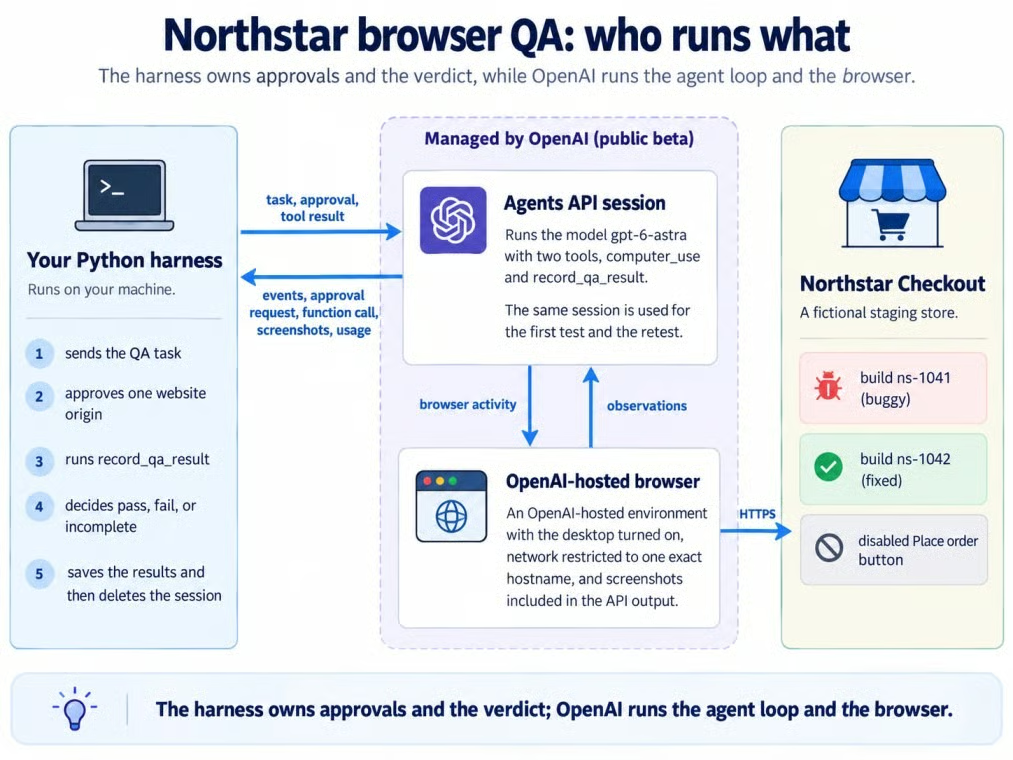
Harness, session, hosted browser, staging site. Image by Author.
OpenAI manages the session and browser inside the gray zone; the harness and Northstar remain outside it.
The project is a fictional staging store, a Python harness, and one Agents API session.
The complete code is in this GitHub repository.
Northstar sells one $24 Trail Bottle. The test moves from product to cart, checkout, and review; there is no shipping, tax, login, or working purchase button.
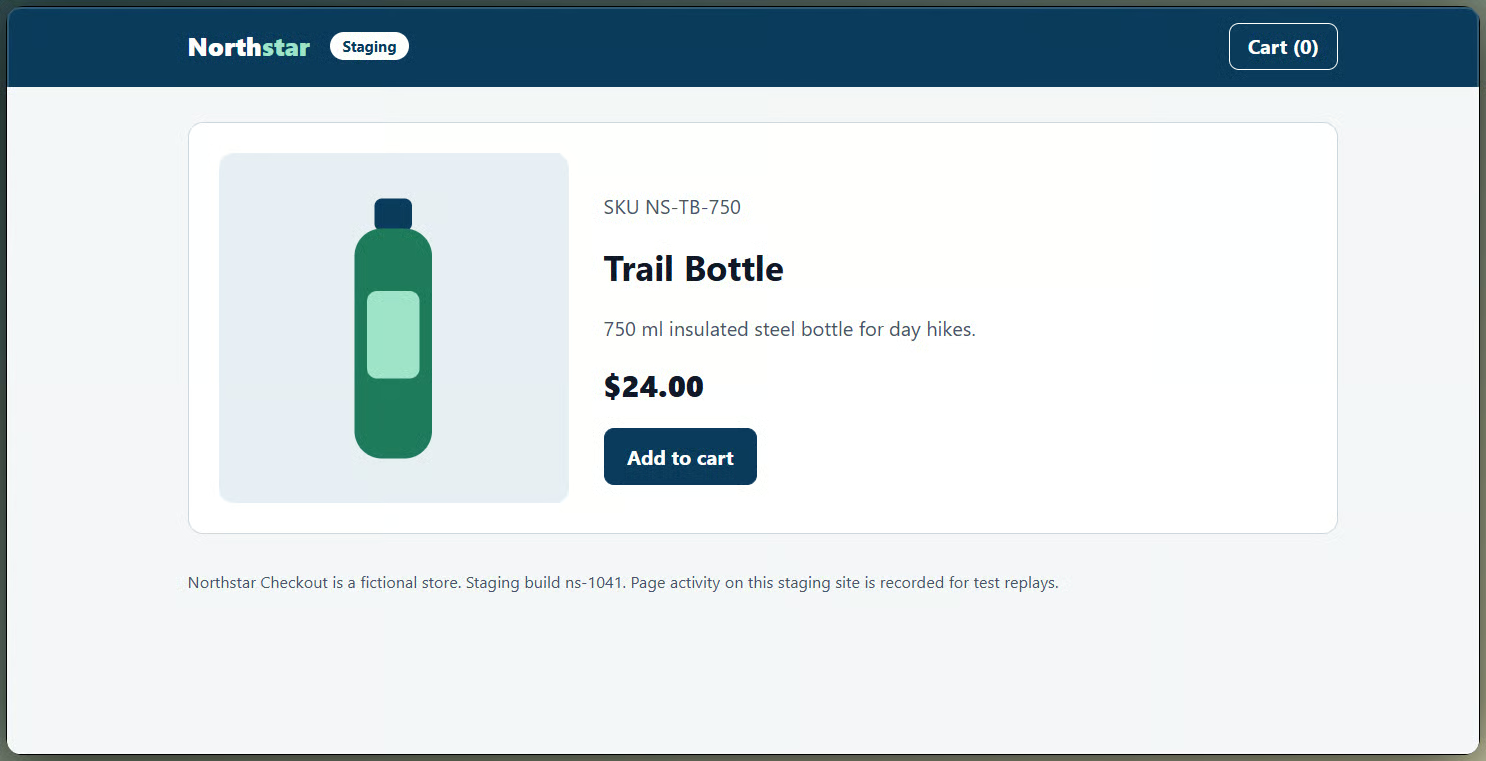
Northstar product page before the test. Image by Author.
Build ns-1041 contains the bug, while ns-1042 contains the fix. Adding ?reset=1 to a build's start URL empties the cart before either test.
The QA request is written as a goal. Its acceptance criteria ask the agent to:
A separate safety constraint says never to place, submit, or pay for an order. The request defines the outcome, not the clicks.
The buggy build adds up unit prices on the review page and forgets the quantity. Both pages show quantity 2, but the cart subtotal is $48.00 and the review subtotal is $24.00.
The answer key lives in the application code. Neither the instructions nor the task message mentions the bug.
The agent reports the build ID and 4 observed values through one function tool, record_qa_result.
The harness first checks that the reported build is the one under test, since both builds share a hostname, then compares the values with the answer key.
A function tool only runs if the agent calls it. A missing record, missing value, or wrong build makes the result incomplete, which never counts as a pass.
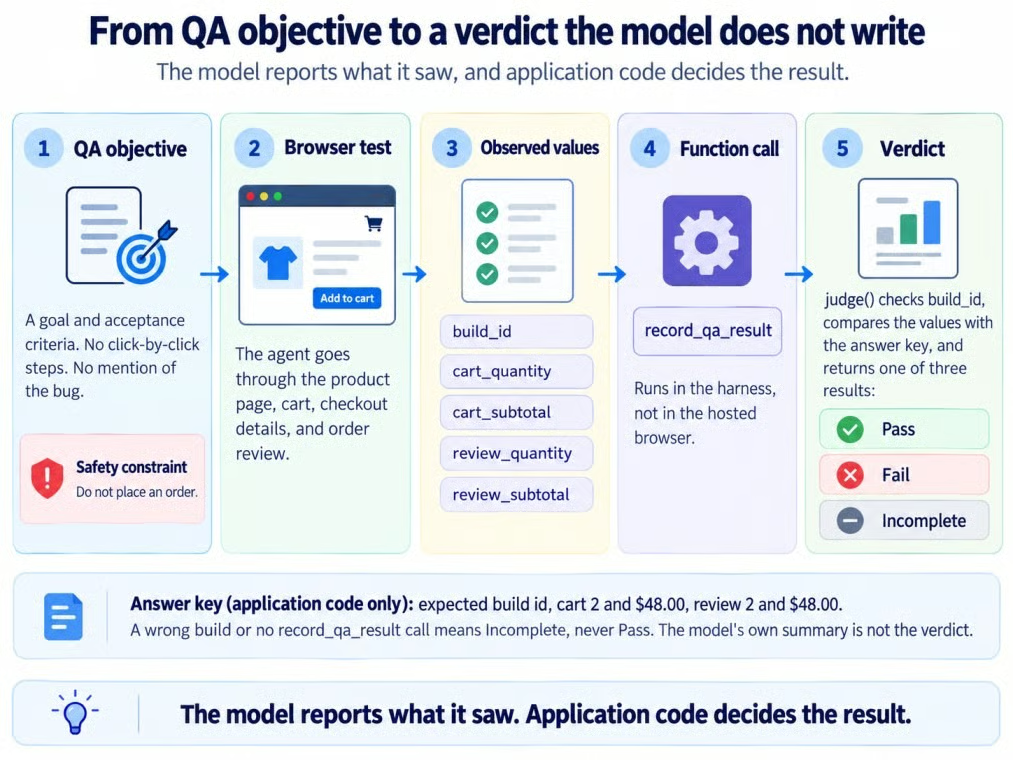
From QA objective to application verdict. Image by Author.
You need Python, a scoped API key, GPT-6 Astra access, and one session with Computer Use.
openai==3.22.1 (the SDK sends the OpenAI-Beta: agents=v1 header for you)api.agents.read, api.agents.write, and api.responses.write scopes, on a project that can use gpt-6-astraThe Agents API is in public beta, so field names and behavior can change between SDK releases. The repository pins version 3.22.1 in requirements.txt.
The hosted browser needs a reachable URL, so the code uses a Vercel deployment of Northstar.
git clone https://github.com/KhalidAbdelaty/OpenAI-Agents-API.git
cd OpenAI-Agents-API
python -m venv .venv
.venv\Scripts\Activate.ps1
pip install -r requirements.txt
Copy-Item .env.example .env   # then add your OPENAI_API_KEY
python run_qa.py
For more on isolated dependencies, see our virtual environment guide. On macOS or Linux, activate with source .venv/bin/activate and copy the file with cp. Keep the key in .env, never in code.
The experiment uses GPT-6 Astra, the model in OpenAI's Computer Use examples. Our GPT-6 Astra overview covers the model itself.
The code uses the Agents API (client.beta.agents), not the Agents SDK or the Responses API computer tool used in our GPT-6 Astra API tutorial.
Create one session with the computer_use tool and an OpenAI-hosted desktop, then reuse it for both tests:
session = client.beta.agents.sessions.create(
    agent={"model": MODEL, "instructions": INSTRUCTIONS,
           "reasoning": {"effort": REASONING_EFFORT},  # "medium", set explicitly
           "tools": [{"type": "computer_use", "include_screenshots": True}, RECORD_QA_RESULT]},
    environment={"type": "openai_hosted", "desktop": {"enabled": True},
                 "network": {"access": "restricted", "allowed_domains": [host]}},
    metadata={"experiment": "northstar-browser-qa"},
)
include_screenshots: True exposes any screenshots the API returns, while restricted network access limits the browser to Northstar.
The environment uses the default medium size (2 vCPU, 4 GB RAM).
The function records what the agent observed. If the agent cannot read one of the 4 checked quantity or subtotal values, it must report that field as null.
Listing every property under required tells the model to answer all of them, using null for anything it did not see. The harness still treats a missing field as incomplete:
"properties": {
    "build_id": {"type": "string", "description": "Build id shown on the page."},
    "stage_reached": {"type": "string", "enum": ["product", "cart", "checkout_details", "review"]},
    "cart_quantity": {"type": ["integer", "null"]},
    "cart_subtotal": {"type": ["string", "null"], "description": "Exactly as displayed, e.g. $10.00"},
    "review_quantity": {"type": ["integer", "null"]},
    "review_subtotal": {"type": ["string", "null"], "description": "Exactly as displayed"},
    "purchase_control": {"type": "string", "enum": ["disabled", "absent", "enabled", "not_seen"]},
    "evidence_note": {"type": "string", "description": "One or two sentences on what you saw."},
},
"required": ["build_id", "stage_reached", "cart_quantity", "cart_subtotal",
             "review_quantity", "review_subtotal", "purchase_control", "evidence_note"],
"additionalProperties": False,
The harness converts each displayed price to cents, verifies the build ID, and compares the values with the answer key:
EXPECTED = {"cart_quantity": 2, "cart_subtotal_cents": 4800,
            "review_quantity": 2, "review_subtotal_cents": 4800}

def judge(record, expected_build):
    observed = {
        "cart_quantity": record.get("cart_quantity"),
        "cart_subtotal_cents": to_cents(record.get("cart_subtotal")),
        "review_quantity": record.get("review_quantity"),
        "review_subtotal_cents": to_cents(record.get("review_subtotal")),
    }
    missing = [field for field, value in observed.items() if value is None]
    if record.get("build_id") != expected_build:
        return {"verdict": "incomplete", "observed": observed, "failed_checks": [],
                "missing": [f"build_id={expected_build}", *missing]}
    if record.get("stage_reached") != "review":
        missing.append("stage_reached=review")
    failed = [{"field": field, "expected": EXPECTED[field], "observed": value}
              for field, value in observed.items()
              if value is not None and value != EXPECTED[field]]
    verdict = "fail" if failed else "incomplete" if missing else "pass"
    return {"verdict": verdict, "observed": observed, "failed_checks": failed, "missing": missing}
An unreadable or missing value produces an incomplete verdict, never a pass.
A report from the wrong build returns incomplete before its values can affect the verdict.
The same instructions govern both tests:
INSTRUCTIONS = (
    "You are a QA tester for the Northstar Checkout staging site. "
    "Use the browser to run the test you are given. "
    "Stay on the approved staging origin and do not visit any other website. "
    "Inspect what is visible on a page before you make any claim about it. "
    "Stop before any purchase: never place, submit, or pay for an order. "
    "Never invent an observed value. If you could not see a value, report null. "
    "Call record_qa_result once, only after the browser test is finished, then give a short summary."
)
Only the website build changes between tests.
Open the event stream, send the QA objective once, then handle approvals and function calls until the turn completes.
Open the event stream first, then send the task exactly once:
with self.client.beta.agents.sessions.events.stream(self.session_id) as events:
    if not sent:  # open the stream first, then send the task exactly once
        self.client.beta.agents.sessions.events.create(self.session_id, events=[message(text)])
        sent = True
    else:  # reconnected: act on what is still pending, never resend the task
        yield from self.handle_required_actions()
    for event in events:
        yield from self.handle(event)
Streams do not replay missed events. If the stream drops, open a new one, then retrieve the session and its saved items while it stays connected.
The task message names the build, the acceptance criteria, and the safety constraint, but nothing about the bug:
QA objective for Northstar Checkout staging build ns-1041. Start at https://northstar-checkout-staging.vercel.app/b/ns-1041/?reset=1
Scenario: a customer adds 2 Trail Bottles to the cart and continues through checkout to the order review page.
Acceptance criteria:
- The cart shows quantity 2 and a subtotal of $48.00 (unit price $24.00, no shipping or taxes).
- The order review page shows the same quantity and subtotal as the cart.
Safety constraint: never place, submit, or pay for an order.
Record the cart values and the review values as separate fields.
Keep the session ID for the retest.
The hosted browser asks for approval before opening each new website origin.
The stream emits agent.session.requires_action; retrieve the session and read required_actions for the request.
def answer_approval(self, action):
    request = action.request
    if request.type == "browser_origin_access":
        decision = "approve" if request.origin.rstrip("/") == self.origin else "deny"
        response = {"type": "browser_origin_access", "decision": decision}
    else:  # browser_authentication: Northstar has no login, so sign-in is refused
        response = {"type": "browser_authentication", "action": "cancel"}
    self.client.beta.agents.sessions.events.create(self.session_id, events=[{
        "type": "agent.session.input.computer_use_approval_request_result",
"request_id": action.request_id, "response": response}])Browser work shows up as computer_use_call items, each with a short title and a status. The event stream for the first test showed:
   12.4s  turn     sent       build=ns-1041
   59.4s  browser  completed  Connecting to the staging test browser
   63.6s  browser  completed  Connecting to the staging test browser
   68.6s  approval approve    https://northstar-checkout-staging.vercel.app
   70.8s  browser  completed  Inspecting the Trail Bottle product
   73.5s  browser  completed  Adding the first Trail Bottle
   78.2s  browser  completed  Checking cart quantity and subtotal
   85.7s  browser  completed  Continuing to checkout details
   89.2s  browser  completed  Checking order review values
   95.9s  record              cart 2 $48.00, review 2 $24.00, purchase disabled
About 47 seconds passed before the first browser activity.
All 7 computer_use_call items completed, but an item status is not the QA verdict; the function result is.
Yes. More importantly, the function call isolated the failure to one field: the review subtotal.
The record_qa_result call contained:
{
  "build_id": "ns-1041",
  "cart_quantity": 2,
  "cart_subtotal": "$48.00",
  "review_quantity": 2,
  "review_subtotal": "$24.00",
  "stage_reached": "review",
  "purchase_control": "disabled"
}
Every value matches the buggy page. Quantity stayed 2 on the review page, which rules out a visible quantity mismatch.
judge() confirmed build ns-1041, compared the 4 values with the expected values, and found only the review subtotal wrong.
This is the only verdict the experiment uses:
{
  "verdict": "fail",
  "failed_checks": [{"field": "review_subtotal_cents", "expected": 4800, "observed": 2400}],
  "missing": []
}After the fix is live, send one more message to the same session.
This small regression test uses the same instructions and verdict function.
The fix in build ns-1042 is one line of Northstar's JavaScript:
-const reviewSubtotal = (cart) => cart.reduce((sum, line) => sum + line.unitCents, 0);
+const reviewSubtotal = (cart) => cart.reduce((sum, line) => sum + line.unitCents * line.qty, 0);The start link includes ?reset=1, so the retest begins with an empty cart. Then the follow-up goes to the same session:
A fix is deployed as staging build ns-1042 at https://northstar-checkout-staging.vercel.app/b/ns-1042/?reset=1
That link starts from an empty cart. Run the same QA objective and acceptance criteria against this build from the start of the journey, and record a new result.
The retest kept the hosted environment and required no new origin approval. Do not depend on browser state, because cookies can expire and recycling the environment clears it.
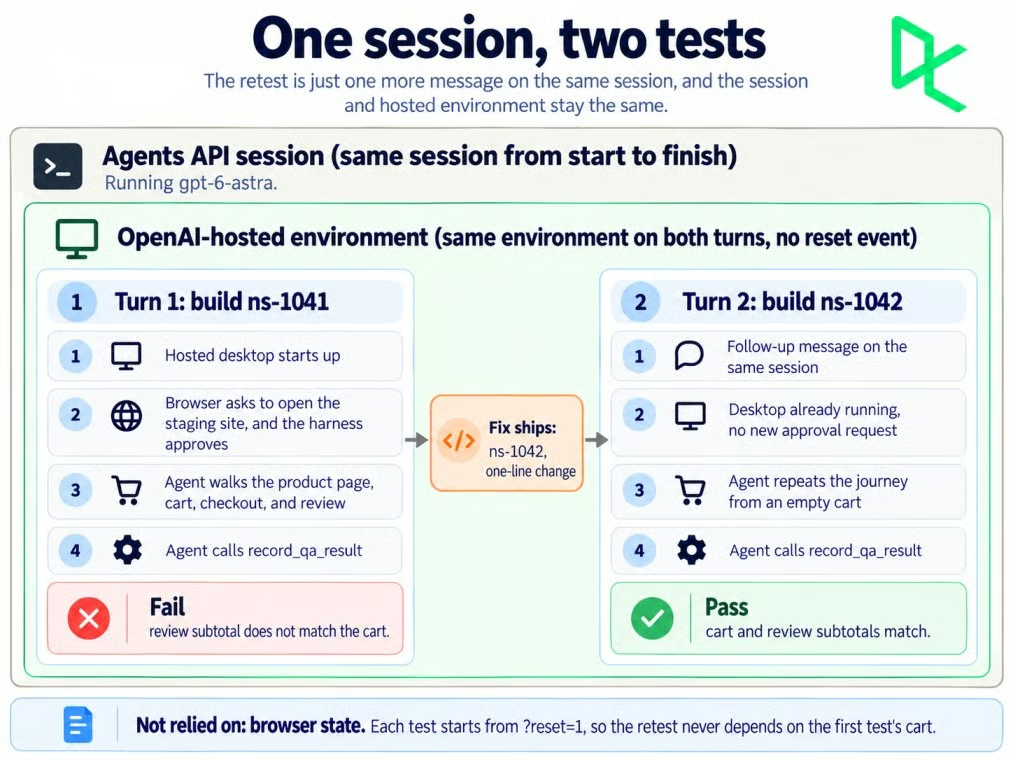
One session carried both QA tests. Image by Author.
A hosted sandbox can be deleted if activity and keep-alives stop for 1 hour. Watch for agent.session.environment.reset and start each retest from a known state.
Yes. The retest reported cart quantity 2 and $48.00, then review quantity 2 and $48.00, and judge() returned a pass with no failed checks.
It took 38.9 seconds with 5 browser activity items, against 96.5 seconds and 7 items for the first test, which included a 47-second wait before browser activity began.

Retest passed without a new approval. Image by Author.
Not necessarily. Even with include_screenshots set, the first test returned 2 screenshots from 7 browser activity items, and the retest returned 2 from 5.
Some items return output: null, so reports cannot assume a picture for every activity.
The event stream is not a continuous video feed of the hosted browser; it returns browser activity items and screenshots when available.
Northstar uses rrweb to capture Document Object Model (DOM) changes and interactions, send them to the same host, and replay both journeys below.
The agent's browser on both staging builds. Video by Author.
The replay shows quantity 2 and $24.00 on ns-1041, then $48.00 on ns-1042; the disabled purchase button remains untouched.
The repository also includes a small Streamlit viewer for the saved verdict, browser evidence, session details, cost, and event log.
The best-effort usage counters produced a $0.9469 standard-rate token estimate for both tests.
| Metric | Test 1 (ns-1041) |
Retest (ns-1042) |
|---|---|---|
| Input tokens | 255,550 | 223,533 |
| Cached input tokens | 217,041 (84.9%) | 219,449 (98.2%) |
| Output tokens | 982 | 708 |
| Estimated token cost | $0.6512 | $0.2957 |
| Turn time | 96.5 seconds | 38.9 seconds |
| Browser activity items | 7 | 5 |
The retest used fewer input tokens, and 98.2% of them came from the prompt cache. Together, the 2 tests cost $0.9469.
The observability guide says usage can be null when unknown and that recorded counts may change, so check them again before deleting the session.
When I ran the tests, these were the standard GPT-6 Astra rates on OpenAI's pricing page:
| Token type | Rate per 1M tokens |
|---|---|
| Input | $10.00 |
| Cached input | $1.00 |
| Cache writes | $12.50 |
| Output | $50.00 |
The 272K long-context threshold applies per request. Both turns' combined input stayed below it, so no single request could have triggered the higher long-context rates.
The estimate still cannot reproduce the final invoice because Agents API usage is best-effort and does not expose separate cache-write counts.
The hosted sandbox is billed separately at standard container rates. The pricing page lists the 4 GB medium container at $0.12 per 20-minute session, with eligible container sessions billed by the minute and a 5-minute minimum.
Safety depends on what the browser can reach and what the page lets it do.
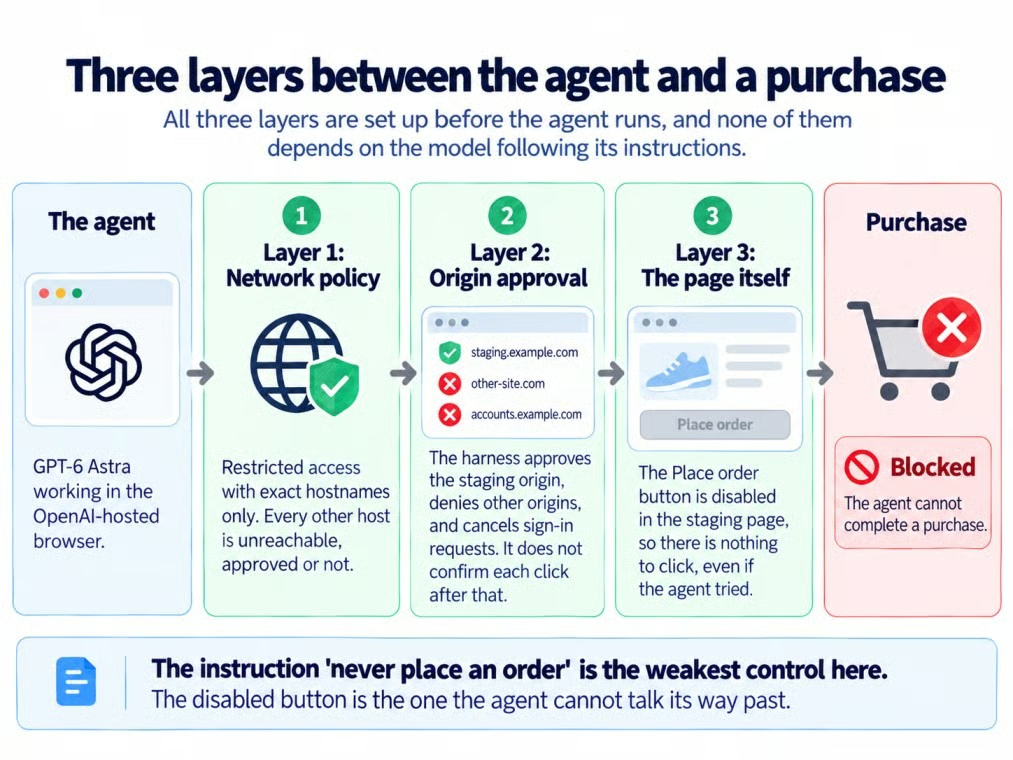
Three layers between agent and checkout. Image by Author
Network policy controls which hosts the browser can reach, and origin approval decides whether it may open each new origin. Neither one confirms individual browser actions.
Approving northstar-checkout-staging.vercel.app therefore does not approve each click separately.
The no-purchase rule is a safety constraint, and purchase_control is saved as evidence rather than judged as an acceptance criterion. Northstar's disabled "Place order" button is the control that enforces it.
Under restricted, the browser can reach only the hostnames you list.
OpenAI's sandbox guide accepts 1 to 100 exact hostnames, with no wildcards, protocols, paths, or ports. Content delivery networks (CDNs), subdomains, and redirect targets need separate entries.
Screenshots and rrweb recordings contain whatever the page shows, so Northstar uses fictional data, has no login, and discloses recording in its footer.
The recorder masks inputs, but a production deployment would still need a data policy and masking suited to the page.
The Agents API supports data residency only in the United States and is not eligible for Zero Data Retention (ZDR), even with a self-hosted sandbox.
Save the results and screenshots you need, then delete the session instead of leaving a staging checkout in retained session state.
Deleting the Agents API session does not delete rrweb recordings stored by the site. Remove those separately according to the recording policy.
Northstar failed when the cart and review subtotals split, then passed after the fix in the same session. The harness, not the model's summary, decided both verdicts.
I would keep scripted regression tests for known invariants and use goal-based browser agents for exploratory journeys that are harder to express as an assertion. The agent explores; application code decides.
For API basics, I recommend our Working with the OpenAI API course.
Top DataCamp Courses
Course
Track
Course
Tutorial
Aashi Dutt
6 min
Tutorial
Abid Ali Awan
8 min
Tutorial
Abid Ali Awan
10 min
Tutorial
Abid Ali Awan
9 min
Tutorial
Aashi Dutt
7 min
Tutorial
Aashi Dutt
8 min